

Always wanted to build your own web app but never learned to code? Coderblock AI is a brand-new AI app builder that lets you describe your idea in plain English while a team of AI agents designs, codes, tests, and deploys a full-stack web app for you. It launched on Product Hunt in October 2026, and its free plan gives you 30 free credits with no credit card required — so you can build a real, working app this week without spending a cent.
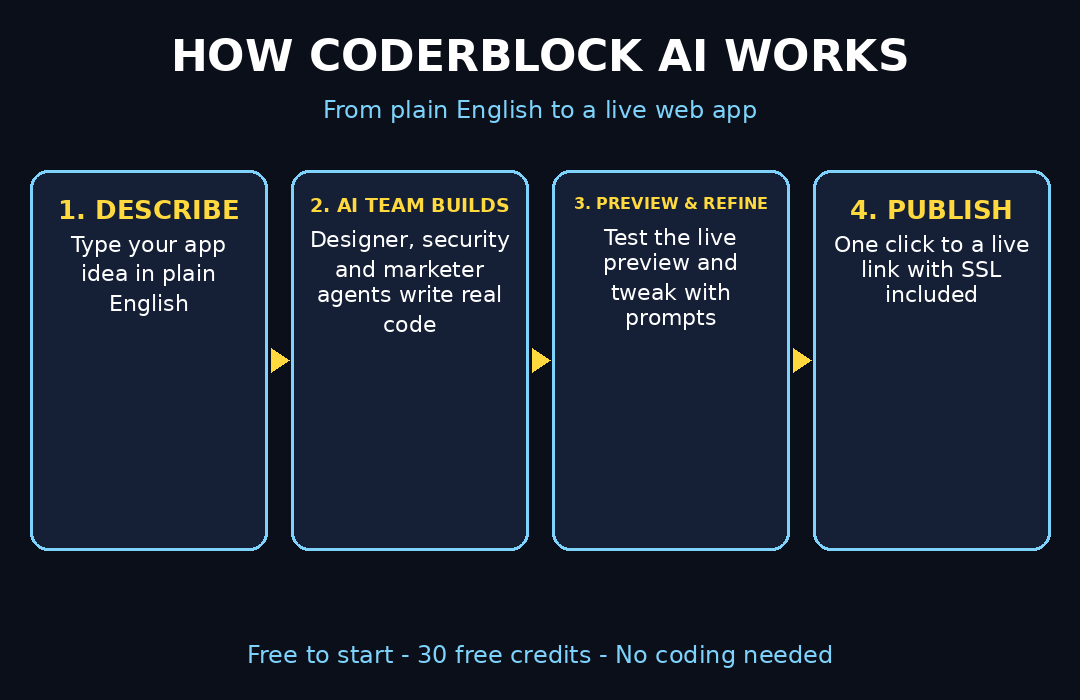
If you have already tried Lovable, another popular AI app builder, you will feel at home here. However, unlike older no-code tools that only make pretty screens, Coderblock builds the whole stack: a React frontend, a real Supabase backend with database, user login, and file storage, plus a built-in AI Gateway so your app can itself use chat, image generation, and AI agents. This beginner guide walks you through every step — from signup to publishing your live app on the web.
Step 1: Create Your Free Coderblock Account
Go to coderblock.ai and sign up with your email or Google account. The free plan launches with 30 free credits and asks for no credit card, so there is zero risk in trying it.
- Your credits are spent when the AI team works on your app. As a result, typical small iterations cost only a few cents worth of credits.
- You can see your credit balance in the dashboard at any time. Therefore, you always know exactly what each build costs.
- If you run out, credit-based paid plans let you top up only for the AI work you actually use.
Beginner tip: treat the 30 free credits like a practice budget. Your first app does not need to be perfect — the goal is to learn the workflow.
Step 2: Choose Your Starting Point
Once you are inside the dashboard, you can start from a blank project or pick one of 32 ready-made product templates. Templates include common app types like booking systems, dashboards, portfolios, stores, and community apps.
- Pick a template when your idea matches a common pattern — it saves credits and time.
- Start blank when your idea is unusual or you want full creative control.
- You can switch ideas later; each project is independent, so experimenting costs nothing extra.
Step 3: Describe Your App in Plain English
This is the core skill of AI app building: describing what you want in words. On the project page, type a clear description of your app. The more specific you are, the better the first result.
For example, a weak prompt sounds like this: *”Make me a booking app.”*
In contrast, a strong prompt sounds like this: *”Build a booking app for my small salon. Customers pick a service (haircut, coloring, facial), choose a date and time, enter their name and phone number, and get a confirmation screen. The owner needs an admin page showing all bookings. Colors: purple and white. Mobile-friendly.”*
Prompting tips that save credits:
- Say who the app is for — customers, staff, friends, or the public.
- List the pages and features — do not assume the AI knows what you need.
- Mention design preferences — colors, style, and whether it must work on phones.
- Name the workflows — what happens when a user clicks, books, signs up, or pays.
If you get stuck writing the description, describe it out loud first, the way you would explain it to a friend, then type that.
Step 4: Let the AI Team Build Your App
However, here is where Coderblock feels different from other AI builders. Instead of a single model spitting out code, your project gets an AI team of specialist agents — think of them as employees in a virtual office: a designer shapes the look, a security agent hardens authentication and permissions, a marketer can help with launch pages, and more.
- The platform picks the right AI model for each job automatically (dynamic model selection), including options like Claude Sonnet and Opus plus lower-cost modes. This is similar in spirit to Google AI Studio, which lets you build apps with Gemini models — except here the agent team handles the entire build for you.
- The team writes real frontend code (React + TypeScript with responsive UI) — not a mockup, actual code.
- Because agents are specialized, the result is more complete than a one-shot generation: layout, logic, and safety rules all get attention.
Meanwhile, watch the build happen in real time. It usually takes a few minutes for the first version of an app.
Step 5: Preview and Test the Live App
When the first build finishes, Coderblock gives you a live preview URL. Click through your app like a real user would. This is the most important beginner habit: do not stop at what you can see.
- Test every workflow: sign up, log in, submit a form, book a slot, add an item.
- A polished screen means nothing if the button behind it does nothing — the workflows are the app.
- Try it on your phone too. The UI is responsive, but always verify with your own eyes.
- If something is broken, note exactly which step failed — you will fix it with words in the next step.
Step 6: Refine Everything with Natural Language
Found something you want to change? Just describe it in the chat panel. You never have to open a code file. Examples of follow-up prompts that work well:
- *”Make the navigation bar sticky at the top.”*
- *”Add an admin table showing all bookings with delete buttons.”*
- *”Prevent customers from booking a time slot that is already taken.”*
- *”Change the headline font to something bolder and add my logo.”*
- *”Make the homepage hero section taller with a darker background.”*
In addition, each iteration spends only a small amount of credits. Consequently, work in this order to save money:
- Fix broken workflows first (things that do not work at all).
- Then fix missing features (things you described but were skipped).
- Polish the design last (colors, spacing, fonts). If you want inspiration for the design step, our Google Stitch beginner guide shows how AI can generate UI designs you can reference.
Beginner tip: batch related changes into one message instead of sending ten tiny messages — fewer agent runs means fewer credits spent.
Step 7: Give Your App Its Own AI Features
One of Coderblock’s standout features is the AI Gateway. Your generated app can include AI features of its own — a support chatbot, an image generator, or tool-using AI agents — without you setting up any AI provider accounts or API keys.
- The gateway works through a metered per-project key, so costs stay tied to your app’s actual usage.
- A chatbot trained on your content is a great first AI feature: FAQs, booking help, or product advice.
- Image generation inside your app is perfect for creative tools, marketing apps, and portfolios.
This is a powerful differentiator because you are not just using AI to build the app — instead, the app itself becomes AI-powered.
Step 8: Understand the Backend (It Is Handled for You)
Beginners often worry about databases and logins. With Coderblock, the backend is provisioned automatically. For typical apps, you get a dedicated Supabase project with:
- Postgres database — stores your app’s data (users, bookings, orders).
- Row-level security — keeps users from seeing each other’s private data.
- Authentication — sign-up, login, and password flows built in.
- Storage — file and image uploads handled securely.
In other words, you do not configure any of this. Instead, the AI team wires it up based on your description — which is why Step 3’s detail matters so much. If you need help reviewing what the AI built, or you want professionals to take your prototype further, a digital agency like Digital 365 Agency can audit and extend AI-generated apps.
Step 9: Publish Your App with One Click
Finally, when your app works the way you want, hit Publish. Coderblock deploys it to a live address on `coderblock.app` with SSL included — your app is on the real internet in seconds.
- Share the link immediately to collect feedback from friends or customers.
- You can connect your own domain through guided DNS setup, or even buy a domain directly through the platform with automatic DNS and SSL configuration.
- The published app is a real product — the code is yours, and you can export it at any time.
For serious launches, pairing an AI-built prototype with real AI automation services can turn a weekend project into a business system.
Step 10: Manage Credits and Keep Improving
After publishing, your app is live. However, great apps are never finished. Here is how to run Coderblock sustainably:
- Spend free credits on learning. Use the 30 free credits to build 1–2 small apps and learn the prompting workflow.
- Iterate on feedback. Share your live link, collect user reactions, and improve with natural-language prompts.
- Use cheaper model modes for small text and styling tweaks; save the powerful models for big features.
- Export your code regularly. You own the generated source code — exporting it is your safety net.
- Upgrade only when it pays. Move to credit-based paid plans when an app earns value or you build for clients.
Beginner tip: keep a simple doc of the prompts that worked best for you. Good prompts are reusable skills — your second app will take half the time.
Coderblock vs Other AI App Builders
| Feature | Coderblock | Lovable | Replit Agent | Bolt.new |
|---|---|---|---|---|
| Free to start | Yes — 30 free credits, no card | Limited free credits | Limited free tier | Limited free tokens |
| Full-stack backend included | Yes (Supabase auto-provisioned) | Yes (Supabase) | Yes | Yes (Supabase option) |
| AI agent team (specialists) | Yes — designer, security, marketer agents | Single-agent flow | Single-agent flow | Single-agent flow |
| AI features inside your app (gateway) | Yes, built-in | Via integrations | Via integrations | Via integrations |
| One-click publish with SSL | Yes (coderblock.app) | Yes | Yes | Yes (Netlify) |
| You own and can export code | Yes | Yes | Yes | Yes |
| Best for beginners who want | A guided team + backend done right | Fast prototypes | Coding + AI together | Quick frontends |
We have covered several of these in depth — for example, see our Lovable beginner guide and Google AI Studio guide. All of them are solid choices, but Coderblock’s specialist-agent approach and built-in AI Gateway make it especially interesting if you want your app to be AI-powered from day one.
FAQ
Is Coderblock really free?
Yes, to start. The free plan includes 30 free credits with no credit card required — enough to build and test a small app. Paid plans are credit-based, so you only pay for the AI work you actually use, and typical iterations cost cents.
Do I need to know how to code?
No. Everything happens in plain English: you describe the app, the AI team builds it, and you refine it with more descriptions. You never have to read or write code — although you own the code and can export it anytime.
What kind of apps can I build?
Almost any web app: booking systems, dashboards, portfolios, stores, community apps, directories, landing pages, and internal tools. It is not the right tool for 3D games or heavy real-time media editing.
Can my app use AI features like chatbots?
Yes. The built-in AI Gateway lets your app call chat models, generate images, and run tool-using agents through a metered per-project key — no separate AI provider accounts needed.
Can I use my own domain?
Yes. You can connect an existing domain with guided DNS setup or buy one directly through the platform, with automatic DNS and SSL configuration.
Do I own what I build?
Yes. The customer owns the source code generated for the project and can export it at any time.
Final Thoughts
Coderblock AI is one of the most beginner-friendly ways to go from “I have an app idea” to “here is the live link” in 2026. Its specialist AI team, automatic full-stack backend, and built-in AI Gateway remove the three biggest blockers for non-coders: design, databases, and deployment. To sum up, start with the 30 free credits, describe your idea clearly, test the workflows — not just the screens — and iterate in plain English.
Above all, your first app will teach you more than any tutorial. Build something small this week, share the link, and improve it based on real feedback.
Explore More Free AI Tools
Want to keep building your AI toolkit? Try these free tools from AI Tool Steps:
- AI Title Generator — craft click-worthy headlines in seconds: https://aitoolsteps.com/
- Meta Description Generator — write SEO-ready meta descriptions fast: https://aitoolsteps.com/
- AI Rewriter — polish and rephrase any text instantly: https://aitoolsteps.com/
- Keyword Density Checker — optimize your content for search engines: https://aitoolsteps.com/