

Introduction
You finish a meeting, and within minutes you have already forgotten who promised what. Did the budget get cut to $90,000 or $120,000? Who had to send the revised proposal by Wednesday? You could take notes by hand, but then you stop listening. You could invite an AI note-taking bot into the call, but then everyone sees a stranger join the meeting — and your private conversation lands on a server you do not control.
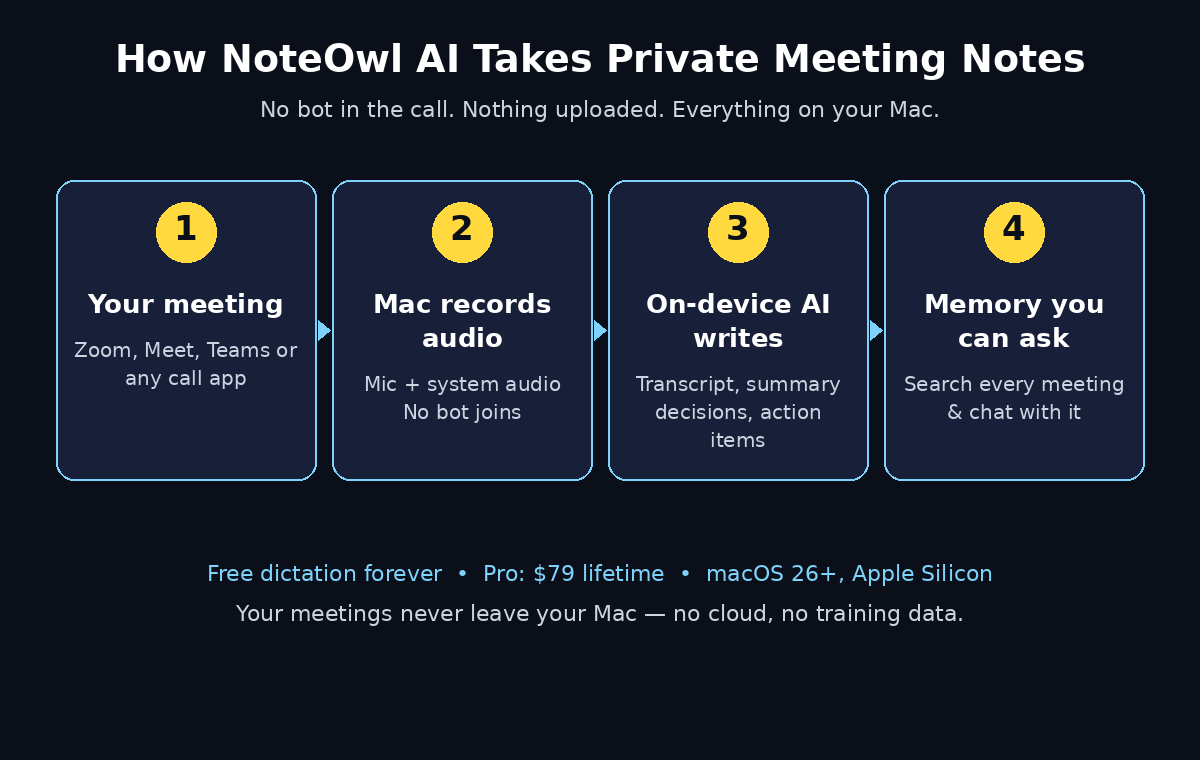
NoteOwl AI was built to end that trade-off. Launched on Product Hunt on November 3, 2026, NoteOwl is a private AI meeting note taker for Mac that runs entirely on your computer. Nothing joins your call, your Mac uploads nothing, and nothing leaves it. It records your microphone and your Mac’s own audio, writes a speaker-labeled transcript, and turns it into a summary, decisions, and action items — all on-device, even offline.
The free part is genuinely free forever: unlimited dictation into any app. Tap the Function key, talk, and your words type live at your cursor — in an email, a message, a document, or a code editor. The meeting-notes features are part of NoteOwl Pro, a $79 lifetime license with a 7-day free trial and no credit card required.
This beginner-friendly guide walks you through everything: checking whether your Mac can run it, installing it, using the free dictation, recording your first meeting without a bot, reading your summary and action items, and asking questions about past meetings. You do not need any technical skills, and you do not need a credit card to start.
Step 1: Understand What NoteOwl AI Actually Is
NoteOwl AI is two tools in one app, and understanding the split saves you confusion later.
The first tool is free dictation. It turns your voice into text anywhere on your Mac. Press the Function key, speak, and your words appear at the cursor in whatever app is open. It is unlimited and free forever, and it works offline after a one-time model download. NoteOwl saves every dictation twice — the raw words beside the polished version — so you can always see exactly what you said.
The second tool is private AI meeting notes and memory, which is NoteOwl Pro. When a meeting ends, NoteOwl writes the transcript on your Mac, labels every line with who said it, and produces a summary, the decisions, and the action items. It then remembers every meeting, so you can ask a question in plain English — “What did we decide about the pilot budget?” — and get an answer that cites the exact passage and opens the recording at that exact moment.
The key idea is simple: your meetings never leave your Mac. There is no bot in the call, no cloud upload, and no recording sent to a server for processing. For founders, managers, salespeople, researchers, and financial advisors who discuss sensitive things on calls, that privacy is the whole point.
Step 2: Check Whether Your Mac Can Run NoteOwl AI
NoteOwl AI runs its AI models on your Mac, so it needs a modern machine. Check these requirements before you download:
- macOS 26 or later — NoteOwl is built for the newest macOS.
- Apple Silicon (M1 or newer) — Intel Macs are not supported, because the on-device models are optimized for Apple Silicon.
- 16 GB of memory minimum, 24 GB recommended — the speech and language models need room to run smoothly alongside your other apps.
If your Mac meets those requirements, you are ready. If you are on an older Mac or an Intel machine, NoteOwl will not run — in that case, a cloud-based note taker such as Otter AI is a better fit, since the heavy work happens on a server instead of your computer.
Step 3: Download and Install NoteOwl AI
Getting started takes only a few minutes, and there is no account wall in front of the free features.
- Open your browser and go to noteowl.ai.
- Click the download button and get the Mac app. It is Apple-notarized, which means Apple has code-signed and scanned the build before it reaches you.
- Open the downloaded file and drag NoteOwl into your Applications folder, then launch it.
- On first launch, NoteOwl downloads its on-device AI models. This is a one-time download — after it finishes, everything works offline, with no connection needed.
- Grant the two permissions NoteOwl asks for: microphone access and system audio recording. These let it hear both you and the other people on the call. It takes only sound — no video, no screenshots, ever.
That is the whole installation. There is no credit card to enter, and the free dictation works immediately.
Step 4: Try the Free Dictation First
Before your first meeting, spend five minutes with the free dictation. It is the fastest way to feel how NoteOwl works, and you will probably keep using it every day.
- Tap the Function key and start talking. Your words type live at the cursor in any app — an email in your inbox, a message, a document, or a code editor.
- Speak naturally. NoteOwl cleans up the filler and punctuation as it types, but it also keeps the raw version of what you said, so nothing is lost.
- Use it anywhere. Draft a reply, write a report, capture an idea while you walk around the room, or dictate a to-do list into your notes app.
Dictation is unlimited and free forever. Many people install NoteOwl for the meeting notes and stay for the dictation, because it quietly replaces a surprising amount of typing. If you have ever wanted a voice keyboard on your Mac, this is the free version that actually works offline — and it pairs well with a dedicated voice-typing workflow like Granola AI Dictation if you want to compare approaches.
Step 5: Record Your First Meeting Without a Bot
This is where NoteOwl feels different from every other meeting tool you have tried. There is no bot to invite, no link to paste into the calendar invite, and no “NoteOwl has joined the meeting” message for your colleagues to see.
- Start your call normally in Zoom, Google Meet, Microsoft Teams, FaceTime, or a Slack huddle. NoteOwl works with any app, because it records the audio your Mac already plays.
- Press Option + Space, or click Start Meeting in the NoteOwl menu. NoteOwl begins recording your microphone and your Mac’s audio at the same time.
- Take your own notes while it listens. NoteOwl shows a live view while you record, with a notes pad of your own. NoteOwl weaves your jottings into the final summary, so the result reflects what mattered to you, not just what was said.
- Stop the recording when the call ends. NoteOwl immediately writes the transcript on your Mac and labels every line with who said it.
One honest note for beginners: because nothing joins the call, the other people on the meeting will not know you are recording unless you tell them. Always mention it at the start of the call — “I’m recording this for my own notes” — just as you would with any recorder. Good manners and local recording laws both point the same way.
Step 6: Read Your Summary, Decisions, and Action Items
When the recording stops, NoteOwl turns the raw transcript into something you can actually use. You get:
- A speaker-labeled transcript, with a time on every line, so you can jump to the exact moment something was said.
- A summary written from one of 22 built-in templates — or your own template, if you prefer your notes in a particular shape. Pick a template that matches the meeting: a sales call, a 1:1, a project review, or a founder update.
- Decisions, listed plainly, so the outcome of the meeting is visible at a glance.
- Action items with owners and due dates, pulled out of the conversation and tied to the passage they came from.
Every captured meeting becomes a dated page of structured notes with sections, decisions, and next steps. Instead of a messy transcript you will never re-read, you get a page you can scan in thirty seconds and forward to your team.
Step 7: Track Every Promise on the Commitments Board
Action items are where most meeting tools stop. NoteOwl goes one step further with a Commitments board — a single place that shows what you owe and what others owe you, sorted by what is due.
When NoteOwl reads a meeting, it pulls out the commitments — who will do what, for whom, and by when — and puts the ones that involve you on the board. Each commitment links back to the moment it was said, so you can check the context before you follow up. Ticking an item off inside a meeting ticks it off everywhere.
For managers running 1:1s and team meetings, this is the feature that pays for the app: before your next meeting with someone, you can see everything still open with that person. For salespeople, it tracks the promises made to prospects and the follow-ups that are due. For founders, it keeps customer calls, investor updates, and 1:1s honest — every promise tracked, with the receipt attached.
The Commitments board, the daily Review, and the action-item tracking are part of NoteOwl Pro.
Step 8: Ask Your Past Meetings Questions
Over weeks and months, NoteOwl builds a memory of every conversation you have recorded. That memory is searchable, and you can chat with it.
Ask in plain English — “Why was the pilot budget reduced?” or “What did Maya promise to send by Wednesday?” — and NoteOwl answers from your own meetings, citing the exact passage and opening the recording at that moment. The answer is grounded in what was actually said, not guessed.
This is the quiet superpower of an on-device note taker. Cloud tools can do something similar, but they do it by keeping your meetings on their servers. NoteOwl does it with the recordings sitting on your own Mac, which means your searchable meeting memory is private by design. Nothing about your business ever becomes training data on another company’s server.
Step 9: Import Old Recordings and Transcribe Files
You do not have to start your searchable memory from zero. NoteOwl Pro can import recordings you already have and transcribe them on your Mac.
Drag in an MP3, WAV, M4A, AIFF, FLAC, AAC, or MP4 file, and NoteOwl produces a transcript with a time on every line and the speakers labeled, then a summary and action items — just as if it had recorded the meeting live. The file never leaves your device.
This is especially useful for researchers transcribing user interviews speaker by speaker, for students turning recorded lectures into study notes, and for anyone with a folder of old call recordings that were never written up. Import them once, and they join the same searchable memory as your new meetings.
Step 10: Understand the Pricing Before You Commit
NoteOwl’s pricing is refreshingly simple, and it is worth understanding before you build a workflow around it.
- Free forever: unlimited dictation into any app, plus voice notes. No credit card, no expiry.
- NoteOwl Pro: a $79 lifetime license for one Mac — no subscription, no monthly bill. Pro adds meeting notes, transcription, chat and memory, action items and the Commitments board, templates, and recording imports.
- 7-day free trial: you can try every Pro feature free for 7 days inside the app, with no card required. If it does not earn its keep in a week of real meetings, you lose nothing.
A lifetime license is unusual in 2026, when most AI tools charge every month. If you take a lot of meetings and you value privacy, $79 once is easy to justify against a single missed commitment. And because the free dictation never expires, NoteOwl stays useful on your Mac even if you never pay.
NoteOwl AI vs Other AI Meeting Tools
| Tool | Bot joins the call? | Your data leaves your device? | Price to start | Standout feature |
|---|---|---|---|---|
| NoteOwl AI | No — records Mac audio | No — fully on-device | Free dictation; Pro $79 once | Private meeting memory you can chat with |
| Otter AI | Yes, as a participant | Yes — cloud processing | Free tier, then paid | Live transcription and team sharing |
| Granola | No — records Mac audio | Yes — cloud processing | Free tier, then paid | Great notes, but cloud-based |
| Google AI Edge Foresight | No — on-device | No — on-device | Free (Mac app) | Google’s on-device rival, also offline |
NoteOwl’s position is clear: if privacy is your top priority and you own a modern Mac, it is the most private option on this list. Otter remains better for teams that need shared team folders, and Google’s AI Edge Foresight is the closest direct rival — but NoteOwl’s free dictation and lifetime pricing give it a practical edge for individual users.
Tips to Get the Most Out of NoteOwl AI
- Pick a summary template per meeting type. A sales call and a 1:1 need different notes. The 22 built-in templates exist for a reason — use them.
- Jot while you record. Your own notes during the call get woven into the summary, so the result reflects your judgment, not just a transcript.
- Review the Commitments board every morning. Five minutes with the board replaces the “what did I owe whom?” panic before your first meeting.
- Import your old recordings in batches. A weekend of importing turns a folder of forgotten calls into searchable memory.
- Tell people you are recording. It takes five seconds at the start of a call, and it keeps everything above board.
- Use dictation for the follow-ups. After the meeting, tap the Function key and dictate the follow-up email while the decisions are still fresh — the summary is right there to copy from.
For small teams, the same privacy-first approach to meetings pairs naturally with a privacy-first approach to everything else. If your business runs on AI tools, a specialist team such as a digital agency can help you choose which workflows to automate first — and if you want to see how AI agents are reshaping whole companies, the team at Agentic Affairs covers the agentic shift in depth.
Frequently Asked Questions
Is NoteOwl AI really free?
Yes, to start. Dictation into any app is unlimited and free forever, with no credit card needed. Meeting notes, transcription, and the Commitments board are part of NoteOwl Pro, a $79 lifetime license with a 7-day free trial and no card required. Like most tools, the free tier covers the everyday habit — dictation — while the paid tier covers the full meeting workflow.
Does NoteOwl AI work on Windows or iPhone?
No. NoteOwl is Mac-only, and it needs macOS 26 or later on Apple Silicon (M1 or newer) with at least 16 GB of memory. There is no Windows, iPhone, or iPad version at launch. If you need meeting notes on other devices, a cloud tool such as Otter AI is the practical alternative.
Does anyone see a bot join my meeting?
No. That is the whole point. NoteOwl records your microphone and your Mac’s audio directly, so nothing appears in the participant list and nobody sees a guest join. It never records video and never screenshots your screen.
Does NoteOwl AI work offline?
Yes. After the one-time model download, NoteOwl needs no connection at all. Dictation, recording, transcription, summaries, and chat with your meeting memory all run on your Mac, even in airplane mode.
Can NoteOwl AI transcribe a recording I already have?
Yes, with NoteOwl Pro. Drag in an MP3, WAV, M4A, AIFF, FLAC, AAC, or MP4 file and you get a speaker-labeled transcript with timestamps, a summary, and action items — all processed on your Mac, with the file never leaving your device.
Is my meeting data used to train AI models?
No. Your recordings, transcripts, and meeting memory live on your Mac and never leave it, so nobody can use them to train anyone’s models. That is the core promise of the app, and it is why it exists.
Final Thoughts
Most meeting tools ask you to choose between convenience and privacy. NoteOwl AI refuses that choice. It gives you clean notes, clear action items, and a searchable memory of everything you have discussed — without a bot in your call and without a single byte of your meetings leaving your Mac.
Start with the free dictation today. Tap the Function key, talk, and watch your words type themselves into any app. Then, before your next important meeting, start the 7-day Pro trial and let NoteOwl write the notes while you actually listen. If a week of real meetings does not convince you, you have lost nothing — and the dictation stays free forever.
Your meetings are where decisions happen and promises are made. It is time your notes remembered them as well as you should.
Explore More Free AI Tools
- AI Title Generator — write headlines that get clicked
- Meta Description Generator — craft search snippets in seconds
- AI Rewriter — refresh old content with a fresh voice
- Keyword Density Checker — check your SEO before you publish