

Introduction
Every growing business hits the same wall. UnleashX AI is the tool built for that moment. More leads arrive, and somebody has to call them back. More customers sign up, and somebody has to remind them about renewals, chase late payments, and answer the same questions again and again. The usual answer is to hire more people, buy more software, and add more manual work — until the team spends its whole day on follow-ups instead of the work that actually grows the business.
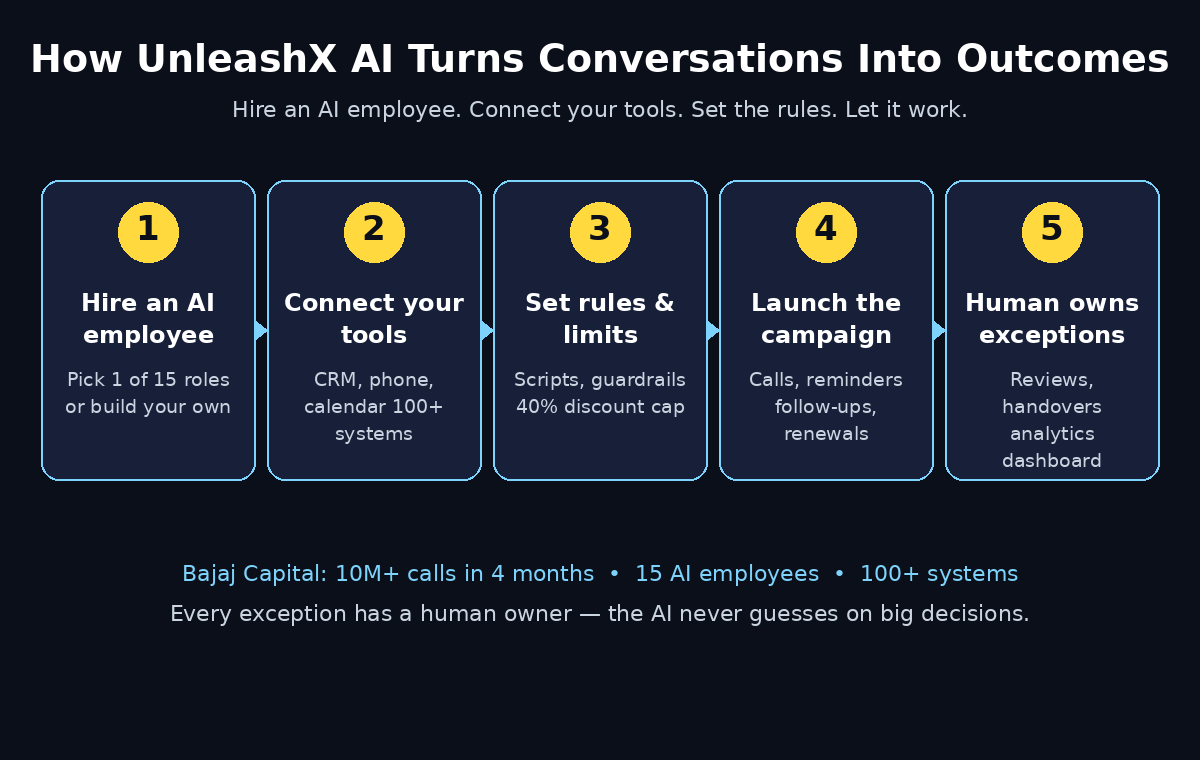
UnleashX AI was built to break that pattern. Launched on Product Hunt on November 2, 2026, where it reached number 3 of the day, UnleashX is an AI workforce platform that lets you hire AI employees the way you would hire people. You pick a role, connect your CRM and tools, set the rules, and hand over the work. The AI employee makes the calls, sends the follow-ups, and updates your systems — and a human steps in only when something needs a real decision.
The proof is not a demo video. Bajaj Capital, a large Indian financial services company, uses UnleashX AI employees for insurance lead follow-ups, policy renewal reminders, and premium reminders — more than 10 million calls in four months. That is work that would otherwise have meant teams dialling from lists all day, every day.
This beginner-friendly guide walks you through everything: what UnleashX AI actually is, the 15 pre-built AI employees you can hire, how to create your account, connect your tools, set guardrails so the AI never oversteps, launch your first campaign, and read the results. You do not need any coding skills, and you do not need to be a large enterprise to understand the idea — the same pattern works for a small sales team, a clinic, a real estate agency, or a growing online store.
Step 1: Understand What UnleashX AI Actually Is
UnleashX AI is not a chatbot and it is not a dialler. It is a platform where AI employees do complete jobs end to end. The founder, Ajay Kadyan, previously co-founded Zimyo, an HR technology company, and he kept seeing the same problem: growth always meant more manual work. More leads meant more follow-ups. More customers meant more conversations. Businesses kept adding people and tools instead of solving the complexity.
UnleashX answers that with a simple idea. Instead of buying another tool that your team still has to operate, you hire an AI employee. You choose from 15 pre-built AI employees, or you build your own, and each one works across more than 100 connected systems — your CRM, your phone system, your email, your calendar, and your payment tools.
Three things make it different from a normal AI assistant:
- It does the work, not just the talking. An UnleashX AI employee does not only answer questions. It calls the lead, qualifies them, books the meeting, updates the CRM, and sends the confirmation — the whole workflow, start to finish.
- It works on voice, around the clock. The platform started as a voice AI agent platform with human-like AI voice agents available 24/7. Your AI employee can speak naturally with customers, understand what they mean, trigger the next step in the workflow, and update your systems in real time.
- Every exception has a human owner. The AI never guesses when something important is at stake. You set the limits, and anything outside them goes to a named human. That is the part that makes it safe to hand over real work.
For a beginner, the mental model is simple: think of it as hiring a very fast, very consistent new team member who never sleeps — and who always follows the rules you wrote down.
Step 2: See the AI Employees You Can Hire
Before you create an account, it helps to know what roles are available. UnleashX offers 15 pre-built AI employees, each designed around one job that businesses repeat every day. You hire one the way you would post a job description: pick the role, describe how you want it done, and let it start.
Here are the kinds of roles the platform covers:
- Lead follow-up employee — calls new leads within minutes, asks the qualifying questions, and books interested people straight into your calendar.
- Sales development employee — works through a list of prospects, handles objections, and hands warm leads to your human sales team.
- Renewal reminder employee — calls and messages customers before a policy, subscription, or contract expires, and helps them renew without a human chasing them.
- Payment reminder employee — politely reminds customers about upcoming or overdue payments and records the outcome.
- Customer onboarding employee — welcomes new customers, collects the missing details, and walks them through the first steps.
- Post-sale support employee — checks in after a purchase, answers common questions, and flags unhappy customers for a human.
- Cart recovery employee — reaches out to shoppers who left items in their cart and brings them back to complete the purchase.
These roles fit the industries UnleashX is built for: insurance, e-commerce, healthcare, real estate, education, and financial services. If your business lives on conversations — calls, reminders, and follow-ups — there is almost certainly a pre-built employee that matches the job.
If none of the 15 fits exactly, you can build your own AI employee from scratch. You define its role, its voice, its script, the tools it can use, and the rules it must follow. For a first project, though, start with a pre-built one. It is already trained for the job, and you can customise it later.
Step 3: Create Your Free UnleashX Account
Getting started takes only a few minutes, and you do not need a credit card to look around. Here is the exact path.
- Open the UnleashX website. Go to tryunleashx.com in your browser, or find UnleashX on Product Hunt and follow the launch page link to the site.
- Sign up with your work email. Use the email address your team actually checks. This becomes the account where your AI employees, campaigns, and call reports live.
- Tell it about your business. The signup flow asks what your company does and which job you want help with first. Answer plainly — “we sell insurance and need help following up leads” is a perfect answer. These answers decide which AI employee the platform suggests first.
- Claim the launch offer. For the Product Hunt community, UnleashX offered 50% off platform fees plus 1000 credits with the promo code PRODUCTHUNT50 at checkout. Launch offers change, so check the pricing page inside your account for the current deal before you pay for anything.
- Confirm your email and log in. Once your account is verified, you land on the dashboard. This is your control room: AI employees on one side, live campaigns and call results on the other.
A useful habit from the start: invite one teammate into the account, even if you are the only person running the first test. AI employees work best when a real human owns the exceptions, and having a second pair of eyes on the first week of calls catches small mistakes early.
Step 4: Connect Your CRM and Tools
An AI employee is only as good as the systems it can reach. If it cannot see your leads, it cannot call them. If it cannot update your CRM, your team will not know what happened. This step is the plumbing, and it is worth doing carefully.
- Open the integrations section in your UnleashX dashboard and look for the tools you already use.
- Connect your CRM first. This is the most important connection. The AI employee pulls new leads from the CRM, and writes back the outcome of every call — answered, interested, not interested, call back later — so your pipeline stays honest.
- Connect your phone and messaging tools. The AI employee makes calls and sends messages through the platform, so it needs the numbers and channels your customers already know.
- Connect your calendar. When a lead says yes to a meeting, the AI employee should book it directly into the right person’s calendar and send the confirmation, without a human in the middle.
- Connect your payment or billing system if the employee handles reminders. It needs to know who has paid, who is due, and who is overdue — otherwise it will chase people who already paid, which is the fastest way to lose a customer.
UnleashX works across more than 100 systems, so most popular CRMs and business tools are covered. Connect one tool at a time and test each connection before moving on. A quick test — pull one lead, check that its details look right — saves hours of confusion later.
If you run a small business and do not have a CRM yet, do not let that stop you. You can start with a simple list of contacts and connect a CRM later. Many small teams work with a digital agency to set up their CRM and automation properly before handing routine follow-ups to an AI employee, and that one-time setup makes everything after it much smoother.
Step 5: Pick Your First AI Employee and Set Its Rules
Now comes the fun part: hiring. Choose one job, and only one, for your first AI employee. The most common first hire is lead follow-up, because the result is easy to measure — more leads answered, more meetings booked — and because every business feels the pain of leads going cold.
- Pick the role. In the dashboard, browse the 15 pre-built AI employees and choose the one closest to your job. For most beginners, that is the lead follow-up employee.
- Give it a name and a voice. Your AI employee will speak to your customers, so pick a voice that fits your brand: calm and professional for insurance or finance, warm and friendly for healthcare or education.
- Write its job description in plain words. Describe what it should do and what it should never do. For example: “Call every new lead within 10 minutes. Ask if they are still interested, answer questions about our plans, and book a meeting if they want one. Never offer a discount. Never take a payment over the phone.”
- Set its working hours. Even though AI employees can work 24/7, your customers may not want a call at midnight. Set the hours that suit your audience, and the time zone they live in.
- Decide what success looks like. Is it a booked meeting? A completed renewal? A payment promise? Pick one outcome and tell the AI employee to aim for it on every call.
The single biggest beginner mistake is hiring three AI employees at once. Start with one role, one job, and one clear outcome. When that works, hiring the second one takes minutes.
Step 6: Train It on Your Business
An AI employee that knows nothing about your business will sound like a stranger reading a script. Training it is how you make it sound like your team. This step takes an afternoon, and it is the difference between calls that convert and calls that annoy people.
- Upload your knowledge base. Add the documents your human team already uses: product pages, pricing sheets, frequently asked questions, and the answers your best salesperson gives on a call.
- Write the script as a conversation, not a speech. The best AI employees talk like people. Give it opening lines, the three or four questions that matter most, and natural replies for the common answers — including “not interested” and “call me later”.
- Teach it your boundaries. This is where you write down the rules your team follows without thinking. For example: never promise a delivery date, never discuss a competitor by name, and always confirm the customer’s name before sharing account details.
- Add your brand details. The company name, how to pronounce it, the product names, and the words you never use. Small details like these are what make a call feel professional instead of robotic.
- Test it on yourself first. Before it calls a real customer, call it yourself, or have it call you. Listen to the whole conversation. Fix anything that sounds wrong, too fast, or confusing. Repeat until you would be happy for your best customer to receive that call.
Training is never finished. Your first week of real calls will teach you things no script covers, and you should update the knowledge base every week at first. The teams that get the best results from AI employees treat training as a weekly habit, not a one-time setup.
Step 7: Set Human Handover Rules and Guardrails
This is the step that makes UnleashX safe for real business. An AI employee should be confident inside its limits and humble outside them. You decide where the line is, and the platform enforces it.
- Set decision limits with numbers, not feelings. UnleashX itself gives a good example: one sales team let its AI employee offer discounts of up to 40% on its own, and anything above that went to a manager. Pick your own numbers for your own business — the discount it may offer, the refund it may approve, the promise it may make — and write them down.
- Name a human owner for every exception. When the AI employee hits something outside its rules — an angry customer, a legal question, a request it does not understand — it must hand over to a named person, not a general inbox. That person gets the call recording and the transcript, so they can pick up exactly where the AI left off.
- Decide what it may never do. Some things should always be human: closing a large deal, handling a complaint about a mistake, or talking about a sensitive medical or financial detail. List them plainly in the rules.
- Turn on call recording and review. Every call is recorded and transcribed. In the first two weeks, listen to a few calls every day. You will spot small fixes — a mispronounced product name, a question it answers too slowly — that make a real difference.
- Set a daily or weekly review. Once a week, look at the calls that were handed over to humans. If the same question keeps causing a handover, add the answer to the knowledge base. Your handover rate should fall every week.
The honest truth is that giving an AI employee real autonomy forces you to write down rules your team has followed without ever saying them out loud. That is uncomfortable for a day, and then it makes your whole business clearer — for humans and AI alike. If your team needs help documenting those processes, an AI automation services partner can turn the way your best people already work into rules an AI employee can follow.
Step 8: Launch Your First Campaign
With the employee hired, trained, and guarded, you are ready to launch. A campaign is simply a list of people to contact and a job to do with each one. Start small on purpose.
- Pick a small, safe list. Fifty to one hundred leads is ideal for a first campaign. Choose recent leads — people who asked about your product in the last few days — because they still remember you.
- Choose the job. For a first campaign, the simplest job is follow-up: call each lead, confirm they are still interested, answer questions, and book a meeting for the ones who say yes.
- Set the call schedule. Spread the calls across the working day instead of blasting them all at once. This keeps the quality high and gives you time to review the first few calls before the rest go out.
- Watch the first five calls live. Listen to the recordings as soon as they land. Check three things: did it introduce the company correctly, did it ask the right questions, and did it book the meeting properly? Fix anything that is off before the next batch.
- Let it run, then check the results. After the first day, open the dashboard and look at the numbers: how many calls were answered, how many meetings were booked, and how many leads asked to be called back. Those three numbers tell you whether the campaign worked.
A good first campaign is boring on purpose. It does one simple job, on a small list, with a human watching. The exciting part comes later, when you trust it enough to run the same campaign every day without thinking about it.
Step 9: Read the Analytics Dashboard
UnleashX gives you a real-time analytics dashboard for every AI employee, and learning to read it is how you improve. The dashboard shows call volumes, outcomes, customer sentiment, and the overall impact of the automation. Four numbers matter most for a beginner.
- Answer rate. Out of all the calls placed, how many were answered? If this is low, the problem is usually the timing or the caller ID, not the AI.
- Outcome rate. Out of the answered calls, how many reached the goal — a booked meeting, a renewed policy, a promised payment? This is the number that decides whether the campaign earns its keep.
- Handover rate. How many calls went to a human, and why? A falling handover rate means the AI employee is learning. A rising one means something changed — a new product, a new question — and the training needs an update.
- Sentiment. How did customers feel during the call? The dashboard tracks sentiment across calls, so you can spot a script or a voice that sounds pushy before it costs you customers.
Check the dashboard every morning for the first month. Ten minutes a day is enough. Look for one thing to fix each week — a better opening line, a clearer answer to the most common question, a tighter handover rule — and your results will keep climbing.
Step 10: Scale What Works — and Keep the Human Touch
Once your first AI employee is booking meetings or completing renewals reliably, scaling is straightforward. Hire the next employee for the next most repetitive job, reuse the training and guardrails you already built, and let the two employees work side by side.
- Add the second role only when the first is stable. Stable means the outcome rate is steady for two weeks and the handover rate is low. If the first employee still needs daily fixes, it is not ready to be copied.
- Reuse what you built. The CRM connection, the calendar, the brand voice, and the guardrails all carry over. Each new employee starts from your existing setup instead of from zero.
- Keep humans on the high-value work. The point of an AI workforce is not to remove people. It is to move them. When the AI handles the follow-ups and reminders, your human team spends its time on the conversations that actually need a person: the big deal, the unhappy customer, the complicated case.
- Review the whole workforce monthly. Once a month, look at every AI employee together. Which one earns its keep? Which one needs retraining? Which job should be handed back to a human? This monthly review is what keeps an AI workforce honest.
- Tell your customers. You do not need to hide the AI employee. A simple line — “our AI assistant will call you to confirm your appointment” — sets the right expectation and builds trust. Customers accept AI calls far more readily when they know what to expect.
The businesses that win with tools like UnleashX are not the ones with the biggest budgets. They are the ones that start with one clear job, measure the result, and scale only what works.
UnleashX AI vs Other Options
| Feature | UnleashX AI | Hiring more staff | Basic chatbot | Power dialler |
|---|---|---|---|---|
| Works 24/7 | Yes | No | Yes | No |
| Makes real voice calls | Yes | Yes | No | Yes, but humans dial |
| Completes full workflows | Yes, end to end | Yes | Only answers questions | Only dials numbers |
| Updates your CRM automatically | Yes | Only if staff remember | Rarely | No |
| Human handover for exceptions | Yes, named owner | N/A | Usually a dead end | N/A |
| Scales to 10M+ calls | Yes | Only by hiring | Yes, but no calls | Only with more staff |
| Best for | Follow-ups, renewals, reminders at scale | Complex, high-value conversations | Simple website questions | High-volume cold calling |
Frequently Asked Questions
Is UnleashX AI really free?
UnleashX does not publish a simple free plan. Its pricing is usage-based — you pay for the work your AI employees actually do — and the exact rates are not published on the website, so check the pricing page inside your account before you commit to a workflow. For the Product Hunt launch, the platform offered 50% off platform fees plus 1000 credits with the code PRODUCTHUNT50. Start with a small campaign, measure the outcome, and only scale when the numbers make sense.
Do I need coding skills to use UnleashX AI?
No. The whole point of the platform is that you hire an AI employee the way you hire a person: pick a role, connect your tools, and set the rules in plain words. There is a no-code workflow builder for the automation, and the 15 pre-built AI employees mean you never start from a blank page. If you can write a job description, you can set up UnleashX.
Which businesses is UnleashX AI best for?
It fits any business where conversations drive revenue: insurance, e-commerce, healthcare, real estate, education, and financial services. The classic use cases are lead qualification, cart abandonment recovery, payment reminders, policy renewals, customer onboarding, and post-sale support. If your team spends hours every day on follow-up calls and reminders, UnleashX is built for you.
Can an UnleashX AI employee really make 10 million calls?
Yes — that is the reported result from Bajaj Capital, which used UnleashX AI employees for insurance lead follow-ups, policy renewal reminders, and premium reminders, reaching more than 10 million calls in four months. Your business will not need that volume on day one, but it shows the platform is built for serious scale, not just demos.
What happens when the AI employee does not know the answer?
It hands over to a human. Every UnleashX AI employee works inside limits you set, and anything outside those limits — an angry customer, a discount above the agreed number, a question it cannot answer — goes to a named human owner with the call recording and transcript attached. The handover is the safety net that makes it practical to hand over real work.
Is my customer data safe with UnleashX AI?
Your data stays inside your connected systems — the AI employee reads your CRM and writes the outcomes back to it. Before you connect anything sensitive, read the platform’s privacy and security pages, check where call recordings are stored, and confirm the setup meets your industry’s rules. For insurance, healthcare, and finance, that check is not optional.
Final Thoughts
UnleashX AI is a simple idea executed at serious scale: hire AI employees for the repetitive conversations, give them clear rules and a human safety net, and let your people do the work that actually needs a person. The Bajaj Capital result — more than 10 million calls in four months — shows what happens when the idea works.
For a beginner, the path is small and safe. Create an account, connect your CRM, hire one AI employee for one job, train it properly, set the guardrails, and run a small first campaign while you watch the first calls. Measure the outcome rate, fix one thing a week, and scale only what works.
You do not need to be an enterprise to benefit. A small sales team that stops losing leads to slow follow-ups, a clinic that never misses a renewal reminder, or a store that recovers abandoned carts while the owner sleeps — that is the real promise of an AI workforce. Start with one employee, one job, and one clear outcome, and let the results decide what happens next.
Explore More Free AI Tools
Want to keep building your AI toolkit? Try these free tools on AIToolSteps:
- AI Title Generator — write headlines that get clicked: https://aitoolsteps.com/
- Meta Description Generator — write search snippets that earn the click: https://aitoolsteps.com/
- AI Rewriter — rewrite any text in a clearer, fresher voice: https://aitoolsteps.com/
- Keyword Density Checker — check your content is optimised for the right words: https://aitoolsteps.com/