

Building your first AI app used to mean two hard problems: learning the code, and paying for the cloud computers that run the AI. The Nebius AI Builder program removes the second problem almost entirely. Launched in 2026 by Nebius, an Amsterdam-based AI cloud company, it is a free program for developers and curious beginners that hands you more than $400 in technology credits, practical step-by-step blueprints, advanced training resources, and direct access to the engineers behind the platform.
More than 1,800 people signed up in the program’s early days, helped by a creator-led campaign that generated over 8 million social impressions. That early momentum matters, because it means the program is actively supported, the community is growing, and the blueprints are being tested by real builders right now.
In this beginner-friendly guide, you will learn exactly how to use Nebius AI Builder, from signing up and claiming your credits to picking a blueprint, building your first AI app, and deploying it for others to use. No technical background is needed to follow along, and you do not need a credit card to join the free program.
Step 1: Understand What Nebius AI Builder Is
Nebius AI Builder is a free developer program, not a single app. Think of it as a starter kit for building AI applications on real cloud infrastructure. Nebius is a cloud infrastructure company that provides the computing power — powerful graphics processors, known as GPUs — that AI models need to run. The Builder Program packages that infrastructure together with learning material and ready-made project plans.
Here is what members receive:
- More than $400 in technology credits to spend on Nebius infrastructure and partner tools, so you can build and test without paying out of pocket.
- Practical implementation blueprints — complete, tested guides for building real AI apps, not just theory.
- Advanced training resources that teach you how AI applications actually work in production.
- Direct access to engineers who build the platform, so you can ask questions when you get stuck.
The program is aimed at developers, but beginners are welcome too. If you can follow a recipe, you can follow a blueprint. And if you run a digital agency or a small software team, the program is a low-risk way to test whether AI features are worth adding to your client projects before spending real money on infrastructure.
Step 2: Check Whether the Program Fits You
Before you sign up, take one minute to check that the program matches what you want to build. Nebius AI Builder fits you best if any of these sound familiar:
- You want to build an AI app — a chatbot, a document summarizer, an image tool, a voice assistant — but cloud costs scare you.
- You already know a little Python or JavaScript and want to learn how AI apps run in the real world.
- You are a freelancer or agency owner exploring AI services for clients and need a cheap sandbox to experiment in.
- You want hands-on training rather than another video course you never finish.
If you have never written a line of code, you can still join and learn from the training material, but you will get the most value once you can read basic code. Pair this guide with our Local Code AI guide, which shows how to run AI models privately on your own Mac — the two tools teach opposite but complementary skills: local AI on your own machine, and cloud AI on Nebius infrastructure.
Step 3: Sign Up for the Free Program
Joining is straightforward. Open the Nebius AI Builder Program page in your browser and look for the sign-up or join button. You will be asked for your name, email address, and a short description of what you want to build. Answer honestly — the team uses this to match you with the right blueprints and training, not to judge your experience level.
A few tips for a smooth sign-up:
- Use an email address you check every day, because your credits and onboarding instructions arrive there.
- Describe your project idea in one or two sentences, even if it is rough. “I want to build a chatbot that answers questions about my shop’s products” is a perfect answer.
- There is no credit card required to join the free program, so never enter payment details during sign-up.
After you submit the form, check your inbox for a welcome email. It usually arrives within minutes and contains your account link and first steps. If it does not appear, check your spam folder before trying again.
Step 4: Claim Your $400+ in Technology Credits
Your credits are the most valuable part of the program, so claim them early and spend them wisely. Once your account is active, open your Nebius dashboard and look for the credits or billing section. Your program credits should already be applied to your account.
Use your credits like a budget, not a buffet:
- Start small. Run your first blueprint on the smallest GPU option that works. You can scale up later.
- Turn things off. Cloud GPUs charge by the hour while they run. Stop or delete resources when you finish a session.
- Track your balance. Check the dashboard weekly so a forgotten test server does not eat your credits.
- Save credits for your real project. Spend a little learning, then save the rest for the app you actually want to ship.
More than $400 in credits is generous for learning, but it is not unlimited. Treat it as runway for one serious project plus a few experiments, and you will get far more value from it than someone who burns it on random tests.
Step 5: Pick a Blueprint for Your First Project
Blueprints are the heart of Nebius AI Builder. Each blueprint is a complete, tested plan for building one kind of AI application — the architecture, the model choices, the code, and the deployment steps, all laid out in order.
To choose your first blueprint, match it to a problem you actually care about. Good first projects include:
- A chatbot that answers questions from your own documents or website.
- A tool that summarizes long articles, meeting notes, or support tickets.
- An image or content generator for your business or hobby.
- A small voice assistant that transcribes and answers spoken questions.
Do not pick the most impressive blueprint first. Pick the simplest one that solves a real problem for you, finish it end to end, and then move to a harder one. A finished simple app teaches you more than three half-finished ambitious ones. Teams offering AI automation services often start exactly this way — one small working demo for a client, then a bigger build once the value is proven.
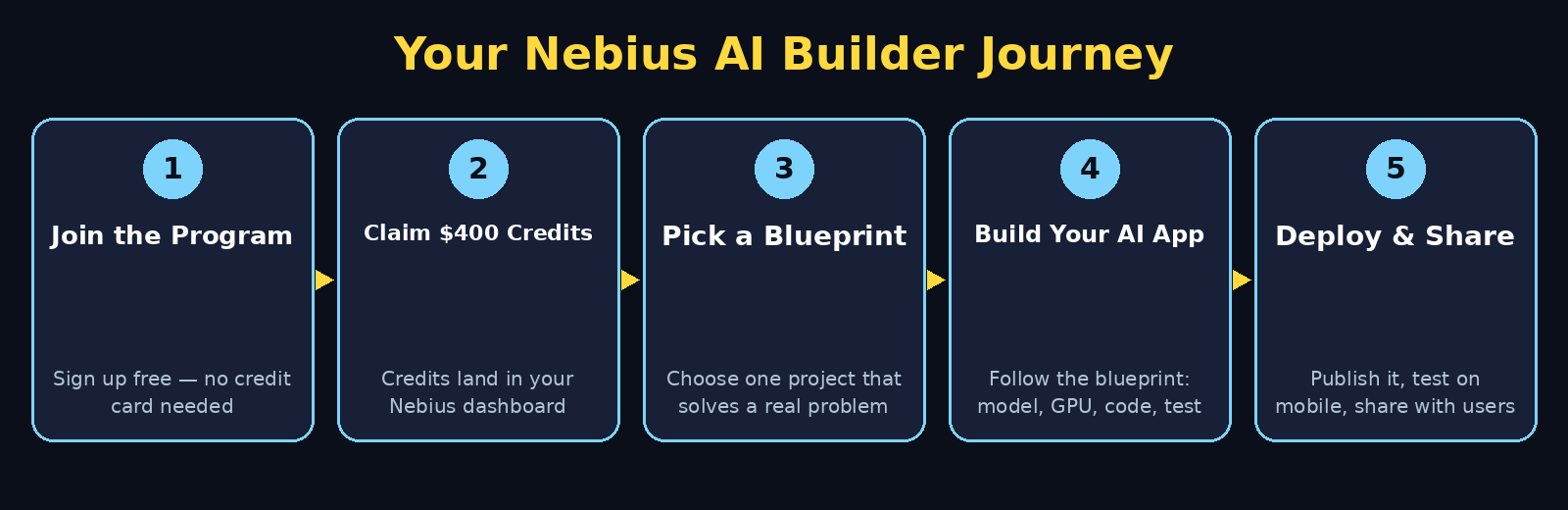
Step 6: Set Up Your First AI App on Nebius
With a blueprint chosen, it is time to build. Open the blueprint and follow it in order — resist the urge to skip ahead. Most blueprints follow the same five moves:
- Choose your model. The blueprint recommends a model for the job. Use it for your first run, even if a newer model exists.
- Provision your compute. Launch the GPU instance the blueprint suggests. Smaller is cheaper; you can resize later.
- Load the code. Clone or download the blueprint’s starter code into your workspace.
- Configure your keys. Add your API keys and settings exactly as the blueprint shows, and keep them private.
- Run it once. Start the app, send it one test request, and confirm you get a sensible answer before adding features.
If something fails at this stage, read the error message slowly before changing anything. Nine times out of ten, the fix is a missing key, a wrong region, or a resource that is still starting up. The program’s direct access to Nebius engineers is genuinely useful here — a short, specific question with the exact error message gets a fast, useful answer.
Step 7: Connect the Partner Tools You Need
The Builder Program includes partner tools alongside Nebius infrastructure, and your credits can cover them. Depending on your blueprint, you may connect a vector database for document search, a model provider for a specific capability, or a monitoring tool that watches your app’s health.
Keep your stack small at first. Every extra tool is another thing that can break and another bill to track. Add a tool only when your app clearly needs it — for example, add a database when your chatbot must remember past conversations, not before. This discipline is what separates a demo that works once from an app that keeps working for real users, and it is the same discipline behind our Wellows AI Visibility Report guide, which shows how to check what AI engines say about a brand before spending more on tools.
Step 8: Learn From the Training and the Engineers
The training resources and engineer access are easy to ignore when you are excited to build, but they are where the long-term value lives. Work through the training in short sessions alongside your build, not as a separate course you will “get to later”.
Focus on these three topics first:
- How inference works. Understand what happens when your app asks a model a question, so you can predict costs and speed.
- How to evaluate answers. Learn simple checks for quality, so you catch a bad model or a bad prompt before users do.
- How deployment works. Learn how an app goes from your laptop to a server that anyone can reach.
When you talk to the engineers, bring a specific problem and what you already tried. “My chatbot answers slowly after 20 messages — here is my setup” gets a far better answer than “How do I make it faster?” Specific questions respect their time and get you specific fixes.
Step 9: Test, Deploy, and Share Your App
A working app on your own computer is only half the job. Deployment is what turns it into something other people can use, and it is where many beginners stop. Do not stop here — the blueprint covers deployment for a reason.
Before you share your app with anyone, run this short checklist:
- Test it with ten different questions, including awkward ones, and fix the worst answers.
- Check the cost of one hour of running it, and set a spending alert if the dashboard offers one.
- Try it on your phone, not just your laptop, because that is how most people will reach it.
- Write two sentences explaining what it does, so the first visitor understands it in five seconds.
- Share it with one friend first and watch them use it without helping — their confusion shows you what to fix.
Once it survives that checklist, share it more widely: your portfolio, your social profiles, or a client demo. A deployed app, even a small one, is worth more than a perfect app that nobody can open. If you run a small business, this is also the moment to look at a workspace tool like the one in our OptimusDesk AI guide — a deployed AI demo plus a tidy workspace makes a convincing pitch to clients.
Step 10: Grow Beyond the Free Credits
Your $400+ in credits will eventually run out, and that is the point where you decide what happens next. You have three honest options, and the right one depends on what you built.
- Keep it small and cheap. If your app is a personal tool, run it on the smallest instance, or only when you need it, and pay a few dollars a month.
- Charge for it. If your app saves people time, a small subscription or pay-per-use price can cover the cloud bill and more.
- Pause and rebuild. If the app did not find users, stop paying, keep the code and lessons, and build the next idea with what you learned.
What you should not do is keep paying for an app nobody uses out of inertia. The Builder Program gave you free runway to learn and test — use the end of that runway as a decision point, not a surprise bill. Review your usage, pick one of the three paths, and act on it the same week your credits run low.
Nebius AI Builder vs Other Ways to Build AI Apps
How does the program compare with the other free routes beginners usually try? Each one has a different strength, and many builders end up using two of them together.
| Option | Cost to start | Best for | Main limit |
|---|---|---|---|
| Nebius AI Builder | Free ($400+ credits) | Building and deploying real AI apps with guidance | Credits eventually run out |
| Google AI Studio | Free tier | Quick prototypes and experimenting with Gemini models | Less control over production deployment |
| Local Code AI | Free (your own Mac) | Private, offline AI work with no cloud bill | Mac only, limited by your hardware |
| Traditional cloud (pay-as-you-go) | Pay from the first hour | Full control at any scale | Costs start immediately, easy to overspend |
The honest summary: use Nebius AI Builder when you want to ship a real app with training and support behind you, use AI Studio when you want to prototype an idea in an afternoon, and use Local Code AI when privacy matters more than scale.
Frequently Asked Questions
Is Nebius AI Builder really free?
Yes. The program itself is free to join, and members receive more than $400 in technology credits for Nebius infrastructure and partner tools. No credit card is required to sign up. You only pay if you keep using paid infrastructure after your credits run out.
Do I need to be a developer to join?
No, but basic coding knowledge helps a lot. The blueprints and training are written to be followed step by step, and beginners who can read simple code will get the most value. If you have never coded, start with the training material first, then pick the simplest blueprint.
What can I build with the $400 in credits?
Enough for one serious project plus several experiments. A small chatbot or summarizer can run for weeks on a modest GPU instance, especially if you turn resources off when you are not using them. Large models and always-on apps burn credits faster, so start small.
How is Nebius AI Builder different from just renting a GPU?
Renting a GPU gives you raw computing power and leaves everything else to you. The Builder Program adds blueprints, training, partner tools, and direct access to engineers — the guidance that turns rented computing into a finished app.
What happens when my credits run out?
Your apps stop running on paid infrastructure until you add a payment method or scale down to a cheaper setup. Nothing is charged automatically. Review your usage before the credits end and choose whether to keep the app small, charge users for it, or pause it.
Can I use Nebius AI Builder for client work?
Yes. Many freelancers and small agencies use the program to prototype AI features for clients. A working demo built on free credits is a strong way to show a client what is possible before either side commits real money.
Final Thoughts
Nebius AI Builder is one of the most practical free programs for beginners who want to move from reading about AI to actually shipping something. The combination is rare: real cloud infrastructure, more than $400 in credits, tested blueprints, training, and engineers you can actually talk to. More than 1,800 early sign-ups and 8 million impressions show the program is being taken seriously, and the free tier means the only thing you risk is your time.
Start today: sign up, claim your credits, pick the simplest blueprint that solves a real problem, and finish it end to end. Then deploy it, share it with one person, and learn from what they do with it. That single finished app will teach you more about building with AI than a month of tutorials — and it costs you nothing to begin.
Explore More Free AI Tools
Keep building your AI toolkit with our free guides. Try the AI Title Generator, Meta Description Generator, AI Rewriter, and Keyword Density Checker on AIToolSteps — all free, all beginner-friendly, and all designed to help your content and your apps reach more people.