

Introduction
Search is changing fast. Today, when someone asks ChatGPT, Perplexity, or Gemini for a recommendation, the answer does not come from a list of blue links. It comes from a short, confident summary written by an AI engine — and your brand is either mentioned in that answer, or it is invisible.
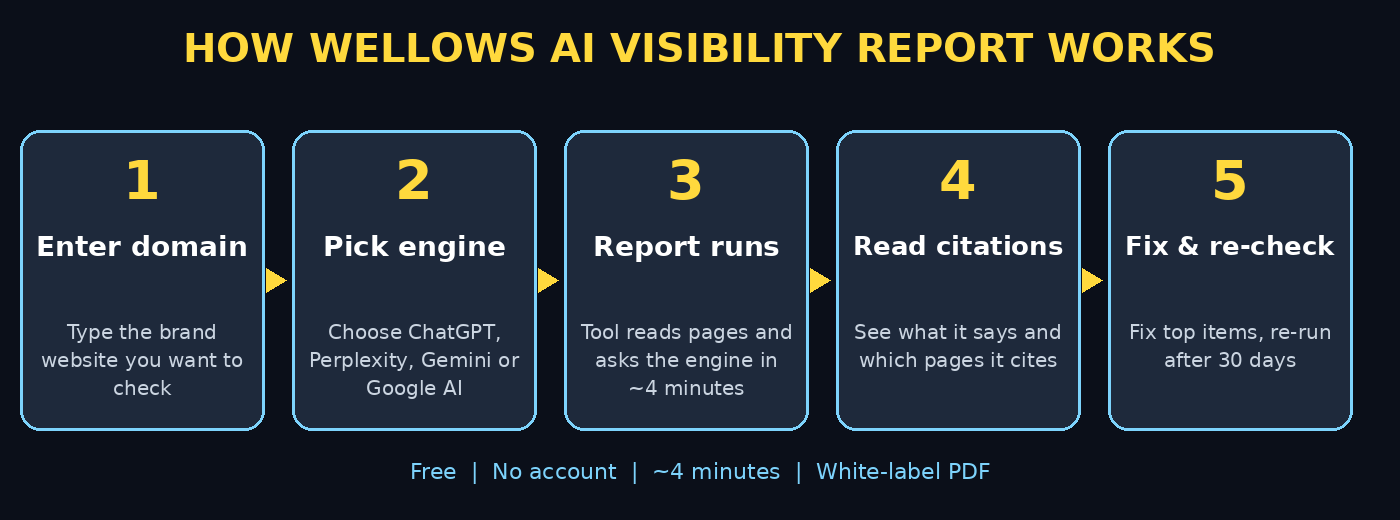
That is exactly the problem the **Wellows AI Visibility Report** solves. Launched on October 30, 2026, it is a free tool for brands, agencies, and freelancers that shows what AI engines say about any brand, which pages they cite, and what to fix first. You enter a domain, pick a country and an AI engine, and in about four minutes you get a white-label report you can read, download, and even share with a client.
In this beginner-friendly guide, you will learn how to use the Wellows AI Visibility Report step by step, how to read every section of the report, and how to turn its findings into simple fixes that help AI engines mention your brand more often. No technical background is needed, and you do not need an account or a credit card to run your first report.
Step 1: Understand What AI Visibility Means
Before you run a report, it helps to understand what you are measuring. AI visibility means how often, and how favourably, AI answer engines mention your brand when people ask questions related to your products or services.
Traditional SEO measures rankings on Google. AI visibility measures something different: whether ChatGPT, Perplexity, Gemini, Google AI Mode, or Google AI Overviews actually talk about you in their answers. A brand can rank well on Google and still be invisible in AI answers, because AI engines prefer clear, factual, well-structured pages they can quote with confidence.
The Wellows report checks this for you. It reads a handful of pages from your website, then asks the AI engine you chose the same kinds of questions your customers would ask — each time in a fresh session, so the results are not skewed by chat history. The result is a realistic picture of what real users see.
Step 2: Open the Wellows AI Visibility Report Page
Start by opening the Wellows AI Visibility Report page in your browser. The tool runs entirely in the browser, so it works on a laptop or a mobile phone with no software to install.
You do not need to create an account to run a report, and no credit card is required. You will see a simple form asking for a domain, a country, and an AI engine. That is all the setup there is — the tool is deliberately simple so beginners can run their first report in under a minute.
If you are an agency, note that the report is white-label: you can add your own name and logo before downloading it, which makes it ideal for pitching new clients or reporting to existing ones.
Step 3: Enter the Brand Domain You Want to Check
Type the website domain of the brand you want to check, for example your own business website or a client’s site. Double-check the spelling before you continue — the tool reads pages from that exact domain, so a typo will produce a report about the wrong site, or no report at all.
You can check any brand’s public website, not just your own. That makes the tool useful for competitor research too: run a report on a competitor’s domain and compare how often AI engines mention them versus you.
One important limit to know: each combination of brand, engine, and country can only be run once every 30 days. So choose your first combination carefully, and save the downloaded PDF, because you cannot simply re-run the same combination tomorrow.
Step 4: Choose a Country and an AI Engine
Next, choose the country your customers are in, and pick one of the five supported AI engines: ChatGPT, Perplexity, Gemini, Google AI Mode, or Google AI Overviews.
Start with the engine your audience uses most. If you are unsure, ChatGPT is a sensible first choice because it is the most widely used AI assistant. Perplexity is a great second choice because it shows its sources clearly, which makes it easier to see exactly which pages get cited.
The country matters because AI answers can differ by market — a brand that is well known in one country may be barely mentioned in another. If you serve customers in more than one country, run a separate report for each market when your 30-day window allows, and compare the results.
Step 5: Add Your Name and Logo for a White-Label Report
If you plan to share the report with a client or a boss, add your agency or business name and logo before the report runs. This turns a generic tool output into a professional, branded document that looks like your own work.
This step is optional for personal use, but it is one of the tool’s best features for freelancers and small agencies. A polished report that shows a client exactly what AI engines say about them — with your branding on it — is a strong, low-effort way to start a conversation about improving their online presence.
For context, many small businesses work with a specialist digital agency to turn reports like this into a practical action plan, but the report itself gives you enough detail to start fixing things on your own.
Step 6: Run the Report and Wait About Four Minutes
Click to run the report, then give it about four minutes. During this time, the tool reads pages from the brand’s website and queries the chosen AI engine repeatedly in fresh sessions, collecting the answers it gives.
Do not close the tab while it runs. Reports are private and open only in the browser that ran them, so if you close the window, you may lose access to that report — sharing means downloading the PDF, not sending a link.
Use the waiting time productively: open the brand’s homepage in another tab and note what it says about the business in plain language. When the report arrives, you will be able to compare what the site claims with what the AI engine actually repeats — and the gaps between those two are where the fixes live.
Step 7: Read What the AI Engine Says About the Brand
The first thing to read in your report is what the engine actually says about the brand. Look for three things: is the brand mentioned at all, is the description accurate, and is the tone positive, neutral, or negative?
An inaccurate description is common and fixable. AI engines repeat what they find on the web, so if your homepage is vague, outdated, or buried under jargon, the engine will repeat that vagueness. Clear, factual sentences on your homepage — what you sell, who it is for, and where you operate — directly improve what AI engines say about you.
If the brand is not mentioned at all, that is also useful information. It usually means the engine could not find enough clear, trustworthy information about the brand, or that competitors with stronger content are taking all the space in the answer.
Step 8: Study Which Pages Get Cited — and Which Do Not
The next section shows which pages the engine cites, and how often your own site is cited compared with third-party sources such as review sites, directories, and news articles.
This is the most actionable part of the report. If your own site is rarely cited, the engine is learning about you from other people’s pages instead of yours — and those pages may be outdated or incomplete. The fix is to publish clear, quotable pages on your own site that answer the exact questions customers ask, with facts, prices, locations, and service details spelled out.
Pay special attention to pages that are cited often. Those are your strongest assets: keep them updated, make sure the facts on them are correct, and link to them from your homepage so both visitors and AI engines can find them easily.
Step 9: Follow the “What to Fix First” Recommendations
Every report ends with a prioritised list of what to fix first. Work through this list in order rather than trying to fix everything at once. The top items are the changes most likely to improve your visibility.
Typical recommendations include clarifying your homepage message, adding a clear services or products page, publishing answers to common customer questions, and making sure your business details are consistent across the web. These are all beginner-friendly tasks — most need only simple edits to existing pages, not a website rebuild.
Teams that offer AI automation services often use reports like this as the starting point for a visibility plan, but a small business owner can handle the first round of fixes alone, one item at a time, and then re-run the report after 30 days to measure progress.
Step 10: Download, Share, and Re-Check After 30 Days
When you are happy with the preview, unlock the full report with a work email and download the PDF. Save it somewhere safe, because the report only opens in the browser that ran it and cannot be re-opened from a link later.
Share the PDF with your team, your client, or your boss, and agree on the top three fixes to complete before the next run. Then set a reminder for 30 days later, when the same brand-engine-country combination becomes available again, and run the comparison report to see whether your fixes moved the needle.
Repeat this cycle — report, fix, re-check — and your AI visibility will improve steadily. The tool is free, the cycle is simple, and the habit of checking is what separates brands that stay visible from brands that slowly disappear from AI answers.
Wellows AI Visibility Report vs Other Ways to Check AI Visibility
| Method | Cost | Speed | Best for |
|---|---|---|---|
| Wellows AI Visibility Report | Free | About 4 minutes | Beginners, agencies, quick brand checks |
| Manual AI chat checks | Free | Slow, inconsistent | One-off curiosity checks |
| Paid AI visibility platforms | Monthly subscription | Ongoing tracking | Large brands needing daily monitoring |
| Google Search Console | Free | Ongoing | Traditional search rankings, not AI answers |
As the table shows, Wellows fills a useful gap: it is faster and more structured than asking chatbots manually, and it costs nothing, unlike paid tracking platforms. For a beginner or a small business, it is the best place to start.
Frequently Asked Questions
Is the Wellows AI Visibility Report really free?
Yes. Running a report needs no account and no credit card. A work email unlocks the full report after a preview, and the PDF download is included. There is no subscription required to run your first report.
Which AI engines does the Wellows report check?
The tool supports five engines: ChatGPT, Perplexity, Gemini, Google AI Mode, and Google AI Overviews. You choose one engine per report, so run separate reports to compare engines.
How often can I run the same report?
Each combination of brand, engine, and country can be run once every 30 days. Plan your runs carefully, download every PDF, and use the gap between runs to complete your fixes.
Do I need a Wellows account to use the tool?
No account is needed to run a report. The report is private and opens only in the browser that ran it, so download the PDF if you want to keep or share it.
Can agencies use the report with their own branding?
Yes. The report is white-label, so agencies and freelancers can add their own name and logo before downloading, making it suitable for client pitches and reports.
Will this report improve my Google rankings?
Not directly. The report measures AI answer visibility, which is different from traditional Google rankings. However, the fixes it recommends — clearer pages, better facts, consistent business details — also help traditional search, so the work pays off twice.
Final Thoughts
AI answers are becoming the front door of the internet. When a customer asks an AI engine for a recommendation, the brands it mentions win the business, and the brands it skips never even get considered. The Wellows AI Visibility Report gives every beginner a free, simple way to see which side of that line their brand is on.
Run your first report today, read what the engine says, study the citations, and fix the top three items on the list. Then re-check in 30 days. That simple loop — measure, fix, measure again — is how small brands stay visible in the age of AI search.
Explore More Free AI Tools
Want to keep exploring? Try these free tools from AI Tool Steps: AI Title Generator, Meta Description Generator, AI Rewriter, and Keyword Density Checker — all free, all beginner-friendly, and all designed to help your content perform better in search and AI answers.