

Most AI website builders have the same embarrassing habit: you ask for a website for your small business, and they invent things about you. Suddenly your two-year-old shop has "20 years of experience" and a "4.9-star rating" you never earned. TruLata AI was built to fix exactly that problem. Launched on October 26, 2026, Website Builder by TruLata is a free AI website builder for small businesses that writes only what it can point to — your own answers, your current website, or your Google Business Profile. Building and editing are free, with no card required, and it launched on Product Hunt on Tuesday, October 27, 2026.
In this beginner guide, you will learn how to use TruLata AI from scratch: what makes it different from other AI website builders, how to answer its questions so your first draft is accurate, how to check every claim before it goes live, and how to publish a website you can actually be proud of. You do not need any coding or design experience. If you can answer a few questions about your own business, you can build your first version in minutes.
Step 1: Understand What TruLata AI Actually Does
TruLata AI is an AI website builder with one unusual rule: every sentence on your site must trace back to a source. That source is either something you told it, something already on your existing website, or something on your Google Business Profile. If it cannot find a source for a claim, it does not write the claim — it asks you where the claim comes from instead.
That sounds like a small difference, but for a small business owner it is a big one. A made-up rating or an invented award is not just embarrassing; it can mislead customers and damage trust. TruLata's founder, Trace Gordon, put it plainly at launch: an owner should never find out their own website made something up. Reviews on a TruLata site appear word for word, from real customers. Claims about results, guarantees, and awards wait for a TruLata reviewer before they publish, so nothing boastful slips through unchecked.
Think of TruLata as a careful assistant rather than a creative one. Other builders try to impress you with a long, polished page. TruLata tries to be accurate first and polished second. For a bakery, a plumber, a boutique, or a local clinic, accuracy is what turns a visitor into a customer.
Step 2: Gather Your Business Facts Before You Start
TruLata can only write from facts you give it, so five minutes of preparation makes your first draft far better. Before you open the builder, collect the following:
- Your business name, exactly as customers know it
- What you sell or offer, in one or two plain sentences
- Your location and service area
- Your opening hours and contact details
- Two or three real customer reviews, copied word for word, if you have them
- Your current website address or Google Business Profile, if either exists
Do not guess at anything on this list. If you are not sure about a detail — a founding year, a service you might add later, a price you might change — leave it out for now. You can add it later once you are sure, and TruLata will happily use it then. This is the single habit that keeps your site honest: only feed the builder facts you can stand behind.
If you already run a business website and want a second opinion on how it presents you, a quick look at how a professional structures service pages can help you decide what belongs on your homepage. The same discipline applies whether you are rebuilding a site yourself or working with an agency team.
Step 3: Start Your Free Build With Just an Email Address
Getting started takes an email address and nothing else. Open the official TruLata website, start a new website build, and sign up with your email. Building and editing are free, with no card required, so you can see your first version before you spend anything.
You will then be asked a short set of questions about your business, or offered the option to point the builder at the website you already have. Answer in plain, simple language. You do not need marketing jargon. "We sell handmade leather wallets in Sialkot and ship across Pakistan" is a better answer than a paragraph of buzzwords, because TruLata writes from exactly what you say.
A useful tip: write the way your customers talk. If customers search for "leather wallet maker" rather than "premium artisanal carry goods", use the customers' words. Clear language helps the builder, helps your visitors, and helps search engines understand what you actually do.
Step 4: Review Your First Draft Line by Line
Within minutes, TruLata produces a first version of your website. This is the most important step in the whole guide, so do not skip it: read every page slowly, line by line, and ask one question about each sentence — "Can I prove this?"
Check the following carefully:
- Business name, location, hours, and contact details are correct
- Services listed are services you actually offer right now
- Reviews are quoted exactly as customers wrote them
- No invented experience, ratings, awards, or guarantees appear
- Prices, if shown, match what you actually charge
If anything looks wrong, fix it in the editor before you publish. TruLata is designed to avoid invented claims, but you are the final authority on your own business. A careful ten-minute review now saves an awkward correction later, when a customer quotes your own website back to you.
Step 5: Handle Claims, Reviews, and Guarantees the TruLata Way
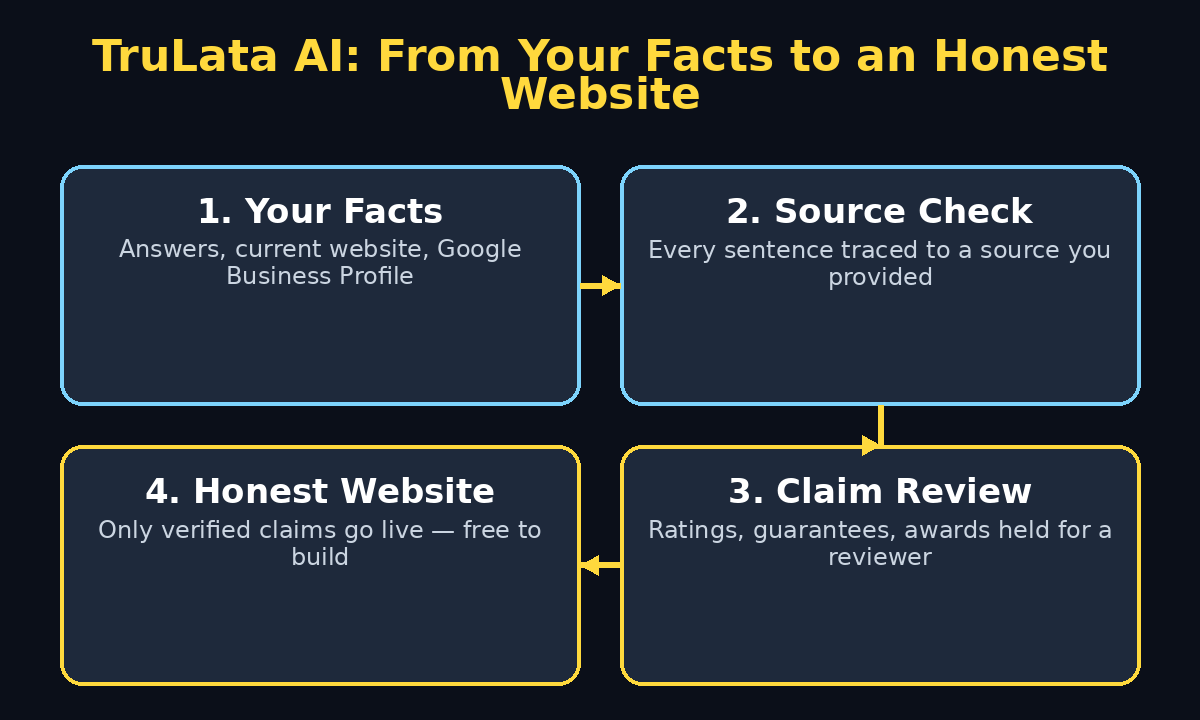
Here is where TruLata behaves differently from every other builder you may have tried. If you ask it for a rating you have not shown it, the assistant asks where the rating comes from instead of inventing one. Claims about results, guarantees, and awards are held for a TruLata reviewer before they publish.
That can feel slow if you are used to instant everything, but it is a feature, not a bug. Treat it as a checklist:
- For each review you want on the site, paste the exact customer wording and where it came from
- For each result or guarantee, provide the evidence or leave the claim off the site
- For each award, name the awarding body and the year, and let the reviewer verify it
If a claim cannot be verified, the honest move is to leave it off until it can be. A short, true website beats a long, impressive-sounding one that a customer can disprove in one search. This discipline is also good practice for any AI content you publish: the same "prove it or leave it out" rule keeps blog posts, service pages, and social posts trustworthy, and it is a habit that growing increasingly build into their own workflows.
Step 6: Edit, Rearrange, and Personalize Your Pages
Once the facts are right, make the site yours. TruLata's editor lets you build and edit for free, so experiment without pressure. Start with the pages every small business website needs:
- Home: what you do, who it is for, and what to do next, in the first screen
- Services or products: each offering in plain language, with prices where helpful
- About: who you are, in a few honest sentences
- Reviews: real customer words, quoted exactly
- Contact: phone, email, location, hours, and a simple contact form or call button
Keep your homepage short. Visitors decide in seconds whether to stay, so your first screen should answer three questions: what is this, is it for me, and what should I do next? Put your main action — call, book, order, or message — where it cannot be missed.
Add your own photos if you have them. Real photos of your shop, your products, or your team build more trust than any stock image. If you do not have good photos yet, a clean layout with honest text still beats a flashy page full of invented claims.
Step 7: Connect Your Google Business Profile for Stronger Sources
If your business has a Google Business Profile, connecting it gives TruLata another verified source to write from: your real hours, location, services, and customer reviews. This is one of the smartest moves a local business can make, because it keeps your website and your Google listing consistent.
Before you connect it, tidy the profile itself. Make sure the business name, address, hours, and phone number match what you plan to put on your website. Inconsistent details confuse customers and search engines alike. Once both match, every future edit becomes easier: change a fact once in the profile, and your sources stay aligned.
If you do not have a Google Business Profile yet, create one first — it is free, and it is often the first thing customers see when they search for a local business. Then come back to TruLata and let the builder draw on it.
Step 8: Publish Your First Version and Share It
When your review is done and your pages read true, publish your first version. Do not wait for perfection. A live, honest website that you can improve is worth far more than a perfect draft that nobody can visit.
After publishing, share the link with three people who know your business well and ask them to read it as customers. Give them one job: find anything that is wrong, unclear, or missing. Fresh eyes catch mistakes you have stopped seeing, and their feedback is usually more useful than another hour of staring at the same pages yourself.
Then check the site on your phone. Most of your visitors will arrive on a mobile screen, so open every page on your phone and confirm the text is readable, the buttons are easy to tap, and nothing important is cut off. Fix anything that looks cramped before you announce the site widely.
Step 9: Keep Your Site Accurate as Your Business Changes
A website is not a one-time project; it is a living record of your business. TruLata's source-based approach makes updates simple, because every change starts from a fact. When something changes, update the fact, not just the sentence:
- New service? Add it with a plain description of what it includes
- Price change? Update the price everywhere it appears
- New review? Add the customer's exact words
- Moved premises or new hours? Update the profile and the site together
Set a simple routine: once a month, spend fifteen minutes reading your site as a customer. Small, regular updates keep the site trustworthy and keep search engines coming back. A site that quietly goes out of date does the opposite — it tells visitors you may have gone out of business.
Step 10: Compare TruLata With Other AI Website Builders Before You Commit
TruLata is not the only AI website builder, and a beginner should know how it differs before committing a business to it. The table below compares the approaches honestly, based on what each builder is known for at launch.
| Builder approach | How it writes | Source checking | Best for | Watch out for |
| TruLata AI | Only from your own facts | Every sentence traced to a source; sensitive claims reviewer-checked | Small businesses that value trust and accuracy | Sensitive claims take reviewer time |
| Typical AI website builder | Fills gaps with fluent, generic copy | Little or no source checking | Fast, good-looking first drafts | Invented ratings, experience, and guarantees |
| Classic drag-and-drop builder | You write everything yourself | You are the only checker | Full control over every word | Slow if you hate writing |
| Hiring an agency | A professional writes for you | Depends on the agency's process | Businesses with budget and complex needs | Cost, and waiting for revisions |
The honest verdict: if your biggest fear is a website that exaggerates, TruLata is the safest first choice. If you need a highly custom design or complex online store features on day one, you may outgrow any simple builder and need a developer or agency later. Starting with TruLata costs nothing, so there is no penalty for trying it first and learning what you actually need.
Frequently Asked Questions About TruLata AI
Is TruLata AI really free?
Building and editing are free, with no card required, according to the launch announcement. You can create and see your first version before paying anything. As with any new tool, check the current pricing on the official site before you rely on a paid feature, since launch pricing can change.
What makes TruLata AI different from other AI website builders?
Other builders often fill gaps with invented details when they do not know something about your business. TruLata writes only from sources you provide — your answers, your current website, or your Google Business Profile — and holds claims about results, guarantees, and awards for reviewer verification before they publish.
Do I need coding or design skills to use TruLata AI?
No. You answer a few questions about your business in plain language, review the draft it produces, and edit it in the builder. If you can write an email about your business, you can build a TruLata site.
Can TruLata AI use my existing website or Google Business Profile?
Yes. You can give the builder your current website or connect your Google Business Profile, and it will draw its facts from those sources. That also keeps your website and your Google listing consistent with each other.
What happens if I ask TruLata for a rating or award I have not shown it?
The assistant asks where the claim comes from instead of inventing one. Claims about results, guarantees, and awards wait for a TruLata reviewer before they publish, so unverified boasts do not go live.
Is TruLata AI good for businesses outside the United States?
TruLata launched in Washington, DC, and the builder itself works from the facts any owner provides, wherever they are based. Availability of specific publishing or reviewer features may vary by region, so check the official site for your country before you build your main business site on it.
Final Thoughts
TruLata AI will not win a contest for the flashiest AI website builder, and that is exactly the point. Its promise is quieter and more valuable: a website that says only what is true about your business, built in minutes, free to try, with no card required. For a small business owner, that honesty is a competitive advantage. Customers trust a site that quotes real reviews word for word and refuses to invent a rating it cannot prove.
Start today with the five minutes of preparation in Step 2, answer the builder's questions plainly, and review your first draft line by line. Publish the honest version, share it with three people who know your business, and keep it accurate with a fifteen-minute monthly check. If you later need fancier features, you will at least know exactly what your business needs — because you built the truthful version first.
Explore More Free AI Tools
If you enjoyed building with TruLata AI, keep exploring free tools on AIToolSteps: try our AI Title Generator for headlines that get clicks, our Meta Description Generator for search snippets, our AI Rewriter for polishing rough drafts, and our Keyword Density Checker for on-page SEO — all free at https://aitoolsteps.com/.