

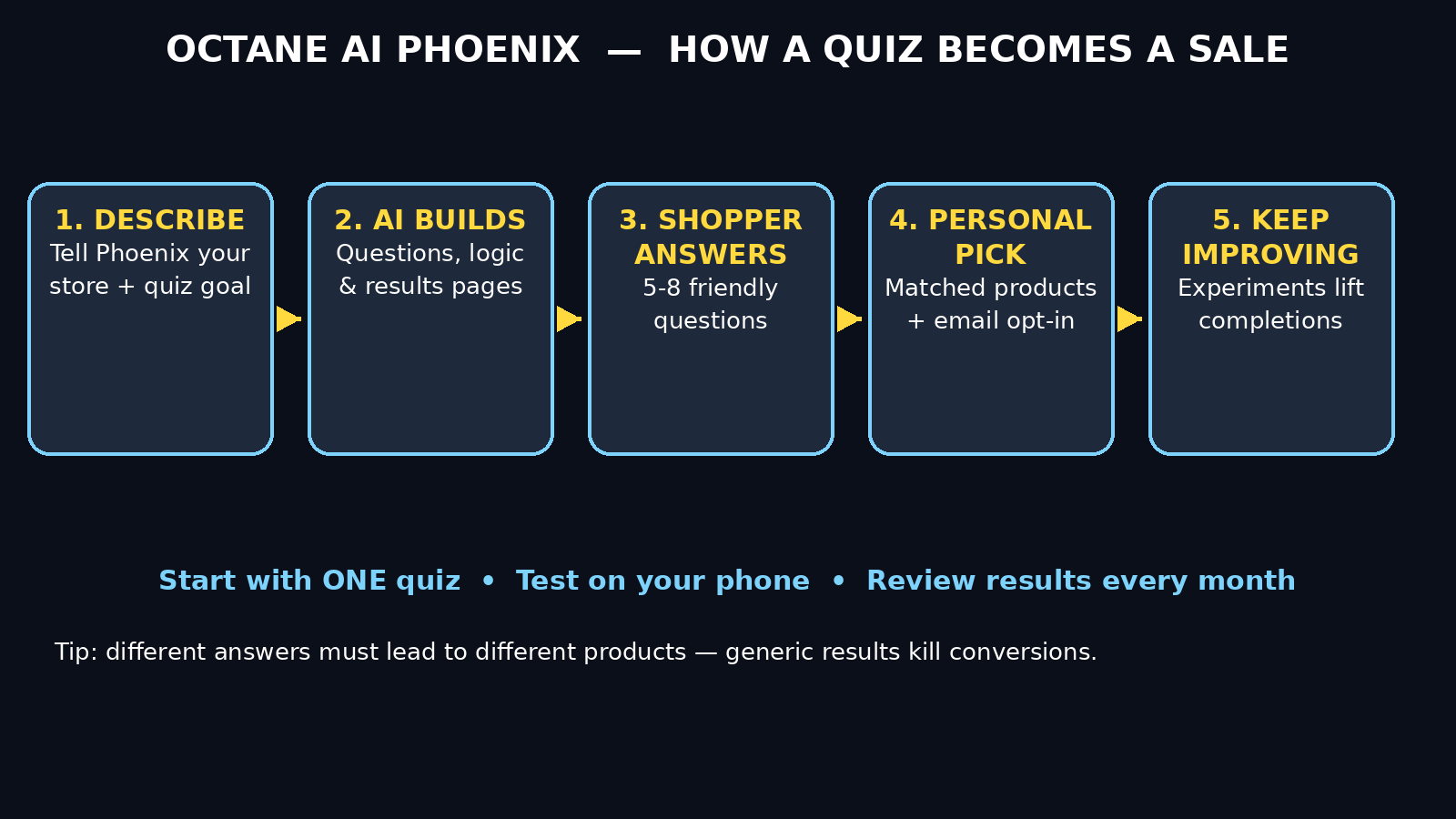
If you run a Shopify store, you already know the hardest part is not getting traffic — it is helping each visitor find the right product. Most shoppers leave without buying because they feel overwhelmed by choice, unsure about sizing, or simply not ready to commit. Octane AI Phoenix, launched on October 28, 2026, is built to fix exactly that problem. It is an AI quiz builder for Shopify merchants: you describe the quiz you want, or upload a quiz you already have, and Phoenix builds it, checks it, personalizes the results, and keeps improving it with experiments.
In plain language, Phoenix turns a boring product quiz into a helpful conversation. A visitor answers a few friendly questions — about their skin type, their budget, their style, or their goals — and the quiz recommends the products that fit them best. Along the way it can collect an email address, so even visitors who do not buy today can hear from you later. You can edit everything by hand afterwards, so the AI does the heavy lifting and you stay in control.
This beginner guide walks you through the whole process, step by step. You do not need coding skills, design experience, or a big budget to follow along. By the end, you will have a working quiz on your store that guides shoppers to the right products and grows your email list at the same time.
Step 1: Understand What Phoenix Actually Does
Before you build anything, it helps to understand what Phoenix is — and what it is not. Phoenix is not a generic chatbot and it is not a page builder. It is a quiz and zero-party data tool made for Shopify stores, from the team behind Octane AI, a platform already known for product quizzes and customer data collection.
Here is what Phoenix does for you:
- **Builds the quiz from a prompt or a plan.** Tell it what you sell and what you want to learn about your shoppers, and it drafts the questions, the answer options, the logic, and the results pages.
- **Rebuilds quizzes you already have.** If you have an old quiz, upload it and Phoenix can refresh it, fix weak questions, and improve the flow.
- **Personalizes the results.** Instead of sending every shopper to the same collection page, Phoenix matches answers to products, so recommendations feel personal.
- **Adds an email opt-in.** Quizzes are one of the best ways to grow an email list, because shoppers willingly share their email in exchange for a personalized recommendation.
- **Keeps improving with experiments.** Phoenix can test variations and learn which version converts better, so your quiz gets smarter over time.
What Phoenix does not do is replace your judgment. The AI draft is a starting point. You should always review the questions, check that the product recommendations make sense, and test the quiz yourself before it goes live. Think of Phoenix as a fast junior assistant: great at drafting, but you are the editor-in-chief.
Step 2: Install Octane AI on Your Shopify Store
Phoenix is available to Shopify merchants through the Octane AI app, so your first step is getting Octane AI connected to your store.
- Open your Shopify admin and go to the Shopify App Store.
- Search for “Octane AI” and install the official app.
- Grant the permissions it asks for, such as access to your products and customer data, so the quiz can recommend real products from your catalog.
- Open the app from your Shopify admin. You should see the Octane AI dashboard, where quizzes, results, and integrations live.
If you already use Octane AI, you may already see Phoenix in your account. If you are brand new, take a few minutes to look around the dashboard before building. Find where quizzes are listed, where product recommendations are managed, and where integrations such as email tools are connected. Knowing your way around now will save you time later.
A quick tip for beginners: start with one quiz, not five. A single, well-built quiz for your best-selling category will teach you more than five half-finished quizzes, and it is much easier to test and improve.
Step 3: Decide What Your Quiz Should Achieve
The biggest mistake beginners make is building a quiz without a clear goal. Before you write a single prompt, answer these three questions on paper or in a note:
- **Who is this quiz for?** New visitors who have never bought from you, returning customers looking for a refill, or gift buyers shopping for someone else? Each group needs different questions.
- **What should happen at the end?** Should shoppers land on one hero product, a small bundle, or a collection of three to five recommended products? Should they get a discount code, or simply a recommendation?
- **What do you want to learn?** Email address, skin type, budget, style preference, or purchase timing? Pick one primary data point and one or two secondary ones. Asking for everything at once makes quizzes long and boring.
Here are some proven quiz goals for Shopify stores:
- Help first-time visitors find their first product without browsing fifty pages.
- Recommend a routine, bundle, or starter kit instead of a single item.
- Collect emails from visitors who are interested but not ready to buy.
- Segment shoppers so your email campaigns can speak to each group differently.
Write your goal in one sentence, for example: “Help new visitors find the right skincare routine and join our email list.” That sentence becomes the backbone of your Phoenix prompt in the next step.
Step 4: Write a Strong Prompt for Phoenix
Phoenix builds from a prompt or a plan, so the quality of your prompt decides the quality of your quiz. Do not write a vague prompt like “make a quiz for my store.” Instead, give Phoenix the details a good human quiz designer would need.
A strong prompt includes:
- What you sell and who it is for.
- The goal of the quiz in one sentence.
- The number of questions you want (five to eight is a sweet spot for most stores).
- The tone: friendly, playful, premium, or expert.
- What the results page should show: products, a short explanation, and an email opt-in.
- Any must-ask questions, such as budget, skin type, or size.
Here is an example prompt you can adapt:
“Build a friendly 6-question quiz for a skincare store. Help first-time visitors find their ideal morning routine. Ask about skin type, main concern, budget, and current routine. Recommend 3 products with a short reason for each, then ask for an email to send the full routine. Tone: warm and helpful, no jargon.”
Notice how specific that is. It tells Phoenix the audience, the goal, the question count, the topics, the result format, and the tone. The more specific you are, the less editing you will need later. If the first draft is not quite right, do not start over — refine it. Ask Phoenix to shorten a question, change an answer option, or make the tone more playful. Iteration is part of the process.
For store owners who work with a digital agency on their store design or marketing, this is also a good moment to share the quiz goal with them, so the quiz design matches the rest of your site instead of looking like an afterthought.
Step 5: Review and Edit the Draft by Hand
When Phoenix finishes, you will have a full draft: questions, answer options, logic, email opt-in, and results pages. Do not publish it yet. Open every question and check it like a shopper would.
- **Read each question out loud.** If it sounds confusing or awkward, rewrite it in simpler words.
- **Check the answer options.** Are they complete? Does every shopper have an option that fits them? Add a “Not sure yet” option where it helps.
- **Follow the logic.** Click through each path yourself. Does a shopper who picks “sensitive skin” actually get gentle products, or does the logic send them to a harsh exfoliant? Fix any mismatches.
- **Check the product recommendations.** Open each recommended product and make sure it is in stock, correctly priced, and genuinely right for that answer combination.
- **Review the email opt-in.** Make the value clear: “Get your full routine by email” works better than a bare “Subscribe” button.
- **Check the tone.** Does the quiz sound like your brand? A luxury brand should not sound like a meme page, and a fun brand should not sound like a textbook.
Manual editing is where good quizzes become great ones. Phoenix saves you hours of drafting, but your product knowledge is what makes the recommendations trustworthy. Spend twenty to thirty minutes on this review step — it is the highest-value time in the whole process.
Step 6: Connect Email, Products, and Your Store Theme
A quiz that recommends products but never captures an email or matches your store design is leaving money on the table. Before publishing, connect the pieces that make the quiz work as part of your store.
- **Email integration.** Connect your email tool so quiz emails flow into the right list or segment. Tag shoppers by their answers when possible, so you can send follow-ups that match their quiz result.
- **Product catalog.** Confirm the quiz pulls live products, prices, and images from your Shopify catalog. If you change a product name or price later, check that the quiz still shows the right information.
- **Theme and placement.** Decide where the quiz lives: a dedicated landing page, a pop-up, a button on your homepage, or a link in your navigation. Most stores start with a dedicated page plus a homepage button, then expand once the quiz proves itself.
- **Mobile check.** Most Shopify traffic comes from phones. Open the quiz on your own phone and tap through it. Are buttons easy to tap? Is text readable? Does anything overflow the screen? Fix mobile issues first — desktop can wait.
If you use AI automation services to connect your store, email, and analytics tools, a quiz is a natural fit: quiz answers become structured data you can use to personalize follow-up emails and offers automatically, instead of guessing what each shopper wants.
Step 7: Publish Your Quiz and Test It Like a Shopper
Now you are ready to publish — but publish carefully. Use this pre-launch checklist before you announce the quiz to anyone:
- Take the quiz yourself on a phone and on a computer, trying at least three different answer paths.
- Complete the email opt-in with your own email address and confirm you receive the follow-up.
- Click every recommended product and confirm it adds to cart correctly.
- Ask one friend or colleague to take the quiz cold, without instructions, and watch where they hesitate or get confused.
- Check that the quiz loads quickly and does not break your page layout.
Once those checks pass, publish the quiz and add it to your store in one or two visible places. Do not hide it in a footer link and hope shoppers find it. A homepage button, a banner, or a menu link will drive far more completions. Announce it once in an email or social post, too: “Not sure where to start? Take our 60-second quiz and get your personalized picks.”
Step 8: Use Experiments to Improve Results Over Time
Publishing is not the finish line — it is the starting line. Phoenix keeps improving your quiz with experiments, and you should review the results regularly, especially in the first few weeks.
- **Watch completion rate.** If many shoppers start but few finish, your quiz is probably too long or one question is confusing. Shorten it or rewrite that question.
- **Watch email opt-in rate.** If shoppers finish but skip the email step, strengthen the offer: a clearer benefit, a small discount, or a full routine by email.
- **Watch click-through to products.** If shoppers finish but rarely click a recommended product, the recommendations may be wrong, too expensive, or poorly explained. Add a short “why this product” line under each recommendation.
- **Test one change at a time.** Change a headline, a question, or a result layout — not all three at once — so you know what actually moved the numbers.
- **Review monthly.** Set a monthly reminder to review quiz performance, update out-of-stock products, and refresh any seasonal questions.
Small, steady improvements beat big redesigns. A quiz that improves by a few percent each month can quietly become one of your best-converting pages within a quarter.
Step 9: Avoid the Beginner Mistakes That Kill Quizzes
Most quiz failures are not technical — they are the same few beginner mistakes repeated. Avoid these and you are already ahead:
- **Too many questions.** Ten or more questions feels like homework. Aim for five to eight, and cut any question that does not change the recommendation.
- **No clear benefit.** Shoppers will not answer questions for nothing. Promise a personalized result, and deliver it clearly.
- **Generic results.** Sending everyone to the same bestseller defeats the purpose. Make sure different answers genuinely lead to different products.
- **Forgetting mobile.** If the quiz is hard to tap through on a phone, most of your traffic will bounce.
- **Never updating it.** Products go out of stock, prices change, and seasons shift. A stale quiz slowly stops converting. Review it monthly.
- **Asking for email too early.** Let shoppers answer a question or two and see value first, then ask for their email near the result, when they are most engaged.
If your first quiz underperforms, do not delete it in frustration. Check the data, fix the weakest step, and test again. Quizzes reward patience and small fixes far more than starting from scratch.
Step 10: Grow Beyond Your First Quiz
Once your first quiz is working, you can expand in sensible ways. Add a second quiz for a different audience, such as gift buyers or returning customers looking to upgrade. Use quiz segments in your email campaigns: send sensitive-skin shoppers different content than oily-skin shoppers. Feature quiz results in product pages or social posts, with permission, as social proof.
You can also use what you learn from quiz answers to improve your store beyond the quiz itself. If half your shoppers say budget is their main concern, consider a budget-friendly bundle. If many shoppers ask about a product you do not carry, that is a product idea worth investigating. A quiz is not just a sales tool — it is a research tool that tells you what your customers actually want, in their own words.
Octane AI Phoenix vs Other Ways to Build a Quiz
How does Phoenix compare with the alternatives a beginner might consider? Here is a simple comparison.
| Method | Speed to launch | Coding needed | Personalized results | Email capture | Best for |
|---|---|---|---|---|---|
| Octane AI Phoenix | Fast — AI drafts the full quiz | No | Yes, AI-matched to products | Yes, built in | Shopify stores that want a smart quiz quickly |
| Manual quiz builder | Medium — you write every question | No | Yes, but you build all logic by hand | Usually, with setup | Stores with very simple, fixed quizzes |
| Custom-coded quiz | Slow — weeks of development | Yes | Yes, fully custom | Needs extra work | Large stores with unique logic needs |
| Plain product filters | Fast | No | No — shopper filters alone | No | Stores that just need browsing help |
| No quiz at all | N/A | No | No | No | Stores not ready to guide shoppers yet |
For most beginners, Phoenix wins on the balance of speed and personalization. You get an AI draft in minutes, you can edit everything by hand, and the quiz is built for Shopify from the start. Manual builders work but take much longer to get right, and custom code is overkill until you have proven that quizzes convert for your store.
Frequently Asked Questions
Is Octane AI Phoenix free to use?
Phoenix is available to Shopify merchants through the Octane AI app. Pricing depends on your Octane AI plan, so check the app listing and your account for the current plan details before you build. Start with one quiz, measure its results, and upgrade only when the quiz is clearly earning its keep.
Do I need coding skills to use Phoenix?
No. Phoenix is designed for non-technical merchants: you describe the quiz in plain language, review the draft, and edit it with normal controls. No code, no developer, and no design software are required for a standard quiz.
How long should my quiz be?
Five to eight questions works best for most stores. Shorter quizzes get more completions, but too few questions cannot personalize results well. If shoppers drop off halfway, shorten the quiz or rewrite the question where they leave.
Can Phoenix rebuild a quiz I already have?
Yes. You can upload an existing quiz and Phoenix can refresh it, fix weak questions, and improve the flow. Always review the rebuilt version by hand before publishing, just as you would with a brand-new draft.
Does Phoenix work on mobile?
Yes, quizzes are designed to work on phones as well as computers, and most Shopify shoppers browse on mobile. Always test your quiz on your own phone before publishing, and fix any tapping or layout issues first.
Will a quiz really grow my email list?
It can, because shoppers trade their email for a personalized result they actually want. The key is timing: ask near the result, explain what they will receive, and follow up with content that matches their answers. A generic newsletter blast to quiz leads wastes the personalization you just earned.
Final Thoughts
Octane AI Phoenix makes one of the most effective Shopify tactics — the product quiz — accessible to beginners. You describe what you want, the AI drafts the questions, logic, and results, and you refine it with your product knowledge before it goes live. Done well, a quiz does three jobs at once: it helps shoppers decide, it grows your email list, and it teaches you what your customers really want.
Start small. Pick one audience, one goal, and five to eight good questions. Review the draft carefully, test it like a shopper, publish it in a visible spot, and improve it a little each month. That simple loop — build, test, refine — is how a first quiz becomes a reliable part of your store.
If you are new to AI tools in general, keep exploring: the more comfortable you get with AI-assisted building, the faster you will spot the next tool that can save you time or grow your store.
Explore More Free AI Tools
Want to keep learning? Try these free tools from AI Tool Steps: AI Title Generator, Meta Description Generator, AI Rewriter, and Keyword Density Checker — all available at aitoolsteps.com. They pair perfectly with your new quiz: better titles and descriptions bring more visitors to the quiz page, and the rewriter helps you polish quiz questions and results copy.