

Imagine starting a new job and spending your first week chasing passwords, laptop deliveries, and approvals instead of doing actual work. That is the exact frustration Zendesk Employee Service AI is built to remove. Announced on October 19, 2026, and introduced publicly on October 26, 2026, Zendesk’s Employee Service AI Agents take an employee request from a simple question to a finished outcome, without the employee having to chase five different teams.
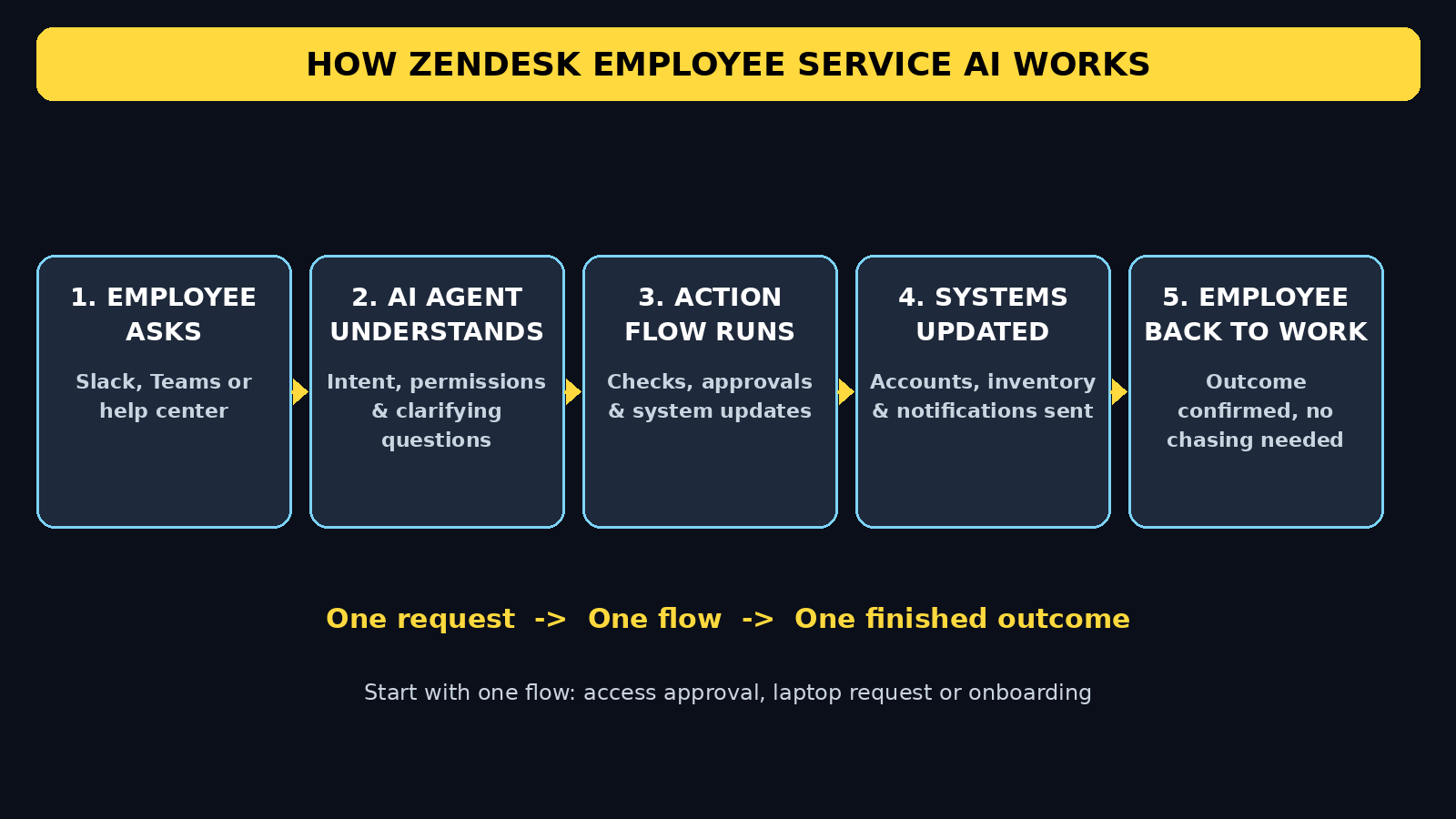
Instead of only answering “how do I reset my password,” the agent can actually run the process behind the answer: check eligibility, get approval, update systems, and arrange delivery. Behind it sit Advanced Action Flows, administrator-built workflows that carry out tasks across connected systems under company policy. Employees ask in Slack, Microsoft Teams, or the Zendesk help center, and the agent coordinates everything in the background.
This beginner guide explains what Zendesk Employee Service AI is, who it is for, how employees use it day to day, and how admins build their first flow, even if you have never managed a help desk before. You do not need to be a software engineer. If you can describe a process in plain language, you can understand this tool.
What Is Zendesk Employee Service AI?
Zendesk Employee Service AI Agents are purpose-built AI agents for internal service teams: IT, HR, Legal, Finance, and other departments that support employees. They understand what an employee needs, decide how to help, and then act through Advanced Action Flows.
Think of it in two parts. The agent is the brain and the conversation: it reads the request, asks clarifying questions when needed, and keeps the employee updated. The Advanced Action Flow is the hands: a workflow that performs the steps, such as creating accounts, checking inventory, requesting approval, and sending notifications. Together, they turn a request into an outcome.
Zendesk says the idea matters because employee requests rarely follow a single straight path. Setting up a new employee, for example, requires hardware setup, system access, and paperwork across several teams and approvals. When a request stalls during manual handoffs, productivity drops before day one even finishes. The agent is designed to remove those stalls.
Early results shared by Zendesk are striking. In the first five weeks of early access, about 300 customers ran 6 million workflow executions with Advanced Action Flows, which Zendesk estimates saved 500,000 hours of manual work. Those are vendor figures, so treat them as a sign of scale rather than a promise for every company, but they explain why IT leaders are paying attention.
Who Should Use It?
Zendesk Employee Service AI is not a consumer chatbot. It is built for organisations that already handle internal requests at volume, and for the employees inside them.
- **Employees** who need IT help, HR documents, access, or workplace support and do not want to learn a new system for every request.
- **IT administrators** who spend their days on repetitive tickets: password resets, access approvals, laptop swaps, and onboarding checklists.
- **HR and workplace teams** who coordinate onboarding, offboarding, employment verification letters, and badge access.
- **Small and growing companies** that want a professional internal help desk without hiring a large support team first. A growing business that works with a digital agency can also use this kind of automation to keep internal service tidy as headcount grows, and teams exploring automation often compare notes with services like D365A digital agency when planning how support, content, and operations fit together.
- **Larger companies** where one request touches many systems. This is where multi-step flows save the most time.
If you are a solo freelancer with no employees, this tool is probably more than you need. If you run or work in a team where requests get lost in email threads, it is worth learning.
Is Zendesk Employee Service AI Free?
Zendesk is a paid platform, so there is no permanently free version of Employee Service AI in the way a free consumer app is free. What beginners can use is Zendesk’s 14-day free trial, which is enough to learn the ticket workflow, test the help center, and try the agent experience on a small scale.
Access to the employee service agents is tied to plan. According to Zendesk’s rollout information, eligible accounts include Employee Service Suite Growth plans and higher, plus Customer Service Suite accounts that use Zendesk for employee services. General availability rolls out from November 3 to December 1, 2026.
From November 3, 2026, Growth and Professional plans include 10 automated resolutions per AI agent per month, and Enterprise and Enterprise Plus plans include 15. Additional automated resolutions cost $0.99 each. That resolution-based packaging matters for budgeting: you pay for finished outcomes, not just for chats. Start small, measure how many requests the agent actually resolves, and only then scale up.
For a beginner, the practical path is simple: use the trial to learn, run one flow for one common request, and check the resolution count before committing to a larger rollout.
Step 1: Understand the Two Building Blocks Before You Touch Anything
Before you build, learn the vocabulary, because Zendesk uses two terms everywhere.
First, the **Employee Service AI Agent** is the part employees talk to. It understands intent, checks permissions, and decides which flow to run. It also respects role-based and departmental access permissions, so it should not show confidential HR or Finance information to someone without clearance. That permission-aware design is critical, and it is one of the first things to test.
Second, **Advanced Action Flows** are the workflows the agent runs. An admin describes a process in natural language, and the system helps identify the integrations the flow needs and generates the business logic to connect them. You can then test and refine the flow before employees ever see it.
A useful mental model is this: the agent asks “what do you need,” and the flow answers “here is how we get it done, step by step, safely.” Keep that distinction in mind and the rest of the setup feels much less confusing.
Step 2: Start With the 14-Day Free Trial
Go to Zendesk’s official website and start the 14-day free trial. Use a work email address, not a personal one, because you will want to invite colleagues to test with you.
During signup, choose the employee service focus rather than only customer support, if that option is offered. You do not need to connect every system on day one. In fact, connecting everything at once is the most common beginner mistake. Start with one channel and one process, learn how the pieces fit, and expand later.
Set aside a test workspace or a small pilot group. Never test a live onboarding flow on a real new hire on your first day. A test group of two or three colleagues gives you honest feedback without risking a real employee’s first week.
Step 3: Set Up Your Help Center as the Home Base
The Zendesk help center is the home base where employees can browse help articles, submit requests, and track their tickets. Even if most requests will come through Slack or Teams, the help center matters because it holds the knowledge the agent uses.
Create a simple structure first: IT help, HR help, and workplace requests. Add three or four short articles for the most common questions, such as password resets, VPN setup, and how to request a laptop. Short, clear articles work better than long policy documents, because the agent can quote and use them more accurately.
Make sure permissions are set correctly. HR articles about leave or verification letters should not be visible to everyone in the same way as a general IT article. Check visibility from an employee’s point of view, not just from your admin view, before you go live.
Step 4: Connect Slack or Microsoft Teams, Where Employees Already Work
This is the step that makes the biggest difference to adoption. Employees do not want another app to check. Zendesk Employee Service AI meets them where they already work: Slack, Microsoft Teams, or the help center.
Connect one channel first, whichever your team actually uses daily. If your team lives in Teams, start there. If it lives in Slack, start there. Add the Zendesk agent to a test channel, post a test request, and watch how the agent responds.
Teach employees one simple habit: describe what they need in one sentence, like a message to a helpful colleague. “I need access to the design drive for the new project” works far better than a vague “help” or a long paragraph with three different requests mixed together. One request at a time gives the agent a clean job to do.
Step 5: Make Your First Request as an Employee
Now switch roles and test the tool as an employee would. This is the fastest way to learn what feels good and what feels broken.
Try a simple request first, such as asking for help with a password or access. Notice three things: does the agent understand you on the first try, does it ask a sensible follow-up question when something is unclear, and does it tell you what will happen next? A good agent never leaves you guessing.
Then try a multi-step request, such as a laptop replacement or an access approval. This is where the difference from a normal chatbot shows up. Instead of only giving you instructions, the agent should start a flow: check inventory or eligibility, route for approval if needed, and keep you updated. If it only gives instructions, your flow is not connected yet, and that is a setup issue to fix, not a reason to give up.
Keep notes on every test. What worked, what confused you, and where you had to repeat yourself are exactly the fixes your first flow needs.
Step 6: Build Your First Advanced Action Flow in Plain Language
This is the admin superpower, and it is simpler than it sounds. You do not start by dragging dozens of boxes around. You describe the process in natural language, and Zendesk helps build the flow.
Pick the simplest high-volume process you have. A good first choice is an access approval or a laptop request, because both have clear steps and a clear finish line. Write the process out in plain sentences first, on paper or in a document: who asks, what gets checked, who approves, what system gets updated, and how the employee is told it is done.
Then describe that process to the flow builder. The system helps identify the integrations needed and generates the business logic to connect them. Review every step it creates. Do not accept a flow blindly. Check the approval step, check what happens if approval is denied, and check what happens if inventory is out of stock. Those edge cases are where real-world flows fail.
Test the flow in a safe environment, run it end to end with a test user, and refine it based on what actually happened. Early users quoted by Zendesk praised exactly this point: one head of support said it helps to go further with automation even without being a software engineer, because it is easy to build the flow and fix it. That ease is real, but only if you test before launch.
Step 7: Add Approvals, Permissions, and Safety Checks
Automation without guardrails is risky, especially for access, HR, and finance requests. Before any flow goes live, add three safety checks.
First, confirm permissions. The agent should only act within the requester’s role and department. Test this deliberately: ask for something you should not have access to, and confirm the agent refuses or routes it properly instead of completing it.
Second, keep a human approval step for anything sensitive. Access to production systems, financial data, or badge access should not be auto-approved just because the flow can do it. Automation should speed up the boring steps, not remove human judgement from risky ones.
Third, keep an audit trail. Every flow execution should be visible: who asked, what was done, who approved, and when. This protects employees and admins alike, and it makes troubleshooting far easier when something goes wrong. Teams that build AI automation carefully, including specialists in AI automation services such as those at Agentic Affairs, treat this audit trail as a core feature, not an optional extra.
Step 8: Automate Onboarding and Offboarding, the Highest-Value Flows
Once your first flow works, onboarding and offboarding are the highest-value processes to automate, because they touch almost every system and every team.
A good onboarding flow coordinates hardware setup, system access, and paperwork in one place. The new employee makes one request, or the HR team triggers one flow, and the agent coordinates accounts, equipment, and approvals behind the scenes. The employee gets a clear checklist and updates, instead of ten separate emails from ten separate people.
Offboarding is just as important, and often more urgent for security. When someone leaves, access must be removed promptly and completely across systems. A flow that follows a checklist every single time is far safer than a manual process that depends on someone remembering every system.
Start with onboarding for one role, such as a new marketing hire, before you try to automate every role at once. Different roles need different tools and access, and a flow that works for one team is the template you adapt for the next.
Step 9: Measure Resolutions, Not Just Chats
It is easy to be impressed by a chatbot that answers quickly. Zendesk Employee Service AI should be judged differently: did it finish the job?
Track automated resolutions, the requests the agent completed end to end without a human agent taking over. Compare that with total requests, and look at which flows resolve most often and which ones hand off to humans. A flow with a high handoff rate is telling you something: the process is unclear, an integration is missing, or employees are asking in a way the flow does not expect.
Also track time saved and employee satisfaction. Ask your pilot group one simple question after each request: did this save you time compared with emailing IT? Their answer matters more than any dashboard number. Use the resolution quota information from your plan to forecast cost, and expand only the flows that actually resolve requests well.
Step 10: Roll Out Gradually, Train in Plain Language, and Keep Improving
Roll out to one team, learn, then expand. Announce the agent in the channel employees already use, with two or three example requests they can copy and try. People adopt a tool faster when they see an exact sentence that works.
Train admins and team leads separately from employees. Employees need to know how to ask. Admins need to know how to build, test, and fix flows, and how to read the execution history when a flow fails. A 30-minute training session with live examples beats a long manual nobody reads.
Keep improving every week. Review failed flows, update help articles the agent uses, and add one new flow at a time. The companies that get the most from this tool treat it as a living system, not a one-time setup. Small weekly fixes compound into a help desk that feels effortless to employees.
Zendesk Employee Service AI vs Traditional Help Desks
| Feature | Traditional Help Desk | Zendesk Employee Service AI |
|---|---|---|
| How employees ask | Ticket form or email | Slack, Teams, or help center chat |
| What happens next | Human reads and routes manually | AI agent understands and starts a flow |
| Multi-step processes | Manual handoffs between teams | Advanced Action Flows run steps automatically |
| Building workflows | Drag-and-drop configuration | Describe in natural language, then refine |
| Approvals and permissions | Often manual and inconsistent | Built into flows with role-based permissions |
| Best for | Low-volume, simple tickets | High-volume onboarding, access, and IT requests |
The table makes the trade-off clear. A traditional help desk is fine when volume is low. When the same multi-step requests repeat every week, an agent plus flows saves the handoffs that eat everyone’s time.
Common Beginner Mistakes to Avoid
- Connecting every system on day one instead of starting with one channel and one flow.
- Launching a flow without testing the denied-approval and out-of-stock cases.
- Writing long, vague requests with three problems in one message.
- Removing human approval from sensitive access or HR steps just because automation can do it.
- Judging success by chat volume instead of completed resolutions.
- Forgetting to check permissions from an employee’s view, not just the admin view.
Avoid those six mistakes and your first month will be far smoother than most first rollouts.
Frequently Asked Questions
Is Zendesk Employee Service AI suitable for beginners?
Yes, if you start small. Employees only need to write a request in plain language in Slack, Teams, or the help center. Admins can describe a flow in natural language instead of coding it. Start with one flow, test it, and expand gradually.
Do I need coding skills to build an Advanced Action Flow?
No. Zendesk designed flow building around natural-language descriptions, with help identifying integrations and generating business logic. You still need to understand your process clearly and test edge cases, but you do not need to write code to build a basic flow.
Which channels can employees use to make requests?
Employees can ask in Slack, Microsoft Teams, or the Zendesk help center. That matters because it removes the need to learn a new app. Choose the channel your team already uses daily for the fastest adoption.
How much does Zendesk Employee Service AI cost?
Zendesk is paid, with a 14-day free trial for learning the platform. From November 3, 2026, eligible Growth and Professional plans include 10 automated resolutions per AI agent per month, Enterprise plans include 15, and extra resolutions cost $0.99 each. Check your plan’s eligibility before budgeting a large rollout.
Can the AI agent access confidential HR or Finance information?
It should only surface information the employee is permitted to see, because it respects role-based and departmental permissions and can draw on more than 20 enterprise knowledge sources. Always test permissions deliberately before launch, especially for HR, Legal, and Finance workflows.
What is the difference between the AI agent and an Advanced Action Flow?
The agent understands the request and decides how to help. The flow is the workflow that carries out the tasks across systems under company policy. You need both: the agent without a flow can only answer, and a flow without an agent has no friendly way for employees to start it.
Final Thoughts
Zendesk Employee Service AI is not magic, and it will not fix a broken process just by automating it. What it does well is remove the chasing, handoffs, and waiting that make internal support feel slow. An employee asks once, in a tool they already use, and an agent plus a tested flow carries the request to a finished outcome.
Start with the free trial, pick one common request, build one flow, test its edge cases, and measure completed resolutions. If that first flow saves real time, you have a template worth repeating across onboarding, access, laptops, and HR requests. If it does not, the test will show you exactly which step needs fixing, before you scale it to the whole company.
That is the beginner-friendly way to use a powerful enterprise tool: small pilot, honest measurement, and gradual rollout, one finished outcome at a time.
Explore More Free AI Tools
Want more beginner-friendly AI guides? Explore the free tools on AIToolSteps, including the AI Title Generator, Meta Description Generator, AI Rewriter, and Keyword Density Checker at aitoolsteps.com. Each guide is written for beginners, with step-by-step instructions you can follow without any technical background.