

How to Use Google SynthID Detector for Beginners (2026)
Is that viral photo real, or did a chatbot dream it up? Is that voice note from a friend — or from a clone? For years, answering these questions meant squinting at pixels and guessing. That changed on October 7, 2026, when Google opened its SynthID Detector to everyone, for free. Visit a website, upload a file, and in seconds you get a straight answer: does this image, video, or audio carry an invisible AI watermark?
This beginner-friendly guide shows you exactly how to use Google SynthID Detector — what you need, how to upload a file, how to read the result, and where the tool’s limits are. No technical background required.
Step 1: Understand What SynthID Detector Actually Checks
Before you upload anything, know what the tool is looking for. SynthID is an invisible watermarking system Google introduced back in 2023. When a supported AI model generates or edits content, it bakes an imperceptible marker directly into the file — into the pixels of an image or the frequency components of audio — not into the metadata that gets stripped when a file is forwarded or re-saved.
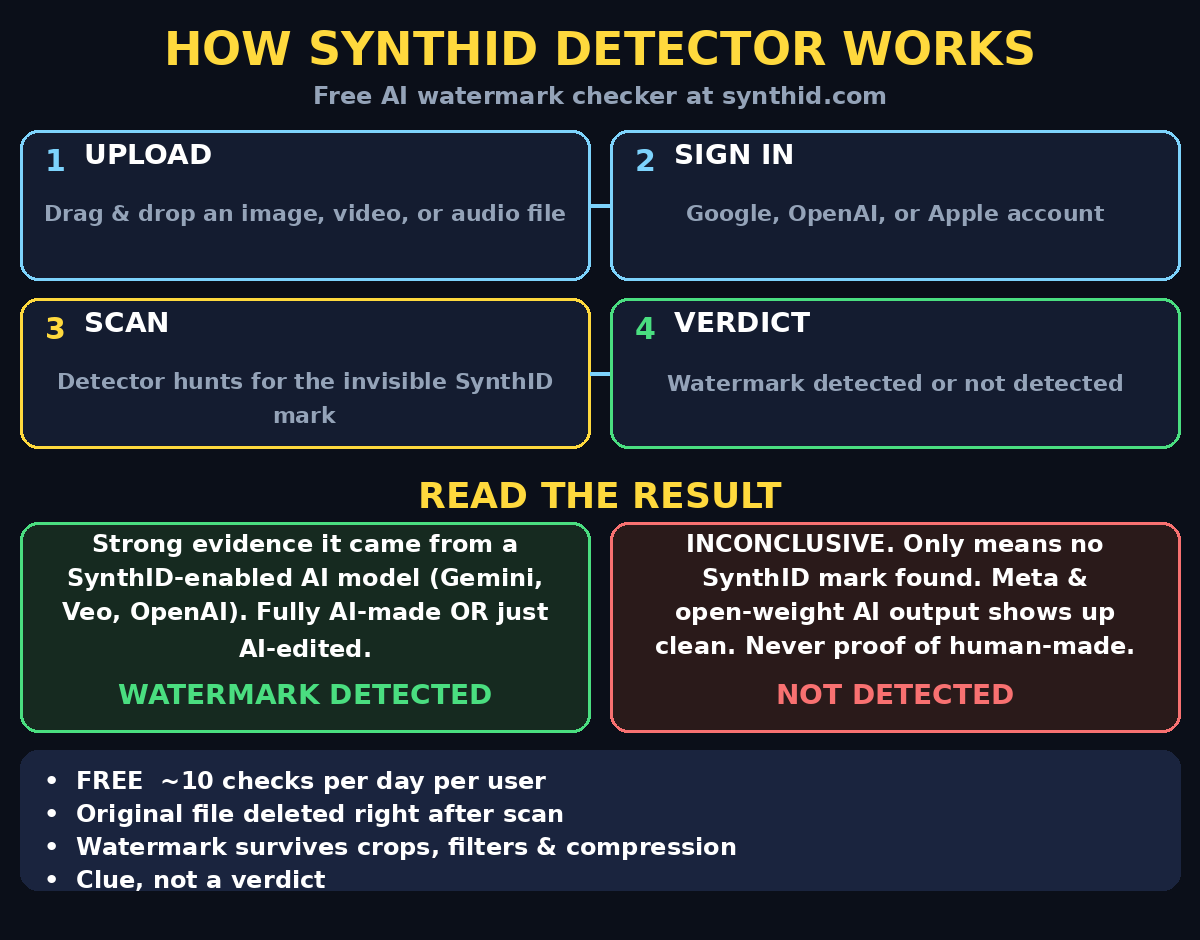
SynthID Detector does one job: it scans an uploaded file and tells you whether that watermark is present. The answer is binary — watermark detected or watermark not detected. That narrow focus is the tool’s strength, because it looks for a real embedded marker instead of guessing from how “AI-looking” something appears.
Two phrases Google itself uses are worth memorizing:
- A positive result means the file was “likely edited or generated by a SynthID-enabled AI model.”
- A negative result is not a clean bill of health. Google’s own line: “This is not a general AI detector.”
Keep those two sentences in your head and you will use the tool better than most people on the internet.
Step 2: Know What It Covers (and What It Doesn’t)
The detector reads watermarks from Google’s own models — Gemini, Nano Banana, Veo, Lyria, Flow and others — plus participating partners that adopted the same SynthID standard, including OpenAI (starting with images from ChatGPT, Codex, and the API), NVIDIA, and Kakao. ElevenLabs has committed to bringing SynthID to more of its generated audio, and Apple support is expected next.
It cannot see watermarks from tools that don’t use SynthID — most open-weight models, plus Microsoft’s and Meta’s separate standards, come back clean. Heavy editing, repeated re-encoding, or screenshots of screenshots can also degrade the signal, and Google notes rare false positives. So treat a “detected” result as strong evidence and a “not detected” result as simply inconclusive — one data point, not a verdict.
Supported formats at a glance:
- Images: JPG, PNG, WEBP, HEIC, GIF, and other common formats
- Video: MP4, MOV, WEBM
- Audio: WAV, MP3, OGG, FLAC, AAC, M4A
- Text: not yet supported
Step 3: Get Ready — What You Need Before Your First Check
You don’t need to install anything. You need exactly three things:
- A modern web browser — Chrome, Edge, Firefox, or Safari, updated to the latest version.
- A free account to sign in — a Google, OpenAI, or Apple account. Google’s AI content detector tool requires sign-in; there is no anonymous mode.
- The original file — always upload the highest-quality copy you have. A photo that has been through five rounds of WhatsApp compression gives the detector less to work with than the original download.
Cost: free. Google caps each signed-in user at roughly 10 checks per day. The limit exists deliberately: it stops anyone from hammering the detector thousands of times to train watermark-removal tools. Ten a day is plenty for a curious beginner, and the quota resets daily.
Privacy note: uploads are processed in real time and the original file is deleted immediately after the check. Only a digital signature of the file is kept for 24 hours, and only to enforce the daily quota. That is unusually clean for a free cloud tool.
Step 4: Go to the Site and Sign In
Type synthid.com into your browser’s address bar and press Enter. One caution: copycat sites will appear around any popular tool, so double-check the address bar says the real domain before you sign in.
- Click Sign in and choose Google, OpenAI, or Apple.
- Accept the terms of use (they are short; the key point is the daily usage cap).
- You land on a clean upload screen — no dashboards, no settings rabbit hole.
That’s the whole setup. Sixty seconds, tops.
Step 5: Upload Your First File and Read the Result
Now the satisfying part. Here’s the exact flow:
- Drag and drop your image, video, or audio file onto the page — or click to browse and select it.
- Wait a few seconds. Scanning takes under a minute, usually just a handful of seconds for a photo.
- Read the result. It’s one of two outcomes:
- ✅ Watermark detected — strong evidence the file came from a SynthID-enabled AI model (remember: it may have been fully generated or merely edited with such a tool — the detector can’t separate those two cases).
- ❌ Watermark not detected — inconclusive. It means no SynthID watermark was found, not that the file is human-made.
For video and audio, the detector goes a step further: it can identify which segments of the file carry the watermark. So a 3-minute clip where only the intro was AI-generated can show exactly that pattern — a genuinely useful detail for fact-checkers.
Your first experiment: generate an image with Gemini (or Nano Banana), download it, and upload it to the detector. Watching “watermark detected” appear on a file you watched being created is the fastest way to trust what the tool does. Then try the reverse: upload a photo you took yourself with your phone camera. Expect “not detected” — and notice that this second result proves nothing about AI involvement from other tools, which is the whole lesson of Step 2.
Step 6: Check a Suspicious Viral Image (Your First Real Mission)
Here’s a workflow you can use today on anything suspicious that lands in your group chats:
- Save the highest-quality version. Ask the sender for the original if you can; avoid the forwarded, recompressed copy.
- Upload it to synthid.com and wait for the result.
- If detected: you now have specific, citable evidence to push back before sharing — “this carries an AI watermark” beats “it looks fake to me” every time.
- If not detected: say so honestly, but don’t declare it real. Pair the check with a reverse image search and your own judgment.
This is the single most practical use of the tool for everyday life — a 30-second pause before you forward something to 200 people. Journalists, researchers, and platform moderators use the same flow at scale, and a digital agency running content verification for clients can fold this check into its standard review process in minutes.
Step 7: Check a Video or Voice Clip the Smart Way
Video and audio checks work the same way as images, with two extras worth knowing:
- Segment-level results: the detector highlights which parts of a clip carry the watermark. A political video where only the audio was cloned, or a podcast where only the intro music was AI-generated, shows up as exactly that pattern.
- Quality matters more: watermark signals survive cropping, filters, compression, and speed changes by design — Google engineered them for robustness — but extreme degradation still hurts. Screen recordings of videos and voice notes re-recorded through a phone speaker are the worst inputs. Always chase the source file.
A handy habit: when a sensational clip arrives from an unknown source, check it before you form an opinion. The tool removes the argument about “AI vibes” entirely — either the marker is there or it isn’t.
Step 8: Make Your 10 Daily Checks Count
Ten checks a day sounds limiting until you realize how to ration them like a pro:
- Don’t burn checks on the obvious. If the image is labeled “Made with Gemini” or came from a known AI art account, you already have your answer.
- Batch related checks. Suspicious about three images from the same viral thread? Check all three in one session — they’re probably from the same source.
- Check the original, not the meme. One check of the source photo beats five checks of captioned re-posts.
- Save checks for high-stakes files. Election content, financial advice screenshots, emergency alerts, and anything you’d forward to family come first.
- Re-check after major edits. If you ran a watermarked image through heavy editing, the watermark may degrade — but that’s an edge case, not a daily habit.
Power users who verify content professionally — for example, teams writing about AI automation and the news around it — will hit the cap fast. For them, the detector is one tool in a larger verification stack, not the whole stack.
Step 9: Understand the Limits (So You Never Misuse It)
This is the step most guides skip, and it’s the one that matters most:
- “Not detected” ≠ human-made. Content from non-SynthID tools (Meta’s models, most open-weight generators) returns clean. Never present a negative result as proof of authenticity.
- “Detected” ≠ fully AI-generated. A real photo retouched with a SynthID-enabled editor carries the watermark too. The detector confirms watermark presence, not the degree of AI involvement.
- It doesn’t judge. The tool can’t tell you whether an AI edit was innocent (removing a photobomber) or malicious (fabricating evidence). Context is still your job.
- Rare false positives exist. Google acknowledges them. One positive result on a file you know is a straight-from-camera photo deserves a second look, not a public accusation.
- It can’t be your only source. Pair it with reverse image search, metadata inspection, and plain common sense. No single free tool is an authenticity oracle.
Memorize Google’s framing — “a clue, not a verdict” — and you’ll use SynthID Detector exactly as designed.
Step 10: Build a 60-Second Verification Habit
Tools only help if you actually use them. Here’s a habit that takes one minute and will genuinely change how you consume media:
- Pause before sharing. Any image, video, or audio that triggers a strong emotion — outrage, amazement, fear — gets checked before it gets forwarded.
- Upload to synthid.com. Ten seconds of drag-and-drop.
- Read the binary result. Detected? Don’t share without a disclaimer. Not detected? Proceed with normal caution.
- Tell the sender. “Hey, I ran this through Google’s watermark checker — it flagged an AI watermark” is a kindness, not an accusation. Most people forwarding fakes have no idea.
Do this for two weeks and it becomes reflex. In a world where anyone can generate a convincing fake in seconds, the people who pause for 60 seconds are the ones who stop misinformation in its tracks. For a deeper dive into spotting manipulated media, our guide on how to use FaceMap AI shows another angle of what AI can read from an image, and Google Deep Review demonstrates how AI can double-check documents the same way SynthID double-checks media.
SynthID Detector vs the Alternatives
| Feature | SynthID Detector | “Ask Gemini” chat check | Reverse image search | Typical AI text detector |
|---|---|---|---|---|
| What it checks | Invisible watermarks | The chatbot’s opinion | Where an image appeared online | Writing style patterns |
| File types | Images, video, audio | Images only (via chat) | Images (video poorly) | Text only |
| Result type | Binary: detected / not detected | Conversational guess | Source matches | Probability score |
| False positives | Rare (watermark-based) | Common (vibes-based) | N/A | Frequent |
| “Not AI” proof | No — only checks one watermark standard | No | No | No |
| Price | Free (10 checks/day) | Free with limits | Free | Mixed |
| Sign-in needed | Yes (Google/OpenAI/Apple) | Yes | No | Sometimes |
| Best for | Provenance evidence | Casual curiosity | Finding originals | Essays and articles |
The honest takeaway: asking a chatbot “is this AI?” is vibes-based and unreliable — the detector replaced that workflow for a reason. Reverse image search answers a different question (“where else has this appeared?”). Use them together: detector for the watermark, search for the source, judgment for the rest.
Frequently Asked Questions
Is Google SynthID Detector really free?
Yes. Sign in with a Google, OpenAI, or Apple account and you get roughly 10 checks per day at no cost, with no credit card required. The daily cap exists to prevent abuse — specifically, to stop people from probing the detector to figure out how to strip watermarks.
Does it work on text or documents?
Not yet. The detector currently supports images, video, and audio files only. If you need to check whether a document was AI-written, you want an AI text detector instead — a different category of tool with its own (larger) accuracy problems.
What does “watermark detected” actually prove?
It proves the file carries a SynthID watermark, which means it was likely generated or edited by a SynthID-enabled AI model — Google’s Gemini, Nano Banana, Veo, Lyria, Flow, or participating partners like OpenAI, NVIDIA, and Kakao. It does not prove the file is 100% AI-generated; a real photo lightly retouched with an AI editor can carry the mark too.
Can someone remove the SynthID watermark?
Google designed the watermark to survive cropping, filters, compression, and speed changes, and reports over 180 billion images and videos watermarked so far. No removal method is publicly reliable — and the 10-checks-per-day cap exists precisely to make researching one harder. Treat it as durable, not invincible.
What should I do if a file I know is real gets flagged?
First, don’t panic — Google acknowledges rare false positives. Ask: was the file edited with any AI tool (even a “magic eraser” or AI upscaler)? Those tools can embed the watermark. If the file is truly untouched and still flags, treat it as a data point, not a scandal, and consider re-exporting from the original.
Is my uploaded file kept by Google?
Uploads are processed in real time and the original file is deleted immediately after the check. Only a digital signature is retained for 24 hours to enforce the daily quota. For a free cloud tool, that’s a refreshingly minimal data footprint.
Final Thoughts
Google SynthID Detector won’t end misinformation, and Google is honest about that — it’s a clue, not a verdict. But it is the first free tool that gives ordinary people evidence instead of opinions about a file’s origins, and evidence changes conversations. A “watermark detected” result turns “I think it’s fake” into “here’s proof,” which is exactly what you need before forwarding — or debunking — the next viral sensation.
The workflow is simple enough to become habit: pause, upload, read the result, decide. Ten checks a day is more than enough for that. And as more providers adopt the SynthID standard — OpenAI and NVIDIA are already in, Apple is on the way — the detector’s coverage will only grow. Start building the habit now; your group chats will thank you.
Explore More Free AI Tools
Want more beginner-friendly AI tools like this one? Try these free tools on our homepage at aitoolsteps.com:
- AI Title Generator — craft click-worthy headlines in seconds at aitoolsteps.com
- Meta Description Generator — write perfect SEO snippets at aitoolsteps.com
- AI Rewriter — refresh and rephrase any text at aitoolsteps.com
- Keyword Density Checker — analyze your content’s SEO at aitoolsteps.com