

You have finished an important document — a research paper, a design proposal, a business report — and you are staring at it wondering what you missed. We all miss things: a claim that outruns its evidence, two sections that quietly contradict each other, a formula with a tiny error that changes everything. On October 14, 2026, Google publicly launched Deep Review, a free AI tool that reads your complex documents the way a careful, slightly ruthless expert would: checking logic, math, facts and consistency, then handing you a detailed list of issues to fix before anyone else sees the document.
Deep Review is not just “ask a chatbot to proofread my paper.” It is a multi-stage agentic pipeline — the descendant of a Google experiment called the Paper Assistant Tool that already reviewed more than 16,000 research submissions at major computer science conferences. Every user gets two free document reviews per week, no API key or payment required.
In this beginner guide, you will learn exactly how to use Google Deep Review: how to open it, what to upload, how to add context so the AI reviews the right things, how to read the report, and how to make your two free weekly reviews count.
What Is Google Deep Review?
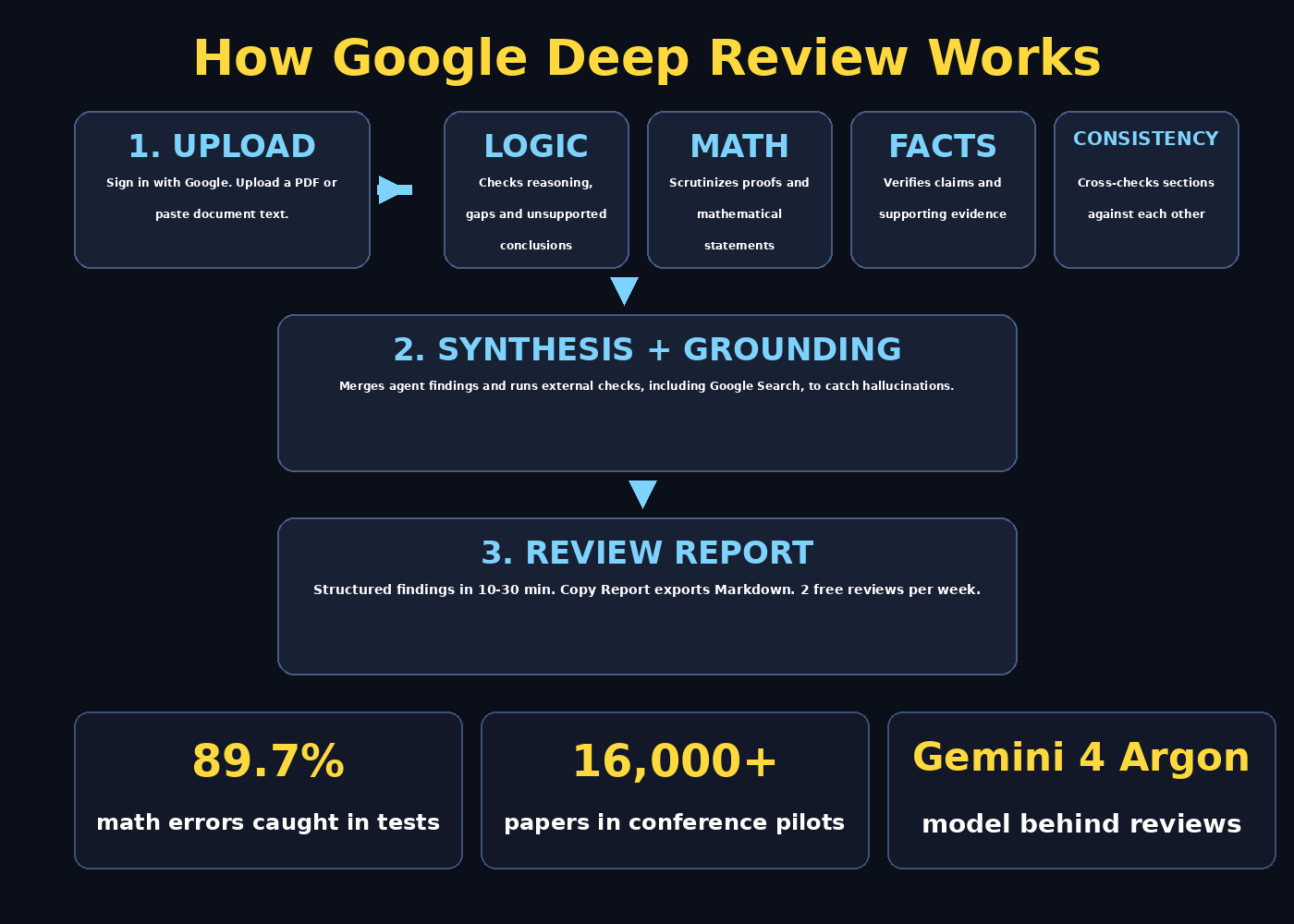
Google Deep Review is an AI-powered document review tool from Google Research. You give it a complex document, and it returns a structured, detailed review — flagging logical gaps, mathematical errors, unsupported claims, contradictions between sections, and suggested improvements. A typical review takes about 10 to 30 minutes, and you get a Copy Report button that exports everything in Markdown so you can work through the findings with your team or paste them into your revision notes.
Under the hood, Deep Review is not a single model call. It runs an agentic four-stage pipeline: separate AI agents examine different aspects of the document, allocate extra reasoning compute to dense technical sections (such as mathematical proofs), and then a synthesis stage merges the findings, cross-checks sections against each other, and even runs external grounding checks — including Google Search — to catch claims that look plausible but are not supported. It runs on Google’s Gemini 4 Argon model, which Google says significantly improves the quality of the feedback.
The public version, launched October 14, 2026, is an “improved and expanded” edition of the earlier Paper Assistant Tool. That tool was offered as an opt-in pre-submission check to authors at four major computer science conferences — STOC, ICML, NeurIPS and ICLR — with more than 16,000 submissions reviewed. The feedback pilots stayed entirely separate from official peer review; Deep Review is a tool for authors to improve their drafts, not a replacement for human reviewers.
How good is it? In a June preprint, Google researchers reported that the pilot system caught 89.7% of known math and proof errors in a test set, while a single response from Gemini 3.1 Pro caught only 55.2%. One analysis of the pilots found substantive errors requiring more than an hour to fix in about 35% of machine-learning papers that passed through the tool. Those are early signals from a small test set — not proof — but they explain why researchers are paying attention.
And while it started with academic papers, the public release covers all kinds of documents: technical reports, design documents, presentations, legal documents, financial documents, proposals and more. If you are learning how AI can help with serious work, Deep Review belongs next to the everyday assistants covered in our guides like Gemini and other free AI tools — it is the specialist for “check my important document before I send it.”
Step 1: Open Deep Review and Sign In With Your Google Account
The first step in learning how to use Google Deep Review is simply getting in. Open the Deep Review tool from the Google Research portal (the entry is linked from Google’s October 14, 2026 launch announcement) in any modern browser — no installation needed.
You will be asked to sign in with a Google account. This is required because your free quota — two document reviews per week — is tied to your account. Any Gmail or Google Workspace account works. The signed-in interface shows your personal “Your documents” table, where finished reviews appear and stay accessible so you can revisit them later.
- Go to the Deep Review page from the Google Research portal.
- Click sign-in and choose your Google account (any Gmail works).
- After signing in, you will see the upload area and your “Your documents” list.
- The free tier is active immediately — no card, no API key, no setup fee.
Step 2: Upload a PDF or Paste Your Document Text
Deep Review accepts two input types at launch: PDF files and plain pasted text. Google’s FAQ also lists Google Docs and Slides as supported sources, and multi-file input is planned, but for now, the practical beginner workflow is upload-or-paste.
- PDF upload: best for papers, reports and formatted documents. Click the upload area, choose your PDF, and the document is queued for review. Make sure the text layer is real (exported from Word/LaTeX/Google Docs), not a scanned image — AI review tools read text, not pictures of text.
- Paste text: best for sections, chapters or short drafts. Copy your document text, paste it into the input box, and submit. This is also handy when you only want feedback on one dense section rather than spending a full review on the whole file.
Before uploading, do a quick sanity pass: remove anything you would not want stored — more on the privacy trade-off in the FAQ below. Also keep the free tier in mind: you get two free reviews per week, so spend them on documents where an error would actually be costly — the paper before submission, the design doc before the review meeting, the proposal before it goes to the client.
Step 3: Add Custom Context So the AI Reviews the Right Things
This step separates casual users from power users. Deep Review includes an optional “Add custom context” box where you can tell the tool what it is reviewing and what it should scrutinize. Do not skip it.
Think of custom context as the instruction brief you would give a human expert reviewer. The more specific you are, the more useful the feedback. Examples:
- “This is a machine-learning research paper aimed at a NeurIPS-style audience. Pay extra attention to the mathematical arguments in Section 3 and check whether the experimental claims in Section 5 are supported by the reported results.”
- “This is a grant proposal. Check it against these scoring criteria: innovation, feasibility, and budget realism.”
- “This is a financial summary for internal review. Flag any numbers that contradict each other across sections.”
Beginner tip: if you do not know what to write, a one-liner naming the document type and your biggest worry is already much better than nothing — e.g. “master’s thesis chapter; I am most worried about logical gaps in the argument.”
Step 4: Submit and Wait — Reviews Take 10 to 30 Minutes
Press submit and the document enters the review pipeline. A review typically takes about 10 to 20 minutes (sometimes up to 30 for long or dense documents), because several specialized agents work through the document in stages instead of skimming it in one pass.
You do not need to keep the tab open and watch it. When the review finishes, it appears in your “Your documents” table inside the signed-in interface. Click “View Review” to read the overall findings plus the detailed comments.
What you get is structured feedback, roughly organized around:
- Logical errors and gaps — reasoning that does not follow, conclusions that outrun the premises.
- Mathematical statements — proofs and formulas checked more rigorously than prose.
- Facts and supporting evidence — claims examined for whether the evidence actually supports them.
- Cross-section consistency — two parts of the document that cannot both be right.
- Concrete suggestions — improvements for clarity, consistency and quality.
Step 5: Read the Review as a List of Leads, Not a Verdict
This is the most important skill in this entire guide. Google explicitly frames Deep Review as an assistant to human judgment, and hands-on reports agree: treat every finding as a lead to verify, not a verdict to obey.
The reason is simple. Automated reviewers produce both false positives (flagging things that are actually correct) and false negatives (missing real errors). Pilot users reported cases where the system wrongly challenged a correct proof. A good discipline when reading the output: for every finding, ask “Can I reproduce this by reading the cited section?” If you cannot, treat it as a possible false alarm before changing anything consequential.
Practical reading workflow:
- Start with the overall findings to get the shape of the problems.
- Sort flagged issues by cost: mathematical errors and contradictions first, stylistic suggestions last.
- Open your document next to the report and check each flagged section yourself.
- Only change things you understand — especially technical claims, where an AI “fix” could introduce a new error.
Step 6: Use Copy Report to Export Feedback in Markdown
Once you have read the review, click “Copy Report”. This copies the entire review in Markdown format — clean, structured, and ready to paste into your revision notes, a shared doc, or a task tracker.
This small feature is genuinely useful for beginners because it turns feedback into an action list:
- Paste the Markdown into a new Google Doc or note titled “Revision checklist — [document name]”.
- Work through the items top to bottom, checking each one off after you verify and fix it.
- Share the checklist with collaborators so everyone sees what was checked and what changed.
It is also the simplest way to keep a record of what the AI checked — helpful if you later want to compare a re-review after revisions, or demonstrate due diligence on an important document.
Step 7: Revise, Then Spend Your Second Weekly Review Wisely
Remember: the free tier gives you two reviews per week. That means the smartest beginner workflow is a two-pass loop — one review to find problems, and a second to verify the fixes.
- Pass 1 — discovery. Upload your draft and read the report as described above. Make your revisions carefully, verifying each flagged issue yourself.
- Pass 2 — verification. Upload the revised document and see whether the issues are resolved and whether your fixes introduced new problems.
If you only have one document this week, consider using the second review on a different draft — a second paper, a different chapter, or that report sitting in your drafts folder. The weekly quota resets each week, so unused reviews do not roll over.
One caution from Google’s own guidance: the tool is a pre-submission assistant. High-level judgment stays with people. Do not use a clean Deep Review report as a guarantee that your document is error-free — and equally, do not panic over every flagged item. Google calls tools like this “a clue, not a verdict,” and that is exactly how to use them.
Step 8: Need More Reviews? Connect Your Gemini API Key
Two reviews a week covers casual use. If you need heavier use — a lab reviewing many drafts, a team running document checks in a pipeline — Deep Review lets you connect your own Gemini API key for higher limits and programmatic access via the Deep Review API.
- With your key connected, you are no longer limited to two weekly reviews.
- Google charges for the underlying model calls at standard Gemini API rates — there is no separate Deep Review fee.
- Cost depends on document size, the model, and the reasoning effort you select. As a rough guide from Google’s pricing FAQ: around $3 for a 40-page document with Gemini 3.8 Flash on Low, up to around $20 with Argon on Extra High. Treat these as estimates, not fixed prices.
- Google also added a similar review pattern to Antigravity, its agent-based coding tool — developers can run multi-agent checks on drafts and proposals from a preview command.
For most beginners, the free two-per-week tier is plenty. Connect an API key only when you have a genuine recurring need — and confirm the costs against your Gemini billing terms before wiring it into any automated workflow. If you are running an online business and want to understand where professional document review fits into a broader operation, a digital agency can help you set up quality workflows that combine AI tools like Deep Review with human oversight.
Step 9: Use Deep Review Beyond Research Papers
The public launch deliberately expanded Deep Review beyond academic papers. Beginners often assume it is only for scientists — but Google’s own examples include design documents, presentations, and legal and financial documents. Here is how different people can use their two weekly reviews:
- Students: run a thesis chapter or final-year project report through it before your supervisor sees it. Catch the embarrassing contradiction between your method and your conclusion.
- Freelancers: check a client proposal or contract summary for internal inconsistencies before sending it. A second pair of (very thorough) eyes, free.
- Content teams: verify that a long white paper’s claims actually match its cited data. If your team publishes a lot of AI-assisted content, pairing Deep Review with services like AI automation services can turn document QA into a repeatable pipeline instead of a scramble.
- Startup founders: stress-test a pitch deck narrative or investor memo for claims that outrun the evidence — investors will ask those questions anyway.
The same careful habit applies everywhere: upload, read the findings as leads, verify yourself, revise, and use your second weekly review for the verification pass.
Step 10: Know the Limits Before You Rely On It
Deep Review is one of the more impressive agentic AI releases of the year — but it has real limits, and knowing them is part of knowing how to use Google Deep Review responsibly.
- It is not a universal fact-checker. The synthesis stage grounds findings with external checks, but the tool surfaces issues — it does not guarantee all errors are caught. High-level judgment stays with people.
- It can be confidently wrong. False positives are a documented behavior, including challenged-but-correct proofs. Always verify before changing consequential claims.
- Privacy trade-off. Google states uploads are never used for model training, but documents are kept for one year so they can be shown in the tool’s interface. That retention may rule out confidential contracts or unpublished results at some organizations — check your own policy before uploading sensitive material.
- Narrow inputs for now. PDF and plain text at launch (Google Docs/Slides listed in the FAQ); spreadsheets, exhibits and multi-document sets are promised, not yet shipped.
- Reviews take time. 10 to 30 minutes per document — this is a deep check, not an instant answer.
Deep Review vs. Other Ways to Check a Document
How does Deep Review compare to the alternatives a beginner might reach for?
| Method | Cost | Depth | Best For |
|---|---|---|---|
| Google Deep Review | 2 free reviews/week | Very deep — multi-agent pipeline, math checks, cross-section consistency, external grounding | Important documents where an error is costly: papers, proposals, contracts |
| Single chatbot prompt | Free (within plan limits) | Shallow — one pass, no dedicated math/proof agents, no systematic cross-checking | Quick informal drafts, short emails, blog outlines |
| Grammar/style checkers | Free tiers available | Surface-level — grammar, spelling, tone; no logical or mathematical verification | Polishing language after the substance is right |
| Human proofreader | Paid | Deep, with real judgment — but slower, expensive, and humans miss things too | Final polish on high-stakes documents |
The sweet spot for beginners: use Deep Review as the systematic pre-pass that spends compute on the cognitively hard parts (math, logic, consistency), then apply your own judgment — and, for truly high-stakes documents, a human expert — on top.
Frequently Asked Questions
Is Google Deep Review really free?
Yes — every signed-in user gets two free document reviews per week with no API key, no card and no separate fee. The free reviews run on Gemini 4 Argon at the Medium setting. If you need more, you can connect your own Gemini API key and pay standard Gemini API rates for the extra model calls.
What file types can I upload to Deep Review?
At launch: PDF files and plain pasted text. Google’s FAQ also lists Google Docs and Slides as supported sources, and multi-file review is on the roadmap. Spreadsheets, exhibits and multi-document sets are promised but not yet shipped.
How long does a Deep Review take?
Typically 10 to 30 minutes per document, depending on length and complexity. The tool runs a multi-agent pipeline — separate agents check logic, math, evidence and consistency, then a synthesis stage merges everything — so it is slower than a single chatbot answer but far more thorough.
Are my uploaded documents private?
Google states that uploads are never used to train its models, which is a strong commitment. However, documents are kept for one year so they can be displayed in the tool’s “Your documents” interface. For highly confidential contracts or unpublished results, check your organization’s policy before uploading.
Can Deep Review replace peer review or my supervisor’s feedback?
No — and Google does not position it that way. The pilots kept the tool entirely separate from official conference peer review. Deep Review is a pre-submission assistant: it finds candidate issues for you to verify, but high-level judgment, novelty assessment and final decisions stay with human reviewers.
Does Deep Review work for non-English documents?
Google’s launch materials describe PDF and text input without specifying language coverage in detail, so treat multilingual support as unverified for now. If you try a non-English document, start with a short test section and your second free review as backup — and always verify the flagged issues yourself, since grounding checks may be weaker outside English.
Final Thoughts
Learning how to use Google Deep Review takes about fifteen minutes: sign in, upload a PDF or paste text, add a line or two of custom context, submit, and come back to a structured review you can export as Markdown. The two-free-reviews-per-week tier is genuinely generous — enough for a serious discovery-plus-verification loop on your most important document each week.
The mental model to keep: Deep Review is the most thorough free proofreader you have ever had, but it is still an assistant, not an authority. Read its findings as leads, verify each one against your own document, fix what is genuinely broken, and keep your own judgment in charge. Used that way, it turns the anxious “did I miss something?” moment before sending an important document into a calm, systematic check.
Explore More Free AI Tools
Want to keep building your free AI toolkit? Try these free tools on our homepage at aitoolsteps.com:
- AI Title Generator — craft click-worthy headlines for your papers and blog posts at aitoolsteps.com.
- Meta Description Generator — write perfect SEO meta descriptions in seconds, free at aitoolsteps.com.
- AI Rewriter — polish and rephrase your drafts with one click at aitoolsteps.com.
- Keyword Density Checker — make sure your SEO keywords hit the sweet spot, free at aitoolsteps.com.