

Google has a new flagship AI model, and its name is Gemini 4 Argon. Announced on September 30, 2026 and opened to paying users on October 13, 2026, Argon is Google’s most capable model yet — built for long, difficult work like software engineering, deep research, and cybersecurity. If you have heard the buzz and want to try it yourself, this beginner-friendly guide walks you through everything: what Argon is, who can actually use it right now, how to switch to it in the Gemini app and in AI Mode, how to write prompts that get the best out of it, and what it costs.
The honest headline first: as of October 2026, Argon is not on the free Gemini plan. You need a Google AI Pro or Google AI Ultra subscription to use it in the Gemini app, or paid access to the Gemini API. If you are on the free plan, this guide still helps — you will know exactly what to check, what to try first when you upgrade, and how to follow along with the free models in the meantime.
Step 1: Understand What Gemini 4 Argon Is
Gemini 4 Argon is the top model in Google’s Gemini 4 family. Think of it as the “big brain” option: where the free Gemini models are fast and light, Argon is designed to think longer and harder about complex problems. Google says it answers more directly with less hedging, follows style instructions better, and keeps you updated on its progress during long tasks.
Here is what Argon is built for:
- Long, multi-step work — big coding projects, research reports, and analysis that takes many steps to finish.
- Software engineering — writing, reviewing, and debugging code across many files.
- Cybersecurity — finding and fixing software flaws. In fact, Google first gave Argon to vetted cybersecurity defenders two weeks before the public release, so they could patch systems before attackers got the same capability.
- Science, finance, and law — domains where accuracy and long reasoning matter.
One important note: Google’s benchmark claims — including first place on the Vals Index, 77.9% on the DeepSWE coding benchmark, and 91.7% on LVBench video understanding — are Google’s own figures. Independent testing by Artificial Analysis ranks Argon 8th out of 216 models on its intelligence index. Treat the marketing as a starting point, and judge the model by your own tasks.
Step 2: Check Whether You Can Access Argon Right Now
Before you go hunting through menus, check which door is open to you. Access depends on what you pay for:
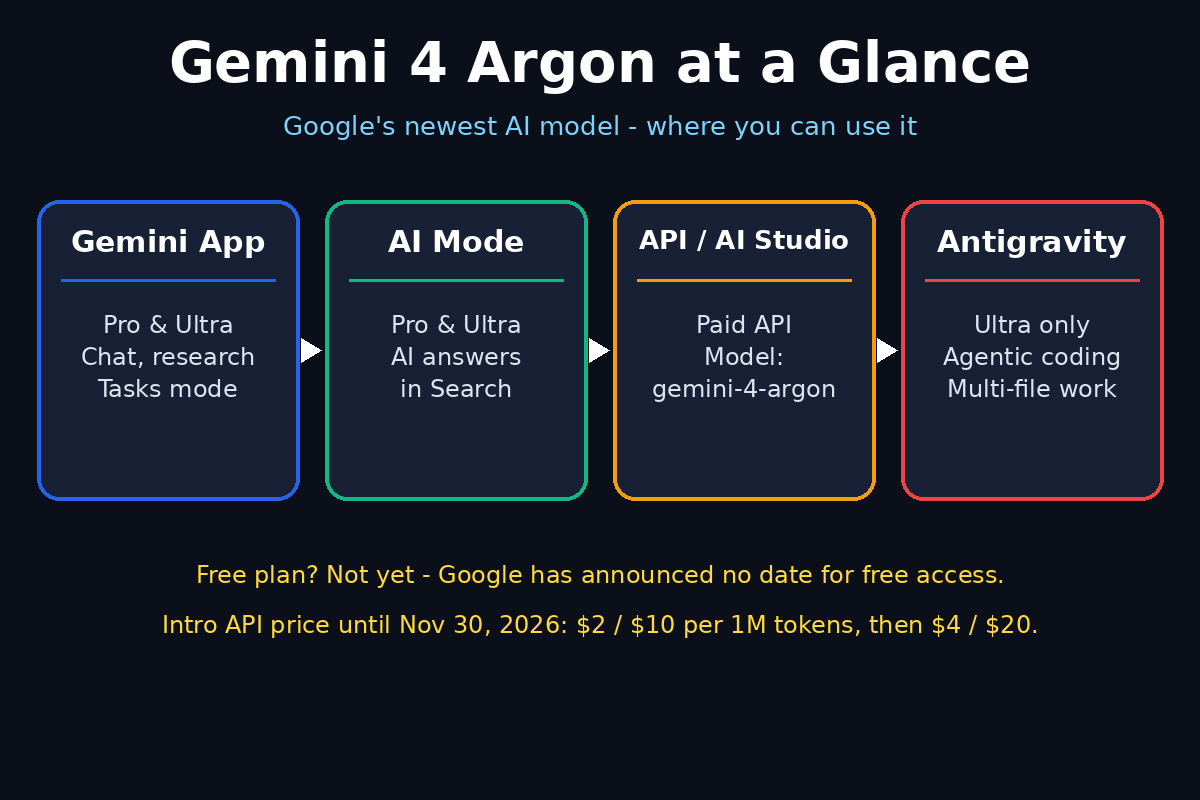
- Google AI Pro (about $19.99/month) — Argon in the Gemini app and in AI Mode in Google Search.
- Google AI Ultra (from about $99.99/month) — Argon in the Gemini app, AI Mode, and Google Antigravity, plus access to try it in Google AI Studio.
- Paid Gemini API — developers can call the model
gemini-4-argonin Google AI Studio and in their own apps, with billing turned on. - GitHub Copilot — available on eligible Copilot plans from the model picker.
- Free Gemini and AI Plus users — no Argon yet, and Google has not announced a date for free access.
The rollout is gradual, so even paying subscribers may not see Argon on day one. If it is missing, update the Gemini app and check again in a day or two. If you run a business and want help deciding whether a paid AI plan is worth it, a digital agency like D365A can help you compare the real costs against the work you actually do every day.
Step 3: Open the Gemini App and Switch to Argon
This is the simplest route, and the one most beginners should start with:
- Open the Gemini app on the web, your phone, or macOS, and sign in with your Google AI Pro or Ultra account.
- Tap the model picker at the top of the chat window. It usually shows the current model name.
- Choose “4 Argon” from the list. If you do not see it, your account may still be waiting for the staged rollout — update the app and try again later.
- Start a fresh chat after switching. Argon works best when it starts a task clean, rather than inheriting a long conversation from another model.
Once Argon is selected, everything else works the way you already know: type a question, attach a file, or ask it to work on a document. The difference is under the hood — Argon will spend more time reasoning before it answers, especially on hard tasks.
Step 4: Try Argon in AI Mode in Google Search
AI Mode is Google Search’s AI answer engine, and Argon now powers it for Pro and Ultra subscribers too. This is a great way to feel the difference without opening a separate app:
- Open Google Search while signed in to your Pro or Ultra account.
- Switch to AI Mode and tap the plus icon (or the model menu) to select Gemini 4 Argon.
- Ask a question your customers actually ask — for example, “best plumber near me” or “how to start a small online shop.” Notice how Argon structures its answer and which sources it cites.
- Compare it with a free-model answer on the same question. The difference in depth and directness is usually obvious.
For website owners, this matters beyond curiosity: AI Mode answers shape what searchers learn about your business. If Argon gets your hours, prices, or services wrong, fix them at the source — your Google Business Profile and your own website — because that is where the model reads them from. Teams that follow Agentic Affairs for AI automation news will already know how fast these answer engines are changing search itself.
Step 5: Write Your First Prompt the Argon Way
Argon rewards clear, specific instructions. Because it is built to reason deeply, vague prompts waste its biggest strength. Use this simple formula: role, task, context, format.
Here are prompts you can copy and try right now:
- “Answer in plain English, in at most five short sentences, with no hedging: should a small online shop use an AI chatbot for customer questions? Give one reason for, one against, and what to try first.”
- “You are a patient coding tutor. Explain this Python error to a beginner in three steps, then show the fixed code with a comment on each changed line.”
- “Plan a 7-day study schedule for learning basic Excel. I have one hour a day. List each day’s topic, one practice task, and how I will know I got it right.”
Three habits make Argon prompts work better:
- Be direct about the output. Say “give me a table,” “answer in five bullet points,” or “write it as a checklist.”
- Give it the facts it needs. Paste the error message, the budget, or the deadline instead of making it guess.
- Ask for one thing at a time. Argon handles long tasks well, but a single clear job per message still beats a five-in-one request.
Step 6: Use Argon for Coding and Long Tasks
This is where Argon earns its price. For coding and long-running work, a few settings and habits matter:
- Pick a thinking level. Argon offers low, medium, and high thinking levels, with medium as the default. Use low for quick answers, medium for everyday work, and high for the hardest problems where accuracy matters more than speed.
- Let it run. Argon can spend a long time thinking, and its output can be very large — Google raised the output limit to around 1 million tokens in long-decode mode. For outputs over 64,000 tokens, Google recommends timeouts of at least 15 minutes and background execution.
- Use the Tasks mode. The Gemini app now has a switch between chat and tasks, where Gemini works in the background on a job you give it. Give it a big job — “research these ten competitors and build a comparison table” — and check back when it is done.
- Review, don’t blindly trust. Argon is strong, but it still makes mistakes. Run code before you ship it, and double-check any fact that affects money, safety, or legal decisions.
If you are new to coding, start small: ask Argon to explain a snippet, then to fix a bug, then to build a tiny project. Each step teaches you what the model is good at and where you still need to check its work.
Step 7: Try the Tasks Mode and Connected Apps
Alongside Argon, Google launched two app changes that are easy to miss but very useful:
- Tasks mode — instead of chatting back and forth, you hand Gemini a job and it works in the background. Great for research, planning, and multi-step preparation.
- Connections to 40+ apps — including Instacart, OpenTable, Adobe, and Shopify. With your permission, Gemini can pull real information from these apps into its answers and plans.
Try this beginner workflow:
- Ask Argon to plan a weekend trip using connected apps for restaurants and bookings.
- Ask it to draft a week’s social media ideas for a small shop, then refine the best three.
- Ask it to compare two products you are thinking of buying, with a table of price, features, and trade-offs.
The trick is to treat Argon as a junior colleague: give it a clear brief, let it work, and review the result before you act on it.
Step 8: Use Argon as a Developer (API and AI Studio)
If you build apps or automate work, the API route is how you put Argon inside your own tools:
- Create an API key in Google AI Studio and turn billing on — Argon is not available on the free API tier.
- Set the model to
gemini-4-argonin your code or in AI Studio’s prompt playground. - Drop the old tuning knobs. Argon ignores temperature, top_p, and top_k, so remove them. It also uses automatic (implicit) caching only, so remove explicit caching calls.
- Raise small output limits. If your max output is under 32,768 tokens, raise it — Argon can spend more of its budget on thinking.
- Plan for long runs. Use background execution and generous timeouts for big jobs.
API pricing is introductory: $2 per million input tokens and $10 per million output tokens through November 30, 2026, with cached input tokens discounted by 95%. After that, the rates double to $4 and $20. Never build a long-term budget on the introductory price.
Step 9: Control Costs and Avoid Surprises
Argon’s power can quietly turn into a bill. Keep these rules in mind:
- Start with the app, not the API. In the Gemini app, your subscription covers your usage — there is no per-token meter running while you learn.
- Watch the output size. Long, high-thinking runs cost the most. Use low or medium thinking for everyday questions.
- Use caching-friendly workflows. Repeated context that Argon can cache costs far less, thanks to the 95% discount on cached input tokens.
- Set a budget alert in Google Cloud if you use the API, and check usage weekly during your first month.
- Do not pay for what you do not use. If you only ask short questions, the free Gemini models may already be enough — upgrade when your tasks get long and hard, not before.
Step 10: Fix Common Problems
Most Argon problems have simple fixes:
- “I don’t see Argon in the model picker.” You may be on the free plan or AI Plus, or your account may still be in the staged rollout. Confirm your plan, update the app, and check again in a day or two.
- “Pro gives me Argon in the app but not in AI Studio.” That is expected — a Pro subscription does not include API access. Turn on paid API billing in AI Studio to use Argon there.
- “Answers are slow.” That is Argon thinking. Switch to a lower thinking level for quick questions, or use a lighter model for simple chats.
- “The API returns an error about output limits.” Raise your max output above 32,768 tokens and give the request a longer timeout.
- “It ignores my temperature setting.” Argon ignores temperature, top_p, and top_k by design. Control the output with clear instructions instead.
Argon vs the Other Ways to Use Gemini
| Access route | Who can use it | Best for | Watch out for |
|---|---|---|---|
| Gemini app | Google AI Pro and Ultra subscribers | Everyday chat, research, documents, Tasks mode | Staged rollout — may take days to appear |
| AI Mode in Google Search | Google AI Pro and Ultra subscribers | Search questions with AI answers | Free users do not get Argon here |
| Gemini API / AI Studio | Paid API users; Ultra subscribers can also try it | Building apps, testing prompts | Intro price doubles after Nov 30, 2026 |
| Google Antigravity | Google AI Ultra subscribers | Multi-file agentic coding | Ultra plan required |
| GitHub Copilot | Eligible Copilot plans | Coding inside your editor | Plan eligibility varies |
Frequently Asked Questions
What is Google Gemini 4 Argon?
Gemini 4 Argon is Google’s most capable AI model, launched to paying users on October 13, 2026. It is built for long, difficult work — software engineering, research, enterprise knowledge tasks, and cybersecurity — and it answers more directly, with less hedging, than earlier Gemini models.
Is Gemini 4 Argon free?
No, not yet. Free Gemini users and AI Plus subscribers do not get Argon, and Google has not announced a free release date. You need Google AI Pro (about $19.99/month), Google AI Ultra (from about $99.99/month), or paid Gemini API access. The API’s introductory price is $2 per million input tokens and $10 per million output tokens until November 30, 2026.
How do I switch to Argon in the Gemini app?
Open the Gemini app with a Pro or Ultra account, tap the model picker at the top of the chat, and choose “4 Argon.” If it is not there, update the app and check again later — the rollout is gradual.
What is the difference between Argon and the free Gemini models?
Free models like Gemini Flash are fast and light, built for quick everyday questions. Argon is the heavyweight: it reasons longer, handles much bigger tasks, and keeps working in the background on jobs that take many steps. Use free models for quick chats and Argon for hard, long work.
Can developers use Gemini 4 Argon in their own apps?
Yes, through the paid Gemini API with the model name gemini-4-argon. Note that Argon ignores temperature, top_p, and top_k, uses automatic caching only, and needs higher output limits and longer timeouts than earlier models.
Is Argon worth paying for as a beginner?
Only if your tasks are long and hard. If you ask short questions, summarize articles, or brainstorm ideas, the free models are plenty. Upgrade to Pro when you start coding real projects, writing long research, or running multi-step jobs — that is where Argon earns its price.
Final Thoughts
Google Gemini 4 Argon is a serious step up for anyone doing long, difficult AI work — but it is also a paid, professional tool, not a free upgrade. Start by checking your plan, switch to Argon in the Gemini app when it appears, and learn its strengths with one clear prompt at a time. Use Tasks mode for big jobs, keep an eye on API costs, and let the free models handle the quick questions. Used that way, Argon becomes a genuinely useful partner for coding, research, and planning — and you will know exactly when it is worth the money.
Explore More Free AI Tools
Want more free AI helpers? Try these tools on AIToolSteps: the AI Title Generator for catchy headlines, the Meta Description Generator for search-ready snippets, the AI Rewriter for polishing your drafts, and the Keyword Density Checker for keeping your SEO on target. Each one is free, beginner-friendly, and built to save you time.