

Making a professional video ad used to mean hiring a model, booking a studio, paying a videographer and waiting a week. Glif AI throws that whole process out of the window. It is a creative AI agent that takes one plain-language brief from you and turns it into finished ads, product photos and short videos — and on 31 October 2026 it launched what it calls the first AI modelling agency, so you can now cast realistic virtual models for your campaigns without ever picking up a camera.
Glif is not a single image generator or a single video tool. It is one chat agent with access to more than 100 native tools and the best-known AI models, including GPT Image, Nano Banana Pro, Kling, Seedance, Veo 3.1 and ElevenLabs. You describe the outcome you want, Glif picks the right models, chains the steps together and hands you the finished media. It relaunched in this form on 24 March 2026, replacing its older node-based workflow builder, and in April 2026 Andreessen Horowitz (a16z) led its seed funding round.
The best part for beginners is that you can start for free. New accounts get 50 bonus credits, which is enough to make your first real ads and see whether Glif fits your work before you spend anything. In this guide, you will learn exactly how to use Glif AI: how to set up your account, write a brief that gets good results, cast a virtual model, generate video ads and product shots, keep your brand looking consistent, and launch a campaign without wasting credits.
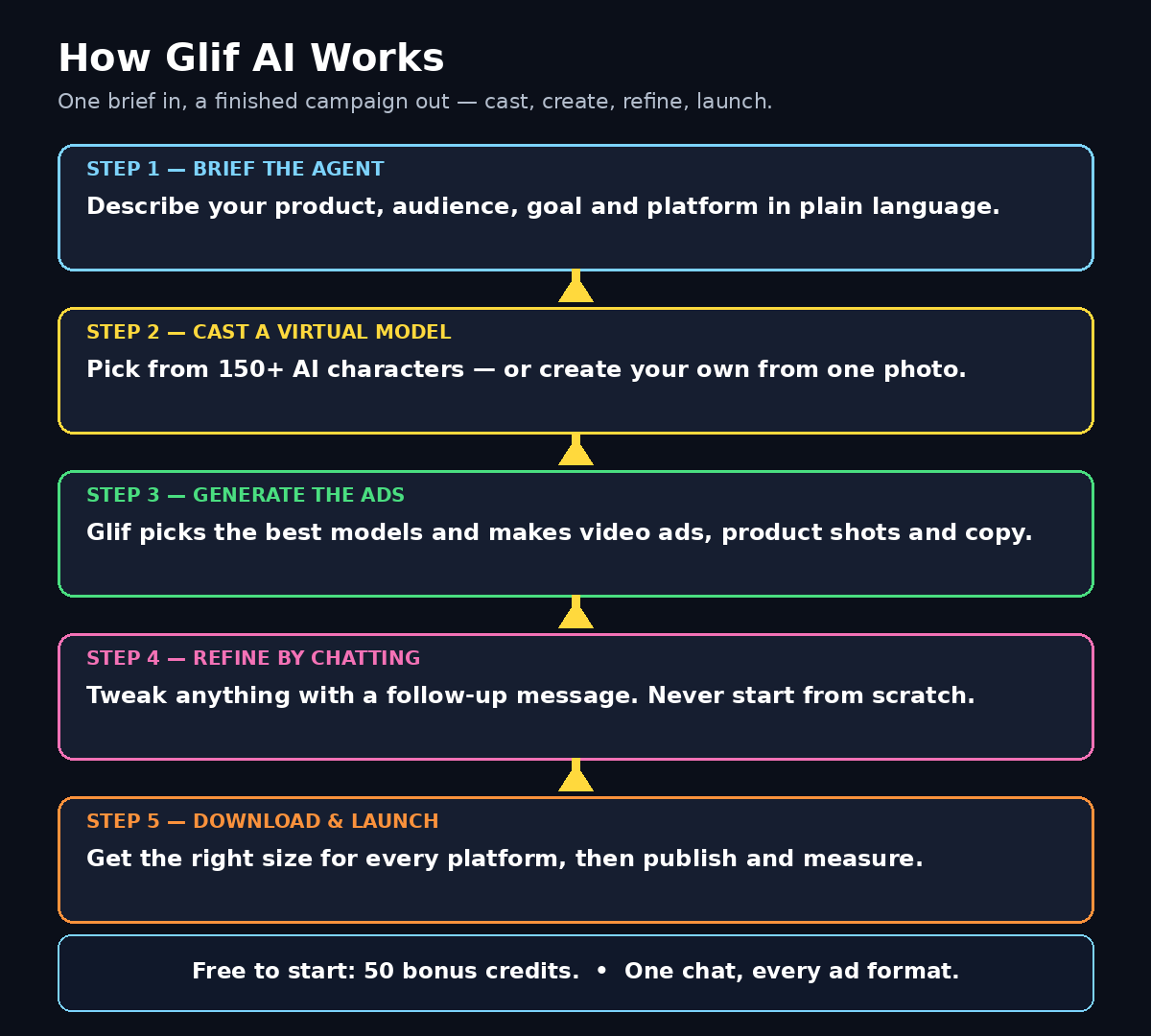
Step 1: Understand What Glif AI Actually Is
Think of Glif as a creative director you can brief in plain English. Most AI tools do one job: one makes images, another makes videos, another writes copy. Glif sits above all of them. You tell it the goal — “make a 15-second TikTok ad for my handmade soap, aimed at women aged 25 to 40, fun and bright” — and it decides which models to use, generates the visuals, writes the script, adds a voiceover and music, and stitches everything into a finished clip.
That orchestration is the whole point. A single request can start with your product photo, become studio product shots, then a short promotional film, then the ad copy and captions for each platform — all in the same conversation, all in the same look. You never juggle five tools or re-upload the same photo five times.
Glif works for creators, marketers, e-commerce sellers and small business owners who want professional-looking media without learning a dozen different apps. Typical jobs include video ads, UGC-style creatives, product photography, sale posters, thumbnails, music videos, slides and avatars. If you sell anything online, Glif can probably make the ad for it.
Step 2: Create Your Free Glif Account and Claim Your 50 Credits
Getting started takes about three minutes, and you do not need a credit card to try the free tier.
- Open Glif in your browser. Go to the official Glif website and click the sign-up or start button on the homepage.
- Create your account. Sign up with your email address and a strong, unique password, or use the Google sign-in option if you prefer. Save the login in a password manager.
- Confirm your email if asked. Some accounts need one confirmation click. Check your inbox and your spam folder.
- Check your free credits. New accounts start with 50 bonus credits. Glif shows a clear per-chat and per-turn credit breakdown, so you always know what a generation will cost before you approve it.
- Set a spending limit early. In your account settings, set a spending limit you are comfortable with. Glif asks for approval before going over it, and failed runs are refunded — but a limit is still the safest habit.
Glif runs on a subscription model with monthly credits, but the free credits are genuinely useful. Treat them like a test budget: spend them on one small, complete campaign instead of scattering them across ten half-finished experiments, so you learn the full workflow from brief to finished ad.
Step 3: Write Your First Brief Like a Creative Director
Glif only works as well as the brief you give it. A vague prompt like “make an ad” produces a vague ad. A good brief answers four questions in one or two sentences: what is the product, who is it for, what should the ad do, and where will it run.
- Product: name it and describe it in one line. “A handmade lavender soap bar, purple packaging, natural ingredients.”
- Audience: who should care, and why. “Women aged 25 to 40 who buy natural skincare.”
- Goal: the action you want. “Get clicks to my online store” is better than “look nice”.
- Platform and format: TikTok vertical video, Instagram Reel, Meta feed image, or YouTube pre-roll. Glif generates the right dimensions for each placement automatically.
Try a brief like this: “Make a 15-second vertical TikTok ad for my handmade lavender soap. Target women 25 to 40 who like natural skincare. Hook in the first 2 seconds, show the soap and packaging, end with a clear call to visit my store. Bright, cheerful, upbeat music.” Then press send and let the agent work. You can also paste a product URL or upload a product photo with the brief — Glif will use the real product in the ad instead of inventing one.
Step 4: Cast a Virtual Model from the AI Modelling Agency
This is Glif’s newest feature, and the one that made headlines on 31 October 2026. Glif launched the first AI modelling agency built directly into its interface: you can cast from hundreds of realistic AI models and generate full video ads, shorts and branded content end to end, with human-like models in studio photoshoots and natural interactions.
The cast lives in the Glif Characters library, launched on 28 September 2026. It holds more than 150 original AI characters, each with a profile showing casting age, height, look and languages. Every profile shows the character from the front, in three-quarter view, in profile and over the shoulder, so you can see how they hold up from any angle before you book them.
- Browse the cast. Open the Characters section and filter by the look, age range or language your ad needs.
- Open a profile. Check the reference photos and the character’s details. Pick someone who looks like your actual customer, not just the most glamorous option — ads convert better when the model looks like the audience.
- Hit Cast or Book. A new chat opens with that character already in your prompt, ready to appear in your ad.
- Or create your own character. Since 26 October 2026 you can create a custom character by uploading as little as one image, so your brand can have its own consistent face.
Each character carries a reference sheet that Glif passes to the image or video model, so the same person’s face stays the same from the first shot to the last. The references are prepared for Seedance 2.5, which keeps faces consistent even when the model moves and talks to camera. You can cast several characters in one message — for example, two friends trying a product together — and add a Style to keep the look consistent as well.
Step 5: Generate Your First Video Ad
With your brief written and your model cast, the video ad is the easiest part. Glif picks the video model for the job — options in its library include Kling, Seedance, Veo 3.1, Hailuo, Wan and Sora-style tools — and handles the technical steps for you.
- Video ads from a product description. Describe the product and audience and get a scroll-stopping video ad with a hook, visuals, voiceover, captions and music, sized for TikTok, Reels, YouTube pre-roll or the Meta feed.
- UGC-style creatives without hiring a creator. Generate authentic-looking user-generated content ads — spokesperson videos, product demos, unboxing reactions — with no camera, studio or creator contract.
- Product videos from a still image. Upload one product photo and Glif turns it into a cinematic ad clip.
Most video clips run up to about 15 seconds per generation, depending on the model, so plan your ad in short scenes: a 2-second hook, a 6-second demo, a 4-second benefit shot, and a 3-second call to action. Ask Glif for each scene separately, then ask it to stitch them into one finished cut with music and captions. Images usually take under 30 seconds to generate, so a full first draft can be ready in minutes.
Step 6: Create Product Photos and UGC-Style Creatives
Video gets the attention, but product photos still do most of the selling on stores and marketplaces. Glif’s image tools cover the full set: clean white-background studio shots, lifestyle context photos, flat lays, model shots and sale posters, all from one product upload.
Upload your product photo and try prompts like “studio product shot on a clean white background, soft shadows” or “lifestyle photo: this soap on a bathroom shelf next to a plant, morning light”. Then ask for the matching ad copy: headlines, primary text and a call to action written for each platform. Glif can test ten headline variations in seconds, which is far faster than writing them yourself.
For UGC-style content, cast a character and ask for a selfie-style video: “Maya, holding the soap, talking to camera like a friend recommending it, kitchen background, natural light.” The trick is to keep the script short and conversational. Real UGC works because it sounds like a person, not a commercial — so write the lines the way your customer actually talks.
Step 7: Keep Everything Consistent with Styles, Skills and Characters
One good ad is nice. Ten ads that all look like they came from the same brand is a business asset. Glif has three features for that consistency.
Styles apply one visual look across a whole series of images — the same colour grade, lighting and mood — so a month of posts still looks like one campaign. Skills are reusable creative recipes: when something works, save the chat as a Skill and invoke it later with a slash command to repeat the exact format with a new product. Characters, covered in Step 4, keep the same face in every shot.
Set up your brand kit before your second campaign: one Style for your brand look, one Skill for your standard ad format, and one or two cast characters as your brand faces. This is the difference between experimenting with an AI tool and running a repeatable content system. A good digital agency will tell you the same thing: consistency is what turns one viral post into a brand people remember.
Step 8: Refine Results by Chatting — Do Not Start Over
Beginners waste the most credits by deleting a decent result and starting from scratch. Glif is a conversation, not a slot machine. When a result is 80 percent right, refine it with a follow-up message: “make the background warmer”, “the model should smile more”, “shorten the voiceover to 10 seconds”, “use a bolder headline”.
You can also choose the agent’s intelligence level for each job, from Glif Lite (the most affordable) for quick drafts to Glif Genius (the most capable) for final, polished work. A smart routine is Lite for exploration and Genius for the final version — that alone can cut your credit use in half.
Two more credit-saving habits: first, always check the cost estimate Glif shows before you approve a generation, because model availability and credit costs can change. Second, if a generation fails, do not pay twice — failed runs are refunded, so check your credit balance before re-running.
Step 9: Download, Resize and Launch Your Campaign
When the ad looks right, download it in the format your platform needs. Glif generates creatives in the correct dimensions for every placement — Stories, Feed, Reels, Display and YouTube — without manual resizing, so download the version for each channel you plan to use.
Before you spend money promoting it, run a simple checklist: does the hook land in the first 2 seconds, is the product clearly visible, is the call to action readable on a phone screen, and does the caption match the platform? Then launch one platform at a time and watch the first day of results before scaling the budget. If you need help turning a working ad into a full campaign, AI automation services can take the same creative system and run it across channels while you focus on the product.
Also keep your assets organised. Save the winning brief, the character you cast, the Style you used and the final files in one folder per campaign. Next month, when you launch a new product, you will reuse all of it instead of starting from zero.
Step 10: Set Spending Limits and Avoid Common Mistakes
Glif is powerful, but five beginner mistakes keep showing up. Avoid them and your free credits will go much further.
- Vague briefs. “Make something cool” wastes credits. Always include product, audience, goal and platform.
- Too many models at once. Casting five characters in your first ad makes the scene messy. Start with one.
- Ignoring the estimate. Always read the credit estimate before approving a generation, especially with premium video models.
- No spending limit. Set a limit in your account on day one. Glif asks before exceeding it, but only if you set it.
- Forgetting the human check. AI models sometimes garble small text, hands or logos. Watch every video once, at full screen, before you publish it.
One more caution: virtual models are original AI characters, and Glif says every character is ready to use in any ad. Even so, keep your claims honest — do not present an AI model as a real customer giving a real testimonial, and do not invent reviews. Trust is the one thing an AI tool cannot generate for you.
Glif AI vs Other AI Ad Tools: A Quick Comparison
| Tool | What it does best | Video ads | Virtual models | Free starting point |
|---|---|---|---|---|
| Glif AI | One chat agent for images, video, audio and copy | Yes — Kling, Seedance, Veo 3.1 and more | Yes — 150+ castable characters | 50 bonus credits |
| Arcads | UGC-style video ads only | Yes | No built-in casting | Free trial, then paid |
| AdCreative.ai | Static banners and ad copy | Limited | No | Free trial, then paid |
| Canva | Templates and quick social designs | Basic editing only | No | Free plan available |
| Krea AI | Real-time image generation | Basic | No | Free plan available |
The pattern is simple: single-purpose tools are fine when you already know exactly what you need, but Glif wins when one brief needs several formats at once — a video ad, product shots and copy, all matching. If you mainly need still images, our Krea AI guide and our Nano Banana AI guide are good companions to this one. And if you want to go deeper on AI video in general, see our Google Flow guide.
Frequently Asked Questions About Glif AI
Is Glif AI really free?
Glif has a free starting point: new accounts get 50 bonus credits to try the platform. After that, Glif runs on paid subscriptions with monthly credits. The free credits are enough to make your first real ads, and you can see the exact credit cost of every generation before you approve it, so there are no surprise charges.
What is the Glif AI modelling agency?
Launched on 31 October 2026, it is a built-in casting library of hundreds of realistic AI models, called Glif Characters. You browse the cast, book a character, and Glif generates full video ads, shorts and branded content featuring that same person from shot to shot. You can also create your own character from a single image.
Do I need design or video editing skills to use Glif?
No. That is the point of the tool. You describe what you want in plain language, and the agent picks the models, runs the steps and delivers finished media. You only need to know your product, your audience and the action you want the ad to drive.
Can Glif AI keep the same model in every ad?
Yes. Each character has a reference sheet showing them from several angles, and Glif passes it to the image or video model so the face stays consistent across a whole series, storyboard or campaign. You can also save a Style and a Skill so the look and the format stay consistent too.
Which AI models does Glif use?
Glif brings many leading models into one chat, including GPT Image, Nano Banana Pro, Seedream, FLUX.2, Krea 2, Kling, Seedance, Veo 3.1, Hailuo, Grok Imagine, Wan, ElevenLabs, MiniMax Music and Lyria 3. You do not pick the model yourself — the agent chooses the best one for each asset, though you can steer it in your brief.
Can I use Glif AI for my small business?
Yes — small businesses are one of Glif’s main audiences. Product shots, sale posters, short video ads and UGC-style creatives are exactly the assets a small shop needs, and the free credits let you test whether the quality fits your brand before you subscribe.
Final Thoughts
Glif AI is the closest thing to hiring a small creative team for the price of a chat. One brief gives you video ads, product photos, UGC-style clips and copy, all in a consistent look, with a castable virtual model holding it together. The modelling agency launch makes it even more useful for small sellers who could never afford a real photoshoot.
Start small and start today: claim your 50 free credits, write one clear brief for one product, cast one character, and make one complete ad. Refine it by chatting instead of restarting, check the cost estimate before every generation, and set a spending limit before you get carried away. Once the system works for one product, save it as a Skill and repeat it for everything you sell. That is how a free AI tool turns into a real marketing engine.
Explore More Free AI Tools
Want to keep building your free AI toolkit? Try the AI Title Generator to write scroll-stopping headlines for your ads, the Meta Description Generator for search-ready descriptions, the AI Rewriter to polish your ad copy, and the Keyword Density Checker to keep your product pages SEO-friendly — all free on AIToolSteps.