

Imagine landing in Tokyo, stepping out of the station, and instead of staring at a tiny blue dot on a flat map, you hold up your phone and see a glowing path drawn right onto the street in front of you. A friendly AI companion walks beside you, answers your questions in your own language, and points out a quiet family-run cafe down a side street that no guidebook ever mentioned. That is exactly what Naviu AI does — and it launched on November 1, 2026, just in time for the autumn travel season in Japan.
Naviu is an AI-powered augmented-reality travel companion built by TANGLE Inc., the Tokyo company behind the tour operators TOMOGO! and Untold Japan. It is available now on iOS and Android, and its official site is naviu.app. In this beginner guide, you will learn how to use Naviu AI from your first download to your first full day exploring Japan with an AI guide in your pocket: how to set it up, ask it anything, follow its AR walking paths, identify temples and signs with your camera, and build a trip plan around your own interests, food needs, and available time.
Step 1: Understand What Naviu AI Actually Is
Before you open the app, it helps to know what makes Naviu different from the map app already on your phone. Naviu is not a chatbot pasted onto a map, and it is not a static guidebook. It combines five things into one travel companion:
- **An ask-anything AI guide** that answers questions about anything around you in 29 languages, grounded in your exact location.
- **City-scale AR navigation** that draws a semi-transparent path onto the real street through your camera, across entire cities.
- **Photo recognition** that identifies a temple, sign, or storefront when you point your camera at it.
- **Bespoke trip planning** that builds itineraries around your dietary needs, interests, accessibility requirements, and available time.
- **A cultural storytelling companion** that narrates local history and stories as you walk, street by street.
The technology behind it is patent-pending geospatial tech that places AR content accurately in the real world without needing a visual positioning system, which means it works across whole cities rather than only inside a few scanned buildings. AR experiences are already live at major landmarks including Senso-ji, Tokyo Skytree, Tokyo Tower, Meiji Jingu, and Tokyo Station, with more places being added.
If you run a travel business or a tourism website, this kind of location-aware AI is also a useful case study in how AI is changing real-world services — the same shift toward helpful, location-grounded assistants is one reason many businesses now work with a specialist digital agency to bring AI into their own customer experience.
Step 2: Download and Set Up the App
Getting started takes about three minutes. Here is the simple path:
- Open the App Store on iPhone or Google Play on Android and search for “Naviu”.
- Tap Install, then open the app once the download finishes.
- Create an account with your email, Apple ID, or Google account — whichever you already use for travel apps.
- Allow the permissions the app asks for: location (essential, because every answer is grounded in where you are standing), camera (needed for AR navigation and photo recognition), and notifications (optional, useful for walking reminders).
That is the whole setup. There is no desktop version to configure and no complicated onboarding quiz. The app is designed for travelers standing on a street corner, so everything important is one or two taps away. If the app store page shows in-app purchases, check what is included before your trip so you know exactly which features are free and which are paid — launch-day details can change, and a quick check now avoids a surprise later.
Step 3: Set Your Language and Location Permissions
Naviu speaks 29 languages, and this is one of its biggest advantages for international visitors to Japan. English, Urdu, Hindi, French, Spanish, German, and many more are supported, so you can ask questions in the language you think in and get answers back in that same language.
- Tap your profile or settings icon and choose your preferred language.
- Make sure location access is set to “While Using the App” at minimum. Without precise location, the AI guide cannot ground its answers in what is actually around you.
- If you are traveling with family, set the language separately on each phone so everyone gets answers in their own language.
A quick tip for first-time users: test the language setting at your hotel before you head out. Ask “What is near me right now?” and confirm the answer comes back in your language and mentions real places nearby. If anything looks wrong, re-check the location permission first — that fixes most setup problems.
Step 4: Ask the AI Guide Anything Around You
This is the heart of Naviu AI, and it is the feature you will use most. Instead of searching the web and piecing together answers from five different pages, you simply ask.
Try questions like these:
- “What is this building in front of me?”
- “Where can I find vegetarian ramen within a ten-minute walk?”
- “Is this shrine free to enter, and what are the customs I should follow?”
- “What is the story behind this street?”
- “Where is the nearest train station, and which platform goes to Shibuya?”
Because the answers are grounded in your precise location, they are specific rather than generic. The app knows which temple you are standing in front of, which side street you are on, and what is open right now. Ask follow-up questions in the same conversation — “Is it crowded right now?” or “How much does entry cost?” — and the guide keeps the context, just like chatting with a knowledgeable local friend.
For the best answers, be specific. “Good food nearby” gives you a list; “quiet sushi restaurant nearby that is good for kids and under 2,000 yen per person” gives you a plan.
Step 5: Follow the AR Walking Path
Traditional maps make you translate a flat screen into the real world: turn left at the corner, look for the blue dot, guess which alley is the right one. Naviu’s AR navigation removes that translation step entirely.
- Choose a destination — a landmark, a restaurant, a station — from the search bar or from an answer the AI guide just gave you.
- Tap Navigate, then hold your phone up so the camera sees the street ahead.
- A semi-transparent AR path appears overlaid on the real road, showing you exactly where to walk, turn by turn.
The path works across entire cities, not just inside one attraction, because Naviu’s geospatial technology places AR content accurately at city scale. Keep your phone at a comfortable angle rather than holding it straight up the whole way; the path stays visible, and you can glance down at the normal map view whenever you want. A practical safety note: AR walking is wonderful, but stay aware of traffic and other pedestrians, especially at busy crossings in Tokyo and Osaka. Use the audio cues when you can, and look up often.
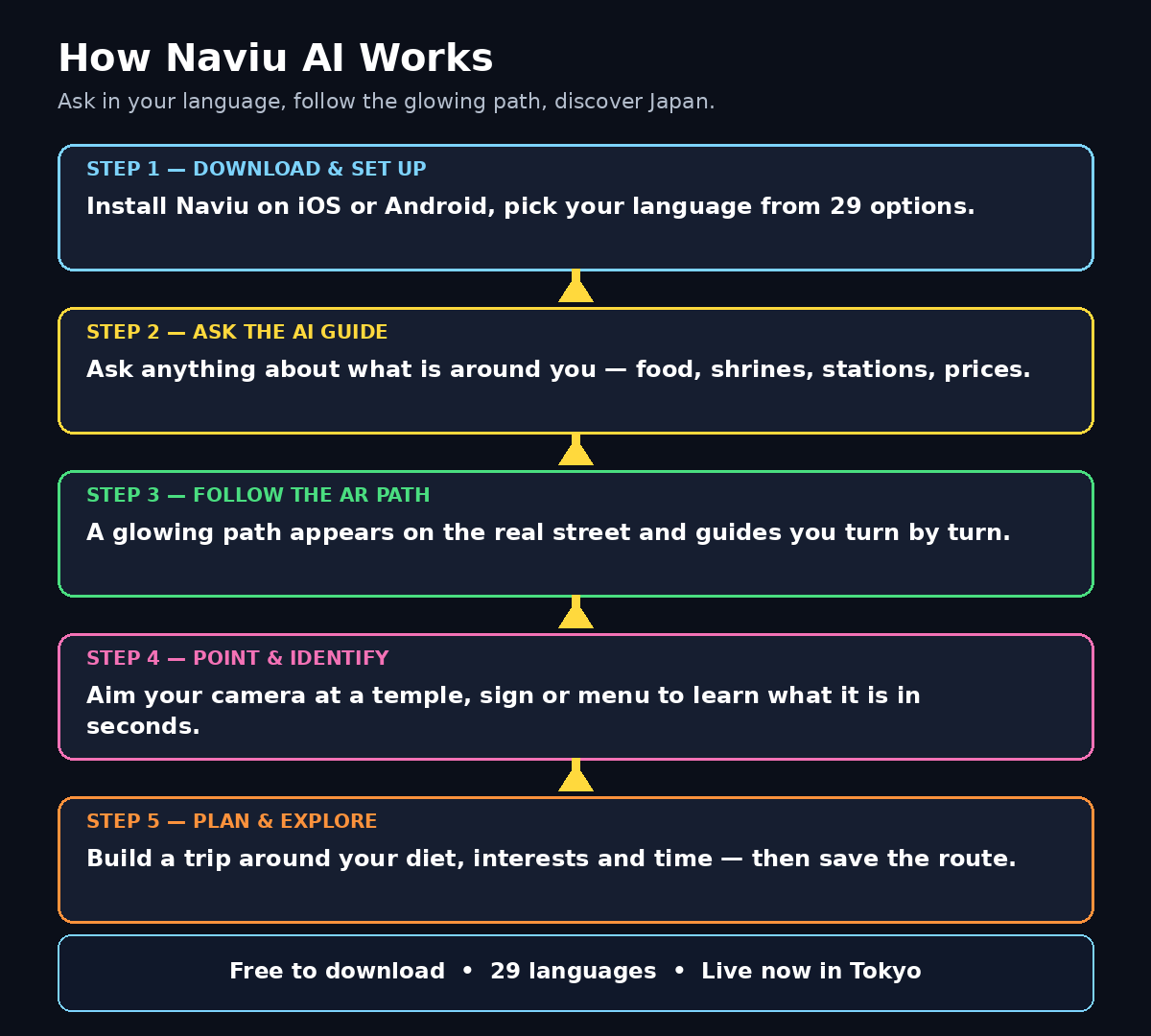
Step 6: Point Your Camera to Identify Places
Japan is full of signs, temples, shopfronts, and street details that are beautiful but unreadable if you do not know Japanese. Naviu’s photo recognition turns your camera into a translator and a tour guide at the same time.
- Open the camera feature inside the app and point it at anything that catches your eye: a temple gate, a street sign, a menu board, a shopfront.
- Tap to identify it. The AI tells you what it is, what it means, and why it matters.
- Ask a follow-up question if you want more: “What does this sign say?” or “When was this shrine built?”
This is especially useful at places like Senso-ji in Asakusa, where every gate, lantern, and statue has a story, or when you are staring at a restaurant menu with no English. Instead of guessing or walking away, you get an answer in seconds. It is also a great tool for curious travelers who want to understand what they are looking at, not just photograph it.
Step 7: Build a Bespoke Trip Plan
Most itinerary apps give you the same top-ten list everyone else gets. Naviu builds a plan around you. Tell it your interests, your dietary needs, any accessibility requirements, and how much time you have, and it creates a route that fits.
- Open the trip planner and enter your starting point and how many hours you have.
- Add your preferences: food you love or cannot eat, places you want to see, walking pace, and whether you need step-free access.
- Review the plan it suggests, then adjust anything you do not like — swap a stop, add a cafe break, or shorten the route.
- Save the plan and let the AR navigation guide you through it, stop by stop.
A half-day plan might take you from Meiji Jingu through Harajuku’s back streets to a quiet lunch spot, while a full-day plan can stretch across several neighborhoods without ever feeling rushed. Because the plan is built around your actual constraints, it is far more useful than a generic list. Travel bloggers and small tour operators can learn from this approach too — personalized, AI-assisted planning is becoming a standard expectation, and AI automation services are now helping travel and hospitality businesses build exactly this kind of tailored experience for their own customers.
Step 8: Turn On the Cultural Storytelling Companion
If you love the stories behind places, this optional mode is Naviu’s most delightful feature. The cultural storytelling companion walks with you street by street and narrates local history, legends, and everyday culture as you move.
- Enable companion mode from the main screen before you start walking.
- Choose a route — a historic neighborhood, a temple district, or a famous street — and let the companion guide you.
- Listen as it explains what you are passing: why a particular shrine matters, what a festival celebrates, or how a neighborhood got its name.
It turns a simple walk into a guided tour without the group, the flag, or the fixed schedule. Use headphones if you are walking through quiet residential streets or temple grounds, and keep the volume low enough to stay aware of your surroundings. If you are visiting with children, the storytelling mode is an easy way to keep them interested — the stories make the walk feel like an adventure rather than a march between landmarks.
Step 9: Discover Hidden Spots the Guidebooks Miss
The feature that surprised early users most is also the simplest: Naviu points out the places guidebooks skip. Because its answers are grounded in your location and local knowledge, it can surface side-street cafes, small local landmarks, and neighborhood shops that rarely appear in top-ten lists.
- When you arrive somewhere, ask “What is special about this area that tourists usually miss?”
- Follow the suggestions that sound interesting, and use AR navigation to walk there.
- At each stop, use photo recognition to learn what you are looking at.
This is how you end up in a tiny kissaten coffee shop in Jimbocho, a hidden shrine behind a shopping street, or a local market stall selling the best taiyaki in the neighborhood. It is also a reminder that the best travel moments are often unplanned — the AI is most useful when it helps you wander with confidence instead of locking you into a rigid schedule.
Step 10: Save, Share, and Revisit Your Route
A great day of exploring should not disappear when you close the app. Naviu lets you keep what you discovered.
- Save places you loved to your favorites so you can find them again tomorrow.
- Save your finished routes so you can share them with friends or repeat them on a future trip.
- Take screenshots of AR views and AI answers you want to remember — the photo recognition results make excellent travel journal entries.
If you are traveling with friends or family, share your saved route before you split up for the afternoon so everyone can find the meeting point without a dozen messages. And when you get home, your saved places become the backbone of your photo album, your blog post, or your recommendations to the next friend who visits Japan.
Naviu AI vs Other Travel Tools: A Quick Comparison
| Feature | Naviu AI | Google Maps | Printed Guidebook | Generic AI Chatbot |
|---|---|---|---|---|
| AR walking directions on real streets | Yes, city-scale | No | No | No |
| Answers in 29 languages | Yes | Limited | One language | Yes, but not location-grounded |
| Photo recognition of places and signs | Yes | Limited (Lens) | No | No |
| Personalized trip planning | Yes, by diet, interests, access | Basic | No | Yes, but generic |
| Cultural storytelling while walking | Yes | No | Yes, static text | Limited |
| Works offline | Limited | Partial | Yes | No |
| Best for | Exploring Japan on foot | Driving and transit | Pre-trip reading | General questions |
The honest summary is that Naviu does not replace Google Maps for transit or a guidebook for pre-trip reading. It shines in the specific moment of walking around Japan, curious about what is in front of you — and that is exactly the moment most travelers need the most help.
Frequently Asked Questions
Is Naviu AI really free?
Naviu is free to download on iOS and Android from the App Store and Google Play, and you can start exploring with its core AI guide and AR navigation right away. Some advanced features may involve in-app purchases, so check the app’s pricing page inside the app before your trip to see exactly what is included.
Which phones work with Naviu AI?
Naviu launched on both iOS and Android on November 1, 2026. AR features work best on newer phones with good cameras and sensors, so keep your phone’s software updated and make sure you have enough free storage before you travel.
Does Naviu AI work outside Japan?
Naviu is built specifically for Japan, with AR experiences already live at Tokyo landmarks like Senso-ji, Tokyo Skytree, Tokyo Tower, Meiji Jingu, and Tokyo Station. It is a Japan travel companion first, so use a general map or guide app for other countries.
Do I need internet to use Naviu AI?
Yes, for most features. The AI guide, AR navigation, and photo recognition need an internet connection to fetch live, location-grounded answers. Buy a local SIM or eSIM, or rent pocket Wi-Fi, before you start exploring, and download any offline maps you need as a backup.
Is Naviu AI good for first-time visitors to Japan?
Yes — it is arguably best for first-time visitors. The 29-language AI guide, AR walking paths, and photo recognition remove the three biggest worries for newcomers: the language barrier, getting lost, and not understanding what you are looking at.
Can I use Naviu AI without the AR features?
Absolutely. If you prefer a normal map view, or your phone struggles with AR, you can use the AI chat guide, the trip planner, and the saved-places features without ever turning the camera on. The app is useful with or without AR.
Final Thoughts
Naviu AI arrived on November 1, 2026 with a simple idea: exploring Japan should feel like walking with a knowledgeable local friend, not like studying a map. The ask-anything AI guide in 29 languages, the AR path drawn onto the real street, the camera that explains temples and signs, and the trip planner built around your own needs all point in the same direction — less time worrying, more time actually experiencing Japan.
The honest test is simple. Before your next trip, download Naviu from the App Store or Google Play, set your language, and take it for a walk around your hotel on day one. Ask it three questions, follow one AR path, and point the camera at one thing you do not understand. If those three small moments feel easier than your last trip, keep it in your pocket for the whole journey. For a brand-new app, that is a promising start — and for travelers heading to Japan, it is one of the most useful free AI tools of the season.
Explore More Free AI Tools
Want more free AI tools like Naviu? Try our AI Title Generator to write better headlines, our Meta Description Generator for search-friendly summaries, our AI Rewriter to polish your writing, and our Keyword Density Checker to keep your content SEO-ready. Visit AIToolSteps.com to explore them all — free, no sign-up needed.