

Imagine opening a browser tab, pressing a few keys, and walking through a world that does not exist yet — a neon cyberpunk street, a frozen fortress, or the Stanford Quad — while an AI builds every step in front of you in real time. That is exactly what Frameboy AI does. Released by World Labs on November 5, 2026, Frameboy is a free research preview that lets anyone explore AI-generated 3D worlds directly in the browser, no download and no game engine required. In this beginner guide, you will learn how to use Frameboy AI step by step: how to open it, pick a scene, steer the camera with your keyboard, and join the Viewfinder waitlist so you can one day build worlds of your own.
Step 1: Understand What Frameboy AI Actually Is
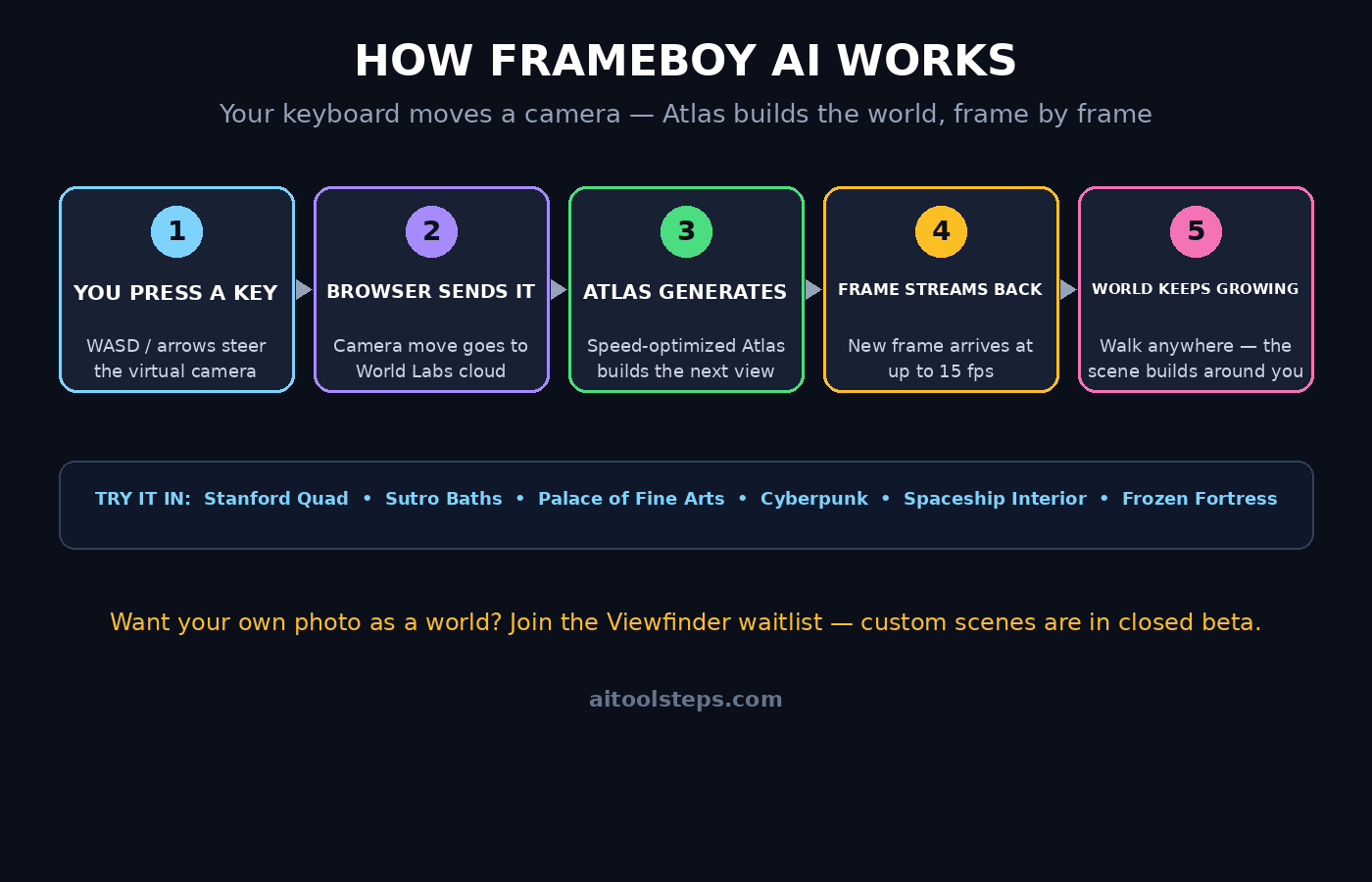
Frameboy AI is a browser demo from World Labs, the AI company founded by Fei-Fei Li, one of the pioneers of modern computer vision. It runs a speed-optimized version of Atlas, World Labs’ world model, on powerful cloud GPUs and streams the generated frames to your browser at up to 15 frames per second. You control a virtual camera with your keyboard, and Atlas generates each new view the moment you move.
The big idea is simple: until now, AI video tools asked you to type a prompt, wait, and watch a finished clip. Frameboy flips that around. The world is generated continuously, inside the navigation loop, so you can change direction at any moment and the scene keeps building around you. It feels less like watching a video and more like playing a handheld game — the name itself is a nod to that Game Boy-style spirit. The public demo is free to try, and it works in an ordinary browser tab, which is why it is such a good first taste of world models for beginners.
Step 2: How Atlas Turns One Image Into a Walkable World
To use Frameboy well, it helps to know what is happening behind the screen. Atlas is what World Labs calls an omni world model. It was introduced on September 1, 2026, and it was pretrained from scratch to understand text, images, video, and 3D together. Given a single photo, Atlas can complete the unseen parts of a scene and generate new viewpoints of it — a process called novel view synthesis.
What makes Atlas different from a normal video generator is that it does not only output pixels. Alongside each frame it produces depth maps, point clouds, and 3D Gaussian splats, which is what lets Frameboy treat a generated scene as a real space you can move through instead of a flat clip you watch. Atlas can also generate up to one minute of 1440p video with precise camera control, but Frameboy trades that slow, high-quality rendering for speed: a leaner version of the model that answers your camera movements almost instantly. That speed is the whole point of the demo.
Step 3: Open Frameboy in Your Browser (No Download Needed)
Getting started takes less than a minute, because there is nothing to install:
- Open your browser. Use a modern desktop browser such as Chrome or Edge on a stable internet connection. Frameboy streams video frames from the cloud, so a fast connection matters more than a powerful computer.
- Go to the Frameboy demo. Search for “World Labs Frameboy” or open the link from World Labs’ official announcement and blog post about Atlas real-time exploration.
- Wait for the stream to connect. The demo connects to a cloud GPU server before the first scene appears. Give it a few seconds — the first frame is the slowest one.
- Allow the page to stay in focus. Keyboard controls only work while the browser tab is active, so click once inside the scene window before you start moving.
There is no account, no sign-up, and no credit card for the public demo. If the page feels slow on your first visit, try closing other heavy tabs, because the stream competes with everything else your browser is doing. A digital agency testing Frameboy for client demos would do the same: a clean browser, a wired or strong Wi-Fi connection, and no background video calls fighting for bandwidth.
Step 4: Pick Your First Scene
The public version of Frameboy only lets you explore preset scenes chosen by World Labs — you cannot upload your own photo yet. That is actually good news for beginners, because the curated scenes are designed to show off different strengths of the model. The launch menu includes Stanford Quad, Sutro Baths, Palace of Fine Arts, Cyberpunk, Spaceship Interior, and Frozen Fortress.
For your first run, start with Stanford Quad or Palace of Fine Arts. Real-world places are the easiest to judge: you can tell at a glance when a wall, a staircase, or a tree looks right, and you will notice how well the world stays consistent as you move. Save Cyberpunk and Frozen Fortress for your second run — imaginary scenes are more forgiving, but they also show you how Atlas invents details that were never in any photo. Spend two or three minutes in each scene before switching, because the model needs a few frames to settle into a stable, believable space.
Step 5: Steer the Camera with Your Keyboard
Frameboy is controlled with the keyboard, like a simple video game. The exact keys are shown on the demo page, but the pattern will feel familiar to anyone who has played a PC game:
- Move forward, back, and sideways with the WASD keys or the arrow keys. Short taps give you small, careful steps; holding a key down moves you in a smooth glide.
- Look around by moving the mouse or using the look keys, so you can turn your head without walking in a new direction.
- Move slowly on purpose. Because frames arrive at up to 15 per second, fast spins and sudden turns make the world blur and rebuild. Gentle, deliberate movement keeps the scene sharp and stable.
- Pause and look. Stop moving for a few seconds and study one view. The model keeps refining the current frame, so a still camera often looks noticeably better than a moving one.
Think of it like filming with a slow camera: smooth pans, slow walks, and planned stops. If a view ever collapses into something strange, just back up a few steps — Atlas usually rebuilds the scene cleanly once you return to a viewpoint it has already generated.
Step 6: Explore Each Scene Like a Film Scout
Once you can move, try exploring with a purpose. World Labs itself lists virtual film scouting among the uses for Atlas, and Frameboy is a surprisingly good way to practice it for free:
- Find a hero shot. Walk until you find one angle that could be a movie poster — a corridor leading to light, a statue framed by arches, a street disappearing into neon fog — then stop and study it.
- Test the edges. Walk toward a wall or a corner and watch how the model fills in what you cannot see yet. This is where you learn what world models can and cannot do.
- Compare real and imagined places. A real location like Sutro Baths should feel grounded and consistent. A fantasy scene like Frozen Fortress will surprise you with invented detail — beautiful, but less predictable.
- Take notes or screenshots. Save the angles you like. If you later get Viewfinder access, those notes become the starting point for the worlds you build yourself.
Teams that work with AI automation services are already watching tools like Frameboy closely, because a world model that can scout a location before a single camera is hired changes how pre-production is planned. For now, though, the best use of your first session is simply to learn the feel of it.
Step 7: Join the Viewfinder Waitlist to Build Your Own Worlds
Exploring preset scenes is only half the story. The other half is Viewfinder, World Labs’ closed-beta web app, where you build scenes frame by frame from your own inputs and then explore them in real time with the same Frameboy streaming. Viewfinder is currently available only through a waitlist, but joining it is the single most useful step a beginner can take today:
- Find the Atlas beta sign-up. Look for the Atlas beta or Viewfinder waitlist link on World Labs’ official site or announcement posts.
- Sign up with an email you actually check. Beta access is rolling out in waves, and invitations can sit unnoticed in a crowded inbox.
- Prepare one good starting image. Viewfinder builds from your uploads, so pick a clear, well-lit photo of a place with visible depth — a street, a room, a garden — rather than a flat or blurry shot.
- While you wait, practice in Frameboy. Every hour you spend learning how the camera behaves in the preset scenes makes your first Viewfinder build dramatically better.
Until your invitation arrives, remember the boundary: the public Frameboy demo explores only World Labs’ own scenes. Anyone promising a download that lets you upload photos into Frameboy today is not describing the official tool.
Step 8: Use Frameboy for Real Work, Not Just Fun
Frameboy is a research preview, not a finished product, but it already points at serious uses. World Labs lists location exploration, virtual film scouting, construction-site inspection, game-level development, and robot simulation as applications for Atlas, and you can try the thinking behind each one in the demo:
- Game developers can walk a level idea before a single 3D artist is hired, testing whether a space feels open, cramped, or confusing.
- Filmmakers can scout angles in a place they cannot visit, checking light, framing, and sightlines from a browser.
- Architects and site teams can imagine walking a space that only exists as a photo or a plan, and spotting problems early.
- Robotics teams can test how a robot might see and move through a generated environment before touching the real world.
- Teachers and students can simply show a class what a world model is — no code, no install, just a keyboard and a browser.
None of these replace professional tools yet, but they are the reason Frameboy matters beyond the novelty. The demo is a preview of a workflow, and beginners who learn it now will recognize it everywhere in a year or two.
Step 9: Work Around the 15 FPS Limit
The honest weakness of Frameboy is speed. The stream tops out at about 15 frames per second, far below the 60 frames a modern game delivers, and World Labs is open about the reason: every frame is generated by a powerful cloud GPU, which is expensive compared with local rendering. Here is how to get the best experience anyway:
- Move slowly and smoothly. Fast camera moves expose the frame rate; slow moves hide it almost completely.
- Use a wired or strong Wi-Fi connection. A weak connection adds lag on top of the generation time, and the two problems multiply.
- Keep the scene simple. Open, uncluttered views render more cleanly than dense crowds of detail.
- Accept the demo for what it is. Frameboy is a research preview proving that a world model can run inside an interactive loop. The frame rate will improve as hardware and software get faster and cheaper — World Labs says so itself — but today, patience is part of the tool.
Step 10: Know the Limits Before You Rely on It
A good beginner guide is honest about limits, so here are the ones that matter most. First, the public demo has no custom uploads: only the preset scenes work until Viewfinder opens up. Second, the worlds are generated, not measured — geometry can drift, objects can melt or duplicate, and a beautiful corridor can quietly become a different corridor if you wander too far. Third, the cost is real: World Labs says Frameboy needs a serious cloud GPU server and is “not cheap compared with local rendering methods,” which is why the demo is a preview rather than a product with a price list. Finally, features and access can change quickly. Frameboy arrived on November 5, 2026, just weeks after AMD agreed in September to acquire World Labs in an all-stock deal valued at about $8.2 billion, expected to close by the end of 2026 — so expect fast changes, new scenes, and shifting access as the company grows. Check the official World Labs pages for the latest status before you plan any serious work around it.
Frameboy AI vs Atlas vs Viewfinder: A Quick Comparison
| Tool | What it does | Who can use it | Best for beginners? |
|---|---|---|---|
| Frameboy | Streams Atlas worlds to your browser in real time (up to 15 fps) with keyboard camera control | Anyone — free public demo, preset scenes only | Yes — the easiest way to try a world model |
| Atlas | The underlying world model; generates up to 1 minute of 1440p video with camera control, plus depth and 3D data | Early access with select partners | Not yet — partner access only |
| Viewfinder | Build explorable scenes from your own images, then walk them in real time | Closed beta via waitlist | Soon — join the waitlist now |
| Traditional game engine | Renders hand-built 3D worlds locally at 60+ fps | Anyone with the software and skills | No — needs 3D modelling skills |
Frequently Asked Questions About Frameboy AI
Is Frameboy AI free to use?
Yes. The public Frameboy demo is free to try in your browser, with no account or download. It is a research preview, so access and features may change, but there is no payment step to start exploring the preset scenes.
Do I need a powerful computer to use Frameboy AI?
No. The heavy work runs on World Labs’ cloud GPUs, not your machine. What you need is a modern browser and a stable, reasonably fast internet connection, because the generated frames are streamed to you like video.
Can I upload my own photo and explore it in Frameboy?
Not in the public demo — it only offers preset scenes such as Stanford Quad, Cyberpunk, and Frozen Fortress. Uploading your own images is part of Viewfinder, the closed-beta app, which you can join through the Atlas beta waitlist.
Why does Frameboy run at only 15 frames per second?
Every frame is generated live by a large AI model on cloud GPUs, which is much slower and more expensive than drawing a pre-built 3D scene on your own graphics card. World Labs says faster hardware and software should improve this over time.
What is the difference between Frameboy and Atlas?
Atlas is the world model itself — the AI that generates scenes, depth, and 3D data. Frameboy is a fast, interactive demo built on a speed-optimized version of Atlas, designed for real-time exploration in the browser instead of slow, high-quality video rendering.
Is Frameboy AI good for beginners?
Yes, it is one of the friendliest ways to experience a world model. There is nothing to install, no prompt engineering to learn, and the keyboard controls feel like a simple game. If you can move a character in a video game, you can explore Frameboy.
Final Thoughts
Frameboy AI is a small demo with a large message: AI is moving from generating pictures and clips to generating places you can walk through. At 15 frames per second, with preset scenes and a waitlist for custom worlds, it is clearly an early preview — but it is also free, instant, and genuinely fun to use, and it teaches you more about world models in ten minutes than an hour of reading about them. Open the demo, pick Stanford Quad, move slowly, and pay attention to how the world rebuilds itself around you. Then join the Viewfinder waitlist, because the moment you can build a world from your own photo and walk through it live, this technology stops being a demo and starts being a tool. If you want more beginner-friendly guides like this one, keep exploring AI Tool Steps — including our guide to Quest AI, another brand-new AI assistant that launched on Product Hunt in November 2026.
Explore More Free AI Tools
Enjoyed this guide? Try more free AI tools on AI Tool Steps: the AI Title Generator, Meta Description Generator, AI Rewriter, and Keyword Density Checker — all free, right on the homepage.