

In this guide on how to use Dessa AI, imagine talking to an AI that does not wait politely for you to finish, turn your words into text, and then read out a reply. Instead, it listens while it talks, laughs at the right moment, says “yeah, got it” while you are still speaking, and changes its tone when your voice changes. That is the promise of Dessa AI, the new speech-only voice model unveiled by Block on October 23, 2026.
Dessa AI is different from every voice assistant you have used so far. Most voice assistants work in three steps: speech to text, text to an answer, and text back to speech. Each step loses something — the pause, the laugh, the sarcasm, the emotion in your voice. Dessa skips the text steps entirely. It takes audio in and gives audio out, learning language the way a child does: by listening to real human conversation.
There is one honest catch you should know before anything else: Dessa AI is a research preview, not a public app you can download today. Early access is going to a small group of AI safety researchers first, and everyone else joins a public waitlist. So this guide shows you exactly how to use Dessa AI in the way that is possible right now — join the waitlist, study the official demos, understand how full-duplex voice works, and get ready so you are first in line when access opens. If you follow the steps below, you will know more about Dessa than almost anyone else waiting for it.
Step 1: Understand What Dessa AI Actually Is
Dessa AI is a full-duplex speech-to-speech model built by a small AI research lab inside Block, the company behind Square and Cash App. The lab was founded by former members of Dessa, a Toronto deep-learning startup, and is led by Ragavan Thurairatnam, reporting directly to Block co-founder Jack Dorsey.
Here is what makes it special:
- Speech only, from scratch. Block says Dessa was trained from scratch on nothing but recorded human conversation — no text data and no pretrained language model underneath it.
- Full-duplex conversation. It listens and talks at the same time, just like a person does. You can interrupt it, and it can interrupt you.
- Real emotion and timing. Block says it hears and produces emotion, sarcasm, laughter, sighs, and even a voice cracking with sadness, because those things live in real conversations, not in text transcripts.
- Faster than real time. Block says inference runs faster than real time, so replies arrive without the awkward pause you get from many voice assistants.
- Runs locally. Block says Dessa runs locally on a MacBook Pro with an M4 Max chip or better, rather than only in a distant data center.
Dorsey called it “the most authentic full-duplex speech model ever built” and said talking with it “feels like talking with a person, full of emotion, nuance, pauses, and a natural cadence.” Thurairatnam called the release “a GPT-3 moment for speech.” Those are big claims, and Block has not yet published benchmarks, a parameter count, or a paper to back them up — so treat them as the company’s claims for now, and judge the demo recordings for yourself in Step 3.
Step 2: How to Use Dessa AI — Join the Waitlist
Since Dessa is not publicly available yet, learning how to use Dessa AI starts with joining the waitlist, the single most important step you can take today, and it costs nothing.
- Open Block’s official Dessa page in your browser and look for the waitlist sign-up. Only use the official Block page — copycat sites and fake “Dessa apps” will appear quickly around any hyped launch, and none of them are real.
- Enter the email address you actually check. If Block opens access in waves, this is the address they will contact.
- If the form asks what you do or why you want access, answer honestly and briefly. Early access is currently going to AI safety researchers, so a clear, honest description of your interest helps, but do not exaggerate your background.
- Save a screenshot or note of your sign-up confirmation, and check your spam folder for any confirmation email in the days after you join.
- Do not pay anyone for “early Dessa access.” Block has announced no pricing, no paid tier, and no reseller program. Anyone selling access is running a scam.
Joining a waitlist is free, takes two minutes, and puts you in the queue the moment Block widens access. It is also the step most people skip while waiting for a launch — do not be one of them.
Step 3: Listen to the Official Demo Recordings
While you wait, the best way to “use” Dessa is to study what it already does in Block’s demo recordings. Block says these conversations were recorded live, with subtitles added afterwards, and they show the skills that make Dessa different.
In the demos, Dessa:
- Laughs in the middle of a sentence at something funny.
- Gasps at an emotional moment in a story.
- Finishes a speaker’s sentence during a movie-title guessing game.
- Changes its volume when asked to speak more quietly.
- Backchannels with short responses like “yeah” and “got it” while the other person is still talking.
Watch each demo twice. The first time, just enjoy how natural it sounds. The second time, listen for the details that text-based assistants lose: the timing of the laugh, the pause before an answer, the way it handles being interrupted. Those details are the whole point of Dessa, and noticing them will help you have much better conversations with it once you get access.
One demo also showed an awkward moment — the model once mistook a speaker for someone named “Ronaldo.” That is a useful reminder: Dessa is a research preview, and it will make mistakes. Expect rough edges, not perfection.
Step 4: Learn How Full-Duplex Voice Works
To use Dessa well, you need to unlearn how you talk to today’s voice assistants. With Alexa, Siri, or a chatbot voice mode, you speak, wait, and then listen. With a full-duplex model like Dessa, the conversation flows more like a phone call with a friend.
Here is the difference in plain language:
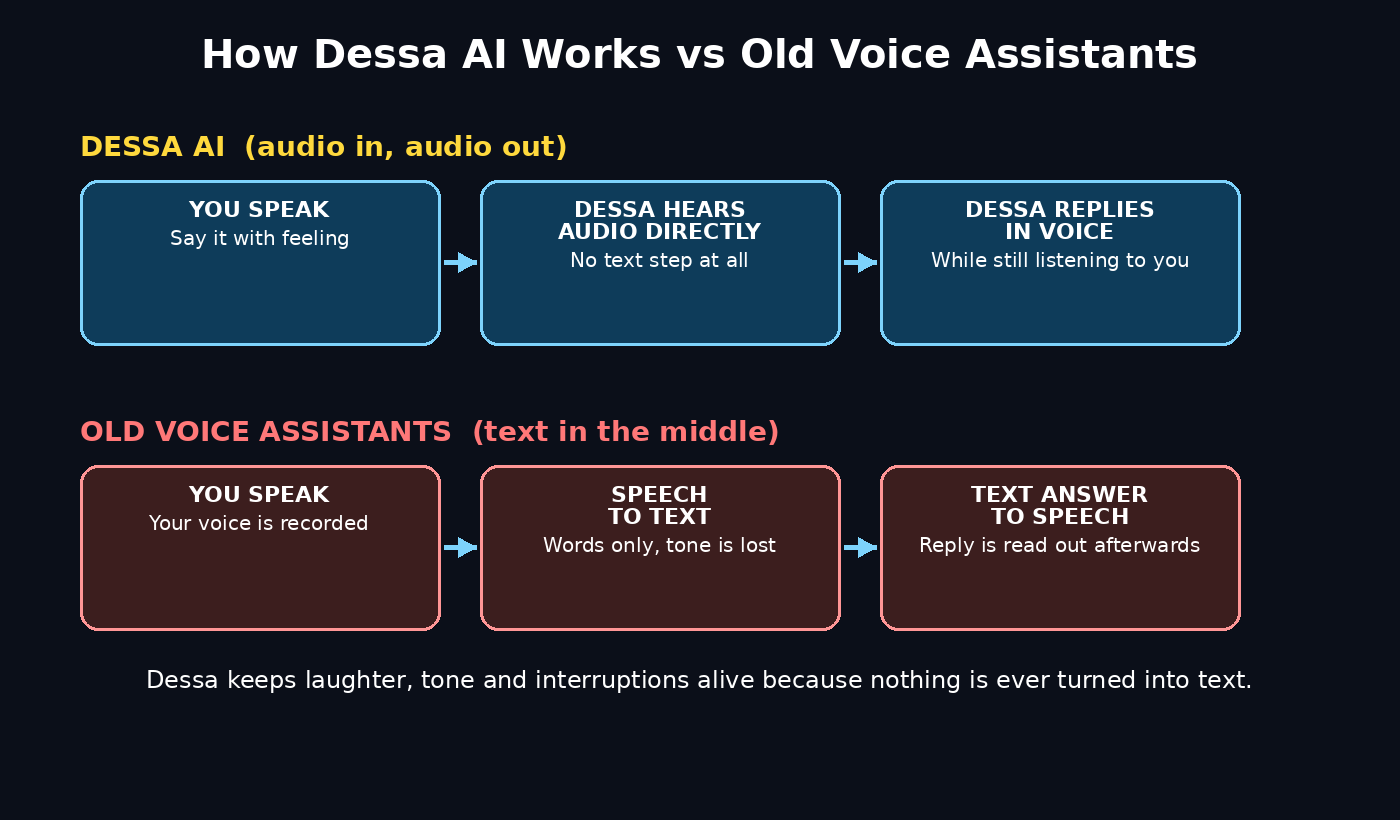
- Old voice assistants: You speak → your speech becomes text → a language model writes an answer → the answer becomes speech → you hear it. Emotion and timing are lost at every step.
- Dessa: You speak → Dessa hears the audio itself and replies in audio, while still listening. Laughter, tone, interruptions, and pauses all survive, because nothing is ever turned into text.
That means three practical changes for you:
- You can interrupt. If Dessa is going in the wrong direction, just start talking. You do not have to wait for it to finish or say a wake word.
- You can backchannel. Short sounds like “mm-hmm” and “yeah” work the way they do with a person — they tell Dessa you are following along.
- Your tone matters. Speak the way you want Dessa to respond. A calm, clear voice gets a calm, clear reply; an excited story gets an excited reaction.
This is also why Dessa could matter for accessibility and for people who prefer talking over typing. A voice-first model that understands tone could one day help with language practice, customer support, and hands-free work in ways a text chatbot never will.
Step 5: Prepare Your Setup While You Wait
Block says Dessa runs locally on a MacBook Pro with an M4 Max chip or better. You do not need that hardware to join the waitlist, but if you want to be ready for local use, here is how to prepare:
- Check your device. If you have a MacBook Pro with an M4 Max chip or better, you already meet the hardware Block describes. If not, do not buy a new laptop for a research preview — Block may later offer a cloud version, and early access is limited anyway.
- Use a good microphone. A decent headset or USB microphone makes a huge difference for any voice AI. Background noise, echo, and a far-away laptop mic all make conversations harder.
- Find a quiet room. Voice models work best in a quiet space, especially when they are listening for interruptions and emotion. A noisy cafe is the worst place to test a new voice model.
- Keep your software updated. When Block opens access, it will likely come with a Mac app or a web page. An up-to-date browser and operating system will save you troubleshooting later.
- Set up a dedicated email folder. Create a folder or label for Dessa and Block emails so an access invitation never gets buried under newsletters.
None of this costs money, and all of it makes your first Dessa conversation better when your turn comes.
Step 6: How to Use Dessa AI in Your First Conversation
When you get access, knowing how to use Dessa AI well means not wasting your first conversation on “tell me a joke.” Plan a short test that shows off what Dessa does best:
- Start with a story, not a question. Tell Dessa about something that happened to you today, with some feeling in your voice. See whether it reacts to your tone, not just your words.
- Interrupt it on purpose. Halfway through one of its answers, jump in with a correction or a new thought, and notice how smoothly it handles the interruption.
- Try an emotion test. Tell a happy story, then a frustrating one, and listen for whether its tone changes to match yours.
- Play a guessing game. The movie-title game from the demos is a great test, because it needs fast back-and-forth, laughter, and interruptions — exactly what full-duplex voice is for.
- Ask it to change its style. Try “speak more quietly,” “slow down a little,” or “sound more excited,” and see how it adjusts its voice in real time.
Write down what worked and what felt awkward. Research previews improve fastest when early users give clear feedback, and your notes will also help you decide whether Dessa is worth using every day once it launches properly.
Step 7: Explore What Dessa Could Be Used For
Dessa is a research model, not a finished product, so its real uses are still being discovered. But the demos already point to several exciting directions:
- Language practice. A voice partner that reacts to your tone and corrects you naturally could be far better than repeating phrases into an app.
- Storytelling and games. Guessing games, roleplay, and interactive stories all benefit from interruptions, laughter, and timing.
- Accessibility. People who find typing difficult could hold full conversations with an AI that truly listens.
- Customer support and companionship. A voice assistant that sounds genuinely attentive could change how companies and individuals use voice AI — though this is also where safety matters most, as we cover in Step 8.
- Creative work. Writers, podcasters, and video creators could brainstorm out loud with a partner that reacts in real time.
For small businesses and creators, the bigger lesson is about where voice AI is heading. Teams that build with voice — from a digital agency exploring AI-powered customer experiences to independent creators testing new formats — will want to watch Dessa closely, because a model trained only on speech could open up products that text-based assistants cannot build. Likewise, anyone following how AI agents are reshaping work can find useful context on AI automation services and how agent-style tools are moving from chat windows into real-time voice.
Step 8: Stay Safe With Ultra-Realistic Voice AI
Dessa’s greatest strength is also its biggest risk: a voice that sounds this human could be misused. CoinDesk and other coverage of the launch noted that reactions split between amazement and worry, with fraud watchers warning that voices this realistic could make phone scams harder to detect. Here is how to stay safe:
- Never trust a voice alone. If someone calls claiming to be a family member, a bank, or a colleague, verify through a second channel before sending money or sharing codes — no matter how real the voice sounds.
- Set a family code word. Agree on a secret word with close family members for emergencies. A real family member will know it; an AI clone will not.
- Do not share sensitive audio. Avoid sending voice samples, voicemail greetings, or long recordings of your voice to untrusted sites or apps.
- Be careful with Dessa demos. If you share a clip of Dessa, label it clearly as AI-generated so nobody mistakes it for a real person.
- Report misuse. If you see Dessa’s voice used to impersonate someone, report it to the platform and to Block.
Block is starting with safety researchers for exactly this reason — to find risks it has not anticipated before a wider release. As a beginner, the safest approach is simple: enjoy the technology, label AI audio honestly, and never let a voice alone convince you to act on money or personal data.
Step 9: Compare Dessa With Other Voice AIs
It helps to place Dessa next to the voice tools you may already know:
| Feature | Dessa AI | Typical Voice Assistants | Chatbot Voice Modes |
|---|---|---|---|
| How it works | Audio in, audio out — no text step | Speech → text → answer → speech | Usually speech → text → model → speech |
| Interruptions | Yes, full-duplex listening | Mostly no, wait your turn | Limited |
| Emotion and tone | Hears and speaks emotion, laughter, sarcasm | Limited, often flat | Some, but filtered through text |
| Training data | Human conversation audio only | Text plus speech data | Mostly text models |
| Runs locally | MacBook Pro M4 Max or better (per Block) | Usually cloud-based | Usually cloud-based |
| Availability | Research preview + waitlist | Public apps | Public apps |
| Price | Not announced | Free with device or app | Free tiers available |
The honest verdict for anyone learning how to use Dessa AI: Dessa is the most interesting voice model of 2026, but it is also the least available. If you need a voice assistant today, use the tools you already have. If you want to be ready for the next generation of voice AI, join the Dessa waitlist and keep learning.
Step 10: What to Do While You Wait for Access
While you learn how to use Dessa AI, waiting does not have to be passive. Here is a simple weekly routine:
- Check your email once a week for a Dessa invitation, including the spam folder.
- Rewatch a demo and note one new detail you missed before.
- Try a voice feature you already own — your phone’s voice assistant or a chatbot’s voice mode — and practice speaking naturally, interrupting, and using tone. Those habits transfer directly to Dessa.
- Follow Block’s official updates only. Ignore rumor accounts claiming release dates or leaked downloads.
- Learn one related skill. Voice AI, prompting, and audio basics will all be more valuable as models like Dessa reach the public.
When your invitation arrives, you will already know how Dessa works, what to test first, and how to use it safely — while most new users are still figuring out the basics.
How to Use Dessa AI: Frequently Asked Questions
Is Dessa AI free?
Block has not announced any pricing for Dessa. Joining the public waitlist is free, and early access is currently going to a small group of AI safety researchers. Do not pay any third party for access, because Block has announced no paid tier or reseller program.
When will Dessa AI be available to everyone?
Block has not given a public release date. Dessa was unveiled as a research preview on October 23, 2026, with early access for safety researchers first and a public waitlist alongside it. Wider availability will depend on what the safety testing finds.
How is Dessa AI different from ChatGPT voice mode or Siri?
Most voice assistants convert your speech to text, generate a text answer, and convert it back to speech. Dessa skips the text steps: it listens to audio and replies in audio, while still listening. That is why it can interrupt, laugh mid-sentence, and react to your tone in real time.
What devices can run Dessa AI?
Block says Dessa runs locally on a MacBook Pro with an M4 Max chip or better, with inference faster than real time. No other devices, apps, or system requirements have been announced yet.
Is Dessa AI safe to use?
As a research preview, Dessa is being tested by safety researchers before wider release, which is a good sign. The main risk is not the model itself but misuse: ultra-realistic voices could be used for scams or impersonation. Never trust a voice alone for money or sensitive information, and always label AI-generated audio clearly.
Can Dessa AI speak languages other than English?
Block has not announced language support for Dessa. Its training on human conversation suggests other languages are possible in the future, but for now, assume English demos are the only confirmed use case and wait for official announcements.
Final Thoughts: How to Use Dessa AI
Learning how to use Dessa AI is a glimpse of where voice AI is going: away from text in the middle, and toward conversations that feel genuinely human. It is not an app you can download today, and anyone telling you otherwise is not being honest. But the steps in this guide — joining the waitlist, studying the demos, understanding full-duplex voice, preparing your setup, and staying safe — are real, free, and useful right now.
The most exciting part is not the technology alone. It is what happens when voice AI stops sounding like a machine reading a script and starts sounding like a person in the room. Dessa may be the first model to get close, and by the time your invitation arrives, you will be ready to have a real conversation with it.
Explore More Free AI Tools
Want to keep learning? Try these free tools from AIToolSteps: the AI Title Generator, Meta Description Generator, AI Rewriter, and Keyword Density Checker — all available at https://aitoolsteps.com/. They are perfect companions while you explore new AI tools like Dessa, helping you write better titles, descriptions, and content for your own projects.