

You publish a new blog post, share it everywhere, and then wait. Days pass, and Google still has not shown it in search results. That waiting is not just annoying — it costs you traffic, because a page Google has not indexed cannot rank, no matter how good it is. Traditionally you would open Google Search Console, paste the URL, and request indexing by hand, one page at a time. It works, but it is slow, and it breaks down completely when you publish dozens of pages or build backlinks every week.
That is the exact problem the Rapid Indexer MCP Server was launched to solve. Announced on October 25, 2026, it connects Rapid Indexer’s Google indexing engine directly to AI agents through the Model Context Protocol, or MCP. In plain words, instead of logging into a dashboard and submitting URLs yourself, your AI agent does it for you — inside the same conversation where you are already working. You ask it to submit a page, it sends the URL to Googlebot within seconds, and later it can check whether that page has actually been picked up.
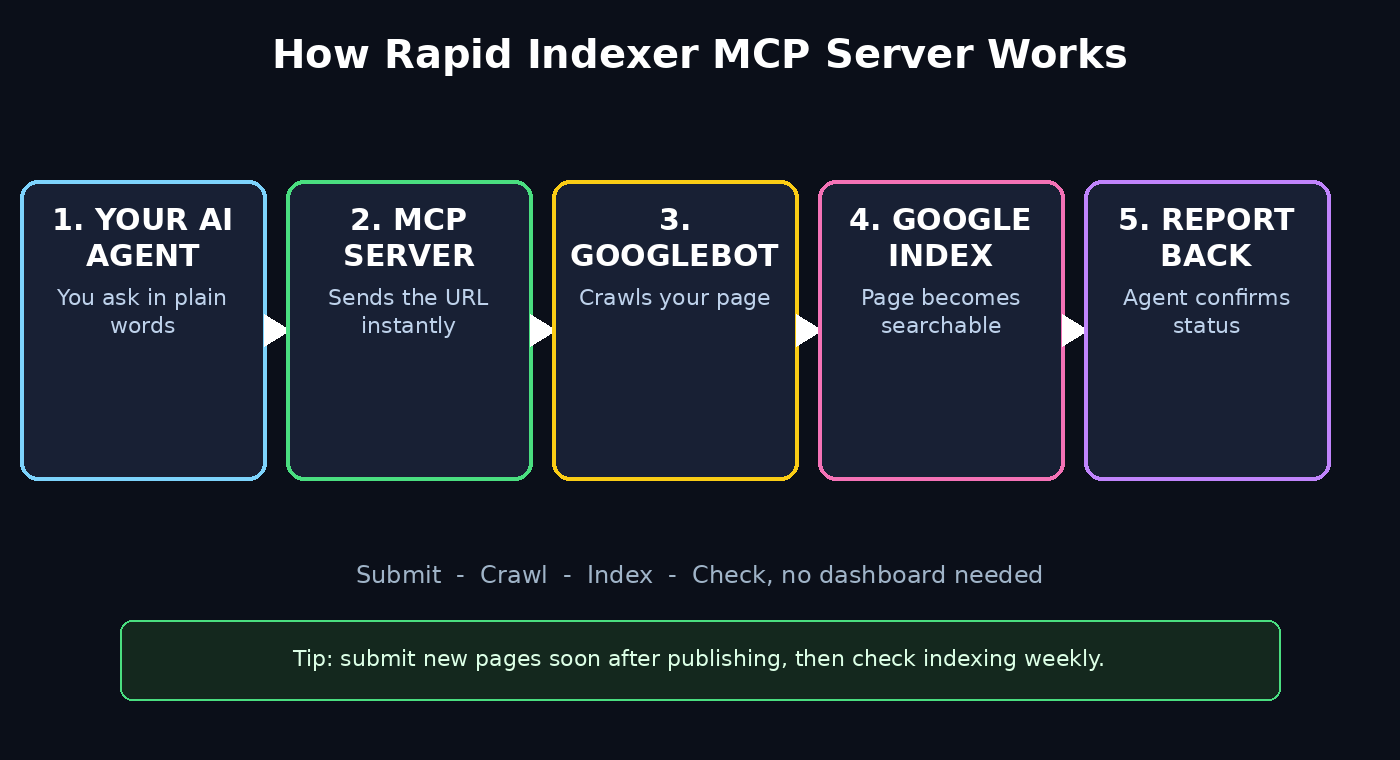
In this beginner-friendly guide, you will learn how to use Rapid Indexer MCP Server step by step, from understanding what MCP really means to submitting your first page, checking its indexing status, and building a simple automated workflow that keeps your new content and backlinks moving into Google without daily manual work.
Step 1: Understand What the Rapid Indexer MCP Server Actually Is
Before you connect anything, it helps to understand the two pieces in the name. Rapid Indexer is an indexing service: its job is to get Googlebot to crawl your URLs faster than it would on its own. The MCP Server part is the delivery method. MCP, the Model Context Protocol, is an open standard that lets AI tools and agents talk to outside services in a structured way — the agent sends a request, the server performs an action, and the result comes back into the conversation.
Put together, the Rapid Indexer MCP Server means there is no dashboard to log into and no list of URLs to copy and paste. It works inside MCP-ready apps, and the examples given at launch include Grok Bot, Muse, and Dots. You stay in your agent, you give it a URL in plain words, and the server handles the submission behind the scenes. That is the whole shift: indexing stops being a separate chore you remember to do, and becomes something your agent does as part of publishing.
For a beginner, the most important thing to grasp is what this tool does not do. It does not write your content, it does not build backlinks for you, and it does not guarantee that Google will rank a page highly. Ranking still depends on content quality, relevance, and authority. What it does is shorten the first step — getting Googlebot to actually visit the page — so good content gets its chance to rank sooner.
Step 2: Pick an MCP-Ready App for Rapid Indexer MCP Server
The server lives inside an MCP-ready app, so your first real decision is simply which app to use. If you already chat with an AI agent every day, start there, because learning a brand-new app just for indexing will slow you down for no benefit.
- Check whether your agent or app supports MCP servers or MCP tools. Look in its settings, integrations, or tools menu for “MCP” or “Model Context Protocol”.
- If you use one of the apps named at launch — Grok Bot, Muse, or Dots — you are in the group the tool was built for first.
- If your current app does not support MCP yet, do not force it. Pick one MCP-ready app for indexing tasks and keep your main writing workflow where it is.
- Keep a note of which app you chose, because every later step in this guide happens inside that app, not on a separate website.
Beginners often worry they need a developer to set this up. You do not. Connecting an MCP server is closer to adding a plugin than writing code: you point the app at the server, confirm the connection, and the new tools appear in your agent’s toolkit. If the setup screen asks for technical details you do not recognise, stop and read the provider’s own setup guide for your app rather than guessing — a wrong endpoint wastes more time than a five-minute read.
Step 3: Connect Rapid Indexer MCP Server to Your Agent
Now connect the server itself. The exact clicks differ slightly between apps, but the pattern is the same everywhere, and following it in order avoids the most common beginner mistake: adding the server but never actually enabling it for the agent.
- Open your MCP-ready app and go to its MCP servers, tools, or integrations section.
- Add the Rapid Indexer MCP Server using the connection details provided by Rapid Indexer for your app.
- Save the connection, then restart or refresh the agent session if your app asks you to — some apps only load new tools on a fresh session.
- Test the connection before you submit anything real: ask your agent what indexing tools it now has available, and confirm it lists the Rapid Indexer tools.
- If the tools do not appear, check two things first: that the server is switched on (not just added), and that you are in a session or workspace where MCP tools are allowed.
Once the connection works, you will notice something important: there is still no dashboard to log into for everyday use. That is by design. Your agent is the interface. You will submit, check, and manage indexing by talking to it, which is exactly what makes the workflow fast once it is set up.
Step 4: Prepare a Clean URL List for Rapid Indexer MCP Server
Speed is only useful if you submit the right pages, so spend a few minutes preparing your list before your first submission. Submitting the wrong URLs — duplicates, broken links, or pages you meant to keep private — creates cleanup work that wipes out the time you saved.
- List only live, public pages you want Google to index: new blog posts, new landing pages, and updated pages with genuinely new content.
- Use the full URL, including https://, exactly as visitors see it. A shortened link or a preview URL will not help Google find the real page.
- Leave out login pages, admin pages, thank-you pages, draft previews, and anything blocked by robots.txt or a noindex tag — indexing tools cannot override those settings, and submitting them is wasted effort.
- Check each URL in a browser first. If it shows an error, fix the page before you submit it, because asking Googlebot to crawl a broken page helps nobody.
- Group your list by job: new pages in one group, backlink targets in another. This makes the next two steps, and your later reporting, much easier to follow.
A good beginner habit is to keep this list in a simple document next to your publishing checklist. Every time you publish a post, add its URL to the list, submit it through the agent, and tick it off. That small discipline is what turns a clever new tool into a reliable routine.
Step 5: Submit a New Page and Confirm Googlebot Was Asked
This is the core action, and it is deliberately simple. You are not uploading a file or filling in a form — you are asking your agent to do one job with one URL.
- In your MCP-ready app, tell your agent plainly what you want, for example: “Submit this new page to Rapid Indexer for Google indexing: https://aitoolsteps.com/how-to-use-rapid-indexer-mcp-server-for-beginners/” — replacing that example with your own URL.
- Wait for the agent’s confirmation reply. It should tell you the submission was accepted, not just that it heard you.
- Save that confirmation alongside your URL list, with the date. If a page later takes a long time to appear, this record is how you prove it was submitted and when.
- Submit new pages soon after publishing, while the content is fresh. The launch announcement specifically highlights that an agent can submit new pages to Googlebot seconds after publishing them, and that speed is the main advantage over a weekly manual batch.
- Do not submit the same URL ten times in a row hoping for a faster result. One clean submission is the job; repeats add noise and can look like spammy behaviour.
If the agent replies with an error instead of a confirmation, read the error before retrying. Common beginner errors are a mistyped URL, a server connection that dropped, or a URL the service will not accept. Fix the actual cause, then submit once more — blindly repeating the same request is the slowest way to solve any tool problem.
Step 6: Submit Your Backlinks With Rapid Indexer MCP Server
New pages are only half the story. Backlinks — links from other sites pointing to your pages — also need Googlebot to notice them before they can help your rankings. The Rapid Indexer MCP Server is built for this job too: the launch announcement describes link building end to end inside one agent, from finding placements to confirming indexing, with no URL lists to copy and paste between tools.
- List the pages where your backlinks live, not just the pages they point to. Googlebot needs to crawl the linking page to discover the link.
- Ask your agent to submit those linking pages through Rapid Indexer, in the same plain-language way as Step 5.
- Keep backlinks and new-page submissions in separate groups in your records, so you can later tell which kind of URL is indexing well and which is not.
- Focus on backlinks you earned honestly — guest posts, mentions, resource pages, and genuine references. Submitting low-quality or spammy links faster does not make them valuable; it just gets bad links noticed sooner.
- For a small business, this step is where a [digital agency](https://www.d365a.com/) would normally spend real hours on manual submission work, and doing it through your agent is a genuine time saver — but only when the links themselves are worth indexing.
One honest warning belongs here. Indexing a backlink is not the same as Google counting it as a strong vote for your page. Google evaluates links on quality and relevance, and it ignores many it considers manipulative. Use this tool to make good links discoverable faster, not to flood Google with links that should never have been built.
Step 7: Check Whether a URL Has Actually Been Indexed
Submitting is not the same as indexed, and confusing the two is the most common beginner mistake with any indexing tool. The Rapid Indexer MCP Server also lets your agent check whether a URL has been picked up, and that check is what closes the loop.
- A day or two after submission, ask your agent to check the indexing status of your URL.
- Record the result next to your original submission date: indexed, not yet indexed, or still unknown.
- If a page is not indexed after a reasonable wait, check the basics before blaming the tool: is the page live, is it blocked by robots.txt or a noindex tag, does it load quickly, and does it contain real, original content?
- Use Google Search Console as your second opinion for your own site. It is free, and it shows how Google actually sees your pages, including crawl errors you should fix.
- Keep checking on a schedule — for example, once a week — rather than checking every hour. Indexing takes time, and constant checking adds stress without adding speed.
Think of submission and checking as two halves of one job. Submission asks Googlebot to visit; checking tells you whether the visit turned into an indexed page. A workflow that only submits, and never checks, is flying blind, and you will never learn which of your pages need more work.
Step 8: Automate Rapid Indexer MCP Server So Indexing Happens Every Time You Publish
Once the manual steps work, the real payoff of an MCP server is automation. Because the tool lives inside your agent, you can fold indexing into the publishing routine you already follow, instead of treating it as an extra task you might forget.
- Add one line to your publishing checklist: “Submit the new URL through the agent before moving on.”
- If your agent supports it, turn that line into a standing instruction: whenever you publish or mention a new page, the agent submits it automatically.
- Build the same habit for backlinks: whenever a new guest post or mention goes live, its URL goes into your agent the same day.
- Keep a weekly review slot — fifteen minutes is plenty — where your agent checks the status of everything submitted that week and reports what is indexed and what is still waiting.
- Start small and prove the routine on ten pages before you scale it to hundreds. Automation multiplies whatever process you already have, good or bad, so a clean small process matters more than a big messy one.
For teams exploring this seriously, the same pattern scales further: an [AI automation services](https://www.agentic-affairs.com/) partner can help wire indexing into a larger publishing pipeline, but a solo beginner does not need that on day one. A checklist, a standing agent instruction, and a weekly check are enough to get the full benefit.
Step 9: Troubleshoot Rapid Indexer MCP Server Problems Beginners Hit Most
Every new tool has a few predictable stumbles. Knowing them in advance saves you from assuming the tool is broken when the fix is actually simple.
- Tool not appearing: the MCP server is added but not enabled, or the session started before the connection was saved. Enable it and start a fresh session.
- Submission rejected: usually a mistyped, broken, or non-public URL. Open the URL in a browser and check it loads for a logged-out visitor.
- Page submitted but never indexed: check robots.txt, noindex tags, thin or duplicate content, and very slow loading. Indexing tools ask Googlebot to visit; they cannot force Google to keep a weak page in its index.
- Agent gives a vague answer: ask it to show the exact result returned by the indexing tool, not a summary. The raw result usually names the problem.
- Too many URLs at once: if you are bulk-submitting for the first time, split the list into smaller batches and confirm each batch before moving on. A clean batch is easier to debug than a giant one.
- Account or access error: re-check the connection details from Rapid Indexer for your app, and confirm the server is still connected. Connections sometimes drop after app updates.
Write down the fix that worked for you next to the problem in your notes. Six months from now, when the same error appears, that note is worth more than any tutorial, because it describes your exact setup.
Step 10: Use Indexing Speed Responsibly and Measure What Matters
Faster indexing is a tool, not a strategy on its own. Used well, it helps good content reach searchers sooner. Used badly — submitting every thin page, every duplicate, and every spammy link the moment it exists — it just helps Google find low-value pages faster, and that does not help your site.
- Submit pages you would be proud to show a searcher, and let weaker drafts stay unpublished until they are ready.
- Measure the outcome that matters: are your new pages appearing in search sooner than they did before you used the tool, and are they bringing in real visitors?
- Compare like with like: track the days from publishing to first appearance in search for a batch of pages before and after you start using the server.
- Keep building the things indexing cannot replace: genuinely useful content, honest backlinks, fast pages, and a site visitors enjoy using.
- Revisit your routine monthly. If a step is no longer saving time, change it; a workflow should serve your publishing, not the other way round.
Used this way, the Rapid Indexer MCP Server earns its place in a beginner’s toolkit: not as magic, but as a quiet, reliable step that removes a boring manual chore and lets you spend the saved time on the content itself.
Rapid Indexer MCP Server vs Other Ways to Get Indexed
| Method | How it works | Cost | Best for |
|---|---|---|---|
| Rapid Indexer MCP Server | Your AI agent submits URLs to Googlebot through MCP, no dashboard | Service pricing applies; check the provider’s current plans | Publishers and SEO teams who publish often and already use an AI agent |
| Google Search Console (manual) | You paste each URL and request indexing by hand | Free | Your own site, a few pages at a time |
| Sitemap submission | You submit a sitemap and Google crawls it on its own schedule | Free | Every site, as a baseline every publisher should have |
| Traditional indexing dashboard tools | You log in, paste URL lists, and submit in batches | Paid, varies by provider | Bulk submissions when you do not use an MCP-ready agent |
If you already use an MCP-ready agent daily, the Rapid Indexer route is the fastest of the four, because it removes the dashboard step entirely. If you publish rarely and only manage your own site, Search Console plus a good sitemap may be all you need — and that is a perfectly good answer. The right tool is the one that matches how often you publish and where you already work.
Frequently Asked Questions About Rapid Indexer MCP Server
What is Rapid Indexer MCP Server in simple words?
It is a service, launched on October 25, 2026, that connects Rapid Indexer’s Google indexing engine to AI agents through the Model Context Protocol. Instead of logging into a dashboard, you ask your AI agent to submit a page or backlink, and the agent sends it to Googlebot for you.
Which apps work with Rapid Indexer MCP Server?
At launch, the announcement named MCP-ready apps including Grok Bot, Muse, and Dots. In general, any app that supports MCP servers should be able to connect, but check the provider’s setup guide for your specific app before you assume it works there.
Is Rapid Indexer MCP Server free?
The launch announcement describes the MCP server itself as connecting the indexing engine to agents, and it does not promise an unlimited free tier for everyone. Treat indexing as a paid service unless Rapid Indexer’s own current pricing page says otherwise, and check that page before you build a workflow that depends on it.
Does submitting a URL guarantee it will rank on Google?
No. Submission asks Googlebot to crawl the page; indexing means Google keeps it in its index; ranking depends on content quality, relevance, authority, and competition. Faster indexing gives good content its chance sooner, but it cannot make a weak page rank well.
Can I use it for backlinks as well as new pages?
Yes. The launch announcement specifically covers link building inside one agent, from finding placements to confirming indexing, and submitting the pages where your backlinks live is a core use case. Keep backlink submissions separate in your records so you can track them properly.
Is it safe to submit lots of URLs at once?
Submitting your own genuine, public pages and honestly earned backlinks through a legitimate indexing service is a normal SEO activity. What is not safe is using any indexing tool to push spammy, duplicate, or manipulative links faster — Google evaluates link quality separately, and bad links do not become good links just because they were indexed quickly.
Final Thoughts
The Rapid Indexer MCP Server is a small idea with a big practical payoff: it moves indexing out of a dashboard you forget to open and into the AI agent you already talk to every day. Connect it once, submit new pages as you publish them, submit backlinks as they go live, and check indexing status on a weekly rhythm. That loop — submit, check, fix, repeat — is the whole system, and it is simple enough for a beginner to run from the first week.
Start today with a single page. Connect the server, submit one new post through your agent, confirm the submission, and check its status in a few days. Once that first loop works, add it to your publishing checklist and let it run quietly in the background. The time you save on manual submissions is time you can spend writing the next genuinely useful article — and that article, indexed promptly, is what actually grows your traffic.
Explore More Free AI Tools
Want to keep building your free AI toolkit? Try the AI Title Generator for scroll-stopping headlines, the Meta Description Generator for search-friendly summaries, the AI Rewriter for polishing your copy, and the Keyword Density Checker to keep your pages SEO-friendly — all free at AIToolSteps.