

Every small business owner knows the same painful routine. You build a great product, you launch a website, and then comes the part nobody warned you about: marketing it every single day. Social media posts, ad creatives, product photos, banners, captions — the list never ends, and hiring a design team is expensive. That is exactly the problem Google Pomelli AI was built to solve.
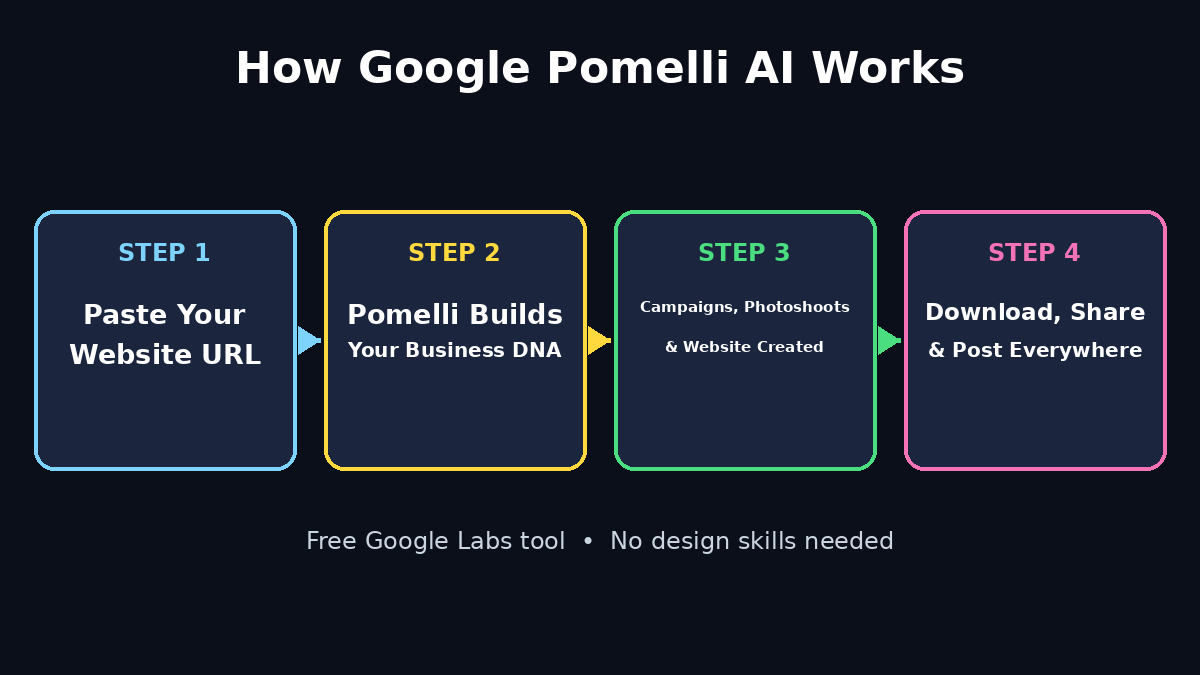
Pomelli is a free AI marketing experiment from Google Labs, built together with Google DeepMind. Instead of starting from a blank canvas, you simply give it your website address. Pomelli studies your site, learns your brand colours, fonts, tone of voice and visual style, and saves all of it as a profile called Business DNA. From that profile it generates on-brand social media campaigns, product photoshoots and even a small website — all ready to edit and download.
In this beginner-friendly guide, you will learn how to use Google Pomelli AI step by step, what it can and cannot do, and how to turn one website link into a full week of marketing content without any design skills.
Step 1: Open Google Pomelli AI and Sign In With Your Google Account
Getting started takes less than a minute, because there is nothing to install and no credit card is required.
- Open your browser and go to labs.google.com/pomelli.
- Click to sign in with your Google account — the same one you use for Gmail or YouTube.
- You will land on the Pomelli home screen, where the tool asks for your business website address.
Pomelli is an experimental Google Labs product, so the first screen may also show a short notice that features can change while Google collects feedback. That is normal for Labs tools. One important note: at the time of writing, Pomelli is officially available in English in the United States, Canada, Australia and New Zealand. If you open it from another country and see a waitlist or unavailable message, the tool simply has not rolled out to your region yet — check back later rather than trying unofficial workarounds.
Step 2: Enter Your Website URL and Let Google Pomelli AI Build Your Business DNA
This is the step that makes Pomelli different from every template tool you have used before. You do not pick colours, upload a logo, or describe your brand from scratch. Pomelli does the studying for you.
- Paste your full website address (for example, your homepage URL) into the box provided.
- Click to continue and give Pomelli a moment to scan your public pages.
- Pomelli reads your site’s colours, fonts, imagery, layout style and tone of voice.
- It saves everything as your Business DNA profile — the single source of truth for everything it creates next.
Think of Business DNA as a snapshot of your brand’s identity. If your site is warm and playful, your campaigns will sound warm and playful. If your site is sleek and professional, your creatives will match that too. This is why Pomelli’s output usually looks like it belongs to your business on the first try, while generic AI tools often need heavy fixing. If your website is thin or brand-new, do not worry — you can add details manually in the next step, and the profile improves as you correct it.
Step 3: Review and Correct Your Google Pomelli AI Business DNA
Never skip this step. AI scanning is good, but it is not perfect, and a wrong brand colour or tone in your DNA will repeat itself in every single campaign.
- Open your Business DNA profile and read through each section: colours, fonts, tone of voice, logo and imagery.
- Fix anything that looks wrong — swap a colour, correct the tone (for example, from formal to friendly), or replace an auto-picked image.
- Add anything Pomelli missed, such as a tagline, a product range, or the values your business stands for.
- Save the profile before moving on to campaigns.
Spending five minutes here saves hours later. Every campaign, photoshoot and website Pomelli builds afterwards will follow this corrected profile, so getting it right once pays off again and again. If you later rebrand or change your website, come back and update the DNA so your new content stays consistent with the new look.
Step 4: Choose a Campaign Idea or Describe Your Own
Once your Business DNA is ready, Pomelli suggests ready-made campaign ideas based on common marketing goals: launching a product, announcing a sale, growing social followers, or promoting a seasonal offer.
- Browse the suggested campaign ideas and pick the one closest to your goal.
- If none of them fit, simply describe your own idea in plain words, for example: “A summer sale campaign for our handmade candles, cheerful tone, 20 percent off.”
- Pomelli adapts your idea to your Business DNA, so the headlines, colours and imagery stay on-brand automatically.
- Review the campaign concept before generating the individual creatives.
Beginners often do best by starting with one suggested campaign, because it shows how Pomelli structures a complete set: a main message, supporting posts and matching visuals. Once you understand that structure, writing your own campaign prompts becomes much easier. Keep your first custom prompt simple — one offer, one audience, one call to action — and add detail only after you see the first result.
Step 5: Generate, Edit and Download Your Google Pomelli AI Creatives
This is where Pomelli turns an idea into finished marketing assets: social media posts, ad banners, captions and images sized for the major platforms.
- Click generate on your chosen campaign and wait for Pomelli to produce the creatives.
- Open each creative and check the headline, body text and image carefully — AI text can contain small errors.
- Edit directly inside Pomelli using plain-language commands, such as “make the text bigger” or “change the background to green”.
- Adjust the copy yourself for offers, prices, dates and contact details — never publish unchecked facts.
- When you are happy, download the finished files for Instagram, Facebook, TikTok, YouTube or LinkedIn.
The in-tool editing is one of Pomelli’s best beginner features. You do not need to open a separate design app to fix a headline or swap a background — you just ask in words. For small businesses, this is a genuine time saver: a digital agency would normally charge real money for exactly this kind of campaign production, and Pomelli lets you produce a usable first version yourself for free. If a creative still does not feel right after two or three edits, regenerate it with a clearer prompt instead of endlessly tweaking the same version.
Step 6: Create a Studio-Quality Product Photoshoot Without a Studio
Pomelli’s Photoshoot feature is the one most beginners love, because professional product photography is normally one of the biggest marketing costs. Pomelli uses Google’s Nano Banana image technology to turn an ordinary phone photo of your product into a polished studio shot.
- Upload one clear photo of your product — a phone photo works fine, and a plain background helps.
- Pick a template: a clean studio shoot, a floating product shot, an ingredients-style scene, or a lifestyle scene.
- Or type your own scene in words, for example: “handmade mug on a wooden table in warm morning light.”
- Generate the shot, review it closely, and regenerate or edit anything that looks off, especially small details and text.
- Download the final image and reuse it across your campaign posts and your website.
Use this feature for your best-selling products first. One strong product image can be reused in a dozen posts, so a small set of good photoshoots quickly covers your whole catalogue. Avoid using AI photoshoots to misrepresent a product — if the generated image changes the product’s colour, size or features, fix it or do not use it, because customers will notice when the real item arrives.
Step 7: Build a Simple Website From the Same Business DNA
If your business does not have a proper website yet, or you need a quick landing page for a campaign, Google Pomelli AI can generate a small website from the same Business DNA profile.
- Choose the website option from your Pomelli workspace.
- Let Pomelli draft the pages using your brand colours, fonts and tone.
- Read every section and correct business details, prices and contact information yourself.
- Download or publish the result according to the options Pomelli shows you.
Treat this as a fast starting point, not a finished company website. It is perfect for a campaign landing page or a simple online presence while you build something bigger. For a business that depends on its website for daily sales, a professionally built site is still worth the investment — but Pomelli’s version gets you online and collecting interest in an afternoon instead of weeks.
Step 8: Download, Share and Schedule Your Google Pomelli AI Assets
A campaign only works when it actually reaches people, so finish the job properly instead of leaving finished creatives sitting in the tool.
- Download every final creative in the right size for each platform you use.
- Post natively where your customers are: Instagram and Facebook for most small businesses, TikTok for short video-style posts, LinkedIn for business audiences, YouTube for community posts.
- Keep the caption, hashtags and call to action consistent with the campaign idea you started with.
- Schedule posts across several days instead of publishing everything at once, so one campaign lasts a full week.
- Save your best-performing creatives and reuse their style in your next Pomelli campaign.
As your marketing grows more ambitious, you may start combining tools: Pomelli for fast on-brand creatives, plus AI automation services that can help schedule, track and scale the repetitive parts of your marketing workflow. The key habit is the same either way — one campaign at a time, published consistently, measured honestly, and improved in the next round.
Step 9: Keep Every Post On-Brand With a Simple Routine
The biggest advantage of Google Pomelli AI disappears if you start mixing random templates from other tools into the same feed. Consistency is what makes a small brand look professional.
- Always generate new creatives from the same Business DNA profile — never start from a blank tool for a one-off post.
- Reuse two or three campaign styles that your audience already recognises, instead of a new look every week.
- Check that headlines, colours and tone match your website before anything goes live.
- Keep a small folder of approved Pomelli downloads so anyone helping you posts the right versions.
- Update your Business DNA whenever your website, logo or offer changes.
After three or four campaigns, this routine becomes second nature. You will spend less time deciding how a post should look and more time on the message itself — which is exactly where a small business owner’s time belongs.
Step 10: Know the Limits of Google Pomelli AI Before You Rely On It
Pomelli is genuinely useful, but it is still an experiment, and honest beginners plan around its limits instead of being surprised by them.
- Availability is limited by region and language for now — English, and officially the US, Canada, Australia and New Zealand.
- Features can change or disappear while Google collects feedback, so do not build your entire business on one Labs feature.
- AI-generated text and images can contain errors, wrong details or odd artefacts — always review before publishing.
- Pomelli creates marketing assets, not marketing strategy: you still decide the offer, the audience and the goal.
- For complex campaigns, video ads or large catalogues, professional tools and human designers still do better work.
The smart way to use Pomelli is as your fast, free first draft machine: it removes the blank-page problem and the design bottleneck, while you stay in charge of the message, the facts and the final decision to publish.
Google Pomelli AI vs Other Free Design Tools
How does Pomelli compare with the tools beginners usually try first? The honest answer is that it wins on brand consistency and loses on flexibility — which makes it a great first tool, not the only tool.
| Tool | Starting point | Free plan | Best for |
|---|---|---|---|
| Google Pomelli AI | Your website URL | Free public beta | On-brand campaigns, photoshoots and quick sites |
| Canva AI | Templates and prompts | Free tier with limits | Full design control and huge template library |
| ChatGPT image tools | Your written prompt | Free tier with limits | One-off images from an idea in words |
| Adobe Express | Templates and stock assets | Free tier with limits | Polished social posts and video basics |
If you already have a website and want marketing that looks like your brand with minimum effort, start with Pomelli. If you want total control over every pixel, pair it with Canva for the finishing touches.
Frequently Asked Questions About Google Pomelli AI
Is Google Pomelli AI really free?
Yes. Pomelli is a free public beta experiment from Google Labs, and there is no subscription fee or credit card required to try it. Because it is an experiment, Google may change features or availability over time, but at the time of writing the core campaign, photoshoot and website features are free to use.
Which countries can use Pomelli?
Pomelli is officially available in English in the United States, Canada, Australia and New Zealand. If you are outside those countries, you may see a waitlist or unavailable notice. Availability for Labs experiments often expands gradually, so it is worth checking back if it is not open in your region yet.
Do I need a website to use Pomelli?
A website is how Pomelli builds your Business DNA automatically, so having one gives the best results. If you do not have a website yet, you can still add your brand details manually and use Pomelli’s website feature to create a simple online presence — but expect to spend more time correcting the brand profile by hand.
Can Pomelli replace a designer or Canva?
For everyday social posts, sale announcements and product photos, Pomelli can replace a lot of routine design work for a small business. For complex branding, packaging, video campaigns or large catalogues, a human designer or a full-featured tool like Canva still gives you more control. Most beginners get the best results using Pomelli for speed and a design tool for finishing touches.
Can I use Pomelli’s images for my business marketing?
Pomelli lets you download the creatives and photoshoots it generates so you can use them in your marketing, which is the whole point of the tool. Because it is an experimental Labs product, always check the current terms shown inside Pomelli before using assets commercially, and never publish an AI image that misrepresents your actual product.
Final Thoughts
Google Pomelli AI solves the most boring and most expensive part of small business marketing: turning a brand into a steady stream of good-looking content. Paste your website, check your Business DNA, generate a campaign, edit it in plain words, and post it — that five-step loop is something any beginner can run in an afternoon, and it only gets faster as your brand profile improves.
Start with one campaign this week: pick your best product or your next offer, generate the creatives, and publish them across your channels. Then come back, look at what your audience responded to, and let the next Pomelli campaign build on what worked. Free tools rarely stay this useful for long, so use Pomelli while it is free, keep your Business DNA updated, and let consistent, on-brand content do the quiet work of growing your business.
Explore More Free AI Tools
Want to keep building your free AI toolkit? Try the AI Title Generator for scroll-stopping headlines, the Meta Description Generator for search-friendly summaries, the AI Rewriter for polishing your campaign copy, and the Keyword Density Checker to keep your pages SEO-friendly — all free at AIToolSteps.