

Imagine handing your computer to a teammate who never sleeps, never gets bored, and actually does the work — sorting your inbox, researching a topic, drafting a report, or organising your files — while you watch, step in whenever you like, and take the finished result. That is the promise of always-on AI agents, and it is also why so many people were frustrated when Grok Bot, xAI’s always-on agent platform, started hitting its weekly usage limits in early November 2026. Elon Musk said on 1 November 2026 that serving Grok Bot had become “unsustainably high relative to revenue”, and subscribers found their weekly allowance used up right in the middle of real work.
AppuBot AI is the answer that launched on Product Hunt on 9 November 2026. Built by Sarthak, AppuBot AI gives you the same kind of AI teammates — named bots that use the apps on your Mac or PC like you do — but with one big difference: they run on the AI plan you already pay for. Connect your Claude Code, Codex (ChatGPT), Cursor, Grok, or Copilot subscription, and AppuBot AI turns it into a team of agents. There are no API keys to buy, no new AI bill, and the desktop app itself is completely free on Mac, Windows, and Linux.
In this beginner-friendly guide, you will learn what AppuBot AI is, why it exists, what you need before you start, how to install it, connect your AI plan, create your first bot teammate, give it real work, stay in control, and decide whether the optional AppuBot Cloud plan is worth it for you. No coding is needed, and no new subscription is needed to try it — if you already pay for an AI plan, you are ready.
Step 1: Understand What AppuBot AI Actually Is
AppuBot AI is a desktop app that turns your existing AI subscription into a team of AI teammates. Each teammate is a bot with a name, a job, and its own skills and routines. You talk to your bots in a familiar chat interface, hand them real work, and they carry it out by using the apps on your computer — opening files, browsing the web, writing documents, and organising things — the way you would.
The idea will feel familiar if you have followed the always-on agent wave of late 2026. Grok Bot gave X subscribers named, always-on agents that live on a shared cloud computer. ChatGPT Dots did something similar for ChatGPT Pro users. Meta Muse and Manus Cue followed the same shape. AppuBot AI is the version of that idea that runs on your own machine and your own AI plan, instead of on somebody else’s cloud computer with somebody else’s usage limits.
Three things make AppuBot AI different from a normal chatbot. First, its bots are persistent teammates, not one-off chats — they keep their job, their skills, and their routines between sessions. Second, they use your computer: they open your apps and do the work inside them, rather than just writing text in a chat window. Third, you stay in charge — you can watch a bot work live and take over at any moment, like sitting next to a colleague and looking over their shoulder.
If you work with a digital agency or run a small business, that last point matters most. A bot that drafts your client reports is only useful if you can check its work before anything goes out. AppuBot AI is built around that idea: the bot does the heavy lifting, and you keep the final say.
Step 2: See Why AppuBot AI Launched Right Now
AppuBot AI did not appear out of nowhere — it arrived at the exact moment Grok Bot users needed an alternative. Grok Bot launched in beta in August 2026 as xAI’s always-on agent platform, and people quickly built real workflows around it: bots that watched their inbox, prepared briefings, and handled routine tasks around the clock. Then, over Halloween weekend in 2026, subscribers found their weekly allowance exhausted, and on 1 November Elon Musk confirmed the cuts were a cost decision, not a glitch.
That is the problem AppuBot AI solves. Instead of renting a slice of somebody else’s cloud computer with a weekly allowance that can shrink without warning, AppuBot AI runs your bots on the AI plan you already have. The app itself costs nothing, so the only cost is the subscription you were already paying for — Claude Code, ChatGPT, Cursor, Grok, or Copilot. When one of your AI subscriptions hits its limit, the idea is the same one Turnstone popularised days earlier: your agents switch to another subscription and keep working in the same conversation.
This is part of a bigger shift in late 2026. Tools like Turnstone, MausBot, OpenClaw, and AppuBot AI all share one belief: the model you pay for should work for you, on your machine, without a second bill and without a vendor deciding how much you may use it. If you already pay for an AI coding assistant, AppuBot AI is the simplest way to turn that same subscription into a team that handles the rest of your work too.
For a clear picture of the wider landscape, see our guide on Turnstone AI, the Grok Bot alternative that launched on 6 November 2026, and our guide on OpenClaw AI, the open-source agent that runs on your own computer.
Step 3: Check What You Need Before You Start
AppuBot AI is deliberately light on requirements. Before you install it, make sure you have the few things it needs.
- A computer running Mac, Windows, or Linux: the AppuBot AI desktop app is free on all three. Your bots run on your machine, so they can use the apps you already have installed.
- An AI plan you already pay for: Claude Code, Codex (ChatGPT), Cursor, Grok, or Copilot. AppuBot AI signs in with your existing subscription — this is the whole point of the tool. No API keys are needed, and there is no new AI bill.
- A job worth handing over: pick one real, repeatable task to start with — clearing and sorting your inbox, researching a topic and writing a summary, preparing a weekly report, or organising a messy folder of files. A bot proves itself fastest on work you actually do every week.
- A few minutes to watch it work: for your first few tasks, stay and watch the bot. You will learn what it does well, where it needs clearer instructions, and how the take-over controls feel — before you trust it with anything important.
One honest note: AppuBot AI launched on 9 November 2026, so it is brand new. The core idea — free desktop app, your own AI plan, bots that use your computer — is the finished product. But small details, like the exact sign-in flow and the Cloud pricing page, can change quickly in the first weeks. If something looks slightly different from this guide, check AppuBot AI’s own site or Product Hunt page for the latest version. The concepts here will still apply.
Step 4: Download and Install the Free Desktop App
Getting AppuBot AI onto your computer takes a few minutes, and the app itself costs nothing.
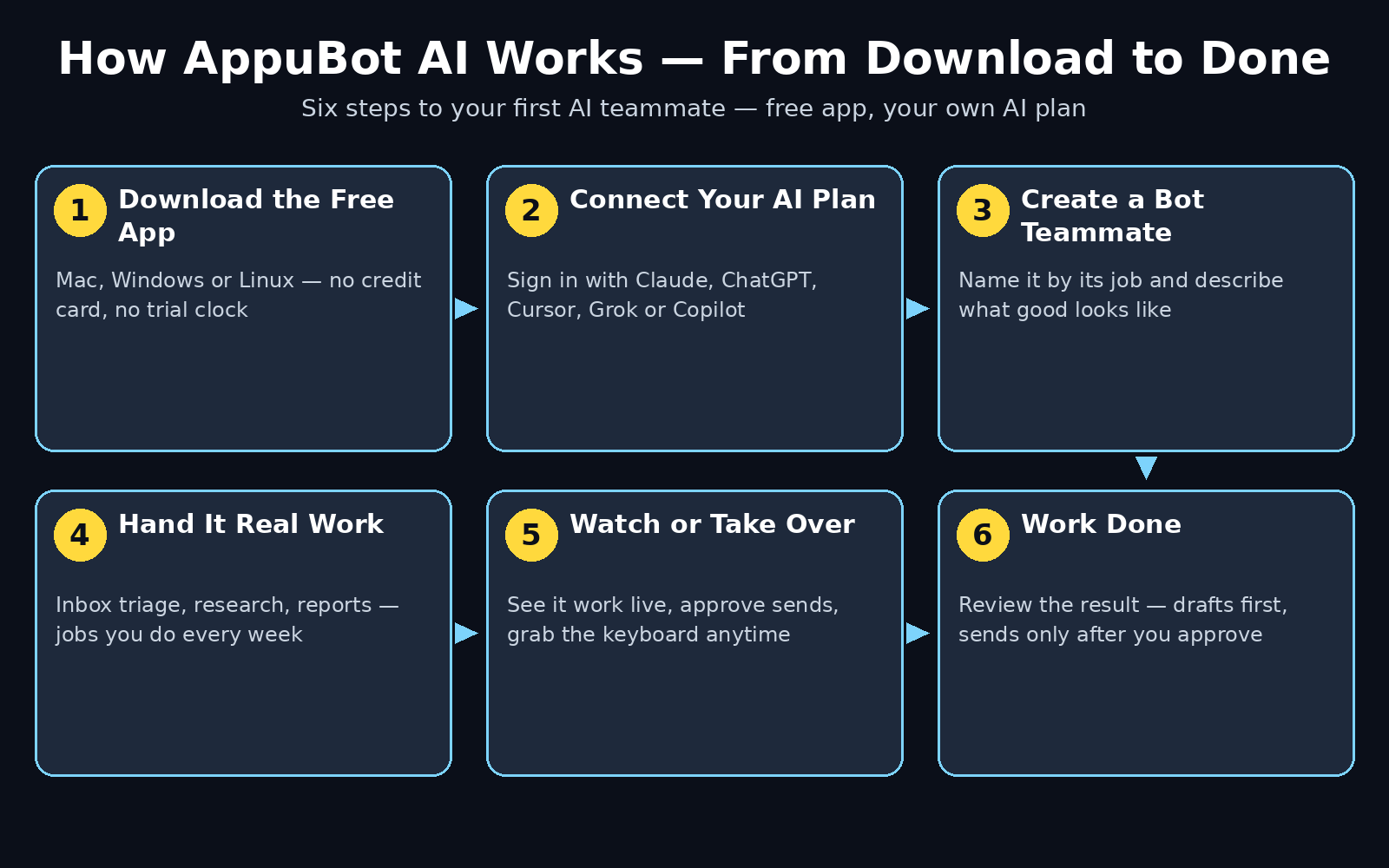
- Open the AppuBot AI page on Product Hunt or the AppuBot website and download the desktop app for your system — Mac, Windows, or Linux.
- Install it the way you install any normal app. On Mac, drag it into your Applications folder; on Windows, run the installer; on Linux, follow the package instructions for your distribution.
- Open AppuBot AI for the first time and look around before you connect anything. Find where your bots live, where conversations happen, and where you can watch a bot work. Five minutes of exploring now saves confusion later.
- Check for updates if the app offers one. A tool this new can ship fixes daily in its first weeks, and the newest version is the one this guide describes.
Because the app is free, there is no trial to expire and no credit card to enter. You can install it, look around, and decide later whether to connect an AI plan. That is a good way to start: install first, explore the interface, and only connect your subscription when you have a real job ready for your first bot.
Step 5: Connect the AI Plan You Already Pay For
This is the step that makes AppuBot AI different from most AI tools. You do not buy API credits and you do not start a new subscription. You sign in with the AI plan you already have, and your bots run on it.
- In AppuBot AI, open the connection or accounts area and choose your provider: Claude Code, Codex (ChatGPT), Cursor, Grok, or Copilot.
- Sign in with that provider’s account — the same login you already use for the plan. AppuBot AI uses your existing sign-in, so there are no API keys to generate, copy, or pay for separately.
- Confirm the connection works. Send a short test message to a bot, or run a tiny task, and check that the reply comes back through your connected plan.
- If you have more than one AI subscription, connect the one you use most first. You can add others later, and having a second plan connected is what lets your agents keep working if the first one hits a usage limit.
Think of this like giving a new colleague a key to the office you already rent. You are not buying a second office — you are letting your new teammate work in the one you already have. That is why AppuBot AI can be free: the app is the workspace, and your existing AI plan is the engine.
If you manage AI automation services for clients, this model is also easier to explain than API billing. There is no meter running in the background and no surprise invoice at the end of the month — the cost is the subscription your team already budgets for, and AppuBot AI simply puts it to work on more jobs.
Step 6: Create Your First AI Teammate
With your AI plan connected, the next step is to create your first bot — a named teammate with a clear job.
- Create a new bot and give it a name that describes its job, not a cute nickname. “Inbox Sorter”, “Research Assistant”, and “Report Writer” are better names than “Buddy”, because the name reminds you — and the bot — what it is for.
- Write a short job description in plain English. Say what the bot should do, what good output looks like, and what it should never do. For example: “Sort my inbox every morning, flag urgent client emails, draft short replies for routine questions, and never send anything without showing me first.”
- Give the bot the skills and routines it needs. A research bot needs web access and a note-taking habit. A report bot needs to know where your data lives and what format your reports use. Start with the smallest set of skills that lets the bot do its one job well.
- Set the bot’s boundaries on day one. Tell it which folders it may open, which apps it may use, and what it must ask you about first. Clear boundaries are what make a bot trustworthy — a bot with no limits is a liability, not a helper.
Start with one bot and one job. It is tempting to create five teammates on the first day, but a single bot doing one job well teaches you more than five bots doing five jobs badly. Once your first bot earns your trust, adding a second one takes minutes — and you will know exactly what to tell it.
Step 7: Give Your Bot Real Work to Do
This is where AppuBot AI stops being a demo and starts being useful. Your bots do not just chat — they use the apps on your computer to get work done.
- Hand over a real task, not a toy example: “Go through yesterday’s inbox, flag the three client emails that need a reply today, and draft a short reply for each one.” A real task shows you immediately whether the bot helps or just creates more work to check.
- Watch it work the first few times: AppuBot AI lets you watch your bot use your apps live. You will see what it opens, what it reads, and what it writes — and you will spot misunderstandings early, while they are still cheap to fix.
- Take over whenever you want: if the bot goes down the wrong path, step in and take control, the way you would take the keyboard from a colleague. Correct it in plain language, and it will carry on from where you left off.
- Start small, then widen the job: let the bot draft replies before it sends them. Let it organise one folder before it organises your whole drive. Each step up in trust should be earned by a few clean runs at the step below.
Good first jobs for an AppuBot AI teammate include a morning inbox triage, a research summary on a topic you need to learn, a first draft of a weekly report, and sorting downloads into named folders. Jobs to avoid at first are anything irreversible — sending emails to clients, deleting files, or changing live settings — until you have watched the bot handle the safe version of the same job several times.
Step 8: Stay in Control With Approvals and Take-Over
An AI teammate that uses your computer needs guardrails, and AppuBot AI is built around them. The point of a bot is not to replace your judgement — it is to do the heavy lifting so your judgement goes further.
- Use approval steps for anything that leaves your computer: sending an email, posting a message, or spending money should always wait for your say-so. Draft first, send after you approve — that one rule prevents almost every bot disaster.
- Keep sensitive folders off-limits: your bot does not need access to your passwords, your financial files, or your private photos to sort your inbox. Give it the smallest access that lets it do its job, and nothing more.
- Review the bot’s work before it matters: read the draft before it goes to a client, check the summary against the source, and glance at the organised folder before you trust it. A two-minute review beats a two-hour cleanup.
- Teach the bot from its mistakes: when a bot gets something wrong, correct it in plain language and update its job description. Bots that learn from corrections get steadily better; bots that are only scolded repeat the same mistake.
This is the same discipline that makes any always-on agent safe, whether it runs on your computer or in the cloud. The difference with AppuBot AI is that everything happens on your machine, under your watch, so you can see exactly what the bot touches — and take the keyboard back the moment you want to.
Step 9: Decide Whether AppuBot Cloud Is Worth It
The desktop app is free, and for most people it is enough. AppuBot Cloud is the optional paid add-on for people who want their bots working around the clock.
- What Cloud adds: from $19 a month, AppuBot Cloud gives your bots a computer of their own, so they keep working even with your laptop closed. Your morning inbox triage is done before you open the lid, and a long research job can run overnight.
- Who needs it: if your bots only work while you work, the free desktop app is fine. Cloud earns its price when you want jobs finished while you sleep, or when you work from a phone or a second computer and still want your team running.
- Who should skip it for now: if you are still learning what your bots can do, stay on the free desktop app. Prove the value on your own machine first — then the $19 a month is paying for a result you have already seen, not a promise.
- What to check before paying: confirm what the Cloud computer can access, how your data is handled there, and whether your bots’ skills and routines move across with them. A Cloud bot should be the same teammate, just on a machine that never sleeps.
The free-versus-paid split is refreshingly honest: the app is free, the Cloud is for always-on work, and your AI plan is the only other cost. There is no free trial that quietly becomes a bill, and no feature you need for basic use locked behind a paywall.
Step 10: Compare AppuBot AI With the Alternatives
AppuBot AI is not the only Grok Bot alternative that launched in November 2026, and the differences between them are worth knowing before you commit to one.
| Tool | Price | Runs on your AI plan | Runs on your computer | Cloud option |
|---|---|---|---|---|
| AppuBot AI | Free app; Cloud from $19/mo | Yes — Claude, ChatGPT, Cursor, Grok, Copilot | Yes — Mac, Windows, Linux | Yes — 24/7 Cloud computer |
| Grok Bot | Part of X subscription, from $30/mo | No — Grok only, on xAI’s cloud | No — shared cloud computer | Built in, with weekly limits |
| Turnstone | Free on Mac | Yes — Claude, ChatGPT, Cursor, Grok, API keys, Ollama | Yes — Mac and iPhone | No — Mac only for now |
| MausBot | Free, open source (Apache 2.0) | Yes — bring your own account or API key | Yes — local first | Optional paid hosting |
| ChatGPT Dots | ChatGPT Pro, from $100/mo | No — ChatGPT only | Partly — cloud computer | Built in |
The pattern is clear. If you want a free app that runs on the AI you already pay for and on the computer you already own, AppuBot AI and Turnstone are the closest match — AppuBot AI covers Mac, Windows, and Linux plus an optional Cloud, while Turnstone adds an iPhone app and self-hosted models. If you want open source and full control, MausBot is the pick. And if you are happy inside one ecosystem and its price, Grok Bot and ChatGPT Dots are the hosted options — with the weekly limits that pushed so many people to look for alternatives in the first place.
Frequently Asked Questions About AppuBot AI
Is AppuBot AI really free?
Yes. The desktop app is free on Mac, Windows, and Linux, and it runs on the AI plan you already pay for — Claude Code, Codex (ChatGPT), Cursor, Grok, or Copilot. There are no API keys to buy and no new AI bill. The only paid option is AppuBot Cloud, from $19 a month, which gives your bots their own computer so they can work 24/7 even with your laptop closed.
Does AppuBot AI need API keys?
No. AppuBot AI signs in with your existing AI subscription, so you never generate, copy, or pay for API keys. That is one of its main selling points: the app is free, and the AI it runs on is the plan you already have.
Which AI plans work with AppuBot AI?
At launch, AppuBot AI works with Claude Code, Codex (ChatGPT), Cursor, Grok, and Copilot. If you already pay for any of these, you can connect it and start. If you pay for more than one, connecting a second plan gives your agents a fallback when the first one hits a usage limit.
Is AppuBot AI the same as Grok Bot?
No, but it is a direct alternative. Grok Bot is xAI’s always-on agent platform: named bots on a shared cloud computer, Grok only, tied to an X subscription, with weekly usage limits that were cut in November 2026. AppuBot AI gives you the same kind of named AI teammates, but they run on your own computer, on the AI plan you already have, with no weekly allowance set by a vendor.
What is AppuBot Cloud, and do I need it?
AppuBot Cloud, from $19 a month, gives your bots a computer of their own so they keep working around the clock, even with your laptop closed. You do not need it to start — the free desktop app covers everything while you work. Consider Cloud once your bots are doing jobs you want finished overnight or before you open your laptop in the morning.
Can AppuBot AI use my apps, or does it only chat?
It uses your apps. Your bots open the applications on your Mac or PC and do the work inside them — reading files, browsing, writing documents, and organising things — while you watch live or take over at any moment. That is the difference between an AI teammate and a chatbot: the teammate does the work, not just talks about it.
Final Thoughts
AppuBot AI arrived at exactly the right moment. Grok Bot showed millions of people what always-on AI teammates could do, and then its weekly limits showed them the risk of renting that power from somebody else’s cloud. AppuBot AI keeps the good part — named bots that use your computer and do real work — and removes the risky part: it runs on the AI plan you already pay for, on the machine you already own, for free.
Start small. Install the free app, connect the AI plan you already have, and give one bot one real job — your morning inbox, a research summary, or a weekly report draft. Watch it work, correct it in plain language, and let it earn more trust one clean run at a time. If the bot proves itself, a second teammate takes minutes to create, and AppuBot Cloud is there when you want the work done while you sleep.
The always-on agent race of late 2026 is really a question about control: who owns the computer your agents run on, and who sets the limits? With AppuBot AI, the answer is you — your machine, your plan, your rules. That is a good place to start.
Explore More Free AI Tools
AppuBot AI is one of dozens of free AI tools that can take real work off your plate. Try our AI Title Generator to write headlines in seconds, our Meta Description Generator to craft search snippets that earn clicks, our AI Rewriter to polish rough drafts into clean copy, and our Keyword Density Checker to keep your articles search-friendly. All four are free at aitoolsteps.com — and every day we publish a new beginner-friendly guide to a tool just like AppuBot AI.