

Imagine a team of AI assistants that answers your emails, triages your Slack messages, updates your Notion pages, and keeps working on a schedule while you do something else — and imagine it costs you nothing extra, because it runs on the ChatGPT, Claude, or Gemini plan you already pay for. That is the promise of Turnstone AI, and it is why the tool climbed the Product Hunt charts on November 6, 2026.
Turnstone is a free Grok Bot alternative that runs on the AI you already have. Grok Bot, xAI’s agent app, changed its pricing on October 12, 2026: it now comes with The X Subscription on Premium ($30 a month) and up, and the Free and $8 Plus plans do not include it. It also picks the model for you, with no model picker. Turnstone flips both of those problems around. You sign in with your Claude, ChatGPT, Gemini, Grok, or Cursor subscription, connect an API key such as OpenRouter, or point it at a model you host yourself with Ollama — and when one subscription hits its usage limit, your agents move over to another one and keep working in the same conversation.
In this beginner-friendly guide, you will learn how to use Turnstone AI step by step: what it is, what you need before you install it, how to sign in with the AI plan you already pay for, how to create your first agent, how to connect your apps, how to put agents on a schedule, how to build a small team of agents that hand work to each other, and how to move your Grok Bots over if you already have them. You do not need any technical skills, and you do not need to buy a second AI plan.
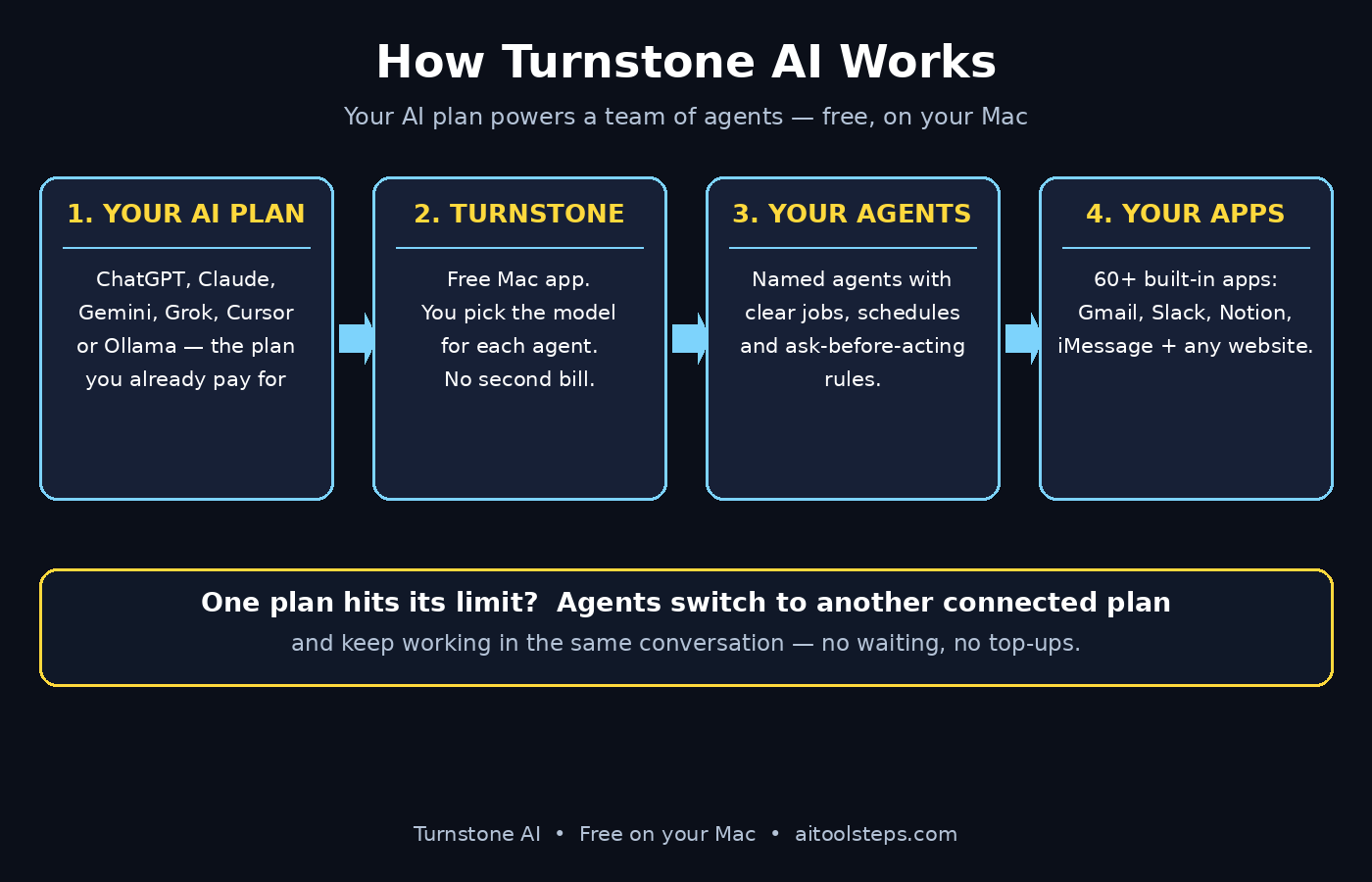
Step 1: Understand What Turnstone AI Actually Is
Before you install anything, it helps to understand the idea in one sentence: Turnstone is a team of AI agents that lives on your Mac and does real work across your apps, powered by the AI subscriptions you already pay for.
Most agent apps rent you their own AI. You pay a monthly fee, you get a shared pool of credits, and when the pool runs out you top it up or wait. Turnstone works differently. It is completely free to use on your Mac, and it will stay that way, according to its Product Hunt launch page. Your usage counts against your own plan’s limits — ChatGPT Plus, Claude Pro, or whichever plan you connect — and Turnstone adds no credits, no meter, and no second pool to track.
That makes Turnstone model-agnostic. For each agent you choose which AI does the work: ChatGPT, Claude, Gemini, Grok, Cursor, OpenRouter, Ollama for local models, or your own OpenAI or Anthropic API key. If you already pay for one of those plans, Turnstone costs you nothing on top of it. The trade-off is honest and worth knowing up front: Turnstone runs on your Mac today, so it needs to be open and signed in while your agents work. Turnstone Cloud, the iPhone app, and the web app are coming soon, and when they arrive your agents and their schedules will keep working with your Mac closed.
Step 2: Check What You Need Before You Install
Turnstone has a short checklist, and it is worth running through it before you download anything, because the whole point of the tool is that it plugs into things you already own.
- A Mac. Turnstone is Mac only today. There is no Windows, Linux, or Android app, and the iPhone and web apps are still on the way. If your daily work happens on a Mac, you are ready.
- An AI plan you already pay for. ChatGPT, Claude, Gemini, Grok, or Cursor all work. If you do not pay for any of them, you can still use an API key from OpenRouter or your own OpenAI or Anthropic key, or run local models with Ollama on your Mac.
- The apps you want agents to work in. Turnstone ships with more than 60 built-in app connections, including Gmail, Slack, Notion, and iMessage, plus its own browser for any website and access to the apps on your Mac. Make a short list of the two or three apps where your repetitive work actually lives.
- Ten quiet minutes. The first setup — install, sign in, first agent — takes about ten minutes. The rest of this guide is about making that first agent genuinely useful instead of just impressive.
If you run a small business and the setup still feels like a lot, this is exactly the kind of rollout a good digital agency handles for clients: pick the apps, wire the agents, and hand you a system that just runs. But most readers will be fine doing it themselves with the steps below.
Step 3: Download and Install Turnstone on Your Mac
Start at the official Turnstone website, myturnstone.ai, or find Turnstone on Product Hunt and follow the launch page link to the site. The Product Hunt listing, updated on November 6, 2026, is the easiest way to confirm you are looking at the real product: it describes Turnstone as a Grok Bot alternative that runs on your AI, completely free, on Mac and iPhone.
Download the Mac app and install it the way you install any Mac app: open the downloaded file, drag Turnstone into your Applications folder, and launch it. The first launch asks for the permissions agents need to do real work — access to the apps you choose and to your files where relevant. Grant only what you plan to use. You can add more permissions later, and keeping the list short on day one makes the security picture easier to understand.
When the app opens, you will see a clean workspace for your agents. Nothing here asks for a credit card, because there is nothing to buy: Turnstone is free on the AI plan you already pay for.
Step 4: Sign In With the AI Plan You Already Pay For
This is the step that makes Turnstone different from every agent app that bills you a second time, so take a minute to choose well.
Turnstone asks you to connect the AI your agents will run on. For ChatGPT and Claude, it runs the official Codex and Claude Code apps on your Mac, and you sign in with your own account through the provider’s own login screen. Your credentials go to the provider, not to Turnstone. Usage counts against your own plan’s limits, exactly as if you were chatting with that AI yourself.
- Already pay for ChatGPT Plus? Connect ChatGPT. Your agents run on the plan you know, and you pay nothing extra.
- Already pay for Claude Pro? Connect Claude. Same deal — one plan, no second bill.
- Use Gemini, Grok, or Cursor? Those connect too, so pick whichever plan you actually use every day.
- Prefer API keys? Connect OpenRouter or your own OpenAI or Anthropic key, and you pay the provider’s usage rates with no Turnstone markup.
- Want everything local? Point Turnstone at Ollama and run open models on your own Mac.
The clever part is what happens at the limit. When one of your AI subscriptions hits its usage limit, your agents move over to another connected one and keep working in the same conversation, so you are never stuck waiting for a limit to reset. Connect two plans if you have them — the fallback only works if there is somewhere to fall back to. This is also the core difference from Grok Bot, which runs on its own pool and cannot use your ChatGPT or Claude plan at all.
Step 5: Create Your First AI Agent
Your first agent should do one small, real job — not ten jobs at once. Agents work best when they have a clear role, a clear set of tools, and a clear instruction about when to ask you before acting.
Give the agent a name and a job description in plain language. “Inbox Triage” is a better first agent than “General Assistant,” because the instructions stay short and the results stay checkable. Write the instructions the way you would brief a new team member: what the agent should do, what it should never do, and what counts as done.
- Name it by its job: “Email Triage,” “Meeting Notes,” or “Lead Follow-up” beats “Agent 1” every time.
- Write the role in two or three sentences: what it handles, which app it works in, and what a good result looks like.
- Set the ask-before-acting rule: tell the agent to ask before sending anything externally, spending money, or deleting anything. Nothing runs, spends, or touches your tools without your permission when you set this up front.
- Pick its model: this is where Turnstone’s model choice matters — give a writing-heavy agent Claude, a research-heavy agent ChatGPT or Gemini, and see which one does your job better. You can change it any time.
Save the agent, then give it one real task and watch what it does. Your first run is a test, not a commitment: check the result, correct the instructions where it misunderstood you, and run it again. Two or three rounds of this is normal, and it is how a generic agent becomes your agent.
Step 6: Give Your Agent Apps to Work With
An agent without apps is just a chatbot. Turnstone’s value comes from its connections: more than 60 built-in apps, including Gmail, Slack, Notion, and iMessage, plus any website through its own browser and the apps already on your Mac.
Connect only the apps this agent’s job needs. An email triage agent needs Gmail, not your entire app library. Connect the app through its normal sign-in, check that the agent can see what it needs — your inbox, a Slack channel, a Notion database — and then test the connection with one real task before you automate anything.
A practical pattern that works well for beginners is the two-app agent: Gmail plus Notion for meeting follow-ups, or Slack plus Gmail for customer questions. Two connected apps are enough to feel the difference between a chatbot and a teammate, and small enough that you can see exactly what the agent did. As your confidence grows, add one app at a time. If you want inspiration for which workflows pay off first, AI automation services roundups are a good place to see what other small teams automate with agents like these.
Step 7: Put Your Agents on a Schedule
Turnstone agents can run on Schedules, which is where the tool stops being a chat window and starts being a team member. A schedule tells an agent when to wake up and what to check: every morning at 8, every Monday, or every hour during work hours.
Start with one schedule for your first agent. Morning inbox triage is the classic: at 8 a.m. the agent reads overnight email, drafts replies for the ones it can handle, and leaves you a short summary of the ones that need your decision. You review the drafts over coffee instead of starting the day inside your inbox.
Two honest limits apply here. First, Turnstone runs on your Mac today, so your Mac needs to be open and signed in while scheduled agents work — Turnstone Cloud is coming soon and will remove that limit. Second, a schedule is only as good as its instructions: if the agent’s morning summary is noisy, tighten the instructions rather than adding more schedules. One reliable schedule beats five sloppy ones.
Step 8: Build a Small Team of Agents That Hand Work to Each Other
Once one agent works, the next step is a team. Turnstone is built around the idea that named agents do work for you, hand tasks to each other, and ask before risky actions — the same shape as Grok Bot’s Bots, but running on your own AI.
A good starter team has three agents and one rule: each agent owns one job, and handoffs happen in writing. For example, a research agent reads the morning’s news and saves the useful items to Notion; a drafting agent turns the saved items into a short brief; and a scheduling agent posts the brief to Slack at 9 a.m. Each agent’s instructions stay short because each job stays small, and when something goes wrong you can see exactly which agent dropped the handoff.
Keep the team small on purpose. Two or three agents that work reliably will save you more time than ten agents you do not trust. Add a new agent only when an existing one is doing a job you can describe in two sentences — that is the test for whether a job is ready to delegate.
Step 9: Move Your Grok Bots to Turnstone
If you already built Bots in Grok Bot and want to move, Turnstone built a shortcut for exactly that. Grok Bot changed its pricing in October 2026, and a lot of its early users are looking for a way out that does not mean rebuilding everything by hand.
The fastest way to switch is to let Grok Bot do the moving. Turnstone has an MCP server that lets another AI create and run your Turnstone Agents. Connect Turnstone to Grok Bot as an MCP server, then ask your Bots to recreate themselves as Turnstone Agents and send each new agent everything they know. Turnstone needs to be open and signed in on your Mac while Grok Bot sends the work over.
If you would rather move by hand, the manual route is simple: for each Bot, copy its name, its instructions, and its routine, then create a matching agent in Turnstone with the same instructions and the same schedule. Move one Bot, test it for a day, then move the next. The manual route is slower, but it has a hidden benefit: you will rewrite instructions that were vague the first time, and the new agents will be better than the old Bots.
One difference to expect after the move: Grok Bot runs in the cloud, so its routines keep going with your laptop closed. Turnstone runs on your Mac today, and Cloud is coming soon. If you need routines to run overnight right now, keep that one routine on Grok Bot until Turnstone Cloud arrives, and move everything else.
Step 10: Check the Free Limits and When Turnstone Costs Money
Turnstone is completely free to use on your Mac, and the launch page says it will stay that way. That sentence deserves a careful reading, because “free” means something specific here: Turnstone charges you nothing, and you pay only the AI provider you already pay.
- What is free: the Turnstone app itself, unlimited agents, schedules, and the 60+ app connections. There is no shared weekly pool and no top-ups.
- What you still pay for: your own AI plan. ChatGPT Plus at $20 a month stays $20 a month; Claude Pro at $20 stays $20. Adding Turnstone does not change that number.
- The comparison that matters: if you pay $20 for ChatGPT Plus, adding Grok Bot means adding X Premium at $30, for a $50 total. Adding Turnstone keeps the total at $20. That gap is the whole business case.
- What to check: your AI plan’s own usage limits, because Turnstone usage counts against them. If one plan hits its limit, Turnstone switches to another connected plan automatically — but only if you connected a second one in Step 4.
Because Turnstone is a young product, check the pricing and platform pages on the official site before you build a workflow your business depends on. Free limits and launch offers can change, and the official site and the Product Hunt listing are the source of truth.
Turnstone AI vs Grok Bot at a Glance
The two tools do a similar job, but they charge for it in opposite ways. This table sums up the differences that matter most to a beginner choosing between them.
| Feature | Turnstone AI | Grok Bot |
|---|---|---|
| Price | Free app; runs on the AI plan you already pay for | Needs X Premium ($30/month) or higher since Oct 12, 2026 |
| Model choice | Your choice per agent: ChatGPT, Claude, Gemini, Grok, Cursor, OpenRouter, Ollama, your own key | No model picker; the model is picked for you |
| Where it runs | Your Mac today; Cloud, iPhone, and web apps coming soon | In the cloud; routines run with your laptop closed |
| Platforms | Mac today; iPhone and web coming soon | Apps on every platform |
| App connections | 60+ built-in apps plus its own browser | Built-in app connections on its cloud computer |
| When a plan hits its limit | Agents switch to another connected plan and keep working | Shared weekly pool; top-ups when it runs out |
| Best for | People who already pay for ChatGPT, Claude, or Gemini and want agents for free | People who want cloud routines and every platform today |
Frequently Asked Questions About Turnstone AI
Is Turnstone AI really free?
Yes. Turnstone is completely free to use on your Mac, and its Product Hunt launch page says it will stay that way. You pay only for the AI plan you already have — ChatGPT, Claude, Gemini, Grok, or Cursor — and Turnstone adds no credits, no meter, and no second bill. If you use an API key or Ollama, you pay only the provider’s own usage rates.
Do I need a Mac to use Turnstone AI?
Yes, for now. Turnstone is Mac only today, with no Windows, Linux, or Android app. Turnstone Cloud, the iPhone app, and the web app are coming soon. If your work happens on a Mac, you can start today; if it does not, the cloud version is the one to wait for.
Can Turnstone use my ChatGPT or Claude plan?
Yes, and that is the whole point. Turnstone runs the official Codex and Claude Code apps on your Mac, and you sign in with your own account through the provider’s own login. Usage counts against your own plan’s limits, and Turnstone does not add a second pool. Grok Bot cannot do this — it runs on its own pool and cannot use your ChatGPT or Claude plan.
How is Turnstone different from Grok Bot?
Both give you named AI agents that do real work, hand tasks to each other, and run on schedules. The differences are price and choice: Turnstone is free and lets you pick the model for each agent, while Grok Bot needs an X Premium subscription of $30 a month or more since October 12, 2026 and picks the model for you. Grok Bot runs in the cloud on every platform; Turnstone runs on your Mac today, with Cloud coming soon.
What happens when my AI plan hits its usage limit?
Your agents move over to another AI plan you connected and keep working in the same conversation, so you are never stuck waiting for a limit to reset. This only works if you connected a second plan, so connect two if you have them. There is no shared weekly pool and no top-up to buy.
Is my data safe with Turnstone AI?
Turnstone runs on your Mac, next to your files and personal apps, and you sign in to each AI provider through that provider’s own login — your credentials go to the provider, not to Turnstone. Agents work with the apps you connect and ask before risky actions, so set the ask-before-acting rule from Step 5 and connect only the apps each agent needs. As with any new tool, check its privacy page on the official site before connecting an inbox that holds sensitive mail.
Final Thoughts
Turnstone AI is the most honest deal in the agent-app wave: a free Mac app that turns the AI subscription you already pay for into a team of agents, with no second bill, no shared credit pool, and no model picked for you. It climbed the Product Hunt charts on November 6, 2026 for exactly that reason — the week Grok Bot’s paywall pushed its early users to look for an alternative, Turnstone was the one that let them keep the AI they already had.
Start small. Install it, connect the one plan you use most, build one agent for one real job, and watch it work for a week. Then add a schedule, then a second agent, then a second plan for the automatic fallback. The teams that get the most from tools like this are the ones that treat the setup seriously from day one — and if you want help turning a working agent into a service you sell to clients, a good digital agency can handle the rollout while you focus on the product.
If you already pay for ChatGPT, Claude, Gemini, Grok, or Cursor, learning how to use Turnstone AI is worth an afternoon of your time. It is free, it runs on your Mac today, and it is the rare AI tool that makes your existing subscription more valuable instead of adding another line to your monthly bill.
Explore More Free AI Tools
Want to keep building with free AI tools? Try these helpers on AIToolSteps — the AI Title Generator for headlines that get clicks, the Meta Description Generator for search snippets that earn the click, the AI Rewriter for polishing rough drafts, and the Keyword Density Checker for keeping your pages on topic. All four are free at https://aitoolsteps.com/ — open the homepage, pick a tool, and put it to work on your next article.