

Every website has the same silent problem: visitors read your page, get confused about one thing, find no answer, and leave forever. You never even learn what they wanted to know. Actually Asked AI is a new free tool launched on Product Hunt in October 2026 that fixes this. It turns your website into a self-improving AI FAQ section that answers visitor questions using only your own content — and every Monday it emails you the questions your pages could not answer, so your content keeps getting smarter.
In this beginner guide, you will learn how to use Actually Asked AI step by step: signing up for the free plan, adding the widget to your website, customizing it to match your brand, testing it with real questions, and using the weekly digest to grow your FAQ and traffic.
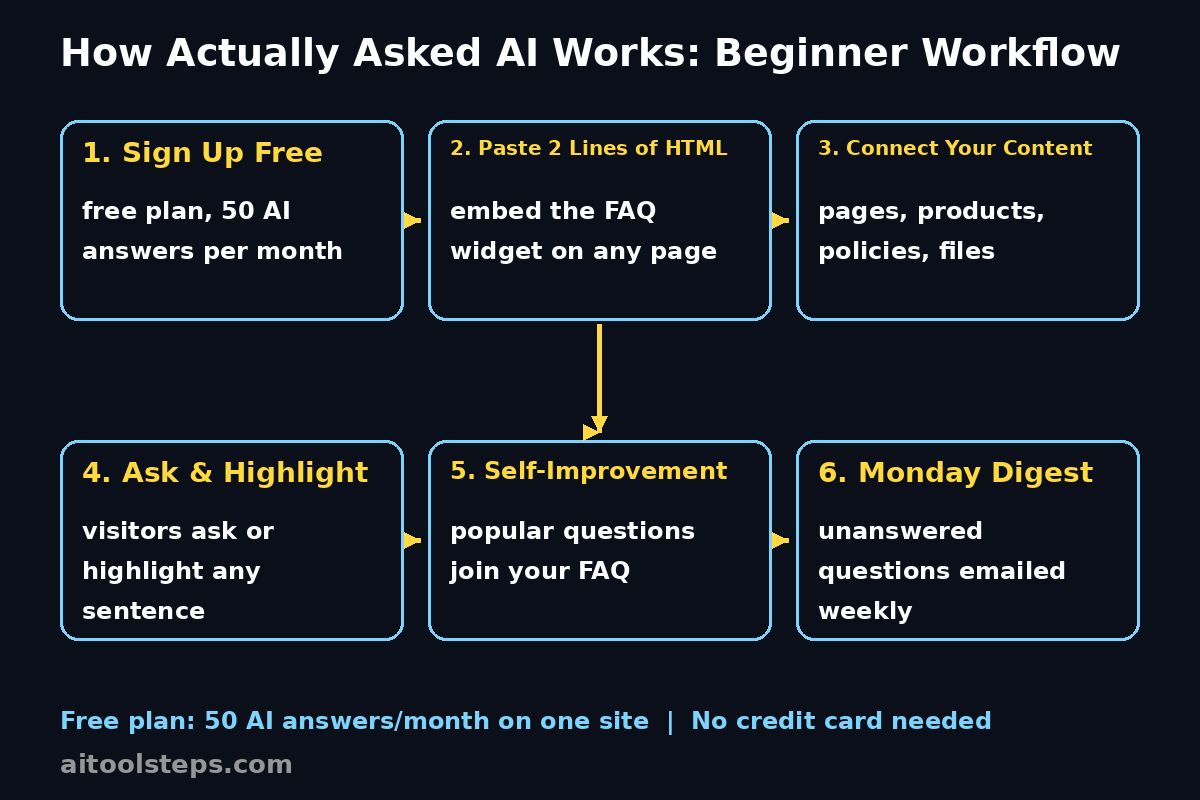
Step 1: Understand What Actually Asked AI Does
Before you install anything, it helps to understand the idea. Most FAQ sections are written once, from guesses about what people might ask, and then never updated. Chat bubbles, on the other hand, feel like a support desk and cover your page.
Actually Asked AI takes a different path. It places a FAQ section directly inside your page, styled in your own fonts and colors so it looks like part of your site. Visitors can open an entry, ask their own question underneath it, or even highlight any sentence on the page and ask about that specific sentence. The answers come only from your pages, products, policies, and files — not from the general internet, so the AI cannot invent things about your business.
Here is the clever part: the questions people ask most often get added to your FAQ automatically. Anything you edit stays exactly the way you wrote it. So your FAQ literally improves itself based on what real visitors want to know.
Step 2: Sign Up for the Free Plan
Actually Asked AI launched on Product Hunt on October 14, 2026, and it offers a free plan that is genuinely useful: 50 AI answers per month on one site, with no credit card required.
To get started:
- Visit the Actually Asked website and create your account with your email.
- Choose the free plan — 50 AI answers per month is plenty for a small blog, portfolio, or new online store.
- Verify your email address if asked, then log in to your dashboard.
That is it. There is no software to download and no complicated setup wizard. The whole product is designed so a complete beginner can be live within minutes.
Step 3: Add Actually Asked to Your Website
Actually Asked works on almost any website, and there are several installation routes depending on your platform:
- WordPress, Webflow, or any custom site: paste two lines of HTML into your page where you want the FAQ section to appear. That is all the code you need.
- Shopify: install it from the Shopify App Store as a theme block, so it slots right into your store’s design.
- Framer: add it from the Framer Marketplace as a plugin.
If you manage content with AI tools like Claude, ChatGPT, Cursor, or Codex, you can also manage Actually Asked over MCP (the Model Context Protocol), which lets your AI assistant help configure it.
For beginners, the two-lines-of-HTML route is the simplest. Open your page editor, switch to the code or HTML view, paste the snippet where you want the FAQ to live, and save. The FAQ section will render in your site’s own fonts and colors automatically.
If you run a WordPress site like this one, a digital agency such as Digital 365 Agency can also help you place and style such widgets if you prefer not to touch code yourself — but honestly, two lines of HTML is something anyone can do.
Step 4: Connect Your Content Sources
The quality of the AI answers depends entirely on the content you give it. Actually Asked answers only from your pages, products, policies, and files, which means you need to make sure it can see them.
In your dashboard:
- Point the tool at the pages and documents you want it to learn from.
- Include your product pages, pricing page, shipping and returns policies, and any important PDFs or guides.
- Remove or update outdated pages so the AI never quotes old information.
Think of this step as training a new employee: the better the training material, the better the answers. Take ten minutes to check what it can read, and you will avoid most beginner mistakes later.
Step 5: Customize the Look and Feel
One of the best things about Actually Asked is that it does not look like a third-party widget. The FAQ section inherits your page’s fonts and colors, so visitors experience it as a native part of your site rather than an intrusive chat bubble.
In the appearance settings:
- Confirm the widget picks up your theme’s fonts and colors correctly.
- Decide where the FAQ section sits on the page — near the top for support-heavy pages, or lower down for sales pages.
- Write or polish your first few FAQ entries manually so the section looks complete from day one.
Remember: anything you edit stays the way you wrote it. The AI will not overwrite your hand-written entries, it only adds new ones based on what visitors ask.
Step 6: Test It Like a Real Visitor
Before you announce anything, test the widget the way a confused visitor would:
- Open your page in a private browser window.
- Ask a question you know the answer is on the page — for example, about shipping times or pricing.
- Highlight a sentence on the page and ask a follow-up question about it, to test the highlight-to-ask feature.
- Ask something your site does NOT cover, and check that the visitor is offered a way to leave their email instead of getting a made-up answer.
That last test is the most important one. A good AI FAQ tool must say “I don’t know” gracefully and capture the lead, not hallucinate. Actually Asked handles this by offering the email capture when your content has no answer.
Step 7: Let the Self-Improvement Loop Run
Once your widget is live, the magic happens on its own. As visitors ask questions, the tool tracks which questions come up most often and promotes them into your FAQ entries. You do not have to guess what people want to know anymore — the data tells you.
Every Monday, you receive an email digest listing the questions your pages could not answer. This is pure gold for content creators:
- Turn unanswered questions into new blog posts or FAQ entries.
- Spot product problems — if everyone asks “does it work with X,” that is a signal.
- Prioritize your content calendar by real demand instead of guesswork.
This weekly loop is what makes Actually Asked different from a static FAQ page. Your site literally gets smarter every week. For site owners exploring AI automation services to reduce support workload, this kind of self-maintaining FAQ is one of the highest-return automations you can install.
Step 8: Review and Approve New FAQ Entries
While the tool can add popular questions automatically, you stay in control. Make it a habit to review new entries:
- Check each new FAQ entry for accuracy before it goes fully live.
- Rewrite answers in your own voice where it matters — remember, your edits are never overwritten.
- Delete or merge duplicate questions so the FAQ stays clean.
A five-minute weekly review keeps quality high while the automation does the heavy lifting. Think of yourself as the editor, not the writer.
Step 9: Use the Email Capture to Grow Your List
When the AI cannot answer a question, visitors can leave their email address. Do not let those emails sit idle:
- Reply personally to the first few — those visitors are your warmest leads.
- Add the unanswered topic to your site, then email them the new link.
- Watch which topics collect the most emails; that is your audience telling you what to build next.
For bloggers and small businesses, this turns unanswered questions into a lead-generation machine instead of lost traffic.
Step 10: Track Results and Upgrade When Ready
The free plan gives you 50 AI answers per month on one site. After a month or two, check your dashboard:
- How many questions did visitors ask?
- How many emails were captured?
- How many new FAQ entries were created automatically?
If you are consistently hitting the 50-answer limit, that is actually good news — it means visitors are engaging. That is the right moment to look at the paid plans for more answers and more sites.
Actually Asked AI vs Traditional FAQ Tools
| Feature | Actually Asked AI | Static FAQ Page | Chat Bubble Widget |
|---|---|---|---|
| Answers from your own content only | Yes | N/A (you write it) | Usually general AI |
| Visitors can ask custom questions | Yes | No | Yes |
| Highlight any sentence to ask about it | Yes | No | No |
| Most-asked questions join the FAQ automatically | Yes | No | No |
| Weekly email of unanswered questions | Yes (every Monday) | No | Sometimes |
| Matches your site’s fonts and colors | Yes | Yes | Rarely |
| Email capture when no answer exists | Yes | No | Sometimes |
| Free plan | 50 AI answers/month, no card | Free (manual work) | Usually limited trial |
| Installation | 2 lines of HTML / app stores | Manual | Script embed |
Frequently Asked Questions
Is Actually Asked AI really free?
Yes. The free plan includes 50 AI answers per month on one site and requires no credit card. It launched with the product on Product Hunt in October 2026. If your site grows beyond 50 answers a month, paid plans add more answers and more sites.
Does the AI make up answers about my business?
No — and that is the core design. Answers come only from your pages, products, policies, and files. When your content does not cover a question, the visitor is invited to leave their email instead of receiving a guessed answer.
Which platforms does Actually Asked work with?
It works on WordPress, Webflow, and any other site with two lines of HTML. It is also available as a theme block on the Shopify App Store and as a plugin in the Framer Marketplace, plus a Claude connector. You can even manage it from Claude, ChatGPT, Cursor, or Codex over MCP.
Will it overwrite the FAQ entries I write myself?
No. Anything you edit stays exactly the way you wrote it. The tool only adds new entries based on the questions visitors ask most often — your hand-written content is never touched.
What is the Monday email digest?
Every Monday you get an email listing the questions your pages could not answer. Use it as a content roadmap: each unanswered question is a blog post, FAQ entry, or product improvement waiting to happen.
Is Actually Asked better than a chatbot?
For most websites, yes. Chat bubbles feel like a support desk and cover your content. Actually Asked lives inside your page in your own design, lets visitors highlight any sentence to ask about it, and improves your FAQ automatically. It is an FAQ section first, not a chat window.
Final Thoughts
Actually Asked AI is one of the most practical AI tools launched this month. It does not try to be everything — it does one job extremely well: turning your website’s FAQ into a living, self-improving section powered by your own content. The free plan (50 AI answers per month, no credit card) is generous enough for beginners to see real value before spending anything.
Start today: sign up, paste the two lines of HTML, connect your content, and let your visitors teach you what they actually want to know. Then use every Monday’s digest to make your site better. That simple loop — ask, answer, learn, improve — is how small sites quietly outgrow bigger competitors.
Explore More Free AI Tools
Want more beginner-friendly AI tools like this one? Try the free tools on AIToolSteps.com: the AI Title Generator, Meta Description Generator, AI Rewriter, and Keyword Density Checker — all free, all beginner-friendly, and perfect companions for growing the content your new AI FAQ will keep asking you to write.