

Ask ChatGPT for the best project management tool for a small team, and it will name three or four products with confidence. Now ask yourself an uncomfortable question: would it name yours? Most business owners have no idea, because the tool they have used for years — the Google rank tracker — cannot answer it. Ranking on page one of Google and being recommended by an AI assistant are two different things, and the second one now decides a growing share of buying decisions. Learning how to use Namedrop AI is the fastest way to find out.
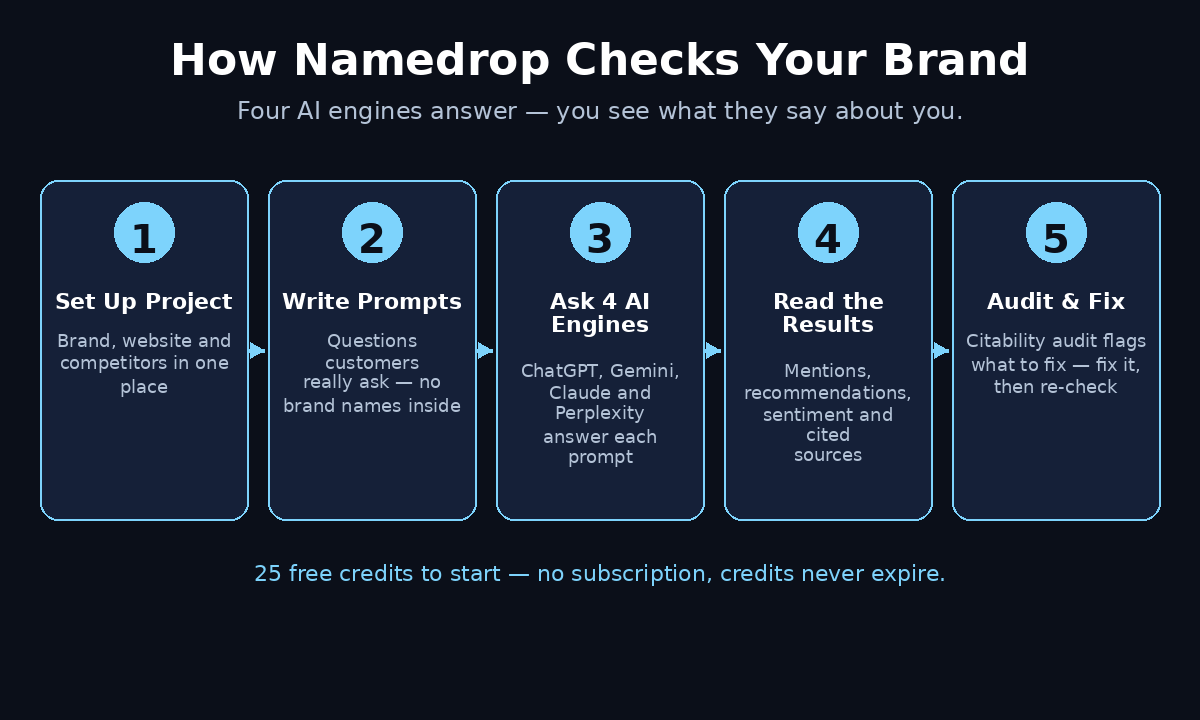
That gap is exactly what Namedrop AI is built to close. Launched on Product Hunt on November 24, 2026, by the consultancy CoreAEX, Namedrop is an AI visibility and brand intelligence platform that checks how ChatGPT, Google Gemini, Anthropic Claude, and Perplexity talk about your brand — whether they mention you at all, whether they recommend you, what they say about you, and which sources they cite when they do. It runs on prepaid credits instead of a monthly subscription, and every new account starts with 25 free credits, so you can run a real audit before spending anything.
This guide shows you exactly how to use Namedrop AI from zero: creating your free account, setting up your first project, writing prompts the way real customers ask them, reading the results properly, and fixing the pages AI never cites. No technical skill is needed, and you can start free.
Step 1: How to Use Namedrop AI — What It Is and Why AI Visibility Matters Now
Namedrop AI is not another Google rank tracker. A rank tracker tells you where your pages sit in search results. Namedrop tells you what AI assistants say when someone asks for a recommendation — and those answers are increasingly where customers start. People now ask ChatGPT or Perplexity “which invoicing tool is best for freelancers?” and buy from the shortlist the AI gives them, often without ever opening Google.
Here is what Namedrop checks for you:
- Brand mentions: whether each AI engine names your brand when answering questions in your category.
- Recommendations: whether the AI actively recommends you, or just mentions you in passing — there is a big difference.
- Competitor visibility: how often your competitors get named and recommended for the same questions.
- Sentiment: whether what the AI says about you is positive, neutral, or negative, backed by the exact sentences it used.
- Sources: which pages the AI cites as evidence, so you can see whether your own content is feeding the answer or a competitor’s is.
The platform also runs repeatable answer checks, because AI answers change from one run to the next. Ask the same question five times and you can get five slightly different shortlists. Namedrop repeats its checks so you see the stable picture instead of one lucky or unlucky answer.
If you already follow AI visibility tools, Namedrop sits in the same family as the tools we have covered before, such as ReSO AI and RankCaster AI. The difference is the model: no subscription, prepaid credits that never expire, and a page-level citability audit that tells you exactly what to fix. If you only need an occasional check — after publishing new content, before a client audit, during a competitive review — that model fits better than another monthly bill.
Step 2: How to Use Namedrop AI Free — Create Your Account and Claim 25 Credits
Getting started takes about five minutes. Namedrop is in public alpha, which began on November 23, 2026, so expect the interface to keep improving — the core workflow below is what matters, and it is already stable.
- Open Namedrop. Go to namedrop.coreaex.com in your browser. This is the official site from CoreAEX, the consultancy behind the tool.
- Create your account. Sign up with your email address and choose a password. New accounts receive 25 free credits automatically — there is no subscription to cancel later, because there is no subscription at all.
- Confirm your email if asked. Some accounts need a quick email confirmation before the first check runs. Do it now so it does not interrupt you mid-audit.
- Check your credit balance. Your 25 free credits should be visible on the dashboard. Credits never expire, so there is no pressure to burn them in the first week — but do not hoard them either, because an unused audit teaches you nothing.
One honest note for beginners: Namedrop is brand new — its first working alpha only appeared on November 17, 2026. Early tools change fast, so treat the pricing page and the Product Hunt listing as the source of truth, and expect small rough edges in the first weeks. That is also the best time to learn it, because the free credits let you practice on a real brand without paying.
Step 3: Set Up Your First Project — Brand, Website, and Competitors
Namedrop organizes everything into projects. One project equals one brand, which keeps your checks, competitors, and trend charts tidy when you later add a second brand or a client.
- Create a project. From the dashboard, start a new project and give it your brand name.
- Add your brand details. Enter your brand name exactly as customers write it, plus your website address. Spelling matters here — if customers write your name with a space and you enter it without one, the AI engines may treat it as a different brand.
- Add your competitors. List the two or three competitors you lose deals to most often, not the biggest names in the industry. A small SaaS tool should track the tools its real buyers compare it with, not the giants it never meets in a sales call.
- Add your core product or service. Note the main thing you sell in plain words, for example “invoicing software for freelancers” or “vegan meal delivery in Lahore.” This shapes the prompts you will write next.
- Save the project before running anything. A tidy project now means your trend charts actually mean something later, because every check is filed against the same brand and the same competitor set.
Take your time here. A project with the wrong competitor list gives you neat charts about the wrong race.
Step 4: How to Use Namedrop AI to Write Customer-Style Prompts
This is the step most beginners rush, and it is the step that decides whether your results are useful. Namedrop checks what AI engines say in response to prompts — so your prompts must sound like customers, not like marketers. Getting this step right is the core skill when you learn how to use Namedrop AI, because the prompts decide what the results can tell you.
Write 10 to 15 prompts across these four types:
- Category prompts: “What is the best invoicing software for freelancers?” — no brand names, just the problem. These show whether AI discovers you on its own.
- Comparison prompts: “X vs Y for small teams — which is better?” — use your brand and one competitor. These show who wins head-to-head.
- Problem prompts: “How do I send invoices that get paid faster?” — the question behind the purchase. These show whether AI connects the problem to your kind of solution.
- Feature prompts: “Which invoicing tool has automatic payment reminders?” — one specific feature you are proud of. These show whether AI knows your strengths.
Three rules make your prompts honest:
- Do not put your brand name in most prompts. If the prompt already names you, the AI will mention you — and you will learn nothing. Unbranded prompts are the real test.
- Use natural language. Real people write “best cheap CRM for a 3-person team,” not “optimal customer relationship management solution.” Copy the phrasing from your actual support emails and sales calls if you can.
- Cover your real use cases. A prompt about a feature you do not have wastes a credit and adds noise. Every prompt should map to a page or product you actually offer.
Step 5: Run Your First Visibility Check Across All Four AI Engines
With your project and prompts ready, the first check is the satisfying part — you finally see what the machines say about you.
- Select your prompts. Start with your five most important prompts, not all fifteen. Five prompts across four engines gives you a clear first picture without spending your free credits in one go.
- Select all four engines. Namedrop checks ChatGPT, Google Gemini, Anthropic Claude, and Perplexity. Run all four, because they disagree constantly — a brand Perplexity recommends may be invisible in Claude.
- Run the check. Namedrop sends your prompts to each engine and collects the answers. This takes a few minutes, since it runs repeatable checks to smooth out the natural variation in AI answers.
- Wait for the results. Do not run the same prompts again immediately. One clean run is worth more than three rushed ones, and repeat runs are what your trend charts are for later.
- Save the run as your baseline. Your first check is the “before” photo. Everything you fix afterwards is measured against it, so keep it.
If your brand appears nowhere in the first run, do not panic. That is the normal result for most small brands — and it is exactly why you are doing this. A zero is a starting point, not a verdict.
Step 6: Read Your Results — Mentions, Recommendations, and Sentiment
Open your first report and read it in this order, because each layer answers a different question. This is the moment learning how to use Namedrop AI starts paying off.
- Mentions first. For each prompt and each engine, did the AI name your brand at all? A mention means you are in the model’s picture of your category. No mention means you are invisible for that question, no matter how good your product is.
- Recommendations second. Being mentioned and being recommended are different. An AI can list you fifth with a lukewarm line, or name you first and tell the user to try you. Namedrop separates the two, so look at the recommendation rate, not just the mention count.
- Sentiment third. Namedrop shows sentiment with the exact sentences behind it, plus the sources. Read those sentences. “Affordable but basic” and “powerful but expensive” are both neutral-sounding summaries that point at completely different problems to fix.
- Sources fourth. Every answer leans on sources. Check whether the AI cited your own pages, a review site, a competitor’s blog, or a directory listing. If a competitor’s comparison page is the source for answers about your category, that page is doing more damage than any ad campaign.
A healthy first report usually shows a mixed picture: visible in one engine, invisible in another, recommended for one prompt type and ignored for another. That mix is useful — it tells you exactly where to aim your fixes instead of guessing.
Step 7: How to Use Namedrop AI to Compare Yourself With Competitors
Your own numbers only mean something next to a competitor’s. That comparison is one of the most useful parts of learning how to use Namedrop AI, because it turns an abstract score into a gap you can close. This is where the competitors you added in Step 3 earn their place.
- Compare mention rates. For each prompt, who gets named and who does not? If a competitor appears in 80 percent of answers and you appear in 20 percent, the gap is a visibility problem, not a product problem.
- Compare recommendation rates. Who does the AI actually push the user toward? A competitor with fewer mentions but more recommendations is winning the moments that matter.
- Compare by engine. One competitor may dominate ChatGPT while another owns Perplexity. That split tells you where each rival’s content strategy is working — and where yours is not.
- Compare by prompt type. You may win feature prompts and lose category prompts, or the reverse. Losing category prompts means people never discover you; losing comparison prompts means they discover you and still choose someone else.
- Note the sources behind their wins. When a competitor gets recommended, which pages does the AI cite? Often it is one strong page — a comparison, a pricing guide, a review roundup — that you can learn from without copying.
Do not try to beat every competitor on every prompt. Pick the one rival you meet most in real sales conversations, and the two or three prompts where the gap is smallest. That is where your first fixes will pay off fastest.
Step 8: Run a Page-Level Citability Audit
This is Namedrop’s most practical feature, and the one that turns a report into a to-do list. A citability audit examines one of your pages and scores how likely AI engines are to cite it when answering questions.
- Pick your most important page. Start with the page that should win your category prompts — usually your homepage, your main product page, or your pricing page. Auditing a random blog post first wastes the insight.
- Run the audit. Namedrop analyzes the page and returns prioritized optimization recommendations — what to fix first, second, and third, instead of a vague list of fifty issues.
- Read the recommendations in order. The top items are usually simple: a missing direct answer, a buried key fact, a vague heading, no comparison table, or outdated information. Fix the top three before touching anything lower down.
- Check what the audit says about structure. AI engines cite pages they can parse easily: clear headings, short direct answers at the top, tables for comparisons, lists for steps, and fresh dates where freshness matters.
- Repeat for your next two pages. Once the first page is fixed, audit the pages behind your next most important prompts. Three strong pages beat thirty mediocre ones.
Think of the audit as a translator between you and the AI: it shows you what the machine needs to see before it will quote you.
Step 9: Fix What the Audit Flags, in Priority Order
Fixing is where most people stall, because the list looks long. Work through it in this order and it stays manageable.
- Add a direct answer at the top. Open the page with two or three sentences that answer the question the page is about, in plain words. AI engines lift direct answers more than any other element — and so do human readers.
- Make key facts unmissable. Prices, limits, supported platforms, and “who this is for” should be visible without scrolling. If the AI cannot find a fact in seconds, it will quote the competitor whose fact it found first.
- Add a comparison table. A short, honest table comparing your product with one or two alternatives is one of the most cited formats in AI answers. Keep it factual — inflated claims get you ignored, not recommended.
- Update stale information. Old pricing, old feature lists, and old screenshots tell the AI your page is out of date. Refresh the numbers and the date before you ask for a re-check.
- Add a short FAQ. Three to five questions in the exact words customers ask, each answered in two or three sentences. FAQ sections are easy for AI to quote, which is why this guide ends with one.
If you manage visibility for clients rather than your own brand, this workflow is exactly the kind of repeatable audit a digital agency can build into a monthly check — the same prompts, the same competitors, the same audit, so the client sees movement instead of a one-off report.
Step 10: How to Use Namedrop AI Trend Charts to Track Progress
One check is a snapshot. Repeated checks are the story — and the story is what proves your fixes worked. Knowing how to use Namedrop AI for repeat checks is what turns a single report into proof that your fixes worked.
- Re-run after fixing. Once you have fixed a page, re-run the prompts that page should win. AI models update constantly, so give it a few days after publishing before you re-check, not a few hours.
- Use the trend charts. Namedrop’s projects include visibility trend charts. A rising mention rate across two or three runs is real progress, even if you are not yet being recommended.
- Keep the prompts stable. Changing your prompts every run makes trends meaningless. Keep the same core prompts for at least a month, and add new ones alongside them instead of replacing them.
- Set a monthly rhythm. For most small brands, one check a month per project is enough. Check more often only after big changes — a relaunch, a pricing change, or a new competitor entering your space.
- Record what you changed. A short note — “added comparison table to pricing page, Nov 28” — next to a trend chart turns a lucky jump into a lesson you can repeat.
A flat trend after real fixes usually means the fixes were aimed at the wrong prompts, not that the fixes failed. Go back to Step 7, check which prompt type is still losing, and aim the next fix there.
Step 11: How to Use Namedrop AI Reports, the Chrome Extension, and MCP
Namedrop gives you three ways to take the results out of the dashboard and into your actual work.
- Export PDF reports. When a client, a boss, or a co-founder asks “are we visible in AI answers yet?”, a PDF report answers with charts instead of your opinion. Export after each monthly check so you build a paper trail of progress.
- Export CSV files. If you like spreadsheets, CSV exports let you slice the data your own way — mention rate by engine, by prompt type, or by competitor over time.
- Use the Chrome extension. The extension brings page-level analysis to the page you are already reading, so you can audit a competitor’s page or your own new draft without opening the dashboard.
- Connect via MCP. Namedrop supports the Model Context Protocol, which lets compatible AI assistants run checks and pull results inside your existing workflow. If that sounds technical, the short version is this: your AI assistant can ask Namedrop questions directly instead of you copying numbers between tools. The wider shift behind MCP — AI assistants that use tools and remember context instead of just chatting — is what Agentic Affairs covers in plain language.
Start with PDF exports and the Chrome extension. Add MCP once you are comfortable with the core checks — it is powerful, but it is not needed for your first month.
Step 12: How to Use Namedrop AI Free Credits Without Wasting Them
Your 25 free credits are enough for a genuine first audit, but only if you spend them deliberately. That discipline is the last piece of learning how to use Namedrop AI well: the tool rewards focus, not volume.
- Spend the first credits on your baseline. Five prompts across four engines, one citability audit on your main page — that is a complete first picture, and it leaves credits in hand.
- Do not test random prompts. Every prompt you run should map to a real customer question and a real page. Curiosity checks are the fastest way to burn free credits on numbers you will never act on.
- Use repeat checks sparingly. Repeatability matters, but re-running the same prompts daily tells you nothing new. Weekly at most during an active fix, monthly once things are stable.
- Buy more only for a reason. Namedrop’s prepaid model means you buy credits when you have a job for them — a client audit, a competitive review, or a re-check after a relaunch. There is no subscription pushing you to use it or lose it, because credits never expire.
- Re-check the price before you buy. Namedrop is in public alpha, so credit pricing may change as the product matures. Check the current pricing on namedrop.coreaex.com before purchasing, and compare it against what one client report or one competitive review is worth to you.
If you reach the end of your free credits with a clear baseline, a fixed page, and a rising trend line, the tool has already paid for itself — the credits after that are just fuel for the same loop.
Namedrop AI vs Other AI Visibility Tools
| Tool | AI engines checked | Free start | Standout feature | Best for |
|---|---|---|---|---|
| Namedrop AI | ChatGPT, Gemini, Claude, Perplexity | 25 free credits, no subscription | Page-level citability audits, MCP, prepaid credits that never expire | One-off audits and occasional checks |
| ReSO AI | ChatGPT, Perplexity, Google AI Overviews | Free visibility tracker | Brand visibility tracking across AI search | Ongoing brand tracking |
| RankCaster AI | ChatGPT, Perplexity, Google AI Overviews | Free visibility tracker | AI citation tracking for your brand | Seeing how AI cites your brand |
| Dageno AI | AI search visibility checks | Free search visibility audit | Search visibility plus Brand Explorer | Brand visibility audits |
Namedrop’s edge is not the number of engines — several tools cover the same four. Its edge is the combination: citability audits that tell you what to fix, prepaid credits with no subscription, and MCP access for teams that already work with AI assistants. If you want continuous monitoring, a subscription tracker like ReSO may fit better; if you want an audit you can act on this week, start with Namedrop’s free credits.
Frequently Asked Questions About How to Use Namedrop AI
Is Namedrop AI really free?
Yes, to start. Every new account receives 25 free credits with no card and no subscription. Credits never expire, and you only pay if you buy more. Namedrop is in public alpha, so check the current credit pricing on the official site before purchasing.
Which AI engines does Namedrop check?
Namedrop checks four major AI engines: ChatGPT, Google Gemini, Anthropic Claude, and Perplexity. Running all four matters, because they frequently disagree — a brand Perplexity recommends can be invisible in Claude.
Why do my results change between checks?
AI answers are not fixed like search results — the same question can produce slightly different answers on different runs. Namedrop uses repeatable answer checks to account for this variability, so trust the pattern across runs, not any single answer.
How is Namedrop different from Google rank tracking?
Rank trackers measure where your pages appear in Google search results. Namedrop measures what AI assistants say and recommend when someone asks a question. Both matter, but they measure different moments in the buying journey — and AI answers are the moment more buyers now start with.
Do I need to install anything to use Namedrop?
No. Namedrop is a web app at namedrop.coreaex.com — you sign up and start in the browser. The Chrome extension is optional, for page-level analysis while you browse, and the MCP integration is optional for teams that want AI assistants to run checks inside their workflow.
Can I use Namedrop for client work?
Yes. Dedicated projects, PDF reports, CSV exports, and competitor tracking are built for exactly that audience — SEO professionals, digital marketing agencies, SaaS founders, and in-house marketing teams. Run one project per client so their trends stay separate.
Final Thoughts
Search is no longer just a list of blue links. When a customer asks an AI assistant for a recommendation, the answer they get is a shortlist — and brands that are not on it do not get a second chance in that conversation. That is why learning how to use Namedrop AI matters now, while the tool is new and the free credits are generous: a single baseline check tells you where you stand, a citability audit tells you what to fix, and a monthly re-check tells you whether the fix worked.
Start small. Claim the 25 free credits, set up one project, write five honest prompts, and run your first check across all four engines. Fix the top three things the audit flags. Then check again in a few weeks and watch the trend line move. Visibility in AI answers is not won with one clever page — it is won by repeating that loop until the machines describe your brand the way your best customers already do.
Explore More Free AI Tools
Want to keep improving how your content shows up in search and AI answers? Try these free tools on AI Tool Steps: the AI Title Generator for headlines that earn clicks, the Meta Description Generator for search snippets, the AI Rewriter for polishing drafts, and the Keyword Density Checker for keeping your pages on topic. And if you want to understand the agent-powered future these tools are heading toward, Agentic Affairs explains agentic AI without the jargon.