

Google search is no longer the only place people find answers. Today, millions of people ask ChatGPT, Perplexity, Gemini and Claude questions directly — and those AI assistants answer by citing websites they trust. If your website never appears in those answers, you are invisible to a fast-growing share of your audience. That is exactly the problem RankCaster AI solves.
RankCaster AI is a GEO (Generative Engine Optimization) platform that shows you how, when and where AI search engines mention your brand. On November 2, 2026, RankCaster released its biggest update yet: citation forecasting for the next 7, 30 and 90 days, a Site Auditor with more than 600 checks, a full content workflow from draft to publication, and an MCP connection that lets you work with your reports inside Claude Desktop. In this beginner-friendly guide, you will learn what RankCaster AI is, how to set it up, and how to use it step by step — even if you have never done SEO before.
What Is RankCaster AI?
RankCaster AI is a platform built for tracking brand visibility inside AI answers. Traditional SEO tools tell you where you rank on Google. RankCaster tells you something newer and more useful: how often ChatGPT, Perplexity, Gemini, Claude, Google AI Overviews and DeepSeek cite your website when they answer questions.
Think of it this way. Old SEO measured success by blue links on a search results page. The new world of search measures success by citations — how many times an AI assistant chose your page as the best answer. RankCaster puts a direct counter beside every page and article, so you can see exactly how many times AI used your content to answer someone.
The November 2, 2026 release makes the platform much more than a tracker. It now predicts which pages AI is likely to cite next, audits your whole site for AI readiness, helps you write and publish content that gets cited, and connects to your favourite AI assistants through MCP. Whether you run a small business website, a blog, or a client site for a digital agency, RankCaster gives you a clear picture of your AI visibility.
Why AI Visibility Matters in 2026
Search behaviour has changed fast. People now ask AI assistants for recommendations, comparisons and how-to answers instead of typing keywords into Google. When someone asks “What is the best invoicing tool for freelancers?”, the AI answer names a few brands and links to their pages. Brands that are never cited simply never get considered.
This shift matters for three reasons. First, AI answers reach users before they ever see a search results page, so a citation can be worth more than a top-ten Google ranking. Second, AI assistants remember and reuse trusted sources, so one well-optimized page can be cited again and again. Third, the competition is still young — most websites have never been optimized for AI search, so early movers have a real advantage.
That is why tools like RankCaster exist. They turn a vague worry — “Is AI talking about my brand?” — into numbers you can act on. And the November 2026 update adds forecasts, so you can see where your visibility is heading, not just where it has been.
Step 1: Create Your Free RankCaster Account
Getting started takes only a few minutes. Open rankcaster.ai in your browser and sign up with your email address. You do not need a credit card to explore the platform, and the MCP connection is available on every plan, including the Starter plan.
After signing up, you will land on the main dashboard. Take a minute to look around. The dashboard shows your projects, your latest prompt measurements, and your overall AI visibility score. Everything in RankCaster is organized around projects — one project per website or brand you want to track.
Tip for beginners: start with just one project — your main website. You can add more projects later once you understand the workflow.
Step 2: Set Up Your First Project
Click “New Project” and enter your website URL and brand name. RankCaster will ask for a few details, such as your industry and the main topics your site covers. These details help the platform choose sensible prompts to track and help its forecasting model understand your market.
Next, add your competitors. RankCaster compares your citations against the pages AI cites most often in your niche, so knowing who you are up against makes every report more useful. Add two or three direct competitors — the sites your customers would visit if they did not visit yours.
Once the project is created, RankCaster starts its first measurement cycle. It runs your prompts through ChatGPT, Perplexity, Gemini, Claude, Google AI Overviews and DeepSeek, and records which brands and pages get cited. Your first results usually appear within a few hours.
Step 3: Add Prompts You Want to Track
Prompts are the heart of RankCaster. A prompt is a question a real person might ask an AI assistant — for example, “best free AI tools for students” or “how to fix a leaking tap”. Every prompt you track becomes a window into whether AI recommends your brand for that question.
To add prompts, open Prompt Intelligence inside your project and click “Add Prompt”. Type the question exactly as a user would ask it. RankCaster suggests related prompts too, based on what people actually ask in your niche.
Beginner rules for good prompts:
- Use natural questions, not keyword strings. “What is the best CRM for a small bakery?” beats “best CRM small business”.
- Cover the whole customer journey: awareness questions (“what is GEO?”), comparison questions (“RankCaster vs traditional SEO tools”) and buying questions (“best AI visibility tool for agencies”).
- Start with 10 to 20 prompts. You can add more once you see your first results.
- Include prompts about your competitors too — that shows you where you are losing citations and why.
Step 4: Read Your AI Visibility Report
After the first measurement cycle, open your project’s report. The headline number is your APR — AI Presence Rate — which shows the share of tracked prompts where your brand appears in the AI answer. RankCaster stores APR separately for each model, so you can see whether ChatGPT cites you often while Perplexity ignores you, for example.
The report also shows:
- Citation count per page: how many times each of your pages was cited, and by which AI model.
- Prompt-level detail: for every prompt, which brands were cited, in what order, and with which links.
- Competitor comparison: how your citation share compares with the sites AI cites most.
- Trend charts: small APR trend charts beside each row, so you can spot movement at a glance.
Export the data in PDF, XLSX, CSV or JSON. The PDF export is ready to attach to a client email, and the XLSX and JSON exports include model-level breakdowns with separate columns for Claude, ChatGPT, Gemini, Google AI Overviews, Perplexity and DeepSeek.
Step 5: Run the Site Auditor (600+ Checks)
The November 2 release adds a one-click Site Auditor that answers one concrete question: “What is stopping this site from appearing in answers from ChatGPT, Perplexity, Gemini, Claude and AI Overviews?” It runs more than 600 checks across 12 analyzers and gives you three summary scores from 0 to 100 — AIO, AEO and GEO — plus an overall score.
Here is what each score means:
- AIO — can AI access the site? The audit checks whether your robots.txt allows GPTBot, ClaudeBot and PerplexityBot, whether your pages respond correctly to their user-agents, whether noindex is set by mistake, whether canonicals are correct, and whether your content exists only after client-side JavaScript rendering. It also checks Core Web Vitals and sitemap status. If AI cannot read your page, nothing else matters.
- AEO — what will AI say about the brand? The audit checks your schema.org markup — Organization, Product, LocalBusiness, FAQ and Article — plus required fields, product identifiers, return and shipping policies, and Open Graph tags. It also checks your Knowledge Graph signals, such as sameAs links to Wikidata, Wikipedia, LinkedIn and Crunchbase, which AI uses to verify that you are a real entity.
- GEO — is the page suitable for citation? The audit checks heading structure, paragraph length and chunkability, lists and tables, E-E-A-T signals, freshness and click depth from the homepage. It scores each page’s helpfulness, clarity and completeness from 1 to 5, with a short explanation.
Every check includes two sections: “why it matters”, a plain-language explanation of the business impact, and “extended fix”, step-by-step instructions for what to change. The report includes a severity-by-effort matrix and a “quick wins” section, so priorities are clear at a glance. You can export the whole report to PDF in one click.
The critical gate: if your homepage has noindex set, or Googlebot is blocked, the overall score drops into the red zone instead of being averaged out. The client sees a high-priority alert rather than a misleading “overall score of 72”.
Step 6: Use Citation Forecasting to Plan Content
This is the most exciting part of the November 2026 release. RankCaster now predicts which pages AI is likely to cite next, for which queries and on which platforms — with forecasts for 7, 30 and 90 days. The closest analogy is a weather forecast: not a guarantee, but a probability calculated from real data.
The forecasting model, called the Source Authority Model (ASAM), looks at hundreds of signals — from domain age and schema.org coverage to the vector similarity between your content and the prompt — and returns a number from 0 to 1: how likely AI is to cite your page for that query. The model is retrained on fresh data every month and scores are recalculated daily.
In the Opportunities section, you will see sites where your brand is not present yet but where AI is likely to look for an answer. Each opportunity includes a citation likelihood score and 7, 30 and 90-day forecasts. Use this list to decide where to place content and whom to approach for publication — based on numbers, not guesswork. If you work with a AI automation services provider, share the forecast list with them so your content plan targets the highest-probability wins first.
Step 7: Bridge Keywords to AI Prompts with Keyword Bridge
Until now, marketers had two separate reports: one showed the queries where AI mentions a brand, and the other showed the keywords people search for. RankCaster’s new Keyword Bridge connects both layers in one workflow.
Here is what happens automatically:
- Keywords are extracted from your prompts. As soon as you add a prompt to Prompt Intelligence, the platform pulls out the search queries people actually use. There is no separate keyword research step.
- Search volume is collected by region. RankCaster checks the search volume for each keyword in your selected region.
- Keywords are compared with cited competitors. For each keyword, the platform calculates what share of the most-cited competitor pages actually contain it. This metric, called AI Share, answers: “Does this keyword work in AI results for this prompt?”
- Content Manager gets ready-to-use recommendations. If a keyword has meaningful search volume and appears on most cited pages, Content Manager suggests adding it to your page. It is deterministic, without “AI magic”: a rule you can show and explain to a client.
In practice, keyword research stops being a separate service, every recommendation is backed by two numbers — search volume and share of cited pages — and the same page work improves both traditional search and AI visibility. Every page change is checked against the following week’s measurements, so if a keyword did not improve citations, you will see it instead of finding out six months later.
Step 8: Write Content That Gets Cited
RankCaster’s Content Workflow takes you from draft to publication without leaving the platform. Open Content Manager and pick a topic from the priority list your forecasts and keyword recommendations produced.
Every generated draft is first checked by a raw AI text detector. It looks for signs of unedited AI text — sentences of similar length, stock transitions and tired phrases. If the text does not pass the threshold, the system regenerates it with a different configuration before sending it to an editor. No raw article goes out for approval.
With one click, the main piece becomes versions for LinkedIn, email newsletters, X/Twitter and short-form video (TikTok, Reels, Shorts). All versions are stored beside the original and versioned, so you can always return to an earlier edit.
You can send an article for approval through a private link. Your client or external editor can open it, leave comments, approve it or request changes — without registration, passwords or workspace invitations. Decisions and discussion history stay on the article card, while anything awaiting a response appears in the Activity Inbox.
The editor is built for long-form content: the action bar with publishing, status and prompt coverage stays pinned at the top as you scroll, the Schema.org card shows which JSON-LD will be added to the page, and you can edit it without leaving the editor. Each article has an AI citation counter, so you can open any article and see how many times ChatGPT, Perplexity, Gemini, Claude and AI Overviews cited it, which prompts triggered the citations, which providers cited it, and when it last happened.
Step 9: Publish Directly to WordPress and Other Platforms
RankCaster connects to five publishing adapters: WordPress, Medium, Wix, Dev.to and a Headless API. Channels connect through their native REST APIs and Application Passwords, so articles publish directly, without copy-paste, carrying all key SEO data: canonical URL, JSON-LD graph, keywords and phrases.
Every client project also gets its own built-in public blog, so you can manage several brands in parallel, each with its own project, blog, content and domain. Add one CNAME record to the client’s DNS and the blog starts resolving on their domain — no DevOps tickets and no waiting. If you prefer your own frontend, the content is also served through a headless JSON API that works with Next.js, Nuxt, Astro or anything else.
The publishing menu shows all connected channels. Publish an article to dozens of connected sites and blogs in one click, revise it and publish again. It saves content managers days of work every month.
Step 10: Work from Claude Desktop with MCP
The November release turns RankCaster into a workspace inside Claude Desktop and any MCP client, including Cursor, Windsurf and Zed. You no longer need to open the dashboard to review an audit or edit an article.
Connect once: copy your MCP endpoint from Connected Apps, add it to the Claude Desktop config, and confirm access. OAuth grants access only to your workspace and within your plan. MCP is available on every plan, including Starter.
Then work through chat. Try prompts like:
- “Show me the critical findings from the latest audit and how to fix each one.”
- “Which domains should I publish on to improve AI visibility?”
- “Which prompts is the brand losing citations for right now?”
- “Show me the content topics for the latest project and the drafts for the top-priority one.”
- “Rewrite the draft in the brand voice, cover all target prompts, and run the quality gates.”
- “The article is live at link X — mark it as published.”
Content editors can handle the whole workflow in one Claude window instead of switching between the dashboard, Google Docs and the CMS. SEO specialists can ask for a spoken diagnosis — “What broke for client X this week?” — and get an answer with links to specific pages and rules. Client updates can be prepared in a conversation instead of by manually checking tabs.
Step 11: Track, Report and Repeat Weekly
AI visibility is not a one-time setup. Make RankCaster part of a weekly routine:
- Monday: check APR trends and new citations. Which pages gained citations? Which lost them?
- Wednesday: review the Opportunities list. Has any 7-day forecast changed? Pick one new content topic.
- Friday: run the Site Auditor after publishing changes, and export a PDF report for your client or team.
Watch the per-article citation counter closely. An article with 847 citations in a month can defend its own budget. An article with zero citations honestly shows that the hypothesis did not work — and points to the next one to test. That is the real power of RankCaster: the old world of SEO measured work by Google rankings, while the new world has a direct counter showing how many times AI decided your content was the best answer.
RankCaster AI vs Traditional SEO Tools
| Feature | RankCaster AI | Traditional SEO Tools |
|---|---|---|
| Main metric | AI citations (APR) | Google keyword rankings |
| AI models tracked | ChatGPT, Perplexity, Gemini, Claude, AI Overviews, DeepSeek | Usually none |
| Citation forecasting | Yes — 7, 30 and 90-day forecasts | No |
| Site audit | 600+ AIO/AEO/GEO checks | Classic technical SEO checks |
| Content workflow | Draft to publish with approval links | Usually separate tools |
| Publishing | WordPress, Wix, Medium, Dev.to, Headless API | Rarely built in |
| MCP / AI assistant access | Yes — Claude Desktop, Cursor, Windsurf, Zed | Rarely |
| Best for | AI visibility and GEO | Classic Google SEO |
RankCaster does not replace traditional SEO tools — it covers the new layer they miss. Use both together: classic tools for Google rankings, RankCaster for AI answers.
Common Beginner Mistakes to Avoid
- Tracking too many prompts at once. Start with 10 to 20 focused prompts. A hundred vague prompts produce noise, not insight.
- Ignoring the AIO score. If AI crawlers are blocked in robots.txt, no amount of content will help. Fix access first.
- Writing for keywords instead of questions. AI answers questions. Structure pages around the exact questions your prompts track.
- Publishing without schema. FAQ and Article schema help AI understand and trust your page. The auditor flags missing schema — fix it.
- Checking once and forgetting. AI citations change weekly as models retrain. Measure every week, or the data goes stale.
Frequently Asked Questions
Is RankCaster AI free?
RankCaster offers a Starter plan, and the MCP connection is available on every plan including Starter. You can explore the platform without a credit card. Paid plans add more projects, prompts and measurement frequency — check the pricing page on rankcaster.ai for the current limits before you commit.
What is GEO and how is it different from SEO?
GEO stands for Generative Engine Optimization. SEO optimizes pages to rank in Google’s list of links. GEO optimizes pages to be cited inside AI-generated answers from ChatGPT, Perplexity, Gemini, Claude and Google AI Overviews. RankCaster is built for GEO: it measures citations, forecasts them, and audits your site for AI readiness.
Which AI models does RankCaster track?
RankCaster tracks citations across ChatGPT, Perplexity, Gemini, Claude, Google AI Overviews and DeepSeek. APR is stored separately for each model, and exports include model-level breakdowns.
How accurate are the citation forecasts?
Forecasts are probabilities, not guarantees — like a weather forecast. The Source Authority Model is trained on RankCaster’s own measurement data, considers hundreds of signals, is retrained monthly, and recalculates scores daily, so forecasts become more precise from one cycle to the next.
Can beginners use RankCaster without SEO experience?
Yes. The dashboard uses plain language, every audit check explains why it matters and how to fix it, and the content workflow guides you from topic to published article. If you can write a question a customer might ask, you can start tracking it.
Does RankCaster publish to WordPress?
Yes. RankCaster connects to WordPress through its native REST API and Application Passwords, and also supports Wix, Medium, Dev.to and a headless JSON API. Articles publish directly with canonical URLs, JSON-LD and keywords included.
Final Thoughts
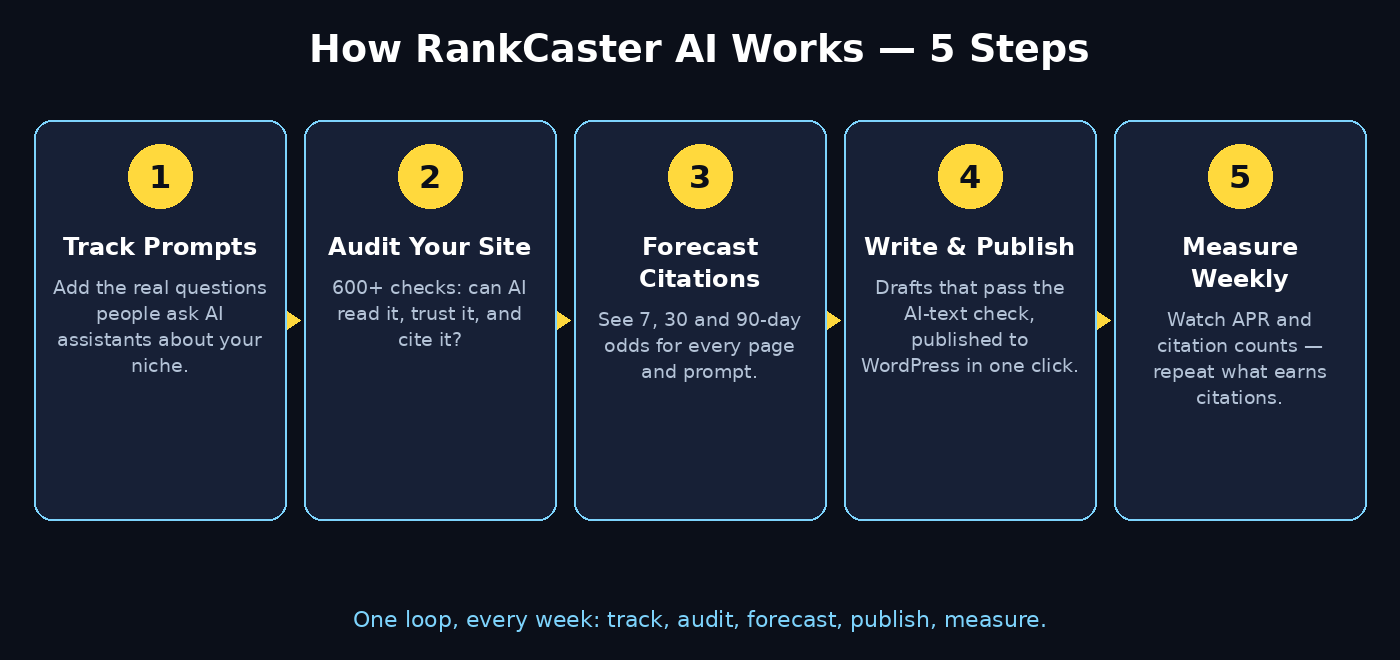
AI search is no longer a future trend — it is where a growing share of your audience gets answers today. RankCaster AI gives beginners a practical way into this new world: track the prompts that matter, audit your site with 600+ checks, forecast where citations will come from, write content that AI actually cites, and publish it without copy-paste.
Start small. Create one project, add ten prompts, run your first audit, and fix the quick wins. Then check your citations every week and let the numbers guide your next article. In a market where most websites have never been optimized for AI search, that simple routine is a real competitive advantage.
Explore More Free AI Tools
Want to keep building your AI toolkit? Try these free tools on AIToolSteps: the AI Title Generator for headlines that get clicked, the Meta Description Generator for search snippets, the AI Rewriter for polishing drafts, and the Keyword Density Checker to keep your pages balanced. Each one is free and takes less than a minute to use.