

Imagine typing your business name into an AI chatbot and discovering that it recommends your competitor instead of you — or that it describes your product incorrectly, or does not mention you at all. Until recently, most small businesses had no easy way to check this. Traditional search tools tell you how you rank on Google, but they say very little about how ChatGPT, Gemini, Perplexity, and other AI assistants talk about your brand when someone asks a question.
That is the problem Dageno AI sets out to solve. Dageno is an AI search market intelligence and GEO/AEO platform — GEO stands for Generative Engine Optimisation, and AEO stands for Answer Engine Optimisation. In plain language, it helps you understand how AI search engines see your brand. On October 28, 2026, Dageno launched Brand Explorer, a free tool that maps how artificial intelligence connects a company to its brands, products, competitors, and information sources. A free version of Brand Overview launched on the same day, placing any brand within its market for comparison with peers across platforms and regions. Both features are free forever with registration, and no credit card is required.
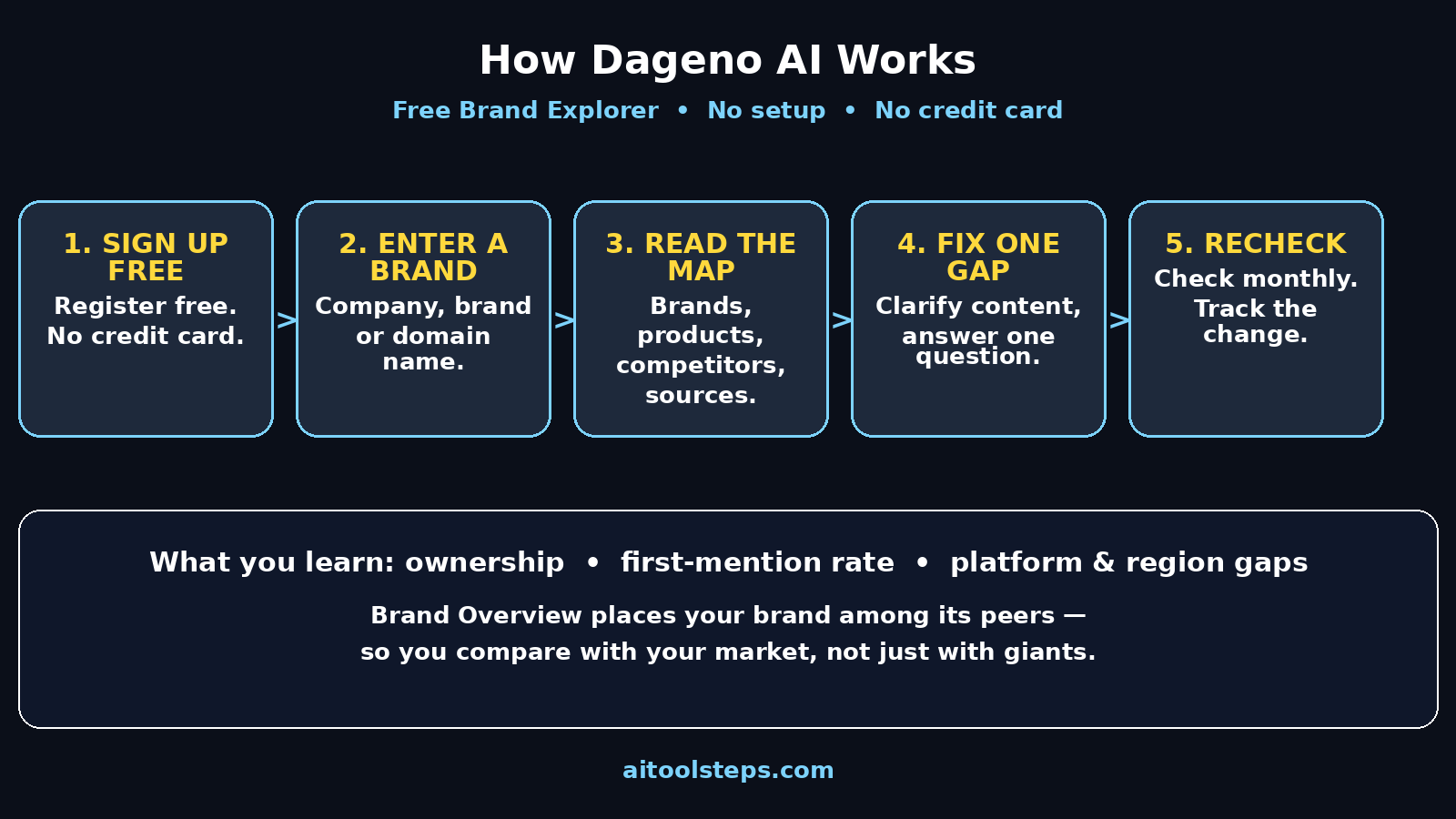
This beginner guide walks you through Dageno AI from scratch: what it is, who it is for, how to sign up free, how to run your first brand check, how to read the results without getting confused by jargon, and what to do next when the results surprise you. You do not need any marketing experience or technical background. If you can type a brand name into a search box, you can use Dageno.
Step 1: Understand What Dageno AI Actually Does
Most people are used to classic search. You type a keyword, Google shows ten blue links, and you click one. AI search works differently. When someone asks an AI assistant a question, it gives a single answer, often naming just one or two brands. If your brand is not in that answer, you are invisible in that conversation — even if your website ranks well on Google.
Dageno collects AI responses daily and studies the entities inside them: companies, brands, products, merchandise, ads, media outlets, creators, social media accounts, and research reports. It then connects those entities into a network of relationships. Brand Explorer reverses the usual way visibility tools work. Instead of asking you to configure every brand, product, competitor, and alternative name you can think of, it starts from the AI responses themselves and automatically identifies every entity that appears. That matters for beginners, because anything you forget to add stays invisible in a traditional tool — and in Brand Explorer, it can surface on its own.
Think of it like a map. Your company sits in the middle, and lines connect it to the brands and products that contribute to its visibility, to the competitors that appear alongside it most often, and to the sources AI assistants seem to trust. Once you can see that map, you can start to understand why AI recommends one brand over another.
- Classic search shows a list of links; AI search gives an answer that names brands.
- Dageno studies daily AI responses, not just website rankings.
- Brand Explorer needs no long configuration list to get started.
- The result is a network map of brands, products, competitors, and sources.
Step 2: Know Who Dageno Is For (and Who It Is Not For)
Dageno is most useful for small business owners, freelancers, marketers, and content creators who want to know how AI talks about them. If you run a shop, a service business, a blog, or a personal brand, and customers increasingly ask AI assistants for recommendations, this kind of check is becoming as basic as checking your Google ranking once was.
It is also useful if you are simply curious. You can look up a well-known brand first, just to learn how the tool works, before you check your own business. That is a good beginner habit: practise on a famous brand, learn what each number means, and only then turn to your own results.
Dageno is not a magic tool that instantly makes AI recommend you. It is a measuring tool first. It shows you where you stand, where the gaps are, and which competitors keep appearing next to you. The fixing part — better content, clearer product pages, stronger mentions elsewhere — comes after, and this guide covers that too.
- Best for: small businesses, freelancers, creators, and marketers.
- Good first practise: look up a famous brand before your own.
- It measures visibility; it does not guarantee recommendations.
- Use it as a regular check-up, not a one-time trick.
Step 3: Sign Up Free — No Credit Card Needed
Getting started is deliberately simple, which is good news for beginners. Both Brand Explorer and the free version of Brand Overview are free forever with registration, and Dageno states that no credit card is required for the free features.
Open Dageno’s official website in your browser and look for the sign-up or registration option for Brand Explorer. Create your account with an email address you actually check, because that is where account messages and any verification link will go. Choose a strong password that you do not reuse on other sites, and keep it in a password manager if you use one. Do not share your login details with anyone, and be wary of any unofficial site or message claiming to offer Dageno access — always start from the official website.
Once you are signed in, you should be able to start exploring straight away. There is no complicated setup, no code to install on your website, and no list of keywords to configure before your first check. That low barrier is the whole point of the free launch: you type a name, and the network appears.
- Registration is free, and no credit card is required for the free features.
- Sign up with an email address you check regularly.
- Use a strong, unique password.
- Start from Dageno’s official website, never a random link.
Step 4: Run Your First Brand Check in Brand Explorer
This is the fun part. In Brand Explorer, enter any company name, brand name, or domain. You can start with your own business, or with a competitor you admire, or with a famous brand if you are still learning.
After a moment, Dageno shows you how AI connects that company to its brands, products, competitors, and information sources. Take your time on this first screen. Beginners often rush past it, but the overview is where the story lives: which brands contribute visibility, which are mentioned but receive lower recommendation priority, how performance varies across AI platforms, and which competitors appear alongside the brand most often.
Try three quick checks in your first session. First, your own brand. Second, your closest competitor. Third, the biggest brand in your niche. Comparing those three side by side teaches you more in ten minutes than staring at one report for an hour, because you can see what a strong AI presence looks like versus a weak one.
- Enter a company name, brand name, or domain — no setup needed.
- Note which brands drive visibility and which get lower priority.
- Compare your brand with one competitor and one market leader.
- Save or note your first results so you can compare them later.
Step 5: Read the Ownership View — Who Really Drives Your Visibility
One of the most useful views in Brand Explorer is ownership. It shows which brands and products contribute to a company’s visibility, counting direct mentions separately from mentions that come through entities in its portfolio. In plain terms: sometimes AI mentions your company directly, and sometimes it mentions a product or sub-brand you own, and that still helps you.
Why does this matter for a beginner? Because many small businesses have more than one name in the wild: a company name, a shop name, a product line, and maybe an old brand name that still appears online. If AI only ever mentions one of those names, the others may be dragging down your overall visibility without you realising it. The ownership view helps you spot that split.
Ask yourself three questions as you read it. Which of my brands gets mentioned most? Are there products I care about that barely appear? And are there old or confusing names still floating around that I should clean up on my website and profiles? Write the answers down — they become your to-do list later.
- Direct mentions count separately from portfolio and product mentions.
- Check whether all your brand names appear, or only one.
- Spot old or confusing names that may still show up.
- Turn surprises in this view into a short cleanup list.
Step 6: Read the Position View — Where You Rank in AI Answers
Visibility alone is not enough. Being mentioned tenth in a long AI answer is very different from being mentioned first as the recommended option. Brand Explorer’s position view shows visibility, first-mention rate, and average mention position, and lets you drill down from the parent company to individual products.
For beginners, two numbers matter most. The first-mention rate tells you how often AI names your brand first, which is a strong signal of recommendation. The average mention position tells you roughly where you appear when you do get mentioned. If you are mentioned often but almost never first, AI knows you exist but prefers someone else — and that points to a content or reputation problem, not an invisibility problem.
Drill down to the product level too. A company can look healthy overall while one important product is never mentioned. If you sell several products or services, check each one separately. The product that earns you the most money deserves the closest look, even if the company average looks fine.
- First-mention rate shows how often AI recommends you first.
- Average mention position shows where you appear when mentioned.
- Mentioned often but rarely first means AI prefers a competitor.
- Drill down from company level to individual products.
Step 7: Compare Platforms and Regions to Find Your Gaps
AI assistants do not all answer the same way. A brand can look strong on one platform and weak on another, and performance can vary by region too. Brand Explorer lets you see which AI platforms and markets show strong performance for a brand, and where the gaps are.
This is practical, not just interesting. If most of your customers use one particular AI assistant, that platform’s view matters more to you than the overall average. If you sell in more than one country, a regional gap might explain why enquiries are strong in one place and quiet in another. Do not try to fix every gap at once. Pick the platform and region where your customers actually are, and focus there first.
A simple beginner routine is to check this view once a month and note one change: which platform improved, which slipped, and whether any new competitor appeared. Small, regular checks beat one big annual review, because AI answers change as models update and new content appears online.
- Performance varies across AI platforms — check them separately.
- Regional gaps can explain uneven enquiries.
- Focus first on the platform your customers actually use.
- Recheck monthly and note one change at a time.
Step 8: Study Your Competitors — Who Keeps Appearing Next to You
Brand Explorer also shows which competitors appear alongside a brand most often. This is one of the most valuable views for a beginner, because it tells you who AI thinks you compete with — which is not always who you think you compete with.
Open a competitor’s profile and read it the same way you read your own: ownership, position, platforms, and regions. Notice what they do differently. Do they have clearer product pages? Are they mentioned by sources AI trusts? Do they appear first for the questions your customers ask? You are not copying them; you are learning what AI rewards in your niche.
Be careful with one temptation here. Do not chase every competitor at once, and do not copy their content word for word. Search engines and AI systems both reward original, helpful content. Use competitor research to find gaps in your own content — questions nobody in your niche answers well — and then answer those questions better, in your own words.
- Note which competitors appear alongside you most often.
- AI’s view of your competition may differ from yours.
- Study what strong competitors do differently, without copying.
- Look for unanswered questions you can answer better yourself.
Step 9: Use Brand Overview to Place Your Brand in Its Market
Alongside Brand Explorer, Dageno launched a free version of Brand Overview, which places any brand within its market for comparison with peers across platforms and regions. Think of Brand Explorer as the close-up map of one brand’s network, and Brand Overview as the wide shot showing where that brand sits among its peers.
For a beginner, Brand Overview is the fastest way to answer the question: “Am I doing well, or just doing okay?” A brand can feel invisible in isolation but look respectable next to its peers, or it can look busy while actually trailing the whole market. Context changes the conclusion, and context changes what you do next.
Use Brand Overview when you want a quick health check, and Brand Explorer when you want to dig into why the health check looks the way it does. Together they give you both the headline and the detail, without needing a marketing degree to read either one.
- Brand Overview compares your brand with peers across platforms and regions.
- Use it for a quick market health check.
- Use Brand Explorer to dig into the reasons behind the result.
- Context matters: compare yourself with peers, not just with giants.
Step 10: Turn What You Find Into Simple Fixes
A report only helps if it changes what you do. Here is a beginner-friendly action plan based on the most common Dageno findings.
If AI barely mentions you at all, start with clarity. Make sure your website clearly states what you do, who it is for, and what your products are called, in plain language on the homepage and product pages. AI assistants learn from clear, consistent descriptions across the web, so inconsistent names and vague pages hurt you. If you run a business and want help presenting it clearly online, working with a professional digital agency can help you tidy up your messaging and web presence.
If AI mentions you but rarely recommends you first, look at trust signals. Are respected sites, reviews, and guides mentioning you? Is your content genuinely helpful, or just sales talk? Publishing clear guides, honest comparisons, and answered questions helps AI see you as a useful source. Teams that offer AI automation services can also help you organise this kind of content and outreach more systematically as you grow.
If one product is invisible while others do fine, give that product its own clear page, its own description, and its own mentions — do not bury it inside a long list. And if a competitor keeps beating you, study their best content and write something more helpful on the same topic, not a copy.
Then recheck in a month. AI visibility moves slowly, and one month is a fair interval for a beginner. Note what changed, keep what worked, and drop what did not. That loop — check, fix one thing, recheck — is the whole skill.
- Barely mentioned: clarify your homepage and product descriptions.
- Mentioned but not first: build trust with helpful, original content.
- One invisible product: give it its own clear page.
- Recheck monthly; fix one thing at a time and track the change.
Dageno AI vs Other Ways to Check Visibility
Beginners often wonder whether they need a tool like Dageno at all. The table below compares the main options in plain terms.
| Method | What it shows | Cost | Best for beginners? |
|---|---|---|---|
| Dageno Brand Explorer | AI brand network, ownership, position, platforms, competitors | Free with registration | Yes — no setup, instant map |
| Dageno Brand Overview (free) | Brand vs peers across platforms and regions | Free with registration | Yes — quick market context |
| Classic Google ranking tools | Website position for typed keywords | Free to paid | Partly — misses AI answers |
| Asking chatbots manually | One answer at a time, no tracking | Free | No — slow, no history |
| Hiring an agency report | Full audit plus recommendations | Paid | Later — once you know basics |
The honest summary is that manual chatbot checks are free but unusable at scale, classic ranking tools answer a different question, and agency reports are valuable later. For a beginner, Dageno’s free tier is the sensible starting point because it answers the AI question directly, with no configuration and no credit card.
Frequently Asked Questions About Dageno AI
Is Dageno AI really free?
Brand Explorer and the free version of Brand Overview are free forever with registration, according to Dageno’s launch announcement on October 28, 2026, and no credit card is required for the free features. Paid plans may exist for deeper features, but a beginner can start and learn a great deal without paying anything. Always check the current pricing page before assuming a feature is included in the free tier.
Do I need to install anything or add code to my website?
No. Brand Explorer works by entering a company name, brand name, or domain — there is no setup, no code to install, and no keyword list to configure before your first check. That is one of its main advantages for beginners over older visibility tools.
What is GEO, and how is it different from SEO?
SEO, or Search Engine Optimisation, is about ranking in classic search results like Google’s link lists. GEO, or Generative Engine Optimisation, is about being mentioned and recommended inside AI-generated answers. Both matter, but they measure different things, and a brand can do well at one while struggling at the other. Dageno focuses on the AI side.
How often should I check my brand on Dageno?
Once a month is a good beginner routine. AI answers change as models update and new content appears, but they do not usually transform overnight. Monthly checks let you spot trends without obsessing over daily noise, and they give your fixes time to take effect before you judge them.
Can Dageno help a very small business, or is it only for big brands?
It can help small businesses, arguably more than big ones, because small brands are the ones most likely to be invisible in AI answers without realising it. A free check costs nothing but a few minutes, and finding out early that AI recommends a competitor gives a small business time to fix its content before the gap grows.
Does using Dageno guarantee AI will recommend my brand?
No, and any tool that promises that should be treated with suspicion. Dageno measures and explains visibility; recommendations improve when your content is clear, trustworthy, and widely referenced. Think of it as a map and a health check, not a shortcut to the top of every answer.
Final Thoughts
AI search is changing how customers discover businesses, and the change is happening fast. A few years ago, ranking on Google was the whole game. Today, a growing share of customers ask an AI assistant first and trust its short answer — and if your brand is not in that answer, you may never get the chance to compete.
Dageno AI’s free Brand Explorer, launched on October 28, 2026, gives beginners a simple way to see that new reality for themselves. Type in a brand, read the network, check ownership and position, compare platforms and regions, study the competitors who appear next to you, and place your brand in its market with Brand Overview. Then fix one thing, recheck in a month, and repeat. No setup, no credit card, and no marketing degree required.
Start today with your own brand — and then check one competitor. The comparison alone will probably teach you something useful, and it only takes a few minutes.
Explore More Free AI Tools
Want to keep learning? Try these free tools from AIToolSteps: AI Title Generator, Meta Description Generator, AI Rewriter, and Keyword Density Checker — all free, right from the AIToolSteps homepage.