

Job hunting in 2026 is a race, and most people do not realize they are already losing it. The average job posting drew 28 applications in 2021. By 2025, that number had grown to 95, according to Greenhouse data cited by HiringNow. The job did not get harder — the pile got bigger, and the first applications in the pile get read first. That is the whole idea behind HiringNow AI. It is an AI job agent that watches company career pages around the clock. It finds new roles before they reach the big job boards. It applies for you — with your approval — while everyone else is still scrolling LinkedIn.
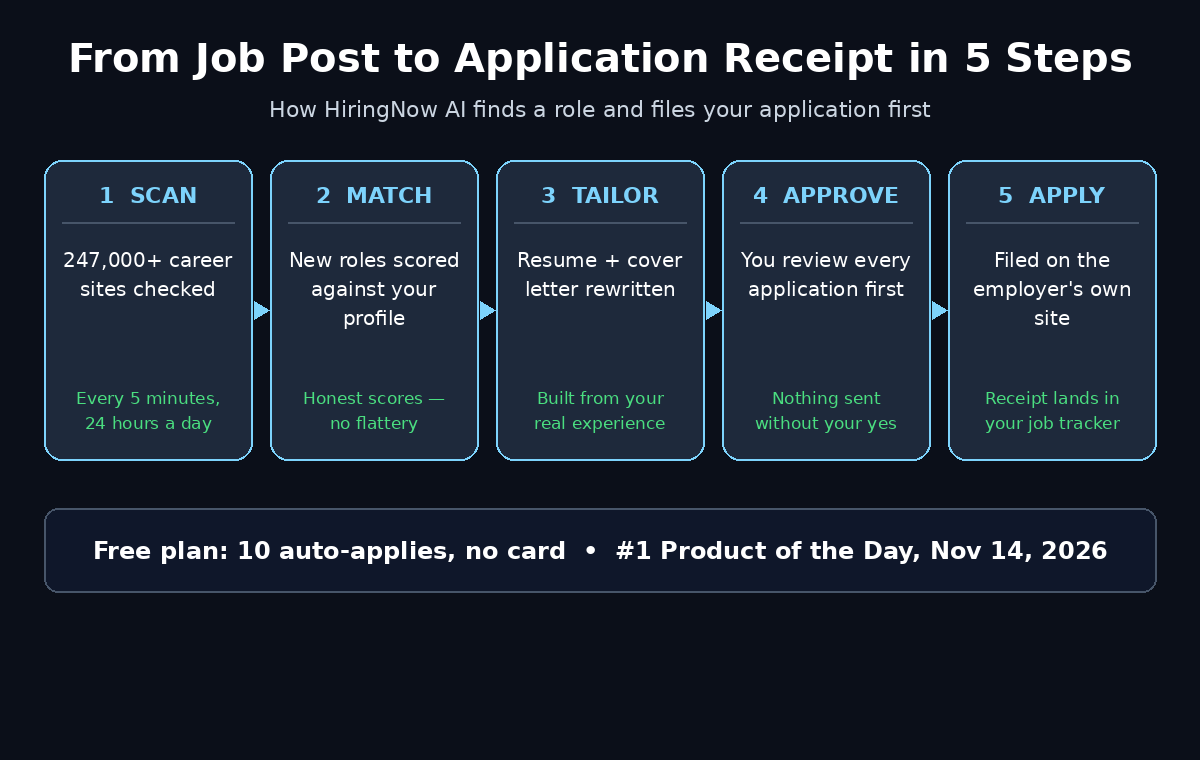
HiringNow launched on Product Hunt on November 14, 2026, and took the #1 Product of the Day spot with 302 upvotes. It monitors more than 247,000 company career sites every five minutes. It matches each new opening to your profile, then tailors your resume and cover letter from your real experience. Finally, it files the application on the employer’s own website. The free plan includes 10 auto-applies with no credit card required. That is enough to test whether the agent earns its keep on real jobs before you pay anything.
This guide shows you exactly how to use HiringNow AI as a beginner. You will set up your profile, read match scores honestly, and approve applications safely. You will also decide whether the paid plans are worth it. No jargon, no hype — just the steps, the limits, and the mistakes to avoid.
Step 1: Understand What HiringNow AI Actually Is
HiringNow is not another job board. Job boards wait for employers to post a role. Then they show it to you hours or days later, alongside thousands of other applicants. HiringNow is an AI agent: software that does a multi-step job for you on its own. Its crawlers check 247,000-plus employer career sites. These are the career pages companies run themselves. They are powered by more than 65 applicant tracking systems, including Workday, Greenhouse, Lever, Ashby, SmartRecruiters, and Oracle Taleo. Every page gets re-checked every five minutes.
That five-minute cycle is the product. A role posted on a company career page at 9:00 a.m. can sit there for hours before it appears on LinkedIn or Indeed. HiringNow can surface it to you in minutes, tailor your application, and file it while the pile is still small. The company behind it was founded in 2026 by Rohith Reddy in Hillsboro, Oregon. The pitch is simple: be first in the pile, not one of a thousand.
HiringNow is one of the clearest everyday examples of agentic AI. It is an agent that finds, prepares, and files work for you instead of just answering questions. But it is not magic, and it is not fully automatic. Nothing is ever submitted until you approve it. And when an application form needs something your profile does not cover, the agent asks you instead of guessing. That approval step is the most important thing to understand before you start.
Step 2: Create Your Free HiringNow AI Account
Start at the HiringNow website and create an account with your email address. The free plan costs $0 and asks for no credit card. You can set everything up and use your 10 free auto-applies before deciding anything about money.
Before you sign up, gather three things so the setup takes ten minutes instead of an hour:
- Your current resume as a PDF or Word file — the agent builds your profile from it, so the newest version matters.
- Your target roles written down plainly, for example “junior data analyst, remote” rather than “something in tech”.
- Your must-haves: locations you will accept, minimum salary, remote or on-site, and any deal-breakers such as night shifts.
One honest note: HiringNow is a young platform, launched in November 2026. Some features, such as mock interviews, are still in beta. If a button behaves oddly, it is usually a launch-week rough edge rather than a broken product. Check the help pages, or try again, rather than assuming the tool is dead.
Step 3: Build a Sharp HiringNow AI Search Profile
Your search profile is the instruction you give the agent, and vague instructions produce vague results. HiringNow AI matches new openings against this profile. Every detail you add sharpens the matches, and every detail you skip widens them into noise.
Set up your profile like this:
- Roles, not industries: list the exact job titles you want — “customer support representative”, “junior front-end developer”, “registered nurse” — instead of broad categories.
- Locations you actually accept: add every city or region you would move for, and mark remote roles separately if you want them.
- Salary floor: set the minimum you will accept so the agent does not waste your 10 free applies on roles you would turn down.
- Experience level: be honest about entry-level, mid-level, or senior. The agent matches against your real experience, and inflating it only produces interviews you cannot pass.
On the free plan you get one search profile, so make it count. Paid plans add more. Autopilot allows three search profiles and Autopilot Max allows ten. That matters if you are genuinely open to two very different kinds of work, such as sales roles and support roles at the same time. If that is you, run your strongest profile first on the free plan and add the second one only if you upgrade.
Step 4: Upload Your Resume and Read the ATS Score
Upload your resume and HiringNow AI gives it an ATS score. That score rates how well applicant tracking systems can read and rank it. This matters more than most beginners realize. Most large employers filter applications through an ATS before a human ever sees them. A pretty resume with tables, icons, and two columns can score badly, because the system cannot parse it.
Fix the easy things first:
- Use a single-column layout with standard headings such as Experience, Education, and Skills.
- Match the employer’s words: if the job post says “customer relationship management”, use that phrase instead of a synonym the system may not recognize.
- Keep dates and titles plain: “Sales Associate, 2023–2025” parses cleanly; a fancy timeline graphic does not.
- Drop the photo and the graphics: they add nothing to an ATS score and can break parsing entirely.
The free plan includes one resume and one cover letter, plus the ATS score. If your score is low, rewrite the resume in the simple format above and re-upload it before you spend any of your 10 applies. A tailored application built on a weak resume is still a weak application. If you want a second opinion on resume tools, our guide to Hira AI, another AI job search agent, covers a different approach to the same problem.
Step 5: Read Your HiringNow AI Match Scores Honestly
Every job HiringNow finds comes with a match score showing how closely it fits your profile. Here is the part most guides skip: these scores are honest rather than flattering. An independent week-long test of the platform found the best match scored 64 out of 100. That is not a failure of the tool — it is the tool refusing to tell you a 40% match is a dream job.
Use the scores like this:
- 70 and above: strong match — apply first, and spend your time tailoring the cover letter.
- 50 to 69: real possibility — apply if the role excites you, but expect a harder interview and read the requirements carefully.
- Below 50: usually a stretch — apply only if you have a specific reason, such as a referral or a rare skill the score undervalues.
Do not chase a perfect score. Job matching is an estimate. AI matching will not always capture nuanced qualifications. A hiring manager may value your volunteer work or your side project more than any score can. The score is a sorting tool, not a verdict. Use it to order your day, not to decide your worth.
Step 6: Review and Approve Every HiringNow AI Application
This is the step that makes HiringNow safe to use, so slow down for it. For each job you pick, the agent writes a resume and a cover letter tailored to that role, using your real experience. It then fills in the employer’s application form. Nothing is sent until you approve it. On the free and Pro plans, you approve one by one. On Autopilot plans, you can set rules that approve in advance.
Before you approve any application, check three things:
- Read the tailored resume: confirm every skill and achievement is genuinely yours. The company says the agent never invents experience — verify that claim on your first few applications until you trust it.
- Read the cover letter: it should sound like you, reference the actual company, and mention one real reason you want that specific role.
- Check the form answers. If a question needs something your profile does not cover, the agent asks you instead of guessing. Answer it yourself rather than leaving it blank.
The agent applies directly on the company’s own career site, not through a third-party portal. It never signs in to your LinkedIn, Indeed, or email accounts. It never asks for those passwords. That is a genuine privacy advantage over older auto-apply tools that wanted your login details. Keep it that way: never hand any tool your LinkedIn or email password, no matter what it promises.
Step 7: Track Every HiringNow AI Application With Receipts
Every application HiringNow AI files comes back with a receipt in your job tracker. That receipt is a timestamped record showing what was sent, when, and to whom. This is more useful than it sounds. Most job seekers lose track after twenty applications. They cannot remember who they applied to, which makes follow-ups impossible and duplicate applications embarrassing.
Build a simple weekly habit around the tracker:
- Every Monday: open the tracker and note which applications are a week old with no reply.
- Follow up once: a short, polite email to the hiring team or recruiter for roles you genuinely want — one follow-up, not three.
- Log the outcome: mark rejections, interviews, and ghosted applications so you can see which kinds of roles actually respond to you.
- Watch for closed roles. Employers take postings down without notice, so a job can close between discovery and filing. The receipt timestamps show how fresh each application was.
Over a month, the tracker becomes your real job-search data. If support roles reply and analyst roles never do, that tells you something about where your profile is strongest. You can then shift your search profile toward what works instead of guessing.
Step 8: Use the HiringNow AI Resume Builder, Mock Interviews, and Chrome Autofill
Auto-apply is the headline, but HiringNow bundles four more tools that beginners often miss. One subscription covers a fresh-job feed, a resume tailor, an application tracker, mock interviews, and auto-apply. It is rounded out with an ATS resume checker, a resume builder, and a Chrome autofill extension.
Use them in this order:
- Resume builder: if your uploaded resume scored poorly, rebuild it here in the ATS-friendly template instead of patching the old file.
- Chrome autofill: install the extension. Application forms on employer sites then fill from your profile in one click. It saves the most time on the forms the agent cannot file for you.
- Mock interviews: practice with the beta interview tool before a real call, especially for roles where you scored 50–69 and expect tough questions. Treat beta feedback as rough guidance, not a grade.
These extras are why the paid plans can make sense even for a careful beginner. You are not paying only for applications. You are paying for the whole workflow. But test them on the free plan first — ten real applications will tell you more about the product than any feature list.
Step 9: Decide Whether HiringNow AI Pro or Autopilot Is Worth It
After your 10 free auto-applies, HiringNow AI asks you to pay. The plans, checked on November 14, 2026, are as follows. Pro costs $29 a month and includes 100 auto-applies a month, unlimited resumes and cover letters, and premium templates. It is $59 per quarter, which works out to about $20 a month. Autopilot costs $49 a month for 300 auto-applies, approval by rules, three search profiles, and a priority queue. Autopilot Max costs $99 a month for 1,000 auto-applies, ten search profiles, and priority support. A Product Hunt launch offer cut 50% off the first month.
Here is a simple decision rule. Stay on the free plan if you are testing the idea or applying to a handful of dream roles. Upgrade to Pro if the 10 free applies produced real interviews or strong replies and you have more roles to chase. For one focused search, 100 applies a month is plenty. Choose Autopilot only if you are applying at genuine volume across two or three different role types. You also need to trust the agent enough to approve by rules instead of one by one. Autopilot Max is for recruiters and career changers running many parallel searches, not for a first job hunt.
One caution for small employers reading this as well. If you run a business and hire regularly, a digital agency can help you write job posts that show up cleanly on career pages and applicant tracking systems. That is exactly the surface tools like HiringNow AI read. Good posts get found early; messy posts get skipped by agents and humans alike.
Step 10: Avoid the Mistakes Beginners Make With HiringNow AI
Most bad experiences with HiringNow AI come from the user, not the tool. Avoid these five mistakes:
- Approving blindly: never approve an application you have not read. One invented skill in a cover letter can end an interview before it starts.
- Applying to everything: ten thoughtful applications beat a hundred random ones. Match scores exist for a reason — use them.
- Leaving a stale resume: if your resume is six months old, the agent is selling an old version of you. Update it first.
- Ignoring the tracker: applications without follow-up are lottery tickets. The receipt is only useful if you act on it.
- Paying before testing: use all 10 free applies on real jobs first. If none of them produced a reply, the paid plan will not fix that — a sharper search profile will.
And keep your expectations honest. HiringNow AI finds jobs early and files clean applications. But it cannot make an employer hire you. And it cannot fix a resume that does not match the roles you want. The agent is a speed advantage, not a substitute for being a good candidate.
HiringNow AI vs Other Ways to Apply
How does an AI job agent compare with the ways you already apply? Here is the honest comparison:
| Method | Speed to new jobs | Resume tailored per role | You approve before sending | Free option |
|---|---|---|---|---|
| HiringNow AI | Minutes — checks 247,000+ career sites every 5 minutes | Yes, automatically | Yes, every application | 10 auto-applies, no card |
| LinkedIn Easy Apply | Hours — roles appear after posting | No — same resume every time | Yes, you click apply | Yes, basic search free |
| Indeed | Hours — depends on employer posting | No — one stored resume | Yes, you click apply | Yes, applying is free |
| Manual applying | Days — you find roles yourself | Yes, but slow and tiring | Yes, full control | Yes, only your time |
The trade-off is clear. HiringNow AI wins on speed and tailoring. LinkedIn and Indeed win on network effects and the sheer number of roles. Manual applying wins on control but costs the most time. The smart move for most beginners is to combine them. Let HiringNow AI catch the fresh roles early. Use LinkedIn for the roles where a connection or a referral matters more than speed.
Frequently Asked Questions
Is HiringNow AI really free?
Yes, the free plan costs $0 and needs no credit card. It includes 10 one-time auto-applies, job matches with match scores, and a tailored resume and cover letter per application. You also get the job tracker, Chrome autofill, one resume, one cover letter, and an ATS score. Paid plans start at $29 a month for Pro.
Does HiringNow apply to jobs without asking me?
No. Nothing is submitted until you approve it. On the free and Pro plans you approve each application one by one. On Autopilot plans you can set rules that approve in advance. That is your choice. Always read the tailored resume and cover letter before you approve.
Does HiringNow invent experience on my resume?
No. The company says the agent never invents experience. It asks you when an application form needs something your profile does not cover, instead of guessing. Still, read your first few tailored applications carefully. Trust is earned, and your resume is not the place to test it blindly.
Which countries and roles does HiringNow cover?
Coverage spans the US, UK, and Canada, across software, data, nursing, sales, entry-level, and remote roles. The crawler network covers 247,000-plus career sites on more than 65 applicant tracking systems. The widest coverage is for roles at companies that run their own career pages.
Is HiringNow better than LinkedIn for job hunting?
It is better at one thing: speed. HiringNow finds roles on employer career pages minutes after they appear and files a tailored application before the pile grows. LinkedIn is better for networking, referrals, and roles that never reach a public career page. Most job seekers should use both rather than picking one.
When did HiringNow launch?
HiringNow launched on Product Hunt on November 14, 2026. It finished as the #1 Product of the Day with 302 upvotes and 28 comments, and #12 for the week with 301 upvotes. It is a young product — mock interviews are still in beta — so expect fast changes and occasional rough edges.
Final Thoughts
HiringNow AI solves a real problem. In a market where the average posting now draws 95 applications, timing matters. Arriving early with a tailored application is worth more than arriving late with a perfect one. Checking 247,000 career sites every five minutes is genuinely useful. So is tailoring your resume from your real experience and filing only with your approval. And the 10 free auto-applies let you prove it on real jobs before spending a dollar.
Use it the smart way. Build a sharp search profile, fix your ATS score first, and read your match scores honestly. Approve nothing you have not read, and follow up on every receipt. Combine it with LinkedIn for the roles where people matter more than speed. And remember the limit that matters most — no agent can make you the right candidate. It can only make sure the right employer sees you first.
Start with the free plan today. Spend your 10 applies on roles you genuinely want. Then let the replies decide whether the agent earns a place in your job hunt.
Explore More Free AI Tools
Want to keep exploring? Try the free tools on AIToolSteps. Use the AI Title Generator for headlines that get clicks and the Meta Description Generator for search snippets. The AI Rewriter polishes your drafts, and the Keyword Density Checker keeps your SEO on track.