

Applying to jobs is tedious and time-consuming. You open ten tabs, read the same job description three times, fill out the same form again, upload your resume again, and answer the same screening questions again. Then you do it all over the next day. Most people quit long before they find the right role — not because they are unqualified, but because the process itself is exhausting.
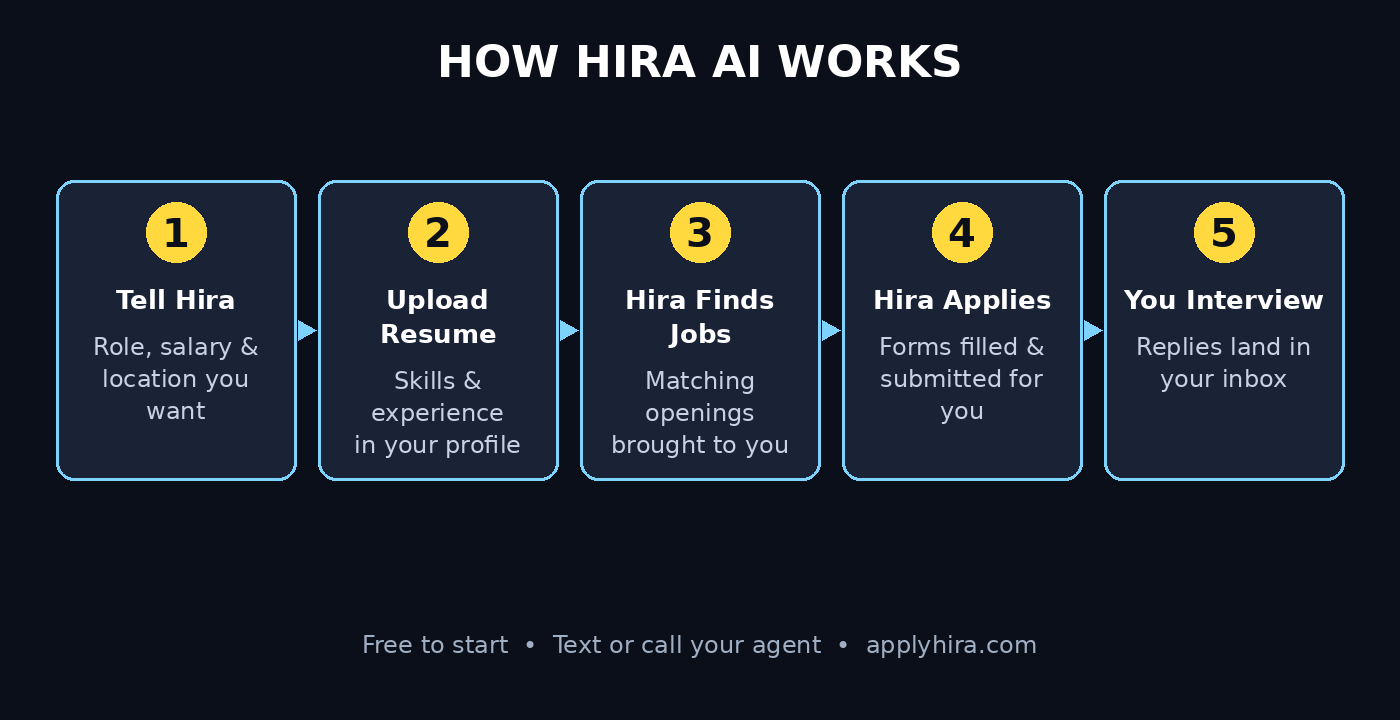
Hira AI changes that. Hira AI is a free AI job search agent that finds relevant opportunities and automatically applies to jobs for you. You can text it, call it, connect it to Claude, or use it through its website at applyhira.com — all for free. It launched on Product Hunt on November 2, 2026, and it is built around one simple idea: you should spend your time preparing for interviews, not filling out forms.
In this beginner-friendly guide, you will learn exactly how to use Hira AI: what it is, how to set up your free account, how to tell it what job you want, how to review the roles it finds, how it fills out and submits applications on your behalf, and how to stay in control while it works. You do not need any technical skills, and you do not need a credit card to start.
Step 1: Understand What Hira AI Actually Is
Hira AI is an AI-powered job search agent — software that acts on your behalf. In plain terms, it is a personal assistant for your job hunt. You tell it what kind of work you want, where you want to work, and what you are good at. Then it searches for matching openings, fills out the applications, and submits them for you.
Here is the idea in one sentence: instead of you spending three hours a night copying your resume into application forms, Hira AI does the repetitive work while you focus on the parts only a human can do — interviews, networking, and deciding which offer is right.
Hira AI works in three ways, and you can pick whichever feels most natural:
- Text it. Message Hira AI like you would message a personal assistant. Tell it what you are looking for, update your preferences, and ask it what it applied to today.
- Call it. Talk to Hira AI on a call, the same way you would brief a recruiter over the phone.
- Use the website. Sign in at applyhira.com and manage everything from a dashboard.
You can also connect Hira AI to Claude, so the agent works inside the AI assistant you may already use every day. That connection is optional. If you have never used Claude, the website and text options are more than enough to get started.
The most important thing to understand is that Hira AI is a tool, not a replacement for you. It finds jobs and handles applications. You still decide which roles are worth pursuing, you still show up for interviews, and you still choose which offer to accept. The agent saves you hours; it does not make your career decisions for you.
Step 2: Create Your Free Hira AI Account
Getting started with Hira AI takes only a few minutes, and there is no payment step. Product Hunt lists Hira at a price of $0, and the makers describe it as free — no credit card, no trial that runs out.
Follow these steps to create your account:
1. Go to applyhira.com. Open the official website in your browser. Always use the official site, not a link from a random ad or message. 2. Sign up with your email. Enter the email address you want job replies to reach. Use the same email that is on your resume, so recruiters can match your applications to your inbox. 3. Choose how you want to talk to Hira AI. During setup you can pick texting, calling, or the website dashboard as your main way to communicate with the agent. You can change this later. 4. Confirm your account. Check your inbox for a confirmation message and follow the link inside it. If you do not see it within a few minutes, check your spam folder.
That is the whole signup. There is no software to install and no complicated settings screen to survive. If a job search tool asks for your card details before showing you a single job, walk away — Hira AI does not work that way.
Once your account is active, Hira AI will walk you through a short setup. Do not rush this part. The quality of the jobs it finds depends entirely on how clearly you describe what you want, and the next two steps are where that happens.
Step 3: Upload Your Resume and Build Your Profile
A job search agent is only as good as the information it has about you. Before Hira AI can find the right roles, it needs to know your skills, your experience, and the kind of work you actually want.
Start by uploading your resume. Hira AI reads it and pulls out the details that matter: your current role, your past roles, your skills, your education, and your years of experience. If your resume is out of date, update it first — the agent will repeat whatever your resume says, so an old job title or a missing skill will follow you into every application.
After the upload, review what Hira AI understood. Check these four things carefully:
- Your job title and seniority. Make sure it matches how you describe yourself to recruiters.
- Your top skills. If a key skill is missing, add it. The agent uses skills to match you to roles.
- Your location and work preference. Remote, hybrid, or on-site — and which cities or time zones you will accept.
- Your contact details. Your email and phone number must be current, because replies from employers will come to you.
This profile is the foundation of everything Hira AI does next. A clear, honest profile produces relevant matches. A vague profile produces a pile of random jobs you will never want. Spend ten extra minutes here and you will save hours of filtering later.
If you run a small business or a freelance practice and you are hiring rather than job hunting, the same idea applies in reverse: a clear description of the role is what makes any hiring tool useful. For teams that want help setting up AI-powered hiring or automation workflows, working with a digital agency can be a shortcut — for example, the team at D365A builds AI automation for growing businesses.
Step 4: Tell Hira AI Exactly What Job You Want
Now tell Hira AI what you are looking for, in plain language. This is the step most beginners rush, and it is the step that decides whether the agent helps you or wastes your time.
Be specific about five things:
- The role. Not just “a job in tech” — say “a junior front-end developer role” or “a customer support role in a SaaS company.” The more precise the title, the better the matches.
- The industry. Startups, healthcare, finance, education, e-commerce — name the sectors you prefer and the ones you want to avoid.
- The salary range. Give Hira AI a minimum you will accept. This stops it from applying to roles that pay less than you need.
- The location. Remote worldwide, remote in your time zone, or a specific city. If you need visa sponsorship, say so clearly.
- The dealbreakers. Night shifts, on-call weekends, a long commute, a company size you dislike — list anything that would make you turn a job down.
You can give these instructions by text or on a call, just like briefing a human assistant. For example: “I am looking for a remote customer support role, $800 to $1,200 a month, no night shifts, in a company with fewer than 200 people.” That one message tells Hira AI more than a dozen vague ones.
Update your preferences whenever your situation changes. Got a new certification? Tell Hira AI. Changed your mind about remote work? Tell Hira AI. The agent works from your latest instructions, so keeping them current is how you keep the matches relevant.
Step 5: Review the Jobs Hira AI Finds for You
Once your profile and preferences are set, Hira AI starts searching for relevant opportunities. Instead of you opening job boards every morning, the agent brings the matches to you.
Review the first batch of matches carefully. This is your chance to train the agent. For each job, ask yourself three questions:
1. Is this the right role? Check the title, the seniority, and the responsibilities — not just the company name. 2. Is this the right company? A great role at a company whose values or working hours clash with yours is still a bad match. 3. Is this the right pay and location? If the salary or the location is wrong, the rest does not matter.
When a match is wrong, tell Hira AI why. “Too senior.” “Not remote.” “Salary too low.” That feedback sharpens the next batch. When a match is right, say so too — the agent learns from approval just as much as from rejection.
Do this review daily for the first week. It takes five minutes, and it is the fastest way to turn a generic job feed into a personal shortlist. After a week of feedback, most people find the matches get noticeably better, because the agent has learned what “relevant” means for them specifically.
A useful habit is to keep a simple shortlist of your own: the five roles you actually want this week. Compare it with what Hira AI brings you. If the two lists overlap, the agent is working. If they never overlap, your preferences need another round of detail.
Step 6: Let Hira AI Fill Out and Submit Applications
This is where Hira AI earns its keep. When you approve a role — or when your settings allow it — Hira AI automatically fills out the application form and submits it for you.
Here is what happens behind the scenes. Hira AI takes the details from your profile, completes the employer’s application form, uploads your resume, and drafts answers to the standard screening questions using what it knows about you. You do not have to retype your work history for the fifteenth time this week.
Before anything is submitted, check how your account is set to behave. Some job search agents ask you to approve every application first; others apply automatically to roles that pass your filters. Open the settings inside your Hira AI account and confirm which mode you are in. If you are new to auto-apply tools, start with the stricter setting — approve each application yourself for the first few days — and loosen it only once you trust the matches.
A few practical rules make auto-apply work for you instead of against you:
- Never let the agent apply to the same job twice. A good agent tracks what it already submitted. If you apply manually to a role as well, tell Hira AI so it does not duplicate it.
- Read the application before it goes out for important roles. For a dream job, review the filled form yourself. A two-minute check beats a rejected application.
- Keep your resume and your answers consistent. If your resume says one thing and the form says another, recruiters notice. Your profile is the single source of truth — keep it updated.
Applied jobs are not finished jobs. An application is the start of a conversation, not the end of one. The next step is tracking what happens after you apply, which is exactly what Step 8 covers.
Step 7: Talk to Hira AI by Text or Call
One of the most useful things about Hira AI is that you do not manage it through complicated menus. You talk to it. That makes it genuinely beginner-friendly, even if you have never used an AI agent before.
Here are everyday things you can say or type to Hira AI:
- “Show me what you applied to today.”
- “I only want remote jobs from now on.”
- “Stop applying to sales roles.”
- “My salary minimum is now $1,500 a month.”
- “Write a short cover note for the support role at the travel company.”
- “Did the marketing company reply yet?”
Treat it like briefing a helpful assistant. Short, clear instructions work best. If something it did looks wrong, say so in plain words and it will adjust. If you want it to pause for a week while you prepare for interviews, just tell it to pause.
The call option is worth trying at least once. Some people explain what they want far more easily out loud than in writing, and a five-minute call can set up a whole week of applications. If you are job hunting from your phone between other tasks, texting is the faster route — quick updates, no need to sit at a desk.
The broader shift here matters beyond one tool. AI agents that you can simply talk to — by text or by voice — are becoming the normal way people get work done online, from job hunting to customer support to research. If you want to follow how this agent economy is developing, Agentic Affairs covers AI agents and the tools built around them.
Step 8: Track Your Applications and Follow Up
Applying is only half the job hunt. The other half is knowing what happened after you applied — and following up at the right moment.
Keep track of three things for every application:
- Where you applied. Company, role, and date. Hira AI keeps a record, but keep your own short list too, so you are never caught off guard by a reply.
- What stage it is in. Applied, screening, interview, offer, or rejected. A simple list is enough.
- What comes next. If an employer asked for a task or a second interview, note the date and prepare for it.
When a reply arrives, it comes to your email — the one on your profile. Check that inbox every day during an active job hunt. Recruiters move fast, and a reply that sits unread for three days can cost you the interview slot.
Follow up politely when a week passes with no answer. A short message — “I applied for the support role last week and I am still very interested; please let me know if you need anything else from me” — is enough. Do not send the same follow-up twice, and do not chase a company that has already said no.
One more habit that pays off: after every interview, write down what went well and what you would answer differently next time. Your next interview will be better for it, and you can even tell Hira AI to focus on roles that match what you learned about yourself.
Step 9: Connect Hira AI to Claude (Optional Power Move)
If you already use Claude as your everyday AI assistant, you can connect Hira AI to it. This is optional — the website, text, and call options work perfectly well on their own — but the connection is useful if Claude is already where you plan your day.
With the connection in place, you can manage your job search from inside Claude: ask about your applications, update your preferences, and check new matches without switching apps. It turns Claude into a single place where your job hunt lives alongside your other work.
To set it up, open the connection or integration option inside your Hira AI account and follow the prompts to link Claude. You will be asked to confirm the connection — read what access you are granting before you approve it, the same way you would for any app that connects to another service.
If you do not use Claude, skip this step entirely. There is no advantage in adding a tool you will not open. Hira AI is designed to work on its own, and most beginners will never need the Claude connection to get great results from it.
Step 10: Stay in Control — Safety Rules for Auto-Apply
Letting an AI apply to jobs for you is powerful, and power needs a few guardrails. These five rules keep you safe:
1. Review your settings before the first application. Know whether Hira AI applies automatically or waits for your approval, and choose the mode you are comfortable with. 2. Never share passwords or bank details. A real job application never asks for your bank account, your credit card, or a payment to “secure” an interview. If a listing does, it is a scam — report it and move on. 3. Check the employer before you celebrate. Before an interview, search the company name, read recent reviews, and confirm the role is real. Hira AI finds openings; you verify the employer. 4. Keep your personal data minimal. Your resume needs your skills and experience, not your home address, your ID number, or your date of birth. Share only what an employer genuinely needs at the application stage. 5. Stay the decision maker. Hira AI can apply, but you decide which interviews to take and which offers to accept. If a role feels wrong, turn it down — no agent knows your life better than you do.
These rules take two minutes to set up and they protect you for the whole job hunt. Auto-apply tools work best when the human stays in charge, and Hira AI is built around that idea: it does the repetitive work, and you keep the decisions.
Hira AI vs Applying Manually: An Honest Comparison
Is Hira AI actually better than doing it yourself? It depends on what you value most — control or time. This table compares the two approaches side by side so you can decide for yourself.
| Task | Applying Manually | With Hira AI |
|---|---|---|
| Finding matching jobs | You search job boards every day | Hira AI brings matches to you |
| Filling out forms | You retype the same details each time | Hira AI fills out and submits applications |
| Tailoring each application | Full control, but slow | Fast, using your profile details |
| Tracking applications | You keep your own spreadsheet | Hira AI keeps a record for you |
| Communicating with the agent | Not applicable | Text or call, like a personal assistant |
| Cost | Free, but hours of your time | Free ($0 on Product Hunt) |
| Best for | A few dream roles you want to perfect | A high-volume search across many roles |
The honest answer is that the two approaches work best together. Use Hira AI to cover the volume — the dozens of solid roles you would never have time to apply to by hand — and apply manually to the two or three dream roles where a personal touch matters most. That combination gives you both reach and quality, and it is how most successful job seekers use auto-apply tools.
Other free and paid AI job tools exist in the same space — Jobright AI, ResumeUp.AI, Huntr, WonsultingAI, and EarnBetter are the alternatives Product Hunt lists next to Hira — and each has its own approach to matching and applying. Hira stands out for beginners because it is free, it works by plain text or call, and it connects to Claude if you want it to. If you try more than one tool, compare them on the same three questions: does it find roles you actually want, does it apply accurately, and does it stay free while you use it.
Frequently Asked Questions About Hira AI
Is Hira AI really free?
Yes. Product Hunt lists Hira at $0, and the makers describe it as free — you can text it, connect it to Claude, or use the website without paying. There is no credit card step in the signup. As with any new tool, check the pricing page inside your account before you rely on it for a long job hunt, because launch pricing can change.
Does Hira AI apply to jobs without asking me?
Hira AI automatically fills out and submits job applications for you — that is its main job. How much freedom it has depends on your settings. Check whether your account is set to apply automatically or to wait for your approval, and choose the mode you trust. When you are starting out, approval mode is the safer choice.
What kinds of jobs can Hira AI find?
Hira AI finds relevant opportunities based on your profile and the preferences you set — the role, industry, salary range, and location you asked for. The more specific your preferences, the more relevant the matches. Review the first batches carefully and give feedback, so the agent learns what a good match looks like for you.
Do I need Claude to use Hira AI?
No. Claude is one optional way to connect to Hira AI. You can also use the website at applyhira.com, text the agent, or call it. Most beginners will be perfectly happy with the website or texting, and you can add the Claude connection later if you start using Claude regularly.
Is it safe to let an AI apply to jobs for me?
It is safe if you stay in control. Review your settings, check the roles it applies to — especially in the first week — and never share passwords or bank details with any employer or listing. A genuine employer never asks for payment during hiring. Keep your resume free of sensitive personal data like your home address or ID number.
How is Hira AI different from Jobright AI or Huntr?
Hira AI is built around conversation: you text or call it like a personal assistant, and it finds jobs and applies for you, all for free. Jobright AI focuses on fast matching, Huntr focuses on tracking your search and automating follow-ups, and ResumeUp.AI focuses on tailoring and autofilling applications. The right choice depends on whether you want a conversational agent, a tracker, or a resume tailor — and Hira AI is the simplest starting point if you want the agent to do the applying.
Final Thoughts
Job hunting is hard enough without the paperwork. Hira AI takes the most repetitive part of the search — finding roles, filling out forms, and submitting applications — and hands it to an agent you can simply text or call. It launched on Product Hunt on November 2, 2026, it costs nothing to start, and it works from the website, by text, by call, or connected to Claude.
The setup takes less than half an hour: create your free account at applyhira.com, upload your resume, tell Hira AI exactly what job you want, and review the first matches. Give it a week of feedback and you will have a job search that runs while you prepare for interviews, learn new skills, or simply live your life.
Start today, stay in control of your settings, and let the agent do the busywork. Your next job may be one application you never had to type.
Explore More Free AI Tools
Want to keep building your AI toolkit? Try these free tools from AI Tool Steps — no signup walls, no credit card:
- AI Title Generator — write catchy headlines for your resume, portfolio, or blog in seconds: https://aitoolsteps.com/
- Meta Description Generator — craft search-friendly descriptions for your pages and profiles: https://aitoolsteps.com/
- AI Rewriter — polish your cover letters and application answers into clear, professional English: https://aitoolsteps.com/
- Keyword Density Checker — check that your resume and LinkedIn profile mention the right skills often enough: https://aitoolsteps.com/
If you found this guide useful, you may also like our beginner’s guide to OpenMail AI — another free AI agent that gives your AI assistants their own email inbox. And if you are building an AI-powered workflow for your own business, the guides on D365A show how small teams put AI agents to work every day.