

Every HR team knows the same painful loop. A new hire joins on Monday, and someone has to walk them through the culture deck, the tools, the safety rules and the first-week checklist — again. A policy changes, and the same ten questions land in the HR inbox — again. A compliance deadline arrives, and half the team has not finished the training video — again. Pitch Avatar HR Suite is a new tool built to break that loop. It launched on Product Hunt on November 18, 2026, finished the day as the number one buzzing launch, and it turns the materials you already have — slides, PDFs and videos — into courses led by a conversational AI avatar that does not just explain, it answers. In this beginner guide you will learn exactly how to use Pitch Avatar HR Suite, from your free trial to your first finished course, your first enrolled team, and your first analytics report.
If you have never used an AI avatar tool before, you are in the right place. You do not need a camera, a recording studio, or any video editing skill. You need your existing training files, about an hour, and the steps below. By the end, every new hire in your company will have a personal guide that speaks their language, answers their questions on the spot, and reports back to HR without anyone chasing a spreadsheet.
Step 1: Understand What Pitch Avatar HR Suite Actually Does
Before you click anything, it helps to understand what makes Pitch Avatar HR Suite different from a normal video tool. Most avatar tools — HeyGen, Synthesia, Colossyan — record a presenter once and play the video back. The viewer watches, and if they have a question, they still have to email HR. Pitch Avatar HR Suite flips that around: its avatars hold a conversation. An employee watches a lesson, asks a question in the middle of it, and the avatar answers right away from your company knowledge base. That one difference is the whole product.
The suite is built around four jobs that eat most of an HR or L&D team’s week:
- Onboarding: a personal guide for every new hire — company culture, tools, first-week checklist — with an avatar that answers questions from day one, at the new hire’s own pace.
- AI HR assistant: an avatar on your intranet or employee portal that answers everyday questions about policies, benefits and processes around the clock, and books a call with HR when a real person is needed.
- Training and compliance: courses people actually finish, with proof they did — enrollments, reminders and completion reports built in.
- Multilingual delivery: build a course once and deliver it in 70+ languages, with no re-recording and no separate version per office.
The practical payoff is simple: HR stops repeating the same session every week, every employee gets the same correct answer, and managers can see who finished what without chasing anyone. If your team is small, the same logic still applies — one person can build a course in an afternoon that used to take a week of live sessions. If you work with a digital agency that handles your training rollouts, the suite also gives them a repeatable format: one knowledge base, one course, every office, every language.
Step 2: Create Your Account and Start the Free 14-Day Trial
Pitch Avatar HR Suite starts with a free 14-day trial, so you can build a real course before you pay anything. At launch the team also offered 50% off HR Suite until November 30, 2026, with the promo code listed on its Product Hunt launch page — worth checking before you subscribe, because launch offers like that usually expire. Pricing itself depends on the number of course creators and the number of employees you train, so there is no single flat price to quote here; check the current plans on the HR Suite pricing page once your trial is running.
Here is the beginner-friendly way to start:
- Go to the Pitch Avatar HR Suite page and start the free trial. Use your work email, not a personal one — your courses will live under this account, and your IT team will thank you later.
- Complete the short setup: company name, team size, and the main languages your people speak. This shapes the defaults for avatars and voices later.
- Book the free 30-minute walkthrough if it is offered during your trial. The team also offers an extended trial or a free pilot after the call, which is useful if your first course needs approval from a manager before you commit.
- Invite one colleague as a course creator and one as a viewer. Building alone is fine, but a second pair of eyes catches the mistakes — a wrong date in a policy, a slide that is out of date — before your whole team sees them.
Do not skip the walkthrough if you are new to avatar tools. Thirty minutes with someone who knows the product saves hours of clicking around, and it is also the fastest way to confirm whether the tool fits your company’s actual training problem rather than the one in the marketing copy.
Step 3: Build Your Company Knowledge Base First
The most common beginner mistake with Pitch Avatar HR Suite is jumping straight to the avatar and the video. The avatar is the face; the knowledge base is the brain. Every answer the avatar gives comes from the materials you add, so if the knowledge base is messy, the answers will be messy too. Spend your first real hour here, not on the fun part.
Your knowledge base is simply the collection of source files the avatar is allowed to answer from: playbooks, policies, slides, handbooks and training videos. Add materials once, and every avatar answers from the same source, so every employee gets the same answer. That consistency is the point — it is what stops two new hires from getting two different versions of the holiday policy.
Start with a small, clean set:
- The employee handbook — the single source of truth for policies, benefits and processes.
- Your onboarding deck — culture, values, tools, and the first-week checklist, as it exists today, not the version from two years ago.
- One or two training videos — safety, compliance, or product training that people currently watch and forget.
- An FAQ document — the ten questions HR answers every week, written down with the approved answers.
Before you upload anything, do a quick freshness check. Open each file and ask: is this still true? A policy that changed in September but lives in a March PDF will teach the avatar the wrong answer, and the avatar will teach it confidently to every new hire. Delete the outdated version, upload the current one, and keep a note of the date you last reviewed each file. If your company uses AI automation services to keep documents in sync, this is a good place to connect that workflow — a knowledge base that updates itself is worth more than one that needs a monthly manual sweep.
Finally, decide who owns the knowledge base. One person — not a committee — should approve new materials and retire old ones. If everyone can upload, the avatar will eventually answer from three conflicting versions of the same policy, and you will be back to answering questions by email.
Step 4: Turn Slides, PDFs and Videos Into Your First Course With Pitch Avatar HR Suite
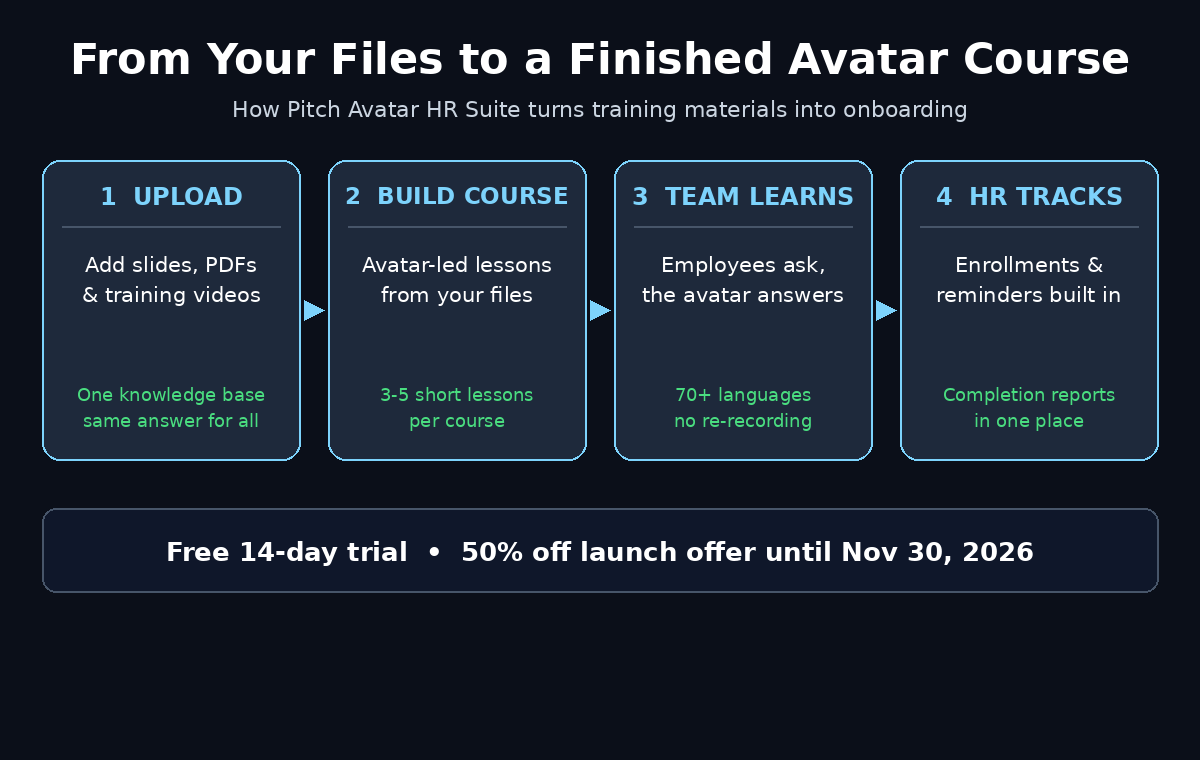
With the knowledge base in place, building your first course is the satisfying part. Pitch Avatar HR Suite turns your slides, PDFs and videos into structured courses, and enrolls teams in a few clicks. You do not write a course from scratch — you convert the training you already run into a format that runs itself.
Pick the right first course. Do not start with your most complex compliance module. Start with the onboarding course, because it has a clear audience (every new hire), a clear finish line (first week done), and a clear payoff (HR stops repeating the same session). A good first course has three to five short lessons, each one answering a single question: Who are we? What tools do I use? What do I do in my first week? Where do I ask for help?
The build flow looks like this:
- Choose your source material. Select the deck or document for one lesson. One source per lesson keeps the avatar’s answers focused and stops lessons from drifting into each other.
- Let the suite structure the lesson. The tool turns your material into a lesson with an avatar presenter, key points, and a natural speaking order. Read the generated script before you approve it — the avatar will say exactly what is written, including any typo you missed.
- Keep lessons short. Three to five minutes per lesson is the sweet spot. If a lesson runs past seven minutes, split it. People finish short lessons; they postpone long ones, and postponed compliance training is the same as unfinished compliance training.
- Add a check at the end of each lesson. One or two questions that confirm the employee understood the point — not a trick exam, just a “can you find the holiday request form?” moment. Completion without understanding is a checkbox, not training.
- Preview the whole course as a new hire would. Watch it end to end, ask the avatar the questions a nervous new hire would ask, and fix anything that sounds wrong before anyone else sees it.
A practical tip from teams that have done this before: build the course with one real new hire in mind. Give them a name, a role, and a first day. Every time you are unsure whether a lesson is clear enough, ask whether that person would understand it on their first morning. Generic courses train nobody; specific courses train everybody.
Step 5: Pick an Avatar and a Voice Employees Will Trust
An avatar is not decoration. It is the person your new hire will spend their first week listening to, so the choice matters more than most beginners expect. Pitch Avatar lets you choose the avatar’s face and voice, and the same course can be delivered in 70+ languages with natural voice-overs — and with voice cloning, the same speaker keeps the same tone in every office.
Choose with your audience in mind, not with your own taste:
- Match the tone to the content. A calm, professional presenter fits compliance and safety training. A warmer, friendlier presenter fits culture and welcome lessons. You can use different avatars for different courses — the suite does not force one face on everything.
- Keep the same avatar for a whole course. Switching presenters halfway through a course feels like switching teachers mid-lesson. Consistency builds trust; variety inside one course builds confusion.
- Test the voice at normal speed. A voice that sounds fine in a ten-second preview can sound rushed or robotic over five minutes. Listen to a full lesson before you commit, and slow the pace slightly if the avatar is racing through policy details.
- Check pronunciation of your company’s words. Product names, office names, and local terms are where AI voices stumble. If your company name or a key term is mispronounced, fix it before launch — employees notice instantly, and it undermines everything the avatar says after it.
If your company already uses avatar video elsewhere — for example a marketing team that makes product explainers — ask them which presenters tested well. But remember the context is different: a marketing video needs energy, a training video needs clarity and patience. The best training avatar is the one employees forget is an avatar, because they are busy learning.
Step 6: Let the Avatar Answer Questions Mid-Lesson
This is the feature that separates Pitch Avatar HR Suite from every plain avatar video tool, so it deserves its own step. In a normal training video, a confused employee pauses, opens a new tab, and either guesses or emails HR. In Pitch Avatar HR Suite, the employee asks the question during the session and gets an answer instantly — not a ticket for HR, not a link to a 40-page PDF, an answer.
Here is how to make that feature actually work for beginners:
- Seed the questions yourself. Before launch, ask the avatar the ten questions new hires always ask — “How many holidays do I get?”, “Who approves my expenses?”, “What is the Wi-Fi password?” — and check the answers. If an answer is wrong, fix the source material in the knowledge base, not the avatar’s script.
- Watch what people ask most. The suite shows HR what employees ask, and that list is gold. If twenty people ask the same question, the lesson itself is unclear — rewrite the lesson, and the questions stop. Your FAQ document should grow from real questions, not from guesses.
- Set the escalation rule clearly. The avatar should answer policy questions, and book a call with HR when a person is needed. Make sure employees know which questions the avatar handles and which ones go to a human — sensitive topics, personal situations, and anything the knowledge base does not cover should reach a person fast.
- Test the edge cases. Ask a question the knowledge base cannot answer, and see what the avatar does. A good answer is “I don’t have that information — let me connect you with HR.” A bad answer is a confident guess. Check this before launch, because a confident wrong answer about pay, leave, or safety is worse than no answer at all.
Think of the avatar as a very patient junior colleague who knows the handbook perfectly and never gets tired — not as a replacement for HR. The goal is not to remove humans from onboarding. The goal is to free humans for the conversations that actually need a human: the nervous new hire, the tricky personal situation, the judgement call.
Step 7: Enroll Your Team and Set Reminders That Actually Work
A course nobody takes is a file, not training. Pitch Avatar HR Suite has enrollments, reminders and analytics built in, so the admin work that usually kills training programmes is handled inside the tool instead of in a spreadsheet.
Enroll in small waves, not one giant blast. Start with your next five new hires, or one department, and watch the completion data for a week. If something breaks — a lesson that will not load, a question the avatar answers badly — you will find it with five people, not fifty. Then roll out to everyone.
Reminders work best when they are specific and kind. “You have a training video to watch” gets ignored. “Your 4-minute safety lesson is due Friday — it takes less time than a coffee break” gets done. Use the suite’s reminder settings to nudge once, then once more a day before the deadline, and then let the manager follow up personally. Three automated reminders and no human follow-up trains nobody; one automated reminder plus a human nudge trains almost everybody.
For compliance courses, set the deadline before you enroll anyone, and tell people the deadline in the enrollment message itself. “Complete by Friday” inside the course is too late — people need the date before they decide when to do it. And keep the enrollment message short: what it is, how long it takes, when it is due, and where to ask questions. Everything else is noise.
Step 8: Track Completion and Read the Analytics Like a Manager
Pitch Avatar HR Suite shows HR course completion across the team in one place, and that visibility is half the value of the tool. But a dashboard is only useful if someone reads it with intent. Check three numbers every week:
- Completion rate by course. If onboarding is at 95% and safety training is at 60%, the problem is not your employees — it is the safety course. Watch the drop-off point: the lesson where people stop is the lesson that needs rewriting, shortening, or splitting.
- Questions asked per lesson. A lesson with many questions is either confusing or interesting. Read the questions to tell which. Confusing questions mean the lesson needs a rewrite; interesting questions mean you have found a topic worth a deeper lesson.
- Time to complete. If a 15-minute course takes people three weeks, the course is not the problem — the scheduling is. Move it into the first week, protect the time on the calendar, and watch completion jump.
Share one short report with managers every month: completion by team, the three most-asked questions, and the one lesson you changed because of the data. That report does two things. It proves training is happening, which matters for compliance audits, and it shows managers that their team’s questions are being heard. When managers see the data, they start enforcing completion themselves — and that is when a training programme stops depending on HR reminders alone.
Step 9: Deliver the Same Course in 70+ Languages
For companies with offices in more than one country, this step alone can justify the tool. Pitch Avatar HR Suite delivers the same course and the same answers in 70+ languages, with no re-recording and no separate version per office. Every employee learns in their own language, so key details do not get lost in translation.
The beginner workflow is simple, but it has one rule: translate from a finished course, not a draft. Finalize the English version first — script approved, questions tested, lessons in final order — and only then roll out the other languages. Translating a draft means translating every edit twice, and the versions drift apart within a week.
- Start with your two biggest languages. Roll out the course in the languages most of your team actually speaks, watch the completion data for a month, and then add the rest. Seventy languages on day one sounds impressive and creates seventy things to maintain.
- Have a native speaker spot-check each language. Machine translation is good, but policy language is precise — a wrong word in a safety rule or a leave policy is a real problem. One native speaker reviewing the script for ten minutes per language catches the errors that matter.
- Keep the avatar consistent across languages. With voice cloning, the same speaker keeps the same tone in every office, which matters for brand consistency. Employees in Lahore, London and Lisbon should feel they are taking the same course, not three different ones.
- Watch the questions in each language. If one language’s learners ask far more questions than the others, the translation — not the learners — is probably the problem.
One more practical point: multilingual delivery also helps inside a single office. Teams in Pakistan, the Gulf, and Europe often share one workplace with three or four home languages. Letting each person learn in the language they think in is not a luxury feature — it is the difference between training that is understood and training that is merely watched.
Step 10: Use the AI HR Assistant for Everyday Policy Questions
The course builder is the headline, but the AI HR assistant is the quiet workhorse. Place the avatar where your people already work — on your intranet or employee portal — and it answers questions about policies, benefits and processes around the clock. You see what people ask most, and the inbox of repeated questions shrinks week by week.
Roll it out in three stages:
- Stage one — internal pilot. Give the assistant to HR and two friendly managers for two weeks. They will ask the awkward questions, find the wrong answers, and fix the knowledge base before anyone else sees it.
- Stage two — one department. Launch it to a single team with a clear message: “Ask the avatar first. If it cannot answer, it will book you a call with HR.” Collect the questions it could not answer — that list is your next knowledge base update.
- Stage three — company-wide. Once the unanswered-question rate is low and the answers are verified, roll it out everywhere. Keep the human escalation visible: every answer should make it easy to reach a person, because an assistant that traps people is worse than no assistant at all.
Measure the assistant the same way you measure the courses: questions answered per week, the share that needed a human, and the top ten questions. If the same question keeps needing a human, the knowledge base is missing a document — add it, and the question stops reaching HR. Over a quarter, that list is a map of everything your company has never written down. Writing it down is the real return on the tool.
Pitch Avatar HR Suite vs HeyGen vs Synthesia vs Colossyan
Pitch Avatar HR Suite is not the only avatar tool, so it helps to see where it sits. HeyGen, Synthesia and Colossyan are all strong general-purpose avatar video tools, and each has its own strengths. The difference is focus: the HR Suite is built for HR and L&D teams, with courses, enrollments and analytics in the box, while the others are built for general video creation and need extra work to become a training system.
| Tool | Built for | Avatar answers questions? | Languages | Free start |
|---|---|---|---|---|
| Pitch Avatar HR Suite | HR onboarding, training, compliance | Yes — conversational, from your knowledge base | 70+ | Free 14-day trial; launch offer 50% off until Nov 30, 2026 |
| HeyGen | General avatar video, marketing | No — plays a recorded script | 175+ (per vendor) | Free plan; Creator from $29/month |
| Synthesia | Corporate video, training videos | No — plays a recorded script | 140+ | Free plan; Starter from $19/month |
| Colossyan | Training video, workplace learning | No — plays a recorded script | 120+ | 20 minutes free; Professional from $59/month |
Prices and free limits change often, so check each vendor’s current pricing page before you decide. The practical takeaway is simple: if your problem is “make a video with a presenter”, any of these tools will do it. If your problem is “onboard fifty new hires, prove they finished, and answer their questions without hiring more HR staff”, the HR Suite’s courses, enrollments, analytics and conversational answers are the features that matter — and the other tools would need extra systems bolted on to match them.
If you want a broader grounding in avatar video first, our beginner guide to HeyGen walks through the general-purpose side of this category — How to Use HeyGen AI for Beginners covers free-plan limits and avatar basics that also apply here. And if your team builds AI tools into its daily work, the AI Canvas guide shows how a design system keeps AI-generated work consistent — the same discipline that makes a good training course.
Common Beginner Mistakes With Pitch Avatar HR Suite
Most failed rollouts fail in the same five ways, and all five are avoidable:
- Uploading outdated material. The avatar teaches whatever is in the knowledge base, including the policy you changed in September. Audit every file before upload, and date-stamp your reviews.
- Building a 40-minute course first. Long courses do not get finished. Start with three short lessons, prove the format works, and expand from the data.
- Skipping the question test. If you never ask the avatar the awkward questions before launch, your employees will ask them after launch — in front of everyone, with wrong answers.
- Hiding the human escalation. Employees who cannot reach a person stop trusting the avatar. Make the “talk to HR” path obvious in every lesson and every answer.
- Treating launch as the finish line. A course is a living document. Review the questions and completion data monthly, retire outdated lessons, and update the knowledge base whenever a policy changes. The teams that get value from Pitch Avatar HR Suite are the ones that keep feeding it.
Frequently Asked Questions About Pitch Avatar HR Suite
Is Pitch Avatar HR Suite free?
Pitch Avatar HR Suite starts with a free 14-day trial, and the launch offer gave 50% off until November 30, 2026. After the trial, pricing depends on the number of course creators and the number of employees you train, so check the current plans on the HR Suite pricing page. There is no unlimited free plan, so use the trial to build a real course and measure completion before you pay.
Do I need video editing skills to use Pitch Avatar HR Suite?
No. You upload the slides, PDFs and videos you already have, and the suite turns them into structured avatar-led courses. You choose the avatar and voice, review the generated script, and enroll your team. If you can make a slide deck, you can build a course.
How is Pitch Avatar HR Suite different from HeyGen or Synthesia?
HeyGen, Synthesia and Colossyan create avatar videos that play a recorded script. Pitch Avatar HR Suite adds a conversational layer: employees can ask questions during the lesson and the avatar answers from your company knowledge base. It also includes enrollments, reminders and completion analytics built for HR and L&D teams, rather than general video creation.
Can the avatar really answer questions in 70+ languages?
Yes — the suite delivers the same course and answers in 70+ languages, with natural voice-overs and voice cloning so the same speaker keeps the same tone everywhere. As with any translation, have a native speaker spot-check policy and safety wording before you roll a language out company-wide.
What happens when the avatar cannot answer a question?
The avatar should say so and connect the employee with HR — for example by booking a call — instead of guessing. Test this behaviour before launch with questions outside your knowledge base, and make sure the human escalation path is visible in every lesson.
Is my company data safe in the knowledge base?
Your materials form a private knowledge base that the avatars answer from. As with any HR tool, check the vendor’s data handling, retention and access controls before uploading sensitive documents, limit uploads to what training actually needs, and keep ownership of the knowledge base with one named person on your team.
Final Thoughts
Pitch Avatar HR Suite solves a problem every growing company feels: training that depends on one person repeating the same session, in one language, at one time, for every new hire. By turning your existing slides, PDFs and videos into avatar-led courses — courses that answer questions, run in 70+ languages, and report completion back to HR — it turns onboarding from a weekly chore into a system that runs itself. The tool is new, launched on Product Hunt on November 18, 2026, and the free 14-day trial is the right way to test it: build one real onboarding course, enroll your next five hires, and let the completion data and the questions decide whether it earns a place in your HR stack.
Start small, keep the knowledge base clean, test the questions before launch, and review the analytics monthly. Do that, and the avatar stops being a novelty and becomes the most patient member of your HR team — the one that never gets tired of the same question, never forgets the policy, and never needs a holiday. And if you are building a wider AI workflow around your team, a digital agency partner can help you connect training, automation and content into one system, while AI automation services can keep the knowledge behind it all up to date.
Explore More Free AI Tools
Want to keep building your AI toolkit? Try our free tools: AI Title Generator, Meta Description Generator, AI Rewriter, and Keyword Density Checker — all free on AIToolSteps.