

Alibaba has opened the first model of its next-generation Qwen family, and it is a big one. Qwen4-Max arrives with a one-million-token context window, text, image and video input, and reasoning switched on by default. The best part for beginners is that you can try it free right now in Qwen Studio, with no API key and no payment card. This guide shows you exactly how to use Qwen4-Max AI, what it is good at, what it costs when you move beyond the free chat, and the mistakes to avoid while the preview window is still open.
Step 1: What Is Qwen4-Max AI?
Qwen4-Max is the flagship model of Alibaba’s new Qwen4 family — the successor to Qwen3.8-Max, which launched in August 2026. It opened as a limited preview on November 11, 2026, under the model ID qwen4-max-preview, and became generally available on Alibaba Cloud Model Studio as qwen4-max on November 16, 2026.
Three things define it. First, the context window is one million tokens, so you can feed it very long documents, whole reports, or large code folders in a single conversation. Second, it is multimodal: it accepts text, image and video input, so you can ask questions about a screenshot, a chart, or a short clip. Third, it is a reasoning model — “thinking” is on by default, which means it works through a problem step by step before answering, instead of jumping straight to the first plausible reply.
One honest note before you start: Alibaba has not published benchmarks, a model card, or the parameter count for Qwen4-Max yet, and the weights are closed — it is API-only, like earlier Max models. That means you should test it on your own real tasks and judge the results yourself, rather than trusting a leaderboard score that does not exist yet.
Step 2: Try Qwen4-Max AI Free in Qwen Studio
The fastest free route is Qwen Studio, Alibaba’s chat app at chat.qwen.ai. You do not need a subscription or an API key to try the model here — a free login is enough.
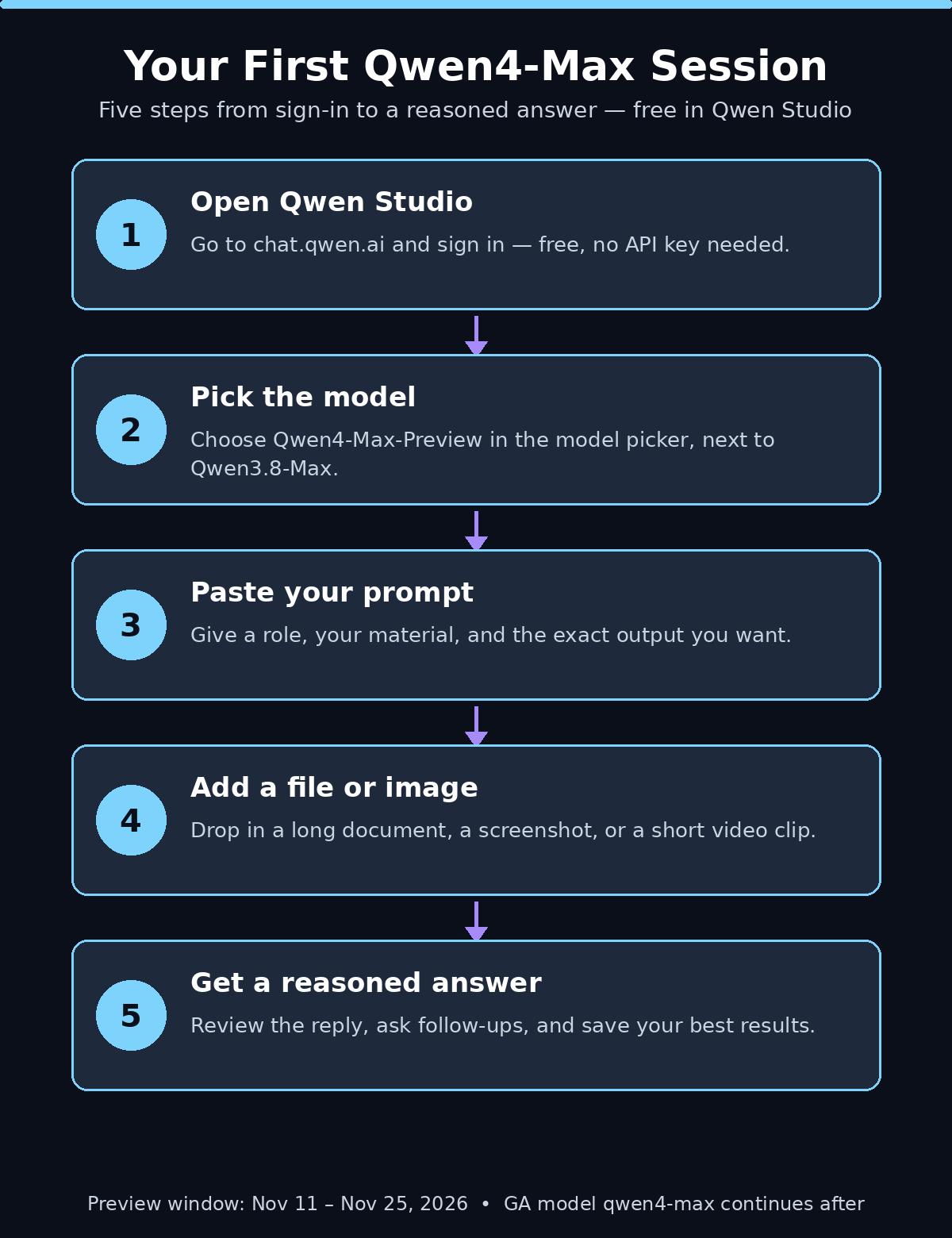
- Open Qwen Studio. Go to chat.qwen.ai in your browser and sign in with your account. If you do not have one yet, create it — it takes about a minute.
- Pick the model. Click the model selector at the top of the chat box and choose Qwen4-Max-Preview. It sits next to Qwen3.8-Max in the picker, so check the name carefully.
- Start a new chat. Open a fresh conversation so the model starts with a clean one-million-token window.
- Send your first message. Type a real question from your own work — a summary, a draft, a coding problem — and watch how it reasons before answering.
Early access is also open in the Qwen app, QwenWork (Alibaba’s AI office app), and Qoder, the company’s AI coding platform. But for a first look, the web chat is the simplest place to start, and it costs nothing.
Step 3: Write Your First Prompt the Right Way
Because reasoning is on by default, Qwen4-Max rewards prompts that give it something to reason about. A vague one-liner wastes its best feature. Try this pattern instead: give it a role, the material, and the exact output you want.
- Set the role: “You are a careful editor for a beginner’s blog.”
- Paste the material: your draft, your data, or your code.
- State the output: “Rewrite this in plain English, keep every fact, and list the three changes you made.”
- Add a constraint: “If anything is unclear, ask me one question instead of guessing.”
For example, a good first prompt is: “Summarize this 20-page report in 10 bullet points a non-expert can understand, and flag any claim that sounds uncertain.” That single prompt tests summarization, plain-language writing, and honest uncertainty handling all at once — and it is the kind of job the model’s long context and default reasoning are built for.
Step 4: Use the 1M-Token Context Window
A one-million-token context window is roughly 750,000 words — several novels’ worth of text in one conversation. Most beginners never need that much, but the practical uses are real:
- Whole-document analysis: upload an entire contract, research paper, or annual report and ask questions that span the full document, not just one page.
- Codebase questions: paste several related files and ask how they connect, where a bug might live, or what would break if you changed one function.
- Long research sessions: keep adding sources to the same chat across an afternoon and let the model compare them, instead of starting over each time.
Two tips make this work well. First, tell the model what to pay attention to — “focus on the pricing section and the cancellation terms” beats “read this and tell me what matters.” Second, remember the output side has its own limit: a shared output budget of 393,216 tokens covers both the model’s thinking and its final answer, so very long reasoning chains leave less room for the reply. If an answer gets cut short, ask it to continue or to answer in two parts.
Step 5: Work With Images and Video, Not Just Text
Qwen4-Max accepts image and video input alongside text, which opens up jobs a text-only model cannot do. Upload a screenshot and ask it to explain an error message. Share a photo of a whiteboard and ask for a typed summary. Drop in a chart and ask what trend it shows and what it hides.
Start with one clear image and one clear question. “What does this chart show, and what would you warn a reader about before they share it?” is a better test than “describe this image,” because it forces the model to interpret, not just label. For video, keep clips short and ask about a specific moment: “At 0:40 the speaker shows a diagram — explain it in three sentences.” If you create images with other AI tools, our guide on how to use Qwen Image AI pairs naturally with this step, since Qwen’s image model and its flagship chat model now sit in the same family.
Step 6: Tune the Reasoning Effort (Low, Medium, Xhigh)
Reasoning is on by default, but you can tune how hard the model thinks with the reasoning.effort setting when you call it through the API or a compatible coding tool. There are three levels:
- Low: fast, short answers. Use it for simple lookups, quick rewrites, and anything where speed matters more than depth.
- Medium: the balanced default. Use it for most everyday work — drafting, summarizing, and explaining.
- Xhigh: the deepest thinking. Use it for hard problems: debugging a tricky bug, checking a contract, or planning a multi-step project.
In the free Qwen Studio chat you do not see this switch, but the same idea applies to your prompts. A short prompt gets a quick answer; a prompt that says “think through this carefully and show your working” gets the deeper treatment. Match the effort to the stakes of the task, and you will save both time and tokens.
Step 7: Connect Qwen4-Max to Your Coding Tools
If you write code, Qwen4-Max is built to live inside your editor. Developer access runs through Token Plan, Alibaba’s monthly credit subscription for coding and agent tools. Individual plans are $6 (Lite), $10 (Essential), $18 (Standard), and $43 (Pro) per month, and during the preview window Qwen4-Max calls use credits at as little as 20% of the standard rate — 8% overnight between 22:00 and 08:00 Beijing time.
Token Plan gives you a dedicated API key and a dedicated base URL. Point your client at that endpoint, set the model ID to qwen4-max-preview, and it works with Qwen Code, Cline, Claude Code, Cursor, OpenCode, and Codex. The API is compatible with OpenAI Chat Completions and Responses formats and with Anthropic Messages, so most existing tools connect without a rewrite. One thing to know: a standard Qwen Cloud API key will not reach the preview model — you need the Token Plan key. And one behavior change to remember: starting with this model, max_tokens is equivalent to max_completion_tokens, and both limit the combined tokens for thinking and the final answer.
Step 8: Understand the Pay-As-You-Go API Pricing
Since November 16, 2026, Qwen4-Max is generally available on Alibaba Cloud Model Studio as qwen4-max with pay-as-you-go pricing of $1.50 per 1M input tokens and $4.50 per 1M output tokens (international pricing). That is the route for apps and backends, and it is separate from the Token Plan preview.
For a beginner, the practical meaning is simple: chatting in Qwen Studio is free, building with the API costs a few dollars per million tokens, and new Singapore accounts get 1M free tokens for 90 days. Keep the free chat for learning and testing, and only move to the API when you have a real app or automation that needs it. If you run a digital agency or build client projects, the pay-as-you-go model makes it easy to price Qwen4-Max into a quote — you pay for what the model actually reads and writes, with no monthly seat to justify.
Step 9: Qwen4-Max vs Other AI Models — Quick Comparison
Here is how Qwen4-Max lines up against the models beginners usually compare it with. Treat this as a starting point, not a verdict — with no official benchmarks published yet, your own tests matter more than any table.
| Model | Best for | Context window | Free way to try |
|---|---|---|---|
| Qwen4-Max | Long documents, reasoning, multimodal work | 1M tokens | Qwen Studio chat (chat.qwen.ai) |
| Qwen3.8-Max | Stable production work on the previous flagship | Large (previous generation) | Qwen Studio chat |
| Gemini 4 Hydrogen | Fast everyday tasks in Google’s apps | Large | Free tier in Google AI Studio |
| Claude Sonnet 5.5 | Writing, coding and office documents | Large | Free Claude plan |
The honest summary: Qwen4-Max wins on raw context length and on the free chat experience, Gemini 4 Hydrogen wins on raw speed for everyday jobs, and Claude’s strength is polished writing and office tools — our guide on how to use Claude Sheets AI shows what that looks like in practice. If you want the fullest picture of the current model race, our guide on how to use Gemini 4 Hydrogen AI covers Google’s fast everyday model, launched the same week as Qwen4-Max.
Step 10: Avoid These Beginner Mistakes
Most first-week problems with Qwen4-Max come from the preview itself, not the model. Avoid these five:
- Do not build production on the preview model. The preview
qwen4-max-previewis frozen during its window and retired on November 25, 2026, at 24:00 Beijing time. Build on the generally availableqwen4-maxinstead. - Do not pick the wrong model in the picker. Qwen4-Max-Preview sits next to Qwen3.8-Max in Qwen Studio. If your answer feels like the older model, check the selector first.
- Do not trust it on facts it cannot check. With no published benchmarks or model card, verify important claims — especially numbers, dates, and prices — against a primary source.
- Do not paste secrets into the chat. API keys, passwords, and private client data do not belong in any AI chat, including a free one.
- Do not expect open weights. Qwen4-Max is closed and API-only. If your project needs a model you can download and run locally, look at Alibaba’s open Qwen models instead, and keep this one for chat and API work.
One more workflow tip: because the preview window is short, treat November as a testing month. Try the model on your real work, keep notes on where it shines and where it stumbles, and decide before the window closes whether it earns a place in your daily toolkit — or in the AI automation services you offer clients.
Frequently Asked Questions About Qwen4-Max AI
Is Qwen4-Max AI free to use?
Yes, in the chat app. Qwen Studio at chat.qwen.ai lets you use Qwen4-Max-Preview free with a login — no subscription and no API key. The API is pay-as-you-go at $1.50 input and $4.50 output per 1M tokens, and new Singapore accounts get 1M free tokens for 90 days. Token Plan subscriptions for coding tools start at $6 per month.
What happens to Qwen4-Max after November 25, 2026?
Only the preview model is retired. The preview qwen4-max-preview runs from November 11 to November 25, 2026, and Alibaba says it will be retired when that window closes. The generally available model qwen4-max on Alibaba Cloud Model Studio continues after that date.
Is Qwen4-Max open source?
No. Qwen4-Max is a closed model with no published weights, no model card, and no official benchmarks so far. It is available through Qwen Studio, the Qwen app, QwenWork, Qoder, and the Model Studio and Token Plan APIs.
How is Qwen4-Max different from Qwen3.8-Max?
Qwen4-Max is the first model of the new Qwen4 family and the successor to Qwen3.8-Max. It brings a one-million-token context window, text, image and video input, and reasoning on by default. Qwen3.8-Max remains the older, stable flagship if you prefer a model with a longer track record.
Can I use Qwen4-Max in Cursor or Claude Code?
Yes, through Token Plan. Subscribe to a Token Plan, take the dedicated API key and base URL, set the model ID to qwen4-max-preview, and it works with Qwen Code, Cline, Claude Code, Cursor, OpenCode, and Codex.
What is Qwen4-Max best at?
Long-context work is its clearest strength: whole documents, large code folders, and research that spans many sources in one conversation. It is also a strong general reasoning model for drafting, summarizing, and explaining, with image and video understanding built in.
Final Thoughts
Qwen4-Max is a genuine flagship launch with a catch every beginner should understand: the free preview is a two-week window, and the model you test today under the preview name is not the model you will build on tomorrow. The right move is simple — try it free in Qwen Studio this week, push it on a real task with a long document or a hard question, and compare it honestly with the tools you already use. If the one-million-token context and the default reasoning save you real time, move to the generally available qwen4-max on Model Studio when the preview closes. If they do not, you have lost nothing but an afternoon of testing, and you will know exactly why your current setup still wins.
Explore More Free AI Tools
Want more free AI tools like Qwen4-Max? Try our AI Title Generator, Meta Description Generator, AI Rewriter, and Keyword Density Checker at aitoolsteps.com — free tools to help you write, optimize, and publish better content every day.