

Introduction
Most websites are frozen the moment they go live. You publish a page, and then it just sits there while Google changes, competitors publish new content, and your visitors ask questions your site never answers. Keeping a website fresh normally means hiring a developer, an SEO specialist, and a content writer — or learning all three jobs yourself.
Greta AI was built to end that problem. Launched on Product Hunt on November 2, 2026, Greta.sh is a self-growing website builder: you describe your business in plain words, the AI builds your website, and then it keeps improving that website on its own. It writes new pages, updates old ones, and handles SEO and AEO (Answer Engine Optimization) automatically, so your site shows up not only in Google search results but also in AI answers from tools like ChatGPT and Perplexity.
This beginner-friendly guide walks you through everything: what Greta AI is, how to create your free account, how to describe your business so the AI builds the right site, how to let it grow your pages, how to check the SEO work it does for you, and how to publish and share your finished website. You do not need any coding skills, you do not need SEO experience, and you do not need to install anything — Greta AI runs entirely in your browser.
Step 1: What Is Greta AI?
Greta AI is an AI website builder with a difference. Traditional website builders give you templates and a drag-and-drop editor, and then the work stops with you. Greta AI gives you a website that keeps working after launch.
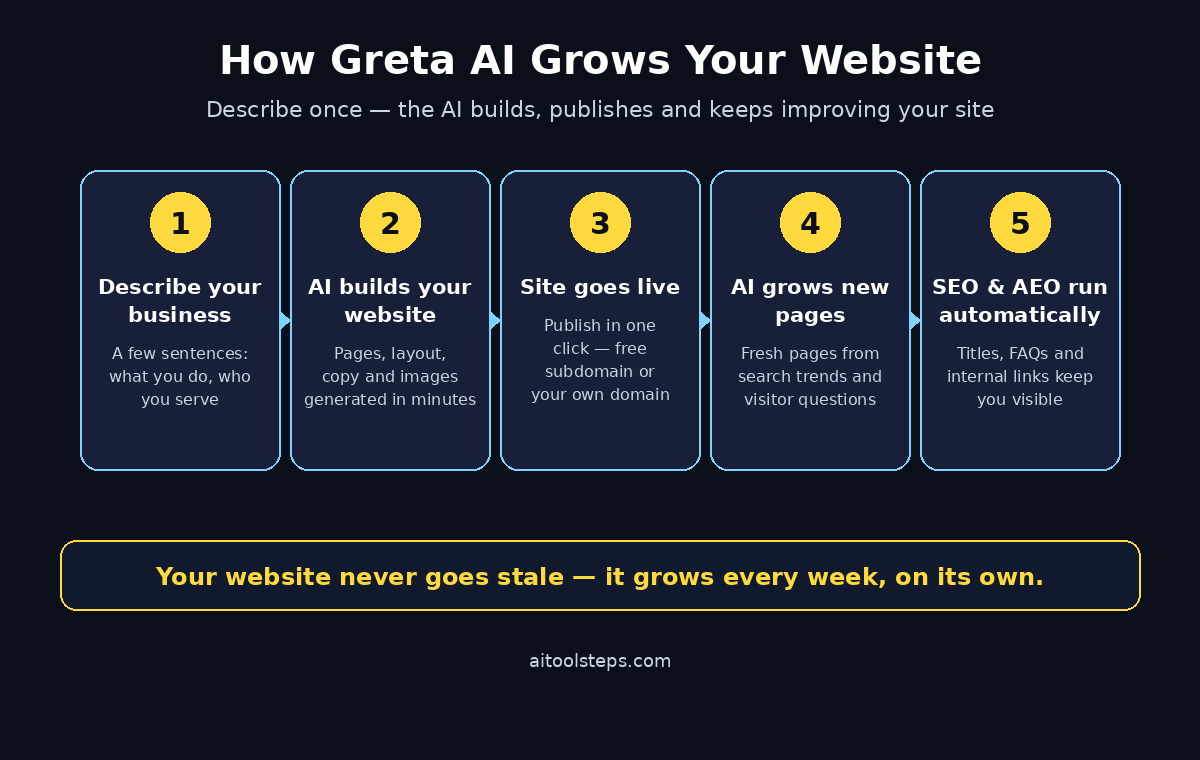
Here is the idea in simple terms:
- You describe your business. A few sentences about what you do, who you serve, and what you want visitors to do.
- The AI builds the website. Pages, layout, copy, images, and structure are generated for you in minutes.
- The website keeps growing. Greta AI monitors search trends, visitor questions, and AI search engines, then creates and updates pages automatically.
- SEO and AEO run themselves. The system optimizes titles, meta descriptions, headings, and structured content so your site is found by Google and quoted by AI assistants.
The “self-growing” part is what makes Greta AI different from tools like Wix, Framer, or Lovable. Those tools help you build a site once. Greta AI treats your website as a living thing that should get better every week without you touching it.
Step 2: Create Your Free Greta AI Account
Getting started takes only a few minutes. You do not need a credit card to try the free version, and you do not need to install anything.
- Open the Greta AI website: Go to greta.sh in your browser, or find Greta AI on Product Hunt and follow the launch page link to the site.
- Click Get Started or Sign Up: Use your Google account or your email address to create an account.
- Confirm your email: Check your inbox for a verification link if you signed up with email.
- Choose your goal: Greta AI will ask what kind of website you want — a business site, a portfolio, a landing page, or an online store. Pick the closest match; you can change it later.
Tip for beginners: sign up with the Google account you already use for your business. It keeps your login simple and makes it easy to connect tools like Google Search Console later.
Step 3: Describe Your Business So the AI Builds the Right Site
The quality of your website depends on the quality of your description. Greta AI is not guessing — it builds from what you tell it, so spend five honest minutes on this step.
- Say what you do in one sentence. For example: “I run a small bakery in Lahore that sells custom birthday cakes and delivers across the city.”
- Name your audience. Who is the site for? Local customers, online buyers, clients looking for a service?
- List your main services or products. Three to five items is enough.
- State the one action you want visitors to take. Book a call, order online, send a message, or join a waitlist.
- Add your style preferences. Modern and minimal, warm and friendly, bold and colorful — pick words that match your brand.
Greta AI turns this description into a full site structure: a homepage, service pages, an about page, and a contact page. If the first version misses the mark, edit the description and regenerate — it is faster to fix the brief than to fix every page by hand.
Step 4: Review Your First Website Draft
Within a few minutes, Greta AI shows you a complete first draft. Do not rush to publish it. Walk through it like a first-time visitor would.
- Check the homepage headline. Does it say clearly what you do and who it is for?
- Read each service page. Is the information correct? Are prices, locations, and contact details right?
- Look at the images. Swap any image that does not match your business.
- Test the buttons. Every call-to-action button should lead somewhere useful.
- Check on your phone. Most visitors will see your site on a mobile screen first, so open the preview on your phone before you approve anything.
Fix mistakes now, while the site is still a draft. The AI can rewrite any section if you tell it what is wrong in plain words — for example, “make the headline shorter” or “add a delivery section for Karachi.”
Step 5: Let the Website Grow on Its Own
This is the step that makes Greta AI special. Once your site is live, the self-growing engine starts working in the background.
- New pages appear automatically. Greta AI finds questions people search for in your niche and creates pages that answer them.
- Old pages get refreshed. Outdated facts, stale offers, and weak sections are updated without you asking.
- Search trends are tracked. When a new topic rises in your industry, your site can cover it early.
- You approve the big changes. Check your dashboard regularly and review what the AI added, so nothing goes live that you would not stand behind.
Think of it like hiring a part-time content and SEO team that works while you sleep. A small business owner who cannot afford a full marketing team gets the next best thing: a website that never stops improving. If you run a digital agency or want a human team to review the growth strategy, a partner like the team at D365A can help you turn the extra traffic into real clients.
Step 6: Understand the SEO and AEO Work Greta AI Does
SEO (Search Engine Optimization) helps Google find and rank your site. AEO (Answer Engine Optimization) helps AI assistants like ChatGPT, Perplexity, and Google AI Overviews quote your site when they answer questions. Greta AI handles both automatically.
- Titles and meta descriptions: Every page gets a clear, keyword-rich title and description.
- Headings and structure: Content is organized with proper headings so search engines understand it.
- FAQ sections: Pages include question-and-answer blocks that AI assistants love to quote.
- Internal links: Related pages link to each other, which helps both Google and visitors explore your site.
- Fresh content signals: Regular updates tell search engines your site is alive and current.
You can watch this working in your Greta AI dashboard, where it shows which pages were created or updated and which search terms they target. For a deeper look at how AI search visibility works, you can also read guides about tracking brand mentions across AI search engines, such as the team behind Agentic Affairs and their work on AI automation services.
Step 7: Edit Any Page with Plain Words
You do not need to learn a page editor. Greta AI lets you change your website the same way you would ask a colleague to change it.
- To rewrite a section: select the text and type what you want instead, for example, “make this friendlier and shorter.”
- To add a page: describe the page you need, such as “add a pricing page with three plans.”
- To change the design: ask for a different style, like “make the homepage darker with bigger headings.”
- To add a form: request a contact form, a booking form, or a newsletter signup.
Every change is instant, and you can undo anything that does not look right. This keeps the website in your control even though the AI does the heavy work.
Step 8: Publish Your Website and Connect a Domain
When you are happy with the draft, publishing takes one click.
- Publish to a free Greta subdomain first. Test the live site, share the link with friends, and collect feedback.
- Connect your own domain. When you are ready, point your custom domain to Greta AI from the settings page. A custom domain looks more professional and builds trust with visitors.
- Check the live site on mobile and desktop. Confirm that images load fast and nothing overlaps on small screens.
- Share the link everywhere. Add it to your Instagram bio, your WhatsApp business profile, and your email signature.
Tip for beginners: publish early, even if the site is not perfect. A live website that grows every week beats a perfect website that never launches.
Step 9: Check Your Growth and Traffic
Greta AI shows you what the self-growing engine is doing. Check your dashboard at least once a week.
- New pages created: See which pages the AI added and what search terms they target.
- Pages updated: Review refreshed content and confirm the facts are still correct.
- Search visibility: Watch which keywords your site starts ranking for over time.
- Visitor behavior: See which pages people actually visit and spend time on.
If a page is not performing, ask the AI to improve it: “rewrite this page to answer the question more directly” or “add a comparison table to this page.” The loop is simple — publish, measure, improve — and Greta AI runs most of it for you.
Step 10: Avoid the Common Beginner Mistakes
New users make the same few mistakes with Greta AI. Avoid them and your site will grow much faster.
- Do not publish a vague description. “I sell things online” builds a generic site. Be specific about what you sell and to whom.
- Do not ignore the AI’s new pages. Review them weekly. A wrong fact on an auto-generated page can hurt your credibility.
- Do not skip the domain step. A free subdomain is fine for testing, but a custom domain is what customers trust.
- Do not expect overnight rankings. SEO takes weeks. Greta AI speeds up the work, but Google still needs time to trust a new site.
- Do not forget your call to action. Every page should tell visitors what to do next — call, order, book, or message you.
Greta AI vs Other Website Builders
| Feature | Greta AI | Framer AI | Wix AI |
|---|---|---|---|
| Build a site from a description | Yes | Yes | Yes |
| Website grows new pages itself | Yes | No | No |
| Automatic SEO updates | Yes | Basic | Basic |
| Automatic AEO for AI answers | Yes | No | No |
| Edit with plain words | Yes | Yes | Partial |
| Coding needed | No | No | No |
| Best for | Small businesses that want traffic | Designers and portfolios | General small business sites |
Frequently Asked Questions
Is Greta AI really free?
Greta AI launched with a free way to start building, and you can try it without a credit card. Like most new AI tools, free limits and paid plans can change as the product grows, so check the pricing page inside your account before you build a business-critical site on the free tier.
Do I need coding skills to use Greta AI?
No. You describe your business in plain words, and Greta AI builds the website. Editing also works in plain words. You never need to touch code, though you can connect a custom domain and share the site like any normal website.
What is AEO and why does Greta AI focus on it?
AEO stands for Answer Engine Optimization. It means making your content easy for AI assistants like ChatGPT and Perplexity to quote when they answer questions. Greta AI structures pages with clear answers, FAQs, and headings so your business shows up in AI answers, not just in Google links.
Can Greta AI really grow my website without me?
Yes, that is its main feature. The engine creates and updates pages based on search trends and visitor questions. You should still review new pages weekly to catch mistakes and keep the facts accurate, but the writing and SEO work happens automatically.
Is a Greta AI website good for a small business?
Yes. Small businesses benefit the most, because they get ongoing SEO and content work without hiring a team. A bakery, a clinic, a tutor, or a local shop can have a website that adds new pages every week and slowly climbs Google rankings while the owner focuses on customers.
Can I move my website away from Greta AI later?
Check the export and domain settings inside your account before you commit to any builder. Your custom domain stays yours, and you can point it to another platform if you ever switch. Keep copies of your important text and images as a backup, as you should with any website builder.
Final Thoughts
Greta AI is one of the most interesting website builders to launch in 2026, because it solves the problem every other builder leaves behind: the website that goes stale the day it launches. You describe your business once, the AI builds the site, and then the site keeps growing — new pages, fresh content, SEO, and AEO — while you run your business.
Start free, describe your business clearly, review the first draft carefully, publish early, and check the growth dashboard weekly. Give it a few weeks, and you will have a website that works harder every month without you learning SEO or hiring a team.
Explore More Free AI Tools
Want more free AI tools like Greta AI? Try the free tools on AIToolSteps: the AI Title Generator, the Meta Description Generator, the AI Rewriter, and the Keyword Density Checker. Each one is free, runs in your browser, and helps you create better content in minutes.