

Introduction
Meetings eat your week. You join a one-hour call just to present three slides, or you miss a client call because two meetings landed in the same slot. Cedric AI was built to fix exactly that problem. Launched on Product Hunt on November 2, 2026, Cedric AI is the first AI agent that presents your slides and attends meetings for you — on Zoom, Google Meet, and Microsoft Teams.
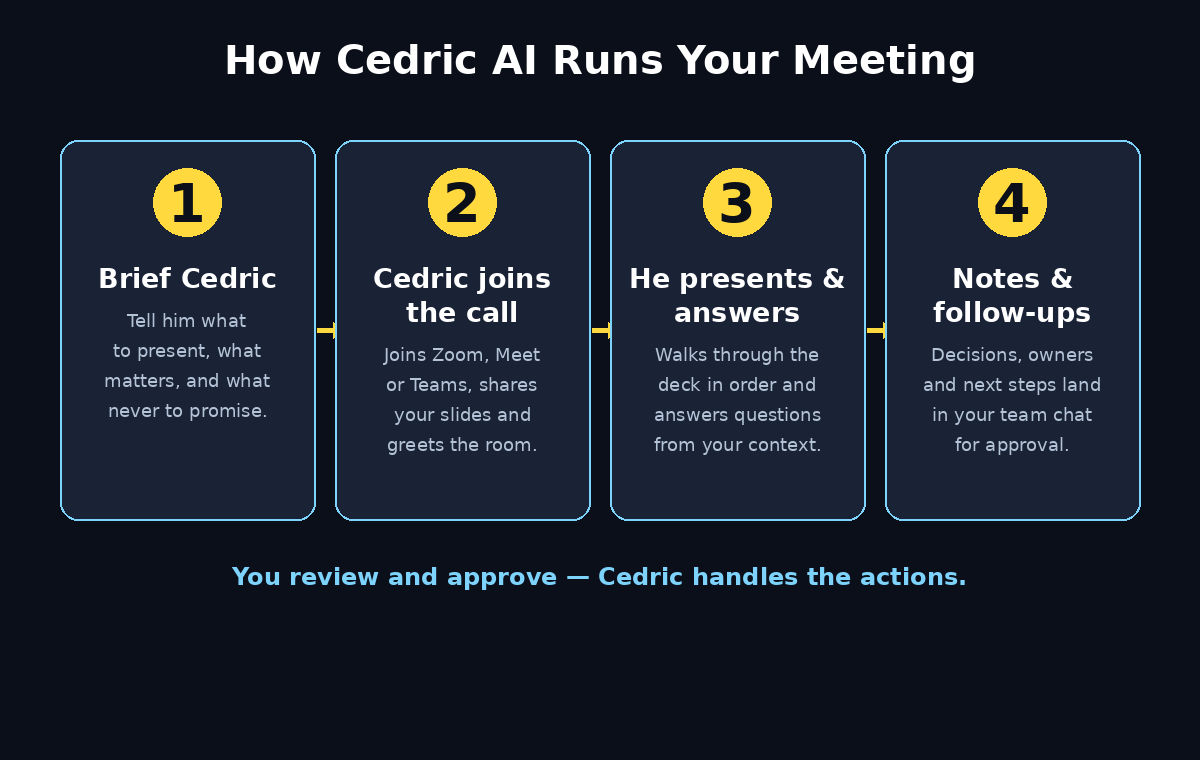
Here is how it works in plain language: you brief Cedric before the meeting, telling him what to present, what matters, and what he should never commit to. He joins the call, shares your slides, answers questions using the context and tools you connected, and takes notes. After the call, you get the decisions, the action items, and the proposed follow-ups. You review and approve them; Cedric handles the actions.
This beginner-friendly guide walks you through everything: creating your free account, connecting your calendar and meeting apps, teaching Cedric your team context, briefing him for his first meeting, and setting up the follow-up automations that save you hours every week. You do not need any technical skills, and you do not need a credit card to start — sign-up includes 100K free credits (worth $50).
What Is Cedric AI?
Cedric AI is an AI teammate built in Zurich, Switzerland, by a startup team that wanted to solve the most annoying part of startup life: the meeting load. Unlike a note-taking bot that silently transcribes a call, Cedric is an active participant. He speaks, presents, answers questions, and follows up.
Think of him as a reliable junior teammate who never gets tired, never double-books, and never forgets a follow-up. He lives where your team already talks — Slack, Discord, Telegram, or the web app — and he connects to more than 3,000 tools, so he can pull live data into a meeting instead of guessing.
Cedric is useful for:
- Founders juggling customer demos, partner calls, and fundraising conversations.
- Sales teams repeating the same product presentation across time zones.
- Agencies and consultants handling overlapping client updates.
- Project leads who need to share a status update without sitting through the whole meeting.
The honest truth is that Cedric does not replace you in the meetings that matter most. A first call with a big prospect, a difficult negotiation, or a sensitive internal conversation still needs a human. But for the routine update, the recurring status call, and the demo you have given twenty times, Cedric is a genuine time-saver. Research cited by the Cedric team puts unproductive meeting time at roughly 31 hours a month per person — that is the week Cedric is trying to give back.
If your team already uses AI tools to automate repetitive work, Cedric fits the same pattern. Many small businesses now pair a meeting agent like Cedric with the kind of AI automation services a modern digital agency sets up for clients — the goal is the same: let software carry the routine work so people can focus on decisions only humans can make.
Step 1: Create Your Free Cedric AI Account
Getting started takes only a few minutes. Open meet-cedric.com in your browser and create your team’s Cedric. Sign-up includes 100K credits (worth $50) and no credit card is needed. During launch week you can also use the code PRODUCTHUNT2026 for extra free credits.
The sign-up flow asks for your name, your work email, and your team or company name. Cedric is built for teams, so creating a team workspace is the first step even if you are the only person using it right now. You can invite teammates later from the settings page.
Once you are inside, you will see the Cedric chat — the main place where you talk to him. It looks like a messaging app, and that is deliberate: you instruct Cedric in plain sentences, the same way you would message a colleague. Try a first message such as “Introduce yourself and tell me what you can do for my team.” His answer will show you the range of jobs he can take on, from scheduling calls to drafting reports.
Before you move on, check the credits balance in your account. Every action Cedric takes — joining a meeting, presenting a deck, drafting a report — uses credits. The free 100K credits are enough to run several real meetings, so use them on genuine calls rather than test meetings with yourself. That is how you will learn what he is actually good at.
Step 2: Connect Your Calendar and Meeting Apps
Cedric can only attend meetings he knows about, so the next step is connecting your calendar. In the settings or integrations area, connect Google Calendar or Outlook Calendar. Cedric reads your upcoming meetings and can suggest which ones he should attend.
Then connect your meeting platforms. Cedric joins Zoom, Google Meet, and Microsoft Teams calls as a participant. The connection uses the standard calendar-invite flow: when Cedric is assigned to a meeting, he receives the invite and joins at the scheduled time, just like a human attendee would.
A practical tip for your first week: start with one recurring internal meeting, such as a weekly standup or a team sync. Internal meetings are low-risk, the stakes are small, and your colleagues can give you honest feedback about how Cedric performed. Save the client-facing demos for week two, after you have seen him present once and tuned his briefing.
Also connect the tools Cedric will need to answer questions during calls. If he is presenting a sales update, connect your CRM or sales dashboard. If he is giving a project update, connect your project tracker. Cedric reads only what a task needs and nothing more, and you can revoke any connection at any time from the integrations page. Scoped permissions are a real privacy feature here, not a marketing line — Cedric is Swiss-based and built with data control in mind.
Step 3: Add Cedric Where Your Team Talks
Cedric works in Slack, Discord, Telegram, or the web app. Pick the place your team already lives and add him there. In Slack, for example, you invite the Cedric app to a channel and then mention him with @Cedric, exactly like tagging a teammate.
This matters more than it sounds. The whole point of Cedric is that follow-ups happen where people already read them. When a meeting ends, Cedric posts the notes and action items into the channel instead of burying them in an email nobody opens. Decisions land in the thread, the next meeting gets booked in the same place, and the weekly report arrives where the team expects it.
If you run a small agency or a solo consultancy, the web app alone is fine to start with. You can still brief Cedric, send him to meetings, and receive his notes in the chat. Add the Slack or Telegram connection later when a client or a teammate needs to see his updates directly. Teams that want a broader automation setup often combine a meeting agent with the workflow help offered by AI automation services — Cedric handles the meetings while the rest of the pipeline runs itself.
Step 4: Teach Cedric Your Company Brain
Cedric has a feature called the Company Brain: the shared context he remembers for your whole team. Teach him once, and he knows it for everyone. This is the step most beginners skip, and it is the step that decides whether Cedric sounds smart or sounds generic in a meeting.
Open the Company Brain section and add the basics first: what your company does, who your customers are, your main products or services, your pricing boundaries, and the things Cedric must never promise on a call. For example, tell him “never offer a discount above 10 percent without checking with me” or “never commit to a delivery date — say we will confirm by email.” These guardrails are what make him safe to send into a client meeting alone.
Then add the live context: your current priorities, the open deals, the projects in flight, and the numbers that matter this month. Cedric uses this context to answer questions in meetings. If someone asks “how is the pilot going?”, a Cedric with a trained Company Brain answers from your real data instead of giving a vague, polite non-answer.
Update the Company Brain weekly, or whenever something important changes. A five-minute update on Monday morning — new priorities, closed deals, changed deadlines — keeps every meeting Cedric attends that week accurate. Think of it as the briefing you would give a new hire, except you only have to write it once and keep it fresh.
Step 5: Brief Cedric Before a Meeting
Briefing is the most important skill in this whole guide. Cedric is only as good as the brief you give him. A vague brief produces a vague presentation; a clear brief produces a meeting that runs itself.
Before each meeting, send Cedric a message with four things:
- What to present. Attach the deck or paste the key points. Tell him the order: “Start with last month’s sales, then the pricing update, then the pilot next steps.”
- What matters. The one or two outcomes the meeting must reach. “We need the client to approve the new timeline” is a useful instruction.
- What to avoid. Topics he should not raise and promises he should not make. Be specific.
- What to do afterwards. “Send the notes to the #client channel and draft the follow-up email for my approval.”
A real example helps. Suppose you run a weekly operations call. Your brief could be: “Join the Thursday 10:00 weekly ops call. Present the three agenda items: sales performance review, pricing v2, and pilot next steps. If anyone asks about pricing, say the v2 proposal is under review and we will confirm by Friday. Do not promise any delivery dates. After the call, post the decisions and action items in #team and book next week’s call.”
Write your first few briefs in full sentences. As you learn how Cedric interprets them, you can shorten them to bullet points. Keep a copy of briefs that worked well — they become templates for the next meeting of the same type, and you will stop writing them from scratch within a couple of weeks.
Step 6: Send Cedric to the Meeting
When the meeting time arrives, Cedric joins the call as a participant. He shows up in the attendee list, introduces himself briefly, and shares your slides when it is time to present. He speaks in a clear voice, moves through the deck in the order you briefed, and answers questions using the Company Brain and the tools you connected.
You have two ways to run the meeting. The first is to join alongside him: Cedric handles the slides while you focus on the discussion, jumping in for the nuanced questions and the relationship moments. This is the best mode for your first few meetings, because you can watch how he presents and correct him live if he drifts.
The second way is to send him alone. This is the mode for the meeting you cannot attend — the overlapping client update, the status call during your travel, the demo in a time zone where it is 3 a.m. for you. Cedric runs it, and you read the notes afterwards. If you arrive late, he catches you up in the chat so you can join mid-call without asking everyone to repeat themselves.
One practical rule: always tell the other attendees that an AI agent will join and present. A one-line note in the invite — “Cedric, our AI teammate, will present the update today” — prevents confusion and is simply polite. Most people are curious rather than annoyed, and a short explanation at the start of the call (“Cedric will present the slides; I am here for questions”) sets the right expectation.
Step 7: Review the Notes, Decisions, and Follow-Ups
After the call ends, Cedric sends you the notes, the decisions that were made, and the proposed follow-ups. Read them before they go anywhere else. Check three things: are the decisions recorded correctly, does every action item have a named owner, and is anything in the notes something you would not want shared outside the team?
This review step is where you stay in control. Cedric drafts; you approve. Anything he would send outside the team — an email to a client, a message to a new contact — waits for your yes. That approval gate is the feature that makes Cedric safe for real business use, and you should never switch it off for external messages.
If Cedric gets something wrong in the notes, correct him in the chat. Tell him what the decision actually was, or who the real owner of a task is. He remembers corrections, and his notes get sharper with every meeting. After three or four meetings, you will find yourself editing less and approving more, which is exactly the learning curve you want.
Also check the recording and transcript if the meeting was important. Cedric’s summary is a starting point, not a replacement for the record. For high-stakes calls, keep the full transcript on file alongside the approved notes.
Step 8: Let Cedric Handle the Follow-Up Actions
The follow-up is where most meetings fail. Everyone agrees on actions, nobody writes them down, and a week later nothing has moved. Cedric exists to close that gap.
Once you approve the follow-ups, Cedric handles them: he drafts and sends the follow-up emails, creates the tasks in your project tool, updates the shared doc, and books the next meeting. In the Cedric example from the product launch, a 25-minute opening-planning call ended with minutes posted to the team channel, two action items filed, and the next session booked — without any human doing the admin.
Start with the follow-ups you approve every time: posting minutes to the team channel, filing action items, and booking the next session. Then let him draft the client follow-up emails for your approval. Only after a month of reliable drafts should you consider letting him send routine internal messages without a check — and even then, keep the approval gate on for anything external.
A useful habit is the Friday review. Spend ten minutes each Friday reading Cedric’s week: the meetings he attended, the decisions he recorded, the follow-ups he completed. You will quickly see which meetings are worth his time and which ones still need you in the room. That review is also the moment to update the Company Brain for the following week.
Step 9: Set Up Recurring Automations
Once Cedric handles single meetings well, set up the recurring jobs that run without a brief each time. In the Cedric chat, describe the job in one sentence and schedule it.
Examples that work well for beginners:
- “Send a weekly report to our investors every Friday at 9:40.”
- “Post a Monday morning summary of open tasks in #team.”
- “Monitor our brand mentions daily and send me anything important.”
- “Book calls with the new leads every Thursday and send them the intro email.”
Cedric connects these jobs to the same tools he uses in meetings, so a weekly report pulls live numbers instead of last week’s copy-paste. The automations page shows everything he runs on a schedule, and you can pause or edit any of them in seconds.
Do not automate everything at once. Add one recurring job per week, watch it run twice, and only then add the next. A small set of reliable automations beats a large set of half-working ones, and your team will trust Cedric more when his scheduled work is consistently correct.
Step 10: Measure the Time Saved and Improve
After a month with Cedric, measure what changed. Count the meetings he attended for you, the hours you did not spend presenting the same deck, and the follow-ups that actually got done. Compare that with the credits you used. The free 100K credits will tell you the real cost per meeting before you ever pay for a plan.
Then improve the system. Look at the meetings where you still had to step in: was the brief unclear, was the Company Brain out of date, or was the meeting simply one that needs a human? Fix the briefs and the context first. Most “Cedric mistakes” trace back to a thin brief or stale context, not to the agent itself.
Share the results with your team. When colleagues see the notes arriving on time and the follow-ups actually happening, they will start briefing Cedric for their own meetings. That is the moment Cedric stops being your personal shortcut and becomes a team habit — which is exactly what the product was designed for.
Cedric AI vs Other AI Meeting Tools
| Feature | Cedric AI | Otter AI | Fathom | Fireflies AI |
|---|
| Presents your slides in the meeting | Yes — AI agent presents | No — transcription only | No — transcription only | No — transcription only |
|---|---|---|---|---|
| Attends meetings alone for you | Yes | No | No | No |
| Answers live questions in the call | Yes, from your context | No | No | No |
| Notes, decisions, and action items | Yes, with owner names | Transcript + summary | Summary + action items | Summary + action items |
| Follow-up actions (emails, tasks) | Yes, after your approval | No | Limited | Limited |
| Meeting platforms | Zoom, Meet, Teams | Zoom, Meet, Teams | Zoom, Meet, Teams | Zoom, Meet, Teams |
| Team chat (Slack, Discord, Telegram) | Yes | Limited | Limited | Slack only |
| Free starting credits | 100K credits ($50), no card | Free plan with limits | Free plan with limits | Free plan with limits |
| Best for | Founders, sales, agencies | Meeting transcription | Quick summaries | Sales call notes |
The table makes the difference clear. Otter AI, Fathom, and Fireflies are excellent note-takers, and our beginner guide to Otter AI is still the best starting point if all you need is transcription. Cedric is a different category: he does the meeting, not just the minutes. If your problem is “too many meetings,” Cedric is the tool built for that problem. If your problem is “I need a transcript,” the note-takers are cheaper and simpler.
Frequently Asked Questions
Is Cedric AI really free?
Yes, to start. Sign-up includes 100K free credits (worth $50) and no credit card is needed. During launch week, the code PRODUCTHUNT2026 adds extra free credits. Credits are used when Cedric joins meetings, presents decks, and runs automations. Heavier use eventually needs a paid plan, so start free, run real meetings, and only pay when the time saved is obvious.
Which meeting platforms does Cedric AI support?
Cedric joins Zoom, Google Meet, and Microsoft Teams calls. He connects through your calendar, so he joins the meetings you assign him to at the scheduled time. No separate download is needed for the people on the call — Cedric appears as a normal participant.
Does Cedric AI record my meetings?
Cedric takes notes and records decisions and action items from the meetings he attends. Always tell attendees that an AI agent is joining, and check your local rules about recording calls. If a meeting is sensitive or confidential, keep it human-only.
Can Cedric AI present my slides?
Yes — presenting slides is his headline feature. Brief him with the deck and the order of the points, and he shares the screen, walks through the slides, and answers questions from the context and tools you connected. For your first meeting, join alongside him so you can watch and step in if needed.
What happens if Cedric says something wrong in a meeting?
Cedric only answers from the context and tools you gave him, and you set the guardrails in the brief — what he may commit to and what he must never promise. After the meeting, you review the notes before anything is sent. If he makes a mistake, correct him in the chat and he remembers it. Keep high-stakes negotiations and sensitive conversations human-only.
Is my data private with Cedric AI?
Cedric is built in Zurich, Switzerland, with scoped permissions: he reads only what a task needs, and you can revoke any tool connection at any time. He works inside your team’s chat and meeting tools rather than copying your data into a separate system. Still, never brief him with passwords, private financial details, or anything you would not share with a new teammate.
Final Thoughts
Cedric AI is the most interesting meeting tool to launch in a long time, because it attacks the real problem. Note-taking bots made meetings easier to remember; Cedric tries to make some meetings unnecessary for you to attend at all. For founders, sales teams, and agencies drowning in status calls and repeated demos, that is a genuine difference.
Start small and start free. Create the account, claim the 100K credits, connect one calendar, and send Cedric to one internal meeting with a clear brief. Review his notes, correct what he missed, and update the Company Brain. If the second meeting runs smoother than the first, you have found a tool worth keeping — and a few hours a week worth getting back.
The future of meetings is probably not fewer meetings. It is meetings where the right person — human or AI — is in the room, and everyone else gets their time back. Cedric AI is a practical first step toward that future, and it costs nothing to try.
Explore More Free AI Tools
Want to keep automating the boring parts of your work? Try these free tools from AI Tool Steps: the AI Title Generator writes click-worthy headlines in seconds, the Meta Description Generator crafts search-friendly descriptions, the AI Rewriter refreshes old content, and the Keyword Density Checker keeps your pages SEO-balanced. All free, all in your browser, no sign-up needed.