

You open your wardrobe, stare at clothes you already own, and still feel like you have nothing to wear. It is one of the most common everyday frustrations, and it has almost nothing to do with how many clothes you own. The real problem is that you cannot see the combinations hiding inside your own closet.
That is the exact problem Meta Style Sketch AI is built to solve. Launched quietly by Meta on October 30, 2026, Style Sketch is a free AI fashion app that turns the clothes you already own into a digital wardrobe, suggests outfit combinations you might never have thought of, lets you preview them on a realistic virtual model, and even plans what to pack for a trip. It is currently available on iOS and Android in Indonesia, Singapore, and Thailand, with a wider rollout still unannounced.
In this beginner-friendly guide, you will learn how to use Meta Style Sketch AI step by step: how to download it, how to build your virtual closet from Instagram photos or manual uploads, how to get outfit ideas, how to use the virtual try-on, and how to plan travel outfits day by day. No fashion background is needed, and the app itself is free to download and use.
Step 1: Understand What Meta Style Sketch AI Is
Meta Style Sketch AI is a virtual wardrobe app powered by artificial intelligence. Instead of pushing you to buy new clothes, it starts with what you already have. You feed it pictures of your clothes, and it builds a digital version of your wardrobe. From that collection, its AI suggests complete outfits based on your style, the weather, and the occasion.
The idea is simple but powerful. Most of us wear the same 20 percent of our wardrobe again and again, while the rest sits untouched. Style Sketch makes the forgotten 80 percent visible again by showing you fresh combinations built around pieces you already own.
Here is what the app does in plain language:
- Builds a virtual closet: It identifies individual clothing items from your Instagram photos or from pictures you take yourself, and organises them into a searchable digital wardrobe.
- Suggests outfits: It combines tops, bottoms, shoes, and accessories into complete looks matched to your personal style.
- Offers virtual try-ons: It shows suggested outfits on a realistic digital model matched to your body shape and skin tone, so you can preview a look before you put it on.
- Plans travel outfits: You enter a destination, trip length, and activities, and it creates a day-by-day clothing plan that accounts for the weather forecast.
- Gives weather-based ideas: It factors in the day’s weather so you are not suggested a heavy jacket on a hot afternoon.
Style Sketch is part of Meta’s growing family of standalone AI apps. A few weeks earlier, Meta launched Waddle World, a Tamagotchi-style AI game. Style Sketch follows the same pattern: a focused, single-purpose app built around one everyday job. And because it connects with Instagram, it can build your closet faster than any manual wardrobe app — your photos are already there.
Step 2: Check Availability and Download the App
Before anything else, check whether Style Sketch is available where you live. At launch, Meta released the app only in three countries: Indonesia, Singapore, and Thailand. It is available on both iOS and Android in those markets, through the Apple App Store and Google Play Store.
If you live outside those three countries, the app may not appear in your store yet. Meta has not announced a wider international rollout or a date for other markets. That is normal for Meta’s quiet app launches — the company tests in a small set of markets first, then expands if the app performs well.
Here is how to get the app if you are in a launch country:
- Open the App Store on iPhone or the Google Play Store on Android.
- Search for “Style Sketch” and look for the app published by Meta.
- Tap Install or Get, then wait for the download to finish.
- Open the app and allow it to send notifications if you want daily outfit reminders.
If the app does not appear in your store, do not download it from random third-party APK sites. Unofficial downloads can contain malware, and they may not receive updates. The safe move is to wait for the official rollout in your country and check the store again every few weeks.
Step 3: Set Up Your Account and Permissions
When you open Style Sketch for the first time, it will ask you to sign in and grant a few permissions. The setup takes about two minutes, and you can change every permission later in your phone settings.
The app will typically ask for:
- A Meta or Instagram login: Style Sketch is a Meta app, so signing in with your Instagram or Facebook account is the fastest route. This is also what unlocks the Instagram closet import in Step 4.
- Photo library access: The app needs this to read pictures from your camera roll when you add clothes manually.
- Camera access: Needed only if you want to photograph clothes directly inside the app.
- Location access (optional): This helps the app give accurate weather-based outfit suggestions for your city. You can skip it and enter your city manually instead.
A quick privacy note: Style Sketch works by analysing photos of your clothes, and connecting Instagram means it can look at photos you have already posted. If you are uncomfortable with that, you can skip the Instagram connection entirely and add clothes manually, as explained in Step 5. You stay in control of what the app sees.
Step 4: Build Your Virtual Closet from Instagram
This is Style Sketch’s cleverest feature, and the reason it can build a wardrobe in minutes instead of hours. When you connect your Instagram account, the app scans the photos you have posted and identifies the clothing items in them — shirts, trousers, dresses, jackets, shoes — and adds each one to your digital closet automatically.
Here is how to do it:
- From the home screen, tap Connect Instagram (or find it under Closet settings).
- Sign in with your Instagram account and approve the connection.
- Let the app scan your posted photos. This usually takes a minute or two.
- Review the items it found. The app will show each detected item as a separate card.
- Confirm the correct items, fix any mistakes (for example, if it splits one outfit into the wrong pieces), and delete anything it got wrong.
The quality of the import depends on your photos. Clear, well-lit full-body shots work best, because the AI can see each garment clearly. Old photos where clothes are partly hidden, heavily filtered, or cropped will produce weaker results — you can always fix those items later by adding them manually.
One honest limitation: Meta has not explained exactly how accurately the app identifies clothing from Instagram photos, or how closely the virtual try-on matches your real appearance. Treat the first import as a draft. Spend ten minutes cleaning it up, and the app gets much more useful.
Step 5: Add Clothes Manually with Photos and Videos
Not every item you own appears in your Instagram photos, and if you skipped the Instagram connection, your closet starts empty. That is fine — adding clothes manually is straightforward, and it gives you the most accurate wardrobe.
Style Sketch gives you three ways to add an item:
- Take a photo: Lay the garment flat on a plain surface or hang it against a plain wall, then photograph it inside the app. Flat, front-facing shots with good light give the cleanest result.
- Upload from your camera roll: Pick an existing photo of the item from your phone gallery.
- Record a short video: A quick video clip of the garment can help the app capture its shape and colour more accurately than a single photo.
For each item, add a few details that make the AI’s suggestions smarter:
- Category: top, bottom, dress, outerwear, shoes, accessory.
- Colour: the app usually detects this, but correct it if the lighting fooled it.
- Season or weather: mark heavy items as cold-weather and light fabrics as warm-weather.
- Occasion tags: work, casual, formal, gym, party.
A useful habit is to photograph new clothes the day you buy or wash them, while they are clean and unwrinkled. Adding five items takes about ten minutes, and after two or three short sessions your closet will be complete enough for genuinely useful suggestions. Think of it as a one-time investment that pays off every morning.
Step 6: Get Your First AI Outfit Suggestions
Once your closet has at least ten or fifteen items, the app can start suggesting outfits. This is where Style Sketch stops being a catalogue and starts being a stylist.
To get suggestions, open the Outfits or Suggestions tab and tap Generate outfits. The AI will combine items from your closet into complete looks. You can also ask for suggestions in a specific way:
- “What should I wear today?” — the app checks the weather and your calendar-style preferences, then suggests a look for the day.
- “Style this item” — pick one piece, such as a shirt you love, and the app builds several different outfits around it.
- “Something for work” — filter by occasion, and the app only suggests appropriate combinations.
- “Surprise me” — let the AI mix items you rarely wear together, which is often how you discover your best new combinations.
Each suggestion shows the full outfit: top, bottom, shoes, and accessories. Swipe through the options, save the ones you like to a favourites collection, and dismiss the ones you do not. Your likes and dismissals teach the app your taste, so suggestions improve over the first week. If the early suggestions feel random, that is normal — the app is still learning what “your style” means, and a closet with more items gives it more to work with.
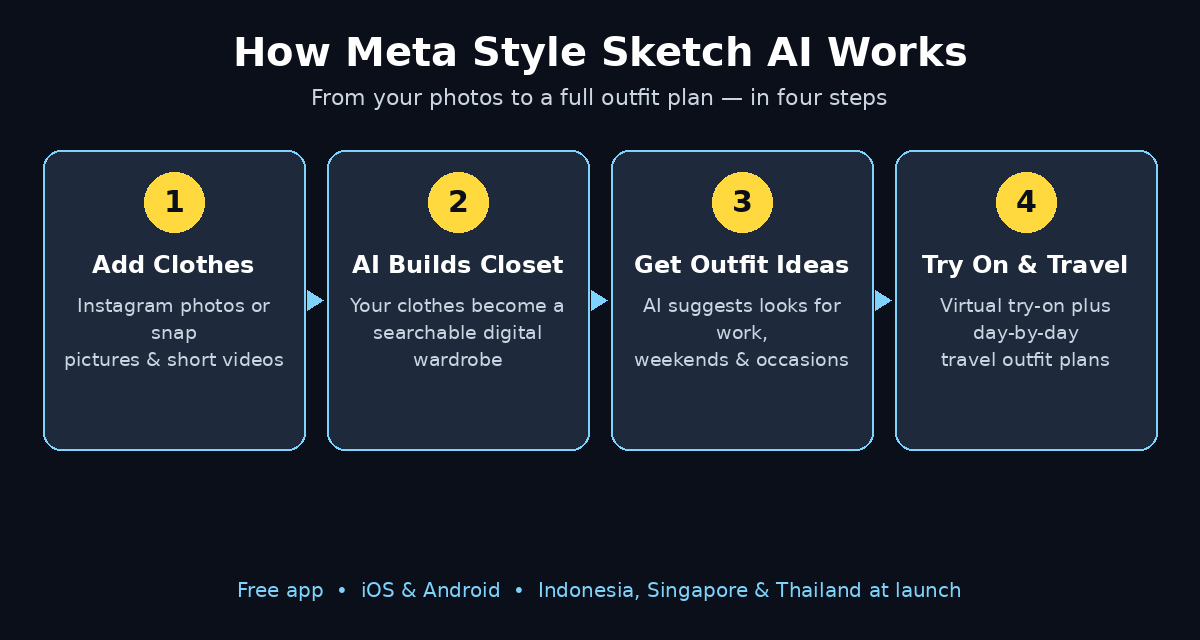
How Meta Style Sketch AI works — your photos become a virtual closet, and the AI turns it into daily outfits, try-ons and travel plans.
Step 7: Style One Item in Many Ways
The single most useful trick in Style Sketch is also the simplest: pick one item and ask the app to build many outfits around it. This is how you break the habit of wearing the same shirt with the same jeans every time.
Here is a practical routine:
- Open your closet and tap the item you want to restyle — a blazer, a patterned shirt, a skirt, a pair of boots.
- Tap Style this item and choose the occasion: work, casual, evening, or weekend.
- Review the five to eight combinations the app generates. Note which pairings surprise you.
- Save two or three favourites with a name, such as “Friday office” or “Dinner out”.
- Try one of the saved looks the next time you wear that item.
This approach also helps you spot gaps honestly. If the app keeps suggesting the same pair of shoes for every outfit, you probably need one more versatile pair — not ten new outfits. And if an item never appears in any suggestion, that is useful information too: it may not match anything else you own, and it might be time to donate or sell it.
For small business owners and creators, the same logic applies to a work wardrobe. A tidy, repeatable set of looks saves decision time every morning, which is exactly why busy founders often standardise what they wear. If you run a small brand and want your online presence to look as organised as your wardrobe, a good digital agency such as the team at D365A can help you present your work consistently across your website and social channels.
Step 8: Try Outfits On with the Virtual Try-On
Seeing a list of clothes is one thing. Seeing how they look together on a body like yours is another, and that is what the virtual try-on is for. According to the app description, Style Sketch shows suggested outfits on a realistic digital model matched to your body shape and skin tone.
To use it:
- Open any suggested outfit and tap Try On.
- Check that your body-shape and skin-tone settings are filled in under your profile. The closer these are to reality, the more useful the preview.
- View the outfit on the model from the front. Compare two or three versions side by side if you are choosing between them.
- If something looks off — a colour clash, a top that looks too long — adjust the outfit and try again.
Be realistic about what this feature can and cannot do. A virtual model can show you proportions, colour combinations, and overall balance. It cannot show you exactly how a fabric drapes on your body, how a size fits, or how an outfit feels to wear. Use the try-on to shortlist looks, then do the final check in a real mirror. Meta has not published technical details about the fitting technology, so treat the preview as a helpful sketch, not a photograph of you.
Step 9: Plan Travel Outfits Day by Day
Packing is where most of us over-pack or forget the one thing we needed. Style Sketch’s travel planner turns packing into a checklist built from your own wardrobe.
Here is how to build a travel plan:
- Open the Trips or Travel section and tap New trip.
- Enter your destination, the dates, and how many days you will be away.
- Add your planned activities: beach, business meetings, hiking, dinners, sightseeing.
- Let the app check the weather forecast for your destination and dates.
- Review the day-by-day clothing plan it generates, built only from items in your virtual closet.
- Adjust anything you dislike, then export the plan as a packing list.
The planner’s real value is restraint. Because it builds the plan from clothes you already own and counts each item once, it naturally stops you from packing five tops for a three-day trip. It also reminds you of the easy-to-forget items: a light jacket for a cool evening, comfortable walking shoes for a sightseeing day, one smarter outfit for a dinner.
If your trip involves content creation — photos, videos, or meetings with clients — planning outfits in advance also means your pictures look consistent. Creators who want that same consistency across their online channels often work with AI automation services such as the team at Agentic Affairs, who help small teams automate repetitive content and outreach work so the creative part gets more of their time.
Step 10: Use Weather-Based Suggestions and Save Your Favourite Looks
The final habit that makes Style Sketch part of your routine is the daily check. Each morning, the app can suggest an outfit based on the weather, your plans, and what you wore recently so you do not repeat yesterday’s look.
To make the daily suggestion genuinely useful:
- Enable weather suggestions and make sure your city is set correctly, either through location access or manually.
- Log what you actually wore. When you wear a suggested outfit, mark it as worn. This stops the app from suggesting the same look two days in a row and builds a history of your real rotation.
- Save favourites into collections. Create collections such as “Work”, “Weekend”, “Summer”, and “Formal”, and save your best outfits into them. A saved collection is faster than generating new suggestions when you are in a hurry.
- Review weekly. Once a week, spend five minutes dismissing outfits you will never wear and saving the ones you love. The app learns from both actions.
- Re-photograph problem items. If the app keeps misreading a garment’s colour, replace its photo with a clearer one in daylight.
Over a month, this routine turns a static list of clothes into a living system: the app knows what you own, what you like, what the weather is doing, and what you wore last week. That is the whole point of an AI wardrobe — not a flashy feature, but a quiet daily habit that removes one small decision from your morning.
Meta Style Sketch AI vs Other Ways to Plan Outfits
| Method | Cost | Time to plan an outfit | Uses clothes you own | Virtual try-on | Travel planning |
|---|---|---|---|---|---|
| Meta Style Sketch AI | Free | About 1 minute | Yes | Yes | Yes |
| Standing in front of the closet | Free | 5–15 minutes | Yes | No | No |
| Pinterest outfit boards | Free | 10–30 minutes | Rarely | No | No |
| Traditional virtual closet apps | Free or paid | 5–10 minutes | Yes | Sometimes | Rarely |
| Hiring a personal stylist | Expensive | Scheduled sessions | Yes | In person | Sometimes |
The table makes the trade-off clear. Style Sketch is not the only way to plan an outfit, but it is the only free option that combines your real wardrobe, AI suggestions, virtual try-on, and travel planning in one place. Its weakness is availability: for now, it only works in three countries, and its accuracy claims are still unproven at scale. Pinterest is better for inspiration, and a human stylist is better for a special occasion — but for everyday decisions, an app that already knows your closet wins on speed.
FAQ: Meta Style Sketch AI for Beginners
Is Meta Style Sketch AI really free?
Yes. The app is free to download and use on iOS and Android, and Meta has not announced any paid tier or subscription. You need a Meta or Instagram account to sign in, but there is no charge for building a closet, generating outfit suggestions, using the virtual try-on, or planning travel outfits.
Which countries can use Style Sketch right now?
At launch on October 30, 2026, Style Sketch is available in Indonesia, Singapore, and Thailand only. Meta has not announced when it will expand to other countries. If it is not in your app store yet, the only safe option is to wait for the official rollout.
Do I need an Instagram account to use Style Sketch?
No, but it helps. Connecting Instagram lets the app build your virtual closet automatically from photos you have already posted. If you prefer not to connect Instagram, you can add every item manually with photos or short videos from your camera roll. The app works either way.
How accurate is the virtual try-on?
Meta describes the try-on model as realistic and matched to your body shape and skin tone, but the company has not published accuracy data or technical details. In practice, treat it as a good preview of proportions and colours, and do the final check in a real mirror before you leave the house.
Will Style Sketch suggest clothes to buy?
No — and that is the point. Style Sketch is designed around the clothes you already own. It suggests combinations from your virtual closet rather than pushing new purchases, which is what makes it different from most fashion apps that are really shopping apps in disguise.
Can I use Style Sketch without sharing my photos with Meta?
You can limit what the app sees by skipping the Instagram connection and adding items manually, one by one. But any photo you add to the app is processed by Meta’s systems to identify the clothing, so if you want zero photo sharing, a fully offline wardrobe app would be a better fit. Check the app’s privacy settings to see exactly what is collected.
Final Thoughts
Meta Style Sketch AI solves a small, daily problem with a surprisingly practical tool. It does not ask you to buy anything, learn fashion theory, or spend hours cataloguing your clothes. Connect Instagram or photograph a few items, and within minutes you have a digital wardrobe that suggests outfits, previews them on a virtual model, and plans your packing for the next trip.
The honest caveats matter: it is only available in three countries so far, the accuracy of its clothing detection and virtual try-on is still unproven, and the app is brand new, so features will change. But the core idea is sound, and the price is free. If you live in Indonesia, Singapore, or Thailand, download it today, spend twenty minutes building your closet, and let it suggest tomorrow’s outfit. You may be surprised how many good looks were already hanging in your wardrobe.
If you are outside the launch countries, save this guide and check your app store in a few weeks — Meta’s quiet launches often expand faster than expected. And while you wait, try one of the free AI tools below to see what else you can automate for free.
Explore More Free AI Tools
Want more free tools like Style Sketch? Try the free AI tools at AIToolSteps — including the AI Title Generator, Meta Description Generator, AI Rewriter, and Keyword Density Checker — all free, no sign-up needed. If you enjoyed this guide, you may also like our beginner guide to Local Code AI, the free private AI assistant for Mac: How to Use Local Code AI for Beginners.