

Empty seats are the silent killer of a good B2B event. You can book the perfect venue, line up great speakers, and prepare a brilliant agenda, but if the right people never show up, none of it matters. The usual fix is more emails, more manual follow-ups, and more hours spent chasing registrations — work that eats the very time you should spend making the event worth attending.
TopAgent AI takes a different approach. Launched on Product Hunt on October 30, 2026, it is an AI agent built for one job: filling your next B2B conference, summit, or workshop. You give it your opted-in audience, your event details, your registration link, and your deadline, and it prepares an SMS invitation campaign, monitors delivery, clicks, and replies, and comes back with follow-ups ready for your approval. You stay in control — the agent does the heavy lifting.
In this beginner-friendly guide, you will learn exactly how to use TopAgent AI, from preparing your audience list and event details to approving messages, launching your campaign, and turning replies into registrations. No marketing experience is needed, and you do not need a credit card to start.
Step 1: Understand What TopAgent AI Is
TopAgent AI is an AI agent for B2B event attendance, not a generic marketing tool. Think of it as a focused assistant that handles the entire invitation workflow for one event at a time. It does not try to run your whole marketing department — it does one thing well: getting the right people to register and show up.
Here is what the agent does for you:
- Prepares your SMS invitation campaign from your event details, audience, and registration link.
- Sends invitations by SMS, the channel most busy professionals actually read within minutes.
- Monitors delivery, clicks, and replies so you always know who received, opened, and answered your invitation.
- Drafts relevant follow-ups for people who have not replied, and brings them to you for approval before anything goes out.
The approval step matters. Nothing is sent without your say-so, which means you keep full control over tone, timing, and who gets contacted. If you run a digital agency that organizes client events, or a small business that hosts workshops and meetups, TopAgent AI turns a week of manual outreach into an afternoon of review and approval.
Step 2: Gather Your Event Details Before You Start
TopAgent AI works from the details you give it, so spend ten minutes collecting them before you open the tool. The better your input, the better the invitations it prepares. You will need:
- Event name and format — conference, summit, workshop, or roundtable.
- Date, time, and venue, including whether the event is in person, virtual, or hybrid.
- Registration link — the page where guests actually sign up.
- Deadline — the last date for registrations, so the agent can pace its follow-ups.
- One-sentence value proposition — why should a busy professional attend? A clear answer here shapes every message the agent writes.
Write the value proposition as if you were texting a colleague: short, specific, and honest. “Join 200 operations leaders to see live demos of AI tools that cut invoice processing time in half” beats “the event of the year” every time. If you struggle to phrase it, our Wellows AI Visibility Report guide shows how to check what AI search engines already say about your brand — useful context when you describe your event to an audience that may look you up first.
Step 3: Prepare Your Opted-In Audience List
TopAgent AI works with your opted-in audience — people who have already agreed to hear from you. This is both a rule and an advantage: messages land with people who know you, so reply rates are far higher than cold outreach.
Prepare your list as a clean spreadsheet with at least a first name and a mobile number for each contact. Then check it before uploading:
- Remove duplicates so nobody receives the same invitation twice.
- Drop numbers that bounced before — old or invalid numbers waste sends and hurt deliverability.
- Segment if you can — past attendees, warm leads, and partners may deserve slightly different messages.
- Confirm consent — every contact should have opted in to receive messages from you. If you are unsure about a segment, leave it out of the first campaign.
A smaller, cleaner list always beats a big, messy one. Five hundred people who know your brand will fill more seats than five thousand cold numbers, and they will complain far less. For teams that want to automate more of this kind of outreach, AI automation services can help connect tools like TopAgent AI into a wider workflow, so invitation data flows into your CRM without manual copying.
Step 4: Create Your First Campaign
With your details and audience ready, creating the campaign is straightforward. Open TopAgent AI and start a new campaign for your event. You will be asked to enter the event details you gathered in Step 2, paste or upload your audience list, and add your registration link and deadline.
A few tips for a smooth setup:
- Use the exact event name from your registration page, so the invitation and the landing page match.
- Double-check the registration link by opening it in a fresh browser tab before you submit it.
- Set the deadline a day or two before the real cutoff, so the agent’s final follow-up still leaves room to act.
- Keep your audience segments separate if you prepared them — you can compare their response rates later.
Once you submit the details, the agent prepares your invitation campaign: draft messages, send order, and a follow-up plan built around your deadline. Review this plan carefully before approving anything. This is the moment where your knowledge of your audience matters most — you know which tone fits your industry, and the agent does not.
Step 5: Review and Approve the Invitation Messages
TopAgent AI drafts the invitations, but you approve them. Read every message as if you had received it yourself on a busy Tuesday morning. Good invitation SMS copy is short, personal, and specific:
- Lead with the benefit, not the event name. “See live demos that cut invoice time in half” works harder than “You are invited to our summit.”
- Keep it to one idea per message. The registration link carries the details; the text carries the reason to click.
- Use the recipient’s first name where the tool supports it — it lifts reply rates noticeably.
- End with one clear action — register, reply YES, or ask a question.
If a draft sounds stiff, generic, or salesy, edit it before approving. The agent learns from your edits only in the sense that your approved version is what actually goes out, so take the two minutes to make each message sound like you. Never approve a message you would delete yourself.
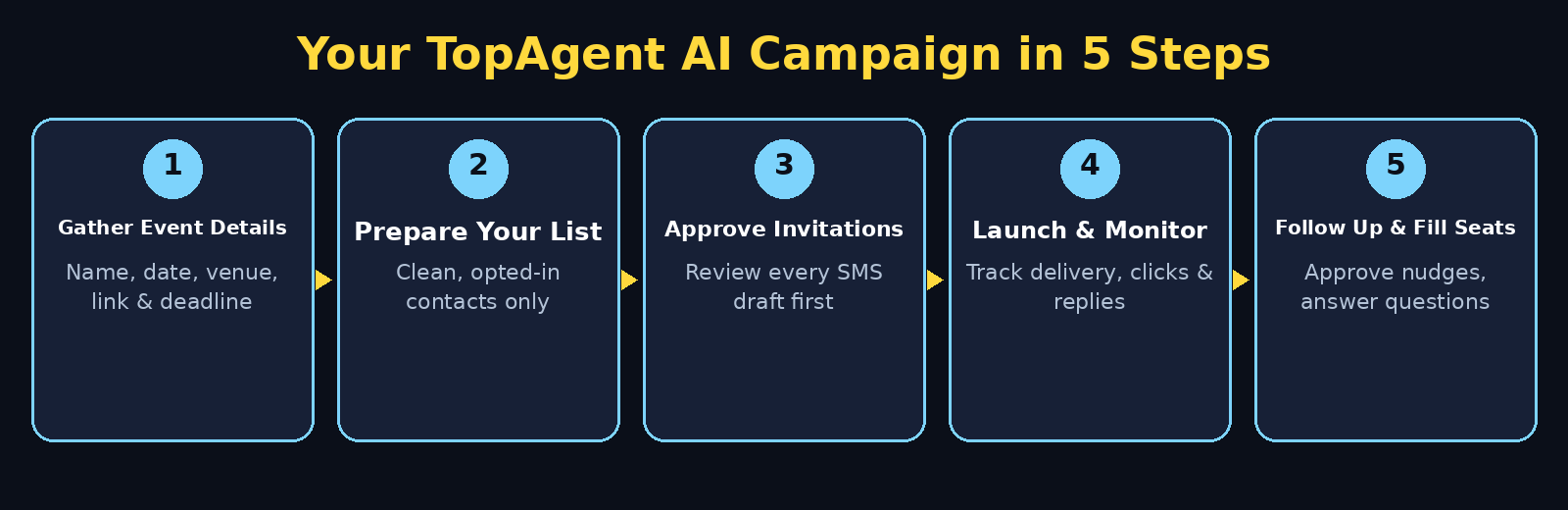
Step 6: Launch the SMS Invitations
Once you approve the messages, the agent sends the invitations by SMS. SMS is the right channel for event invitations for a simple reason: busy professionals ignore overflowing inboxes, but they read text messages within minutes. That speed matters when seats are limited and deadlines are near.
After launch, resist the urge to hover. Let the first wave settle for a few hours before judging results. Early replies usually come from your warmest contacts — past attendees and people who already like your brand — while the rest of the list needs a little more time. If your registration page shows a spike within the first hour, the campaign is working; if it does not, wait for the follow-up wave before changing anything.
Step 7: Monitor Delivery, Clicks, and Replies
TopAgent AI monitors delivery, clicks, and replies, and this dashboard is where the campaign becomes genuinely useful. Check three numbers every day while the campaign runs:
- Delivery rate — the share of messages that actually reached a phone. A sudden drop usually means stale numbers, not a tool problem.
- Click rate — the share of recipients who tapped your registration link. This tells you whether the message itself was convincing.
- Reply rate — the share who answered. Replies are gold: they include questions, objections, and yeses you can act on immediately.
Read the actual replies, not just the counts. A reply that says “What time does it start?” is a registration waiting to happen. A reply that says “Send me the agenda” tells you what your next follow-up should contain. Answer questions the same day — a fast, human reply converts far better than any automated nudge.
Step 8: Approve and Send the Follow-Ups
Most registrations do not come from the first message. They come from the polite, well-timed follow-up sent to someone who meant to register and forgot. TopAgent AI prepares these follow-ups for you and returns with them ready for approval — it never sends follow-ups on its own.
When you review a follow-up draft, check three things:
- It adds new information — a speaker announcement, a seat count, a deadline reminder — instead of repeating the first message.
- It respects the recipient — one follow-up is helpful, three in a day is spam. Space them out and stop after two or three attempts.
- It matches the reply history — someone who asked a question should get an answer, not a generic reminder.
Approve follow-ups in small batches rather than all at once, so you can adjust the wording based on what the first batch achieves. This is the same discipline that makes any outreach work: measure, adjust, repeat.
Step 9: Turn Replies Into Registrations
A campaign is only successful when replies become registrations, so close the loop deliberately. Each morning during the campaign, export or review the reply list and do three things:
- Answer every question personally — even a one-line answer builds trust.
- Send the registration link again to anyone who said yes but has not yet registered.
- Note the objections — price, timing, travel, agenda — and use them to improve your next event and your next campaign.
If a contact replies STOP or asks not to be contacted, remove them from the list immediately and confirm it. Respecting opt-outs is not just polite; it protects your sender reputation for every future campaign.
Step 10: Measure Results and Plan the Next Event
When the deadline passes, sit down with the final numbers for thirty minutes. Write down the delivery rate, click rate, reply rate, and — most importantly — how many registrations and actual attendees came from the campaign. Then ask what you would change next time:
- Which audience segment replied best, and should it get a bigger share of the list next time?
- Which message earned the most clicks, and what made it different?
- Did the follow-ups add registrations, or did most people decide after the first message?
- How many days before the event did registrations peak — and should the next campaign start earlier?
Save the winning message drafts and the segment breakdown somewhere you will find them. Your second TopAgent AI campaign will be faster, cheaper, and more effective than your first, because you will start from evidence instead of guesses.
TopAgent AI vs Other Ways to Fill an Event
Every event organizer already has options for invitations. Here is how TopAgent AI compares with the usual alternatives:
| Method | Speed | Effort | Best For |
|---|---|---|---|
| TopAgent AI (SMS agent) | Minutes to read | Low — approve drafts | B2B events with an opted-in list |
| Email invitations | Hours to days | Medium — design and write | Large lists, detailed agendas |
| Manual SMS outreach | Minutes to read | Very high — one by one | Tiny VIP lists under 50 people |
| Social media posts | Unpredictable | Medium — content creation | Public awareness, not seats |
| Event platforms only | Depends on discovery | Low — list and wait | Events with strong organic demand |
The honest answer is that TopAgent AI works best as the engine of your invitation plan, not the whole plan. Pair its SMS campaign with one good email and a single social post, and you cover the three places your audience actually looks.
Frequently Asked Questions
Is TopAgent AI really free?
TopAgent AI launched on Product Hunt on October 30, 2026, as a free tool for B2B event organizers. As with any new launch, pricing may evolve as features are added, so treat free as the current position and check the official pricing page before planning a large campaign.
Do I need a big audience list to use TopAgent AI?
No. A list of a few hundred opted-in contacts is enough to see real results. The tool is designed for quality over quantity — people who already know your brand respond far better than cold lists of any size.
Can TopAgent AI send messages without my approval?
No. The agent prepares invitations and follow-ups and brings them to you for approval before anything is sent. You stay in control of every message, every recipient, and every send time.
What kind of events work best with TopAgent AI?
B2B conferences, summits, workshops, and roundtables work best, because the audience is professional, the value is concrete, and SMS reaches decision-makers quickly. It also works for partner meetups and training sessions with an existing audience.
What happens if someone replies STOP?
Remove them from your list immediately and do not contact them again. TopAgent AI works with opted-in audiences, and honoring opt-outs protects both your reputation and your future campaigns.
Does TopAgent AI replace email invitations?
Not entirely. SMS is faster and gets read sooner, but email carries more detail — full agendas, speaker bios, and maps. The strongest approach is SMS for the invitation and the nudge, with email carrying the detail.
Final Thoughts
Filling a B2B event used to mean choosing between slow email and exhausting manual outreach. TopAgent AI offers a third option: an AI agent that prepares the campaign, watches the replies, and drafts the follow-ups, while you keep the final say on every message. That balance — automation for the volume, humans for the judgment — is exactly what a small team needs to fill seats without hiring a team to do it.
Start with one event, one clean list, and one clear value proposition. Approve the drafts carefully, answer the replies quickly, and measure what happened. If the seats fill, you have found a repeatable system for every event you run next — and if they do not, the reply data will tell you exactly what to fix.
Explore More Free AI Tools
Want to keep building with free AI? Try the AI Title Generator, Meta Description Generator, AI Rewriter, and Keyword Density Checker at https://aitoolsteps.com/ — they are free, beginner-friendly, and a great next step after your first TopAgent AI campaign.