

Learning a new language is hard enough without forgetting every word you looked up yesterday. You read a word in a book, you check its meaning, you feel confident — and a week later it is gone. That is the exact problem MindDory AI was built to solve. MindDory is a free AI vocabulary builder that lives where you already read and write: your phone keyboard, your Chrome browser, and your camera. It saves the words you meet and the mistakes you make, then brings them back at the right time until they stay.
Unlike Duolingo, MindDory is not a game. Unlike Anki, it is not a chore. It is a modern, AI-native vocabulary app built around spaced repetition, the memory science that serious learners trust. AI does the heavy lifting: instant translations, example sentences, memory cues, and short stories built around your own words. The free plan includes unlimited cards and reviews, the grammar keyboard, the Chrome extension, and 30 translations a day. It works in more than 60 languages, and the keyboard checks grammar in nine.
This beginner guide walks you through everything step by step: installing MindDory, setting your level, adding your first words, reviewing with spaced repetition, fixing grammar in any app, and building a daily habit that actually sticks. No technical background needed, and no credit card required to start.
Step 1: Download MindDory and Create Your Free Account
Start by getting the app on the device you use most. MindDory is available for iPhone and Android, and there is a full web version at app.minddory.com that runs in any browser. If you enjoy creating with AI in the browser, our Google AI Studio guide shows another free way to build with AI. Your cards sync across all of them with one free account, so you can add a word on your phone during a commute and review it on your laptop later.
- On iPhone or Android: search for “MindDory” in the App Store or Google Play and install it. The app is free to download.
- On the web: open app.minddory.com in Chrome or any modern browser and sign up with your email.
- Create your account: use your email address and pick a password, or sign in with your existing Google or Apple account if the option is offered. One account covers every device.
- Pick your target language: MindDory supports learning in more than 60 languages, including English, French, Spanish, German, Korean, Chinese, and Japanese. Choose the language you want to learn first — you can add more later.
The free plan covers daily study with no expiry date: unlimited flashcards and reviews, the grammar keyboard, the Chrome extension, cloud sync, and a daily allowance of AI stories, memory cues, scans, and translations. Premium costs $9.99 a month or $49.99 a year and raises the daily AI caps. For a beginner, the free plan is genuinely enough to learn every day.
Step 2: Take the 2-Minute CEFR Language Test
Before you add a single word, MindDory asks you to take a short language test — and you should say yes. The test is aligned to the CEFR scale, the international standard that ranks language ability from A1 (beginner) to C2 (mastery), and it takes about two minutes.
- Answer honestly: the test places you at the right level so the words and examples MindDory suggests are neither too easy nor impossible.
- Check your level: your result tells you where you stand, which makes your progress easy to measure later. Retake the test after a few weeks of study to see your level climb.
- Start at the right difficulty: a beginner who starts with advanced academic words will quit; an intermediate learner stuck on basic words will get bored. The test prevents both problems.
The CEFR test is available for eight languages, with levels from A1 to C2 in six of them. If your language is not covered by the test yet, just skip it and set your level manually — you can change it any time in settings.
Step 3: Add Your First Words the Easy Way
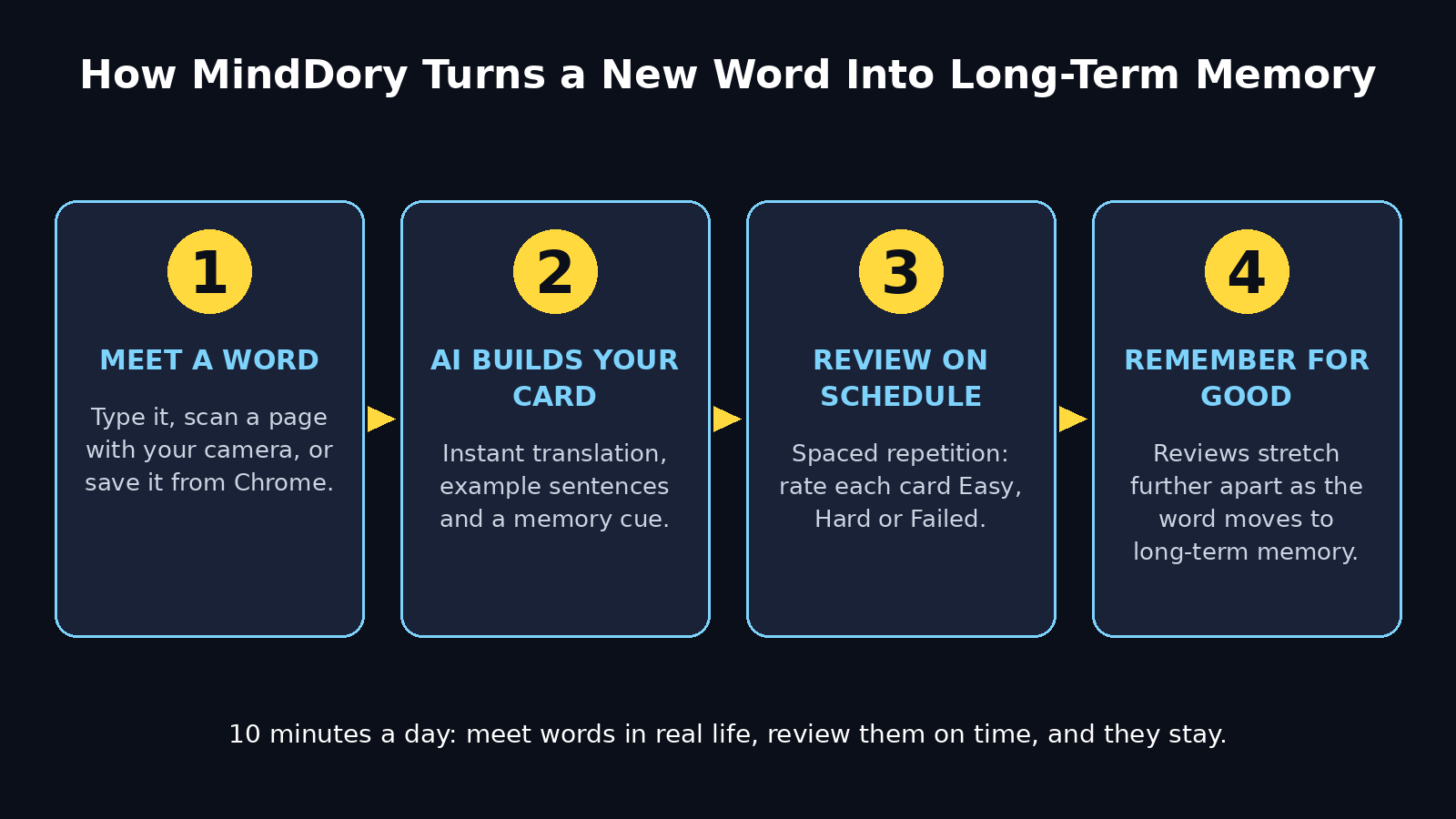
MindDory’s best trick is how little effort adding a word takes. You do not build decks or fill in forms. You meet a word in real life, and MindDory turns it into a card.
- Type a word: tap the add button, type the word, and MindDory instantly shows the translation, synonyms, and example sentences. Tap save, and the card is ready.
- Scan a page: point your camera at a book page, a menu, or a document. MindDory reads the text and lets you tap any word to save it.
- Photograph anything: a street sign, a product label, a worksheet — if you can photograph it, you can learn the words on it.
- Save from the web: the Chrome extension lets you save a word from any web page in one click while you read articles or study online.
- Import from your chats: if you use Claude or another MCP-compatible AI assistant, you can connect it so useful words from your AI conversations become MindDory cards automatically. This is optional — the app works perfectly without it.
A good first day looks like this: add 10 words you genuinely met today, not 100 words from a list. Words from your own reading, work, or conversations stick far better than words from a textbook, because you already have a memory attached to them.
Step 4: Let AI Build Your Flashcards for You
The moment you save a word, MindDory’s AI builds a complete flashcard around it. This is where it beats a plain flashcard app.
- Instant translation: the AI translates the word into your language automatically, with synonyms so you learn the shades of meaning, not just one definition.
- Example sentences: each card comes with example sentences that show the word used naturally, so you learn how it behaves in a real sentence.
- Memory cues: for stubborn words, the AI generates a memory cue — a smart keyword association or mental image that gives your brain something to hold on to.
- Pronunciation help: listen to the word spoken aloud and repeat it. Hearing a word and saying it yourself is one of the fastest ways to remember it.
- Folders and tags: organize cards into folders by topic — work vocabulary, travel phrases, exam words — so you can review one set at a time.
You never have to design a card yourself. Your job is only to meet words in the wild and save them. MindDory does the teaching design. That is why learners who burned out on Anki’s setup often stick with MindDory: the friction between “I saw a word” and “I am learning it” is almost zero. If privacy matters to you, our Underdog AI guide covers a free assistant that runs entirely on your own computer.
Step 5: Review With Spaced Repetition — the Science That Makes Words Stick
Saving a word is only half the job. Remembering it a month later is the real goal, and that is what spaced repetition is for. The idea is simple. Your brain forgets on a predictable curve. MindDory AI shows you each word again just before you would forget it, and the gaps stretch longer every time you remember correctly.
- Review daily: open the review queue and work through the cards MindDory shows you. Each card asks you to recall the meaning before revealing the answer.
- Rate yourself honestly: after each card, mark it Easy, Hard, or Failed. Easy pushes the next review far into the future. Hard brings it back soon. Failed brings it back today.
- Trust the schedule: do not review the same word ten times in one sitting. The algorithm spaces reviews for a reason — cramming feels productive but fades fast, while spaced review builds long-term memory.
- Keep sessions short: five to ten minutes of review beats an hour once a week. MindDory’s queue is designed for short, daily sessions.
- Watch your streak: the app tracks your daily reviews. A visible streak is a gentle nudge to come back tomorrow, and consistency is the single biggest predictor of vocabulary growth.
If you do only one thing from this guide, do this: review every day, even if it is only for five minutes. Spaced repetition only works when the spacing actually happens.
Step 6: Turn On the MindDory AI Grammar Keyboard and Fix Mistakes in Any App
This is MindDory’s most unusual feature, and the one that makes it different from every other flashcard app. MindDory is also a keyboard — a smart keyboard that checks your grammar in any app on your phone.
- Install the keyboard: in the MindDory app, open the keyboard settings and follow the steps to add MindDory as a keyboard on your iPhone or Android. It takes about a minute.
- Type anywhere: switch to the MindDory keyboard in WhatsApp, Gmail, Notes, or any app where you type in your target language.
- See mistakes marked: as you type, the keyboard marks grammar mistakes. Tap a marked word to see the explanation — what is wrong and why.
- You stay in control: nothing is corrected automatically. The keyboard waits for you to tap Fix, so you actually learn the rule instead of letting the app silently rewrite your sentence.
- Learn from your own mistakes: every mistake you make while typing is a word or rule you personally need. That makes the keyboard a teacher that adapts to you, not a generic grammar lesson.
The keyboard checks grammar in nine languages, and it also counts the English dictionary words you type, which feeds your Active Words score — a simple measure of how much of your vocabulary you actually use. It never saves what you type as cards, and it only counts dictionary words, so your private messages stay private.
Step 7: Learn Words in Context With AI Stories
Isolated flashcards have a weakness: you can remember a word on a card and still freeze when you need it in a sentence. MindDory fixes this with AI stories — short, contextual narratives built around exactly the words you are learning.
- Generate a story: pick a few cards you are struggling with and ask MindDory to write a short story that uses them naturally.
- Read, then re-read: reading your words inside a story gives each one a scene, a character, and a reason to exist. That context is what makes the word retrievable later.
- Make it personal: stories work best when they connect to your life. If you are learning English for work, ask for a story set in an office. If you are learning for travel, ask for one set in a hotel or airport.
- Use the daily allowance wisely: AI stories are part of your daily AI allowance on the free plan, so spend them on the words that refuse to stick, not on words you already know.
This feature is why MindDory’s maker built the app in the first place: after burning out on Anki, he wanted vocabulary wrapped in stories instead of isolated cards. For many learners, a word learned inside a story is a word remembered.
Step 8: Explore the MindDory AI Word Map and Connect Related Words
Vocabulary grows faster when words connect to each other. MindDory’s Word Map shows you how words relate, across a map of more than 38,000 words.
- Open the Word Map: from any card, open the map to see related words, synonyms, and words that often appear together.
- Follow the branches: one word leads to three related words, and each of those leads to more. A ten-minute wander through the map can add a whole cluster of useful words to your deck.
- Learn in families: words learned together are remembered together. If you learn “negotiate”, also learn “agreement”, “deadline”, and “compromise” — they belong to the same real-world situation.
- Go deeper with Premium: the free plan includes the Word Map, and Premium unlocks deeper insights and more example sentences in the add-card flow. Start free and upgrade only if the map becomes your favorite way to study.
The Word Map is also a great cure for the “I don’t know what to learn next” problem. When you are stuck, open the map from a word you already know and let it suggest the next step.
Step 9: Connect Claude and Save Words From Your AI Chats (Optional)
If you already use an AI assistant such as Claude for work or study, MindDory can meet you there too. Through the Model Context Protocol (MCP), you can connect Claude or any MCP client to MindDory, so words from your chats become cards.
- Connect once: link your MCP client in MindDory’s integrations settings. The connection is optional and opt-in.
- Save words mid-conversation: when Claude uses a word you do not know, save it straight into MindDory without leaving the chat.
- Learn the language of your work: this is especially powerful for professionals. If you use AI tools to draft emails, reports, or proposals, the vocabulary you meet is the vocabulary your job actually needs.
- Keep it private: the integration only saves the words you choose. Nothing else from your chats is shared.
This step is completely optional. If you never use Claude or MCP, skip it — the keyboard, the scanner, and the Chrome extension already cover every way most learners meet new words.
Step 10: Build a Daily 10-Minute Habit with MindDory AI
Tools do not teach languages; habits do. MindDory AI gives you the structure, but the habit is yours to build. The good news is that ten focused minutes a day is enough.
- Pick a fixed time: attach your review to something you already do — your morning coffee, your commute, or the ten minutes before bed. A fixed slot beats willpower every time.
- Review first, add second: clear your review queue before adding new words. Reviews protect what you already learned; new words can wait a day.
- Add five to ten words a day: that is 150 to 300 words a month, and 1,800 to 3,600 words in a year — enough to transform your reading, writing, and speaking.
- Use your words: write one sentence, one message, or one email a day using a word you just learned. MindDory’s Active Words count shows how much of your vocabulary you actually use, and using a word is the final step in owning it.
- Review your progress weekly: check your streak, your review accuracy, and your Active Words. Small weekly wins keep motivation alive far longer than vague goals like “become fluent”.
Language learning is a long game, and MindDory is built for the long game. The app handles the scheduling, the card design, and the grammar checks. Your only job is to show up for ten minutes a day.
MindDory vs Duolingo vs Anki: Which One Should You Use?
| Feature | MindDory | Duolingo | Anki |
|---|---|---|---|
| Main idea | AI vocabulary builder with spaced repetition | Gamified language lessons | Customizable flashcard system |
| Free plan | Unlimited cards and reviews, grammar keyboard, 30 translations a day | Free with ads and limits | Free on desktop and Android, paid on iOS |
| Spaced repetition | Built in, automatic | Limited | Powerful but needs manual setup |
| Grammar help | Keyboard checks grammar in any app | Grammar tips inside lessons | None |
| AI features | Stories, memory cues, smart translation, Word Map | AI conversations on paid plans | Add-ons only |
| Languages | 60+ for learning, 9 for grammar check | 40+ | Any, if you build the deck |
| Best for | Learners who want words from real life to stick | Casual daily practice and motivation | Advanced users who love customizing decks |
The honest answer is that these tools do different jobs. Duolingo is excellent for daily motivation and basic practice. Anki is unmatched if you enjoy building your own system. MindDory is the best choice when your goal is practical: learn the words you actually meet, fix your grammar while you type, and remember everything with minimal setup. Many learners use Duolingo for fun and MindDory for serious vocabulary — they work well together.
FAQ: MindDory AI for Beginners
Is MindDory AI really free?
Yes. The free plan never expires and includes unlimited flashcards and reviews, the grammar keyboard, the Chrome extension, the Word Map, cloud sync, and a daily allowance of AI stories, memory cues, scans, and translations (30 translations a day). Premium costs $9.99 a month or $49.99 a year and raises the daily AI caps. Start free and upgrade only if you hit the limits.
Which platforms does MindDory run on?
MindDory runs on iPhone, iPad, Android phones and tablets, and any web browser at app.minddory.com. Your cards sync across all of them with one free account. The grammar keyboard works on iPhone and Android, and the Chrome extension works in the Chrome browser.
How many languages can I learn with MindDory?
You can learn vocabulary in more than 60 languages, including English, French, Spanish, German, Korean, Chinese, and Japanese. The grammar keyboard checks your writing in nine languages, and the Word Map and CEFR language test cover eight languages, with levels from A1 to C2 in six.
Is MindDory better than Anki?
It depends on what you want. Anki is more customizable and completely free on desktop, but you have to design your own cards and configure spaced repetition yourself. MindDory builds the cards for you with AI translations, examples, and stories, adds a grammar keyboard, and needs almost no setup. If you want a tool that works out of the box, MindDory is the easier choice. If you love fine-tuning every setting, Anki is still king.
Does the MindDory keyboard read my private messages?
No. The keyboard marks grammar mistakes and explains them, but it never changes your text until you tap Fix, and it never saves what you type as cards. It only counts the English dictionary words you use, so it can show your Active Words score. Your messages stay yours.
Can I use MindDory for professional English at work?
Absolutely — this is one of its best uses. The grammar keyboard catches mistakes in work emails and messages before you send them, and the words you save from real work documents become the vocabulary your career actually needs. Freelancers and small teams who write client proposals in English often pair it with help from a digital agency for bigger content and marketing work, while AI automation services can take over repetitive research and reporting so you spend your study time on language, not admin.
Final Thoughts
MindDory AI is one of the most practical free language tools launched in 2026, because it solves the problem other apps ignore: not how to start learning words, but how to remember them. The spaced repetition engine handles the timing, the AI builds your cards, the grammar keyboard teaches you while you type, and the stories and Word Map give every word a context to live in. You do not need a paid plan, a study system, or hours of free time — ten minutes a day and the words you already meet in real life are enough.
Start today: install the app, take the two-minute level test, add ten words you met today, and turn on the keyboard. Review tomorrow, and the day after. In a month, your Active Words count will tell you the story better than any promise in this guide. Your vocabulary is not a list to memorize — it is a library you build one real word at a time, and MindDory is the librarian.
Explore More Free AI Tools
Want to keep building with free AI? Try the AI Title Generator, Meta Description Generator, AI Rewriter, and Keyword Density Checker at https://aitoolsteps.com/ — they are free, beginner-friendly, and a great next step after your first week with MindDory AI.