

For years, AI assistants have waited politely for you to ask them something. You type a question, you get an answer, and the conversation ends there. On October 21, 2026, Anthropic flipped that script with Claude Duet AI — a proactive AI agent that starts the conversation itself. Instead of waiting for a prompt, Duet sends you a morning brief pulled from your connected apps. It checks your accounts through the day. It keeps working on your tasks in the background even when your phone and laptop are switched off.
This is a bigger shift than it sounds. A chatbot answers questions; an agent does work. Claude Duet reads your email, watches for unpaid invoices, drafts reminders, prepares payroll inputs, and can even buy things for your business — which means that setup, permissions, and trust matter far more than clever prompting. Get the setup right and it feels like hiring a tireless junior assistant. Get it wrong and it is just an expensive notification machine.
This beginner guide walks you through everything step by step: what Claude Duet actually is, who can use it right now, how to join the waitlist, how to connect your apps safely, how to get real value from the morning brief on day one, and the honest limitations you should know before you hand it any real responsibility.
Step 1: Understand What Claude Duet Actually Is
Claude Duet AI is a standalone app for iOS and Android, also available on claude.ai, built around Claude Opus 5.5. Anthropic says it chose that model specifically for its judgment — the ability to decide what needs your attention, what can wait, and when it should check with you first. Anthropic aims it at professionals and small business owners, and it carries over your memory, skills, and connected apps from your existing Claude account, so setup is meant to be light.
The fundamental shift is in who starts the conversation. A normal chatbot waits for a prompt. Duet works in one ongoing thread — by typing or by voice — and it initiates contact itself. You can hand it anything from scheduling a meeting to building a dashboard that pulls data together from dozens of tools. It can also build a financial or sales forecast, a prototype, or even a small web app. It runs on its own virtual machine with its own browser, so your devices do not need to stay on for it to keep working.
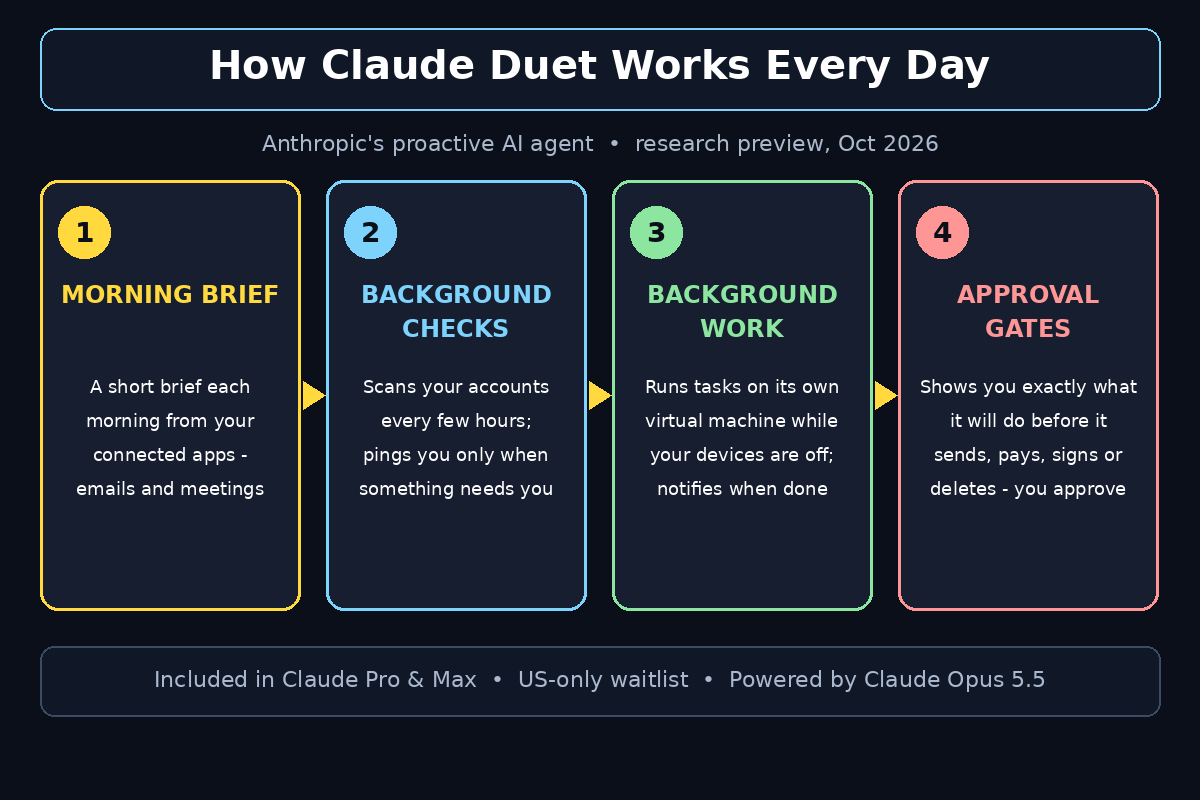
Three rhythms define what Duet does all day, according to Anthropic. First, the morning brief: each morning it sends you a short summary. It covers the most important items across your connected apps. Second, background checks: through the day it checks your connected accounts every few hours and messages you only when something genuinely needs your attention. Third, background work: it executes longer tasks on its own and notifies you when something is done or needs review. Think of it less like a search box and more like an employee who works the night shift.
Step 2: Check Whether You Are Eligible Right Now
Before you get excited, here is the honest gate: Claude Duet is in research preview, and access is narrow. During the preview Anthropic includes it at no extra charge in Claude Pro (20 dollars a month, or 17 dollars a month billed annually) and Max (starting at 100 dollars a month) plans. There is no separate Duet price — but there is no free tier either.
Availability is currently limited to Claude Pro and Max subscribers in the United States, rolling out through a waiting list. Anthropic has not included Team and Enterprise plans yet, and has not announced dates for other countries. So if you are outside the US, on a free plan, or on a Team plan, you cannot use Duet yet — but you can still follow this guide to understand it, because most observers expect the preview to widen over time.
The second catch is the meter. Duet shares your plan’s usage limits with the rest of Claude, and its background checks and background work count toward those limits. Bigger jobs — a financial model, a slide deck, a research sweep — use more model turns. Launch coverage notes that Anthropic has published no task-level cost estimates or benchmarks for Duet yet. So if you already push against your Claude usage limits, the always-on monitoring will eat into them faster.
Step 3: Get on the Claude Duet AI Waiting List
Since Duet is rolling out through a waiting list, your first real action is to get in line. Here is how to do it:
- Sign in to your Claude account on claude.ai with the account that holds your Pro or Max subscription. Anthropic ties Duet to the subscription, so make sure you are logged in with the right email.
- Look for the Duet announcement or waitlist page in Anthropic’s official communications — the company announced Duet on October 21, 2026, and eligible users can register their interest from the official page rather than from any third-party link. Never join a waitlist through a random link someone sends you; phishing pages love hot launches.
- Register with your Pro or Max account details and confirm your region. Because the preview is US-only for now, your account region matters.
- Watch your email and your Claude app for the invite. Anthropic is rolling access out gradually, so there may be a wait even after you register.
While you wait, there is genuinely useful prep work to do. Audit which of your apps hold the information Duet would need — your email, calendar, invoicing tool, task manager — and decide which ones you are comfortable connecting. An agent is only as useful as the access you give it, and deciding your comfort level in advance means you will set it up in minutes instead of agonizing over permissions later. If you run a business and this whole category feels overwhelming, remember that a digital agency can set up AI workflows for you — for example, D365A helps companies put AI tools to work inside real business processes, which is exactly the territory Duet is moving into.
Step 4: Install the App and Sign In
Once your invite arrives, download the standalone Claude Duet AI app on iOS or Android, or open it on claude.ai in your browser. Note that Duet currently lives in a separate app from the main Claude app — that is a known limitation of the preview, so do not go hunting for it inside the Claude app you already have.
Sign in with the same Claude account that carries your Pro or Max subscription. Duet carries over your memory, skills, and connected apps from your Claude account. Much of your context comes along automatically. You should not need to re-teach it who you are or re-explain your preferences from scratch.
On first launch, Duet will walk you through a short setup: what it can do, how the morning brief works, and — critically — the approval rules. Read this screen properly instead of tapping through it. Understanding what Duet will and will not do without asking you is the single most important part of the setup, and we will cover those guardrails in detail in Step 9.
Step 5: Connect the Apps You Actually Use
This is where Claude Duet AI becomes useful — or stays a demo. Duet can draw on the 6,000+ connectors and plugins in the Claude Marketplace, which is an enormous surface. The beginner mistake is connecting everything at once. The smart move is to connect the two or three apps where your work actually lives.
Good first connections for most people:
- Email (like Gmail): so Duet can catch you up on threads you missed overnight and flag messages that need a reply.
- Calendar: so the morning brief can tell you what your day actually looks like, including prep it did for your meetings.
- One work system: Slack for team chatter, QuickBooks or Stripe if you invoice clients, Shopify if you run a store.
Anthropic’s own examples of Duet’s business work are concrete: catching up on missed Gmail and Slack messages, checking QuickBooks or Stripe for unpaid invoices and drafting payment reminders, preparing payroll in Gusto, drafting a LinkedIn job posting, preparing agreements in Docusign, and setting up or managing a Shopify store. Start with the apps behind your biggest daily headaches, prove the value there, and expand later. Every connection you add is another data source Duet watches — and another permission to manage — so earn each one.
Step 6: Set Up Your Morning Brief
The morning brief is Claude Duet AI’s signature feature and the lowest-risk way to experience a proactive agent. Each morning, Duet sends you a short brief on the most important items across your connected apps — the overnight emails that matter, today’s meetings, deadlines approaching, invoices overdue.
To get a brief worth reading, tell Duet what “important” means to you. During setup (or by simply telling it in the ongoing thread), specify things like: which inboxes to scan, which calendars count, whether you want a strict 7 AM delivery or a brief that arrives when you first open the app, and what should never make the cut. Publications tracking the AI agent economy closely — sites like Agentic Affairs follow how tools like Duet are changing the way work gets done — consistently note one thing. Proactive agents are only as good as the priorities you teach them, and the morning brief is where that teaching starts.
For the first week, treat the brief as a draft, not gospel. Each morning, tell Duet what it got right and what it missed: “this thread didn’t need flagging,” “always include Stripe payouts,” “skip the newsletter summaries.” This feedback loop is how the brief goes from generic to genuinely personal. Reviewers of the preview agree on one thing: the brief is the feature most likely to earn its place in your routine, because it delivers value before you have lifted a finger.
Step 7: Tell Duet What to Watch (and How Often)
Beyond the morning brief, Claude Duet AI runs background checks through the day — scanning your connected accounts every few hours and messaging you only when something needs attention. Anthropic deliberately does not check nonstop, because constant checking would burn through your plan’s usage limits much faster.
This is worth configuring explicitly rather than leaving on defaults. Tell Duet:
- What counts as urgent for you. A client email? An invoice over a certain amount? A calendar change? Be specific — “urgent” means nothing until you define it.
- What should never interrupt you. Newsletters, automated receipts, FYI threads — name them so Duet learns to stay quiet.
- How often to check. Every few hours is the default rhythm; if your work is slower-moving, less frequent checks save your usage allowance for real work.
The pattern to aim for is simple: Duet should message you rarely, but every message should matter. If you find yourself muting it, the configuration is wrong — tighten the definition of “worth interrupting me” until the signal-to-noise ratio feels right. A proactive agent that cries wolf trains you to ignore it, which defeats the entire purpose.
Step 8: Give Duet Its First Background Task
Once the brief and the background checks feel right, hand Claude Duet AI a real piece of background work. This is the feature that separates Duet from every chatbot you have used: it runs on its own virtual machine with its own browser, so it keeps working when you step away. Your laptop and phone do not need to be on. You get a notification when the task is done or needs your review.
Good first tasks are bounded, low-stakes, and verifiable:
- “Draft follow-up emails for the three invoices overdue in QuickBooks, and show me the drafts before sending anything.”
- “Research three options for our team’s offsite venue under this budget and summarize them in a table.”
- “Watch my inbox for the client’s reply on the proposal and summarize it the moment it arrives.”
Notice the pattern: each task has a clear deliverable and an explicit review step. Do not start with “handle my inbox” or “manage the project” — open-ended mandates are where even the best agents stumble, and Duet’s own documentation is upfront that it can still misread a thread or misjudge what is urgent. Start narrow, verify the output, and widen the mandate only as trust is earned. One more practical note: Duet cannot yet show you its browser while it works, so for now you judge it purely on results.
Step 9: Learn the Approval Gates Before You Need Them
An agent that reads your email and spends your money lives or dies on its brakes, so understand Claude Duet AI’s guardrails now — not after a surprise. Duet reads, drafts, and prepares work on its own, but before it sends a message, makes a payment, signs a document, or deletes anything, it shows you exactly what it is about to do and waits for your approval. Nothing consequential happens without your explicit yes.
Anthropic keeps a few things off-limits even with approval, including trading securities and moving money between accounts — hard limits the company baked into the product. On the privacy side, Duet never directly sees your passwords or sign-in tokens, following the same design as Claude’s managed agents. A dedicated classifier checks messages and rejects requests to share credit card numbers and government identification outright; other sensitive information, like health or personal finance details, goes out only when you have explicitly instructed it to. Anthropic also says it red-teamed Duet, put it through external penetration testing, and covers it with a public bug bounty program.
Practical rules for your first month: never approve a payment or a sent message without reading what Duet shows you. Keep purchases to small, reversible amounts. Duet can buy things for your business through Link, Stripe’s digital wallet, paying with a virtual card after you approve the spend, or check out with Shopify’s Shop Pay. And never hand any agent — from any lab — unsupervised control of payments in week one. The approval gate is the feature. Use it.
Step 10: Review, Correct, and Iterate
Claude Duet AI is a research preview, and Anthropic is unusually upfront that this is an early version. It can still misread a thread or misjudge what is urgent. Personal errands like booking tickets are weaker than its business features. Early outside reaction is mixed: one product reviewer called it the most polished agent launch she had seen, while also saying it is not proactive enough yet, is too slow for synchronous work, and lacks a desktop app — so it has not become her daily driver.
Treat the first month as a trial with a clear verdict date. Each week, ask yourself three questions: Did the morning brief save me time or just add reading? Did background tasks come back correct without rework? Did the background checks stay inside my usage limits? Keep a simple log of what you asked Duet to do and whether the result was usable as-is, usable after edits, or unusable. If the “usable as-is” column is not growing by week three, your configuration — or your task selection — needs rethinking, not the product.
And keep expectations calibrated: independent long-term testing of Duet does not exist yet, because the product is days old. Launch-week praise and launch-week criticism deserve equal skepticism. What matters is what it does for your specific work, measured honestly, over a few weeks.
Claude Duet vs the Other Proactive Agents: Quick Comparison
Duet did not arrive in a vacuum. In about six weeks, every major lab shipped its own always-on agent: Meta launched its Muse personal agent in September 2026, OpenAI followed with the always-on Dots, and Google added a unified agent to Gemini. Anthropic is the fourth mover, and the honest differences so far are about scope and emphasis rather than raw capability claims.
| Feature | Claude Duet | OpenAI Dots | Meta Muse | Google Gemini Agent |
|---|---|---|---|---|
| Launched | Oct 21, 2026 (research preview) | Oct 2026 | Sep 2026 | Oct 2026 |
| Availability | US only, waiting list, Pro/Max subscribers | ChatGPT Pro and Business Premium users | Broader consumer rollout | Rolling out in Gemini app |
| Core model | Claude Opus 5.5 | GPT-6 class models | Meta Muse models | Gemini models |
| Main focus | Business work: invoices, payroll, forecasts | General always-on assistance | Consumer personal tasks | Business hub + general assistance |
| Pricing | Included in Pro ($20/mo) / Max (from $100/mo); usage counts toward plan limits | Included in Pro/Business tiers | Included in Meta AI offering | Included in Gemini plans |
| Safety stance | Approval required before send/pay/sign/delete; hard ban on trading and money movement | Approval gates vary by task | Standard consumer guardrails | Varies by integration |
| Best for | Professionals drowning in email, invoices, scheduling | ChatGPT power users wanting ambient help | Everyday consumers in Meta’s ecosystem | Small businesses already on Google Workspace |
Dots and Muse launched broader and more consumer-facing. Duet launches narrower — US-only, subscriber-only, waiting list — and pitches business work, with approval-first rules and hard limits that read stricter on paper than its rivals’ defaults. Whether that caution feels reassuring or slow is exactly what the preview will test.
Frequently Asked Questions
What is Claude Duet?
Claude Duet AI is Anthropic’s proactive AI agent app, launched in research preview on October 21, 2026. Powered by Claude Opus 5.5, it sends you a morning brief, checks your connected apps every few hours, works on tasks in the background on its own virtual machine, and asks for your approval before sending messages, paying, signing, or deleting anything.
How much does Claude Duet cost?
There is no separate charge during the research preview. Duet is included with Claude Pro (20 dollars a month, or 17 dollars a month billed annually) and Max (from 100 dollars a month). However, its background checks and background tasks count toward your plan’s normal usage limits, so heavy users should watch their allowance.
Who can use Claude Duet right now?
Only Claude Pro and Max subscribers in the United States, through a waiting list, on iOS, Android, and claude.ai. Team and Enterprise plans are not included yet, and Anthropic has not announced dates for other countries.
Is Claude Duet safe to connect to my email and accounts?
Anthropic built Duet with approval-first guardrails: it must show you exactly what it is about to do and wait for your approval before sending messages, making payments, signing documents, or deleting anything. It never directly sees your passwords or sign-in tokens, a classifier blocks sharing credit card numbers and government IDs outright, and trading securities or moving money between accounts is banned entirely. It was also red-teamed and externally penetration tested. Still, start with read-only style tasks and small approvals until you trust it.
How is Claude Duet different from a normal chatbot?
A chatbot waits for your prompt and answers in the moment. Duet initiates contact itself — the morning brief arrives without you asking — monitors your connected apps in the background, and keeps working on tasks on its own virtual machine even when your devices are off. The shift is from “ask and answer” to “watch, work, and report back.”
Will Claude Duet replace a virtual assistant?
For narrow, repetitive business workflows — invoice reminders, inbox triage, meeting prep, status summaries — it can already do a meaningful chunk of a virtual assistant’s busywork. But it still misreads threads, misjudges urgency, and struggles with personal errands, and it cannot show you its browser while it works. Think of it as a promising junior assistant in week one of the job: useful under supervision, not someone you leave unsupervised yet.
Final Thoughts
Claude Duet AI is the clearest sign yet of where AI assistants are headed: from tools you operate to agents that operate alongside you. The morning brief, the background checks, the virtual machine that keeps working while you sleep — each piece points at a future where the assistant handles the busywork and you handle the judgment calls.
But the future is not here yet; the research preview is. Duet’s narrow release, shared usage limits, and honest early limitations mean the smart play is to join the waitlist, set it up carefully, start with the morning brief, and measure the results over a few weeks. If you are a Pro or Max subscriber in the US buried under email, invoices, and scheduling, Duet costs you nothing extra to try — and the morning-brief pattern is the lowest-risk on-ramp to the proactive-agent era.
If you are outside the US or on a free plan, do not feel left out: the race Duet joined — with OpenAI’s Dots, Meta’s Muse, and Google’s Gemini agent — guarantees this category will keep widening. Learn how proactive agents work now, and you will be ready whichever one reaches you first.
Explore More Free AI Tools
Want to sharpen the rest of your AI workflow while you wait for your Duet invite? Try these free tools on AIToolSteps: our AI Title Generator for headlines that get clicked, the Meta Description Generator for search snippets that earn the click, the AI Rewriter for polishing rough drafts, and the Keyword Density Checker for keeping your SEO on target.