

If you have ever wanted your own website but felt blocked because you do not know how to code, this is the guide for you. Lovable AI lets you build websites without coding — you simply describe the site you want in plain English, and its AI writes the code, designs the layout, and puts a live website online in minutes.
Lovable is a Swedish AI app builder founded in Stockholm in 2023 by Anton Osika and Fabian Hedin. Instead of giving you a drag-and-drop page builder with limited templates, it generates a real, working website (React front end, optional Supabase backend for databases and sign-ins) from your prompts. You can start for free, publish on a Lovable subdomain, and later connect your own domain when you upgrade.
In this beginner-friendly, step-by-step guide, you will learn how to build websites without coding using Lovable AI — from signing up and writing your first prompt to refining the design, publishing, and choosing the right plan.
How It Works: The 9 Steps to Build Websites Without Coding Using Lovable
The process is simple: sign up, describe your idea, refine the result, and publish. Below is the full step-by-step process, followed by a visual overview of how Lovable turns a text prompt into a live website.
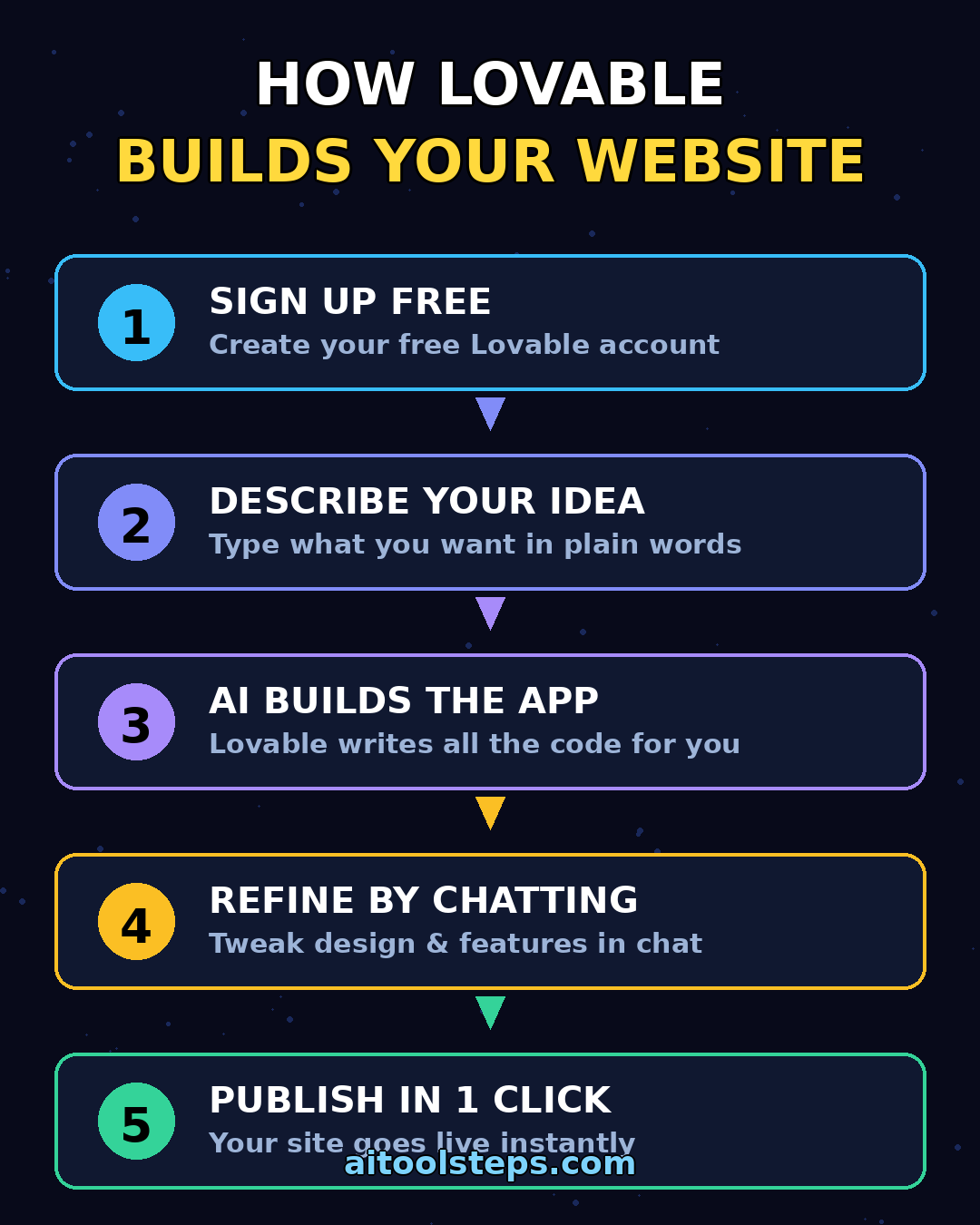
Step 1: Create Your Free Account and Plan to Build Websites Without Coding
Start at Lovable and create a free account. The free plan costs nothing and gives you 5 build credits per day (capped at 30 per month), which is enough to build and test a simple website or landing page.
Before you type anything, spend five minutes planning. Beginners get the best results when they know the basics of their site before prompting:
- Purpose: What is the site for? (portfolio, small business, blog, landing page, directory)
- Pages: Home, About, Contact — plus any special pages like Pricing or Gallery
- Style: Modern and minimal, bold and colorful, dark and premium — pick a vibe
- Content: A short description of yourself or your business, plus any text you want on the page
Write these answers in a note or document. You will paste them into your first prompt, and they make a huge difference in quality.
Step 2: Build Websites Without Coding by Describing Your Site in a Prompt
This is the core of Lovable: you describe the website you want in plain words, and the AI builds it. Click "Start a new project" and write a detailed prompt. Think of it as briefing a web designer.
A good first prompt looks like this:
> "Build a one-page portfolio website for a freelance photographer named Sara. Dark, modern design with a hero section, an About section, a photo gallery grid with 6 placeholder images, a pricing section with 3 plans, and a contact form at the bottom. Make it mobile-friendly."
Tips for better first results:
- Be specific about sections (hero, features, testimonials, contact form) rather than vague words like "a nice website"
- Mention the color scheme and mood (e.g., "dark blue and white, clean and professional")
- State whether you want multiple pages or a single page
- If you need a form or sign-up, say so explicitly — Lovable can wire up a database for it
Hit enter and wait a few minutes. Lovable will generate the code, design, and a live preview of your site.
Step 3: Review Your Preview When You Build Websites Without Coding
Once generation finishes, Lovable shows you a live preview. Click through it as if you were a visitor:
- Does the layout look balanced on desktop?
- Scroll through and check every section for missing text or odd spacing
- Open the preview on your phone (or resize your browser) to check mobile view
Do not worry if the first version is not perfect — nobody's is. Each build costs a few credits, so take a minute to collect all the changes you want before editing. This saves credits and gets you a better result faster.
Step 4: Refine Your Website with Follow-Up Prompts
Here is where Lovable really shines for beginners. You do not edit code — you just keep talking to the AI in the chat panel. Each follow-up message is a "credit-consuming" prompt, so batch your requests together.
Examples of effective refinement prompts:
- "Make the hero headline bigger and change the button color to orange."
- "Add a testimonials section with 3 fake reviews between the pricing and contact sections."
- "Change the font to something more elegant and increase the spacing."
- "Add a footer with social media links."
Lovable also supports visual edits: you can click an element in the preview and describe the change, and it updates just that part. If something breaks or looks wrong, tell the AI exactly what you see — "the mobile menu overlaps the logo" works better than "fix the menu."
Step 5: Add Real Content, Images, and Your Own Branding
A generated site usually has placeholder text and stock-style images. Replace them with your real content:
- Text: Swap the AI's sample copy for your real business description, bio, or service list. Pro tip: ask an AI chatbot to draft website copy for you first, then paste it in. Our guide on how to use Google Gemini for beginners shows how to generate great text for free.
- Images: Upload your own photos — product shots, team photos, or portfolio work — directly in the editor.
- Branding: Add your business name and logo. On the paid plans you can also remove the Lovable badge for a fully white-label look.
- Contact details: Update phone numbers, email addresses, and social links so visitors can actually reach you.
Step 6: Add a Contact Form, Sign-Up, or Database with Supabase
If your site needs more than static pages — say a working contact form, newsletter sign-up, or user logins — Lovable can set that up using its built-in Supabase integration. Supabase handles the database, authentication, and file storage behind the scenes, with no extra configuration needed.
Just ask in plain words, for example:
- "Connect the contact form so submissions are saved to a database."
- "Add a simple newsletter sign-up that stores email addresses."
- "Add a login page so users can create accounts."
Lovable writes the backend logic and connects it automatically. On the free plan you get limited Cloud/AI grants, so keep testing light; if you plan real traffic or many database operations, review the paid plans below.
Step 7: Publish Your Website in One Click
When you are happy with the preview, publishing is literally one click. Lovable deploys your site to a live URL on a Lovable subdomain (e.g., your-site.lovable.app). On the free plan you can publish to up to five Lovable subdomains.
Before you hit publish, run through this beginner checklist:
- Check every page on your phone, not just your desktop
- Click every button and link to confirm they go somewhere
- Proofread all text — AI-generated copy often has small grammar slips
- Make sure your contact information is correct
- Remove any placeholder images or lorem ipsum text
Once published, your site is live for anyone to visit. You can keep editing and re-publishing after launch — updates go live the same way.
Step 8: Connect a Custom Domain (Paid Plans)
A subdomain like your-site.lovable.app is fine for testing, but a custom domain like yourbusiness.com looks far more professional. Custom domains require a paid Lovable plan (Pro or higher).
The process is straightforward:
- Upgrade to Pro in your Lovable workspace settings
- Buy a domain from any registrar (Namecheap, Cloudflare, etc.)
- In Lovable, open your project settings and add the custom domain
- Update your DNS records at your registrar as instructed
- Wait for the changes to propagate (usually under an hour)
- Simple prompts use fewer credits; long, complex builds use more. Budget for revisions, not just the first build.
- On Pro, paid credits can roll over for a limited period, while daily free grants do not.
- If you burn through your credits, you can buy top-ups instead of upgrading.
- AI Title Generator — create catchy titles for your articles, videos, and posts in seconds.
- Meta Description Generator — write SEO-ready meta descriptions that get clicks.
- AI Rewriter — rewrite and polish any text while keeping its meaning.
- Keyword Density Checker — check your content's keyword usage for better SEO.
Lovable handles the SSL certificate automatically, so your site gets the secure padlock icon with no extra setup.
Step 9: Build Websites Without Coding at Scale — Choose the Right Plan
Lovable uses a credit-based pricing model: each AI generation consumes credits, and plans differ in how many credits you get. Pricing details below are based on Lovable's official pricing page as of October 2026 (plan capacity and credit rules can change, so check the official page before subscribing).
| Feature | Free | Pro | Business |
|---|---|---|---|
| Price | $0/month | $25/month ($21/mo billed annually) | $50/month ($42/mo billed annually) |
| Monthly credits | 5/day build credits (capped at 30/mo) | 100 monthly credits | 100 monthly credits |
| Projects | Public projects only | Private projects | Private projects |
| Domain | Up to 5 lovable.app subdomains | Custom domains, unlimited subdomains | Custom domains |
| Branding | Lovable badge included | Remove Lovable badge | Remove Lovable badge |
| Best for | Trying it out, learning, small prototypes | Solo founders, freelancers, real projects | Teams, agencies, client work |
A few notes on credits:
If you are comparing AI builders before committing, this detailed Lovable pricing breakdown (verified against Lovable's pricing page in October 2026) is a solid reference.
Frequently Asked Questions
Is Lovable AI really free to start?
Yes. The free plan costs $0 and includes 5 build credits per day (capped at 30 per month), plus limited Cloud credits. That is enough to build and publish a simple website on a Lovable subdomain. You only pay when you need more credits, private projects, or a custom domain.
Do I need any coding skills to use Lovable?
No. That is the whole point. You describe what you want in plain English, review the preview, and refine it with more plain-English messages. A developer can optionally inspect or take over the code via GitHub sync, but beginners never need to touch it.
How many credits does it take to build a website?
It depends on complexity. A simple landing page might take a handful of credits; a multi-page site with a database and several rounds of revisions will take more. A practical rule: the free plan (30 credits/month) comfortably covers one small website plus some edits. Active builders who iterate daily should expect to need Pro.
Is Lovable better than WordPress or Wix for beginners?
It depends on your goal. WordPress and Wix give you templates, visual editors, and mature SEO and plugin ecosystems — better for blogs and content sites. Lovable generates real custom code from your description, which is faster for unique landing pages and app-like sites. Many people use both: Lovable for quick custom pages, WordPress for a full blog. Our guide to AI agents for beginners covers more ways AI tools can handle web tasks for you.
Can I connect my own domain name?
Yes, on Pro and Business plans. You buy a domain from any registrar, add it in your Lovable project settings, update your DNS records, and Lovable handles the SSL certificate automatically.
Can I export the code or move my site elsewhere?
Yes. Lovable projects sync to GitHub, and you can download or export the code. You own what you build — there is no vendor lock-in, which is a genuine advantage over closed template builders.
Final Thoughts
Lovable AI makes it genuinely possible to build websites without coding: describe your idea, refine the preview in plain English, and publish — often in a single afternoon. Start on the free plan, invest your credits in a well-planned first prompt, and iterate with clear feedback.
If your project needs forms, sign-ups, or a database, Lovable's built-in Supabase integration covers it with zero setup. And when you outgrow the free tier, Pro at $25/month buys you 100 monthly credits, private projects, and custom domains — enough for serious solo work.
Explore More Free AI Tools
Want to keep exploring what AI can do for free? Check out these handy tools at AIToolSteps:
Also see our beginner guides: how to use Gamma AI for turning ideas into presentations, and how to use Meta AI for a free everyday AI assistant.