

How to use Testifly AI is simple. Most small teams ship software the same way: a developer finishes a feature, clicks through it once or twice, and hopes nothing else broke. Then a customer writes in that the signup form silently fails, or the checkout button does nothing, and the team finds out days later — from the people they were trying to impress.
Testifly AI was built to end that pattern. Launched on Product Hunt on November 3, 2026, Testifly is an autonomous AI QA tool for teams with no QA department. You connect your web app, and it discovers your real user flows, writes the tests itself, runs them on every deploy, and shows you a video when something breaks. No test scripts, no prompting, no maintenance.
The pitch is simple: “Zero prompting. Zero maintenance.” This beginner-friendly guide shows you exactly how to use Testifly AI, from creating your free account to reading your first failure video, connecting your team’s tools, and deciding whether the paid plan is worth it after the trial ends. You do not need QA experience, and you do not need to write a single line of test code.
Step 1: Understand What Testifly AI Actually Is
Testifly AI is not another test recorder, and it is not a chatbot that writes test scripts for you to maintain. It is an autonomous testing agent that lives alongside your web app and checks the flows your customers actually use.
Here is the simple version of how it works:
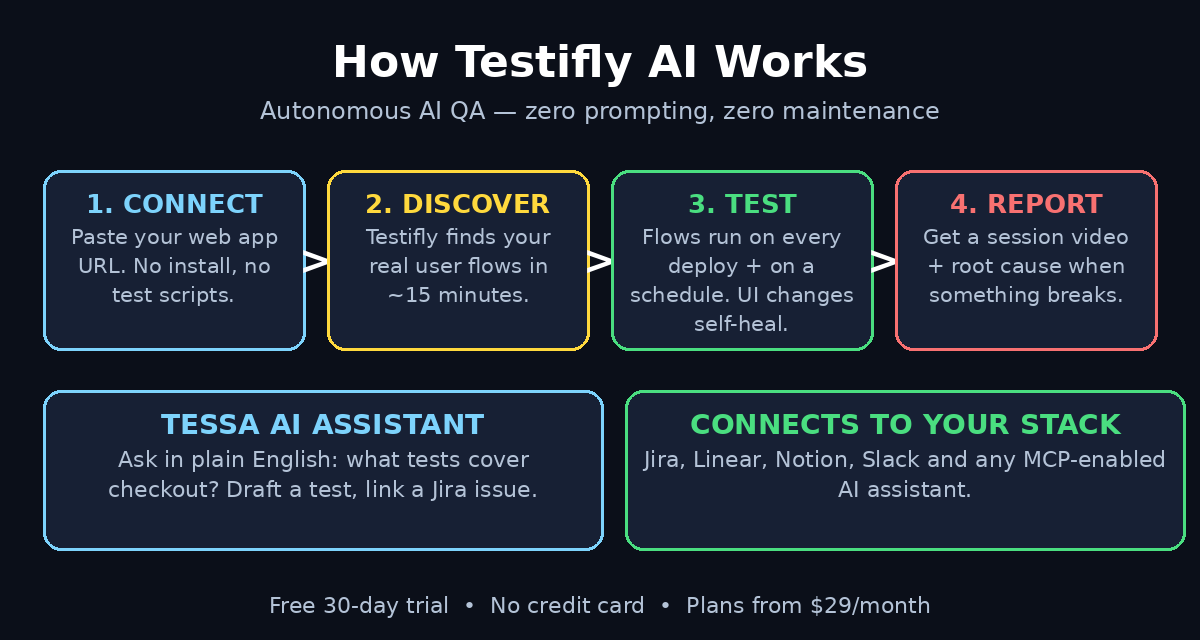
- Discover. You connect your web app by entering its URL. Testifly explores the app on its own and finds the real user flows — signup, login, checkout, search, settings, and everything in between. Discovered flows become automated tests, and your coverage grows as your app grows.
- Test. Testifly runs those tests automatically on every deploy and on a schedule you choose. It catches silent failures, like a form that looks fine but never actually saves, or a button that stops working after a redesign.
- Report. When something breaks, you do not get a red status light and a stack trace. You get a session video showing exactly what broke, plus a root-cause explanation that tells you whether it is a real regression or a test that needs updating.
The key idea is that Testifly tests your app the way a customer uses it — through the real interface, in a real browser — instead of testing code in isolation. That is why it can catch the bugs that unit tests miss: the broken flow, the dead button, the form that swallows data.
If you run a small product team, a startup, or a client project at a digital agency, this is the gap Testifly is trying to close. A team without a dedicated tester can still ship with confidence, because the testing happens automatically on every deploy. If you work with a team that builds websites and web apps for clients, the same idea applies: an AI automation service like the one described on agentic-affairs.com can sit next to a tool like Testifly so that quality checks and routine work both run without constant manual effort.
Step 2: Decide Whether Testifly Is Right for You
Testifly is aimed squarely at founders and CTOs with small teams and no time or resources to test and maintain a test suite. That tells you most of what you need to know about fit.
Testifly is a great fit if:
- You ship a web app and nobody on the team owns QA.
- Your team deploys often and worries about breaking things silently.
- You have been burned by a bug that customers found before you did.
- You want test coverage but cannot afford to hire a tester or maintain a test suite.
Testifly is probably not the right tool if:
- Your product is a native mobile app only — Testifly is built around web apps.
- You already have a mature test suite and a QA engineer who maintains it.
- Your app sits behind a login or network that an outside service cannot reach (check the setup options first — many tools support staging URLs and test accounts).
One honest note for beginners: Testifly launched on November 3, 2026, so it is a brand-new product. Early tools improve fast, and they also change fast. Treat the official website and the in-app pricing page as the source of truth for plans and limits, not a screenshot from launch week.
Step 3: Create Your Free Account
Getting started takes minutes, and the trial is genuinely free to start: 30 days free, no credit card, and no sales call.
Follow these steps:
- Open the Testifly app. Go to the Testifly website and click the “Start free for 30 days” button, which takes you to the app signup page.
- Create an account with your email. Sign up with your work email. There is no sales call in the way, and you do not need to enter payment details to start the trial.
- Confirm your email if asked. Some accounts ask for a quick email confirmation before you can connect an app. Do that first so nothing blocks the setup.
- Open the dashboard. After signup you land on a clean dashboard. It will look empty at first — that is normal, because you have not connected an app yet.
There is no software to install on your computer and no test framework to configure. Everything runs in the cloud, and your job is simply to point Testifly at your app.
Step 4: Connect Your Web App
This is the one step where Testifly needs something from you: the URL of the web app you want tested.
Here is how to do it:
- Enter your app’s URL. Paste the address of your live app or staging environment into the connect box. Testifly works from the URL you give it, so use the version your customers actually use — or your staging URL if you want to test before a release.
- Let it explore. Once connected, Testifly starts discovering your app’s real user flows on its own. You do not write a briefing, and you do not list the flows for it. Results are typically back in about 15 minutes.
- Check what it found. When discovery finishes, review the list of flows Testifly found. This is your coverage map: signup, login, checkout, search, profile settings, and any other flow a real user would follow.
A practical tip: if your app needs a login to reach its most important flows, make sure Testifly can get past it. Many teams create a dedicated test account for this, with a simple email and password, so the AI can walk through authenticated flows like a real user. Keep that test account’s data harmless — no real customer information, no real payment methods.
Step 5: Review the Flows Testifly Discovered
Discovery is the part that feels like magic, and it is also the part worth checking carefully. Testifly turns each flow it finds into an automated test, so the quality of your coverage depends on the quality of what it discovered.
Here is what to do when the first discovery run finishes:
- Scan the flow list. Read through every flow name. Does it cover the journeys that matter most to your business — signup, purchase, booking, or whatever your app’s core action is?
- Look for gaps. If an important flow is missing, it may be hidden behind a step Testifly could not reach, such as a multi-step form or a page that only appears after a specific action. Note the gap and come back to it after your first full run.
- Remove noise if needed. If Testifly discovered flows that do not matter — an admin page nobody uses, a legacy settings screen — you can focus your attention on the flows that do. Coverage that matches your real product is more useful than coverage of every corner.
- Confirm the critical paths. Pick your three most important flows and make sure they are in the list. If signup, login and checkout are covered, you already have the safety net that matters most.
Think of this step as a five-minute review that pays off every time you deploy. A team that builds client websites through a digital agency knows the same principle: the most valuable checks are the ones that run on the journeys customers actually take, not on pages nobody visits.
Step 6: Let Testifly Test on Every Deploy
Once your flows are discovered, the testing runs itself. Testifly tests your app automatically on every deploy and on a schedule, so you do not have to remember to run anything.
Here is what that means in practice:
- Every deploy gets checked. When you push a new version of your app, Testifly re-runs the discovered flows against it. A broken signup or a dead checkout button gets caught before your customers find it.
- Scheduled runs catch drift. Even when you do not deploy, scheduled runs keep checking that your app still works. Third-party services change, APIs go down, and content shifts — scheduled tests catch the silent failures that have nothing to do with your last release.
- Silent failures are the target. The bugs Testifly is best at catching are the quiet ones: a form that submits but never saves, a button that looks clickable but does nothing, a page that loads with the wrong data. These are the failures that never trigger an error alert, because nothing technically crashed.
Your job after setup is not to run tests. Your job is to read the results when Testifly tells you something broke — which is exactly what the next step covers.
Step 7: Understand a Failure — Watch the Session Video
When a test fails, Testifly does not hand you a cryptic log file. It gives you a session video and a root-cause explanation, which is the fastest way for a non-tester to understand what went wrong.
Here is how to read a failure:
- Watch the session video first. The video shows exactly what Testifly did and where it broke, step by step. You will see the click that failed, the form that did not save, or the page that loaded wrong. In most cases, thirty seconds of video tells you more than a page of logs.
- Read the root-cause analysis. Testifly explains why it thinks the test failed. This is the part that saves you from guessing whether the bug is in your app or in the test.
- Check whether it is a real regression. Testifly tells you whether the failure looks like a real bug in your app or a test that needs updating because the UI changed. That distinction matters: a real regression goes to your developer, a test update is Testifly’s own housekeeping.
- Fix the bug, then re-run. Once your team fixes the issue, the next deploy run confirms the fix automatically. You do not need to re-test anything by hand.
The video-first approach is also useful for teams. Instead of pasting an error message into a chat and hoping a developer understands it, you can share the exact recording of the failure. Everyone sees the same thing, and the conversation starts from evidence instead of guesswork.
Step 8: Ask Tessa AI About Your Project
Testifly includes an AI assistant called Tessa that already knows your project. Instead of digging through dashboards, you can ask questions in plain English from one chat window.
Here is what Tessa can do for you:
- Answer questions about coverage. Ask “What tests do we have for the checkout feature?” and Tessa will tell you — for example, that 14 tests cover checkout, 12 are passing, and 2 are flagged — and offer to open the flagged ones.
- Draft a test. If you want coverage for a flow Testifly has not discovered, describe it in your own words and ask Tessa to draft a test for it.
- Link a Jira issue. You can connect a Jira issue to a test from the same chat window, so the testing work and the tracking work stay in one place.
For beginners, Tessa is the fastest way to learn what Testifly knows about your app. If you are not sure where to look, just ask. The assistant is built for people who do not want to learn a testing tool’s interface before they can use it.
Step 9: Connect Jira, Linear, Notion and Slack
Testifly connects to the tools your team already uses to plan, ship, and talk. The integrations keep testing inside your normal workflow instead of adding another dashboard to check.
The integrations available at launch are:
- Jira. Link test failures to issues and track fixes where your team already tracks work.
- Linear. The same idea for teams that plan in Linear — failures become trackable work items.
- Notion. Keep test coverage and results next to your product documentation.
- Slack. Get failure alerts where your team actually talks, so a broken deploy does not sit unnoticed in an email inbox.
- MCP. Testifly also connects to any MCP-enabled AI assistant, so your existing AI tools can ask Testifly about your project’s test status.
Start with one integration — Slack alerts are the most useful for a small team, because a failure notice in the channel you already watch is far harder to miss than a report in a dashboard you open once a week. Add Jira or Linear once you are comfortable with the failure workflow.
Step 10: Use Self-Healing When Your UI Changes
Every team that has tried traditional test automation knows the same pain: you redesign a page, and half your tests break because a button moved or a label changed. Maintaining the tests becomes a second job.
Testifly is designed to avoid that trap:
- When only the UI changes, the test heals. If a button moves or a label is renamed but the behaviour is the same, Testifly adapts the existing test around the change. Nothing decays silently, and nobody has to rewrite a script.
- When the behaviour changes, the flow adapts. If the underlying behaviour genuinely changes — a checkout step is removed, a form gains a new required field — Testifly adapts the flow to match the new reality.
- You stay in the loop. Healing does not mean hiding changes from you. The point is that a cosmetic redesign does not create a pile of false alarms, so when Testifly does flag a failure, you can trust that it is worth looking at.
This is the feature that makes autonomous QA practical for small teams. Without self-healing, automated tests become a maintenance burden within weeks. With it, the suite stays useful while your product keeps changing.
Step 11: Understand the Pricing Before the Trial Ends
Your first 30 days are free, with no credit card and no sales call. That gives you a full month to connect your app, watch a few deploys get tested, and decide whether the results are worth paying for.
Here is what to know before the trial ends:
- Plans start at $29 per month for 50 tests and 5,000 monthly executions, according to the launch pricing page. Check the in-app pricing page for the current breakdown, because launch-week pricing can change.
- Count your flows before you pay. The 50-test starting tier is generous for a small app, but a large app with dozens of discovered flows can use it up quickly. Review how many tests your app actually generated during the trial.
- Watch your execution count. 5,000 monthly executions sounds like a lot, but frequent deploys plus scheduled runs add up. If your team deploys many times a day, check the usage meter before the trial ends.
- Decide with evidence. By the end of 30 days you will have a real answer to the only question that matters: did Testifly catch a bug your customers would have found first? If it caught even one silent failure, the $29 is easy to justify.
A fair warning: because Testifly is brand new, pricing and plan details may change after launch. Treat the official pricing page as the source of truth, and do not build a budget on a launch-week screenshot.
Testifly AI vs Manual QA vs Traditional Test Automation
| Feature | Testifly AI | Manual QA | Traditional test automation |
|---|---|---|---|
| Setup effort | Connect a URL, results in ~15 minutes | Hire and train a tester | Write and maintain test scripts |
| Test writing | Automatic — flows become tests | Done by hand each time | Written by developers in code |
| Runs on every deploy | Yes, automatically | Only if someone remembers | Yes, if the suite is maintained |
| Self-healing after UI changes | Yes | Not applicable | No — scripts break and need fixing |
| Failure evidence | Session video + root cause | A written bug report | Logs and stack traces |
| Best for | Small teams with no QA | Teams with a dedicated tester | Teams with QA engineers on staff |
| Starting cost | Free 30-day trial, then from $29/month | A full salary | Developer time + tooling |
Frequently Asked Questions About Testifly AI
What is Testifly AI?
Testifly is an autonomous AI QA tool that discovers your web app’s user flows, tests them on every deploy, and shows you what broke — without requiring you to write or maintain test scripts. It launched on Product Hunt on November 3, 2026, aimed at small teams with no QA department.
Do I need to write tests or configure test cases?
No. Testifly automatically discovers your app’s user flows and uses them to build and run tests. You do not write test scripts, and you do not configure test cases. You can review the flows it discovers and ask its Tessa AI assistant to draft a test for anything it missed.
How fast can I get started with Testifly?
Getting started is simple. Create an account with your email, connect your web app, and let Testifly discover your user flows. Results are typically back in about 15 minutes, and there is nothing to install and no test scripts to write first.
What happens when I ship a redesign?
Testifly tells the two failure modes apart. When only the UI changes, it heals the existing test around it. When the underlying behaviour changes, it adapts the flow. Either way, nothing decays silently — a cosmetic redesign does not flood you with false alarms.
What does Testifly cost after the free trial?
Your first 30 days are free, with no credit card and no sales call. After that, plans start at $29 per month for 50 tests and 5,000 monthly executions. Check the official pricing page for the current breakdown, because launch-week details can change.
Is Testifly only for developers?
No. Testifly is built for founders, CTOs and small product teams, not just developers. The session videos and plain-English root-cause explanations are designed so a non-technical founder can understand what broke and why, and the Tessa AI assistant answers questions in everyday language.
Final Thoughts
Testifly AI solves a problem every small team recognises: the bugs that cost you customers are rarely the ones that crash your app. They are the silent ones — the signup that never saves, the checkout button that stops working, the form that swallows data. Customers do not report those bugs. They leave.
What makes Testifly worth trying is not that it is clever, but that it is low-effort. Connect a URL, wait about 15 minutes, and you have a test suite that runs on every deploy, heals itself when your UI changes, and shows you a video when something breaks. The 30-day free trial with no credit card means the experiment costs you nothing but the setup time.
Start with one app and your three most important flows. Watch the first few deploy runs, read one failure video, and ask Tessa a question about your coverage. If Testifly catches a single silent failure in that month, it has already earned its place in your shipping process — and the $29 plan after the trial will be an easy decision.
Explore More Free AI Tools
Want to keep exploring free AI tools? Try the AI Title Generator, Meta Description Generator, AI Rewriter, and Keyword Density Checker on AIToolSteps.com — free tools that help you write better content, faster.