Introduction
Every day your feed serves up dramatic health headlines: “Common food slashes cancer risk,” “New study proves coffee adds years to your life,” “Doctors stunned by this one vitamin.” Some of these stories are solid reporting on genuine science. Many more are exaggerated, cherry-picked, or just plain wrong – and it is nearly impossible for a non-scientist to tell the difference. Tessa Newslink AI checks dramatic health claims against published research in minutes, so you can see which stories hold up.
Reading the original research paper is not a realistic option for most of us. Papers sit behind paywalls and use dense academic language. Knowing whether a study’s findings actually support a headline requires understanding sample sizes, control groups, and statistical confidence. This gap between headlines and evidence is exactly the problem Tessa Newslink AI solves.
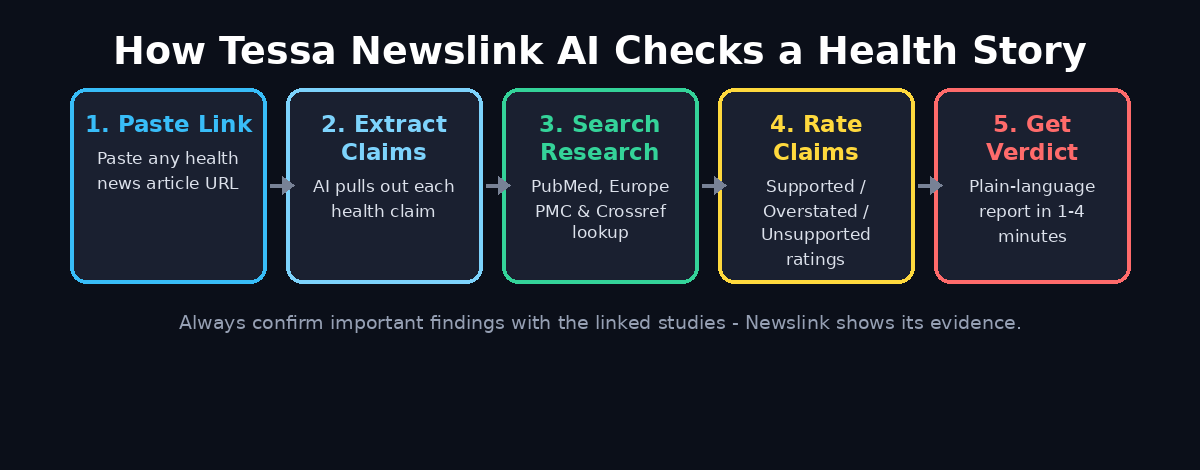
Tessa AI, a company formerly known as Siensmetrica, launched Newslink in October 2026 as a free web tool. Here is the idea: you paste the link of any health or medical news story. Within one to four minutes, you get a plain-language report. It extracts the story’s key health claims. Then it searches the published research behind them in PubMed, Europe PMC, and Crossref. Finally, it tells you — claim by claim — whether the science actually supports what the headline says.
In this beginner’s guide, you will learn how to use Tessa Newslink AI step by step, how to read its verdicts correctly, and how to make it part of your daily habit of not being fooled by health hype. No science degree required.
Step 1: Understand What Tessa Newslink AI Does (and Does Not Do)
Before you open Tessa Newslink AI, it helps to know what you are getting. Tessa Newslink is an evidence-checking assistant, not a doctor and not a general-purpose fact checker.
What it does: It takes a news article about health or medicine and identifies the specific health claims in the story. For example: “drinking green tea reduces the risk of heart disease.” Then it finds the research studies the story cites — or should cite — in trusted scientific databases. It compares what each study actually found with what the story says, and grades the result.
What it does not do: It does not give you medical advice. A “Supported” rating does not mean you should change your diet, start a supplement, or stop a medication. It also does not detect every kind of AI content — it only evaluates claims against published research. As CEO Marc Toth said at launch: “We’re not asking people to trust an AI. We’re showing them the evidence.”
Think of Newslink as a research assistant that reads the fine print for you. You decide how much weight to give each headline.
Step 2: Find a Health News Story You Want to Check
Start with a story that caught your eye. The more dramatic the headline, the more interesting the check tends to be. Good candidates include:
- Headlines that promise a cure, a breakthrough, or a “miracle” result
- Stories claiming a common food or habit causes or prevents a disease
- Viral social media posts summarizing a “new study” without linking to it
- Articles your friends or family members forwarded to you as advice
Copy the full URL of the article from your browser’s address bar. Newslink works from the article link. You need the public web address of the story, not a screenshot or a copied paragraph. If the story is behind a hard paywall, the tool may not be able to read it. In that case, look for a freely accessible version of the same story from another outlet.
A useful habit: keep a small list of the health claims you encounter each week. Fact-checking one or two stories a week with Tessa Newslink AI will train your instincts for spotting exaggerated reporting.
Step 3: Open Tessa Newslink in Your Browser
Tessa Newslink AI is a free web tool. There is nothing to install, and you do not need an account or sign-up to run a check. Open your browser on a phone, tablet, or computer and navigate to the Tessa Newslink page.
The tool launched publicly in October 2026, so its interface may evolve. But the core workflow is deliberately simple: one input box for the article link and one button. The company says the tool is free to use. That makes it a rare AI health tool — the most useful feature costs nothing.
Do you run a content team, a health blog, or a digital agency? Then make this a quality-control step before anything goes live. A quick evidence check can save you from publishing a claim you would later have to retract. Teams that produce a lot of AI-assisted content often pair tools like this with professional workflows. For example, the specialists at D365A build content and automation systems with verification steps inside the publishing pipeline.
Step 4: Paste the Article Link and Start the Check
Paste the copied URL into the input box and start the analysis. That is genuinely the whole input step — no settings to configure, no options to choose, no prompt engineering needed.
Behind the scenes, Tessa Newslink AI does several things in sequence:
- It reads and summarizes the news article, pulling out each distinct health claim.
- It searches PubMed, Europe PMC, and Crossref for the studies relevant to those claims.
- It compares the wording and findings of the research with the wording of the story.
- It writes its findings up in plain, non-technical language.
This is where the one-to-four-minute wait comes from. Deeper stories with many claims take longer because there is more research to cross-reference. You do not need to keep the tab in the foreground, but do not close it. The report appears on the same page when the analysis finishes.
Step 5: Wait One to Four Minutes for the Report
While Newslink works, resist the urge to skim the article and decide for yourself first. It is more fun — and more instructive — to compare your gut reaction with the tool’s verdict afterward.
Typical processing time is between one and four minutes. Shorter, single-claim stories (“this vitamin lowers blood pressure”) tend to finish quickly. Long feature articles that cite multiple studies take longer because the tool checks each claim separately.
Sometimes Tessa Newslink AI cannot access an article. This usually happens with paywalls or sites that block automated readers. Try the same story from a different publisher. Multiple outlets almost always cover major health findings. At least one version is usually freely readable.
Step 6: Read the Tessa Newslink AI Verdict First
When the report loads, start at the top: Newslink gives the story as a whole one of four overall ratings. Understanding these four labels is the key to using the tool well:
| Overall Rating | What It Means | How to Read It | Supported | The research backs the story’s main claims | The headline is fair — you can trust the gist | Mostly Supported | The core is right, with minor overstatements | Trustworthy overall, but some details are stretched | Mostly Unsupported | Key claims go beyond what the research shows | Treat the headline with skepticism | Entirely Unsupported | The research does not back the story’s claims | The story is misleading — do not share it as fact |
|---|