

Journalists writing a breaking story need one thing more than anything else: a credible expert they can quote right now. The first qualified voice to reach them often becomes the voice of the article — and that is exactly what newsjacking is. Tools like Featured Newsjacking AI exist to help everyday experts win that race. Newsjacking, also called reactive PR or rapid-response PR, is the practice of adding your expert commentary, data, or perspective to a breaking news story so you earn media coverage while the story is still developing.
For years, running newsjacking meant a patchwork of Google Alerts, a spreadsheet of reporters, and a separate check of your HARO inbox every morning. On October 14, 2026, Featured — the AI co-pilot for PR — launched a free tool that replaces that entire patchwork: Featured Newsjacking. You describe what you or your clients can credibly speak about, and the tool sends you breaking stories that fit, each with a suggested angle, the reporters covering it, and the open HARO requests you can pitch — by email or Slack, as often as every 15 minutes.
This beginner-friendly guide walks you through Featured Newsjacking AI step by step: what it is, how to set up your first workflow, how to read the story cards it sends you, and how to turn a breaking story into press coverage. No PR experience needed, and no credit card required — the tool is free. Follow this Featured Newsjacking AI tutorial from start to finish, and you will go from curious beginner to running your first reactive-PR workflow today.
Step 1: Understand Newsjacking and Why Speed Wins
Before you touch the tool, understand the game you are playing. When a story breaks — a new regulation, a viral trend, a major product launch — reporters work on tight deadlines and need expert sources fast. If your commentary lands in their inbox within the first hour, your chances of being quoted are dramatically higher than if it arrives the next day.
Newsjacking works best when three things are true: the story is fresh, your angle is genuinely relevant, and you respond fast. Featured Newsjacking AI exists to handle all three — which is why learning how to use Featured Newsjacking AI is such a high-leverage skill for marketers in 2026. It watches the news for keywords you choose, matches stories to the expertise you declare, and delivers each match as a card with a ready-made angle — shrinking the time between a story breaking and your pitch landing from hours to minutes.
Key terms to know:
- Newsjacking / reactive PR / trendjacking: different names for the same practice — reacting to breaking news with expert commentary.
- Localizing a story: tying a national story to a specific market or industry, which is often the easiest angle for small businesses.
- HARO (Help a Reporter Out): a service where journalists post requests for expert sources; Featured Newsjacking surfaces the open requests that match your expertise.
Step 2: Create Your Free Featured Newsjacking AI Account
Featured Newsjacking is free to use. Start by heading to Featured.com and creating an account. The sign-up is the standard email flow — no payment details are requested for the Newsjacking workflow.
Once you are logged in, take a minute to look around the dashboard. Featured is an AI co-pilot for PR, so you will see options for different workflows. The one you want is labeled Newsjacking. If you run a digital agency or handle marketing for several brands, the good news is that Featured Newsjacking is built for exactly that: you can run one workflow per client, so each client gets their own monitored keywords and their own alerts.
Tip: Use a work email you check often for the account, or connect Slack during setup (more on that in Step 7), so the breaking-news alerts actually reach you in time to act on them.
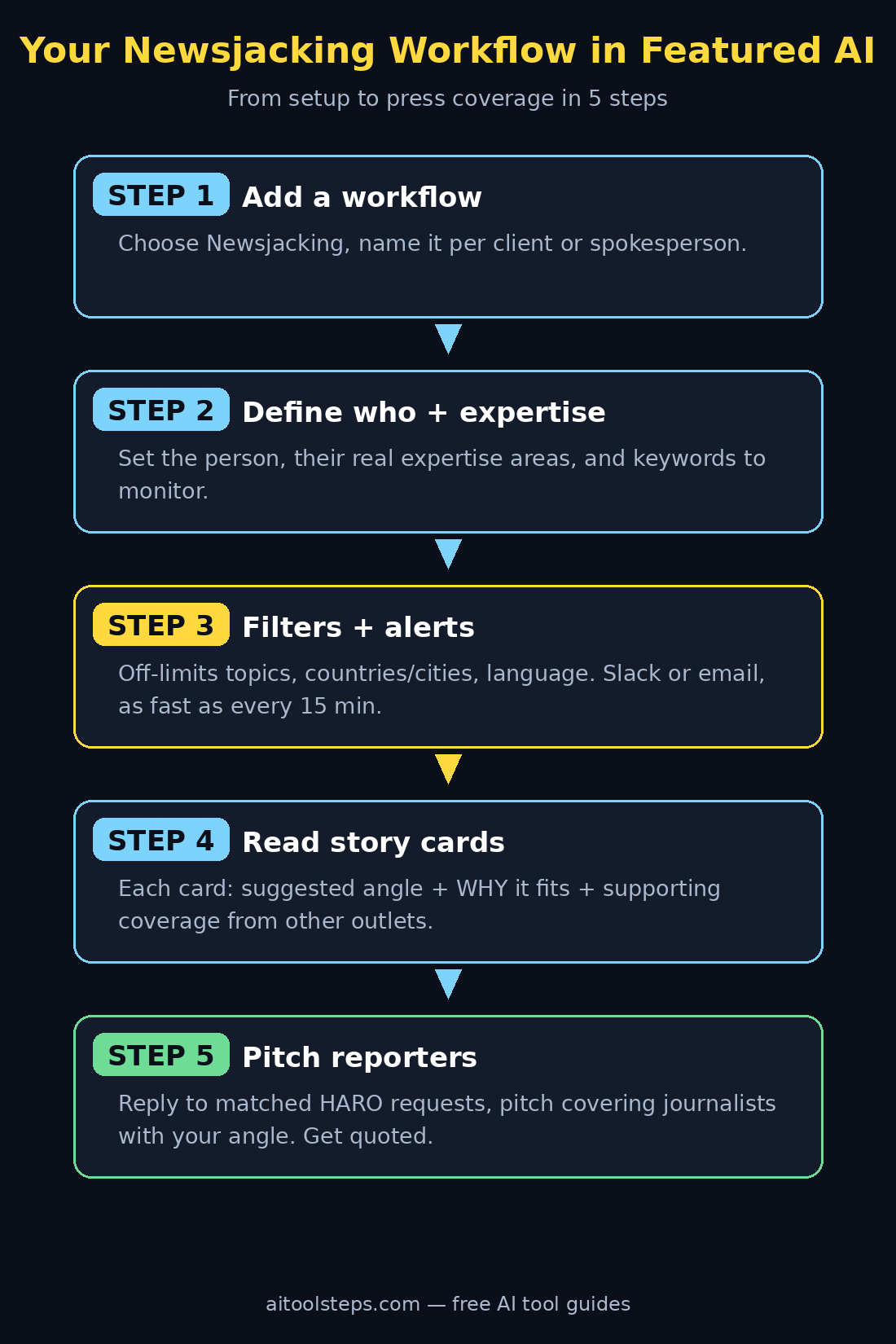
Step 3: Add a Newsjacking Workflow
Inside your Featured dashboard, choose “Add new workflow” and select Newsjacking from the list. Think of a workflow as a saved monitoring job: everything you are about to configure — the person, the expertise, the keywords, the geography — lives inside this workflow, and you can create a separate one for each client or spokesperson you represent.
Name the workflow clearly, especially if you plan to run several. “Acme Robotics — product news” beats “Workflow 1” when you are scanning a busy Slack channel at speed. If you are a freelancer or run a digital agency like the team behind d365a.com, one workflow per client keeps every client’s alerts, angles, and pitches neatly separated — and that separation is what makes reactive PR scalable instead of chaotic.
Step 4: Tell the Tool Who You Are Pitching For
The first question the workflow setup asks is simple: who is this workflow for? You can choose yourself, a client, or a spokesperson. This matters because every story card and suggested angle the tool generates is written from this person’s point of view.
Be specific and honest here. If the workflow is for a client, use the client’s name and role — “Sarah Chen, founder of a sustainable packaging startup” is far more useful than “startup founder.” The AI uses this identity to judge whether an angle is credible. A cybersecurity consultant should not be pitched as a commentator on fashion trends, and the tool knows it — but only if you give it an accurate profile to work from.
If you are an individual creator or solo founder, choose yourself. Newsjacking is not reserved for big agencies; a one-person business with genuine expertise can absolutely earn quotes in major outlets by reacting quickly to the right stories.
Step 5: Enter Expertise Areas and Monitoring Keywords
This is the most important configuration step, so take your time. You will enter two related things:
Areas of expertise. List what the person can credibly speak about. Think in terms of problems you solve, industries you know, and topics you have real experience with. For example, an accountant might list “small business tax planning, freelance finances, and IRS policy changes.” Agencies that offer AI automation services — for instance, teams like the one at agentic-affairs.com — might list “AI workflow automation, customer support chatbots, and AI adoption for small businesses.” The tighter and more truthful this list, the better your angles will be.
Keywords to monitor. These tell the tool which news to watch. Keywords can be topics, industries, companies, or even competitors. A mix works best: broad topics (“artificial intelligence regulation”), specific companies (“OpenAI”), and your competitors’ names (so you can react when they make news). Start with 5–10 keywords; you can always add more once you see the volume of alerts.
Pro tip: Include a few “opportunity keywords” — topics slightly outside your core niche where you still have a credible take. These often produce the most original angles, because fewer experts are competing for them.
Step 6: Set Off-Limits Topics, Geography, and Language
Good newsjacking is as much about what you avoid as what you chase. Featured Newsjacking AI lets you declare off-limits topics — subjects you never want to be associated with. A children’s brand might exclude anything crime-related; a financial advisor might exclude cryptocurrency controversies. Set these deliberately; one tone-deaf pitch can do more damage than ten good ones build.
Next, set your geography and language. You choose the countries and cities to track, plus the language of the coverage. This is where localizing a story becomes powerful: a national story about remote-work policy becomes a local story when you track your own city and pitch the local angle. A bakery in Lahore does not need New York tech news — but it absolutely wants to know when a national food-safety story breaks that it can comment on locally.
Step 7: Choose Slack or Email Delivery and Your Schedule
Now decide how the alerts reach you, and how often. Featured Newsjacking delivers through Slack or email, on a daily, weekly, or custom schedule — and the custom schedule can run as often as every 15 minutes.
For true reactive PR, speed is everything, so most beginners should start with the fastest sensible option: Slack alerts every 15 minutes during working hours, or email alerts a few times a day if Slack is not your thing. You can tune this later. Too many alerts and you will start ignoring them; too few and you will miss the stories that matter.
Practical advice: If you are managing inboxes already crowded with notifications, pair this step with better email habits. Our beginner guide to keeping alerts under control — How to Use Inbox Zero AI for Beginners — shows how to triage high-priority messages automatically, which is exactly the skill a 15-minute news alert rhythm demands.
Step 8: Read Your Story Cards Like a Pro
When news breaks on one of your tracked keywords, Featured sends you the story as a card. Each card contains three things, and understanding them is the core skill of using Featured Newsjacking AI well:
- A suggested angle based on the expertise you declared. This is the AI’s recommendation for how you (or your client) can credibly comment on the story. Treat it as a strong first draft, not a final script — add your own data, anecdotes, or contrarian take to make it yours.
- A “Why” that explains the fit. This tells you why the tool matched this story to your profile. Read it critically: if the reasoning is thin, the pitch probably is too. Skip stories where the fit feels forced.
- “Supporting coverage” listing the other outlets reporting the story. This shows you how big the story is and who else is covering it — useful both for judging the opportunity and for finding more reporters to pitch.
Quality check before you pitch: never react to a story you have not at least skimmed yourself, and never comment on claims you have not verified. For health or science stories especially, run the claims through a fact-checker first — our guide How to Use Tessa Newslink AI for Beginners shows how to check a news story’s claims against published research in minutes.
Step 9: Find the Right Reporters and Open HARO Requests
Here is where Featured Newsjacking AI pulls ahead of a plain Google Alert: alongside each story card, it finds the journalists covering the topic and the open HARO requests you can respond to while the story is still developing.
Start with the HARO requests. These are journalists actively asking for expert sources — replying to one is the highest-probability pitch you can make, because the reporter has already told you exactly what they need. Match your response tightly to the request, lead with your credential, and keep it quotable: short sentences that can be lifted straight into an article.
For the reporters, prioritize the ones already covering the story (the “Supporting coverage” list is your shortlist). A brief, personalized note referencing their specific article beats a mass email every time. Mention the story they wrote, add your angle in two or three sentences, and offer availability for a quick call. Journalists on deadline love sources who make their job easy.
Step 10: Pitch Fast With the Suggested Angle
Everything so far has been preparation; this is the payoff. When a strong card arrives, move quickly:
- Personalize the angle. Take the AI’s suggested angle and sharpen it with something only you can say — a client result, a surprising statistic, a contrarian opinion.
- Keep the pitch short. Subject line with the story hook, two to three sentences of commentary, one line of credentials, and your contact details. That is it.
- Offer more. End with “happy to jump on a quick call or provide data” — availability is often the deciding factor.
- Track what you send. A simple spreadsheet of story, reporter, angle sent, and outcome turns newsjacking from luck into a repeatable system.
Then promote what you win. Every quote, mention, or backlink is social proof — share it on your social channels the same day. If you manage social media for clients, our How to Use Spira AI for Beginners guide shows how to turn press wins into scheduled social content automatically.
A realistic expectation: not every pitch lands, and that is normal. Even experienced PR professionals convert a fraction of their pitches. The advantage of Featured Newsjacking is volume and speed — more at-bats, earlier in the news cycle — which compounds into real coverage over weeks, not days.
Featured Newsjacking AI vs the Alternatives
| Feature | Featured Newsjacking AI | Google Alerts | Manual spreadsheets | Paid media monitoring |
|---|---|---|---|---|
| Price | Free | Free | Free | $100+/month |
| Suggested pitch angles | Yes, AI-generated from your expertise | No | No | Sometimes |
| Explains why a story fits | Yes (“Why” on every card) | No | No | Rarely |
| Finds matching journalists | Yes | No | Manual research | Yes |
| Surfaces open HARO requests | Yes | No | Manual checking | Sometimes |
| Alert speed | As fast as every 15 minutes | Often delayed hours | N/A | Real-time |
| One workflow per client | Yes | Messy with many alerts | Doable but slow | Usually enterprise tiers |
| Best for | Beginners and agencies doing reactive PR | Casual monitoring | Tiny one-off efforts | Large PR teams with budget |
The honest takeaway: Google Alerts tells you a story exists; Featured Newsjacking tells you what to say about it, who to say it to, and where the open requests are. For a free tool, that gap is remarkable — and it is why this launch is worth your attention even if you have never done PR before.
Frequently Asked Questions
Is Featured Newsjacking AI really free?
Yes. Featured launched Newsjacking as a free tool on October 14, 2026 — no credit card is required to create the workflow and receive alerts. Featured also offers other PR products, but the Newsjacking workflow itself (story cards with angles, journalist matches, and HARO request matching) is free.
Do I need to work at a PR agency to use it?
No. While agencies benefit most from the one-workflow-per-client structure, the tool works just as well for founders, freelancers, consultants, and creators. If you have genuine expertise in something, you have something to newsjack with.
How fast do the alerts arrive?
You control the schedule: daily, weekly, or custom — down to every 15 minutes. For reactive PR, a fast cadence during your working hours is the whole point, since the first credible expert to respond usually gets quoted.
Does it work outside the United States?
Yes. When you set up a workflow, you choose the countries, cities, and language to track, so the monitoring follows your market rather than assuming a US-centric news cycle. That makes it practical for localizing national stories in your own region.
What should I do if I am getting too many irrelevant alerts?
Tighten your inputs: remove broad keywords, add more off-limits topics, and narrow the geography. Irrelevant alerts almost always trace back to keywords that are too generic or an expertise list that is too wide. Small, precise workflows beat big, vague ones.
Can newsjacking backfire?
It can, if you chase the wrong stories. Never comment on tragedies or sensitive events just for visibility, respect your off-limits list, and verify claims before you repeat them. Credibility is the entire currency of reactive PR — spend it carefully.
Final Thoughts on Featured Newsjacking AI
Featured Newsjacking AI takes one of the highest-leverage activities in marketing — being quoted in the press while a story is hot — and makes it accessible to anyone with expertise and an internet connection. The setup takes under half an hour: one account, one workflow per client or spokesperson, honest expertise areas, sharp keywords, and a fast alert schedule. From there, the discipline is simple: read the cards, judge the fit, personalize the angle, and pitch fast.
Start with a single workflow for yourself, even if your end goal is client work. Learn what a good story card looks like, land your first quote, and then scale the system across clients. In a media environment where speed increasingly decides who gets heard, a free tool that hands you the story, the angle, and the reporter in one card is not just convenient — it is a genuine competitive edge.
Explore More Free AI Tools
Want to keep building your free AI toolkit? Check out these beginner guides on AIToolSteps:
- AI Title Generator — craft click-worthy headlines for your pitches and articles
- Meta Description Generator — write search-friendly summaries in seconds
- AI Rewriter — polish your commentary before you send it
- Keyword Density Checker — keep your content SEO-balanced