

Most AI tools answer a question and stop. Strawberry AI Browser is built for the next step: it does the browser work itself. On October 26, 2026, Stockholm startup Strawberry launched version 1.0 of its AI browser, taking it out of beta about a year after its invite-only debut. Instead of a chatbot you prompt again and again, you get AI “companions” — virtual colleagues that live in the browser, remember how your team works, and carry out multi-step tasks such as research, data extraction, form-filling, updating records, and drafting messages.
This matters most for non-technical teams. If your daily work already happens in browser tabs — sales, recruiting, customer support, or marketing — Strawberry is designed so you do not need to learn code, write prompts like a developer, or keep everything on one person’s laptop. One person trains a companion once, and the whole team can use what it has learned. Strawberry says companions run on your own device inside the browser, using the tabs, logins, and tools your team already has, and they ask for approval before anything consequential goes out.
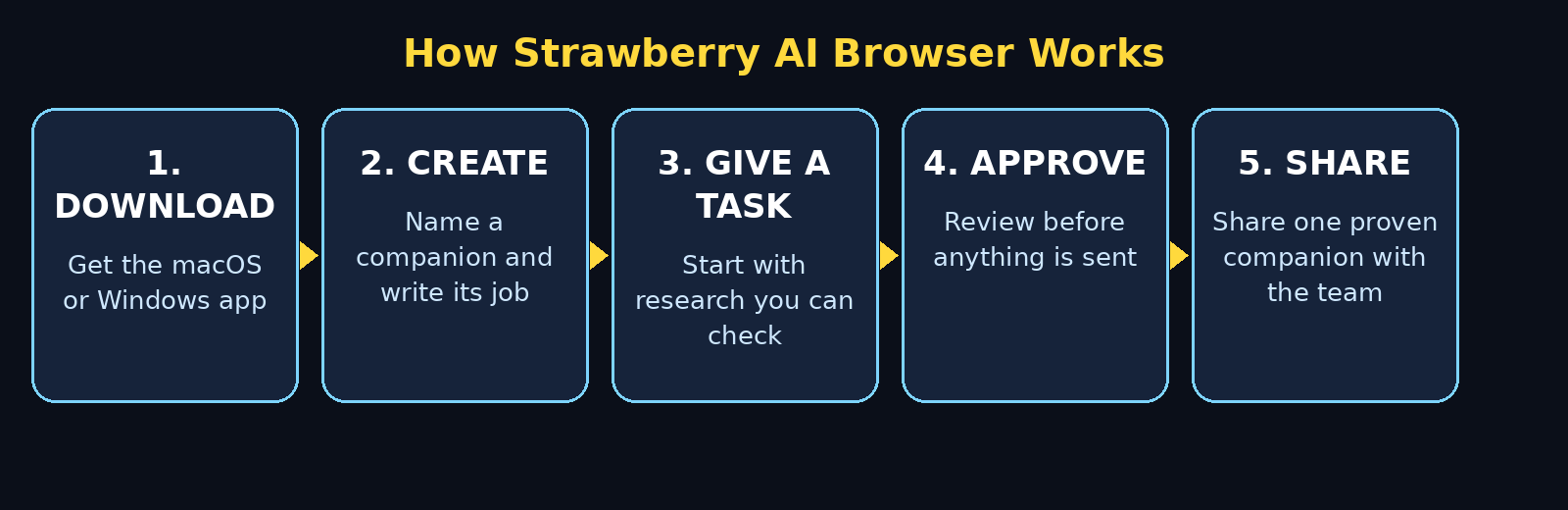
The platform is free to try, with subscription pricing based on team size and usage not disclosed at launch. Desktop apps are available for macOS and Windows. This beginner guide explains how to use Strawberry AI browser step by step, even if you have never used an AI agent before. It walks you through downloading Strawberry, creating your first companion, trying a ready-made companion, giving it a safe first task, connecting apps, setting up routines, and sharing it with your team — without handing over control of anything important.
Step 1: Understand What Strawberry AI Browser Actually Is
Think of Strawberry as a browser with colleagues built in, not as a separate chatbot window. A normal chatbot takes one prompt and returns one answer. A companion is different in three important ways.
First, a companion has context. It works where your team’s context, workflows, and logins already live: the browser. Second, a companion learns across the team. When one person teaches it how your team qualifies a sales lead or screens a candidate, everyone on the team benefits, instead of that knowledge staying trapped on one laptop. Third, a companion does multi-step work. It can research across tabs, extract information, fill out a form, update a record, and draft a message in one workflow, rather than asking you to copy and paste between tools.
Strawberry calls this the shift from answering prompts to doing the clicking. Its chief executive, Charles Maddock, put it simply at the 1.0 launch: the technology is already here, and agents can now work for weeks in a row. The problem Strawberry is trying to solve is adoption — making AI so natural that a whole team actually uses it.
For a small business, that framing is useful. If you run a digital agency, for example, a companion that remembers your client onboarding checklist is far more valuable than a chatbot that can explain onboarding in general. Teams that offer AI automation services, such as the team behind Agentic Affairs, will recognise this pattern immediately: the value is in the repeatable workflow, not in a single clever answer.
Step 2: Download Strawberry AI Browser and Create Your Free Account
Getting started is straightforward, and you should not need any technical setup.
- Download the desktop app: Strawberry offers desktop apps for macOS and Windows. Download the version for your computer from the official Strawberry website and install it like any other browser.
- Create your account: Sign up with your work email. Use a work account rather than a personal one if you plan to share companions with colleagues later, because sharing and permissions are easier to manage that way.
- Take the first tour: When Strawberry opens, explore the main browser window, the companion sidebar, and the chat area. Notice that this is a real browser: you can open tabs, visit websites, and sign in to the tools you already use.
- Check the companion plaza: Version 1.0 adds a new look you can design for each companion, plus a plaza where companions hang out between jobs. This is a small detail, but it shows the product’s idea clearly: companions are meant to feel like members of the team, not hidden background scripts.
Beginner tip: do not import every tool and login on day one. Start with one browser profile, one companion, and one simple task. You can connect more apps once you trust how approvals work.
Step 3: Create Your First Companion
A companion is an AI agent with a job, a personality, and permission boundaries. Creating one is less like installing software and more like writing a short job description for a new colleague.
- Give it a clear name and role: For example, “Sales Research Assistant” is better than “Helper.” A clear name tells your team what it is for, and it tells the companion what kind of work to expect.
- Describe the job in plain language: Write two or three sentences about what it should do, such as: “Find the company, contact name, and role for each lead on this list, then draft a short, polite outreach message. Do not send anything without my approval.”
- Set its limits in the same description: Add what it must never do, for example: “Never send emails, never change a CRM record, and never share pricing without asking me first.” Strawberry’s approval settings are your safety net, but a clear job description is your first line of defence.
- Customise its look: Version 1.0 lets you design each companion’s appearance. This is optional, but it helps a team tell companions apart at a glance, especially when you later have several of them.
The best first companion is a narrow one. A companion that does one job well — researching leads, for example — will teach you more in a day than a vague “do everything” companion that confuses itself.
Step 4: Try a Ready-Made Companion First
If writing a job description feels hard, start with one of Strawberry’s nine ready-made companions in version 1.0, such as Sales Sally or Talent Theo. These are built for common team jobs, so you can see how a companion works before you build your own.
Sales Sally is a good test for a sales team: give it a short list of companies, ask it to research each one, and see what it finds. Talent Theo is the equivalent test for hiring: give it a role description and ask it to help source or screen candidates from public information. Watch how it moves between tabs, what it reads, and where it pauses to ask you a question.
Use a ready-made companion as a template, not as a finished employee. After your first run, edit its instructions to match your team’s language, your qualifying questions, and your approval rules. That edited version is the one worth sharing with colleagues.
Step 5: Give Your Companion Its First Safe Task
When you are learning how to use Strawberry AI browser, your first task should be useful, visible, and easy to check. Research is ideal because a mistake is easy to spot and nothing is sent anywhere.
A good first task sounds like this: “Research these five companies. For each one, find the company size, industry, headquarters city, and the name of the head of sales or marketing if it is public. Put the results in a simple table and show me the source page for each fact.”
Watch the whole run the first time. Notice which tabs it opens, how it handles a page that blocks it, and what it does when a fact is missing. A good companion says when it cannot find something. A companion that invents a name or a number is a companion you should stop and retrain immediately.
When it finishes, check three things before you trust it: is every fact linked to a real source, is anything missing rather than guessed, and does the table match what you asked for? If the answer to any of these is no, tighten the instructions and run it again on a smaller list. This checking habit is the whole skill of using an AI browser well.
Step 6: Connect Apps and Set Permissions Carefully
Strawberry lists 93 native integrations, with 1,254 operations, plus another 1,975 apps accessible through authorised accounts. That is a lot of power, and it is exactly why permissions matter more here than in a normal chatbot.
- Connect one app at a time: Start with a read-only or low-risk app, such as a spreadsheet or a research source, before you connect a CRM, an inbox, or a payment tool.
- Use “Ask every time” first: Strawberry’s permission settings let you choose “Ask every time,” “Always allow,” or “Disable action” for supported app actions. For your first week, choose “Ask every time” for anything that sends, edits, deletes, or shares data.
- Review permanent permissions regularly: Permanent permissions can apply across chats, and some reads or actions do not have an individual permission control. Once a month, review what each companion is allowed to do and remove anything it no longer needs.
- Never share passwords through a companion: Sign in to apps yourself in the browser, using the normal login screens. A companion should use your existing signed-in session, not a password you paste into chat.
This is also where a business should think about who owns the data. If a companion works inside a shared team browser, decide in advance which client or candidate data it may see, and keep sensitive systems disconnected until you have a clear policy. A digital agency handling client accounts, for instance, would normally keep billing and admin systems off-limits for any AI agent until the approval workflow has been tested.
Step 7: Set Up Routines That Run on a Schedule or Trigger
One of the most useful version 1.0 features is routines: work that runs on a schedule or when an event happens, instead of only when you remember to ask.
A beginner-friendly routine is a weekly lead-research digest: every Monday morning, the companion checks a short list of new companies, researches each one, and drafts — but does not send — a summary for you to review. Another is a daily support-ticket summary: each morning, it reads new tickets, groups them by topic, and highlights the ones that mention refunds, cancellations, or urgent language.
To set up a routine safely, follow three rules. First, make the routine read and draft only, never send or publish, until you have reviewed at least three runs. Second, give it a small, fixed input list, not your entire database. Third, add a stop rule, such as: “If more than ten items appear, stop and ask me before continuing.” Routines are powerful precisely because they run without you watching, so their limits need to be stricter, not looser.
Step 8: Use Meeting Capture Without Adding Another Bot
Strawberry’s recent updates include meeting capture across Google Meet, Zoom, and Microsoft Teams without a bot joining the call. For a beginner, this is worth understanding correctly: the point is to capture what was said and who said it, so follow-ups do not depend on someone’s handwritten notes.
A simple workflow is: after a sales or hiring call, ask your companion to summarise the meeting, list the decisions, and draft the follow-up tasks with owners and deadlines. Then read the summary before you send it. Meeting transcripts can mishear names, numbers, and dates, so treat the draft as a starting point, not as a finished record.
Privacy rule: tell participants that the meeting is being captured, and check your company’s policy before capturing client or candidate calls. A tool that makes capture easy does not remove the need for consent.
Step 9: Share a Companion With Your Team
This is where Strawberry is different from a personal chatbot, and it is the step most beginners skip. Sharing is the point.
- Share one proven companion, not ten experiments: Pick the companion that passed your checks in Steps 5 and 6, clean up its instructions, and share that one.
- Write a one-paragraph handover note: Say what it does, what it never does, what “Ask every time” is set for, and who to tell if it makes a mistake. Your colleagues should not have to guess.
- Let colleagues improve it: Because learning is shared across the team, a colleague’s correction — for example, a better qualifying question — improves the companion for everyone. Encourage people to report mistakes rather than quietly working around them.
- Keep a human owner: Every shared companion should have one named owner who reviews its permissions, checks a sample of its work each week, and retires it when the workflow changes. A companion with no owner slowly drifts out of date.
Early users cited by Strawberry include Swedish startup Lovable, which uses it to source engineers, and Tandem Health. You do not need to copy their workflows. The lesson is simpler: pick one team workflow, prove it with one companion, and only then expand.
Step 10: Review, Correct, and Improve Every Week
An AI browser companion is not a set-and-forget tool. Spend fifteen minutes a week reviewing its recent work, and it will stay useful. Skip that review, and small errors become team habits.
Check a random sample of its outputs, not just the ones that looked wrong. Ask: did it follow the approval rules, did it cite sources, did it stop when it was unsure, and did it stay inside its job description? When you find a mistake, fix the instruction, not just the output. If it guessed a missing fact, add: “If a fact is not found, write ‘Not found’ and show the pages you checked.” If it sent a draft too early, tighten the permission to “Ask every time” for that action.
Also watch for scope creep. A sales companion that starts editing CRM records, or a hiring companion that starts contacting candidates, has outgrown its original job description. Either update the job description and permissions deliberately, or pull it back. Deliberate is the key word: nothing about a companion’s power should change by accident.
Step 11: Know the Limits, Pricing, and Safety Trade-Offs
Strawberry 1.0 is free to try, but subscription pricing based on team size and usage was not disclosed at launch, so budget for a paid plan if your team adopts it widely. Founded in 2023, the 12-person Stockholm company raised $6 million in October last year, led by General Catalyst and EQT Ventures, and plans a Series A round to scale across Europe and the United States. That funding history is useful context, but it is not a guarantee: young companies change pricing, features, and availability.
Other limits to keep in mind: companions work inside the browser, so work that lives outside browser tabs may not fit; some actions do not have individual permission controls, so “Ask every time” is not a blanket guarantee; and a companion can only be as good as the sources it can read. If a website blocks automated browsing, the companion may return partial results, and you need to notice that.
Safety checklist for beginners: never let a companion send money, change billing, delete data, or contact clients unsupervised; never give it access to an admin account; review permissions monthly; and keep a human in the loop for anything a customer or candidate will see. Strawberry asks for approval before consequential actions, and that checkpoint is there to be used, not clicked through.
Strawberry AI Browser vs Chatbots vs Traditional Automation
| Feature | Strawberry AI Browser | Regular AI Chatbot | Traditional Browser Automation |
|---|---|---|---|
| What it does | Multi-step browser work with companions | Answers one prompt at a time | Repeats a fixed script |
| Who it is for | Non-technical teams | Anyone with a question | Developers and automation specialists |
| Team learning | Shared across the team | Usually stuck on one person’s account | Shared only if someone maintains the code |
| Approval before sending | Built-in checkpoint for consequential actions | No action to approve | Depends on how the script was written |
| Coding needed | No | No | Yes, usually |
| Best first use | Research, form-filling, drafting, summaries | Writing, brainstorming, explanations | High-volume repetitive clicks |
| Main risk for beginners | Over-permissioned companions | Invented facts in answers | Brittle scripts that break when a site changes |
The table makes the choice clear. If your problem is “I need an answer,” a chatbot is enough. If your problem is “my team repeats the same browser workflow every day,” Strawberry’s companion model is the more direct fit — provided you keep approvals strict.
Frequently Asked Questions About How to Use Strawberry AI Browser
What is Strawberry AI Browser in simple words?
Strawberry AI Browser is a desktop browser for macOS and Windows with built-in AI agents called companions. A companion learns how your team works, remembers that knowledge across the team, and carries out multi-step browser tasks such as research, data extraction, form-filling, and drafting messages, asking for approval before consequential actions.
Is Strawberry AI Browser really free?
Strawberry 1.0 is free to try. Subscription pricing based on team size and usage was not disclosed at launch, so treat the free trial as a way to prove one workflow, and check the current pricing page before rolling it out to a whole team.
Do I need coding skills to use Strawberry AI Browser?
No. Strawberry is built for non-technical teams in sales, recruiting, customer support, and marketing. You create companions by describing their job in plain language, and you can start from ready-made companions such as Sales Sally and Talent Theo.
Is Strawberry AI Browser safe for team and client data?
It can be, if you set it up carefully. Use “Ask every time” for sending, editing, deleting, or sharing data, connect one app at a time, review permanent permissions regularly, and never give a companion an admin account. Strawberry says companions run on your own device inside the browser and ask for approval before consequential actions, but you should still keep sensitive systems disconnected until you have tested the workflow.
What is the difference between a companion and a chatbot?
A chatbot answers a prompt and forgets the workflow. A companion works like a colleague: it lives in the browser where your team’s context already is, it learns how your team works, that learning is shared with colleagues, and it can carry out multi-step work across tabs and apps instead of returning a single answer.
Can Strawberry AI Browser replace my team?
No, and that is not its design. Strawberry describes companions as working alongside people, not instead of them. The human still defines the job, approves consequential actions, checks the work, and owns the relationship with customers and candidates. The companion removes repetitive browser work so people can do the higher-value part.
Final Thoughts
Strawberry AI Browser version 1.0 is an interesting launch because it does not ask beginners to become prompt engineers or developers. If you follow this guide on how to use Strawberry AI browser, you will set up your first companion safely and share it with confidence. It asks them to do something more familiar: write a clear job description, set sensible limits, check the work, and share what works with the team. If you follow that pattern — one companion, one safe task, strict approvals, weekly review — you will learn quickly whether an AI browser fits your team, without risking a client email, a CRM record, or a hiring decision.
Start today with a ready-made companion, a five-company research list, and “Ask every time” turned on. By the end of the week, you will know more about AI agents than most teams learn in a month of reading about them, because you will have watched one work, corrected it, and improved it yourself.
Explore More Free AI Tools
Want to keep learning? Explore more free AI tools on AIToolSteps, including the AI Title Generator, Meta Description Generator, AI Rewriter, and Keyword Density Checker — all free, all beginner-friendly, and all designed to help you create better content faster.