

Imagine walking into your most important work conversation — a salary negotiation, a difficult feedback chat, a big sales pitch — and already knowing exactly what to say. Not because you memorized a script, but because you practiced it, out loud, with a patient coach who never gets tired and never judges you. That is the idea behind Rumi AI for beginners.
Rumi AI is a new AI coaching platform from Chronus, a company that has spent two decades building mentoring software for workplaces. Launched on October 26, 2026, Rumi pairs AI-powered coaching with human-led mentoring in one place. Its headline feature is Rumi Coach, which lets employees practice high-stakes conversations with an AI partner — by voice or by text — across ready-made scenarios, and then gives them a readiness score after every attempt. This complete guide to Rumi AI for beginners covers everything from your first roleplay to reading your readiness score.
This beginner guide walks you through Rumi AI step by step: what it is, how you get access, how to run your first roleplay, how to read your feedback, and how to turn occasional practice into a habit that genuinely makes you better at the conversations that matter at work. No technical background is needed. If you can hold a conversation, you can use Rumi AI for beginners.
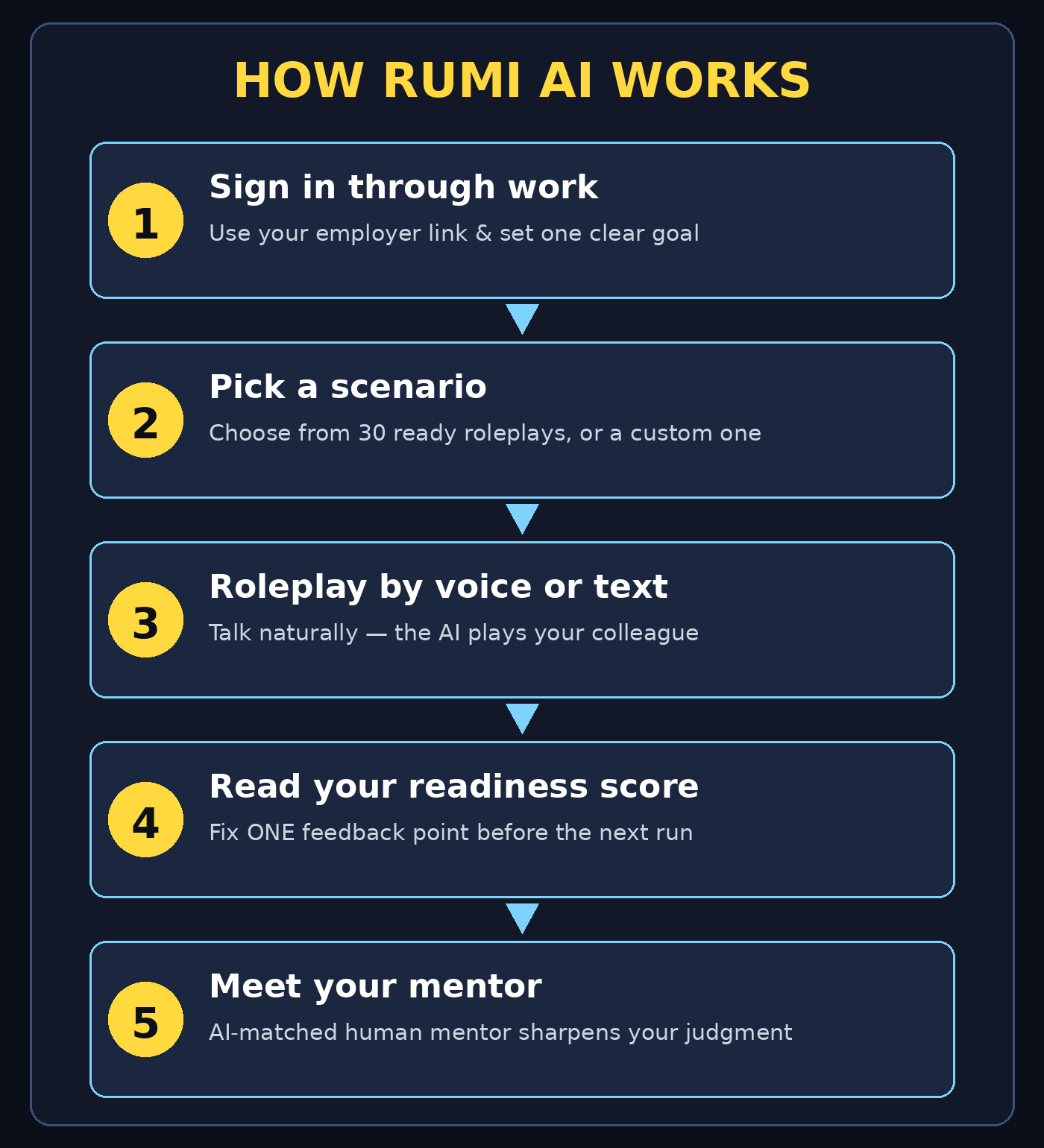
Step 1: Understand What Rumi AI Is
Rumi AI is not a general chatbot like the ones you use for writing emails or answering trivia. It is a coaching platform built for workplace growth, and it has two parts that work together:
- Rumi Coach: the AI coaching product. It runs practice conversations, called roleplays, and scores how ready you are after each one.
- Rumi Mentor: Chronus’s proven mentoring solution, now with AI-powered matching and guided conversations that keep mentor relationships on track.
The key difference from a normal chatbot is structure. A chatbot waits for your question and answers it. Rumi Coach sets up a situation — for example, “you are giving feedback to a team member who missed a deadline” — plays the other person, reacts to what you say, and then tells you how you did. That structure is what turns chatting into training.
Rumi Coach also draws on context your organization chooses to share, such as roles, skills, and career goals. That means its coaching can be relevant to your actual job, instead of generic advice that could apply to anyone. Administrators control the privacy settings, so the AI only uses approved profile information during your sessions.
Step 2: Check How You Get Access to Rumi AI
Here is the first thing beginners need to know: Rumi AI is a workplace platform, so most people access it through their employer rather than by downloading a public app. Before you go looking for a sign-up page, check these routes in order:
- Ask your manager or HR team: if your company uses Chronus mentoring tools, Rumi may already be available to you, or planned for rollout soon.
- Check your company’s learning portal: Rumi access is often linked from the same place you find training courses and onboarding materials.
- Watch for a launch email: new platform rollouts usually come with an invitation email explaining how to sign in and what to try first.
- Ask about a pilot group: if your company is still evaluating Rumi, volunteering for a pilot is often the fastest way in.
If your employer does not offer Rumi yet, you can still learn the method in this guide — the practice techniques, like preparing an opening line and reviewing your own performance, work with any roleplay partner. And if your organization is exploring AI coaching tools for its teams, a specialist digital agency can help plan the rollout; for example, the team at D365A works with businesses adopting new digital tools. The point is to start with the conversations you actually struggle with, not with the technology itself. That approach is a practical first step with Rumi AI for beginners.
Step 3: Sign In and Set Up Your Profile
Once you have access, setup takes only a few minutes. The exact screens depend on your organization’s setup, but the flow is usually the same:
- Sign in with your work account: use the link or button your employer provides, and sign in with your normal work credentials.
- Confirm your profile details: check your name, role, and team. These details help Rumi suggest scenarios that fit your job.
- Set your goals: you will usually be asked what you want to improve — leadership conversations, sales calls, interviews, or conflict handling. Pick the one that matters most right now, not all of them.
- Choose voice or text: Rumi Coach supports practice by voice or by text. Voice feels closer to a real conversation, while text is great for your very first session because you can think before you reply.
- Check your privacy settings: take a minute to see what profile information Rumi can use. If anything looks wrong, flag it with your administrator before your first session.
Beginner tip: do not skip the goals step. A vague goal like “get better at talking” produces vague practice. A specific goal like “handle pushback when I say no to extra work” produces practice you can actually use on Monday morning.
Step 4: Run Your First Roleplay
This is the heart of Rumi AI, and it is simpler than it sounds. Rumi Coach launched with 30 ready-to-use scenarios, plus the option for your organization to build custom ones. For your first session, pick a ready-made scenario rather than building your own:
- Browse the scenario library: look for a situation close to something you face at work, such as giving feedback, handling a complaint, or pitching an idea.
- Read the brief first: every scenario tells you who you are playing, who the AI is playing, and what a good outcome looks like. Read it properly — two minutes here saves a confused session.
- Start the conversation: greet the AI partner the way you would greet a real colleague. Natural openings work better than stiff, formal ones.
- Respond, don’t perform: answer as yourself, not as an actor. The AI reacts to your actual words, so honest practice beats polished acting.
- Keep it short: your first roleplay only needs to last a few minutes. Aim to reach a natural stopping point, like agreeing on a next step, rather than talking until you run out of things to say.
Common beginner mistake: trying to “win” the roleplay. Rumi is not a game with a high score for dominating the conversation. The best sessions are the ones where you listen, adapt, and try one new technique — for example, asking an open question instead of jumping straight to your solution. Keep that in mind with Rumi AI for beginners.
Step 5: Read Your Readiness Score and Feedback
After each roleplay, Rumi Coach gives you a readiness level — a simple score showing how prepared you are for that kind of conversation. Here is how to use it well:
- Treat the score as a snapshot, not a grade: it reflects one practice session, not your worth as an employee. A low first score is normal and useful.
- Read the feedback before your next session: look for one or two specific observations, such as “you interrupted twice” or “you stated your position clearly but did not check the other person’s view.”
- Pick one thing to fix: trying to fix five things at once fixes nothing. Choose the single observation that would change your next real conversation the most.
- Compare sessions over time: after three or four roleplays on similar scenarios, look at the trend. Steady improvement matters far more than any single score.
- Save or note your best lines: when a phrase works well in practice, write it down. Your personal playbook of lines that work is one of the most valuable things Rumi helps you build.
If a score surprises you — much higher or lower than you expected — trust the feedback details over the number. The details tell you what to do next; the number only tells you where you stand.
Step 6: Practice a Custom Scenario
Once you are comfortable with ready-made scenarios, custom scenarios are where Rumi AI becomes truly powerful. Your organization can build scenarios around its real situations, and you can request ones that match your upcoming challenges:
- Name a real upcoming conversation: for example, “I need to tell a client their deadline will move by two weeks.”
- Describe the other person’s likely reaction: will they be upset, skeptical, or supportive? The more realistic the setup, the more useful the practice.
- Define what success looks like: is it keeping the relationship strong, getting a clear decision, or simply delivering the news calmly?
- Run it twice: the first run shows you where you get stuck. The second run, right after reading your feedback, is where the improvement happens.
- Try the hard version: once the easy version feels comfortable, ask for a tougher counterpart — one who pushes back or asks difficult questions. Real conversations are rarely easy.
This is also where Rumi’s blend of AI and human mentoring shines. After a custom roleplay, you can take your feedback to a human mentor and ask, “Here is how I handled it — what would you do differently?” AI gives you unlimited practice reps; a human mentor gives you judgment. Use both. That combination is what makes Rumi AI for beginners so useful.
Step 7: Ask Rumi for a Mentor Match
Rumi Mentor, the second half of the platform, uses AI-powered matching to connect you with experienced colleagues, and keeps the relationship on track with guided conversations. Here is how beginners should approach it:
- Let Rumi suggest matches: the matching looks at your role, goals, and growth areas, then recommends mentors who fit.
- Check the fit, don’t just accept it: read the mentor’s background and think about whether their experience matches the conversations you want to improve.
- Start with one guided conversation: Rumi Mentor provides structure so your first mentor chat is not awkward. Follow the prompts and be honest about what you are working on.
- Share your roleplay feedback: showing a mentor your Rumi Coach results gives them something concrete to coach you on, instead of a vague “I want to improve.”
- Keep the rhythm: short, regular mentor check-ins beat one long meeting every six months. Even a monthly conversation keeps your growth moving.
Mentoring used to depend on who you happened to know in the office. AI matching does not replace the human relationship — it simply helps the right two people find each other faster.
Step 8: Build a Weekly Practice Routine
One roleplay will not change how you handle tough conversations. A small, regular routine will. The good news is that Rumi sessions are short, so a routine is easy to keep:
- Pick a fixed slot: fifteen minutes, twice a week, works better than an ambitious hour you never take. Attach it to something you already do, like your Friday planning session.
- Rotate scenario types: one week practice feedback, the next week practice persuasion. Variety builds flexible skills instead of rehearsed lines.
- Practice before real events: if a difficult meeting is coming on Thursday, run the matching scenario on Wednesday. This is the highest-value use of Rumi.
- Review monthly: once a month, look back at your readiness trend and your mentor conversations together. What improved? What still feels hard?
- Celebrate the real wins: when a real conversation goes better because you practiced it, note it down. That connection between practice and real life is what keeps the habit alive.
Think of it like fitness training. Nobody gets fit from one gym visit, and nobody needs to live in the gym either. Short, regular, focused sessions — that is the whole secret. Short, steady practice is the heart of Rumi AI for beginners.
Step 9: Use Rumi Coach with Your Real Career Goals
Rumi works best when it is connected to where you actually want to go, not just the next meeting on your calendar. Because Rumi Coach draws on your roles, skills, and career paths, you can aim your practice at bigger goals:
- Map skills to scenarios: if you want a promotion into management, practice the conversations managers actually have — feedback, delegation, and handling disagreement.
- Prepare for interviews internally: roleplaying promotion interviews or panel discussions is one of the most practical uses of the platform.
- Practice cross-team conversations: talking to other departments, senior leaders, or clients uses different skills than talking to your own team. Practice those separately.
- Bring your manager into the loop: sharing your practice goals with your manager turns private practice into visible growth, which matters at review time.
Organizations adopting AI coaching at scale often pair it with broader automation of their people processes, and specialists in AI automation services can help connect coaching tools with the rest of a company’s workflow. For you as an individual, though, the rule stays simple: practice the conversations that stand between you and your next goal.
Step 10: Track Progress, Stay Safe, and Keep Improving
The final step is the one beginners most often skip: looking after the whole system so your practice keeps paying off. A few habits cover it:
- Check your readiness trend monthly: rising scores across similar scenarios mean real improvement. Flat scores mean you need a new scenario type or a mentor conversation.
- Protect your privacy: only share what you are comfortable practicing with. Rumi uses only approved profile information, but you should still avoid pasting sensitive personal data into any AI tool.
- Balance AI and human feedback: if your scores improve but your mentor disagrees with the AI’s advice, talk it through. Human judgment wins when the two conflict.
- Refresh your goals quarterly: as your role changes, your practice should change too. Update your goals every few months so Rumi keeps suggesting relevant scenarios.
- Help colleagues start: the fastest way to lock in your own learning is to show a teammate how to run their first roleplay. Teaching is practice too.
Rumi AI arrived at a moment when workplace skills are changing fast — industry projections suggest a large share of core job skills will transform by 2030. Tools that let you practice, get feedback, and improve on your own schedule are becoming essential, not optional. Starting now, while the platform is new, puts you ahead of colleagues who wait until practice becomes mandatory.
Rumi AI vs Other Ways to Practice Conversations
| Method | Practice partner | Feedback | Cost for beginners | Best for |
|---|---|---|---|---|
| Rumi Coach roleplays | AI partner, 30+ scenarios | Readiness score after every session | Through your employer | Real workplace conversations |
| Rumi Mentor | Human colleague, AI-matched | Guided human advice | Through your employer | Long-term career growth |
| Generic AI chatbot | General chatbot | None, unless you ask | Free plans available | Quick brainstorming |
| Practicing with a colleague | A willing coworker | Informal opinions | Free, but hard to schedule | One-off important meetings |
| Training workshops | Instructor and group | Group feedback | Often expensive | Intensive skill days |
The table shows why Rumi’s combination is distinctive: unlimited AI practice reps plus human mentoring in one platform. A chatbot can brainstorm with you, and a workshop can inspire you, but neither gives you a scored practice session you can repeat the night before a big meeting.
Frequently Asked Questions About Rumi AI
What is Rumi AI?
Rumi AI is an AI coaching and mentoring platform from Chronus, launched on October 26, 2026. It combines Rumi Coach, an AI roleplay practice tool with readiness scores, and Rumi Mentor, an AI-matched human mentoring solution.
Is Rumi AI free for beginners?
Rumi is a workplace platform, so access usually comes through your employer rather than a public free plan. If your company uses Chronus tools, ask your HR or learning team whether Rumi is included in your package.
Do I practice by voice or by text?
Both. Rumi Coach supports roleplay practice by voice or by text. Voice feels more like a real conversation, while text gives beginners more time to think through each reply.
What does the readiness score mean?
The readiness level is Rumi Coach’s rating of how prepared you are for a particular type of conversation, given after each roleplay. Use it to track improvement over time, and pay most attention to the detailed feedback behind the score.
Can Rumi AI replace a human mentor?
No, and it is not designed to. Rumi Coach gives you unlimited practice reps, while Rumi Mentor connects you with real colleagues for judgment, experience, and career advice. The two parts work best together.
Is my practice data private?
Rumi Coach uses only the organizational context your employer chooses to share, and administrators control privacy settings. Still, avoid sharing sensitive personal information in any AI practice session, and check your organization’s policy if you are unsure.
Final Thoughts
Rumi AI is one of the most practical workplace AI launches of late 2026 because it solves a problem everyone recognizes: the conversations that matter most are the ones we practice least. A presentation gets rehearsed, but a difficult feedback chat usually gets improvised — and then regretted.
With Rumi, you get a patient practice partner, a readiness score that shows real progress, and a human mentor to sharpen your judgment. The setup takes minutes, the sessions take minutes, and the payoff shows up in real meetings within weeks.
If your employer offers Rumi, start this week: sign in, set one clear goal, and run your first roleplay. That is how to use Rumi AI for beginners in practice — pick a scenario close to a conversation you actually face, read the feedback, and run it once more. Then bring what you learned to your mentor. That small loop — practice, feedback, mentor, repeat — is the entire method, and it works.
Explore More Free AI Tools
Want to keep exploring? Try these free tools from AIToolSteps: AI Title Generator, Meta Description Generator, AI Rewriter, and Keyword Density Checker. Each one is free, beginner-friendly, and built to make your content and daily work a little easier.