

You get a text message: “Your parcel is stuck at customs. Pay $2.99 to release it.” There is a link. It looks almost official, and your thumb is already hovering over it. That single tap is exactly how most online scams start — not with a hacker breaking into your phone, but with a normal person clicking a link that looked fine. Learning how to use Scam Link Check AI takes less than a minute, and it can stop that tap from becoming a costly mistake.
Scam Link Check AI exists for that exact moment. It is a free tool that lets you paste a suspicious link — or the whole message — and get a plain-English verdict before you click: Dangerous, Suspicious, or No known risk. It launched on Product Hunt in November 2026, it needs no account, no sign-up, and it stores nothing you paste.
In this beginner-friendly guide, you will learn how to use Scam Link Check AI from scratch: what it checks, how to paste your first link, how to read each verdict, what to do after a bad result, and how to use it to protect family members who are not tech-savvy. No technical background is needed, and every step below works on the free version.
Step 1: What Scam Link Check AI Is (and the Problem It Solves)
Scam Link Check AI is a simple web tool with one job: tell you whether a link is safe to tap before you tap it. You paste a link or a whole message into a box, and within seconds you get a verdict in plain words, plus an explanation of what to do next.
The problem it solves is bigger than most people realize. Scam texts and emails have become the most common way criminals reach ordinary people. A fake delivery notice, a bank “security alert”, a prize you never entered, a job offer that asks for a fee — they all arrive as a message with a link. The link is the trap: it can lead to a fake login page that steals your password, or a download that installs malware.
Most people have no way to judge a link. Shortened links like bit.ly hide the real destination completely. Look-alike domains like paypa1-secure.top look real at a glance. And “https” with a padlock icon only means the connection is encrypted — it says nothing about whether the site itself is honest.
Scam Link Check AI was built for exactly that gap. Its own description says it is made to help older relatives and anyone who is not tech-savvy decide if a text or link is safe to tap. If you have ever forwarded a suspicious message to a family member and asked “is this real?”, this tool gives you a real answer in seconds instead of a guess.
Step 2: How Scam Link Check AI Actually Checks a Link
Before you learn how to use Scam Link Check AI, it helps to know what happens behind the box, because it explains why you can trust the verdict — and where its limits are.
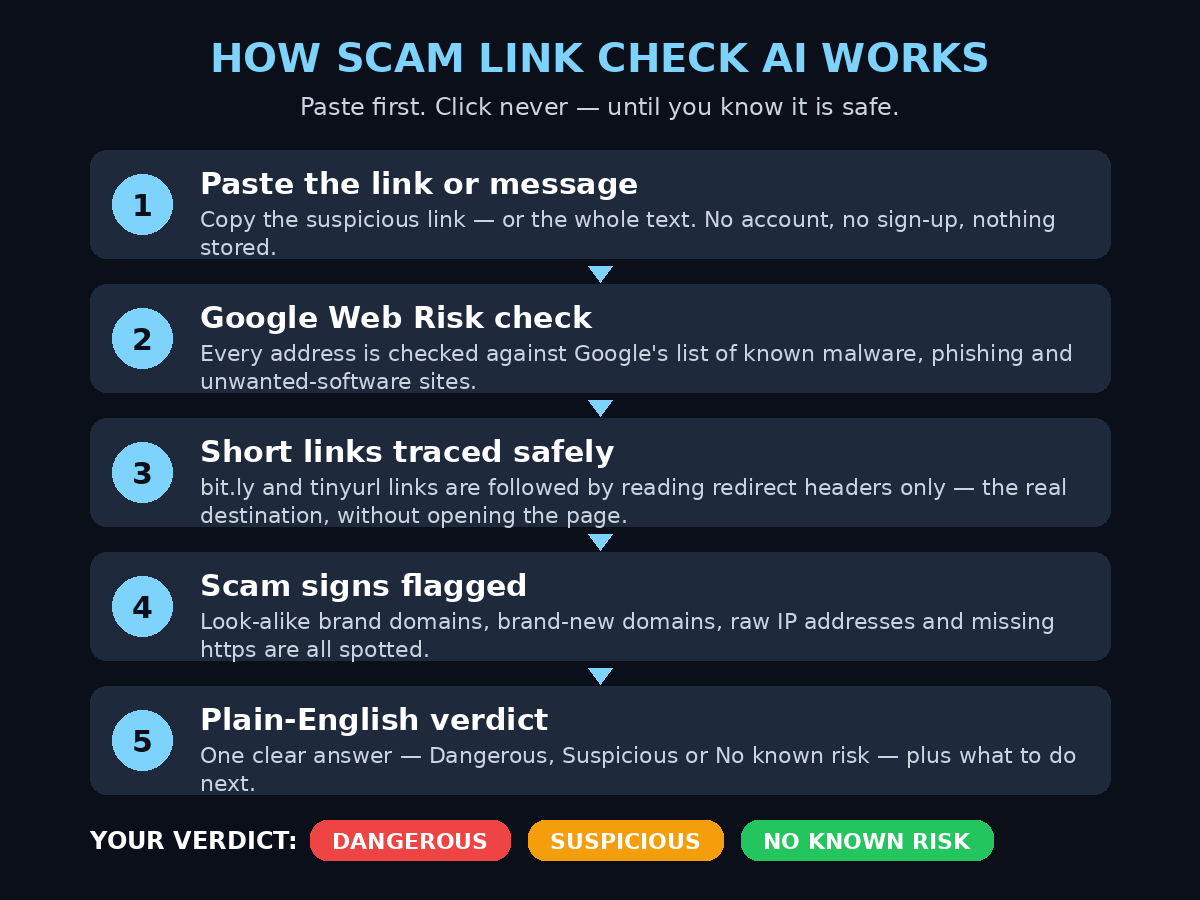
When you paste a link or a message, the tool runs four checks:
- It finds every web address. If you paste a whole message, it pulls out every URL in it — even ones written without “http” at the start. You do not need to copy just the link; the full text works.
- It checks each address with Google Web Risk. Google Web Risk is Google’s own database of known-bad sites — pages flagged for malware, phishing, and unwanted software. If a link is already on that list, the tool knows instantly.
- It follows short links safely. Shortened links (bit.ly, tinyurl, and similar) are followed by reading only the redirect headers, so the tool sees where the link really goes without ever opening the page. That matters, because opening a scam page yourself is the risky part.
- It flags simple scam signs. The tool looks for the classic tricks: a brand name sitting on a domain that is not the brand’s (like paypa1-secure.top pretending to be PayPal), a brand-new domain registered days ago, a raw IP address instead of a domain name, and a missing “https” connection.
Then it gives you one big answer — Dangerous, Suspicious, or No known risk — plus what to do next, in English or Chinese. The tool is honest about its own limits: its page says clearly that no tool catches every scam. A “No known risk” result means nothing bad was found, not that the link is guaranteed safe. Keep that in mind and you will use it correctly.
The tool itself is refreshingly simple under the hood. It is built on Google Cloud Run from a single Python file using only the standard library, and it scales to zero when nobody is using it. For you as a user, the important facts are simpler: it is free, it needs no sign-up, and it stores nothing you paste.
Step 3: Open the Tool and Paste Your First Link
Here is the whole process, start to finish. It takes less than a minute.
- 1. Open Scam Link Check on Product Hunt (or search for “Scam Link Check” on Product Hunt) and follow the link to the tool’s website. You do not need to create an account anywhere — there is no login screen at all.
- 2. Find the big input box. It is the main thing on the page. You cannot miss it.
- 3. Copy the suspicious link. On your phone, long-press the link in the message and choose Copy. On a computer, right-click the link and choose Copy link address. Do not tap or click the link itself — that is the thing you are trying to avoid.
- 4. Paste it into the box. Long-press and choose Paste on mobile, or press Ctrl+V (Cmd+V on Mac) on a computer.
- 5. Tap or click Check. Within a few seconds, the verdict appears: Dangerous, Suspicious, or No known risk, with a short explanation underneath.
That is the entire workflow for a single link. If you want to practice first, try a link you already trust — for example, your bank’s official website or a well-known news site — and watch it come back as “No known risk”. Getting comfortable with a safe link first means you will trust the tool when a real scam shows up.
Step 4: Paste the Whole Message Instead of Just the Link
Most scam messages are not just a bare link. They are a paragraph of text with a link buried inside it: “Dear customer, your account will be suspended in 24 hours unless you verify here: …” Copying only the link is fiddly on a phone, and it is easy to copy the wrong part.
Scam Link Check AI handles this for you. Paste the entire message — all of it, exactly as it arrived — and the tool extracts every web address from the text automatically, even addresses written without “http” in front of them. Each address is then checked the same way as a single pasted link.
This is the fastest way to use the tool in real life:
- Suspicious text message: copy the whole SMS, paste it, read the verdict.
- WhatsApp message from an unknown number: copy the message, paste it, read the verdict.
- Email that feels off: copy the body text (or just the suspicious part), paste it, read the verdict.
- A message with several links: the tool checks each one, so a message that mixes one real link with one fake link still gets caught.
One habit makes this ten times more useful: do it *before* you reply to the sender, not after. Scammers rely on urgency — “act now or your account closes” — and the 30 seconds a check takes is exactly the pause that breaks their trick.
Step 5: Read the Verdict — Dangerous, Suspicious, or No Known Risk
The verdict is the whole point of the tool, so here is exactly what each one means and what to do about it.
Dangerous means the link is on Google’s Web Risk list or shows clear scam signals. Do not open it. Do not tap it. Delete the message it came in, and if it arrived by text or email, report it as spam or phishing using your phone or email app’s built-in report button. If you already tapped a link like this before checking, change the password for any account the message was pretending to be — your bank, your email, your delivery account — and turn on two-factor authentication.
Suspicious means something about the link looks wrong — a look-alike domain, a very new domain, a raw IP address, or a missing secure connection — but it is not on a known-bad list yet. Treat it as guilty until proven innocent. Do not open it from the message. If the message claims to be from a company you actually use, open that company’s official app yourself, or type its real website address into your browser by hand, and check there. Never use the link in the message to get there.
No known risk means the checks found nothing bad. The link is not on Google’s list of known threats and shows no obvious scam signs. This is good news, but it is not a guarantee — brand-new scam sites may not be on any list yet. If the message itself still feels wrong (strange wording, pressure to act fast, a prize you never entered, a request for a password or a payment), trust your instincts over the verdict and check through the official app or website instead.
The verdicts come with a short “what to do next” note in plain language. Read it — it is written for non-technical people, and it is the most useful part of the result.
Step 6: What to Do After Each Verdict (Your Action Plan)
A check is only useful if you act on it. Here is the simple plan for each outcome, so you never have to think twice.
If the verdict is Dangerous:
- Delete the message immediately.
- Report it as spam or phishing (in SMS apps, long-press the message; in Gmail, use the “Report phishing” option).
- If you already clicked the link, change the password of the account involved and enable two-factor authentication.
- If you entered card details, call your bank right away and ask them to watch or block the card.
- Never reply to the sender — replying tells scammers your number is active.
If the verdict is Suspicious:
- Do not click the link. Open the company’s official app or type the real website address yourself.
- If you were expecting a delivery or a payment, check its status inside the official app, not through the message.
- When in doubt, call the company on the number printed on its official website — not a number from the message.
If the verdict is No known risk:
- You can proceed, but stay alert. If the page asks for a password, a one-time code, or card details, stop and double-check the address in your browser bar.
- If anything on the page looks different from the real site you know, close it and go through the official app instead.
Save this plan in your head as three words: delete, verify, or proceed with care. That is all you need to remember.
Step 7: Check Shortened Links Without Opening Them
Shortened links are the scammer’s favorite disguise. A link like bit.ly/3xK9mQ2 tells you nothing about where it goes — it could lead to a real article, or to a fake bank login page. That is why most people’s instinct is to tap it just to find out. Tapping to find out is the mistake.
Scam Link Check AI solves this without you ever opening the page. When it sees a short link, it follows the redirect chain by reading only the redirect headers — the technical instructions that say “go here next” — and reports the real final destination. The page itself is never loaded, no JavaScript runs, and nothing is downloaded to your device.
Try this once to see how it works: take any shortened link you received recently, paste it into the tool, and look at the verdict. You will often see that the real destination is a completely different domain from what the message implied. That single habit — never tapping a short link blind — protects you from the most common delivery and bank scams circulating right now.
And if you ever need to share a link yourself, remember the other side of this: people trust full, readable links more than shortened ones. If you run a small business and send links to customers, use your real domain so your messages do not look like the scams your customers are learning to avoid. If you want help presenting your business professionally online, a digital agency can set up your website and customer messaging properly, so your real links never get mistaken for fakes.
Step 8: Spot the Scam Signs Yourself (5 Red Flags)
The tool is your safety net, but learning the five red flags yourself means you will spot most scams before you even need a check.
- 1. A brand name on the wrong domain. paypa1-secure.top is not PayPal. apple-support-verify.net is not Apple. Real companies use their own domain. If the domain after the brand name is not the brand’s real one, it is a scam.
- 2. Urgency and threats. “Your account will be closed in 24 hours.” “Pay now or your parcel is returned.” Real companies give you time and let you check through their app. Scammers create panic so you click before you think.
- 3. Unexpected prizes, refunds, or job offers. You did not enter a competition, you did not apply for that job, and no company refunds money through a random text link. If you were not expecting it, it is almost certainly fake.
- 4. Requests for passwords, one-time codes, or card details. No real bank, delivery company, or government office asks for your full password or a one-time code by text or email link. Ever.
- 5. Sloppy writing and strange sender details. Odd capitalization, grammar mistakes, a sender number from another country, or an email address that is almost — but not quite — the company’s real one. One wrong letter is all it takes.
Keep this list somewhere your family can see it. The tool catches the technical tricks; these five flags catch the human ones. Together, they cover almost every scam message you will ever receive.
Step 9: Protect Your Family — Set It Up for Parents and Grandparents
The people most likely to be hurt by scam links are often the people least likely to check them: parents and grandparents who use a phone every day but have never been taught how link scams work. Scam Link Check AI was built with them in mind — its own description says it helps older relatives decide if a text or link is safe to tap.
Here is how to set it up for a family member in ten minutes:
- Bookmark the tool on their phone. Open it once in their browser and add it to the home screen, so it sits next to WhatsApp and the messaging app.
- Show them one check. Paste a safe link together, then paste a suspicious-looking one, and let them watch the verdicts appear. One live demo beats ten lectures.
- Agree on one rule: “check before you tap.” Not every link — just the ones from unknown numbers, delivery notices, banks, and anything asking for money. Make it a family habit, like locking the front door.
- Tell them what to do with a Dangerous result. Delete the message, do nothing else, and call you. That is the whole plan — no panic, no replying, no clicking.
- Practice with real examples. The next time a scam message arrives in your own inbox, forward it to them and check it together. Real examples stick.
If you work with clients or customers who are not technical, the same idea applies at a bigger scale: businesses that communicate clearly and use their real domain build trust, while businesses that send vague links from strange addresses look like scams. Teams that build AI automation services for customer messaging often include exactly this kind of safety — verified sender details and links people can trust.
Step 10: Scam Link Check AI vs Other Free Link Checkers
Scam Link Check AI is not the only free tool in this space, and knowing the alternatives helps you pick the right one for each situation. Here is how the main free options compare.
| Tool | What you paste | How it checks | Verdict style | Cost | Best for |
|---|---|---|---|---|---|
| Scam Link Check AI | Link or whole message | Google Web Risk, redirect following, scam-sign flags | Dangerous / Suspicious / No known risk, plain English | Free, no sign-up | Quick checks for anyone, including non-technical family |
| URLSecure AI | URL | AI-assisted risk score out of 100, domain and HTTPS insights | Risk score with plain-language explanations | Free | People who want a detailed risk breakdown |
| Peekray | Link or whole message | Follows redirects, three threat lists, AI decision model | Safe / Check first / Suspicious / Scam | Free, Chrome extension available | Checking links directly from the browser |
| RAVIONIX Scanner | Link, text, or email | AI verdict with confidence and reasons, password-leak check | Safe / Suspicious / Scam | 3 free AI checks a day, no account | Checking emails and texts, plus leaked-password checks |
| Malwarebytes URL checker | URL | Threat intelligence database, screenshot of destination | Safe / Dangerous / Unknown | Free, no registration | A second opinion from a big security brand |
Scam Link Check AI wins on simplicity: no account, no daily limit mentioned, whole-message pasting, and verdicts a non-technical person can act on immediately. URLSecure AI is better if you want a numeric score and more detail. RAVIONIX is useful when the message is an email and you also want to check whether a password has leaked — but it limits you to three free AI checks a day. For most people, the best approach is to keep Scam Link Check AI as the everyday tool and use one of the others as a second opinion when a verdict is unclear.
Step 11: The Limits — What Scam Link Check AI Cannot Do
An honest guide has to include the limits, because over-trusting any safety tool is itself a risk. Here is what to keep in mind.
- It cannot catch brand-new scams. A scam site created an hour ago may not be on Google’s Web Risk list yet. That is why a “No known risk” verdict is not a guarantee, and why the five red flags in Step 8 still matter.
- It reads text, not phone calls or images. If a scammer calls you and talks you into something, or sends a QR code that hides the link inside an image, a link checker cannot help. For calls, the rule is simple: hang up and call the company back on its official number.
- It does not replace your judgment. If a message feels wrong — strange tone, unexpected request, pressure to hurry — trust that feeling even if the tool says “No known risk”. The tool checks the link; only you can judge the message.
- Never paste passwords or sensitive personal details into any checker. Scam Link Check AI says it stores nothing you paste, which is good — but as a general rule, only ever paste the suspicious link or message, never your passwords, card numbers, or one-time codes.
- It is a second opinion, not a shield. The safest habit is still the simplest one: go to important sites through their official app or by typing the address yourself, never through a link in a message.
Used with those limits in mind, Scam Link Check AI is one of the most useful free tools a beginner can keep on their phone. It takes thirty seconds, it costs nothing, and it turns a nervous guess into a clear answer.
Frequently Asked Questions
Is Scam Link Check AI really free?
Yes. The tool costs nothing to use, needs no account, and asks for no sign-up. It launched on Product Hunt in November 2026 at a price of $0, and there is no paywall or daily limit mentioned on its page. You open it, paste, and check.
Does Scam Link Check AI store what I paste?
No. The tool’s own description says nothing you paste is stored. It checks the link or message and gives you a verdict, and that is all. Even so, as a good habit, paste only the suspicious link or message — never passwords, card numbers, or one-time codes — into any online checker.
Can it check a link inside a QR code?
Not directly. A QR code hides the link inside an image, and the tool only reads text you paste. If you scan a QR code from a poster, a parcel, or a restaurant table and it opens a suspicious-looking web address, copy that address from your browser bar and paste it into the tool before you interact with the page. If the QR code came from an unexpected message or a sticker placed over a real code, treat it as suspicious.
The verdict says “No known risk” — is the link 100% safe?
No. It means the checks found nothing bad: the link is not on Google’s list of known threats and shows no obvious scam signs. But a scam site created very recently may not be on any list yet. If the message itself feels wrong — urgency, a prize you never entered, a request for a password — trust your instincts, and check through the company’s official app or website instead of using the link.
Does Scam Link Check AI work on a phone?
Yes. It is a web tool, so it works in any phone browser — no app to install. Open it, paste the message or link, and tap Check. For the people in your family who check links most often, add it to the phone’s home screen so it is always one tap away.
What languages does it support?
Verdicts and guidance are available in English and Chinese. The interface is simple enough that the verdict words themselves — Dangerous, Suspicious, No known risk — are easy to understand even if English is not your first language.
Final Thoughts
Scam links work because they exploit a split-second decision: a message arrives, it looks urgent, and your thumb moves before your brain catches up. Scam Link Check AI exists to give your brain those thirty seconds back. Paste the link, read the verdict, and then decide — that tiny pause is the whole defense.
Now that you know how to use Scam Link Check AI, make it a habit, and make it a family habit. Bookmark the tool on your phone and on your parents’ phones. Show them one check. Agree on the rule: check before you tap, and a Dangerous result means delete the message and call you. That is all it takes to turn the most common online scam into something you catch every single time.
The tool is free, it needs no account, and it stores nothing. There is no reason not to use it — and every suspicious message you check is one less chance for a scammer.
Explore More Free AI Tools
Want to keep learning? Explore more free AI tools and beginner-friendly guides on the AI Tool Steps homepage — including the AI Title Generator, Meta Description Generator, AI Rewriter, and Keyword Density Checker. Every guide is written for beginners, free to read, and focused on tools you can start using today.