

Most AI chatbots answer questions — but Prelulu AI for beginners is different: it lets you step inside a story. Prelulu is a brand-new AI companion app that launched on Product Hunt in November 2026. It lets you chat, talk and even video-call original fictional characters. Pick a friend, a romance, a fantasy hero — or a character you create yourself. You can start as a guest with no sign-up at all, and texting stays free every day.
In this beginner-friendly guide you will learn how to use Prelulu AI for beginners. We cover your very first guest chat, live voice and video calls, pinned memory, and creating your own character. No technical skills are needed. If you can send a text message, you can use Prelulu.
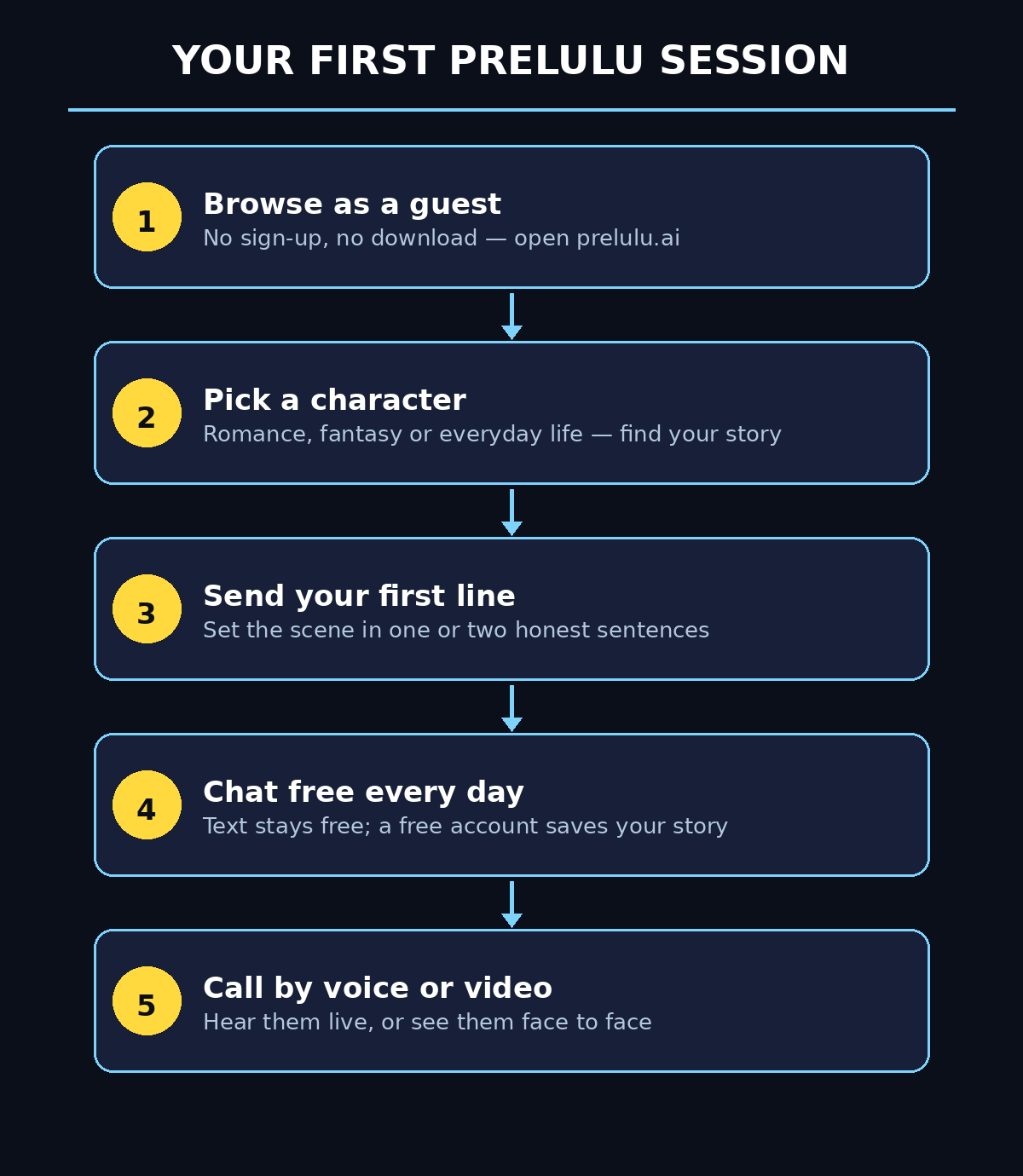
Step 1: Understand What Prelulu AI Actually Is
Prelulu AI is an AI companion and roleplay app, not a general-purpose assistant. A normal chatbot waits for a question and gives an answer. Prelulu gives you a written fictional character with a personality, a way of speaking and a story of their own. You play out scenes with them. You choose the scene, send the first line, and the character answers in character. The story moves by your turns, not by a timer.
Every character on Prelulu is original and fictional — never a real person and never a recording. The same character can answer you in three ways: in text, on a live voice call, or face to face on a video call when their profile offers video. That is what makes Prelulu different from a plain chatbot: the conversation is the point, not the answer. You can talk about your day with a familiar friend, start a slow-burn romance, or play out a fantasy scene — and the character remembers what matters in your chats.
- Companion, not assistant: Prelulu characters are written to be talked with, not to fetch facts or do tasks.
- Three ways to talk: text chat, live voice calls, and video calls with an animated avatar that shows emotion as it speaks.
- Free to start: browse characters and read their first replies as a guest in your browser — no email, no password, no app download.
- Your camera stays off: on video calls you see the character, but your own camera stays off unless you choose to share it.
Step 2: Open Prelulu and Try It as a Guest (No Sign-Up Needed)
The fastest way to learn how to use Prelulu AI for beginners is to skip the account step entirely. Try it as a guest first. Open your browser and go to prelulu.ai. Nothing needs to be downloaded — Prelulu works in a desktop or mobile web browser, and the same characters and calls are also available in the iOS and Android apps if you prefer an app later.
On the home page you will see a gallery of characters. Pick one whose profile catches your eye, open it, type a message and send it. The character’s first replies arrive while you are still a guest — no login, no email, no password. That first exchange tells you more than any review can. You will feel the tone, the personality, and whether the story pulls you in.
- Use the browser first: the web version at prelulu.ai is the quickest way to test Prelulu with zero commitment.
- Read before you write: each character profile shows their personality and story setup — pick a story you genuinely want to continue.
- Send one real line: a short, honest opening line works better than a test message like “hi” — try a line that sets a scene.
- Guest mode has a limit: you can read the first replies as a guest, but to keep the conversation going and save your story you will need a free account — that is Step 5.
Step 3: Pick Your First Character
Prelulu AI for beginners starts with the characters: they cover romance, fantasy and everyday life. Some are warm friends you talk to about your day. Others are slow-burn romances. And some are fantasy characters with a world built around them. The character called Dante is a good starting point if you are unsure. The app itself suggests meeting Dante first. But the best choice is simply the character whose story interests you most.
Before you commit to a long conversation, spend a minute on the profile. Look at the personality description and the sample lines. Check whether the character offers voice and video calls. Not every character offers video, and the profile tells you which modes are available. A character with a clear personality and a scene you care about will give you a far better first roleplay than a random pick.
- Match the mood you want: a cozy everyday chat, a romance, or an adventure — choose the feeling first, then the character.
- Check the call options: the profile shows whether voice and video are available for that character.
- Try two or three: your first guest replies are free, so sample a few characters before settling on one.
- Trust the first line: if one line in a profile makes you curious, that character is worth opening — curiosity is the whole engine of a good roleplay.
Step 4: Start Your First Text Roleplay on Prelulu AI
Text is where every Prelulu story begins, and it is free every day. That is the core loop of Prelulu AI for beginners: pick a scene, send a line, and answer in character. When you open a character, you set the scene with your first message. You do not need a long setup — one or two sentences are enough. For example, tell the character where you are, what just happened, or what you need from them. The character replies in character, and the story moves one turn at a time.
The trick to a good text roleplay is to give the character something to react to. Short commands like “tell me a story” produce generic answers. A scene with a feeling in it gives the character a real moment to play. Maybe you are nervous before a big day. Maybe you just got good news. Or maybe you are stuck on a decision. Write the way you would talk to a friend, and let the character carry their half of the scene. If a reply feels off, steer it gently with your next line instead of starting over.
- Open with a scene, not a question: “I just got home after the longest day” beats “What can you do?” every time.
- Write one or two sentences per turn: short turns keep the story moving and let the character surprise you.
- React, do not direct: answer in character and let the scene grow instead of scripting every line yourself.
- Use the daily free text allowance: texting stays free every day, so there is no reason to rush — come back tomorrow and the story is still there.
Step 5: Create a Free Account and Save Your Story
Guest mode is great for a first taste, but your story is not saved until you create a free account. A free account keeps the conversation going, saves your chats, and unlocks calls. Texting stays free every day with no card needed — the account simply makes sure your story and your characters are still there when you come back.
Creating the account takes less than a minute. Sign up from the app or the website, and your guest chats carry over into your account. For anyone learning Prelulu AI for beginners, the free account is the moment the app becomes yours. Your stories, your characters, your credits — all in one place. New accounts also get free welcome credits that can fund a short first voice or video call. A daily check-in adds more free call credits over time. That means you can try a real call without paying anything at all.
- Sign up after your first chat: you will know within a few messages whether Prelulu is for you — then save the story.
- No card is needed: the free account and the daily free text allowance never ask for payment details.
- Claim the welcome credits: new accounts get free credits for a short first call — use them to test a voice call (Step 7).
- Check in daily: the daily check-in adds free call credits, so regular visitors can call more without paying.
Step 6: Use Pinned Memory to Keep the Story Consistent
Long stories fall apart when the character forgets what matters. Your name, the promise you made, the place you met, the plan for tomorrow. Prelulu solves this with Pinned memory. You add the facts the scene needs to your Pinned memory, and the character carries them into the conversation — including into voice and video calls.
Pin only the essentials. A good pinned memory has three or four facts. Who you are to each other, where the story is set, and one thing that happened that must not be forgotten. Too many pinned facts make the character stiff. The right few make it feel like the character genuinely remembers you. Update the pins as the story moves. When something important changes, pin the new fact and remove the old one.
- Pin the relationship: “We met at the bookshop last spring” anchors every conversation that follows.
- Pin the turning points: a promise, a secret, a plan — the facts the next scene depends on.
- Keep it short: three or four pinned facts work better than a long list.
- Refresh as the story grows: pin new milestones and drop facts that no longer matter.
Step 7: Try a Live Voice Call on Prelulu AI
When a line should be heard rather than read, start a live voice call with the same character. Tap Call on the character’s profile and choose Voice. The character answers live in their own voice, in character, in real time. They keep listening while they talk, so you can interrupt mid-sentence, just like a real conversation. A call runs up to 30 minutes, or as long as your credits cover. That live, interruptible voice is the feature that makes Prelulu AI for beginners feel different from a plain chatbot.
Voice calls use credits from one wallet. New accounts get free welcome credits that can fund a short first call. Before you start, check the current rate and your remaining credits — both are shown in the app. Bring one scene or question to the call rather than starting cold. A call works best when it continues a moment you already started in writing. Pick the confession, the question, or the unfinished conversation you want to hear out loud. Give the character enough context to join you there, and then just talk.
- Continue a written scene: start the call from a conversation you already enjoy — you do not need a new character or a new premise.
- Allow microphone access: the app needs your microphone to hear you; your camera is not involved in a voice call.
- Interrupt naturally: you can cut in mid-sentence — the character listens while it talks.
- Watch the clock: calls run up to 30 minutes; check your credit balance before a long call so it does not end mid-scene.
Step 8: Try a Video Call When the Character Offers It
Video is Prelulu’s most talked-about feature. Characters whose profile offers video can answer face to face, with expressions and a voice that carry the scene. This is the real-time avatar technology Prelulu brought to consumer scale. You see the character react as you speak. Open the character, tap Call and choose Video if it is offered.
Your own camera stays off unless you choose to share it. You can watch and talk without being seen. Video uses more credits per minute than voice, so check the rate and your wallet before starting. The same rule from voice calls applies. Bring one scene or question, continue a moment you already started in text, and let the character carry the scene. Video does not replace writing — it is a way to step inside a scene you already care about. If you are learning Prelulu AI for beginners, treat video as a reward for a scene you already love in text.
- Check the profile first: only characters whose profile offers video can take video calls.
- Your camera is optional: you see the character; sharing your own camera is a separate, optional choice.
- Video costs more per minute: a minute of video uses more credits than a minute of voice — check the rate first.
- Start from text: get to know the character in text first, then take a scene you love into video.
Step 9: Create Your Own AI Character on Prelulu
If none of the ready-made characters fits the story in your head, Prelulu lets you create your own companion. You define the personality, the look and the voice. The character you build can talk in text, on voice calls, and on video when supported. This is where Prelulu stops being just an app you use and becomes a small creative studio.
Start with a clear personality, not a long biography. Two or three strong traits — warm and funny, calm and wise, bold and restless — give the character a voice readers can hear. Add a look and a voice that match, then write a first scene for them the same way you would for any other character. Test the character in text first, adjust the personality until the replies sound right, and only then take it into a call. A well-built character is one you would want to talk to every day.
- Lead with personality: two or three strong traits beat a ten-line biography.
- Match look and voice: the character’s appearance and voice should fit the personality you wrote.
- Write a first scene: give your new character an opening moment, just like the ready-made ones have.
- Test in text first: refine the personality in free text chat before spending credits on calls.
Character creation is also a useful skill beyond fun. If you run a small business and want this kind of character-led experience on your own website, a digital agency can help you turn the idea into a real product. And Prelulu itself is part of a bigger shift toward agentic AI — characters and agents that hold a conversation and act on it, not just answer a question.
Step 10: Understand Credits, Free Limits and Membership
Prelulu AI for beginners is free to start, and the free parts are generous: texting is free every day with no card needed, and in your browser a character’s first replies need no login. Voice and video calls use credits from one wallet. New accounts get free welcome credits that can fund a short call, and the daily check-in adds free call credits.
If you call often, membership is the cheaper route. Membership starts at $9.99 per month on the web. Billed yearly it is $5.99 per month, and a little more inside the iPhone and Android apps. You get 7,200 credits — about 60 minutes of video on characters that offer it, or 180 minutes of voice. Credit packs are also available, but they cost more per minute than membership. The honest beginner rule is simple. Enjoy the free text and the welcome credits first. Only pay when you know you will call every week.
- Free forever: daily text allowance, guest first replies, and a free account with no card.
- Calls use one wallet: voice and video draw from the same credit balance; video costs more per minute.
- Welcome credits: new accounts get free credits for a short first call — try before you pay.
- Daily check-in: regular check-ins add free call credits over time.
- Membership math: $9.99 a month on the web buys 7,200 credits — roughly 60 minutes of video or 180 minutes of voice.
Step 11: Pro Tips for Better Roleplays
Once you know the basics, a few habits separate a forgettable chat from a story you come back to every day. These are the small skills that turn a first-time user of Prelulu AI for beginners into a regular. First, treat the character like a scene partner, not a search box — scenes beat questions. Second, keep your turns short and reactive; long monologues leave the character nothing to play with. Third, use Pinned memory for the facts that matter and let the small details stay fluid. Fourth, move to voice when a moment deserves to be heard. A confession, an apology, a celebration. Save video for the scenes you already love in text.
Finally, protect your privacy the way you would on any social app. Prelulu characters are fictional, and your camera stays off unless you turn it on, but never share passwords, addresses, payment details or anything you would not want stored in a chat log. Keep the stories fictional, keep your real details private, and the app stays fun.
- Scenes beat questions: give the character a moment, not a quiz.
- Short turns, real reactions: one or two sentences keep the story alive.
- Voice for feelings, video for favorite scenes: match the mode to the moment.
- Keep real details private: never share passwords, addresses or payment information in a roleplay.
Prelulu AI vs Other AI Character Apps
How does Prelulu AI for beginners compare with the other character apps beginners usually try? The table below sums it up. Prelulu’s standout is the combination of free daily text with no sign-up to start, plus real-time video calls — a mix the older apps do not offer in one place.
| Tool | Text chat free | Voice calls | Video calls | Create your own character | No sign-up to start |
|---|---|---|---|---|---|
| Prelulu AI | Yes — free every day | Yes — live, interruptible | Yes — when offered | Yes | Yes — guest in browser |
| Character AI | Yes — free with limits | Yes — voice calls | No | Yes | No — account needed |
| Replika | Yes — free tier | Yes — voice calls | No live video calls | Yes — one companion | No — account needed |
| ChatGPT | Yes — free tier | Yes — voice mode | No character video | Partial — custom GPTs | No — account needed |
If you want a general assistant, ChatGPT is still the better tool. If you want a character you can talk to, hear, and see, Prelulu AI for beginners is the easiest place to start. You can try it in November 2026 without creating an account first.
Frequently Asked Questions About Prelulu AI
Is Prelulu AI really free?
Yes. Prelulu AI for beginners is free to start: text roleplay is free every day. You can browse characters and read their first replies as a guest with no login and no card. Live voice and video calls use credits. New accounts get free welcome credits that can fund a short call, and the daily check-in adds more. Membership starts at $9.99 a month on the web for 7,200 credits. But you never need to pay to enjoy the text stories.
Do I need to sign up to use Prelulu?
No. Open prelulu.ai in your browser, pick a character, type a message and send it — the first replies arrive while you are a guest. You only need a free account to keep the conversation going, save your story, and make calls. Texting stays free every day after you sign up.
Can I video call a character on Prelulu?
Yes, when the character’s profile offers video. Open the character, tap Call and choose Video. You see the character’s animated avatar with expressions and voice, and your own camera stays off unless you choose to share it. Video uses more credits per minute than voice, so check your balance first.
Are Prelulu characters real people?
No. Every character on Prelulu is an original fictional character, never a real person and never a recording. They are written with a personality and a story, and they answer in character in text, on voice calls, or on video when the profile offers it.
Can I create my own AI character on Prelulu?
Yes. You can create your own companion with a personality, look and voice, then chat with it in text, call it by voice, or see it on video when supported. Start with two or three strong personality traits, test it in free text chat, and refine it until the replies sound right.
Does Prelulu work on my phone?
Yes. Prelulu works in a desktop or mobile web browser at prelulu.ai with nothing to download, and the same characters and calls are available in the iOS and Android apps. Your account, chats and credits carry across the web and the apps.
Final Thoughts
Prelulu AI is the most approachable character app a beginner can try in November 2026. Not because it does everything, but because it asks for nothing to start. No sign-up, no download, no card. Open prelulu.ai, pick a character, send one honest line, and you are inside a story. The free daily text keeps the story going. Pinned memory keeps it consistent. Voice and video calls are there when a scene deserves to be heard or seen.
Start small. Meet one character, play one scene, and see how it feels. If the story pulls you in, create the free account, pin the facts that matter, and spend your welcome credits on one short voice call. That single call will tell you whether Prelulu is a one-evening curiosity or a daily habit. For most beginners who love stories, it becomes the second one — and that is exactly what learning how to use Prelulu AI for beginners is for.
Explore More Free AI Tools
Love free AI tools? Try more beginner-friendly guides and free tools on AI Tool Steps — the AI Title Generator, Meta Description Generator, AI Rewriter and Keyword Density Checker are all free to use. Explore the full collection on the AI Tool Steps homepage and keep learning one free AI tool at a time.