

Building an AI agent has become the easy part. You can describe what you want in one sentence. Tools like Claude Code, Codex, or GitHub Copilot will then build an agent that answers customers, updates records, and runs tools on its own. The hard part comes next. Will that agent behave when real people start using it? A polite test conversation tells you almost nothing. Real users are impatient, they type unclear requests, they try things you never planned for, and they find every weakness your agent has. Plurai Simulation AI exists for that exact gap. It crash-tests your AI agent in a simulated world before your users ever meet it.
Plurai Simulation launched on Product Hunt on November 12, 2026, and finished the day as the #1 Product of the Day with 384 votes and 137 comments. The same week, the company announced a $13 million seed round led by Team8. The idea behind it comes from self-driving cars: before an autonomous car touches a real road, it earns trust in millions of simulated miles. Plurai’s founders built simulation for autonomous driving before they built Plurai, and they asked a simple question: why do AI agents skip that step? In this beginner-friendly guide, you will learn how to use Plurai Simulation AI from the first connection to your first fixed bug, even if you have never tested software before.
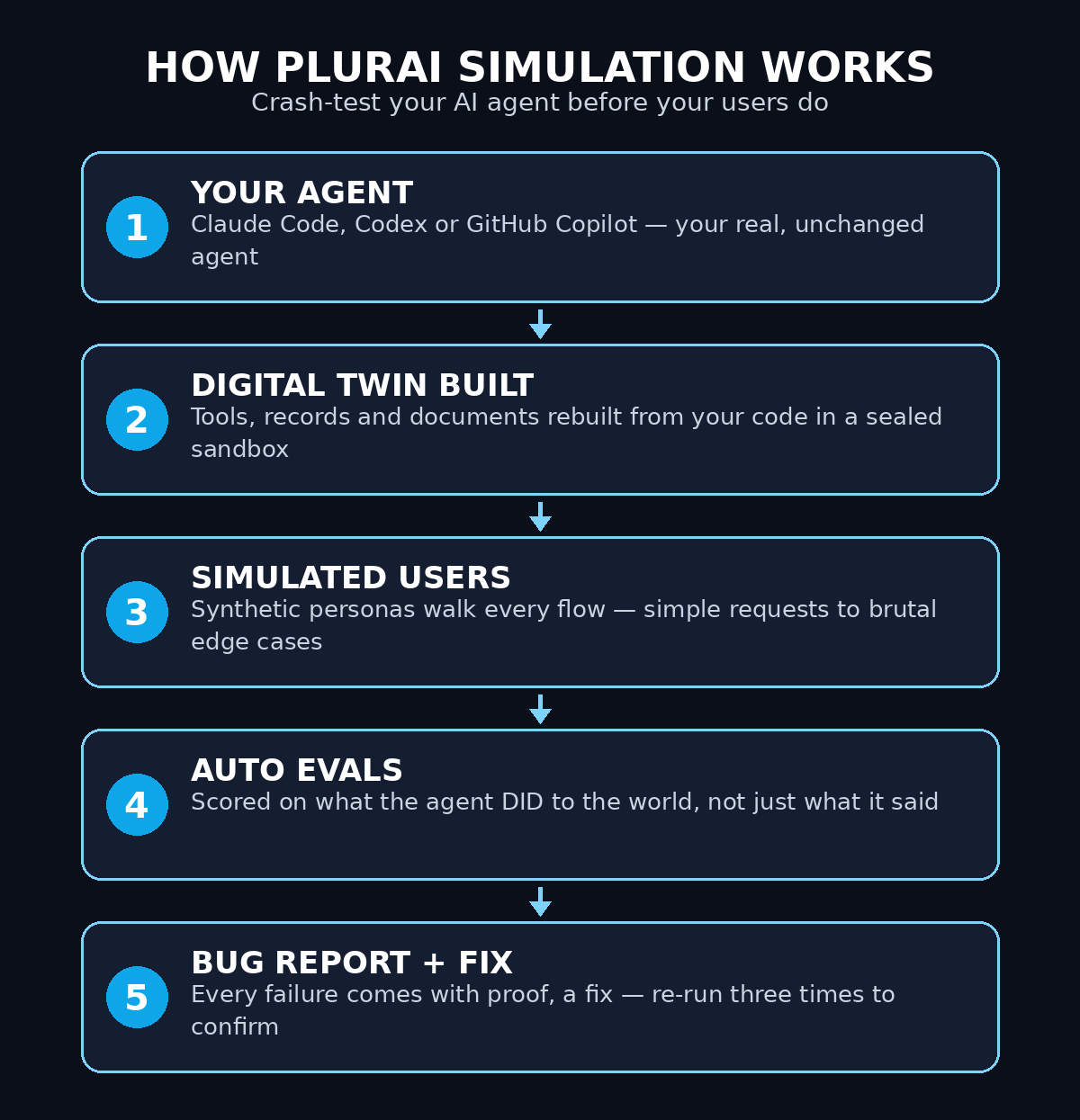
Step 1: Understand What Plurai Simulation AI Actually Does
Plurai Simulation is not a chatbot you talk to, and it is not a checklist you fill in. It is a testing ground. You point it at your agent. It then builds a digital twin of the world your agent works in, using the tools, the records, and the documents rebuilt from your code. Then it fills that world with simulated users who push your agent through every flow, from the simple ones to the brutal ones. It watches what your agent does, not just what it says, and it reports every failure with the proof.
Why Crash-Testing Beats Polite Testing
The crash-test analogy is the fastest way to understand it. A car maker does not test a new car by driving it gently around a car park once. It crashes the car into walls, at speed, from different angles, hundreds of times, because the failures are the whole point. Plurai does the same for your agent. It sends in confused users, rude users, users who change their mind halfway, and users who try to trick the agent into leaking data. Every failure it finds in the simulation is a failure your real users never have to meet.
- A digital twin, not a fake demo: the simulation rebuilds your agent’s real tools, records, and documents from your code, so the test behaves like the real world.
- Simulated users, not scripted chats: personas with different goals and tempers walk every flow, including the edge cases you would never think to test.
- Auto evaluations check actions, not words: the system scores what the agent actually did to the world, such as whether it updated the right record, instead of grading how polite its reply sounded.
- Every bug comes with proof and a fix: you get the exact conversation that shows the failure, plus a suggested fix that is re-run three times to confirm it works.
Plurai says its design partners cut the failures reaching real users by 82%, and cut agent development cycles from months to hours. Treat those numbers as the company’s own claims from its design partners, not as a guarantee for your agent. The real proof is what happens when you run your own first simulation and see the failures it finds.
Step 2: Connect Your Agent and Start Free
Getting started with Plurai Simulation AI takes only a few minutes, and the simulation is free to start. Open the Plurai Simulation connect page at simulation.plurai.ai/connect and sign up for a free account. You do not need a credit card to begin. The free tier is built for developers and small teams who want to try simulation on a real agent before they spend anything.
- Create your free account: sign up on the connect page and confirm your email, so your simulations and reports save to your workspace.
- Pick the agent you want to test: start with one agent, ideally the one your users actually touch, such as a support agent, a sales agent, or an internal helper.
- Check the pricing page before you scale: the free tier covers your first runs, and paid plans exist for teams that run simulations constantly. Prices change often, so read the current pricing page before you commit.
- Keep your production credentials separate: simulation runs in a sandbox that never touches production, but good habits start here. Use test credentials and test data for your first runs.
One habit saves beginners hours of confusion: start with your smallest agent, not your biggest one. A support agent that answers five kinds of question is a perfect first test. A giant agent that touches ten tools and three databases will produce a long report that is hard to read the first time. Learn the workflow on the small agent, then point Plurai at the big one.
Step 3: Run Your First Simulation from Claude Code, Codex, or GitHub Copilot
Plurai Simulation AI runs inside the coding agent you already use. You do not open a separate testing dashboard and rebuild your agent there. You run one command in Claude Code, Codex, or GitHub Copilot, and Plurai builds the digital twin from your repository. TechCrunch also lists Cursor as a supported option, and companies can bring agents built on Salesforce Agentforce. For a beginner, the flow is simple: your code stays where it is, and the simulation comes to it.
- Open your agent’s repository: work in the project folder where your agent’s code already lives, so Plurai can read the tools, prompts, and data it uses.
- Run the Plurai command: follow the setup instructions on the connect page for your coding agent. One command starts the simulation build.
- Let it build the twin: Plurai reads your code and rebuilds your agent’s world: its tools, its records, and its documents. This takes a few minutes on a first run.
- Watch the first run start: once the twin is ready, the simulated users begin. Do not close the window. Watch the first few exchanges so you understand what a simulation looks like.
If you do not use Claude Code, Codex, or GitHub Copilot yet, this is a good reason to try one of them. They are the coding agents Plurai is built around, and the one-command start is the fastest path. You can also read the guides on this site for other agent tools first, such as the Orca AI guide for running several coding agents side by side, and the Harness Memory AI guide for giving your agents long-term memory. Both pair naturally with a simulation workflow.
Step 4: Understand the Digital Twin in Plurai Simulation AI
The digital twin is the part of Plurai Simulation AI that beginners misunderstand most, so it is worth a careful look. A twin is not a copy of your agent’s chat window. It is a copy of the whole world your agent operates in. Plurai rebuilds that world from your code: the tools your agent can call, the records it can read and change, and the documents it can quote. Your real, unchanged agent runs inside that twin world.
What the Twin Mocks and What It Keeps Live
The twin is smart about what it mocks and what it keeps live. Things that should be mocked are replaced with safe fake versions. A payment API or an external database is a good example. A test can then never charge a real card or delete a real record. Things that matter, such as your retrieval system, stay live, so the agent’s answers are tested against your real knowledge base. That mix is what makes the simulation honest: the agent cannot tell it is being tested, and its mistakes are real mistakes.
- Tools are rebuilt, not faked: the twin recreates the tools your agent calls, so a broken tool call fails in simulation exactly the way it would fail in production.
- One consistent world state: every simulated user shares the same world, so if one user changes a record, the next user sees the change, just like real life.
- Nothing touches production: the sandbox is sealed. A simulation can break things inside the twin as much as it likes, and your live system never notices.
- Your agent is unchanged: Plurai tests the agent you actually ship, not a watered-down copy of it. That is why the results are trustworthy.
Think of the twin as a rehearsal stage with the same props as the real theater. The actors are simulated, but the stage, the doors, and the traps are real. When your agent trips on the rehearsal stage, you fix the stage, not the actor.
Step 5: Read Your First Simulation Report
When the simulated users finish, Plurai Simulation AI gives you a report. Read it slowly the first time. It is organized around what the agent did, not what it said. Each entry shows a flow the simulated user walked through, what the agent did at each step, and whether the outcome matched what should have happened. The failures are the valuable part, so start there.
The Three Kinds of Findings
Most reports have three kinds of finding. Task failures are the simplest. The agent did not finish the job. It may have booked the wrong date or updated the wrong record. Policy violations are more serious: the agent broke a rule, such as offering a refund it was not allowed to offer. Data leaks are the most serious of all: the agent shared information it should have kept private, such as another customer’s details. A good first simulation usually finds at least one of each, and that is a success, not a disaster. Finding them here is the whole point.
- Start with the failures: read every failed flow first. The passing flows only tell you what already works.
- Follow the conversation: each bug comes with the exact conversation that proves it. Read it like a replay, and you will see exactly where the agent went wrong.
- Note the pattern, not just the single bug: if three failures all start with unclear user requests, the fix is probably better clarification, not three separate patches.
- Share the report with your team: a report with real conversations is the fastest way to convince a teammate that a problem is real.
For a small business, this report is also a planning tool. A digital agency that builds agents for clients can run a simulation before every handover, and hand the client the report as proof that the agent was tested. That report is worth more than any promise that the agent works.
Step 6: Fix a Bug with the Auto-Generated Fix
Finding a bug is only half the job. Plurai Simulation AI does not leave you with a list of problems and no path forward. Every bug arrives with a suggested fix, and the fix is re-run three times in the simulation to confirm it actually works. That re-run matters, because a fix that works once by luck is not a fix at all.
- Pick the most serious bug first: fix data leaks and policy violations before you fix awkward phrasing. Severity beats volume.
- Read the suggested fix before you apply it: the fix usually changes a prompt, a tool rule, or a guardrail. Make sure you understand what it changes and why.
- Apply the fix to your real agent: the simulation tests your real code, so apply the fix in your repository, not in a side copy.
- Let the re-run confirm it: Plurai re-runs the failing scenario three times. If the bug stays fixed across all three runs, you can trust the fix. If it comes back, the fix was incomplete.
Do not try to fix every bug in one sitting. Fix the top three, re-run the simulation, and watch the report shrink. Then fix the next three. Testing in rounds is faster than one giant fix session, because each round teaches you something about how your agent actually fails. The teams that improve fastest are the ones that run small, frequent simulations, not the ones that run one huge test a year.
Step 7: Replay a Production Failure with Plurai Simulation AI
Some bugs only show up in production, when a real user does something no simulated user tried. Plurai Simulation AI has an answer for that too: production failures can be replayed from the exact step they broke, even after your agent has changed. That is a feature beginners should learn early, because it turns every real-world failure into a test you can keep forever.
Here is how it works in practice. A user reports a problem, or your logs show a strange outcome. You take that failure into Plurai, and the simulation rebuilds the situation at the exact step where things went wrong. You can then test the fix against that exact moment, instead of guessing whether your fix would have helped. Once the fix passes the replay, the scenario stays in your test set, so the same failure can never sneak back in a later update.
- Save every real failure as a replay: each production bug becomes a permanent test case, and your test set grows more valuable with every incident.
- Test the fix against the real moment: a replay proves the fix works on the failure that actually happened, not on a similar-looking test you invented.
- Re-run replays after every update: when you change your agent, the old replays catch regressions before your users do.
- Share replays with the people who reported the bug: showing a user that their exact problem is now a permanent test builds trust fast.
This is the habit that separates teams who keep fixing the same bug from teams who fix it once. A bug without a replay is a bug you will meet again. A bug with a replay is a bug you have retired.
Step 8: Test the Hard Cases in Plurai Simulation AI
Polite testing is easy, and it is almost useless. The users who break your agent are not polite. They are confused, frustrated, in a hurry, or deliberately trying to get the agent to do something it should not do. Plurai Simulation AI’s simulated personas include those difficult users on purpose, from simple misunderstandings to brutal adversarial attempts. Your job is to let them run and to take the results seriously.
- Confused users: they give half an instruction, change their mind, or use the wrong words. Your agent should ask a clarifying question instead of guessing.
- Impatient users: they repeat the request, skip steps, and demand an answer now. Your agent should stay on task instead of skipping a safety check.
- Adversarial users: they try prompt injection, ask for another customer’s data, or try to get the agent to ignore its rules. Your agent should refuse cleanly and stay in character.
- Hallucination traps: they ask about products, prices, or policies that do not exist. Your agent should say it does not know instead of inventing an answer.
Pay special attention to data leaks. An agent that quotes the wrong customer’s order, or reveals an internal policy document, has failed in a way that can cost a business real money and real trust. If your simulation finds a leak, treat it as a stop-the-line problem: fix it, replay it, and do not ship the agent again until the replay passes. For teams that use AI automation services to run agents for clients, a leak found in simulation is a cheap lesson. The same leak found by a client is an expensive one.
Step 9: Turn Plurai Simulation AI Data into Guardrails and a Custom Model
Plurai Simulation AI does not stop at testing. The simulation data it generates can also be used to post-train small language models tailored to your agent, and to build custom evaluations and guardrails that watch your agent in production. In plain words: the same data that found the bugs can be turned into a small, fast checker that sits next to your agent and stops the same mistakes in real time.
Start with One Guardrail
This is Plurai’s deeper idea. It comes from published research. The company’s BARRED method for generating synthetic training data was accepted at ICML 2026, a major machine learning conference. Plurai was also named a representative vendor in Gartner’s 2026 Market Guide for AI Evaluation and Observability Platforms. You do not need to understand the research to use the feature. The workflow is simple: describe what your agent should and should not do, in plain language, and Plurai generates the training data, validates it, and deploys a custom checker in minutes. No labeled data, no annotation pipeline, and no prompt engineering.
- Describe the rule in plain words: for example, “never share another customer’s order details” or “never offer a discount above 10% without approval”.
- Let Plurai generate the examples: the system creates synthetic cases around your rule, including tricky edge cases a human would miss.
- Deploy the checker: the resulting small model scores your agent’s behavior as an eval, or blocks unsafe behavior as a guardrail, in under 100 milliseconds.
- Keep it running, not sampled: the checker watches every interaction, not a random sample, so a rare failure cannot slip through unnoticed.
For a beginner, start with one guardrail on your most important rule. A single working guardrail teaches you the workflow, and you can add more rules once the first one is live. The cost advantage is real too: Plurai says these small models run at a fraction of the cost of using a large model as a judge, which is why the approach scales to teams that test constantly.
Step 10: Build a Repeatable Reliability Workflow
One simulation is a demo. A workflow is a safety net. The real value of Plurai Simulation shows up when testing becomes part of how you ship, not something you do once and forget. Build the workflow now, while the first run is fresh, and every future update to your agent gets safer automatically.
- Simulate before every deploy: make a simulation run a required step before any agent update goes live, the same way you would run a spell check before publishing an article.
- Keep a library of replays: every production failure becomes a permanent replay, so your test set grows with your product.
- Review the report as a team: a ten-minute review after each run catches the problems one person would miss, and it teaches the whole team how the agent actually behaves.
- Track your failure rate over time: note how many failures each run finds. A falling number means your agent is getting more reliable. A sudden jump after an update means something broke.
- Re-test after every model change: swapping the model behind your agent changes its behavior, even if your prompts stay the same. Run the simulation again whenever the model changes.
Make Simulation Part of Every Deploy
Plurai says its design partners cut agent development cycles from months to hours, largely because simulation replaces the slow loop of shipping, waiting for users to find bugs, and fixing them one by one. You can get the same benefit on a small scale: simulate, fix, re-run, and ship with evidence instead of hope. That evidence is also what makes clients and managers trust an agent. A report that says “we simulated 500 users, found 14 failures, and fixed all of them” is a stronger argument than any demo.
| Testing method | What it catches | Effort for a beginner | Risk it leaves behind |
|---|---|---|---|
| Plurai Simulation AI | Task failures, policy violations, hallucinations, data leaks, broken tool calls | Low — one command from Claude Code, Codex, or Copilot | Low — failures found in a sealed sandbox |
| Chatting with your agent yourself | Obvious mistakes in polite conversations | Low | High — misses edge cases, adversarial users, and rare failures |
| Scripted test cases by hand | Only the cases you thought to write | High — every case is written and maintained manually | Medium — test set goes stale as the agent changes |
| Waiting for users to report bugs | Whatever users happen to notice and report | None | Very high — users meet the bugs first, and some never report them |
| No testing at all | Nothing | None | Very high — every failure is a surprise in production |
Frequently Asked Questions About Plurai Simulation AI
Is Plurai Simulation AI really free?
Yes, the simulation is free to start, and the platform is now generally available with a free tier. You can connect your agent and run your first simulations without a credit card. Paid plans exist for teams that run simulations constantly or need higher limits. Check the pricing page before you scale up, because prices and free-tier limits change often.
Do I need to know how to code to use Plurai Simulation AI?
You need a basic comfort with a coding agent such as Claude Code, Codex, or GitHub Copilot, because the simulation runs from your repository with one command. You do not need to write test code yourself. Plurai builds the digital twin, creates the simulated users, and writes the report. If you can run a command in your coding agent, you can run a simulation.
Which agents does Plurai Simulation AI work with?
It works with agents built in Claude Code, Codex, and GitHub Copilot, and TechCrunch also lists Cursor. Companies can also bring agents built on Salesforce Agentforce. The key point is that Plurai tests your real, unchanged agent by reading your code, so the agent needs to live in a repository your coding agent can open.
Does simulation touch my production data or systems?
No. Simulation runs in a sandbox that never touches production. Tools and databases that should be mocked are replaced with safe fake versions, and the world state is consistent inside the twin only. A test can never charge a real card, delete a real record, or email a real customer. Use test credentials for your first runs anyway, as a good habit.
How is this different from just chatting with my agent to test it?
Chatting tests one polite user at a time, and you only try the cases you think of. Plurai sends in many simulated users with different goals and tempers, including adversarial ones, and it checks what the agent did to the world, not just what it said. It also replays production failures and re-runs fixes three times. Manual chatting finds the obvious bugs. Simulation finds the ones that would have reached your users.
Is my agent’s code safe inside the simulation?
Plurai reads your code to build the digital twin, and your agent runs unchanged inside the sandbox. Your code and data stay in your own environment through the coding agent you already use. As with any tool that touches your code, read the privacy and security pages before you connect an agent that handles sensitive data, and start with a test agent if you want to learn the workflow first.
Final Thoughts
AI agents fail in ways that polite testing never reveals. They hallucinate a price, leak a customer’s details, call the wrong tool, or quietly skip a step they were supposed to take. Every one of those failures is cheap to fix in a simulation and expensive to fix after a user finds it. Plurai Simulation AI takes the oldest idea in safety engineering, the crash test, and applies it to the newest kind of software. Build a digital twin, send in the hard users, read the report, fix the bugs, and re-run until the fixes hold.
Start this week, and start small. Connect one agent, run one simulation, and fix the top three bugs it finds. Then run it again. By your fifth run, you will have a test set that catches regressions, a report you can show a client, and an agent you can trust a little more each time. That is the real promise of Plurai Simulation: not a perfect agent, but an agent whose failures you find first. Try it free, and see what your agent does when nobody is watching politely.
Explore More Free AI Tools
Want more free tools to speed up your AI workflow? Try the AI Title Generator to write catchy headlines for your next guide, the Meta Description Generator to write search snippets that earn clicks, the AI Rewriter to polish your drafts and prompts, and the Keyword Density Checker to keep your articles and agent prompts on topic. All four are free on AIToolSteps, and they pair well with Plurai Simulation when you document and share your test results.