

How to Use Pinku AI for Beginners (Free Guide 2026)
Pinku AI offers a different trade-off: Every time you type a question into a cloud chatbot, your words travel to a server owned by someone else. They get stored, logged, and sometimes even reviewed by real people. Most of us accept that trade-off because the answers are good — but what if you could keep the convenience and skip the server entirely?
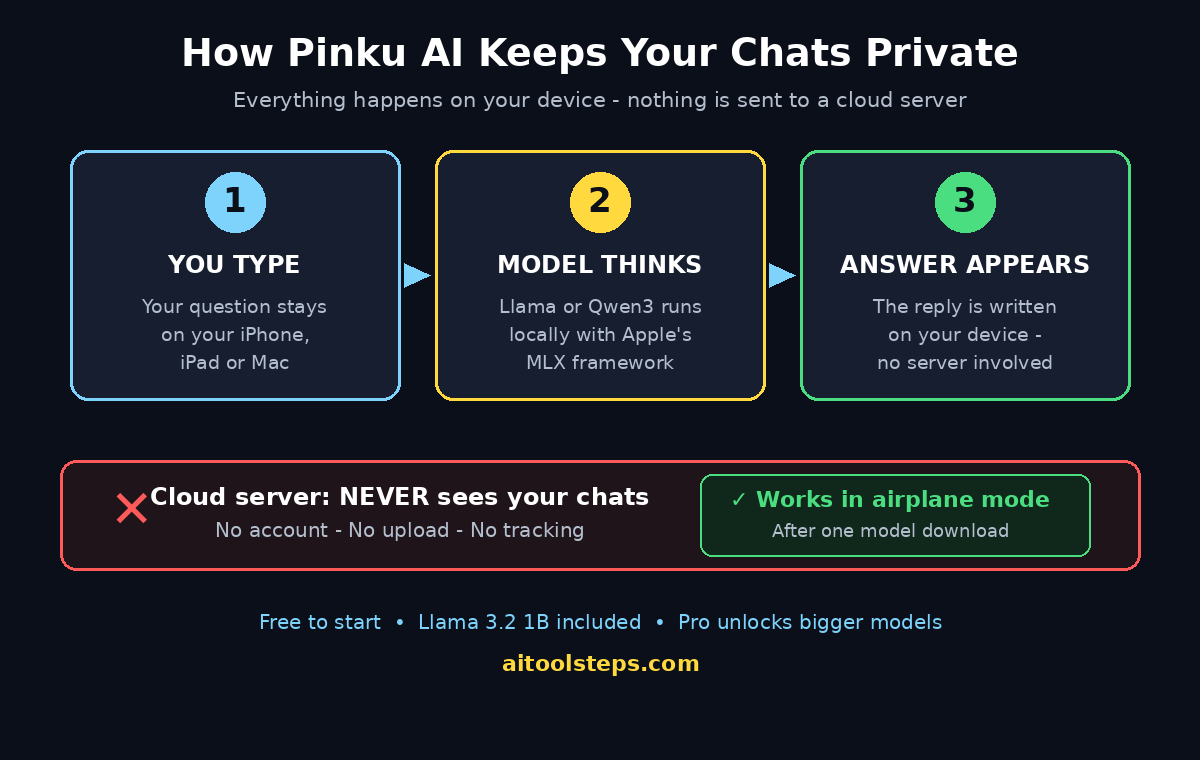
Pinku AI was built to answer exactly that question. Launched on Product Hunt on November 5, 2026, Pinku is a private AI chat app for iPhone, iPad and Mac that runs its language model entirely on your own device, using Apple’s MLX framework. You download a model once from Hugging Face, and from then on you can chat offline — even in airplane mode. There is no account to create and no server that ever sees your chats.
In this beginner-friendly guide, you will learn exactly how to use Pinku AI: what it is, how to check whether your device can run it, how to download it for free, how to pick your first on-device model, and how to chat, write, rewrite and brainstorm with complete privacy. You do not need any technical skills, and you do not need a credit card to start.
Step 1: Understand What Pinku AI Actually Is
Pinku AI is a chat app with one radical difference from ChatGPT, Claude or Gemini: the AI lives on your device. When you type a question, the answer is written by a small open model — such as Llama 3.2 1B or a Qwen3 model — running locally on your iPhone, iPad or Mac. Nothing is sent to a cloud server for processing.
Here is how the privacy model works in plain language:
- No account. Pinku asks for no email, no password and no profile. You open the app and start chatting.
- No chat server. Your prompts and answers never leave your device. The makers state plainly that there is no server of theirs that sees your chats.
- Offline by design. After the one-time model download, Pinku works with no internet at all — on a flight, in a tunnel, or in airplane mode.
- Open models. You pick from more than a dozen open models, from the tiny Qwen3 0.6B up to Qwen3 8B, plus Llama and Gemma options. Bigger models answer better but need more storage and a stronger device.
- Online only for three things. Pinku goes online only to download models, to fetch the list of available models, and for optional Pro purchases. The privacy page even lists every network call the app makes.
What is Pinku good at? Quick drafts, rewriting, explaining ideas, brainstorming, and answering questions when you are offline. What is it not? The makers are honest about this: it is not a GPT-5 replacement. Small on-device models are weaker than the giant cloud models at long reasoning, coding and obscure facts. Pinku trades raw power for privacy — and for many everyday jobs, that trade is worth it.
If your work involves sensitive information, that trade matters even more. A freelancer drafting client proposals, a student journaling personal thoughts, or a small business owner handling customer details can all benefit from an AI that never phones home. If you need help turning that kind of private workflow into a proper setup, a digital agency can help you plan which tools stay on-device and which are safe to run in the cloud.
Step 2: Check Whether Your iPhone, iPad or Mac Can Run Pinku AI
Pinku AI runs on Apple devices only, because it is built on Apple’s MLX framework, which is designed for Apple Silicon chips. Before you download anything, check these requirements:
- iPhone or iPad: a recent iPhone or iPad with Apple Silicon. Newer models run the bigger models smoothly; older devices should stick to the smallest models.
- Mac: an Apple Silicon Mac (M1 or newer). Intel Macs are not supported, because MLX is built for Apple Silicon.
- Storage: each model is a download of several hundred megabytes to a few gigabytes. Keep at least 2 GB free for a small model, and more if you want to try the larger Qwen3 models.
- Internet (only for setup): you need a connection once, to download the app and your first model. After that, normal chat works fully offline.
If you are on Android or Windows, Pinku is not an option for you yet — it is an Apple-only app at launch, so check the official listing or the Product Hunt page for any platform updates before you look for unofficial downloads, which can be unsafe.
Step 3: Download Pinku AI for Free
Getting started takes a few minutes, and the free tier is genuinely free to start:
- Find Pinku on Product Hunt. Search for “Pinku” on Product Hunt and open the launch page, or search the App Store on your iPhone, iPad or Mac for Pinku. The launch page links to the official download.
- Install the app. Download Pinku from the App Store. It is free to start with the Llama 3.2 1B model included in the free tier, and there is no credit card step.
- Open the app — no sign-up. Because Pinku needs no account, there is nothing to register. No email, no password, no profile to create. You land straight in the chat screen.
One caution applies to any brand-new app: free limits and paid tiers can change as the product grows, so check the pricing inside the app before you build a workflow that depends on heavy daily use. And remember the launch context — Pinku arrived on Product Hunt on November 5, 2026, as a brand-new product, so expect fast updates in its first weeks.
Step 4: Pick and Download Your First On-Device Model
The first time you open Pinku, you choose a model. This is the most important decision in the whole setup, so here is how to think about it:
- Start with Llama 3.2 1B (free). This is the free starter model. It is small, fast and downloads quickly. It handles short drafts, simple questions and rewrites well, and it is the best way to learn how the app feels.
- Try Qwen3 0.6B if your device is older. The smallest Qwen3 model is even lighter, and it is a good choice on an older iPhone or a Mac with limited free storage.
- Move up to Qwen3 4B or 8B for better answers. The bigger models write more naturally and follow instructions better, but they need more storage and a newer device. Pinku Pro unlocks the bigger models, so check which sizes your plan includes.
- Download on Wi-Fi. Model files are large. Download over Wi-Fi, not mobile data, and leave the app open until the download finishes.
- You can switch models later. You are not locked in. Download a second model and switch between them from the model picker whenever you like — use a small model for quick notes and a big one for careful writing.
Think of models like notebooks: a pocket notebook is great for quick lists, while a big hardback is better for long essays. Pinku lets you keep both on the shelf and grab whichever fits the job.
Step 5: Start Your First Private Chat
Once a model is downloaded, chatting feels just like any other AI chat app — except nothing leaves your phone:
- Tap New Chat and type your question. Ask anything: “Explain photosynthesis in simple words,” “Draft a polite email asking for a deadline extension,” or “Give me five blog ideas about gardening.”
- Watch the answer appear on-device. The model writes its reply locally. On a newer device the words appear quickly; on an older device or with a bigger model, give it a few extra seconds.
- Follow up naturally. Pinku remembers the conversation, so you can say “make it shorter,” “make it friendlier,” or “give me three more options” and it will adjust.
- Try a rewrite. Paste a paragraph you wrote and ask Pinku to fix the grammar, simplify it, or rewrite it in a warmer tone. This is one of the best everyday uses of a small on-device model.
A good first test is something personal that you would never paste into a cloud chatbot — a private journal entry, a draft message about a sensitive topic, or notes about your health or finances. With Pinku, that text stays on your device, which is the whole point.
Step 6: Use Pinku AI Offline — Even in Airplane Mode
This is Pinku’s superpower, and it is worth testing on purpose:
- Turn on airplane mode. Switch your iPhone or Mac to airplane mode, then open Pinku and ask a question. It answers normally, because the model is already on your device.
- Use it on flights and in dead zones. Planes, subways, rural roads and buildings with no signal are all fine. Your AI assistant travels with you.
- Remember the one exception. Downloading a new model needs the internet. If you want a bigger model for a trip, download it before you leave.
- Your chats stay put. Conversations are stored on your device, not synced to a cloud account. That means no cross-device sync — but also no cloud copy of your words.
For students, travellers and anyone who works in places with patchy internet, offline AI removes a real frustration. You stop planning your thinking around your signal bars.
Step 7: Customise Pinku with Instructions and Voice (Pro)
The free tier covers the core experience: private on-device chat with the starter model. Pinku Pro is the optional upgrade, and it unlocks three useful extras:
- Bigger models. Pro opens the larger Qwen3 models, which write better and follow complex instructions more reliably.
- Custom instructions. Tell Pinku how you want it to answer — “always reply in simple English,” “keep answers under 100 words,” or “answer like a friendly teacher.” The app then follows that style in every chat.
- On-device dictation and read-aloud. Speak your prompt instead of typing it, and have Pinku read answers back to you — both processed on your device, not in the cloud.
Before paying, use the free tier for a week. If you find yourself chatting every day and wishing the answers were sharper, Pro is worth a look. If you only need quick drafts and simple questions, the free Llama 3.2 1B model may be all you ever need.
Step 8: Write, Rewrite and Brainstorm with Pinku AI
Pinku shines at everyday writing jobs. Here are five beginner-friendly workflows to try this week:
- Morning drafts. Ask Pinku to draft a reply to a difficult email, then edit the result in your own voice. You get a starting point in seconds, and the draft never leaves your device.
- Explain it simply. Paste a confusing paragraph from a contract, a manual or a textbook, and ask Pinku to explain it like you are twelve. Small models are surprisingly good at plain-language explanations.
- Brainstorm lists. Ask for ten names for your new shop, five captions for a photo, or three ways to start a presentation. Pick the best, then ask for five more in that style.
- Fix your writing. Paste your own text and ask for grammar fixes, a shorter version, or a more formal version. Review every change before you send it — small models sometimes change your meaning.
- Plan offline. On a flight or a commute with no signal, use Pinku to outline a blog post, plan a week’s meals, or sketch a study schedule.
One honest habit to build: always re-read important output before you use it. On-device models are smaller than cloud giants, so they can get facts wrong or invent details. Pinku is a drafting partner, not a source of truth — verify dates, prices and names before you publish anything it writes.
Step 9: Manage and Delete Your Chats
Because Pinku stores everything on your device, you are in charge of your history:
- Organise by topic. Start a new chat for each topic instead of piling everything into one long thread. Short chats also help small models stay on track.
- Delete what you do not need. Swipe or tap to delete a conversation when you are done with it. Since there is no cloud backup, deleting is permanent — which is exactly what privacy-minded users want.
- Free up space. If storage gets tight, remove a model you no longer use from the model list. You can re-download it later whenever you want.
- Keep the app updated. Pinku is days old at the time of writing, so updates will arrive quickly. Each update may add models, fix bugs or improve answers — check the App Store regularly.
Step 10: Pinku AI vs Other Private AI Apps
Pinku is not the only app that runs AI on your device. Here is how it compares with the closest alternatives a beginner might consider:
| Feature | Pinku AI | CuriousLM AI | ChatGPT (cloud) |
|---|---|---|---|
| Where the AI runs | On your iPhone, iPad or Mac | On your phone or laptop | On OpenAI’s servers |
| Works offline | Yes, after model download | Yes, in airplane mode | No |
| Account needed | No | No | Yes |
| Platforms | iPhone, iPad, Mac | Phone and laptop | Web, iOS, Android |
| Models | Llama, Qwen, Gemma (12+) | Curious 2B | GPT-5 and others |
| Free to start | Yes, Llama 3.2 1B | Yes, $0 | Yes, limited |
| Best for | Private everyday chat on Apple devices | Private chat with memory and journal | Most powerful answers, needs internet |
The pattern is clear: if privacy and offline use matter most, Pinku and CuriousLM win. If you need the smartest possible answer and you have internet, a cloud chatbot still leads. Many people end up using both — Pinku for personal and sensitive chats, and a cloud tool for heavy research.
Step 11: Common Problems and Quick Fixes
New apps have rough edges. Here are the fixes for the problems beginners hit first:
- Answers feel slow. You may be running a large model on an older device. Switch to Llama 3.2 1B or Qwen3 0.6B, close other apps, and keep your chats short.
- The model download stalls. Model files are big. Stay on Wi-Fi, keep the app open and the screen awake, and try again if the connection drops.
- Answers are vague or wrong. Small models know less than cloud models. Ask for shorter, simpler tasks, give more context in your prompt, and always verify facts before you rely on them.
- You cannot find Pinku on Android or Windows. That is expected — Pinku is Apple-only at launch. Do not install lookalike apps from unofficial stores.
- Storage warnings appear. Each model takes space. Delete models you do not use, and keep only one or two installed at a time.
Step 12: Is Pinku AI Worth It?
Pinku AI is worth trying if you care about privacy, if you often work without internet, or if you simply like the idea that your AI chats belong to you and nobody else. It is free to start, it needs no account, and it takes five minutes to set up — so the cost of trying it is almost zero.
It is not the right tool if you need the deepest reasoning, the latest web knowledge, or long and complex coding help. Small on-device models cannot match the giant cloud models yet, and Pinku’s makers say so themselves. The honest way to use it is as a private everyday companion: drafts, rewrites, explanations, brainstorming and offline chats — with a cloud chatbot kept for the heavy jobs.
For small businesses, the same logic applies at a bigger scale. Keeping sensitive customer conversations on-device is a real advantage, but choosing the right mix of private and cloud tools takes planning. Teams that want that planning done properly often work with AI automation services that can map out which workflows stay local and which can safely use the cloud.
Pinku launched on November 5, 2026, so it is days old. Expect bugs, missing features and fast changes in the first weeks — and expect the model list to grow. Check the official site and the Product Hunt listing for the latest features and pricing before you build a daily workflow around it. But the core promise is already real: a private AI chat that runs on your own device, with no account and no server watching.
Frequently Asked Questions About Pinku AI
Is Pinku AI really free?
Yes, to start. Pinku is free to start with the Llama 3.2 1B model, and there is no account or credit card step. Pinku Pro is an optional paid upgrade that unlocks the bigger models, custom instructions, on-device dictation and read-aloud. Check the pricing inside the app, because free limits can change as the product grows.
Does Pinku AI work without the internet?
Yes, after the one-time setup. The app and the model need the internet to download, but normal chat works fully offline — even in airplane mode — because the model runs on your device with Apple’s MLX framework.
Is Pinku AI available on Android or Windows?
No, not at launch. Pinku is built for iPhone, iPad and Mac with Apple Silicon. There is no Android or Windows version announced, so check the official listing for updates and avoid unofficial downloads.
Is Pinku AI really private?
Yes, by design. Pinku runs open models on your device, needs no account, and has no server that sees your chats. It only goes online to download models, fetch the model list, and process Pro purchases — and the privacy page lists every network call it makes.
Which model should I download first?
Start with the free Llama 3.2 1B model. It is small, fast and good for everyday drafts and questions. Once you are comfortable, try a bigger Qwen3 model for sharper writing — just make sure your device has the storage and power for it.
Can Pinku AI replace ChatGPT?
Not completely. Pinku is better for privacy and offline use, but small on-device models are weaker than cloud models at long reasoning, coding and obscure facts. The makers themselves say Pinku is not a GPT-5 replacement. Most people will use Pinku for private everyday chats and keep a cloud chatbot for heavy research.
Final Thoughts
Pinku AI arrives at a moment when more people are asking where their AI chats actually go. Its answer is refreshingly simple: nowhere. Your words are written on your device, stored on your device, and never sent to a server. For quick drafts, rewrites, explanations and offline thinking, that is a genuinely useful kind of freedom — and it costs nothing to try.
Download Pinku from the App Store, start with the free Llama 3.2 1B model, test it in airplane mode, and see how it fits your day. If you love the privacy, explore the bigger models and the Pro features. If you need more power, keep a cloud chatbot alongside it. Either way, you now have a private AI in your pocket — and that is a big step forward for everyday AI.
Explore More Free AI Tools
Want more free AI tools like Pinku AI? Try the free tools at AI Tool Steps — the AI Title Generator, Meta Description Generator, AI Rewriter, and Keyword Density Checker can help you write better titles, descriptions, and content in seconds, all free.