

Most AI assistants stop at the talking stage. You ask a question, you get an answer, and then you still have to do the work yourself. Nod by n8n is built to close that gap. Released on 10 November 2026 as a research preview from n8n Labs, Nod is a free, open-source personal AI agent that runs on your own computer, works inside your apps and on real websites, and finishes jobs instead of handing you a to-do list. It shot to #1 on Product Hunt on 11 November 2026, and it is easy to see why: people are tired of chatbots that can only describe the work.
This beginner-friendly guide shows you exactly how to use Nod by n8n. You will learn what it is, how to install it on Mac or Windows, how to connect your AI model and your apps, how to give it its first real task, and how to keep costs and safety under control. You do not need any coding skills, and you do not need an n8n account.
One important clarification before we begin: Nod is NOT n8n. n8n is the popular workflow automation platform where you build automations with nodes. Nod is a separate, standalone desktop app from a new team inside n8n called n8n Labs. You do not build workflows in Nod. You chat with it in plain words, and it does the work. If you already use n8n for team automations, Nod is the personal companion that sits next to it, and a digital agency can help a business connect the two into one automation setup.
Step 1: Understand What Nod by n8n Actually Is
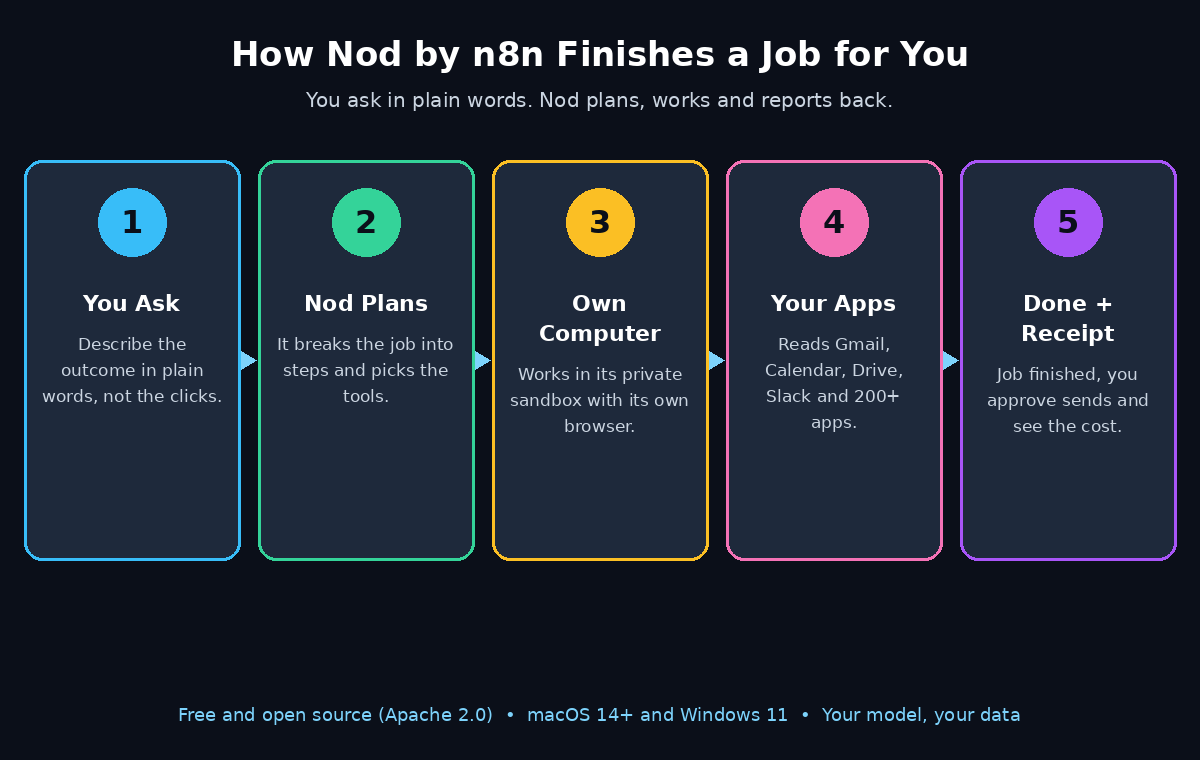
Nod is a personal agent with its own computer. That sentence sounds strange, so let us unpack it. When you install Nod, it runs a private virtual machine on your own computer, with its own browser, its own files and its own terminal. When you give it a job, it works inside that sandbox: it opens websites, clicks buttons, fills in forms, reads your email, checks your calendar and creates documents and spreadsheets until the job is finished.
Because it has its own browser, Nod can work on websites that have no official integration at all. A normal chatbot can only use apps that someone built a connector for. Nod can sign in to a supplier portal, pull out your invoices, watch a price on a dashboard that has no export button, or cancel a subscription and request a refund. That is the difference between an assistant that answers and an agent that acts.
Nod also works ahead of you. It reads your connected apps and suggests jobs it could take off your plate, such as a morning briefing, a price check or a follow-up you forgot. And it remembers: n8n reports a score of 93.2% on LongMemEval, a public benchmark for long-term memory, so Nod can recall things from months of conversation without you repeating yourself. For anyone tracking how AI agents are changing everyday work, Agentic Affairs covers this shift toward agents that remember and act.
- Its own computer: a private Linux virtual machine on your machine, with its own browser.
- Your apps: Gmail, Calendar, Drive, Slack, Notion, Linear and more than 200 apps in total.
- Your model: you choose the AI provider, from OpenAI and Anthropic to a local model.
- Free and open source: Apache 2.0 licence, with the code on GitHub.
Step 2: Check the System Requirements
Before you download anything, make sure your computer can run Nod. The requirements are simple, but the Windows version is still a preview, so read this step carefully.
- Mac: macOS 14 or later, on Apple silicon or Intel. This is the smoothest way to run Nod today.
- Windows: Windows 11 in preview, and it needs WSL 2 (Windows Subsystem for Linux) because Nod’s sandbox is Linux-based. If WSL 2 is not already on your PC, expect an extra setup step.
- Your own server: you can also self-host Nod with Docker Compose, for one person, if you prefer running it on a machine that never sleeps.
- An AI model: Nod itself is free, but you pay your model provider for the AI you use, or you connect a free open-source model running on your own computer.
One practical limit to know upfront: when Nod runs on your laptop, it stops when the laptop sleeps. If you want jobs running around the clock, the server option is the way to go. Nod also cannot make phone calls, so anything that needs a real voice call is still a job for you.
Step 3: Download and Install Nod
Getting Nod onto your computer takes only a few minutes. The download lives at nod.n8n.io, and the code is published at github.com/n8n-io/nod if you want to read it first.
- Go to nod.n8n.io and download the installer for your system: Mac or Windows 11.
- Run the installer and open Nod. You do not need to create an n8n account, and there is no server or cloud service to set up first.
- On Windows, make sure WSL 2 is installed before you launch Nod, or the sandbox will not start.
- When Nod opens for the first time, it sets up its private virtual machine in the background. Give it a minute, then you will see the chat window where all your work begins.
Because Nod is a research preview, currently around version 0.6, expect the product to change quickly in its first weeks. Treat the official site and the GitHub repository as the source of truth for the latest features, and check the release notes after updates.
Step 4: Connect Your AI Model Provider
Nod does not come with its own AI model. Instead, it lets you bring the model you already use, which keeps the app free and keeps your choice open. This is the step beginners find most confusing, so take it slowly.
In Nod’s settings, open the model section and pick your provider. Supported options include OpenAI, Anthropic, OpenRouter, Google Gemini, Amazon Bedrock, Google Vertex AI, Azure OpenAI and Cloudflare. If you have a ChatGPT Plus or Pro plan, you can connect that too, so Nod runs on the subscription you already pay for. Prefer to pay nothing per token? Connect a local model through Ollama, LM Studio, vLLM or llama.cpp, and the AI runs on your own computer.
Enter your API key or sign in with your plan, then send Nod a short test message such as “Hello, what can you do?” If it answers, your model is connected. A word of honest warning from the n8n team: some early testers found tasks cost more than they expected. That is why Step 7, on spending controls, matters so much, and why starting with a cheap model or a local model is a smart first move.
Step 5: Connect Gmail, Calendar and Your Other Apps
A personal agent is only useful if it can reach your work. Nod connects to your apps with a single sign-in each, and its app catalog, powered by Composio, covers more than 200 apps.
- Gmail: let Nod read, search and draft emails, and learn your writing style from messages you have already sent.
- Google Calendar: let Nod check your availability, book meetings and prepare you for the day.
- Google Drive: let Nod find files, read documents and save the files it creates for you.
- Slack and Notion: let Nod read channels and pages, post updates and keep notes in sync.
- Linear and more: developers can connect issue trackers and other tools from the same catalog.
Connect only the apps you actually need for your first week. Each connection asks for your permission, and you can remove any app later. A good starter set is Gmail and Calendar: with those two, Nod can already draft replies, find free meeting times and build your morning briefing. You can add Drive and Slack once you trust it with a few small jobs.
Step 6: Give Nod Its First Real Task
Now the fun part. Talk to Nod the way you would talk to a capable assistant. Be specific about the outcome you want, not about the clicks needed to get there. Nod figures out the steps itself.
Good first tasks are small, safe and easy to check:
- “Find all the invoices from my internet provider in Gmail from the last three months and put the amounts in a spreadsheet.”
- “Check my calendar for tomorrow, and draft a short briefing with my meetings and anything I need to prepare.”
- “Search the web for the best budget wireless headphones under $50 and make a comparison table.”
- “Find the cheapest flight from Lahore to Dubai next month and show me the options.”
Watch what Nod does on its first job. It will open its own browser, visit the sites it needs, and work through the task. When it needs a decision, it asks before it acts. When it finishes, it shows you the result and a receipt for what the task cost. If something looks wrong, say so in plain words and it will fix it. Start with read-only jobs, such as research and summaries, before you let it send emails or spend money.
Step 7: Approve Actions and Control Spending
An agent that can click, send and pay needs guardrails, and Nod has several built in. Learn them before you hand over anything important.
First, the approval step. Before Nod sends, pays, posts or deletes anything you did not explicitly ask for, a separate server-side trust check confirms you actually asked for it, and Nod asks for your approval. This check is itself a model, so it can make mistakes, which is why your approval is the real safeguard, not a formality. Read the approval prompt every time, especially when money is involved.
Second, the cost controls. Every task shows what it cost, and a finished task ends with a receipt. You can set a monthly spending limit, and Nod checks in with you once a task passes $5, an amount you can change. Each scheduled job also shows an estimated monthly cost before you turn it on. If a task starts looking expensive, stop it, switch to a cheaper model, or move that kind of job to a local model that costs nothing per token.
- Set a monthly spending limit on day one, before your first big task.
- Keep the $5 check-in switched on, or lower it while you are learning.
- Read every task receipt, so you learn which jobs are cheap and which are pricey.
- Never approve a payment or a send you did not read first.
Step 8: Let Nod Work Ahead with Memory and Schedules
Once the basics feel safe, Nod’s two most powerful features open up: memory and schedules. Memory means Nod remembers months of conversation, so you do not have to keep reminding it what you want. It records how it completed tasks, reuses those notes, and revises them when a website changes. It can even learn your writing style from sent Gmail messages, so its drafts start to sound like you.
You stay in control of that memory. You can inspect what Nod remembers, edit it, or delete it. If it ever remembers something wrong, correct it in chat and it updates its notes.
Schedules let recurring work run on its own. Ask Nod to send you a morning briefing every weekday, check a price every day, or summarise your inbox every evening. Each schedule shows its estimated monthly cost, so you can decide whether the convenience is worth it. Nod can also propose jobs after reading your connected apps, which is a good way to discover uses you would not have thought of yourself.
Step 9: Chat with Nod from Telegram or WhatsApp
You do not have to be sitting at your computer to use Nod. You can chat with it in the app, or through Telegram and WhatsApp, and it is the same conversation everywhere. That means you can start a job from your phone while you are out, and check the result when you get back.
This also means several jobs can run in parallel while you carry on with your day. Ask Nod to research one thing, draft a document for another, and keep a price watch running, all from the same chat. Just remember the laptop rule from Step 2: if Nod runs on a laptop that goes to sleep, its jobs pause until the machine wakes up. For phone-based control of round-the-clock jobs, the server install is the better home for Nod.
Step 10: Keep Your Data Safe with the Vault and Logs
Trust is the whole question with an agent that can sign in as you, so here is how Nod handles it. Your data, memory, files and saved logins stay on the machine running Nod. Only your chosen AI provider receives the information each task needs.
Saved logins and payment cards live in an encrypted vault on your machine, and Nod enters them through private forms the model cannot read, so your passwords are never part of the AI’s view of the task. Nod also logs every sign-in, every card use, every action in your connected apps and every model cost, creating an activity record you can review at any time.
Three habits will keep you safe:
- Review the activity log once a week, especially sign-ins and card uses.
- Use a dedicated email or a limited-permission account for risky first experiments, not your main inbox.
- Keep your model provider account protected with a strong password and two-factor authentication.
Nod by n8n vs ChatGPT vs n8n vs Grok Bot
How does Nod compare with the tools you may already use? The short answer is that they solve different problems, and many people will use more than one.
| Feature | Nod by n8n | ChatGPT | n8n | Grok Bot |
|---|---|---|---|---|
| What it is | Personal AI agent with its own computer | AI chatbot and assistant | Workflow automation platform | AI agent that runs on your subscriptions |
| Does the work for you | Yes, in apps and on real websites | Mostly answers and drafts | Yes, through automations you build | Yes, on your Mac or PC |
| Price | Free app; you pay your model provider | Free tier; Plus/Pro plans | Free self-hosted; paid cloud | Free app; runs on your AI plan |
| Open source | Yes, Apache 2.0 | No | Yes | No |
| Own browser and computer | Yes, private sandbox | No | No | Uses your computer |
| Long-term memory | Yes, 93.2% LongMemEval | Yes, limited | Via memory nodes | Yes |
| Best for | Beginners who want jobs finished | Questions, writing, ideas | Builders automating team processes | Hands-off tasks on your AI plan |
If you already use ChatGPT every day, Nod does not replace it. ChatGPT is still the fastest way to ask a question or draft a paragraph. Nod is what you reach for when the answer is not enough and the job itself needs doing, and if you want to compare it with the automation tools it sits beside, our guides to Zapier AI and Make AI show the other side of that world.
Frequently Asked Questions About Nod by n8n
Is Nod by n8n really free?
Yes, the app itself is free and open source under Apache 2.0. You pay your model provider for the AI usage, or you connect a free open-source model running on your own computer through Ollama or LM Studio. If you use a ChatGPT Plus or Pro plan, Nod runs on the subscription you already pay for.
Is Nod the same thing as n8n?
No. Nod is a standalone desktop app from n8n Labs, a new team inside n8n. You do not build workflows or use nodes in Nod, and you do not need an n8n account. You chat with Nod in plain words and it does the work, while n8n remains the platform for building team automations.
Which computers can run Nod?
Mac computers running macOS 14 or later, on Apple silicon or Intel, and Windows 11 in preview, which needs WSL 2. You can also self-host Nod on your own server with Docker Compose. Nod stops when a laptop sleeps, so a server is best for round-the-clock jobs.
Is it safe to let Nod sign in to my accounts?
Nod is designed with safety in mind: logins and cards are encrypted in a vault on your machine and entered through private forms the model cannot read, a trust check and your approval stand before sends, payments, posts and deletions, and every action is logged. Even so, start with low-risk jobs, read every approval carefully, and review the activity log weekly.
What can Nod not do yet?
Nod is a research preview, so expect rough edges and fast changes. It cannot make phone calls, it stops when your laptop sleeps, and early testers found some tasks cost more than expected, so watch the per-task receipts and set a monthly spending limit. The n8n team says recent releases have brought costs down substantially.
Where do I download Nod?
Download it from nod.n8n.io for Mac or Windows, and find the open-source code at github.com/n8n-io/nod. Check the official site and the GitHub repository for the newest version and release notes, because a research preview changes quickly.
Final Thoughts
Nod by n8n is the clearest sign yet that personal AI is moving from answering to doing. A free, open-source agent with its own computer, its own browser, months of memory and a vault for your logins is a big step for beginners who have never written a line of code. The research preview label is honest: costs can surprise you, the Windows version is still a preview, and the product will change fast. But the core idea is already working, and it earned the #1 spot on Product Hunt on its first full day for a reason.
Start small. Install Nod, connect one model and two apps, and give it one read-only job. Read the receipt, check the log, and then give it something bigger. That is how you learn what a personal agent is good for, without surprises. And if you run a business and want this kind of automation across a whole team, a digital agency that builds AI workflows can help you plan it properly.
Explore More Free AI Tools
Want to keep exploring? Try our free tools on AIToolSteps.com — the AI Title Generator, Meta Description Generator, AI Rewriter, and Keyword Density Checker. They are free, beginner-friendly, and built to help your content rank.