

Most AI tools hand a small business owner a blank chat box and leave them to figure out what to ask. That is exactly the problem NEXUPIRA AI was built to solve. Launched on Product Hunt on November 2, 2026, NEXUPIRA does not give you one more chatbot — it gives you an AI team. Each teammate has a role, a ready-made first task, and hands back finished work you can actually use: a quote as a PDF, receipts turned into a clean Excel sheet, customer replies drafted from your own documents, and a calendar that stays in order.
If you run a small shop, a service business, a freelancing practice, or any business where you answer customers long after closing time, this guide is for you. You do not need any technical skills, and you do not need a credit card to start — the free plan is live today. Below, you will learn exactly how to use NEXUPIRA AI: what each teammate does, how to set up your knowledge base, how to connect WhatsApp, Google Workspace and Notion, and how to stay in control of everything the AI sends on your behalf.
Step 1: Understand What NEXUPIRA AI Actually Is
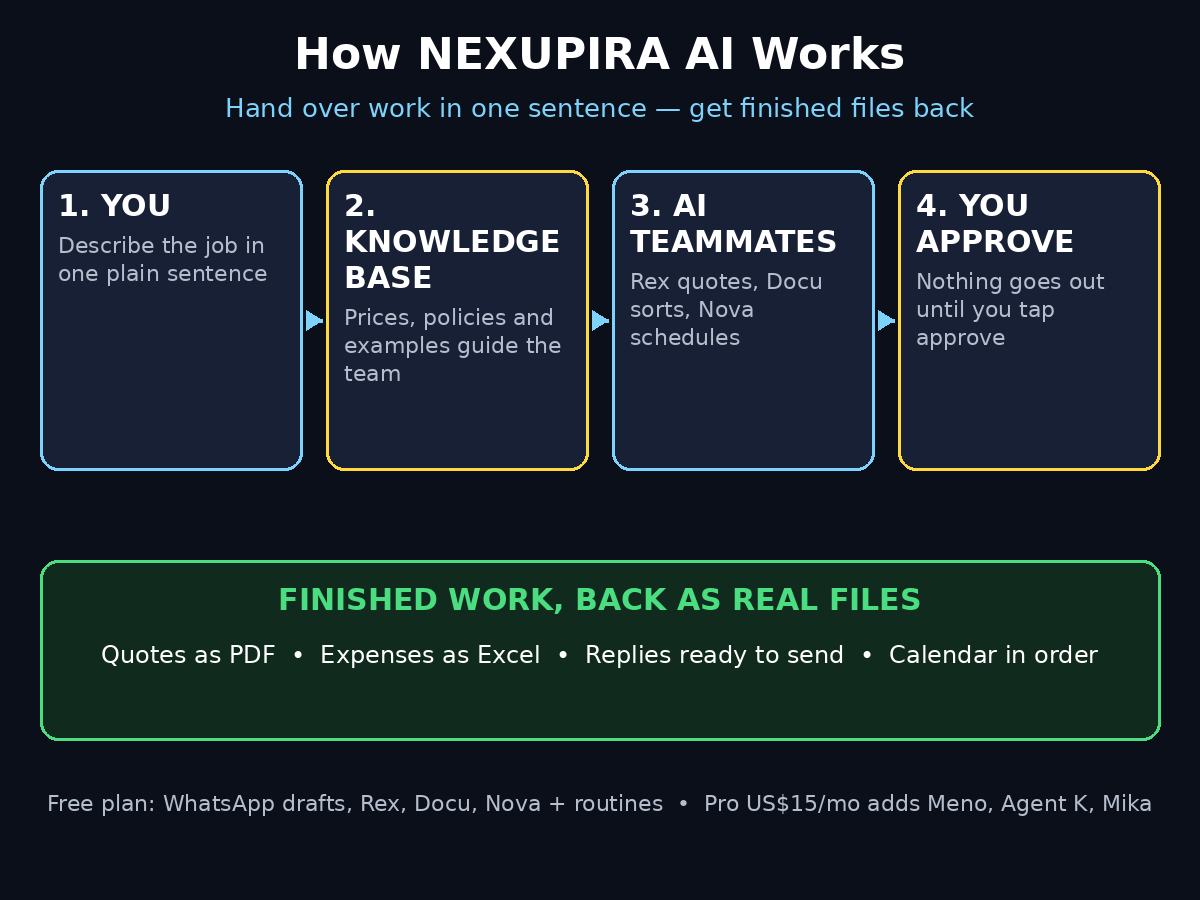
NEXUPIRA is best understood as hiring an AI team, not opening another chat box. Traditional AI assistants wait for you to write the perfect prompt. NEXUPIRA flips that around: every teammate already knows its job, and each one comes with a ready-made first task, so you hand work over in one sentence and get finished work back.
The free plan, live since launch, includes four teammates and tools:
- WhatsApp inbox — every customer message gets a reply drafted from your own documents. You approve what goes out.
- Rex (sales and customer service) — prepares quotes as ready-to-send PDFs.
- Docu (finance and expenses) — turns income, receipts and statements into a clean Excel sheet.
- Nova (admin secretary) — keeps your calendar and schedule in order.
- Routines — run on a schedule, like a daily industry-news digest saved to your knowledge base.
Everything comes back as real files: Excel, Word and PDF. That matters, because a quote you can attach to an email is useful in a way a chat answer never is. The paid Pro plan, at US$15 a month, adds three more teammates — Meno for team knowledge, Agent K for projects and workflows, and Mika for marketing drafts — plus Slack, GitHub and Linear connections, and the ability to work with your AI team from inside ChatGPT or Claude.
The founder, Jojo, built NEXUPIRA after watching small business owners answer customer messages, build quotes and sort receipts long after closing time. The work is repetitive, but it cannot be sloppy — so the whole product is designed around one idea: you hand work over in one sentence and still stay in control of what goes out.
Step 2: Create Your Free NEXUPIRA Account
Getting started takes a few minutes and no credit card.
- Go to the NEXUPIRA website and choose the free sign-up option.
- Create your account with your work email — the one your customers already write to.
- Tell NEXUPIRA a little about your business: what you sell, who your customers are, and what a normal day looks like. This is not a formality. The teammates use this context to draft replies and quotes that sound like your business, not a generic template.
- Confirm your email and sign in to your dashboard.
Once you are inside, you will see your team listed by role. Do not try to learn everything at once. Pick one teammate — most people start with Rex or the WhatsApp inbox — and get one small win first. A single finished quote or a single approved reply teaches you more about the tool than an hour of clicking around settings.
A practical tip for beginners: use the same business name, logo and contact details everywhere you set them up. When Rex builds a quote PDF, it uses the details you gave it, and consistent branding makes a one-person business look like a business customers can trust.
Step 3: Set Up Your Knowledge Base First
This is the step most beginners skip, and it is the step that decides whether NEXUPIRA is genuinely useful or just another demo. The teammates draft from your own documents — your price list, your service descriptions, your policies, your past quotes. If you give them nothing, they can only guess. If you give them your real documents, their work sounds like you.
Start with these four documents:
- Your price list or rate card — the products or services you sell and what they cost.
- Your service descriptions — what is included, what is not, and how long things take.
- Your policies — payment terms, delivery times, refund or rescheduling rules.
- A few example quotes or replies — the way you normally write to customers.
Upload them to your NEXUPIRA knowledge base from the dashboard. You can add files as you go, so do not wait until everything is perfect. A price list and one good example quote are enough to start, and you can keep adding documents whenever you notice a teammate guessing at something you already have written down somewhere.
Think of the knowledge base as the new employee’s training manual. The better it is, the less you have to correct. If you work with a digital agency or an advisor on your online presence, this is also the moment to make sure your website and your price list say the same thing — a mismatch between the two is the most common reason an AI-drafted reply looks wrong, and it is usually a business problem, not a tool problem. Many small businesses sort this out with help from a digital agency like D365A, whose team builds the websites and online systems that tools like NEXUPIRA then plug into.
Step 4: Connect WhatsApp and Let the AI Draft Replies
For most small businesses, WhatsApp is where customers actually live. NEXUPIRA’s free WhatsApp inbox watches incoming customer messages and drafts a reply for each one, using your knowledge base — your prices, your policies, your tone.
Here is how to use it in practice:
- Connect your WhatsApp Business number from the NEXUPIRA dashboard and follow the on-screen steps to link it.
- Choose which chats the AI should watch. Start narrow — one number, one product line — until you trust the drafts.
- When a customer writes in, NEXUPIRA drafts a reply and shows it to you for approval. Nothing goes out without your tap.
- Approve it, edit it, or reject it. Every correction teaches the system how you actually talk to customers.
The approval step is the whole point. The founder’s own question to early users was simple: would you approve an AI-drafted reply in one tap, and if not, what would make you trust it? The honest answer for most owners is that trust comes from seeing ten good drafts in a row, and from knowing a bad one can never slip out on its own. So keep approval on, at least for the first few weeks. The time you save comes from not writing the reply from scratch — approving a good draft takes seconds.
Set a simple rule for yourself: if a message involves money, a complaint, or a promise with a deadline, read the draft twice. Everything else, one careful read is enough.
Step 5: Ask Rex to Build Your First Quote as a PDF
Rex is the teammate most owners fall in love with first, because quoting is the job that eats evenings. Instead of opening a spreadsheet and rebuilding the same document for the hundredth time, you describe the job in one sentence and Rex prepares a ready-to-send PDF.
Try it like this:
- Open Rex from your dashboard and describe the job in plain words: the customer, what they need, quantities, and any deadline.
- Rex pulls your prices and terms from the knowledge base and drafts the quote.
- Check the numbers line by line. Prices, quantities, tax, delivery — this is your money, and a quote with a wrong total is worse than a slow quote.
- Approve it, download the PDF, and send it to the customer.
A good first test is a real quote you already sent before, so you can compare Rex’s version against your own. If the numbers match and the wording is clean, you have just found the hour you used to lose every evening.
Over time, build a habit: every time you approve a quote, save it as an example in the knowledge base. Rex gets sharper, your quotes get more consistent, and customers start to notice that your business answers fast and looks professional. If your business is growing and you want your quoting, website and follow-up to work as one system rather than three separate chores, that is exactly the kind of joined-up setup an AI automation services team helps small businesses put together.
Step 6: Hand Docu Your Receipts and Get a Clean Excel Sheet
Docu handles the job nobody enjoys: turning a pile of receipts, income records and bank statements into something an accountant can actually use.
To use Docu:
- Gather your receipts and statements — photos of paper receipts, PDF invoices, downloaded bank statements.
- Upload them to Docu from the dashboard.
- Docu reads each document, pulls out the date, vendor, amount and category, and builds a clean Excel sheet.
- Open the sheet and check a few rows against the originals, especially the first time. Amounts and dates are the fields that matter most.
- Save the finished sheet with the month in the file name, so your records stay organised.
The practical win here is at tax time. Instead of a shoebox of paper and a weekend of data entry, you have a month-by-month Excel file that is already structured. Small businesses that do this weekly — ten minutes every Friday — almost never face the end-of-year panic that comes from doing it all at once.
One caution: Docu works from the documents you give it. A blurry photo of a faded receipt will produce a guess, not a fact. Photograph receipts flat, in good light, as soon as you get them, and keep the originals until you have checked the sheet.
Step 7: Let Nova Organise Your Calendar and Schedule
Nova is your admin secretary. While Rex sells and Docu counts, Nova keeps your calendar and schedule in order — the quiet job that stops double-bookings and missed calls.
In practice, Nova helps you:
- Keep appointments, deadlines and follow-ups in one place.
- Turn a customer conversation into a calendar event without you retyping the details.
- Remind you about the follow-ups that make the difference between a quote and a sale.
The habit that makes Nova work is a daily two-minute check: open your schedule each morning, confirm what is real, and let Nova hold the rest. Owners who do this stop losing jobs to the most expensive mistake in a small business — forgetting to call someone back.
If you already live in Google Calendar, connect Google Workspace from the dashboard so Nova works with the calendar you already use, instead of creating a second one you have to check separately.
Step 8: Set Up a Routine That Runs on Schedule
Routines are NEXUPIRA’s quiet superpower, and they are included in the free plan. A routine is a job that runs on a schedule without you asking each time — for example, a daily industry-news digest saved to your knowledge base, or a weekly summary of your open quotes.
Set up your first routine like this:
- Pick one repeating job you do every day or every week.
- Tell NEXUPIRA what the output should be and where it should go — for example, “every morning, save a short digest of AI tools news for small businesses to my knowledge base.”
- Choose the time it should run.
- Check the first two or three outputs before you trust it completely, then let it run.
Start with one routine. Owners who set up five on day one usually abandon all five, because they never check whether any of them is actually useful. One routine that saves you fifteen minutes every morning is worth more than five you never read.
Step 9: Connect Google Workspace, Notion and Telegram
The free plan connects Google Workspace, Notion and Telegram, and these connections are what turn NEXUPIRA from a clever demo into a daily tool.
- Google Workspace — lets the team work with your Gmail and Calendar, so quotes, replies and scheduling use the accounts your customers already know.
- Notion — connects your notes, price lists and SOPs, so the knowledge base stays current without you re-uploading files.
- Telegram — gives you another channel to reach the team from your phone.
Connect one at a time, and check what each connection can see before you switch it on. A good rule for any AI tool is to connect the smallest set of permissions that still does the job, and to review those connections once a month. If a connection stops being useful, disconnect it — a tidy set of integrations is easier to trust than a long list you have forgotten about.
Step 10: Review, Approve and Stay in Control
NEXUPIRA is designed so that you approve what goes out, and that design only works if you actually use it. Build a simple daily review habit:
- Morning (5 minutes): check Nova’s schedule, approve or edit the overnight WhatsApp drafts, and glance at today’s quotes.
- During the day: let Rex and Docu do the drafting and sorting, and approve as things arrive.
- Evening (5 minutes): check what went out, fix anything that looked off, and add the fix to the knowledge base so it does not happen twice.
This is also where you protect your business. An AI teammate is a helper, not a manager. It should never send a price, a promise or a refund without your approval, and it should never be given access to move money on its own. The free plan’s approval step is a feature, not a chore — it is the difference between delegating work and losing control of it.
If a draft ever looks wrong, do not just fix the draft. Ask why it went wrong. Nine times out of ten the answer is a missing or outdated document in the knowledge base, and fixing that one document prevents the same mistake across every teammate at once.
Step 11: Decide If Pro (US$15 a Month) Is Worth It for You
The free plan covers the core team: WhatsApp drafts, Rex quotes, Docu expenses and Nova scheduling, plus routines and the Google Workspace, Notion and Telegram connections. For many one-person businesses, that is genuinely enough.
Pro, at US$15 a month, adds:
- Meno — team knowledge, so the whole team shares what it knows.
- Agent K — projects and workflows, for work that spans more than one teammate.
- Mika — marketing drafts, for posts, emails and campaigns.
- Slack, GitHub and Linear connections — for teams that already live in those tools.
- Working from ChatGPT or Claude — use your AI team from inside the chatbots you already open every day.
Upgrade when you hit a specific limit, not before. Good reasons to upgrade: your team has grown past one person and needs shared knowledge, you are running multi-step projects that need Agent K, or you are writing marketing every week and want Mika to draft it. Bad reasons to upgrade: curiosity, or a feeling that the free plan must be missing something. Use the free plan hard for two or three weeks first. If it is saving you real hours every week, US$15 a month is a small price for a team that never sleeps. If it is not, no upgrade will fix that — the fix is a better knowledge base.
NEXUPIRA AI vs the Alternatives
| Option | What you get | Cost to start | Best for |
|---|---|---|---|
| NEXUPIRA AI (free plan) | AI teammates for WhatsApp replies, PDF quotes, Excel expenses, calendar and routines | Free, no credit card | Small businesses that want finished work, not a chat box |
| A blank AI chatbot | Answers when you write a good prompt | Free | Quick questions and one-off writing |
| Hiring a virtual assistant | A real person who learns your business | Usually US$300+ a month | Businesses with steady, complex work |
| Separate quoting and accounting apps | Professional quotes and books, but you do the typing | Free tiers, then subscriptions | Businesses that like doing each job in its own app |
| Doing it all yourself | Full control, zero tools | Free, but costs your evenings | Very small workloads |
The honest comparison is this: a chatbot is cheaper and a human assistant is smarter, but NEXUPIRA sits in the middle — it hands back finished files with almost no prompting, at a price a small business can actually afford. That middle ground is exactly where most one-to-five-person businesses live.
Frequently Asked Questions About NEXUPIRA AI
Is NEXUPIRA AI really free?
Yes, to start. The free plan includes the WhatsApp inbox, Rex for quotes, Docu for expenses, Nova for your calendar, scheduled routines, and connections to Google Workspace, Notion and Telegram. No credit card is required to sign up. Pro costs US$15 a month and adds three more teammates plus extra integrations. As with any new launch, check the pricing page before you build a workflow that depends on heavy daily use, because free limits can change as the product grows.
Do I need technical skills to use NEXUPIRA AI?
No. The whole point of the product is that each teammate already knows its job. You describe work in plain words — “draft a reply to this customer” or “make a quote for this job” — and the teammate hands back finished work. If you can use WhatsApp and email, you can use NEXUPIRA.
Can NEXUPIRA send messages to my customers without asking me?
No. Every WhatsApp reply is drafted for your approval, and nothing goes out until you approve it. That approval step is built into the free plan. Keep it switched on, especially for messages about money, complaints or deadlines.
What kind of files does NEXUPIRA give back?
Real files you can use: quotes as PDF, expense records as Excel sheets, and documents as Word files. That is the difference between a teammate and a chatbot — the output is something you can attach to an email or hand to your accountant.
Is NEXUPIRA AI good for freelancers and one-person businesses?
Yes — it was built for them. The founder’s starting point was small business owners doing admin work long after closing time. A freelancer who answers clients on WhatsApp, sends quotes and tracks expenses gets the same benefit as a small shop: the repetitive work gets done, and the owner keeps control of what goes out.
When did NEXUPIRA AI launch?
NEXUPIRA launched on Product Hunt on November 2, 2026. It is a brand-new product, so expect fast improvements — and fast changes. Treat the official website and the in-app pricing page as the source of truth, not a screenshot from launch week.
Final Thoughts
NEXUPIRA AI is a small, honest idea done well: instead of a blank chat box, you get a team that already knows its job. Rex builds your quotes, Docu sorts your receipts, Nova keeps your calendar, and the WhatsApp inbox drafts replies your customers actually receive — all from the documents you already have, and all with you approving what goes out.
The setup that makes it work is not complicated, but it is not optional either. Spend twenty minutes on your knowledge base before you judge the tool, start with one teammate and one small win, and keep the approval step switched on until trust is earned. Do that, and the free plan alone can give you back the hour you used to lose every evening — the hour you can spend on the work only you can do.
Explore More Free AI Tools
Want to keep building your free AI toolkit? Try the AI Title Generator, Meta Description Generator, AI Rewriter, and Keyword Density Checker — all free at https://aitoolsteps.com/ — and keep exploring practical, beginner-friendly guides on AI tools that save small businesses real time every day.