

What Is Memorias AI?
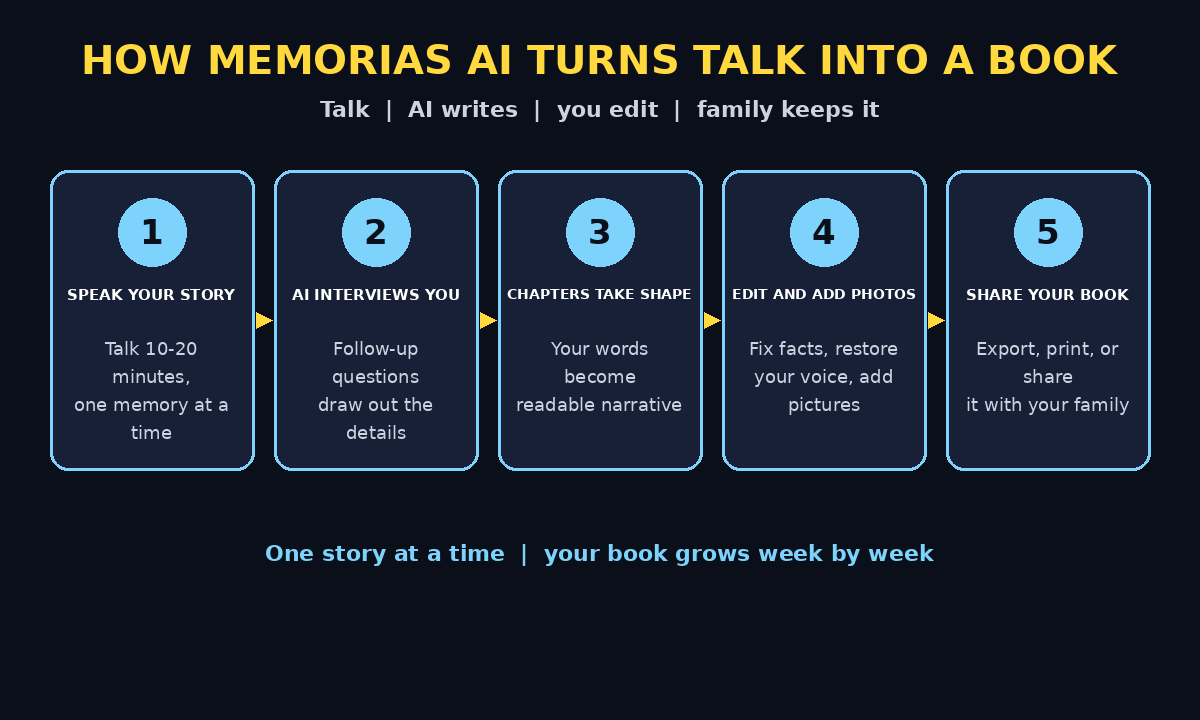
Memorias AI is an AI biographer that turns your spoken stories into a book. Instead of staring at a blank page, you talk — about your childhood, your family, your work, the moments that shaped you — and the AI listens, asks follow-up questions, and shapes your answers into written chapters. It launched on Product Hunt on November 9, 2026, with the simple promise: “An AI biographer that turns your stories into a book.”
Most people have a life worth writing down and no idea where to start. A memoir feels like a huge project, and writing is slow work. Memorias AI removes the hardest part. You do not need to be a writer, you do not need an outline, and you do not need to type long passages. You speak the way you would tell a story at a family dinner, and the tool does the writing. That is why it is such a good fit for beginners, for older parents and grandparents, and for anyone who has always meant to write their story down “one day.”
This guide shows you how to use Memorias AI from your first visit to your finished book, step by step. You will learn how to set up your book, how to answer the AI’s questions so your chapters come out rich and true, how to edit what it writes, and how to share the result with the people who matter most.
Step 1: Find Memorias on Product Hunt and Create Your Account
Start by searching for “Memorias” on Product Hunt, where it launched on November 9, 2026. The launch page is the best place to confirm the current pricing, the free tier, and the latest features, because a brand-new tool can change fast in its first weeks. From the launch page, follow the link to the Memorias website and create your account with your email address.
Use an email address you check regularly, because that is where your book lives and where any export or sharing links will be sent. If you are setting this up for a parent or grandparent, create the account with their email — or yours, if you will be the one managing the book — and keep the login details somewhere safe. A memoir project runs for weeks, and losing access halfway through is the one mistake that is hard to undo.
- Check the launch page first: pricing and free limits for a new tool can change quickly, so confirm them on Product Hunt before you start.
- Use a lasting email: your book is tied to the account, so pick an address you will still use in a year.
- Allow microphone access: speaking is the whole point of Memorias AI, so let your browser use your microphone when it asks.
Step 2: Start Your First Book and Set the Basics
Once you are signed in, start a new book. Memorias AI will ask for a few basics: whose story this is, a working title, and roughly which part of life you want to begin with. Do not overthink the title — “My Life Story,” “Growing Up in Lahore,” or simply your name all work fine. You can change it later, and most people do once the chapters take shape.
The more useful choice is where to begin. Starting at the very beginning — childhood — feels logical, but it is not always the easiest place to start talking. Many people find it easier to begin with a memory that is vivid right now: a first job, a wedding, a move to a new city, a funny family story. Pick the memory you can already see clearly in your mind. The AI biographer will help you work backwards and forwards from there until the whole timeline fills in.
Step 3: Answer the AI Biographer’s First Questions
This is where Memorias AI is different from a blank document. Instead of asking you to write, it interviews you. Expect simple, open questions such as where you grew up, what your childhood home was like, who the important people in your early life were, and what a normal day looked like when you were young.
Answer in your own words and in your own voice. There are no wrong answers here, and short answers are fine — the AI is trained to follow up. If you say “we lived in a small house near the market,” it may ask what the street sounded like in the morning, or who your neighbours were. Those follow-ups are where the good material comes from. The details you think are boring — the smell of the kitchen, the walk to school, the radio in the background — are exactly the details that make a memoir feel real to the people who will read it.
Step 4: Record Your Memories by Speaking, Not Typing
Talk instead of typing whenever you can. Speaking is faster, and more importantly, it sounds like you. When you type, you edit yourself as you go and the story comes out stiff. When you speak, you remember more, you wander into useful side stories, and your natural way of talking survives into the written chapter.
Keep each recording session short — ten to twenty minutes is plenty. Talk about one memory per session: one place, one person, or one event. Sit somewhere quiet, hold the phone or microphone close, and just tell the story the way you would tell a friend. If you lose your place, pause and start the sentence again; the AI can handle that. If a new memory pops up halfway through, finish the one you are telling first, then come back to it in the next session. Short, focused sessions build a better book than one exhausting three-hour recording.
- One memory per session: a single story, told properly, beats five half-told ones.
- Speak slowly and clearly: the AI transcribes your words, so mumbling costs you detail later.
- Name names and dates: “my uncle Rashid, in the summer of 1998” is worth ten vague sentences.
Step 5: Let the AI Turn Your Answers Into Chapters
After each session, Memorias AI shapes what you said into a written chapter. It keeps your stories in order, smooths out the pauses and repetitions of spoken language, and writes it in a readable narrative voice. This is the moment the project starts to feel real: your spoken memories come back as pages you can actually read.
Read the chapter soon after it is written, while the conversation is still fresh in your mind. Check that the facts are right — names, dates, places — and that the story says what you meant. The AI writes only from what you told it, so anything it gets wrong is usually a misunderstanding of something you said, not something it invented. Fixing it now takes seconds; fixing it after ten more chapters takes much longer.
Step 6: Read, Edit, and Fix the Details
Every AI biographer needs a human editor, and that editor is you. Go through each chapter with three questions in mind: Is it true? Does it sound like me? Is anything missing?
First, correct the facts. AI transcription and AI writing can both mishear a name or blur a date, and in a life story those details are the whole point. Second, restore your voice. If the AI smoothed a sentence so much that it no longer sounds like something you would say, rewrite it in your own words — a few of your own sentences in every chapter keep the book honest. Third, fill the gaps. When you read a chapter and think “I should have mentioned the shop next door,” add it. The book grows stronger with every small correction, and this editing pass is what turns a rough AI draft into a memoir your family will actually keep.
Step 7: Add Photos to Bring Each Chapter to Life
A photo can do what a paragraph cannot. Add old photographs to the chapters they belong to: the house you grew up in, the people you are writing about, the places that no longer exist. A photo of a street, a wedding, or a first car anchors the story in something real and helps younger readers picture a world they never saw.
Before you upload, take a minute to scan or photograph old prints in good light, flat on a table, without glare. Write a one-line caption for each photo — who is in it, where it was taken, and roughly when. Captions matter because memories fade, and in twenty years the caption may be the only record of what the photo shows. If a chapter has no photo, that is fine; not every memory needs one. But the chapters that do will be the ones your family returns to first.
Step 8: Organize Your Chapters Into a Real Story Arc
By now your book is a pile of chapters, and a pile is not a story. Open the book view and look at the order. Most life stories work best in roughly chronological order — childhood, youth, work, family, the present — but you do not have to be strict about it. What matters is that the reader can follow your life from one chapter to the next without getting lost.
Move chapters around until the flow feels right. Group short memories about the same time or place together, and give each group a clear chapter title that tells the reader what is inside: “The House on Canal Road” says more than “Chapter 4.” If two chapters repeat the same story, merge them and keep the better version. A memoir of fifteen strong chapters is worth more than thirty padded ones, so cut what does not earn its place.
Step 9: Invite Family to Add Their Own Memories
A life is never lived alone, and the best memoirs include more than one voice. If Memorias AI lets you invite family members, bring them in — a sibling remembers the same childhood differently, a spouse remembers the wedding day from the other side, and children remember moments you forgot entirely. Their additions do not have to be long; even a short memory or a correction adds a layer your book would not have on its own.
Share the book privately while it is still a draft. Family can read chapters, point out mistakes, and add their own stories before anything is final. Set the ground rules early: this is your story, so you decide what stays in, and anything sensitive — health details, family disagreements, private matters — stays out unless you choose to include it. A memoir is a gift to your family, and it should feel like one to everyone in it.
Step 10: Export, Share, or Print Your Finished Book
When the chapters are edited and the order feels right, it is time to finish the book. Check the export options in Memorias AI — most AI memoir tools offer a PDF or an e-book file, and some offer a printed hardcover. Download a copy for yourself first, so you always own your book no matter what happens to the app or your account.
Then decide how to share it. A private link or a PDF works well for family spread across different countries. A printed copy makes a far better gift — a grandparent’s life story, bound and printed, is the kind of present that gets kept on a shelf for decades. If you want your finished book to live on a proper website — a family archive, a personal brand page, or a portfolio — a digital agency can build it for you. However you share it, read the whole book once more before you send it out. This is your life story, and the final read-through is worth the hour it takes.
Memorias AI vs Other AI Memoir Tools
Memorias AI is not the only AI biographer, and the right choice depends on how you like to tell your story and what you want at the end. Here is how it compares with three well-known alternatives.
| Tool | How you tell your story | What you get | Best for | Starting price |
|---|---|---|---|---|
| Memorias AI | Speak your stories to an AI biographer | A finished book built from your spoken memories | Anyone who would rather talk than write | Check the Product Hunt launch page |
| Remento | Weekly prompts, answered by speaking | Written chapters plus an optional hardcover book with QR codes that play your recordings | Families recording a parent’s stories | $99 for the first year |
| StoryWorth | One emailed question a week, answered in writing | A hardcover book at the end of the year | A gift for a parent or grandparent | Paid plan, book included |
| Ever Journal (Eve) | Chat interview, one question at a time | Chapters in your own voice, downloadable as text | A private memoir on a budget | Free to start; Eve+ $7.99 a month |
The pattern is clear: if you love talking, Memorias AI and Remento fit you best. If you prefer writing short answers, StoryWorth is the classic choice. If privacy and cost matter most, Ever Journal’s free start is hard to beat. And if you run a business and want AI to handle repetitive writing or customer follow-ups the way Memorias handles your memories, AI automation services can set that up for you.
Tips for Better Stories With Memorias AI
- Start with the easy memories: funny stories and happy moments come out more naturally than painful ones. Save the hard chapters for later, when you trust the process.
- Record little and often: one short session a week will finish a book in a few months. Waiting for a free weekend means the book never gets written.
- Use real names, places, and dates: “Uncle Rashid’s shop on Hall Road in 1998” will mean something to your grandchildren. “A relative’s shop, long ago” will not.
- Keep a notebook nearby: memories arrive at odd times — in the shower, on a walk, at 2 a.m. Write down the one-line trigger and record it in your next session.
- Let the AI ask twice: if a follow-up question feels odd, answer it anyway. The second question is often the one that unlocks the detail you forgot.
- Save your own copy: download your book regularly. Your stories belong to you, and your own file is the only copy you fully control.
Frequently Asked Questions About Memorias AI
Is Memorias AI free?
The Product Hunt launch listing does not spell out a free tier or a price, and a tool this new can change its pricing quickly. Check the Memorias launch page on Product Hunt for the current plan before you start, and try the free option first if one is offered.
Do I need to be a writer to use Memorias AI?
No. That is the whole point of the tool. You talk, the AI writes. If you can tell a story out loud to a friend, you can use Memorias AI. Your job is remembering and speaking; the writing is the AI’s job, and the editing is a short pass you do afterwards.
Can I use Memorias AI for a parent or grandparent?
Yes, and this is one of its best uses. Sit with them, open a session, and let the AI ask the questions while they talk. Older people often tell wonderful stories when someone asks, and a recorded session preserves not just the story but the way they tell it. Just make sure they are comfortable and happy to be recorded.
Who owns the stories and the finished book?
Your stories are yours. Before you upload sensitive family details, read the tool’s privacy page to confirm how your recordings are stored and whether they are used to train AI models. As a habit, download your finished book so you always hold your own copy.
Can I print the book Memorias AI makes?
That depends on the export options Memorias offers at the time you finish. Most AI memoir tools export a PDF or an e-book file, which any print shop can bind into a book. Check the export menu in the app before you plan a printed gift, and test it with one chapter first.
What if the AI gets a fact wrong in my chapter?
Correct it in the edit pass. The AI writes only from what you told it, so a wrong fact is usually a misheard word or a confused date. Fix names, dates, and places as soon as you spot them, and read each chapter while the conversation is still fresh in your mind.
Final Thoughts
Memorias AI solves the oldest problem in memoir writing: the blank page. You do not need to be a writer, you do not need an outline, and you do not need to find hours of quiet time. You need a phone, a quiet room, and ten minutes to tell one story. Do that once a week, and in a few months you will have a book — your book, in your voice, full of the details only you remember.
Start today, while the memory you are thinking of is still vivid. Open Memorias AI, answer the first question, and tell one story. The second story will be easier, the tenth will feel natural, and by the time the book is finished, you will wonder why you waited so long. Your life is worth a book, and now writing it is as simple as talking.
Explore More Free AI Tools
Want more free AI tools to grow your content? Try the AI Title Generator, Meta Description Generator, AI Rewriter, and Keyword Density Checker — free tools from AI Tool Steps to help you write, polish, and rank your content faster.