

This Inception Mercury 3 for beginners guide is written for complete newcomers — follow each step below and you’ll go from curious to capable in under an hour.
On 19 October 2026, Inception Labs — a Redwood City, California AI company — launched Mercury 3, its new flagship model. Mercury 3 is a diffusion LLM, which means it generates text differently from classic models like GPT or Claude: instead of producing one token at a time, it writes many tokens in parallel. Inception says this lets Mercury 3 reach 1,068 tokens per second on NVIDIA GPUs — a 4 to 8x speed advantage over speed-optimised rival models, according to the company (independent benchmarks have not yet verified these figures, so treat them as vendor claims for now).
This guide walks you through everything a beginner needs: what Mercury 3 is, how to sign up and claim 100 million free tokens with no credit card, how to try it with zero coding, how to connect it to popular coding agents, and how to build a real-time use case with it.
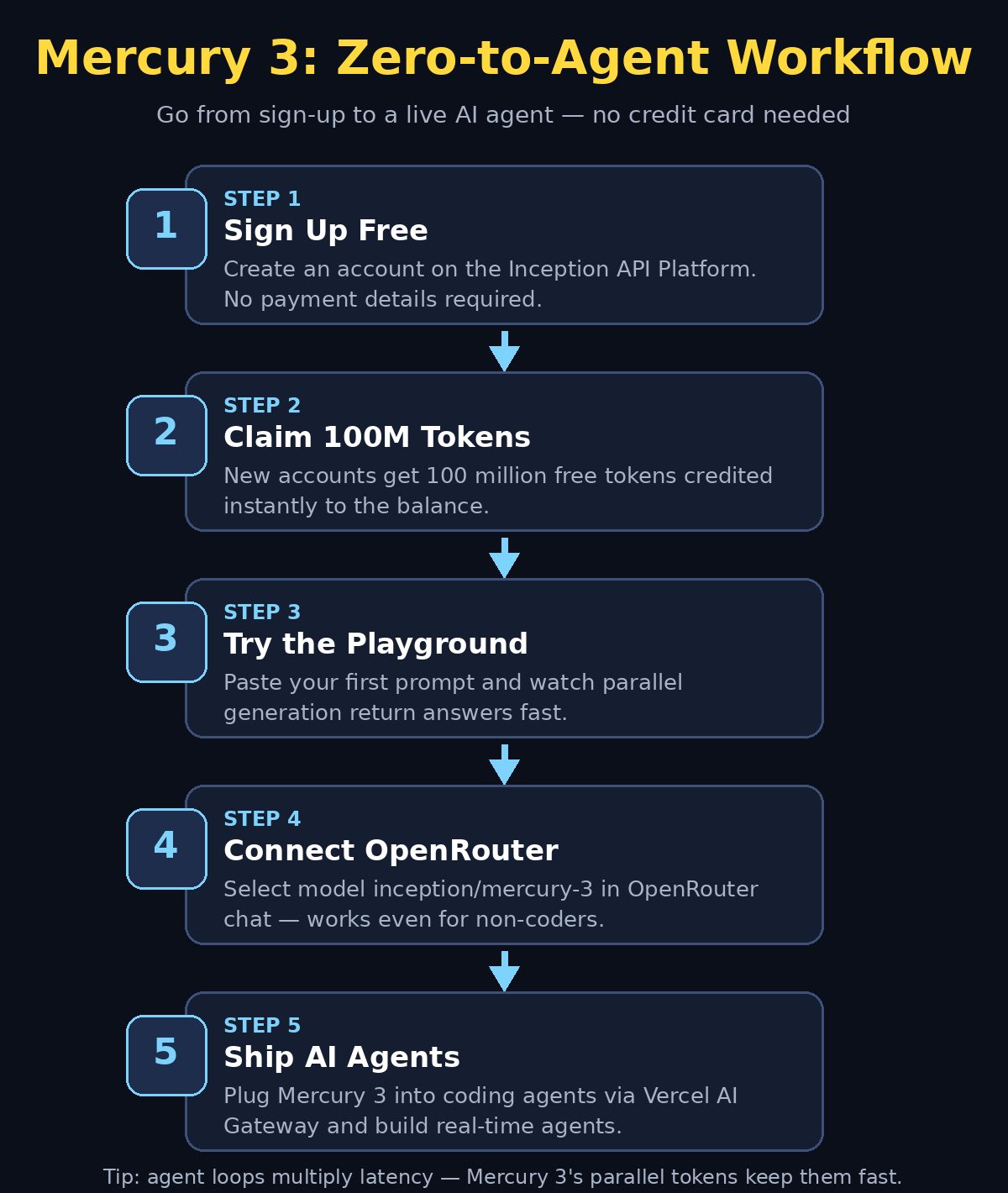
Step 1: Understand What Mercury 3 Is and Why Speed Matters
Traditional large language models are autoregressive — they generate answers word by word, left to right, waiting for each token before producing the next. Diffusion models flip this around: Mercury 3 drafts many tokens at once and refines them in parallel.
Why does raw speed matter so much? Because modern AI apps run agent loops — a model calls a tool, reads the result, thinks, calls another tool, and repeats. Latency multiplies at every turn, so a slow model makes the whole agent feel sluggish. Mercury 3 is built for exactly these workloads:
- Browser agents that need to read pages and act in real time
- Real-time search experiences with instant answers
- Interactive tutoring that responds like a patient teacher
- Customer support bots that answer before the user gets impatient
- Coding agents (Claude Code, Codex, Cursor) where every loop counts
It also ships with a 1-million-token context window — up from 260K in Mercury 2.5 — so it can hold entire codebases, long documents, or hours of conversation in memory.
Step 2: Sign Up and Claim Your 100 Million Free Tokens
Inception is giving new API Platform accounts 100 million free tokens with no payment details required — one of the most generous offers in the industry right now.
- Go to the Inception API Platform sign-up page.
- Create an account with your email — no credit card is asked for.
- The 100M free tokens are credited to your new account automatically.
- Grab your API key from the dashboard and keep it somewhere safe, just like a password.
That’s it. You now have a serious amount of free compute — enough to experiment heavily, run real projects, and learn the platform without spending anything.
Step 3: Try Mercury 3 in the Playground With Your First Prompt
Before writing a single line of code, open the playground on the Inception API Platform. The playground lets you chat with Mercury 3 the same way you’d use any chatbot.
- Select the model
mercury-3from the model dropdown. - Type a prompt like: “Explain how diffusion language models work in five bullet points a beginner can understand.”
- Watch how quickly the answer appears — this is the parallel generation at work.
Try a few different prompts to get a feel for it:
- “Write a 10-line Python script that renames all files in a folder.”
- “Summarise the plot of Pride and Prejudice in three sentences.”
- “Give me five business names for an AI-powered resume checker.”
Notice two extra settings you can play with: reasoning_effort and temperature. Temperature controls creativity (low for factual answers, higher for creative ones), and reasoning_effort controls how much the model thinks before answering — we’ll tune that properly in Step 6.
Step 4: Use It With Zero Code via OpenRouter Chat
If you don’t want to touch the Inception dashboard every time, OpenRouter is the beginner-friendly route. OpenRouter is a single hub where you can chat with hundreds of models — and Mercury 3 is already there.
- Create a free OpenRouter account.
- Open the OpenRouter chat interface.
- Select the model
inception/mercury-3. - Chat normally — OpenRouter handles the API key and billing behind the scenes.
This is also how many small businesses test a model before committing to an integration. If you run a shop or agency and want someone to handle the setup end to end, a digital agency like d365a.com can wire a model like Mercury 3 into your website or support flow without you touching any code.
Step 5: Connect It to Coding Agents via Vercel AI Gateway
Here’s where Mercury 3 gets exciting for builders. Coding agents such as Claude Code, Codex, and Cursor can use Mercury 3 through the Vercel AI Gateway:
- Run the one-command setup:
npx vercel ai-gateway setup. - Choose the model name
inception/mercury-3when prompted. - Your coding agent will now route its model calls through Mercury 3.
Because agent workflows loop dozens of times — write code, run tests, read errors, fix, repeat — the model’s speed compounds. A faster model doesn’t just feel snappier; it can finish whole coding tasks noticeably sooner. Inception’s launch materials cite partner results like RevisionDojo getting student feedback in about 1 second and Octen AI seeing 0.9-second median generation with 2.2-second end-to-end responses — though remember these are the company’s own reported figures.
For teams building on top of agentic AI, sites like agentic-affairs.com track AI automation services and can help you scope what a Mercury 3-powered workflow would look like for your business.
Step 6: Tune reasoning_effort for Speed vs Smarts
The reasoning_effort parameter is Mercury 3’s speed-vs-smarts dial. Higher effort means the model thinks longer and answers more carefully; lower effort means faster, snappier responses.
- Low effort — quick questions, drafts, chat replies, live search snippets. Maximum speed.
- Medium effort — everyday coding help, summarisation, tutoring. A balanced default.
- High effort — hard math, tricky debugging, multi-step reasoning where accuracy matters most.
Start at medium for general use, drop to low when you need instant answers, and push to high only for genuinely difficult problems. Beginners often leave everything at maximum and wonder why responses feel slow — tuning this one setting is the fastest way to make Mercury 3 feel right.
Step 7: Build a Real-Time Use Case — An Instant Homework Helper
Let’s make something real. An instant homework helper shows off Mercury 3’s strengths: fast answers, big context, and low effort for quick questions.
Concept: a simple web page where a student pastes a question and gets an answer in under two seconds.
- Take your Inception API key from Step 2.
- Install the official SDK:
pip install inceptionai(Python) ornpm install inceptionai(TypeScript). - The SDK is OpenAI API compatible, so if you’ve used OpenAI’s library before, the code looks almost identical — just point it at Mercury 3 with model id
mercury-3. - Set
reasoning_effortto low for instant replies. - Send the student’s question and stream the answer back to the page.
Level up with documents: the 1M-token context window lets you upload an entire textbook chapter and let students ask questions about it — live document Q&A with answers that reference the actual text. That’s a weekend project that genuinely impresses.
Step 8: Manage Your Free Tokens and Understand the Pricing
100 million tokens sounds like a lot. Here’s the pricing math so you know where you stand once the free tokens run out. Inception launched with 50% off introductory pricing:
- Input: $0.10 per 1M tokens (standard price $0.20)
- Output: $0.35 per 1M tokens (standard price $0.70)
- Cached input: a further 90% off, making repeated context nearly free
At launch prices, 100M free tokens would be worth roughly $10 of input-only usage or about $35 if it were all output — in practice a mix, so comfortably tens of dollars of free experimentation.
Tips to stretch your tokens:
- Reuse conversation context so cached-input discounts kick in.
- Use low
reasoning_effortfor drafts and only pay for heavy thinking when it matters. - Stream responses and stop generation the moment you have what you need.
- Monitor the usage dashboard weekly — tokens go fast with big context windows.
Also note Inception sells two sibling products alongside Mercury 3: Mercury Voice (time-to-first-token under 170ms, aimed at voice agents) and Mercury Decide (a classification model). And if you’re a Mercury 2 or 2.5 user: those versions are retired for new users, but existing users keep access until 15 November 2026.
Step 9: Compare Mercury 3 With the Alternatives
Inception positions Mercury 3 against fast, affordable models like GPT-6 Luna and Claude Haiku 5.5. On its own benchmark materials, the company reports SWE-Bench Atlas 51.08 and IFBench 76.84 — quality scores competitive with those rivals, at a claimed 4–8x speed advantage.
| Mercury 3 | GPT-6 Luna | Claude Haiku 5.5 | |
|---|---|---|---|
| Speed claim | ~1,068 tok/s (vendor claim) | Fast-tier model | Fast-tier model |
| Context window | 1M tokens | Large | Large |
| Launch input price | $0.10 / 1M tokens | Competitive | Competitive |
| Launch output price | $0.35 / 1M tokens | Competitive | Competitive |
| Free tier | 100M tokens, no card | Varies | Varies |
| Quality scores | SWE-Bench Atlas 51.08, IFBench 76.84 (vendor claims) | Vendor-published | Vendor-published |
Important honesty note: every speed and quality number above for Mercury 3 comes from Inception’s own launch materials. Independent benchmarks have not verified the 1,068 tokens/second figure or the 4–8x claim yet. The free-tokens offer is real and verifiable — the speed records, for now, are the company’s word. That’s normal for a launch; just wait for third-party tests before making big buying decisions.
Step 10: Pitfalls and Honest Limitations
No model is perfect. Before you go all in, know these:
- Claims are unverified. The headline speed numbers are Inception’s own measurements on NVIDIA GPUs. Your mileage with different hardware, prompts, and workloads will vary.
- It’s brand new. Mercury 3 launched on 19 October 2026 — one day before this article. Early bugs, documentation gaps, and third-party integration quirks are all likely.
- Diffusion is different. Parallel generation changes failure modes. If you built prompts tuned for autoregressive models, re-test them — some tricks transfer, some don’t.
- Ecosystem is young. GPT and Claude have years of tooling, examples, and community knowledge. Mercury 3’s community is just starting.
- Old versions are going away. Mercury 2 and 2.5 are retired for new sign-ups; existing users have until 15 November 2026 to migrate.
None of this makes Mercury 3 a bad choice — it makes it a new choice. Try it with the free tokens, measure it yourself, and decide with your own data.
Frequently Asked Questions
Is Mercury 3 really free to try?
Yes. New accounts on the Inception API Platform receive 100 million free tokens with no payment details required. That is enough for extensive testing and small real projects before you ever pay anything.
What is a diffusion LLM?
A diffusion language model generates many text tokens in parallel and refines them, instead of writing one token at a time like traditional (autoregressive) models. Inception claims this gives Mercury 3 a 4–8x speed advantage — a claim independent benchmarks have not yet verified.
Do I need to know how to code to use Mercury 3?
No. You can use the Inception playground or OpenRouter chat with zero coding. Coding is only needed if you want to build apps or connect it to coding agents like Claude Code, Codex, or Cursor.
How fast is Mercury 3 in practice?
Inception claims 1,068 tokens per second on NVIDIA GPUs. Real-world speed depends on your setup, prompt, and settings like reasoning_effort. The free tokens let you measure it yourself — which is the only number you should truly trust.
Is Mercury 3 better than GPT-6 Luna or Claude Haiku 5.5?
It depends what you optimise for. Inception’s own benchmarks show competitive quality scores (SWE-Bench Atlas 51.08, IFBench 76.84) at a claimed 4–8x speed advantage and aggressive launch pricing. But these are vendor claims. For maximum speed in agent loops, it’s worth testing; for ecosystem maturity, the incumbents still lead.
What happens to Mercury 2 and 2.5?
They are retired for new users — everyone new gets Mercury 3. Existing users can keep using 2 and 2.5 until 15 November 2026, then must migrate.
Final Thoughts
Mercury 3 is one of the most interesting launches of 2026: a flagship diffusion LLM that treats speed as the headline feature rather than an afterthought. For agent builders, coders, and anyone running real-time AI workloads, the combination of 1M-token context, OpenAI-compatible API, and 100M free tokens makes it nearly free to evaluate.
The honest summary: Inception’s speed claims are bold and unverified, but the free tier removes all risk from trying. Sign up, claim your tokens, run your own tests, and see whether parallel generation changes what your agents can do. In a field where every year brings a faster model, the winners are the people who test early and ship fast.
Explore More Free AI Tools
Want to create better content with AI? Try these free tools at aitoolsteps.com:
- AI Title Generator — create catchy, SEO-friendly titles in seconds.
- Meta Description Generator — write click-worthy meta descriptions that boost rankings.
- AI Rewriter — refresh and rephrase your content effortlessly.
- Keyword Density Checker — keep your SEO perfectly balanced.
Inception Mercury 3 for Beginners: Quick Recap
This wraps up our Inception Mercury 3 for beginners walkthrough. If this Inception Mercury 3 for beginners guide helped you, share it with a friend who’s just starting out. We’ll keep this Inception Mercury 3 for beginners resource updated as the platform evolves, because every Inception Mercury 3 for beginners journey starts with a single prompt.
Inception Mercury 3 for Beginners: What to Try First
If you’re new to this Inception Mercury 3 for beginners path, start with the playground: pick a simple prompt, run it at low reasoning effort, and watch how fast the answer lands. Then claim your 100M free tokens and experiment without spending a penny.
Inception Mercury 3 for Beginners: Keep Learning
This Inception Mercury 3 for beginners series will grow as the platform adds features, so bookmark this page and check back often — every new Inception Mercury 3 for beginners update will land right here.
Inception Mercury 3 for Beginners: Mistakes to Avoid
Most newcomers on this Inception Mercury 3 for beginners journey burn free tokens by running huge prompts at high reasoning effort. Instead, start small, compare low and medium effort on the same task, and only scale up when you understand what each setting costs.
Inception Mercury 3 for Beginners: What’s Next
Once you’re comfortable, take this Inception Mercury 3 for beginners foundation further: connect the model to a coding agent, try Mercury Voice for voice applications, and follow Inception’s changelog for new diffusion model updates.
Inception Mercury 3 for Beginners: Pricing Recap
Remember the numbers from Step 8: launch pricing is 50% off, so input costs $0.10 per million tokens and output $0.35. Because cached input is 90% cheaper still, reusing context is the easiest way to stretch your 100M free tokens.
Inception Mercury 3 for Beginners: Speed or Accuracy
The reasoning_effort dial is the main trade-off to learn. For example, low effort gives you instant drafts and chat replies, while high effort is worth it for tricky debugging and multi-step reasoning. Start at medium and adjust from there.
Inception Mercury 3 for Beginners: FAQ Highlights
Still unsure about something? The FAQ above covers the free tier, diffusion LLMs, coding requirements, real-world speed, and what happens to Mercury 2 and 2.5. In addition, Inception’s own docs are the best place for API details.
Inception Mercury 3 for Beginners: Key Terms Glossary
A few definitions will make the rest of this guide click. A diffusion LLM generates text tokens in parallel instead of one by one. Reasoning effort controls how long the model thinks before answering. And tokens are the chunks of text the model reads and writes — your 100M free tokens are simply your experimentation budget.