

How to Use Dedica AI for Beginners (Free Guide 2026)
Introduction: Your Website Has a New Kind of Visitor
This guide shows you how to use Dedica AI, step by step. AI agents are no longer just answering questions in a chat window. Tools like Muse, Instinct, and GrokBot now browse the web, compare products, sign up for accounts, and even complete purchases on behalf of real people. That means your website has a brand-new kind of visitor — one that does not click buttons the way a human does, does not read your design the way a human does, and silently leaves when it gets stuck.
Most websites fail these visitors without their owners ever knowing. A checkout form that needs a mouse hover, a signup flow hidden behind a pop-up, or a pricing page written only for human eyes can all stop an agent cold — and the sale, signup, or booking goes with it.
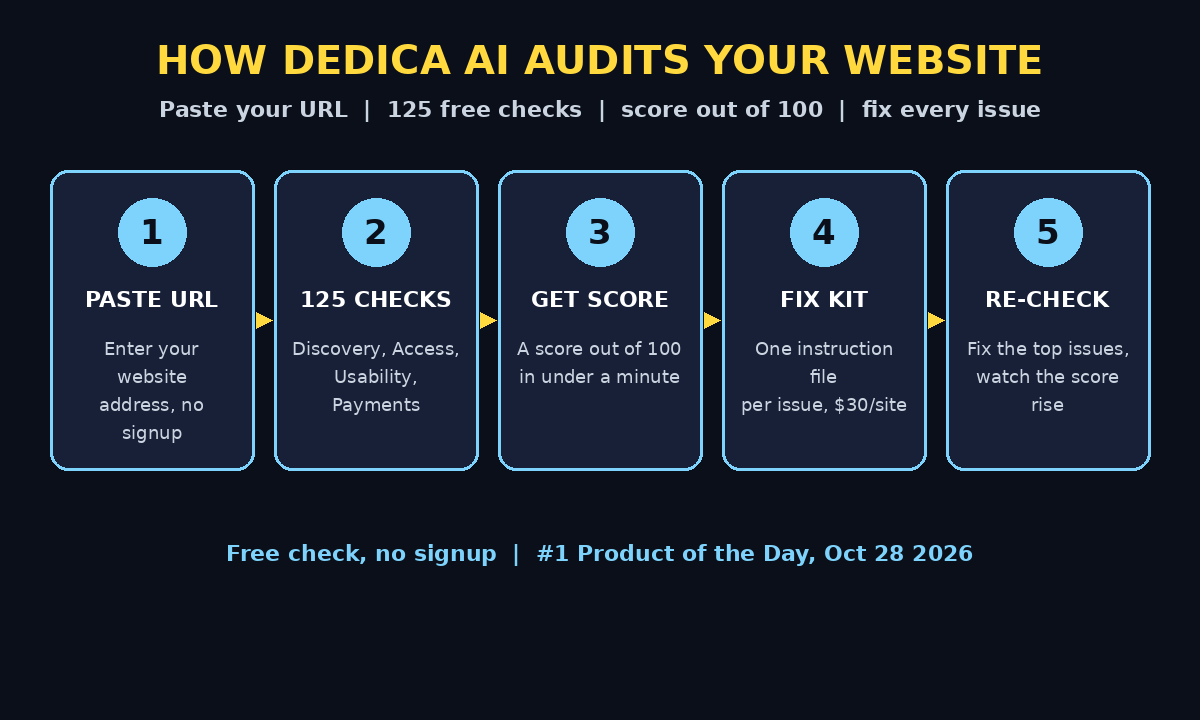
That is the problem Dedica AI solves. Dedica tests your website the way AI agents actually use it, runs 125 checks across four categories, and gives you a score out of 100 plus a fix for every place agents fail. The checks are completely free, take under a minute, and need no signup. In this guide, you will learn exactly how to use Dedica AI for beginners, step by step — from your first free check to handing the fixes to your coding agent.
If you run a website, a store, or a service page of any kind, this is one of the most useful free AI tools of 2026. Dedica launched on Product Hunt on October 28, 2026, earned 307 upvotes, and took the number one Product of the Day spot — because it solves a problem almost every site owner has but almost nobody can see.
Step 1: Understand What Dedica AI Actually Does
Before you run your first check, it helps to understand what Dedica is measuring. Traditional website audits look at your site the way Google looks at it: page speed, keywords, backlinks, and mobile layout. Dedica looks at your site the way an AI agent looks at it — and those are two very different things.
An AI agent does not “see” your beautiful homepage. It reads the page structure, follows links, fills in forms, and tries to complete a task, such as finding a price, creating an account, or buying a product. When any of those steps is unclear, blocked, or broken, the agent gives up — and the customer behind it never hears about it.
Dedica runs 125 automated checks that simulate this agent journey. The checks fall into four categories:
- Discovery: can agents find your site, understand what it offers, and reach the right pages?
- Access: can agents get past login walls, cookie banners, bot protection, and other gates?
- Usability: can agents actually use your forms, navigation, search, and key pages?
- Payments: can an agent understand your checkout and payment options, including agent-friendly methods?
After the checks, Dedica gives you a score out of 100 and lists every failed check in priority order, with the fixes that move your score the most at the top. You do not need to be a developer to understand the report — each issue is explained in plain language.
Step 2: How to Use Dedica AI to Run Your First Free Check
Running your first Dedica check is refreshingly simple. There is no account to create, no credit card to enter, and no software to install.
- Open the Dedica website in your browser.
- Paste your website URL into the check box on the homepage.
- Click the run button and wait — the full check usually finishes in under a minute.
That is the whole setup. Because the free check needs no signup, you can test your own site, a client site, or even a competitor site to compare results. This makes Dedica a great first step for anyone offering website or digital agency services: you can walk into a client conversation with a real, evidence-based score instead of a guess.
Tip: start with your homepage URL. Dedica follows your site from there, so the homepage gives the most complete picture of the first impression an agent gets. You can run more specific pages later — your pricing page, your signup page, and your checkout page are the three most valuable follow-up checks.
Step 3: Read Your Score Out of 100
When the check finishes, the first thing you will see is a single number: your score out of 100. Think of it like a health score for agent readiness.
- 80–100: your site is in good shape for AI agents. Fix the remaining small issues and re-check.
- 50–79: agents can use parts of your site, but real tasks are probably failing somewhere.
- Below 50: agents are likely blocked or confused early. Treat the top fixes as urgent.
Do not panic if your first score is low. Most websites score low on their first Dedica check, because almost nobody has designed for agent visitors yet. A low score is not an embarrassment — it is a map. Every point on the list is a specific, fixable problem, and Dedica orders them by impact so you always know what matters most.
Below the score, you will see the breakdown by category — Discovery, Access, Usability, and Payments — so you can tell at a glance whether your biggest problem is being found, being entered, being used, or being paid through.
Step 4: Work Through the Four Check Categories
The report groups all 125 checks into four categories. Here is what each one means in practice, and the kind of issue you will find inside it.
Discovery. This checks whether agents can find and understand your site at all. Common issues include missing or unclear structured data, pages that do not explain what the business actually does, and important pages that are hard to reach from the homepage. If agents cannot discover your offer, nothing else matters.
Access. This checks whether agents can get through the gates in front of your site. Aggressive bot protection, cookie walls that block automated visitors, and login requirements on pages that should be public all show up here. Note the balance: you still want to block malicious bots, but Dedica helps you spot the difference between security that protects you and barriers that also block legitimate AI visitors.
Usability. This is usually the biggest category. It checks whether an agent can complete real tasks: find a product, compare plans, fill in a form, create an account, or contact you. Forms with unclear labels, buttons that only work with a mouse hover, and multi-step flows with no clear progress are classic failures here.
Payments. This checks whether an agent can actually get through checkout. Dedica looks at whether agent-friendly payment methods are supported and whether your payment documentation is clear enough for an agent to understand. This category matters more every month, as more purchases start with an agent doing the shopping.
Work through the categories in the order Dedica lists them — the report is already sorted by priority, so the first issues are the ones costing you the most.
Step 5: Prioritize the Fixes That Move Your Score Most
With 125 checks, the report can look long. Do not try to fix everything at once. Dedica shares results in priority order on purpose: the fixes at the top are the ones that unlock the most agent tasks.
A good rule is to fix the top five issues first, then re-run the check. In most cases, a handful of high-impact fixes — a clearer signup flow, a machine-readable pricing page, a checkout that an agent can follow — will lift your score far more than dozens of tiny tweaks.
As you read each issue, ask three questions:
- Does this block a real task, like signing up or buying?
- Does it affect many pages, or just one?
- Can I fix it in minutes, or does it need a developer?
Issues that block a real task on many pages go first. One-page cosmetic issues go last. If you manage websites for clients, this priority list is also a ready-made report: you can show the client exactly what is broken, why it matters, and what fixing it will unlock — which is a much stronger conversation than a vague promise to “improve the website.”
Step 6: How to Use Dedica AI’s Fix Kit with Your Coding Agent
Knowing what is broken is only half the job. Dedica also gives you the fix for every issue — and this is where the tool becomes genuinely practical for beginners.
The free check shows you the issues and the fixes that matter most. For a one-time payment of $30 per site at the launch price (normally $50), the fix kit gives you one instruction file per issue. Each file is written so you can drop it straight into a coding agent like Claude Code or Cursor, and the agent applies the fix for you.
Here is how to use it:
- Run the free check and review your priority list.
- Get the fix kit for your site if you want the ready-made instruction files.
- Open your coding agent and paste the instruction file for the top issue.
- Let the agent make the change, then review it before publishing.
- Repeat for the next issue on the list.
If you do not code at all, you can hand the same instruction files to a developer or a freelancer — they are written as clear, specific tasks, not vague suggestions. Either way, you go from “something is broken” to “here is the exact fix” without writing a single technical specification yourself.
Teams that publish content about AI and automation, such as the writers behind AI automation services coverage, often use this same pattern: audit first, fix with an agent, then re-check to prove the improvement.
Step 7: Re-Run the Check and Confirm the Improvement
Never assume a fix worked — prove it. After you apply the top fixes, run the Dedica check again on the same URL. Your score should move, and the fixed issues should disappear from the report.
This re-check loop is the real workflow:
- Run the free check and note your starting score.
- Fix the top five priority issues.
- Re-run the check and record the new score.
- Repeat until the score is where you want it.
Keep a simple log — date, URL, score, and what you fixed — so you can show progress over time. If you run a store or a service business, this log is also useful evidence for stakeholders: a score that climbs from 42 to 81 in a week tells a much clearer story than “we improved the website.”
Re-check after every significant website change, too. A redesign, a new checkout step, or a new bot-protection rule can quietly break agent access that used to work. A one-minute Dedica check after each launch catches those regressions before they cost you customers.
Step 8: How to Use Dedica AI’s API and MCP Server to Automate Checks
If you manage more than one website, running checks by hand gets slow. Dedica also offers a public API and an MCP server, so your own AI agent can check sites itself — no manual pasting required.
With the API, you can run checks from your own tools and dashboards, schedule regular audits, and compare scores across all your sites in one place. With the MCP server, an agent you already use can call Dedica directly as part of a bigger workflow — for example, auditing a client site as the first step of an onboarding checklist.
Beginners do not need either of these on day one. Start with the free manual check, learn what the report means, and only move to automation when you are checking sites often enough for it to save real time. The manual check and the automated check run the same 125 checks, so nothing is lost by starting simple.
Step 9: Make Agent-Readiness Part of Every Launch
The smartest way to use Dedica is not as a one-time fix, but as a habit. AI agents are becoming a normal way people shop, book, and sign up — and the share of traffic they represent will only grow from here. Sites that are ready for agents will win those customers; sites that are not will lose them silently.
Add a Dedica check to your launch checklist, next to your usual steps:
- Run the free check before any major launch or redesign goes live.
- Fix the top issues before launch day, not after.
- Re-check after launch to confirm nothing broke.
- Schedule a monthly check for your most important pages.
This takes minutes per month and protects a channel that most of your competitors are still ignoring. It also keeps you ahead of emerging standards — Dedica tracks new agent protocols such as WebMCP and scores your site against them, so your site stays ready as the agent web evolves.
Dedica AI vs Other Website Audit Tools
How does Dedica compare with the audit tools you may already know? The difference is the visitor it tests for.
| Feature | Dedica AI | Traditional SEO audit | Manual testing |
|---|---|---|---|
| Tests for | AI agents completing tasks | Search engines ranking pages | Human visitors browsing |
| Number of checks | 125 automated checks | Usually 50–100 checks | As many as you have time for |
| Free option | Yes — full check, no signup | Often limited free tier | Free, but very slow |
| Time per check | Under 1 minute | A few minutes | Hours per site |
| Fixes included | Yes — instruction file per issue | Usually suggestions only | You write them yourself |
| Best for | Agent readiness and conversions | Google rankings and traffic | Design and user experience |
Dedica does not replace an SEO audit or human testing — it covers the visitor those tools miss. Use all three together: SEO tools for search traffic, manual testing for human experience, and Dedica for the AI agents that are increasingly doing the shopping.
Frequently Asked Questions About How to Use Dedica AI
Is Dedica AI really free?
Yes. The full 125-check audit is free, takes under a minute, and needs no signup. You only pay if you want the fix kit — a one-time $30 per site at the launch price (normally $50) — which gives you one ready-made instruction file per issue to hand to your coding agent.
Do I need to create an account to use Dedica?
No. The free check works without any signup. Just paste your website URL and run it. This is one of the reasons the tool is so beginner-friendly: there is no onboarding, no dashboard to learn, and no commitment before you see your first result.
What is a good Dedica score?
Think of 80 or above as good, 50 to 79 as work in progress, and below 50 as urgent. Most websites score low on their first check because they were never designed for agent visitors. A low first score is normal — what matters is fixing the top-priority issues and watching the score climb on re-checks.
Can Dedica fix my website automatically?
Dedica does not change your website itself. It finds the problems and gives you the fix for each one. With the fix kit, each fix comes as an instruction file you can drop into a coding agent like Claude Code or Cursor, which then applies the change for you. You always review the change before it goes live.
Which AI agents does Dedica test for?
Dedica tests your site the way agents like Muse, Instinct, and GrokBot use it — agents that browse, compare, sign up, and shop on people’s behalf. It also tracks emerging agent protocols such as WebMCP, so the checks stay current as new agent standards appear.
How often should I run a Dedica check?
Run one before every major launch or redesign, once a month for your most important pages, and any time you change your checkout, signup flow, or bot protection. Each check takes under a minute, so there is no reason to let agent readiness drift.
Final Thoughts
AI agents are quietly becoming some of the most important visitors your website will ever receive. They do not admire your design, they do not forgive a confusing form, and they do not come back to try again — they simply move on to a competitor whose site works for them.
Dedica AI makes this invisible problem visible in under a minute, for free, with no signup. Run the check, read your score out of 100, fix the top-priority issues first, and re-check to prove the improvement. If you want the fixes done fast, the fix kit hands your coding agent one clear instruction file per issue.
Start today: pick your most important page — your homepage, your pricing page, or your checkout — and run your first free Dedica check. The score might surprise you, but every point you gain afterwards is a real customer an AI agent can now reach.
Explore More Free AI Tools
Want more free tools like Dedica? Try the AI Title Generator, Meta Description Generator, AI Rewriter, and Keyword Density Checker — all free on AI Tool Steps, and built to make your content and SEO work faster.