

Search is changing fast. More and more people now ask ChatGPT, Google Gemini, Perplexity or Google AI Overviews for a recommendation instead of scrolling through ten blue links — and if the AI never mentions your business, you are invisible to those customers even if you rank well on Google. That is the exact problem the AI Visibility Checker was built to solve. Launched free on October 14, 2026 by Los Angeles SEO and generative-engine-optimization agency AlchemyLeads, it checks how AI search platforms see your website, whether their crawlers can even reach it, and whether your brand shows up in AI-generated recommendations.
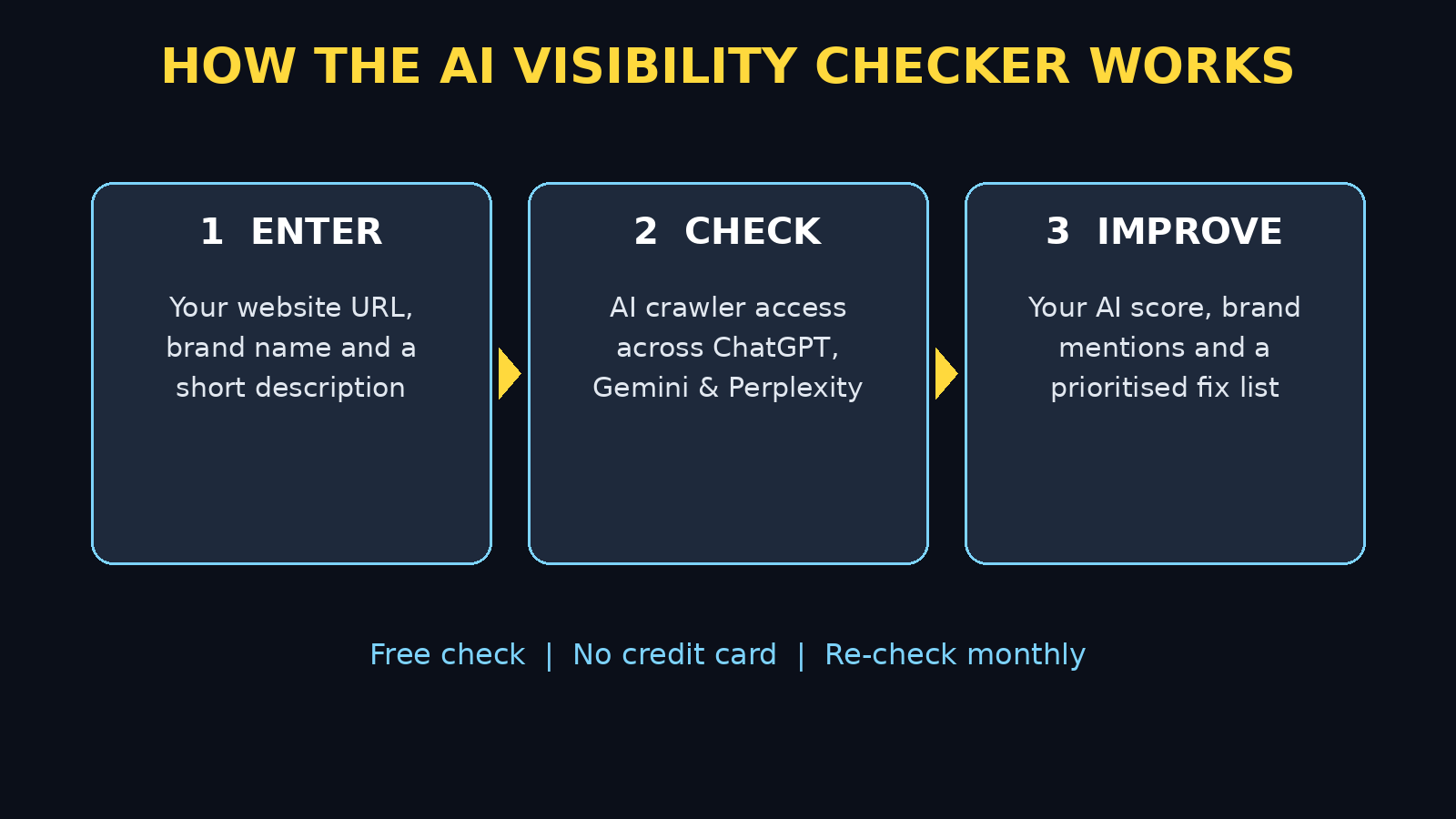
The best part for beginners is that you do not need to be an SEO expert, install anything, or pay anything to get your first result. You type in your website address, your company name and a short description of what you sell, and the tool returns an AI readiness score, a crawler access report and competitive insights in seconds. Enter your email and you unlock the full assessment, including prioritized recommendations for improving your AI search presence. This beginner guide walks you through every step: running your first check, reading your score, fixing the most common problems, and re-checking your progress — even if you have never heard of AI search before.
Step 1: Understand What the AI Visibility Checker Is
Traditional SEO asks one question: does Google rank my page? AI visibility asks a different, newer question: when someone asks an AI assistant for a recommendation, does it mention my brand, link to my site, or describe my product correctly? A business can rank number one on Google and still be absent from ChatGPT answers, because AI platforms use different data sources, different crawlers and different rules for what they trust.
Think of it this way. Google Search shows a list and lets the user choose. An AI answer usually picks just two or three names and presents them as the answer. If your business is not in that short list, the customer never even sees you. The AI Visibility Checker measures exactly that gap: can AI platforms access your site, do they understand what you offer, and do they actually recommend you? For a small business owner, freelancer or blogger, that single picture is worth more than a dozen vanity metrics.
Step 2: Open the Free AI Visibility Checker Tool
Getting started takes less than a minute, and there is no software to download:
- Open the tool in your browser: search for “AlchemyLeads AI Visibility Checker” and open the official tool page. Always use the official page, never a link from a random ad or message.
- No account is needed for the first result: the instant check runs from the details you type in — no credit card, no installation, no technical setup.
- Have three things ready: your website URL, your exact business or brand name, and one or two sentences describing your products or services.
- Use a desktop browser if you can: the full report is easier to read on a bigger screen, although the tool works fine on a phone too.
Beginner tip: run the check on your homepage first, not a deep inner page. AI platforms usually form their first impression of your brand from your homepage, so that is the fairest baseline to start from.
Step 3: Enter Your Website, Brand and Description
The AI Visibility Checker form asks for just a few fields, but each one matters. Fill them carefully, because the AI platforms are judged on exactly this information:
- Website URL: type your full address, for example https://example.com — double-check the spelling, because a typo checks someone else’s site.
- Company name: use the name customers actually search for, not a legal name nobody knows. If your brand and your domain name differ, use the brand name.
- Description: write one clear sentence about what you sell and who it is for, for example “a bakery in Lahore selling custom birthday cakes” rather than “we provide solutions.”
- Target country (if asked): pick the country where most of your customers live, so the recommendations match your real market.
- Custom prompts (optional): add two or three questions your customers would really ask an AI, such as “best birthday cake shop near me” or “affordable logo designer for startups.”
Keep your description honest and specific. Vague wording like “best quality services” tells the checker nothing, and it tells AI platforms nothing either — and that vagueness is often why a brand scores badly in the first place.
Step 4: Read Your AI Visibility Checker Readiness Score
After you submit, the tool immediately returns an AI readiness score plus a crawler access report. Do not panic if the number is low — most small sites score low on their first check, because they were built for Google, not for AI answers. Here is how to read it:
- The overall score: a single snapshot of how ready your site is for AI search. Treat it as a starting line, not a judgement — you will re-check it after every fix.
- Crawler access: whether AI crawlers from ChatGPT, Gemini, Perplexity and others can actually fetch your pages. If a crawler is blocked, no amount of good content will help, because the AI simply cannot see it.
- Brand mentions: whether AI platforms already mention your brand in answers about your topic, and whether those mentions are accurate.
- Competitive insights: how your visibility compares with competitors in the same niche, so you can see who the AI is recommending instead of you.
Write your first score down, with today’s date. Without that baseline you cannot tell later whether a change helped or not, and beginners often waste weeks changing things blindly. Your first report is your “before” photo.
Step 5: Unlock the Full AI Visibility Checker Assessment With Your Email
The instant result is useful, but the full assessment is where the real action plan lives. Enter your email address when prompted to unlock it. The full version adds prioritized recommendations — the fixes ranked by impact — plus deeper detail on each platform and each blocked crawler.
Use a business email you actually check, because follow-up reports and re-check reminders may go there. If you are checking a client’s site, use your own work email and keep the report in a folder for that client. One practical warning: the checker is a marketing tool from an agency, so expect an occasional follow-up email about their services. You are never obliged to buy anything — the free check and its recommendations are genuinely usable on their own.
Step 6: Fix AI Visibility Checker Crawler Blocks First
If the report says an AI crawler is blocked, fix that before anything else. This is the single highest-impact beginner fix, and it is usually a one-line change:
- Check your robots.txt file: open yoursite.com/robots.txt in a browser. Look for lines blocking AI bots such as GPTBot, ClaudeBot, PerplexityBot or Google-Extended.
- Do not block everything by accident: some sites block all bots for security and accidentally block AI search too. Allow the major AI crawlers while keeping genuinely abusive bots blocked.
- Ask your web person if you are unsure: if you use WordPress or a website builder, your developer or host support can adjust robots.txt in minutes. Show them the checker report so they change the right lines.
- Re-run the check after the fix: crawler changes can take days to show up in AI answers, but the checker should confirm access much sooner.
A useful comparison: fixing crawler access is like unlocking your shop door. Beautiful displays inside mean nothing if customers cannot get in. Many agencies, including a digital agency that handles AI visibility work for clients, start every AI search audit with this exact access check before touching content.
Step 7: Make Your Site Easy for the AI Visibility Checker to Understand
Once crawlers can reach you, the next job is clarity. AI platforms reward pages that state facts plainly, because they quote facts, not slogans. Work through your homepage and your main service pages with this checklist:
- One clear headline: say what you do in the first line, for example “Custom birthday cakes in Lahore, delivered same day” — not “Welcome to our website.”
- Facts in plain sentences: prices, locations, services, opening hours and delivery areas, written as simple statements an AI can quote accurately.
- Short paragraphs and headings: break long walls of text into sections with descriptive headings, so the AI can find the right answer quickly.
- A FAQ section: answer the exact questions customers ask, in the exact words they use. AI platforms love FAQ pages because they match real user questions.
- Fresh, accurate content: update old prices, closed locations and discontinued services. AI answers that quote stale facts hurt trust more than no mention at all.
You do not need to rewrite your whole site in one day. Fix the homepage first, then your top two service pages, then re-check. Small, accurate pages beat a large, confusing site every time in AI answers.
Step 8: Test AI Visibility Checker Prompts Your Customers Actually Ask
The checker lets you submit custom prompts, and this is where beginners get the most eye-opening results. Instead of testing “is my site visible,” test the real questions a buyer would ask:
- Write down ten questions customers ask you in real life, on WhatsApp, in your shop or by email.
- Run three or four of them through the checker as custom prompts, plus the same questions in ChatGPT or Gemini yourself.
- Note who the AI recommends, what it says about each business, and whether your name appears at all.
- If a competitor appears and you do not, open the competitor’s page and compare: what facts do they state that you do not?
This habit also teaches you what AI search really is: not a ranking to game, but a reputation to earn. Businesses that publish clear facts, genuine reviews and helpful answers get mentioned. Businesses that hide behind vague marketing copy do not. Teams that offer AI automation services often use the same prompt-testing routine to show clients exactly which questions they are winning and which they are losing.
Step 9: Track Competitors With the AI Visibility Checker Monthly
AI visibility is not a one-time fix. Models update, competitors publish new content, and AI answers change week to week. Build a simple monthly routine:
- Re-run the checker once a month: same URL, same brand name, same description, so the scores are comparable.
- Log the score and the top three fixes: a simple spreadsheet with the date, the score, and what you changed is enough.
- Watch one competitor: pick the competitor the AI mentions most and check what new pages or reviews they added.
- Fix one thing per month: one crawler fix, one rewritten page, or one new FAQ set. Steady monthly progress beats a frantic one-week overhaul.
After two or three monthly checks you will start to see patterns: which pages the AI quotes, which questions you win, and which topics need a new article. That pattern is your AI search strategy, built from evidence instead of guesswork.
Step 10: Avoid Common AI Visibility Checker Beginner Mistakes
Most beginners lose marks on the same few avoidable errors. Watch out for these:
- Checking the wrong URL: a staging site, an old domain, or a page with a typo gives you a report for a site that is not yours.
- Blocking AI crawlers “for privacy”: blocking crawlers also blocks AI recommendations. If you want AI visibility, crawlers must be allowed in.
- Keyword stuffing: repeating your brand name fifty times does not help. AI platforms reward natural, factual writing, not repetition.
- Expecting instant results: crawler and content changes take days or weeks to appear in AI answers. Re-check monthly, not hourly.
- Paying for a “guaranteed AI ranking”: nobody can guarantee an AI mention. Use the free checker, fix what it flags, and judge agencies by their reports, not their promises.
AI Visibility Checker vs Other Free Tools
| Feature | AI Visibility Checker | Google Search Console | Manual AI chat tests |
|---|---|---|---|
| Price | Free | Free | Free |
| AI readiness score | Yes | No | No |
| Crawler access report | Yes, across AI platforms | Googlebot only | No |
| Brand mentions in AI answers | Yes | No | Yes, one chat at a time |
| Competitor comparison | Yes | Limited | Manual |
| Prioritized fix list | Yes (full report) | Technical only | No |
| Best for | Beginners checking AI search | Google rankings | Spot-checking one question |
The honest takeaway is that these tools complement each other. Search Console still rules Google rankings, manual chat tests still show you the exact wording of one answer, but only the AI Visibility Checker gives a beginner the whole AI-search picture — score, access, mentions and competitors — in one free report.
Frequently Asked Questions
Is the AI Visibility Checker really free?
Yes. AlchemyLeads launched it as a free tool on October 14, 2026. The instant score and crawler report are free with no credit card, and entering your email unlocks the full assessment. Paid agency services exist, but they are optional.
Which AI platforms does it check?
It assesses visibility across the major AI search platforms, including ChatGPT, Google Gemini, Perplexity and Google AI Overviews. The crawler report covers the AI crawlers behind those platforms, so you can see exactly which ones can and cannot reach your site.
Do I need technical skills to use it?
No. Running the check needs only your URL, brand name and a short description. Fixing a crawler block may need your developer or host support, but reading the report and rewriting a homepage headline needs no technical skill at all.
How long until my score improves?
Crawler access changes can show in a re-check quickly, but changes in actual AI answers take days to weeks, because AI platforms re-crawl and re-index on their own schedules. Re-check monthly and track the trend, not daily jumps.
Can it check a site I do not own?
Technically you can enter any public URL, which is useful for comparing a competitor. Only change crawler settings or content on sites you own or manage, and never use the report to copy a competitor’s content.
Is a low score bad news?
No — it is a starting point. Most small sites score low on their first check because they were built for Google, not AI answers. A low score with a clear fix list is far better than no information at all, because now you know exactly what to do first.
Final Thoughts
AI search is not a future trend anymore, and the AI Visibility Checker is the simplest way to measure it — it is already how a growing number of customers find businesses, and the gap between being mentioned and being invisible will only widen. The free AI Visibility Checker gives any beginner a clear, honest picture of that gap in minutes: your score, your crawler access, your brand mentions and your competitors. Run it today, write down your baseline, fix the crawler blocks first, make your homepage state its facts plainly, and re-check next month. That simple loop — check, fix, re-check — is the whole strategy, and it costs nothing to start.
Explore More Free AI Tools
Keep building your AI toolkit with these free tools from AI Tool Steps: try the AI Title Generator for headlines that AI platforms can quote, the Meta Description Generator for search snippets, the AI Rewriter to sharpen your homepage copy, and the Keyword Density Checker to keep your pages natural and readable. Each one is free, beginner-friendly, and built to help your content perform in both Google and AI search.