

You subscribe to brilliant newsletters. You follow the best YouTube creators in your niche. Every Sunday you promise yourself you will finally act on what they teach — and every Monday, nothing has changed. The problem is not a lack of good advice. The problem is that reading is not doing.
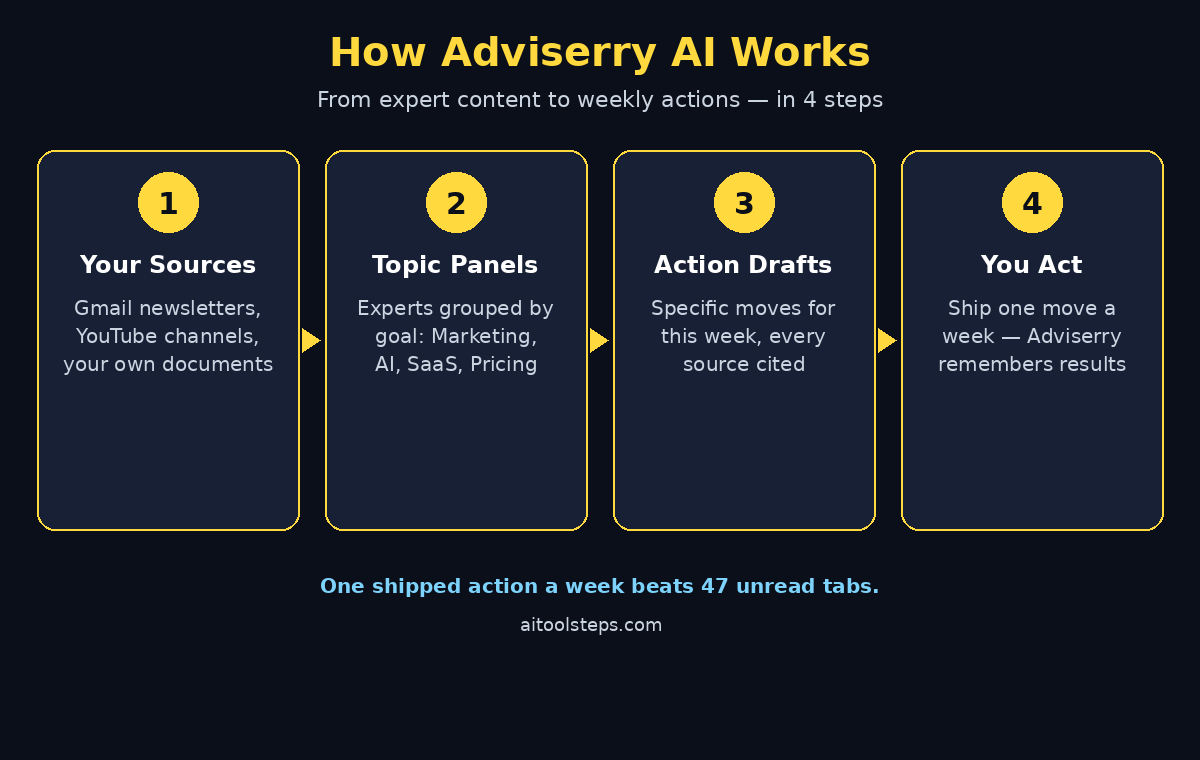
Adviserry AI fixes exactly that gap. Launched on Product Hunt on 5 October 2026, Adviserry turns the experts you already follow into a working advisory panel: it reads every newsletter and video they publish, weighs it against what you are actually building, and drafts the specific moves worth making this week — with every suggestion cited to its source. In this beginner guide, you will learn how to set up Adviserry AI in about five minutes and turn your overflowing inbox into a weekly action list.
Step 1: Understand What Adviserry AI Does
Adviserry is not another chatbot that waits for you to type a question. It works proactively. Once connected, it reads your newsletters and YouTube channels automatically, organises them into topic panels, and drafts concrete actions such as “Test this pricing change” or “Send this email to the stuck deal” — copy-paste ready and linked to the exact issue or video it came from.
Three ideas make it different from simply pasting newsletters into ChatGPT:
- Action drafts, not summaries: every new piece of content is distilled into a specific move you can make this week.
- Cross-source synthesis: when three of your experts touch the same topic in the same week, Adviserry notices and combines their positions into one recommendation.
- Working memory: it remembers what you are building, what you tried, and what worked, so recommendations get sharper the longer you use it.
If you run a small business, this is the closest thing to hiring a research assistant who reads everything for you. Teams that already work with a digital agency for their marketing often use Adviserry to stay on top of the expert advice their agency is acting on, so the conversation stays grounded in the same sources.
Step 2: Start Your 14-Day Free Trial
Every Adviserry plan starts with 14 days free, and no card is needed to start. Head to adviserry.com and click “Start your free trial”. You can also try the interactive demo on the homepage first — it shows the kind of move Adviserry drafts from your experts with no signup at all.
There are three plans after the trial:
- Core — $14.99/month: weekly action drafts every Friday, 2 panels, 10 sources per panel, daily summary email, MCP access.
- Pro — $24.99/month: action drafts every weekday, AI chat with memory, cross-source synthesis, unlimited insights, 5 panels.
- Team — $99.99/month: everything in Pro for 5 seats, shared panels, 10 panels, one person sets up the sources for everyone.
Start on Core. You can upgrade to Pro later if you want the AI chat and daily drafts — the trial lets you feel the weekly rhythm first without paying anything.
Step 3: Connect Your Gmail Newsletters
Adviserry connects to Gmail with read-only access. It detects the senders that are newsletters and ingests only those — the rest of your inbox is never stored or processed, and you can revoke access at any time.
To connect it:
- Go to your Adviserry dashboard and open the Sources section.
- Click “Connect Gmail” and sign in with the Google account where your newsletters arrive.
- Approve the read-only permission. Adviserry will scan your inbox once and list the newsletter senders it found.
- Keep the ones you actually want to learn from and remove the rest. Ten good sources beat fifty noisy ones.
If you use a different email provider, you can forward newsletters to your private Adviserry address instead. Gmail OAuth tokens are encrypted, and the service passed a Google CASA Tier 2 security assessment, so the connection is built to a verified standard.
Step 4: Add Your Favorite YouTube Channels
Newsletters are only half the archive. Adviserry also ingests YouTube channels: new videos are transcribed as they publish and land in the same searchable archive as your newsletters.
Add the channels whose advice you actually want to act on — the pricing expert, the retention specialist, the creator whose frameworks you keep quoting. Do not add every channel you watch for fun; the panel works best when every source earns its place. Each panel holds up to 10 sources, so choose deliberately.
Once a channel is added, its back catalogue and every new upload flow in automatically. You never upload or copy-paste anything again.
Step 5: Create Your First Topic Panel
Panels are how Adviserry organises your experts. A panel is a focused group of sources aimed at one part of your work — for example “Marketing” (Hormozi, Godin, GaryVee) or “AI” (Lenny, Greg Isenberg).
To create your first panel:
- Click “New Panel” and give it a clear name tied to a real goal, such as “SaaS Pricing” or “Content Growth”.
- Add the newsletters and YouTube channels that speak to that goal.
- Write one or two sentences about what you are working on in that area. This context is what turns generic advice into actions that fit your situation.
Core gives you 2 panels, Pro gives you 5, and Team gives you 10. Start with one panel done well — a single sharp panel that drafts three useful actions a week beats five vague ones.
Step 6: Upload Your Project Documents
This is the step most beginners skip, and it is the one that makes the biggest difference. Upload your pitch deck, strategy doc, or project brief (PDF, DOCX, PPTX, XLSX, or images up to 10MB each). Adviserry grounds every action and answer in what your experts said and your specific situation.
For example, if your pricing page says $29 a month and three of your experts have written about value-based pricing, Adviserry can draft the exact test to run instead of a generic “consider raising prices”. The same idea applies to any business: when your own documents meet expert advice, the output stops being generic.
Founders who pair this with professional AI automation services often upload their current workflow docs first, so the panel’s weekly actions line up with the automations they are already building instead of pulling in a different direction.
Step 7: Read Your First Weekly Action Drafts
On Core, new drafted actions arrive every Friday. On Pro, they arrive every weekday with a deeper pass on Fridays. Each draft is a specific move — “Test this pricing change”, “Try this framework on the stuck deal” — with the source cited underneath.
Build a simple Friday habit around them:
- Open the week’s drafts and read each one with its cited source. The citation is the point: you can verify the reasoning in seconds.
- Pick one action, not five. The tool drafts the moves; you decide what ships.
- Do the one action before the next batch arrives. A panel that produces one shipped change a week compounds fast.
Your daily summary email keeps you current without inbox overload, and on Pro the most actionable hits land in your daily digest automatically. Adviserry even scans new content every hour and flags anything urgent enough to ping you directly.
Step 8: Ask Questions with AI Chat (Pro)
Pro unlocks AI chat across everything your experts have published. Instead of re-Googling the same question for the fifth time, ask your panel directly: “How would Hormozi price my SaaS?” or “What framework does Lenny recommend for my retention problem?”
Because the answers are grounded in what your experts actually said — and in the documents you uploaded — they come back specific and sourced instead of generic. The built-in memory means follow-up questions build on what you already discussed and what you already shipped.
Good first questions to try:
- “Should I raise my prices? My SaaS is at $29 a month — what do my experts recommend?”
- “My churn went from 4% to 7%. What do my advisors say about diagnosing churn spikes?”
- “I need to start cold outreach for my B2B product. What strategies do my experts recommend?”
Step 9: Connect Adviserry to Claude via MCP
Every plan includes MCP access. Adviserry gives you a personal MCP server with a unique API token (found in Settings). Connect it to Claude Desktop, Cursor, or Claude Code, and your whole archive lives inside the tool where you already work.
Once connected, Claude can search your newsletter knowledge base, list your panels, pull recent issues, and extract key topics — all without leaving your coding or writing environment. If you already use Claude Code daily, this turns Adviserry from a website you visit into a layer inside your workflow.
Setup takes a couple of minutes: copy your token from Adviserry Settings, paste it into your MCP client configuration, and restart the client. Then ask Claude something like “What did my marketing panel say about pricing this week?” and watch it answer from your own archive.
Step 10: Turn Actions into Real Results Every Week
The tool only works if the loop closes. Adviserry drafts the move; you ship it; Adviserry remembers what worked. That loop is the whole product.
Make it stick with three habits:
- One action per week, minimum: small shipped changes beat a perfect backlog. A pricing test, a rewritten onboarding email, a new outreach opener — one is enough.
- Prune your sources monthly: if a newsletter has not produced a single useful action in a month, remove it from the panel. Your panel should get sharper, not bigger.
- Feed results back: when an action works, note it in your project docs and upload the update. The working memory gets smarter about what to recommend next.
After a month, check the record: how many drafted actions did you actually ship? If the number is four or more, the panel is paying for itself. If it is zero, the problem is usually the sources, not the tool — tighten the panel, not the subscription.
Adviserry Core vs Pro vs Team: Which Plan Should You Pick?
| Feature | Core ($14.99/mo) | Pro ($24.99/mo) | Team ($99.99/mo) |
|---|---|---|---|
| Action drafts | Weekly (Fridays) | Every weekday + Friday deep pass | Every weekday + Friday deep pass |
| Panels | 2 | 5 | 10 (shared) |
| Sources per panel | 10 | 10 | 10 |
| AI chat with memory | No | Yes | Yes |
| Cross-source synthesis | No | Yes | Yes |
| Daily summary email | Yes | Yes (unlimited insights) | Yes, for every member |
| MCP access | Yes | Yes | Yes (own token per member) |
| Seats | 1 | 1 | 5 included, +$15 per extra seat |
| Free trial | 14 days, no card | 14 days, no card | 14 days, no card |
Start with Core if you want a weekly rhythm and a searchable archive. Move to Pro when you want to ask questions daily and get weekday drafts. Choose Team when one person should set up the sources and the whole team should get the output.
Frequently Asked Questions About Adviserry AI
What is Adviserry AI?
Adviserry is an AI tool that turns the experts you already follow into a working advisory panel. It reads every newsletter and YouTube video they publish, weighs it against what you are building, and drafts the specific moves worth making each week, with every suggestion cited to its source. You can also ask questions across everything they published through the built-in chat or from Claude Desktop, Cursor, and Claude Code via MCP.
Is Adviserry AI free?
There is no permanent free plan, but every plan starts with a 14-day free trial and no card is needed to start. After the trial, Core costs $14.99 a month, Pro costs $24.99 a month, and Team costs $99.99 a month for 5 seats. You can also try the interactive demo on the homepage without signing up.
Can Adviserry read my personal emails?
No. Adviserry requests Gmail read-only access and ingests only the senders it detects as newsletters, so the rest of your inbox is never stored or processed. Gmail OAuth tokens are encrypted with AES-256-GCM, content sits behind Postgres row-level security, and the service passed a Google CASA Tier 2 security assessment. You can revoke access at any time.
What content sources does Adviserry support?
Adviserry supports email newsletters (via read-only Gmail or forwarding), YouTube channels (transcribed automatically), and your own uploaded documents (PDF, DOCX, PPTX, XLSX, and images up to 10MB each). Podcast support is on the way, according to the official FAQ.
How is Adviserry different from pasting newsletters into ChatGPT?
Pasting works once, until the pasting stops. Adviserry ingests every newsletter and video automatically as they publish, remembers your projects and goals, and drafts new actions every week (every weekday on Pro) without being asked. Every answer cites the exact issue or video it came from, and the MCP server puts your whole archive inside Claude, Cursor, or Claude Code.
What happens if I cancel my subscription?
You keep access through the end of your billing period, then the subscription ends. Your panels and archive are not deleted, so if you re-subscribe later you pick up where you left off. Early adopters who bought the old one-time Core lifetime deal keep their Core features even after cancelling Pro.
Final Thoughts
Most of us do not have an information problem. We have an action problem. The newsletters are already in your inbox and the videos are already in your subscriptions — what is missing is the step between “that was smart” and “I did something about it”. Adviserry exists to close that gap: one panel, a few good sources, your real project docs, and one shipped action a week.
Start the 14-day free trial, connect Gmail, add three YouTube channels you genuinely learn from, and build one panel around the goal that matters most right now. By Friday, you will have your first drafted actions. Ship one of them. That single shipped move is the whole point — and the reason a tool like this earns its place in your workflow.
Explore More Free AI Tools
Want to keep building your AI toolkit? Try the free tools on AI Tool Steps: the AI Title Generator for headlines that get clicked, the Meta Description Generator for search snippets that earn the click, the AI Rewriter for cleaner drafts in seconds, and the Keyword Density Checker to keep your pages SEO-friendly. Each one is free and takes less than a minute to try.